How do I setup a subdomain for email sending with Klaviyo?

Updated on 2 Aug 2026: We updated this guide for Klaviyo's current send types, DNS selectors, routing options, and warming requirements.
For Klaviyo, you normally do not point the email sending subdomain to an IP address. Set it up by creating a branded sending domain, also called a dedicated sending domain, inside Klaviyo. Select Marketing, Transactional, or Service as the send type, choose an unused subdomain such as send.example.com, then add the DNS records Klaviyo generates at the DNS host for the root domain. If you choose Dynamic routing, Klaviyo gives you NS records. If you choose Static routing, Klaviyo gives you CNAME records. In both cases, Klaviyo gives you a TXT record for domain ownership verification.
The important point is that the subdomain does not need web hosting, an SSL certificate for a website, or a random A record. It exists because DNS records make it exist for email. Klaviyo's branded domain guide follows the same process: choose the send type, add the generated DNS records, verify them, then activate the domain when you are ready to send.
- No IP: Do not create an A record unless Klaviyo explicitly gives you one for a dedicated IP or reverse DNS workflow.
- Best name: Use a clean, unused subdomain such as send, emails, or newsletter. Klaviyo recommends send for marketing traffic.
- DMARC: Put DMARC on the root domain first. That policy covers subdomains unless you publish a specific subdomain policy.
- Testing: Send a real Klaviyo email after verification and confirm SPF, DKIM, and DMARC pass in the received message.
What the Klaviyo subdomain actually is
A Klaviyo sending subdomain is an email identity, not a website. When people ask what IP address to use, the short answer is: none, unless Klaviyo provides one. For a standard branded sending domain, Klaviyo routes mail through its own infrastructure after you prove control of the domain through DNS.
The subdomain gives inbox providers a brand-specific sending identity to evaluate. It appears in email headers, helps remove visible Klaviyo sender branding in many clients, and builds domain reputation around your traffic. It does not need a blank page, a parked page, or a hosting account.
Do not invent DNS values
Use the exact hostnames and values generated inside your Klaviyo account. DNS examples in articles are useful for understanding the pattern, but authentication values are account-specific. A single copied value from the wrong account can keep DKIM or routing disconnected.
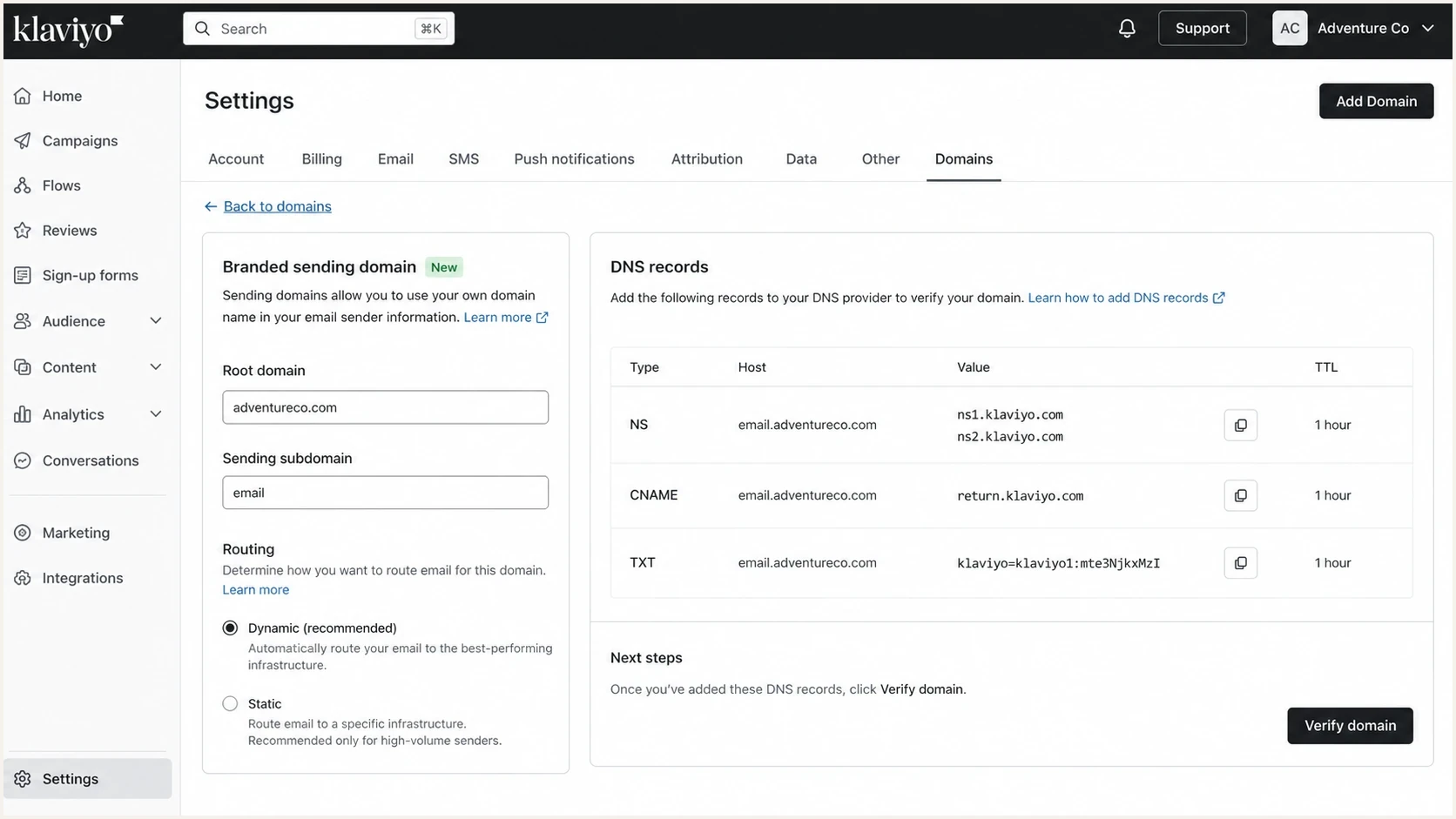
Klaviyo Domains settings showing branded sending domain setup choices.
Step-by-step setup in Klaviyo
Only users with the Owner, Admin, Manager, or Campaign Coordinator role can configure a branded sending domain. If you are activating your first marketing domain or replacing the active marketing domain, pause sending before applying the change. Adding a transactional or service domain does not require pausing an existing marketing domain.
- Open settings: In Klaviyo, go to Settings, then Domains, then choose Add Domain.
- Choose send type: Select Marketing, Transactional, or Service based on the traffic this domain will carry.
- Confirm root: Check that the root domain is your real brand domain, such as example.com.
- Choose subdomain: Enter an unused label such as send, not a label already used for a website, mailbox, or another sender.
- Pick routing: Use Dynamic routing when your DNS host supports NS records at the subdomain. Use Static routing when it does not.
- Copy records: Copy every generated record exactly, including host, value, and record type.
- Publish DNS: Add the records in the authoritative DNS zone for the root domain, keep any proxy disabled, then allow up to 48 hours for propagation.
- Verify and activate: Return to Klaviyo, verify the records, fix any failure, and activate the domain when you are ready.
- Send carefully: Send a small test first. Resume normal campaigns or begin a required warming plan only after authentication looks correct.
|
|
|
|---|---|---|
Dynamic | Flexible routing | NS |
Static | Single provider | CNAME |
Ownership | Verify domain | TXT |
Policy | Root domain | DMARC |
Compact setup choices for a Klaviyo sending subdomain.
Which DNS records you will see
Klaviyo currently supports two main DNS patterns for branded sending domains. Dynamic routing delegates the sending subdomain to Klaviyo with up to four NS records. Static routing uses up to three CNAME records. Both approaches also use a TXT record on the root domain for ownership verification.
Dynamic routing patternDNS
send.helloworld.com.  NS   ns1.klaviyo.com.
send.helloworld.com.  NS   ns2.klaviyo.com.
send.helloworld.com.  NS   ns3.klaviyo.com.
send.helloworld.com.  NS   ns4.klaviyo.com.
helloworld.com.       TXT  klaviyo-site-verification=PUBLIC_KEY
With delegation, Klaviyo manages DNS below that specific subdomain. This does not give Klaviyo control over your root domain or unrelated subdomains. It only affects the delegated label, such as send, and you can revoke it by removing the NS records.
Static marketing routing patternDNS
send.helloworld.com.              CNAME  1.klaviyodns.com.
km1._domainkey.helloworld.com.   CNAME  km1.domainkey.1.klaviyodns.com.
km2._domainkey.helloworld.com.   CNAME  km2.domainkey.1.klaviyodns.com.
helloworld.com.                   TXT    klaviyo-site-verification=PUBLIC_KEY
The current static selectors depend on send type: marketing uses km1 and km2, transactional uses kt1 and kt2, and service uses ks1 and ks2. A second domain of the same type receives the next selector pair. Older static domains using kl1 and kl2 remain valid and do not need changes. A static service domain also requires the MX record Klaviyo generates for inbound routing. If multiple Klaviyo accounts share one branded sending domain, publish every account's distinct TXT verification value.
DMARC belongs on the root domain first
Avoid a separate DMARC record on the sending subdomain at the start. A root DMARC record covers subdomains by default. If Klaviyo offers to add DMARC during setup, check the root domain first and never publish a second DMARC record at the same hostname. Add a subdomain-specific record only when you need a different policy or reporting address for that exact subdomain. Suped's DMARC monitoring keeps authentication results visible across Klaviyo and every other sender using the domain.
Dynamic versus static routing
Dynamic routing lets Klaviyo select a sending provider for each message based on performance and stability. Klaviyo recommends Dynamic routing when the DNS host supports NS records at the subdomain. Static routing sends through one provider and remains the correct choice when delegation is blocked or your internal DNS process requires explicit records.
Dynamic routing
- DNS type: Uses NS records to delegate the sending subdomain to Klaviyo.
- Control: Klaviyo manages sending records below that delegated subdomain.
- Use when: Your DNS provider accepts subdomain delegation and you want provider selection handled dynamically.
Static routing
- DNS type: Uses CNAME records for the sending domain and DKIM selectors.
- Control: You keep the individual records in your DNS zone.
- Use when: Your DNS provider blocks NS records or your team prefers explicit CNAME records.
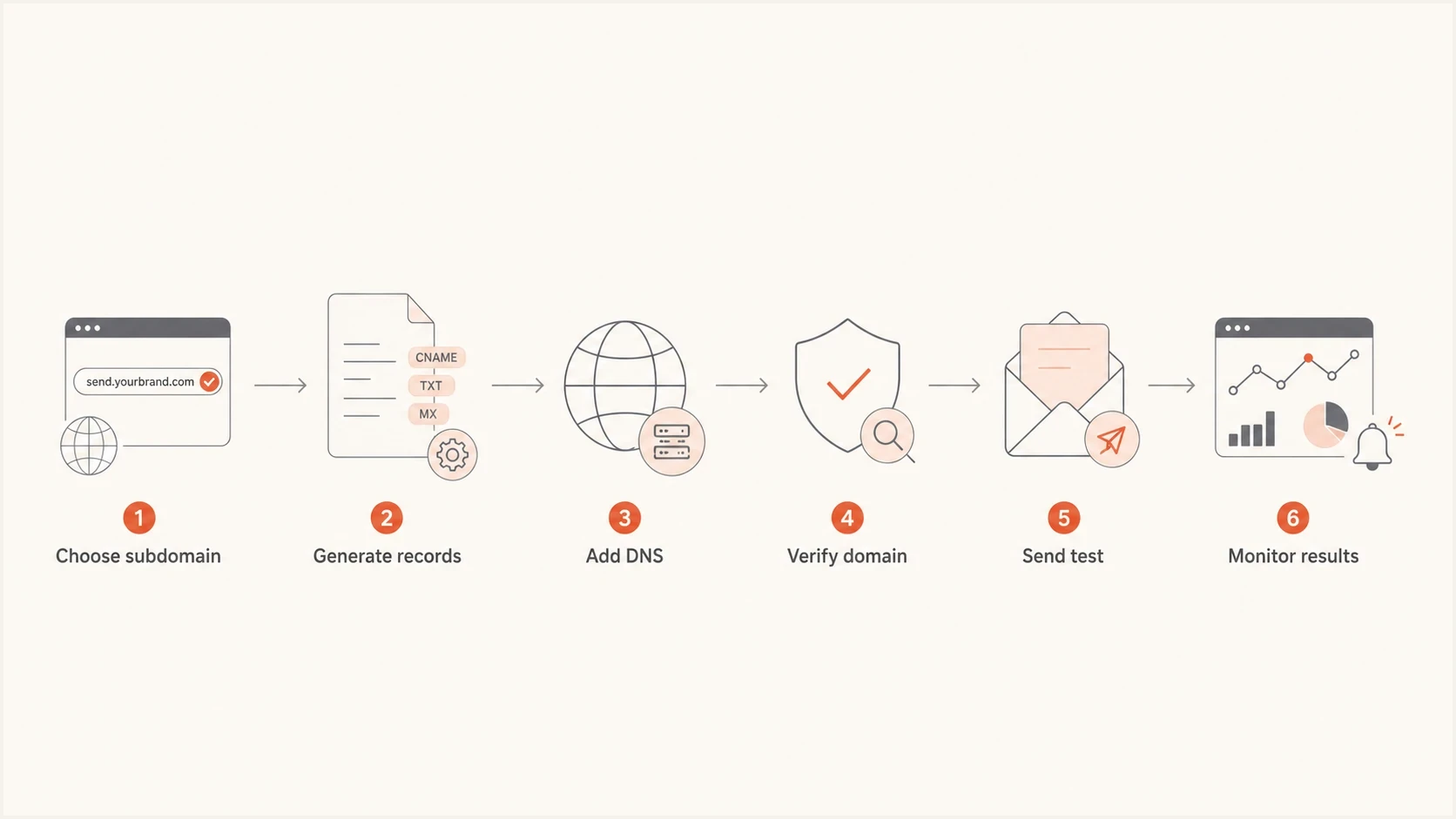
Flowchart showing the Klaviyo sending subdomain setup path.
How to choose the subdomain name
Use a short name that you can keep for years. The name does not need to explain every campaign type. It is usually clearer to use send.example.com for all Klaviyo marketing than to create separate names for every flow, season, or list. If you need a broader DNS checklist, the email subdomain DNS guide covers the general record pattern.
- Use send: It is Klaviyo's recommended prefix for marketing and easy for DNS owners to recognize later.
- Avoid mail and www: Mail is often reserved for inbox infrastructure, while www belongs to the website.
- Separate send types: Use a different unused subdomain for each marketing, transactional, or service domain.
- Keep ownership clear: Document that Klaviyo owns the sending setup so future DNS cleanup does not remove live records.
Do not send From the sending subdomain
For most Klaviyo accounts, use a visible From address at the root domain, such as hello@example.com, not hello@send.example.com. The branded sending subdomain handles the sending identity in headers. Your normal From domain keeps replies and brand recognition cleaner.
Choose the Klaviyo send type
Klaviyo asks which traffic the branded sending domain will carry before it generates DNS records. Each send type has one active branded sending domain, its own DNS records, and a separate domain reputation. Configure only the send types your account uses.
|
|
|
|
|---|---|---|---|
Marketing | Campaigns and promotional flows | send.example.com | Pause sending when activating the first domain or replacing the active domain. |
Transactional | Customer-triggered flow messages | updates.example.com | Campaigns cannot use this domain. |
Service | Klaviyo Helpdesk or Inbox replies | support.example.com | Static routing also requires a generated MX record. |
Klaviyo branded sending domain types and practical setup choices.
A new qualifying Klaviyo account using a marketing branded sending domain, or an account using a domain registered within the last 30 days, should warm marketing traffic over the first two to four weeks. An existing customer generally does not need to warm again when the root domain is at least 30 days old and already has email sending history. Transactional and service domains typically do not need warming because their traffic is customer-triggered and lower volume. When replacing an active domain, Klaviyo can warm a second domain of the same send type before activation.
How Suped fits after Klaviyo verifies
Klaviyo verifies that its required records exist, but that is only the first checkpoint. After the first real sends, check whether SPF, DKIM, and DMARC pass in production, which sources are using the domain, and whether an unrelated system starts sending with the same From domain.
Suped is our DMARC reporting and email authentication platform. It groups DMARC reports by sending source, turns authentication problems into fix steps, sends alerts when results change, and keeps hosted SPF, hosted DMARC, hosted MTA-STS, SPF flattening, and blocklist monitoring in one place.
Suped DMARC dashboard showing email volume, authentication health, and source breakdown
A quick domain health check before and after the Klaviyo change catches missing DNS, weak SPF, DKIM selector mistakes, and DMARC gaps. After sending starts, blocklist monitoring helps you watch domain and IP reputation signals, including blacklist listings that can affect campaign performance.
?
What's your domain score?
Deep-scan SPF, DKIM & DMARC records for email deliverability and security issues.
Testing before you resume campaigns
Do not treat Klaviyo verification as the final test. Verification proves the DNS records are visible to Klaviyo. A real message proves the headers, authentication result, and visible sender details look right after the message leaves Klaviyo.
Send a small internal campaign or a test campaign to a mailbox you can inspect. Then run it through an email tester so you can see the authentication result without digging through every header by hand.
Email tester
Send a real email to this address. Suped shows a results button when the test is ready.
?/43tests passed
- SPF result: Check whether the envelope sender domain passes SPF. With Klaviyo, this is normally handled by the branded sending domain setup.
- DKIM result: Check that the Klaviyo DKIM signature passes and uses the expected brand domain.
- DMARC result: Check that DMARC passes through aligned SPF or aligned DKIM.
- Link branding: If you configured dedicated click tracking separately, click a safe internal test link and confirm the tracking domain is correct.
Common mistakes to avoid
Most Klaviyo subdomain problems come from treating an email subdomain like a website subdomain. The setup is DNS-driven. If the record type, host, or target is wrong, the domain stays disconnected even if the subdomain name itself looks reasonable.
- Wrong zone: Add records in the authoritative DNS zone for the root domain, not in a registrar panel that is not hosting DNS.
- Double domain: Some DNS hosts append the root domain automatically, so entering the full host can create a duplicate name.
- Existing record: A CNAME cannot coexist with other record types at the same host, so check for old records first.
- Proxied DNS: Keep Klaviyo CNAME and delegated records in DNS-only mode. Proxying can prevent verification and authentication.
- Premature send: Do not resume normal campaigns until Klaviyo verifies the domain and a real message passes authentication.
- Overbuilt DMARC: Do not add a separate subdomain DMARC record unless you need a different policy from the root domain.
Views from the trenches
Best practices
Use the exact DNS values Klaviyo generates, because account-specific targets change per account.
Keep the sending subdomain unused so existing websites, mailboxes, and tracking stay clean.
Test a real message after verification, then watch authentication reports for source drift.
Common pitfalls
Do not add a random A record for the subdomain unless the provider asks for one.
Do not put the branded sending subdomain in the visible From address for replies.
Do not add a separate subdomain DMARC policy before checking the root policy first.
Expert tips
Use Dynamic routing when your DNS host accepts NS records and Klaviyo-managed routing fits.
Use Static routing when your DNS host cannot delegate NS records at the subdomain.
Document each record owner so future DNS cleanups do not disconnect the sending domain.
Marketer from Email Geeks says the Klaviyo wizard should be the source of truth for the exact records, because the generated values are account specific.
2024-09-25 - Email Geeks
Marketer from Email Geeks says the subdomain can exist only through DNS authentication records and does not need web hosting.
2024-09-25 - Email Geeks
Recommended setup
For a normal marketing setup, use send.example.com as the branded sending domain, choose Marketing as the send type, select Dynamic routing if DNS supports it, publish the generated NS records and verification TXT record, keep DMARC on the root domain, verify and activate the domain in Klaviyo, then send a real test before resuming campaigns or starting a required warm-up.
Then monitor the domain in Suped so Klaviyo, transactional senders, inbox systems, and other authorized sources appear in one DMARC view. This catches unauthorized senders, authentication breaks after DNS cleanup, and blocklist or blacklist signals that appear as sending volume increases.




