Where can I find Yahoo Postmaster domain reputation data and feedback loop signup?

Updated on 19 Aug 2026: We added Yahoo's performance feeds and clarified current Sender Hub data, CFL enrollment, sender requirements, and AT&T coverage.
The direct answer is that Yahoo Postmaster tooling now lives in Yahoo Sender Hub. Feedback loop signup is handled through the Complaint Feedback Loop flow after you create a Sender Hub profile, add your DKIM signing domain, verify it, and enroll the domain. Yahoo calls this service CFL, while senders also refer to it as the Yahoo FBL. Yahoo does not give you a public, categorical domain reputation grade. The main self-service data source is Sender Hub Insights, which shows aggregate delivered volume and spam complaint rate for verified DKIM domains. Yahoo also documents separate Email Deliverability & Performance Feeds with deeper placement and campaign metrics, but access requires a direct inquiry and is not part of the standard Insights dashboard.
Treat Yahoo reputation work as a signal-matching exercise. Yahoo gives useful data, but not a single reputation label that explains every delivery outcome. Combine Sender Hub Insights, CFL complaint reports, SMTP errors, authentication results, unsubscribe behavior, and blocklist (blacklist) checks to understand what is happening.
Answer at a glance
- Signup: Use Yahoo Sender Hub, then go to Manage Services and enroll in the Complaint Feedback Loop.
- Self-service data: Use Dashboard and Insights for aggregate delivered volume and spam complaint rate.
- Deeper feeds: Yahoo documents separate placement and campaign performance feeds with access requirements handled by direct inquiry.
- Scope: Yahoo CFL is DKIM-domain based, not IP or CIDR based, and covers Yahoo-hosted consumer brands such as AOL.
- Caveat: CFL reports are ARF complaint reports. They are not domain reputation reports.
Where to sign up for Yahoo CFL
The old Yahoo postmaster request-form mental model causes confusion because the current operational path is Sender Hub. Start at Yahoo Sender Hub, create or access your sender account, add the domain that signs your outbound mail, complete DNS verification, and then enroll the verified domain in CFL. The legacy form is retired, so only a current Sender Hub enrollment provides ongoing ARF delivery. If you need to contact Yahoo about setup, use the Contact path inside Sender Hub rather than sending a generic support request.
- Create: Set up a Sender Hub profile with a team-controlled alias if more than one person needs access.
- Verify: Add the DKIM domain used in production mail and publish the DNS verification record.
- Enroll: Open Manage Services, choose Complaint Feedback Loop, and enroll the verified domain.
- Confirm: Check the enrollment status and verify the controlled reporting address that receives ARF reports.
- Use: Feed complaints into suppression logic so complainers stop receiving marketing mail.
|
|
|
|
|---|---|---|---|
Complaint reports | CFL | ARF events | DKIM-based |
Self-service Yahoo stats | Insights | Rate and volume | Thresholds apply |
Deeper Yahoo data | Performance feeds | Placement and engagement counts | Separate access requirements |
Reputation grade | Not offered | No public label | Infer from signals |
IP-based CFL | Not offered | No IP/CIDR feed | Use DKIM domain |
Setup help | Contact | Postmaster route | Be specific |
Yahoo Sender Hub paths for common postmaster tasks.
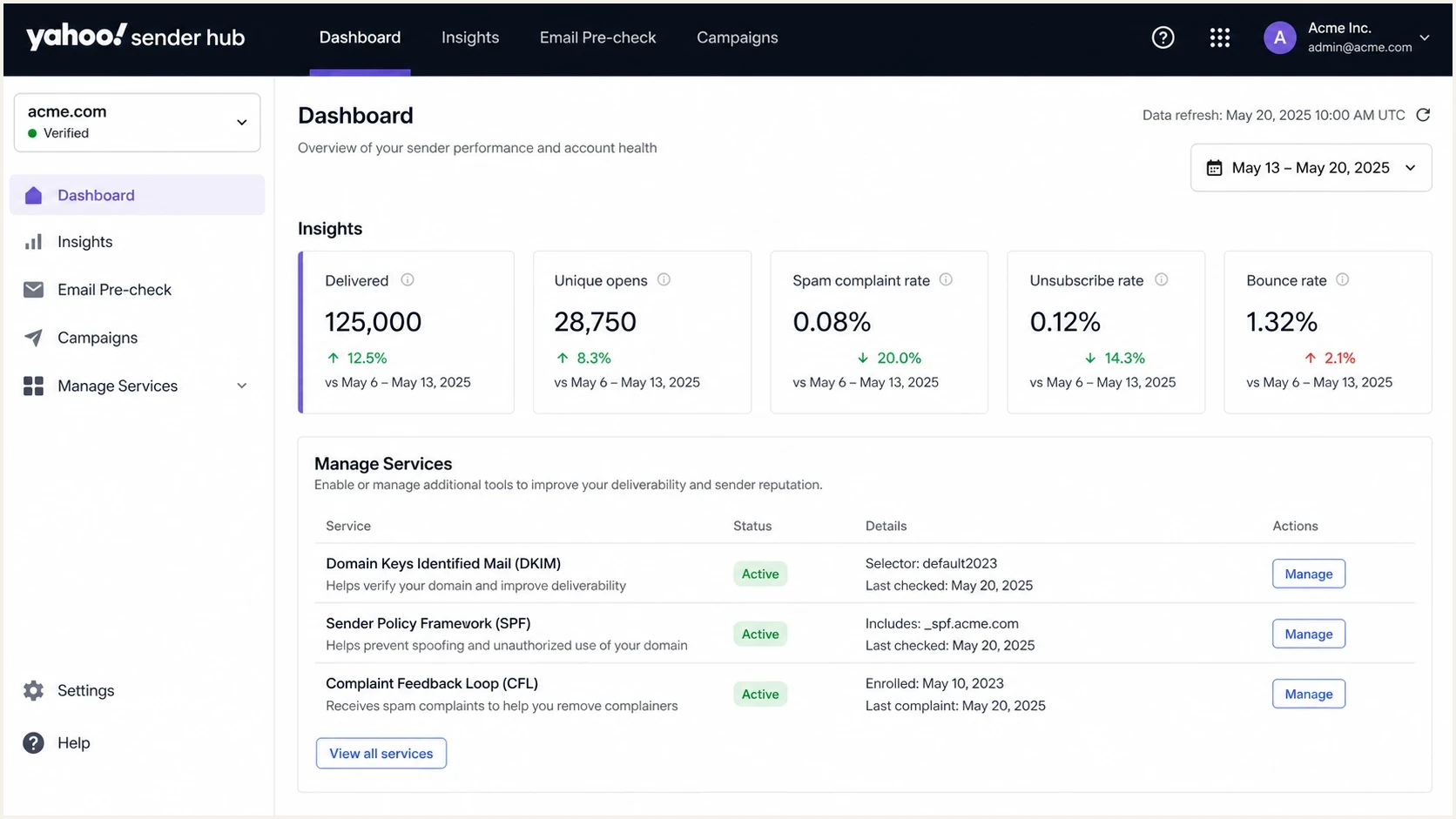
Yahoo Sender Hub dashboard with Insights and Complaint Feedback Loop areas.
The important part is that the signup target and the self-service data target are different areas. CFL enrollment gets you complaint events. Insights gives aggregate Yahoo delivery and complaint metrics. These areas do not replace your own complaint processing or mail stream tracking. Keep DMARC reporting separate.
The reporting mailbox does not need to match the From domain or DKIM domain, but it needs to be controlled and verified during enrollment. After that one-time verification, the same address can be used for additional Yahoo CFL domain enrollments.
What Yahoo actually gives you
Yahoo Sender Hub Insights is the main self-service answer to the domain reputation part of the question. It is not a reputation score. It shows aggregated delivery statistics for DKIM domains you have added and verified, with current signals such as delivered messages and spam complaint rate. The dashboard compares the selected period with the previous period and displays data in UTC. Data appears after activation, requires enough daily volume, and covers Yahoo-managed mailbox domains. Yahoo Japan is separate.
Insights rolls data together when the same DKIM domain signs mail for more than one visible sending domain. Only the Sender Hub account that verified a domain can view its data, and Yahoo does not provide API access to Insights. Those limits matter when several teams share a signing domain.
That means the answer is partial. You can see whether Yahoo users are complaining and how much mail Yahoo reports as delivered, but you do not get a public categorical reputation label. Yahoo calculates reputation internally from signals that include IP, URL, domain, sender, ASN, DKIM, and DMARC data.
Yahoo CFL can produce complainer-level ARF reports when your headers contain a stable recipient or subscriber identifier. That makes the loop useful for direct suppression, while Insights remains aggregate data.
Yahoo CFL
- Purpose: Receives complaint reports when Yahoo users mark enrolled DKIM-signed mail as spam.
- Output: Sends ARF reports with original headers and machine-readable metadata to the verified reporting address.
- Coverage: Covers Yahoo-hosted consumer domains such as Yahoo Mail and AOL when the DKIM domain is enrolled.
- Action: Suppress complainers, audit acquisition sources, and reduce repeat complaints.
Yahoo Insights
- Purpose: Shows aggregate Yahoo delivery statistics for verified DKIM domains.
- Output: Shows delivered volume and spam complaint rate over the selected period.
- Limit: Does not expose a direct reputation label or an API.
- Action: Watch complaint rate trends and compare them with campaign changes.
Yahoo complaint rate reading
Use these practical bands to decide how urgently to investigate Yahoo complaint behavior.
Healthy
Under 0.1%
A low rate gives room for normal campaign variation.
Watch
0.1% to 0.3%
Review list source, frequency, offer, and recent content changes.
Critical
Over 0.3%
Yahoo sender requirements use 0.3% as an important complaint threshold.
Do not treat 0.29% as safe simply because it is under 0.3%. A rate near the threshold means the audience, offer, cadence, or source mix needs attention. Yahoo calculates spam rate against mail delivered to the inbox, so compare CFL counts with the right delivered denominator rather than total messages attempted.
Advanced Yahoo performance feeds
Yahoo also documents Email Deliverability & Performance Feeds for senders that meet its access requirements. These feeds are separate from Sender Hub Insights and provide deeper aggregate data. They are not a public reputation lookup or a standard Dashboard option, and they do not replace CFL suppression.
|
|
|
|
|---|---|---|---|
Placement Feed | DKIM domain, From domain, IP, campaign header | Inbox, spam, folder, error, complaint counts | Hourly data, 12-hour SLA |
Campaign Performance Feed | Sender domain and campaign | Delivered, read, click, delete, move, reply, complaint counts | Daily delivery data, 48-hour SLA |
Yahoo's documented deliverability and performance feeds.
Both feeds use UTC, retain 30 days of data, and report aggregated counts rather than user-level behavior. The Placement Feed can be filtered with an allowlist of sender domains or sending IP addresses. The Campaign Performance Feed adds campaign and engagement context that standard Insights does not show.
Choose the right Yahoo data source
- Insights: Use the self-service Dashboard for delivered volume and inbox-based complaint rate.
- CFL: Use ARF reports to identify and suppress complaints for enrolled DKIM domains.
- Placement Feed: Ask Yahoo about access when aggregate inbox, spam, folder, error, and complaint counts are needed.
- Campaign Performance Feed: Ask Yahoo about access when campaign-level engagement data is operationally useful.
Yahoo directs interested senders to mail-questions@yahooinc.com to discuss the program and its access requirements. Ask for the specific feed you need, describe your Yahoo volume and use case, and do not assume that a Sender Hub account automatically grants access.
What to check before enrolling
Yahoo CFL is domain-based and depends on DKIM. Yahoo no longer offers IP or CIDR-based CFL reporting, so the domain that matters is the DKIM d= domain in the message signature. If your visible From domain is example.com but your ESP signs with a shared platform domain, Yahoo sees the DKIM signing domain for CFL eligibility. That is why ESP-managed sending needs a quick confirmation before you assume your own domain is enrolled.
Before you touch Sender Hub, send a production-like email to an email tester and inspect the DKIM domain, SPF result, DMARC result, and headers. Then run a broader domain health checker so DNS issues are fixed before Yahoo verification fails.
For all senders, Yahoo requires SPF or DKIM, low complaint rates, valid forward and reverse DNS for sending IPs, and RFC-compliant mail. Bulk senders must pass SPF and DKIM, publish DMARC with at least p=none, and pass DMARC through relaxed or strict alignment. Marketing and subscribed mail also needs a functional List-Unsubscribe header and a visible in-body unsubscribe link. Yahoo highly recommends the RFC 8058 POST method, accepts mailto, and requires unsubscribe requests to be honored within 2 days.
Records to have readydns
selector1._domainkey.example.com. 3600 IN TXT "v=DKIM1; k=rsa; p=..."
_dmarc.example.com. 3600 IN TXT "v=DMARC1; p=none; rua=mailto:dmarc@example.com"
example.com. 3600 IN TXT "v=spf1 include:mail.example.net -all"
Most setup mistakes are domain mismatches
- DKIM: Enroll the domain in the DKIM signature, not only the domain users see.
- Multiple signatures: Yahoo evaluates every DKIM signature for DMARC alignment and CFL fulfillment. Yahoo also uses the results to calculate reputation, so review every production signature.
- ESP: Ask whether your ESP already handles Yahoo CFL enrollment and ARF suppression.
- DNS: Publish verification records exactly and wait for normal DNS propagation.
- Reports: Use a controlled mailbox or processor that will not drop ARF messages.
Email tester
Send a real email to this address. Suped shows a results button when the test is ready.
?/43tests passed
The test message should be sent through the same provider, IP pool, DKIM selector, return-path setup, and campaign stream that you plan to evaluate. A test from a corporate mailbox does not prove that your marketing platform has the same authentication path.
If Yahoo setup fails, keep the request narrow. State the verified Sender Hub account, the domain, the DKIM signing domain, the service you are trying to enroll, and the exact failure. For escalation wording, the Yahoo sender support path should be treated as a postmaster setup request, not a general mailbox support issue.
Interpreting missing data
Missing Yahoo data does not always mean the setup is broken. Sender Hub Insights depends on domain verification, activation, enough daily volume, and the DKIM domain you are viewing. CFL reports depend on users marking mail as spam, the relevant DKIM domain being enrolled, and the reporting mailbox receiving ARF mail. These are separate pipelines.
- Verification: The Sender Hub DNS verification record must resolve in the account that needs to view the domain data.
- Activation: Insights data can take 24 to 48 hours after activation to appear.
- Volume: Low-volume domains can stay blank even when the configuration is correct.
- DKIM rollup: One signing domain can combine data for several visible From domains.
- Hosted domains: Yahoo reporting covers Yahoo-managed domains, including AOL, while Yahoo Japan is separate.
- CFL: No ARF messages means no enrolled complaint events were generated or report delivery failed.
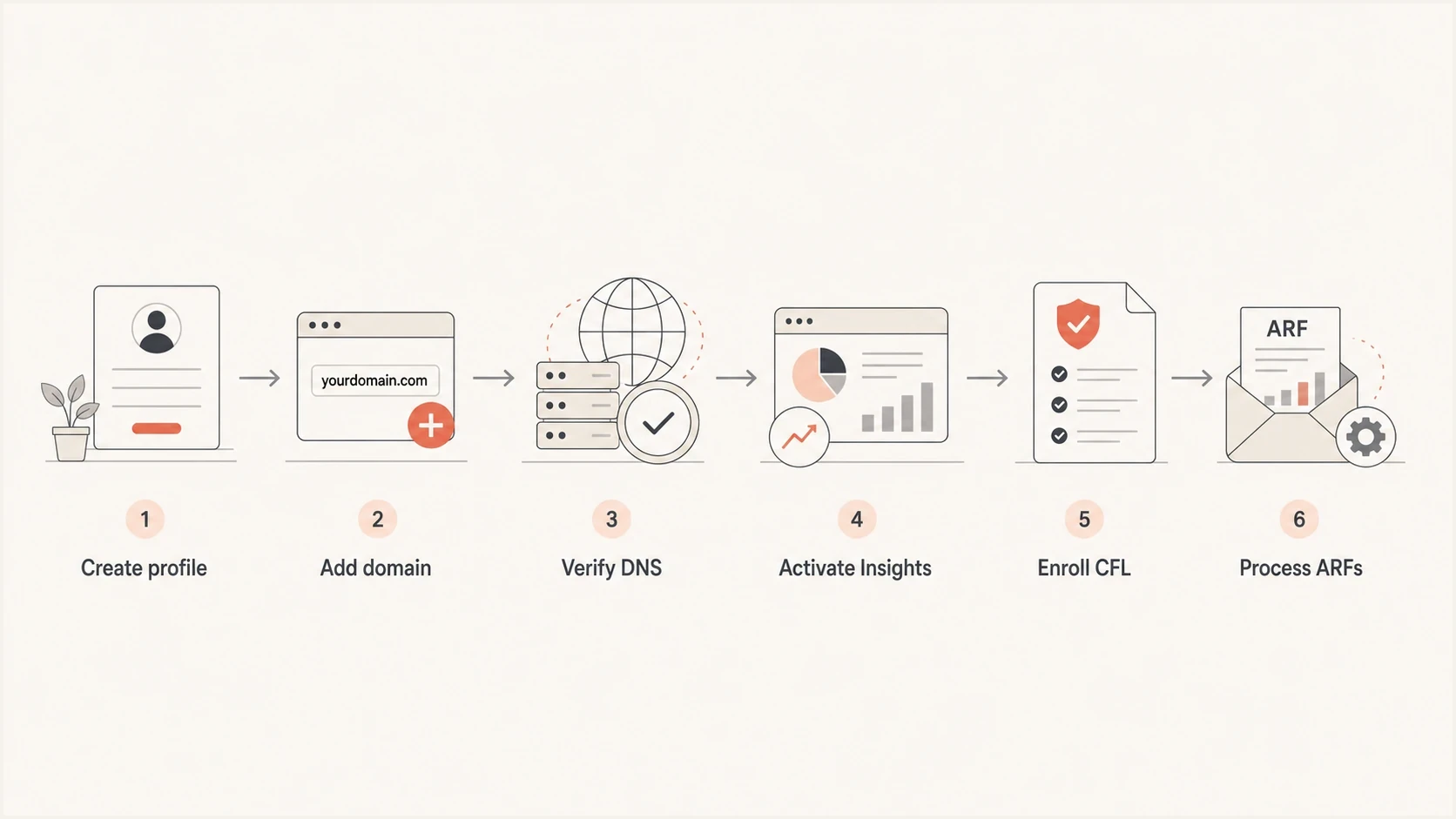
Yahoo Sender Hub setup flow from profile creation to ARF processing.
Yahoo completed a routing change for several AT&T recipient domains, including att.net, currently.com, sbcglobal.net, bellsouth.net, and pacbell.net. Yahoo is now the gateway for those domains, so use Yahoo's deliverability resources and SMTP responses when diagnosing mail sent to those addresses.
When the data appears sparse, segment your investigation by mail stream. A welcome series, daily promotion, reactivation campaign, and transactional notice can share a domain while producing very different Yahoo complaint behavior. Domain-level averages can hide the stream that needs fixing.
The right response is to compare Yahoo complaint rate with your own delivered count, suppression events, unsubscribe rate, bounce logs, and campaign calendar. If all Yahoo metrics move after a single acquisition source or content change, treat that change as the first suspect.
How Suped fits
Yahoo Sender Hub covers Yahoo-managed mailboxes and does not replace domain-wide authentication monitoring. Suped's product is a DMARC and email authentication platform that helps teams connect Yahoo signals with DMARC, SPF, DKIM, hosted SPF, hosted DMARC, hosted MTA-STS, alerts, and blocklist (blacklist) monitoring.
Use Yahoo Sender Hub for Yahoo-specific complaint and Insights data, then use Suped's DMARC monitoring to see whether legitimate senders pass authentication. Keep blocklist monitoring close to Yahoo investigations because a blacklist event can explain sudden deferrals, even when complaint reports are quiet.
Yahoo data
- Scope: Yahoo-managed mailbox domains only.
- Signal: Delivered volume, complaint rate, and ARF complaint events.
- Gap: No complete view of all senders using your domain.
Suped workflow
- Scope: Domain-wide DMARC, SPF, DKIM, hosted SPF, MTA-STS, and blacklist context.
- Signal: Authentication health, source inventory, alerts, and steps to fix issues.
- Use: Connect Yahoo symptoms to the sending source or DNS record that needs work.

Issue steps to fix dialog showing the issue overview, tailored fix steps, and verification action
Yahoo complaints often point at list quality or cadence, while DMARC reports point at source identity and authentication. If a new vendor starts sending without proper DKIM, Yahoo Sender Hub will not give you the whole story. Suped can flag the unverified source and give the fix path before the issue causes broader reputation damage.
Views from the trenches
Best practices
Verify the DKIM domain that signs production mail before enrolling any Yahoo CFL address.
Route ARF reports into suppression logic so complainers stop receiving campaigns fast.
Check Sender Hub Insights by DKIM domain, especially when ESP mail uses shared signing.
Compare Yahoo complaint rate with delivered volume before deciding a stream is healthy.
Common pitfalls
Expecting a public reputation grade in Yahoo causes wasted support loops and delay.
Enrolling the visible From domain fails when the active DKIM signature uses another domain.
Treating ESP complaint exports as proof of Yahoo CFL enrollment leaves blind spots in audits.
Ignoring low volume thresholds makes a working Insights setup look broken for several days.
Expert tips
Use one controlled reporting inbox for CFL ARFs, then process and suppress by recipient.
Keep DMARC aggregate reports beside Yahoo data to catch authentication drift quickly.
Separate marketing streams when one content type drives most Yahoo complaints or bounces.
Review blocklist and blacklist status when Yahoo deferrals rise without complaint spikes.
Marketer from Email Geeks says Yahoo's sender resources live in Sender Hub, and the Contact path is the right starting point when looking for feedback loop enrollment.
2024-07-12 - Email Geeks
Marketer from Email Geeks says Yahoo CFL reports should not be treated as domain reputation reports, because they are complaint reports for enrolled DKIM domains.
2024-07-19 - Email Geeks
Yahoo Sender Hub workflow
For Yahoo feedback loop signup, use Sender Hub and enroll through Manage Services after your DKIM domain is verified. For self-service Yahoo domain data, activate Sender Hub Insights and interpret it as aggregate delivery and complaint telemetry, not a direct reputation score. If you need deeper placement or campaign performance data, ask Yahoo about its separate feeds and access requirements.
The operating model is simple. Verify the right DKIM domain, activate Insights, enroll CFL, process ARF complaints into suppression, and compare Yahoo complaint behavior with your campaign and authentication data. Keep each source separate enough to know whether a change came from complaint activity, authentication drift, delivery errors, or audience behavior.
Operating workflow
- Yahoo: Use Sender Hub Insights for Yahoo complaint and delivery signals.
- CFL: Enroll the verified DKIM domain and suppress ARF complainers quickly.
- Performance feeds: Ask Yahoo about access when standard Insights does not provide enough detail.
- Suped: Monitor DMARC, SPF, DKIM, MTA-STS, blocklist and blacklist status, and actionable fixes beside Yahoo symptoms.




