
What causes 'Server is not currently available, possibly due to too many connections' and how to fix it?

Published 12 May 2025
Updated 29 Sep 2026
12 min read
Summarize with
Updated on 29 Sep 2026: We clarified the SMTP throttling paths and corrected the Postfix backoff example.
The error "Server is not currently available, possibly due to too many connections" is a temporary SMTP deferral when it comes with a 421 or another 4xx reply. It means the SMTP server that returned the reply would not accept the connection or transaction at that moment. That server can be your outbound relay, a security gateway, a local receiving service, or the recipient's MX. Controlled backoff is the immediate response, but the lasting fix depends on which host returned the code. If the phrase appears without a numeric SMTP reply, first confirm it came from an SMTP log because a generic application error needs a different diagnosis.
A parallel connection limit of 2 can still be too high. A receiver can count more than live sockets. It can also evaluate recent connection attempts, hourly volume, failed recipients, complaint signals, authentication quality, reverse DNS, IP reputation, and how aggressively your queue retries after a deferral.
- Identify first: Find the responding host and SMTP stage in the full transcript before changing limits.
- Immediate fix: If a remote MX returned the error, drop concurrency to 1 for that recipient domain or MX group, add a delivery delay, and let the queue retry with backoff.
- Root fix: Check local capacity or, for a receiver-side throttle, review PTR, HELO, SPF, DKIM, DMARC, bounce quality, complaints, and blocklist (blacklist) status before increasing volume.
- Escalation fix: If clean traffic remains deferred across several controlled retry windows, send the responsible administrator your IPs, timestamps, SMTP transcript, and authentication evidence.
What the error means
This message belongs in the same family as 421 Service Not Available and other 4xx deferrals. The server is not saying the address is invalid. It is saying to try again later. Read the complete reply because an enhanced status code and provider-specific text can narrow the cause.
|
|
|
|---|---|---|
421 | Temporary service failure that closes the channel | End the session, queue, and retry |
4.3.2 | Temporary system or concurrency condition | Check connection scope and local capacity |
4.7.x | Security or policy status, when present | Read the full enhanced code |
Too many connections | The responder reports connection pressure | Reduce sessions and inspect aggregate flow |
Unavailable | The cause is ambiguous without context | Identify the responding host |
How to read the error parts.
Treat the reply as a temporary capacity or policy signal until the logs identify the responder. A 421 reply closes the SMTP channel, so the client should stop that session and return the message to its queue. A server can be genuinely busy. When one remote destination repeatedly defers the same sender while other senders deliver normally, policy pressure against the traffic pattern becomes more likely.
Do not turn this into an immediate hard bounce
A temporary deferral needs a controlled retry schedule. If your system expires the mail too quickly, valid recipients never get another fair attempt. If it retries too often, the responder sees more connection pressure and can keep deferring the mail.
Identify which server returned the error
Start with the complete SMTP transcript, not the bounce summary. The last host that sent the 4xx reply owns the immediate limit. Also note where the reply appeared: at connection greeting, after EHLO, during authentication, after a recipient command, or after message data. The stage separates connection pressure from account limits, recipient policy, and content processing.
- Locate the responder: Record its host name, IP address, reply code, enhanced status code, and exact text.
- Mark the SMTP stage: A rejection from your submission relay requires a different fix than a rejection from a recipient MX.
- Compare scope: Check whether the error affects one recipient domain, one MX host, one sending IP, one authenticated account, or every destination.
- Correlate the time: Match the reply with queue depth, active sessions, traffic bursts, and service health at the same timestamp.
When it is your server
If your outbound relay or receiving MTA returned the error, inspect active SMTP sessions, queue depth, worker limits, CPU load, memory pressure, and connections by source. Clear stuck sessions only after confirming they are stale. Raise a server-wide limit only when legitimate demand is sustained and the host has enough capacity, since a higher ceiling can move the failure to another resource.
Separate submission throttling from recipient throttling
If the error appears while an application submits mail to its authenticated relay, the limit can apply to the account, source IP, connector, or submission service. Recipient-domain throttles will not fix that path. Reduce the application's connection pool, reuse established sessions when the relay permits it, pace submissions, and check the relay's account and source limits.
|
|
|
|---|---|---|
Application to authenticated relay | Account, source IP, connector, or service quota | Shrink the connection pool and pace submissions |
Sending MTA to recipient MX | Destination, MX group, sending IP, or sender policy | Apply a destination-specific throttle and backoff |
Remote sender to your receiving MTA | Listener capacity, source limit, or local resource pressure | Inspect inbound sessions and server capacity |
Use the responder and SMTP stage to choose the fix.
Do not increase submission concurrency just because messages are waiting. That can add sessions faster than the relay can clear them. Confirm whether the relay publishes a retry interval or connection limit, then keep the application's retry schedule within that policy.
Why two connections can still fail
A setting such as "parallel connections: 2" describes only part of the delivery shape. Two live connections can generate a lot of pressure when each connection sends many recipients, reconnects quickly, or runs across several IPs that the receiver groups together.
What the sender limited
- Sockets: The number of open SMTP sessions at one time.
- Processes: The number of delivery workers allowed to target a domain.
- Per-IP flow: Only one part of the receiver's rate calculation.
- Recipient batching: How many recipients each delivery attempts.
What the receiver also counts
- Hourly volume: Messages and recipients accepted or attempted in a rolling window.
- Retry cadence: How quickly deferred messages return to the same MX hosts.
- Trust signals: PTR, HELO, SPF, DKIM, DMARC, complaints, and list quality.
- Shared identity: Related IPs, domains, or tenants that the receiver evaluates together.
That is why the first receiver-side test is often one connection, not two. A one-connection cap reduces pressure but does not send a special signal to the receiver. Add a delivery delay so the same server pool does not see constant reconnects, then hold the lower rate long enough to compare accepted mail with deferrals.
Example recovery throttle
Start low, then raise volume only after accepted mail stays stable.
Start
1 session
Use one connection and a meaningful delay.
Watch
24 hours
Hold the new rate through a full day of normal traffic.
Raise
10-20%
Increase slowly if deferrals fall and delivery succeeds.
Stop
Any spike
Pause increases if deferrals or expiries return.
How to fix the sending pattern
For a receiver-side limit, start in the MTA. Create a destination-specific throttle for the affected recipient domain or its MX group. Do not slow all outbound mail unless the problem is broad. The goal is to protect normal traffic while giving the strict receiver a calmer stream. If transport_maps already has a value, add the new map to the existing setting instead of replacing unrelated routing.
Example Postfix-style throttlebash
# main.cf
transport_maps = hash:/etc/postfix/transport
slow_destination_concurrency_limit = 1
slow_destination_rate_delay = 30s
slow_destination_recipient_limit = 20
slow_destination_concurrency_failed_cohort_limit = 10

# /etc/postfix/transport
recipient-domain.example slow:

# master.cf
slow unix - - n - - smtp

# Build the map, validate, and reload
postmap /etc/postfix/transport
postfix check
postfix reload
Use the exact controls for your MTA, but keep the same delivery shape: one connection, a controlled number of recipients per delivery, a delay between deliveries, and a retry lifetime long enough for a temporary deferral to clear. In Postfix, a nonzero destination rate delay forces per-destination concurrency to 1. Setting the matching failed-cohort limit to at least 10 prevents a single connection or handshake failure from immediately suspending that destination. Test configuration syntax before reloading and confirm that the affected destination uses the named transport.
- Scope: Throttle by recipient domain or MX, not by the whole outbound fleet.
- Cadence: Let the MTA's normal backoff operate, and do not repeatedly flush the deferred queue.
- Queue: Keep temporary failures in queue long enough to benefit from backoff.
- Evidence: Track attempts, accepted messages, deferrals, and final expiries separately.
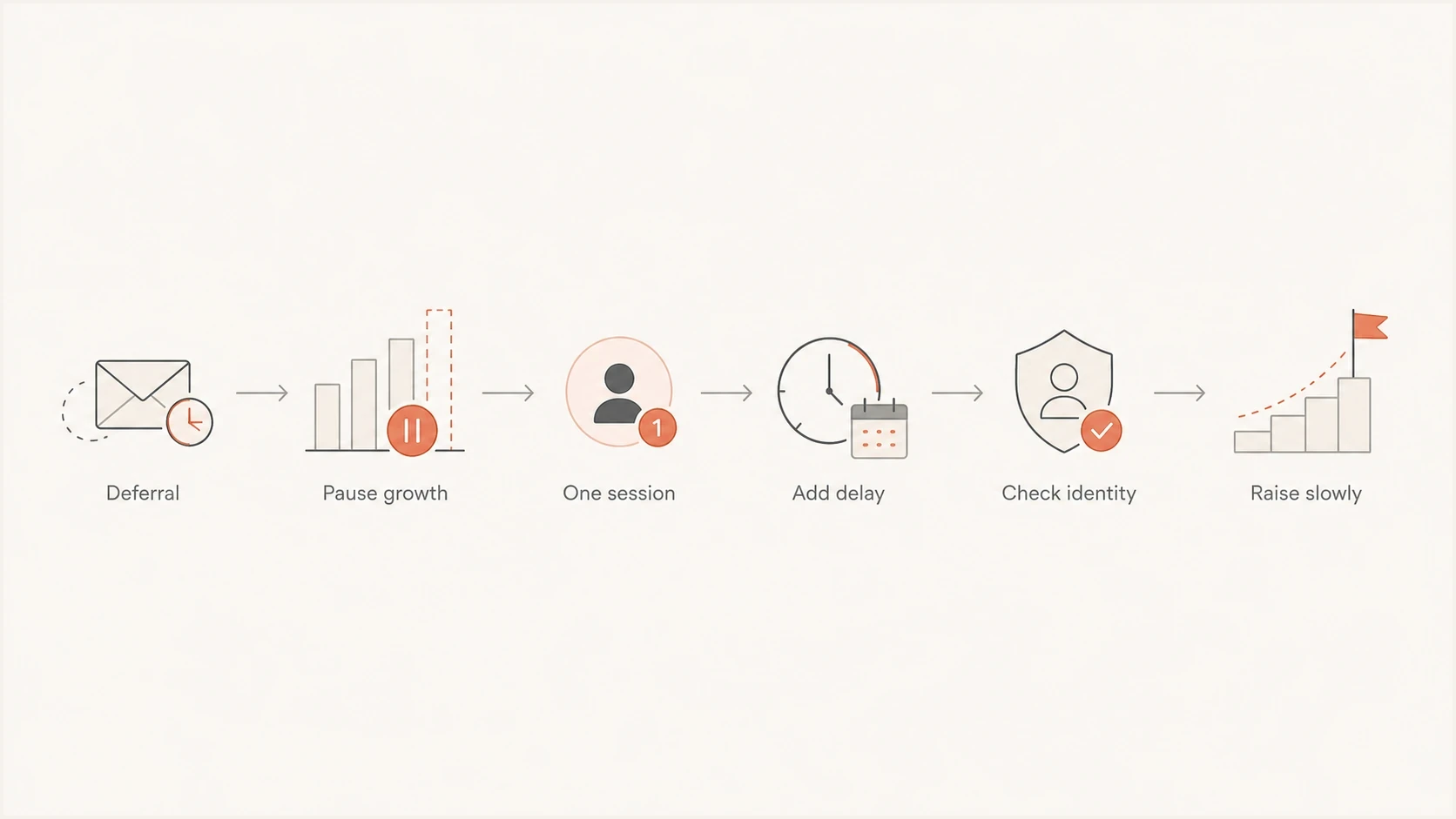
Flowchart showing how to recover from a temporary SMTP connection limit.
Check identity before asking for review
Identity checks help separate a pure capacity problem from sender-trust throttling. Check forward-confirmed reverse DNS first. The PTR should be a real host name, the host name should resolve back to the same IP, and the HELO or EHLO name should match the sending host.
Identity records to verifydns
mail1.example.com. 3600 IN A 203.0.113.10
10.113.0.203.in-addr.arpa. 3600 IN PTR mail1.example.com.
example.com. 3600 IN TXT "v=spf1 ip4:203.0.113.10 -all"
selector1._domainkey.example.com. 3600 IN TXT "v=DKIM1; p=..."
_dmarc.example.com. 3600 IN TXT "v=DMARC1; p=none; rua=mailto:d@example.com"
Then send a representative test message and inspect the headers. A clean SMTP connection with broken authentication gives the receiver less evidence that the domain owner authorized the mail, although it does not prove that authentication caused the connection limit. If the deferral occurs at the greeting or after EHLO, the receiver has not yet evaluated SPF, DKIM, or DMARC for that message. Use authentication history as context, not proof of the immediate cause. Suped's email tester shows what the receiver sees after the message is built, which DNS-only checks cannot confirm.
?
What's your domain score?
Deep-scan SPF, DKIM & DMARC records for email deliverability and security issues.
For a broader pre-review check, Suped's domain health checker can catch DNS and authentication issues before you contact a receiver. Postmaster teams often ask for the same evidence, including IPs, sample timestamps, sending host names, SPF results, DKIM results, DMARC results, and recent SMTP transcripts.
Check reputation and traffic quality
A receiver can show a connection-limit message when reputation contributes to the policy decision. The message text is not a full diagnosis. If mail to one destination keeps deferring after controlled backoff, check whether the sending IP or domain recently had complaint spikes, invalid recipients, trap hits, or blocklist (blacklist) exposure.
Signals to gather before escalation
- SMTP proof: Full transcript, response code, timestamps, sending IP, and receiving MX.
- Traffic proof: Hourly attempts, accepted mail, retry count, and final expiry count.
- Identity proof: PTR, forward DNS, HELO, SPF pass, DKIM pass, and DMARC result.
- Reputation proof: Complaint rate, hard bounce rate, list source, and blacklist or blocklist status.
If the traffic is genuine but the list has old addresses, a lower rate alone will not fix the pattern. Remove confirmed invalid recipients quickly, keep temporary failures queued through the configured retry lifetime, and investigate addresses that repeatedly soft bounce. Separate high-risk streams from transactional mail.
Where Suped fits
Suped's product helps investigate identity and reputation signals that sit outside the SMTP transcript. The platform brings DMARC, SPF, DKIM, and blocklist (blacklist) observations into one place and records steps for fixing authentication issues. It does not control a recipient's connection limits, so MTA logs remain necessary for identifying the responder and SMTP stage.

Issue steps to fix dialog showing the issue overview, tailored fix steps, and verification action
Within Suped, DMARC monitoring shows whether legitimate sources pass authentication, while blocklist monitoring helps identify blacklist or blocklist events that can coincide with receiver-side throttling.
A practical workflow in Suped
- Monitor: Watch authentication health by source and domain.
- Detect: Use automated issue detection to find DNS and sending-source problems.
- Fix: Follow the suggested steps, then verify after DNS and receiver data refresh.
- Alert: Use alerts for failure spikes before they become delivery incidents.
Views from the trenches
Best practices
Set per-recipient-domain throttles before retry queues build pressure on one MX group.
Check forward and reverse DNS together, then wait for receiver reputation data to refresh.
Separate high-risk streams so one client's rate issue does not affect shared IP traffic.
Common pitfalls
Reducing parallel connections alone can fail when hourly volume remains too high for a domain.
Changing PTR names without matching A records leaves the identity problem partly unresolved.
Retrying every few minutes can look like pressure and extend a temporary deferral window.
Expert tips
Use one connection, add rate delay, and watch accepted mail for a full day before raising volume.
Keep retry lifetimes long enough for soft bounces, but remove bad recipients quickly each day.
Track deferrals by MX host because one domain can route mail through several server pools.
Marketer view
Marketer from Email Geeks says a two-connection cap did not fix one receiver because the sender still pushed too much total traffic too quickly.
2024-02-18 - Email Geeks
Marketer view
Marketer from Email Geeks says waiting and retrying is part of the fix when the response is temporary, but repeated expiry after 48 hours means the throttle is still too high or reputation needs review.
2024-04-09 - Email Geeks
How to confirm the fix
Confirmation requires more than an empty queue. Traffic might have stopped, or deferred messages might have expired. Compare the same recipient domain and sending stream before and after the change. Accepted messages should rise, the deferred queue should shrink, repeat 421 responses should fall, and final expiries should remain at zero.
Keep the lower rate through a full day of normal traffic. Once acceptance stays stable, raise volume in small increments. Stop the increase if deferrals return, then use the responder, SMTP stage, and enhanced status code to decide whether the remaining issue is capacity or policy.




