
What causes high bounce rates during IP warming, and how can they be fixed?

Updated on 7 Oct 2026: We updated our IP warming advice with bounce spike alerts and clearer suppression and retry rules.
High hard bounce rates with user unknown replies usually indicate bad recipient data during IP warming. A high total bounce figure can also include temporary deferrals caused by rate limits, erratic volume, or weak reputation. If the permanent failures are mostly 550 5.1.1 or similar user unknown replies, treat that as an address quality problem. Pause volume increases, suppress every confirmed invalid recipient, find the signup or migration path creating invalid addresses, then restart the warm-up with the cleanest and most engaged recipients.
A new IP with a 95% delivery rate can still be in trouble if the missing 5% is mostly hard bounces. During warming, mailbox providers are deciding whether the new sending pattern deserves trust. Repeated sends to nonexistent users make the stream look poorly permissioned, even when SPF, DKIM, and DMARC are configured correctly. Delivery rate measures acceptance by the receiving server; it does not establish inbox placement.
Fix list hygiene and the capture process first, then use authentication, bounce, engagement, and blocklist (blacklist) data to decide when to scale again.
Common causes of high bounces during IP warming
When bounce rates rise during IP warming, check concrete causes before blaming reputation. These are the most common.
- Invalid addresses: Typos, deleted mailboxes, fake signups, and stale imported records create user unknown hard bounces. Disposable addresses become invalid when the mailbox expires.
- Missing suppressions: A migration to a new ESP often misses old hard bounces, complaints, unsubscribes, and manual suppressions.
- Unsafe signup flows: Web forms without bot controls, typo checks, or confirmed opt-in can produce invalid addresses quickly.
- Risky acquisition: Purchased, rented, scraped, or old lists contain more invalid and unengaged recipients than recent permission-based data.
- Classification changes: The old ESP and new ESP can label the same response differently, so compare raw SMTP text, not only dashboard categories.
- Policy rejections: Some providers use 550-class replies for authentication, content, reputation, or rate-limit rejections, so the exact text matters.
- Bursty sending: Sudden volume jumps or excess connection concurrency can trigger temporary 4xx throttling that appears in a combined bounce figure.
- Recipient server issues: Greylisting, temporary DNS failures, or recipient server outages can cause soft bounces without making the address invalid.
Do not scale through invalid-recipient bounces
A 3% invalid-recipient hard bounce rate on new opt-in subscribers warrants a data quality investigation. Hold the ramp when replies say the recipient does not exist.
- Immediate action: Hold the volume ramp and suppress recipients confirmed as invalid by the full SMTP replies.
- Next check: Break bounce rate down by signup channel, provider, campaign, list age, and migration source.
Hard bounce thresholds during warming
These are example internal alert levels for invalid-recipient hard bounces. Set stricter controls when your ESP or normal baseline requires them; mailbox providers have no universal published cutoff.
Monitor
< 1%
Investigate sudden increases even below this level.
Investigate
1-2%
Find the source before the next volume step.
Pause scaling
> 2%
Suppress confirmed invalid recipients and repair the data source.
Incident
~3%+
Investigate signup data promptly, even on small batches.
Separate hard bounces from temporary deferrals
A dashboard can combine permanent failures, temporary failures, and first-attempt deferrals under one bounce figure. Separate them before changing the list. SMTP 4xx replies and enhanced 4.x.x codes indicate temporary failure; 5xx replies and 5.x.x codes indicate rejection of the current request. RFC 5321 defines the SMTP reply classes. A 5xx policy rejection does not prove the recipient is invalid, and full diagnostic text is needed because ESP categories vary.
|
|
|
|---|---|---|
4.x.x or 421/450/451 | Soft bounce or deferral caused by throttling, capacity, or a temporary policy condition | Retry with backoff and hold the next volume increase |
5.1.1 with user unknown text | Permanent invalid recipient | Suppress immediately and repair the source |
4.2.2 mailbox full | Temporary mailbox capacity problem | Retry within the queue lifetime; review persistent failures before suppressing future mail |
5.7.x or policy text | Authentication, content, reputation, or provider policy rejection | Stop retrying the rejected message, fix the policy cause, and retain valid recipients |
NXDOMAIN or temporary DNS failure | Nonexistent recipient domain or a transient DNS problem | Suppress confirmed nonexistent domains; retry temporary lookup failures |
Use the response class and full SMTP text to choose the next action.
Keep final outcomes and delivery attempts separatetext
permanent failure rate = final permanently failed recipient-messages / attempted recipient-messages x 100
invalid-recipient bounce rate = confirmed invalid-recipient failures / attempted recipient-messages x 100
temporary deferral rate = 4xx delivery attempts / all SMTP delivery attempts x 100

Count each recipient-message once in final outcomes; keep pending messages separate.
A 4xx response should not trigger permanent suppression on its first occurrence. Let the sending queue retry with backoff. If deferrals stay elevated at a low, steady volume, inspect authentication, reputation, connection concurrency, and message content before resuming the ramp. Use the same denominator over time and deduplicate retries for each recipient-message when reporting final outcomes. When the queue lifetime expires, record a failed delivery and investigate persistent failures before suppressing future mail. Queue expiry alone does not establish an invalid recipient. Avoid resubmitting delayed messages as new campaigns because that bypasses retry pacing.
What 550 5.1.1 really tells you
A 550 5.1.1 response usually means the recipient address does not exist, but the numeric code alone is not enough. Keep the enhanced status code, the full SMTP reply, the mailbox provider, the recipient domain, and the campaign that caused it.
Example bounce evidence to keeptext
recipient=status@example.com
enhanced_status=5.1.1
smtp_reply=550-5.1.1 The email account does not exist
provider=gmail
signup_channel=web
signup_age_hours=3
sending_ip=192.0.2.10
smtp_stage=RCPT TO
message_id=warmup-001
If a 5xx reply says user unknown, no such user, or address not found, suppress the address permanently. For 4xx replies, retry with backoff. Do not automatically retry the same request after a 5xx reply, even if the text sounds temporary; investigate and fix the condition first. If the text mentions authentication, policy, spam, reputation, blocking, throttling, or content, investigate that cause separately.
|
|
|
|---|---|---|
5.1.1 with user unknown text | Bad address | Suppress |
4.2.1 or 5.2.1 | Mailbox disabled or unavailable; check the full reply | Retry 4xx; suppress a confirmed disabled mailbox after 5xx |
Policy | Authentication or reputation | Investigate |
Timeout | Temporary network issue | Retry with backoff |
5.3.4 message too large | Message exceeds the receiving server's size limit | Reduce attachments or message size before sending again |
Compact guide to common bounce signals during IP warming.
This distinction matters because a hard bounce fix and a reputation fix are different. Bad addresses require suppression and source repair. Policy bounces require DNS, authentication, content, sending-pattern, or blocklist (blacklist) investigation.
Why bounces increase after an ESP migration
A lower bounce rate in the old ESP does not prove the underlying list was cleaner. It often means the old environment was hiding risk through suppression, pre-send filtering, or different bounce handling.
Old ESP
- Suppression memory: Past hard bounces, complaints, and unsubscribes were already excluded.
- Hidden filtering: Some platforms block obvious bad recipients before attempting delivery.
- Different math: Dashboards can exclude some rejected recipients from visible bounce rate.
New warm-up
- Clean slate risk: If suppressions were not imported, old bad addresses become eligible again.
- New classification: The new ESP can expose hard bounces that were previously grouped differently.
- Provider scrutiny: A new IP gets less benefit of the doubt when invalid traffic appears early.
Before warming a migrated stream, collect a suppression export from every old sending system: hard bounces, soft bounces that later became permanent, complaints, unsubscribes, role accounts if policy requires it, manual suppressions, and addresses blocked by prior validation rules. Apply these suppressions to triggered automations as well as bulk campaigns, then test that an excluded address is blocked before any SMTP attempt.
Suppression export fieldscsv
email,bounce_type,provider,reason,first_seen,last_seen
user1@example.com,hard,gmail,user unknown,2026-05-21,2026-05-21
user2@example.com,hard,yahoo,mailbox disabled,2026-05-21,2026-05-21
How to diagnose the real source
The fastest way to fix high bounces is to stop treating the list as one list. Split the data until one source, form, acquisition path, or migration slice explains most of the damage.
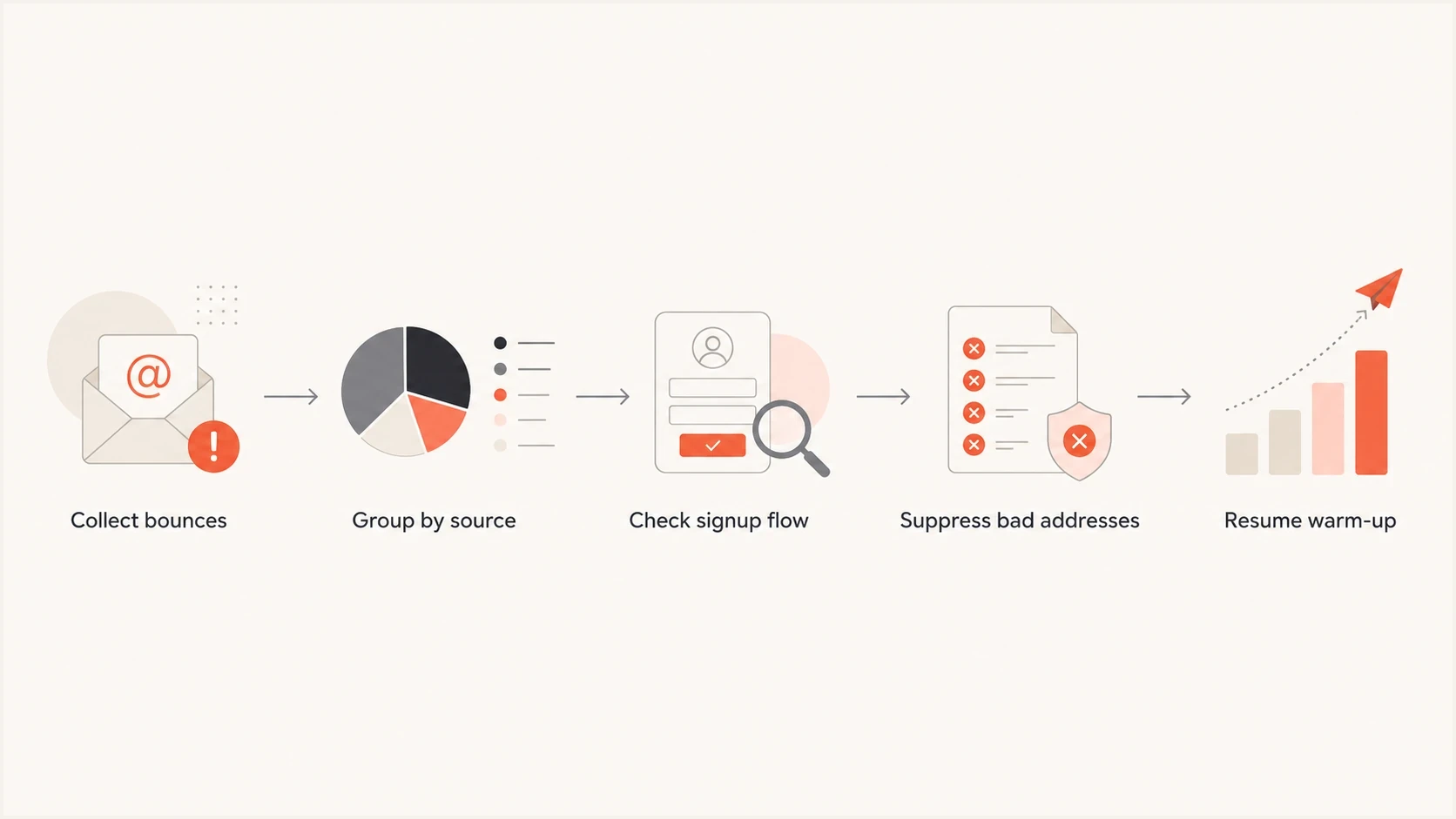
IP warming bounce investigation: collect replies, group by source, fix signup capture, suppress invalid addresses, and resume.
- Source split: Compare web, app, API, paid acquisition, import, referral, and partner sources separately.
- Age split: Compare same-day signups, recent signups, and older records. New invalids point to capture problems.
- Provider split: Separate Gmail, Yahoo, Microsoft, Apple, business domains, and smaller mailbox providers.
- Message split: Compare onboarding, marketing, product, and transactional templates because the audience often differs.
- Raw reply split: Group by full SMTP text so user unknown bounces do not mix with policy rejections.
Send a controlled message through Suped's email tester to inspect headers, authentication results, and obvious content or DNS issues. This checks the sending setup for that test message; it does not validate a whole list or guarantee inbox placement.
Email tester
Send a real email to this address. Suped shows a results button when the test is ready.
?/43tests passed
Catch bounce spikes before scaling
Use delivery events or bounce alerts from the ESP during each warm-up batch. Compare invalid-recipient bounces, policy rejections, and temporary deferrals separately against the recent baseline for the same provider and acquisition source.
- Set an absolute alert level using the operating thresholds above, and investigate sharp increases below that level. A fixed percentage increase is not a universal mailbox-provider rule.
- Include failure counts and attempted recipient-message counts in every alert. Two invalid addresses in a batch of 50 produce a 4% rate, which needs investigation but gives little evidence about the rest of the list.
- Route the alert to the person who controls the affected campaign or signup flow. Hold the next volume increase and pause the source producing confirmed invalid recipients.
- Check that bounce events update suppression lists promptly across campaigns and triggered automations. Otherwise, scheduled messages can repeat the same invalid-recipient failures.
Before resuming, verify that the source is repaired, suppression updates have reached every sending workflow, and pending retries are included in the throughput plan. Check final delivery outcomes before approving the next increase.
How to fix the bounce problem
The repair plan has to remove bad recipients and close the path that created them. Cleaning only the bounced rows helps today, but the bounce rate returns if the same form keeps accepting bad addresses.
- Pause ramping: Pause the affected acquisition source or automation and hold volume increases until the cause is repaired.
- Suppress decisively: Confirmed invalid recipients should not receive another warm-up send. Investigate policy rejections separately before any resend.
- Import history: Bring old ESP suppressions, complaints, unsubscribes, and manual blocks into the new system.
- Fix capture: Add syntax checks, typo suggestions, mail-routing checks, bot controls, and confirmed opt-in where risk is high. Ask users to confirm corrections rather than silently changing their address.
- Warm with quality: Restart with recent, engaged, confirmed recipients before adding colder segments.
Validation helps most before the send
A definitive invalid-recipient bounce is stronger evidence than an earlier validation result. Validation is useful at signup and before import, but an MX check identifies advertised mail routing; it does not prove that a server accepts mail or that a specific mailbox exists. RFC 5321 also permits address-record fallback when MX records are absent, so missing MX alone is not proof of an invalid domain. Avoid uploading a full list without confirming how recipient data is handled.
- Good use: Real-time checks on risky forms and high-volume acquisition sources.
- Bad use: Using validation as a reason to resend to confirmed invalid recipients.
A catch-all domain can accept otherwise unrecognized recipients, so validation cannot reliably establish a specific mailbox there. Role accounts are not automatically invalid; assess permission and actual delivery responses before excluding them.
If the bounce source is web signup, start there: block disposable domains if the business can support it, rate-limit repeated attempts, use invisible bot checks, show typo suggestions for common domains, and ask for confirmation before the address joins the normal onboarding stream. If the source is mobile app signup, check keyboard autocorrect, social login mapping, address editing, and whether users can skip email until value is clear.
For a separate review of long-term sender damage, the hard bounce impact explainer covers why repeated invalid-recipient traffic matters beyond the immediate send.
Authentication and reputation checks
Even when the root cause is bad data, check the sending foundation because IP warming gives you very little room for extra errors. Run a domain health check before the next volume step. Confirm SPF authorizes the new sending IP and DKIM signs the actual messages. DMARC needs a passing SPF or DKIM result whose domain matches the visible From domain under the applicable matching rules. Check that the sending IP has a PTR record whose hostname resolves back to that IP, an appropriate EHLO/HELO identity, and TLS. Review link and tracking domains too.
?
What's your domain score?
Deep-scan SPF, DKIM & DMARC records for email deliverability and security issues.
Suped's DMARC platform provides DMARC monitoring, source-level SPF and DKIM results, and authentication alerts. During IP warming, use Suped to identify unexpected sending IPs and investigate authentication failures. Use ESP delivery logs for recipient bounces and retries, since DMARC aggregate reports do not contain the full SMTP responses.
Issues page showing top issues, verified sources, unverified sources, and authentication pass rates
Also watch for domain or IP listings with Suped's blocklist monitoring. A blocklist (blacklist) listing is not the usual reason for user unknown bounces, but it can explain policy rejections or sudden provider-specific failures during the same warm-up window. Repair the cause before requesting delisting; reputation recovery depends on subsequent sending behavior.

Blocklist monitoring page showing domain and IP checks across blocklists with importance and status
Restart IP warming safely
Once the source is repaired, do not jump back to the original ramp immediately. Restart with the cleanest slice, then let the data decide the next step.

Restart IP warming after high bounces: clean the list, confirm the sending setup, send a small batch, and expand gradually.
- Start small: Send to recipients with recent clicks, purchases, logins, or confirmations.
- Watch daily: Review hard bounce rate, temporary deferrals, provider split, complaint rate, unsubscribes, and engagement. Treat opens as directional because privacy protections can inflate them.
- Pace by provider: Hold or reduce traffic where deferrals rise. Group business domains by their receiving MX provider when applying connection and hourly throughput limits.
- Hold on spikes: If one provider or source spikes, stop adding volume until the cause is clear.
- Document decisions: Keep a simple log of volume, audience, hard bounces, deferrals, and changes made each day.
The restart pace depends on the current reputation, audience quality, and provider response. Keep throughput steady instead of sending in bursts. For a planning reference, the warm-up timing page explains how long a healthy ramp usually takes and why sudden jumps create avoidable risk.
Views from the trenches
Best practices
Segment every bounce by source, form, mailbox provider, signup age, and campaign before scaling.
Import suppression data before sending through a new ESP, even for triggered onboarding mail.
Treat repeated 550 user unknown replies as a data problem until the full SMTP text says otherwise.
Common pitfalls
Assuming a lower old-ESP bounce rate proves the list is clean can hide missing suppressions.
Using validation after the send instead of fixing signup capture leaves the bad source open.
Continuing a warm-up with three percent invalid-recipient bounces can damage sender reputation.
Expert tips
Compare web, app, and API signups separately because one channel usually creates most waste.
Add confirmed opt-in only where risk is high, then measure completion and invalid rates.
Keep full bounce text, not only enhanced codes, because providers reuse numeric labels.
Marketer view
Marketer from Email Geeks says a new ESP with worse bounce rates often points to missing suppression data rather than a sudden change in acquisition quality.
2024-06-10 - Email Geeks
Marketer view
Marketer from Email Geeks says invalid addresses on new opt-in subscribers should push the team toward signup validation and bot-control checks.
2024-06-10 - Email Geeks




