
What are the legal timeframes for unsubscribing email addresses by country?

Published 15 May 2025
Updated 27 Sep 2026
13 min read
Summarize with
Updated on 11 Oct 2026: We expanded the country table and clarified how to calculate deadlines and distinguish statutory limits from self-regulatory guidance.
The direct answer is that the legal maximum depends on which rules cover the recipient and sender, along with the message itself. The safest operating rule is simple: remove the address from every marketing sendable audience immediately, then keep a suppression record so it cannot be re-added by a later import.
The U.S. and Canada allow no more than 10 business days. Australia and New Zealand use 5 working days. Singapore uses 10 business days, and Hong Kong uses 10 working days. In the UK, EU, Japan, Brazil, South Africa, and China, the practical answer is prompt or immediate suppression because the rules focus on withdrawal, objection, refusal, or no further marketing instead of giving senders a fixed grace period.
Treat those legal timeframes as outer limits, not scheduling targets. If a person clicks unsubscribe and then receives another campaign the next day, they do not care that a statute gives you more time. They see a broken promise and often use the spam complaint button. That hurts deliverability faster than most compliance teams expect.
The country-by-country answer
This table covers the countries and regions that most global email programs ask about first. It is not a substitute for local counsel, but it gives a practical operating baseline for marketing and lifecycle email.
|
|
|
|
|---|---|---|---|
United States | 10 business days | Same day | CAN-SPAM also bars fees, extra personal data, and multi-step barriers. The opt-out mechanism must accept requests for at least 30 days. See the FTC CAN-SPAM guide. |
Canada | Without delay, no later than 10 business days | Immediate | CASL expects a simple unsubscribe method that remains valid for at least 60 days. |
Australia | 5 working days | Immediate | The unsubscribe facility must be clear and free to use, and it must remain functional for at least 30 days after send. It cannot require a login or extra personal information. |
New Zealand | 5 working days | Immediate | Consent is treated as withdrawn after the deadline, and the facility should remain valid for at least 30 days. |
United Kingdom | No fixed grace period; stop as soon as possible | Immediate | PECR and UK GDPR require you to stop after an opt-out, consent withdrawal, or direct-marketing objection. |
EU and EEA | No fixed email grace period | Immediate | After a GDPR direct-marketing objection, the personal data can no longer be processed for that purpose. |
Singapore | 10 business days | Same day | The Spam Control Act sets the outer deadline, and the unsubscribe facility must work for at least 30 days. |
Hong Kong | 10 working days | Same day | The UEMO applies to commercial electronic messages with a Hong Kong link. |
China | No fixed email grace period | Immediate | China requires a way to refuse electronic advertising and does not permit further advertising email after the recipient refuses it. |
Japan | No stated grace period | Immediate | Under the rules for specified electronic mail, do not send further promotional email after a valid opt-out. |
Brazil | No fixed statutory email deadline | Immediate | LGPD does not set a specific email grace period. A non-statutory industry code uses 2 business days for automated requests and 5 for other requests; those are not LGPD deadlines. |
South Africa | No fixed email deadline; stop after opt-out | Immediate | POPIA protects recipients against unsolicited direct marketing and further marketing after they opt out. |
India | No settled email-specific maximum | Immediate | The DPDP consent and withdrawal provisions are scheduled to apply on 13 May 2027. Build an auditable immediate-suppression process during the transition. |
Common unsubscribe deadlines for commercial email programs.
Business days and working days are not calendar days. Use the holidays and time zone recognized by the applicable law, record when the request arrived, and confirm when that law starts counting. An immediate global suppression target avoids most calculation disputes.
For broader country research, maintain a jurisdiction matrix that records the rule, regulator guidance, effective date, recipient scope, message scope, and counsel owner. Build the sending system around the strictest applicable rule because country segmentation often fails when lists move across CRMs, data warehouses, and sending platforms.
The practical rule
The legal clock matters, but the reputation clock starts at the click. Do not use a 10-business-day allowance to keep sending campaigns. Treat it as a fallback for edge cases, manual remediation, and proof that the suppression system was corrected before the legal maximum expired.
How to choose the governing deadline
The sender's registered office does not always determine the unsubscribe law. A rule can attach to the recipient's location, the sender's establishment, targeting activity, or a defined local link. One campaign can therefore fall under overlapping global email marketing laws.
- Recipient location: Record reliable country data gathered during the relationship instead of relying only on an IP address.
- Sender entity: Identify the legal entity that authorizes the campaign and every affiliate that can send it.
- Message purpose: Classify the message by its primary purpose, including any promotional modules in a transactional template.
- Recipient type: Record whether the address belongs to a consumer, sole trader, partnership, or corporate subscriber where the law distinguishes them.
- Request scope: Store whether the person stopped one list, all email marketing, one brand, or all direct marketing.
If more than one deadline can apply, use the shortest one in the compliance record and suppress immediately in the sending system. That approach removes the need to resolve a close jurisdiction question before the next campaign leaves the queue.
Country data can be wrong
People travel, use corporate networks, and keep addresses after moving. Use immediate global suppression as the control, then use the country matrix for legal review, facility design, retention decisions, and evidence.
Why immediate suppression is the right operating standard
There are two clocks after an unsubscribe request. The legal clock measures the maximum time before the sender is out of compliance. The recipient clock measures patience. The recipient clock is shorter.
Most modern sending stacks can suppress before the next campaign attempt. The hard part is not the click. The hard part is making every downstream system respect the click: CRM exports, audience builders, automation journeys, data warehouse syncs, and any second ESP used by another team.
Unsubscribe processing risk
A practical way to view delay after a recipient has opted out.
Best
0-1 hour
Suppressed before the next send attempt.
Acceptable fallback
Same day
Useful when a short legacy queue cannot be canceled.
Compliance and reputation risk
After the next send
A further marketing send can breach prompt-stop rules and trigger complaints.
Fixed limits reached
5-10 days
Some countries set outer limits in business or working days.
Removal and suppression are separate controls. Removal means the person is no longer in a newsletter segment. Suppression means the address is on a do-not-mail list that blocks future marketing even if a CSV import, sales integration, or database query tries to add it back.
- Global default: Process all marketing unsubscribes immediately, regardless of country.
- Suppression scope: Apply the opt-out to every promotional list covered by the request.
- Audit trail: Store timestamp, source, scope, system, and sync status for the request.
- Reactivation: Require a new affirmative marketing opt-in before sending again.
How to design the suppression workflow
A compliant unsubscribe system has to work at send time, not only at list-management time. If an address is removed from a CRM list but remains in a scheduled journey, the recipient still gets mail. This is a common failure pattern.
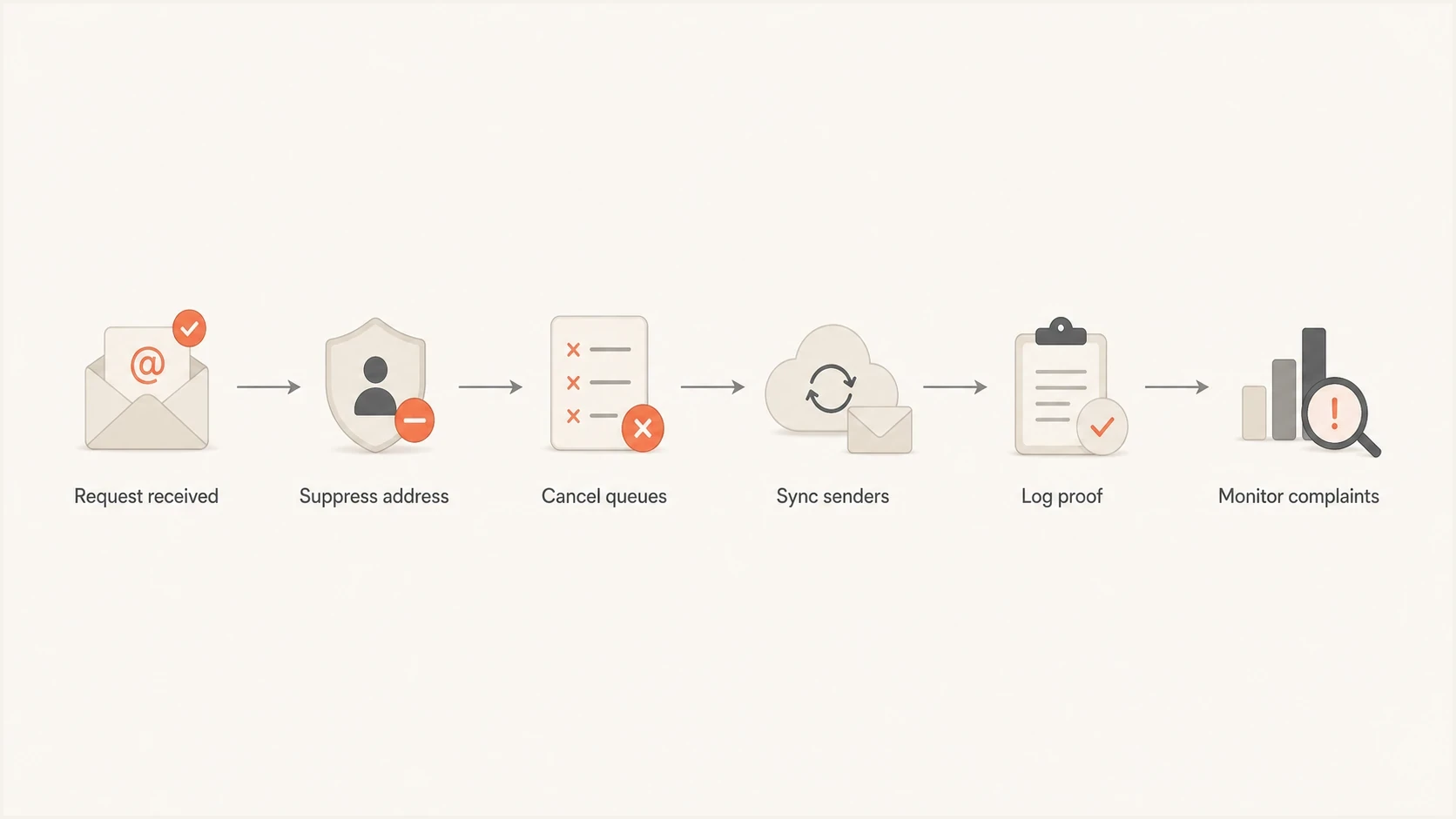
Flowchart showing unsubscribe request handling through suppression, queue cancellation, sender sync, logging, and complaint monitoring.
The clean pattern is event driven. The unsubscribe event updates a central suppression table, pushes to each sending platform, cancels queued promotional messages where the platform supports cancellation, and writes a compliance log. The MTA or ESP should check suppression immediately before each attempt, not only when the campaign audience is built.
Suppression event payloadJSON
{
  "email": "recipient@example.com",
  "reason": "unsubscribe",
  "scope": "all_marketing",
  "source": "list_unsubscribe",
  "received_at": "2026-05-23T10:18:00Z",
  "effective_at": "2026-05-23T10:18:03Z",
  "systems_synced": ["crm", "esp_a", "esp_b"],
  "audit_id": "unsub_01HX7Y8Q"
}
The confirmation page can say that a message already in delivery might still arrive, but it should not promise a delay window that conflicts with an immediate opt-out. Use direct wording: "Your marketing unsubscribe is effective now. A message already in delivery might still arrive."
Testing matters because unsubscribe failures often hide in edge cases. Send a real email, click the unsubscribe link, then send a follow-up test through the same production path. A live email tester check helps confirm headers, authentication, and the actual message path after you make changes.
Email tester
Send a real email to this address. Suped shows a results button when the test is ready.
?/43tests passed
Queued sends and multiple ESPs
Queued email is the usual reason teams ask whether they can take 24 hours, 3 days, or 10 business days. The law in some countries allowed for legacy batch processing, but the better technical answer is to check suppression at the last responsible moment before a promotional message leaves the system.
Weak implementation
- Batch exports: Audiences are pulled nightly and do not re-check opt-outs before send.
- Local lists: Each ESP has its own unsubscribe table with delayed sync.
- Queue drift: Journey emails already scheduled continue after the unsubscribe click.
- Poor proof: Logs show a click, but not when every sender stopped.
Strong implementation
- Central suppression: All promotional senders read from one do-not-mail source.
- Pre-send check: The MTA or ESP checks the suppression table before each attempt.
- Queue control: Pending marketing messages are canceled or skipped where supported.
- Audit proof: The log shows the request and effective times, plus each system's sync status.
Multiple ESPs are common in larger organizations. Marketing uses one platform, sales uses another, product uses a lifecycle tool, and an agency has a separate campaign account. The legal duty does not split politely across those tools. If the recipient unsubscribes from covered marketing, the suppression state has to move to every sender that can send that class of email.
Do not treat suppression as a mailing list
Moving an unsubscribed address to a suppression list is different from moving it to another active marketing list. A suppression list is a do-not-mail control. Keep it, secure it, limit its use, and sync it to every sender that needs it for compliance.
If you need a preference center, keep it optional. A user should not have to log in, remember a password, or answer unrelated profile questions to stop marketing. For a deeper treatment of that edge case, see the page on requiring a login before changing your unsubscribe flow.
What the unsubscribe request must stop
An unsubscribe request usually applies to marketing email, not necessary transactional or relationship email. Order receipts, security notices, billing alerts, product safety notices, and account access messages often continue because their primary purpose is not promotional. Local definitions and the actual content still matter.
The risky area is mixed-purpose email. A receipt with a large promotion at the top can be treated as marketing in practice. A product update that pushes an upgrade can also become promotional. Keep transactional templates narrow after opt-out and remove cross-sell modules for suppressed recipients.
- Marketing: Stop newsletters, promotions, event invites, nurture sequences, and winback campaigns.
- Transactional: Continue necessary receipts, password resets, security notices, and service alerts.
- Preference updates: Send a neutral confirmation page or notice, not a re-engagement pitch.
- List headers: Use List-Unsubscribe and honor one-click requests where mailbox providers expect them.
One-click unsubscribe is also a deliverability expectation for bulk senders. Some mailbox-provider subscription rules require one-click requests to be processed within 48 hours. That is an operating requirement, not a universal statutory deadline, but it can be stricter than the legal maximum. One-click does not replace your normal footer link. The related page on one-click unsubscribe explains the request flow and scanner-related edge cases.
Where Suped fits
Unsubscribe processing is not a DMARC setting. It is a consent and suppression workflow. Bad unsubscribe handling still becomes a deliverability problem quickly: complaint rates rise, engagement drops, filtering tightens, and sender reputation can move toward blocklist (blacklist) risk.
Suped's product covers the authentication and reputation side of this work. It brings DMARC monitoring, SPF, DKIM, hosted SPF, hosted DMARC, hosted MTA-STS, alerts, and blocklist monitoring in one place so the team can compare complaint and reputation changes with authentication failures.
Issues page showing top issues, verified sources, unverified sources, and authentication pass rates
The concrete workflow starts after the unsubscribe path is fixed. Track whether complaint patterns and authentication pass rates improve. If a sending source keeps mailing suppressed users or fails DKIM domain matching, Suped can identify the source and affected domain so the operations team can investigate both problems without confusing consent failure with authentication failure.
?
What's your domain score?
Deep-scan SPF, DKIM & DMARC records for email deliverability and security issues.
For MSPs and teams with many domains, the multi-tenant dashboard matters because unsubscribe failures often appear in one brand or business unit first. Central visibility helps the operations team catch the sending source before a local process becomes a domain-wide reputation issue.
Implementation checklist
Use a compliance target that is stricter than every country in the table: suppress immediately, prove it, and make the suppression durable. That gives you a single engineering standard instead of a fragile country-by-country branch in every campaign system.
- Capture: Accept unsubscribe requests through footer links, reply handling, one-click headers, preference forms, support requests, and other clear objections.
- Suppress: Write the address to a central do-not-mail table before any confirmation message is sent.
- Sync: Push suppression to every ESP, CRM, sales tool, and audience builder that can send marketing.
- Block: Run a final suppression check immediately before each promotional send attempt.
- Log: Keep request time, effective time, request source, IP or user agent where lawful, and sync outcome.
- Review: Check complaint spikes, blocklist or blacklist events, and failed authentication after major sends.
An unsubscribe is not automatically an erasure request. Keep only the minimum suppression record needed to prevent a later upload from mailing the person again, restrict access, and document the retention basis. Route an express deletion request through the privacy workflow and obtain legal review before removing the control that prevents accidental re-enrolment.
Views from the trenches
Best practices
Suppress at click time, then let every sender read the same do-not-mail source of truth.
Put a short queue notice on the success page when old systems need time to stop.
Keep suppression records separate from active lists and restrict each permitted use case.
Test every unsubscribe path after ESP changes, imports, journey rebuilds, and forms.
Common pitfalls
Treating the U.S. 10-business-day window as normal send delay damages trust fast.
Letting queued journeys continue after opt-out creates complaints that were avoidable.
Syncing only one ESP leaves other business units free to mail suppressed users later.
Deleting opt-outs fully can let later imports re-add the same address again by accident.
Expert tips
Check suppression at send time, not only when a campaign audience is built or exported.
Use legal maximums for remediation evidence, not for routine unsubscribe operations.
Scope opt-outs clearly so email, SMS, and channel preferences stay accurate over time.
Monitor complaint changes after fixes to confirm recipients stopped objecting again.
Expert view
Expert from Email Geeks says the U.S. 10-business-day rule is a legal maximum, not a good standard for active senders.
2022-07-14 - Email Geeks
Marketer view
Marketer from Email Geeks says there is no technical reason for most systems to take longer than instant suppression.
2022-07-14 - Email Geeks
The practical answer
The legal maximum is 10 business days in the U.S. and Canada, 5 working days in Australia and New Zealand, 10 business days in Singapore, and 10 working days in Hong Kong. In the UK, EU, Japan, Brazil, South Africa, China, and similar regimes, work from prompt or immediate suppression because the rules are tied to consent withdrawal, direct-marketing objection, refusal, or no further marketing.
For engineering and deliverability, the real answer is simpler: suppress immediately everywhere, keep a durable do-not-mail record, sync every ESP, and cancel queued promotional sends where possible. Then monitor complaint and authentication changes plus any blocklist (blacklist) signals.




