Is requiring a login to unsubscribe from emails legal?

Published 19 Apr 2025
Updated 24 Aug 2026
12 min read
Summarize with
Updated on 24 Aug 2026: We updated this guide with current legal timing, safer token handling, and durable suppression-list practices.
For marketing and other commercial emails, requiring a login before someone can unsubscribe is usually not legal. In the United States, CAN-SPAM says the opt-out mechanism cannot require a fee, cannot demand personal information beyond the email address and opt-out preferences, and cannot make the recipient take any step other than sending a reply email or visiting a single web page. A login wall normally fails that test, including for B2B commercial email.
This is both a compliance problem and a deliverability problem. If a person wants to stop marketing email and the page asks them to sign in, reset a password, create an account, or contact support, many recipients will press the spam button instead. That complaint is not only a legal signal. It is also mailbox feedback that can hurt future inbox placement.
The narrow caveat is transactional email. A receipt, password reset, security alert, warranty notice, or account-required service message does not always need a marketing unsubscribe link. But if the message's primary purpose is advertising, promotion, newsletters, product updates, events, offers, re-engagement, cold outreach, or a sales sequence, the recipient needs an easy opt-out path. Do not hide a marketing message behind a transactional label.
The short answer
Risk callout
Do not require login for a marketing unsubscribe. The body link should identify the recipient through a secure token and open one page where they can confirm a full opt-out. A preference center or survey can appear after that, but it cannot block the full unsubscribe. A separate "update preferences" or account settings link can exist, but it must not replace the no-login global unsubscribe path.
The FTC guide is the clearest U.S. reference point. It explains that commercial email must give recipients a clear opt-out method and that requests must be honored within 10 business days. It also says the sender cannot require more than a reply email or a visit to a single web page as a condition for honoring the request.
That unsubscribe rule sits alongside the other commercial email basics: accurate routing information, non-deceptive subject lines, ad disclosure when required, and a valid physical postal address. Fixing the login wall does not rescue a campaign that misses those requirements.
- Login required: High risk for marketing email because it adds authentication, password recovery, and account access friction before opt-out.
- Single page: The safe pattern is one web page that confirms the recipient and lets them stop all marketing.
- Preference center: Allowed when it includes a clear full opt-out and does not require authentication first.
- Cold outreach: A sales sequence or cold promotional email should still give a visible opt-out path without login.
- B2B mail: CAN-SPAM has no exception for commercial email sent to business recipients.
- Transactional mail: Different rules apply, but promotional content can turn a mixed message into a commercial one.
Why a login wall fails the test
A login wall shifts the burden onto the recipient. The sender already knows which address received the email because the unsubscribe URL can carry a signed, random, recipient-specific token. Asking for a password is not needed to honor a global marketing opt-out.
The worst cases happen when the email address is wrong. Someone mistypes an address at signup, an old address gets recycled, or a family member uses the wrong mailbox. The real recipient cannot log in because the account is not theirs. If the sender requires login, the recipient has no practical way to stop the marketing email.
Login-gated flow
- Access barrier: The recipient must remember or reset a password before opt-out.
- Wrong address: A mis-subscribed recipient cannot access the account.
- Complaint path: The spam button becomes easier than the unsubscribe path.
- Audit weakness: You record page visits, not completed opt-outs.
Compliant flow
- Token link: The URL identifies the address without account login.
- Full stop: One obvious option stops all marketing email.
- Fast update: Suppression applies across every campaign system.
- Clear record: The audit log shows when and how the opt-out happened.
That does not mean every preference center is unlawful. A preference center is useful when people want fewer messages instead of no messages. The important distinction is order of operations: process the unsubscribe first, then offer choices. Use direct wording such as "unsubscribe from all marketing email" or another phrase an ordinary recipient will understand. Do not make choices, login, survey questions, account recovery, or extra data a condition of stopping all marketing.
If account-level preferences need login because they expose private settings, keep that flow separate. Put detailed account controls behind authentication, but keep the marketing unsubscribe link available to anyone who received the email.
What different laws expect
The exact wording changes by jurisdiction, but the practical rule is consistent: make unsubscribe easy, free, available, and effective. If you send internationally, design for the strictest common workflow instead of building different friction levels by country.
|
|
|
|
|---|---|---|---|
United States | High risk | 10 business days | No extra step beyond reply email or one web page. |
Canada | High risk | 10 business days | Readily performed, no-cost unsubscribe; link valid 60 days. |
EU and UK | High risk | Without undue delay | Consent withdrawal must be easy; direct-marketing objections are absolute. |
Australia | Not allowed | 5 working days | No fee, login, or extra personal information; function for 30 days. |
Compact comparison of unsubscribe requirements that matter for login walls.
In the U.S., the opt-out mechanism needs to keep processing requests for at least 30 days after the message is sent. In Canada, the unsubscribe link must remain valid for at least 60 days after a commercial electronic message is sent. In Australia, the unsubscribe option must work for at least 30 days. These validity windows matter when recipients open old messages, forward messages, or return to an email after a long delay.
A common engineering mistake is treating unsubscribe as an account settings action. It is not. Marketing opt-out is a recipient-right workflow. It must work even when the recipient cannot authenticate, does not own the account, forgot the password, or never created an account in the first place.
For deeper operational detail, review one-click unsubscribe requirements. The safest build is a visible body link that completes the opt-out on a single web page plus technical headers that support mailbox-provider unsubscribe buttons.
How to build the safe flow
A good unsubscribe flow is not complicated. The email contains a visible body link and a List-Unsubscribe header. The body link opens a single page. For bot safety, a normal GET page load should render the page without changing the subscription state. The confirmation button should process the opt-out, while the header one-click endpoint must process the mailbox provider's POST request.
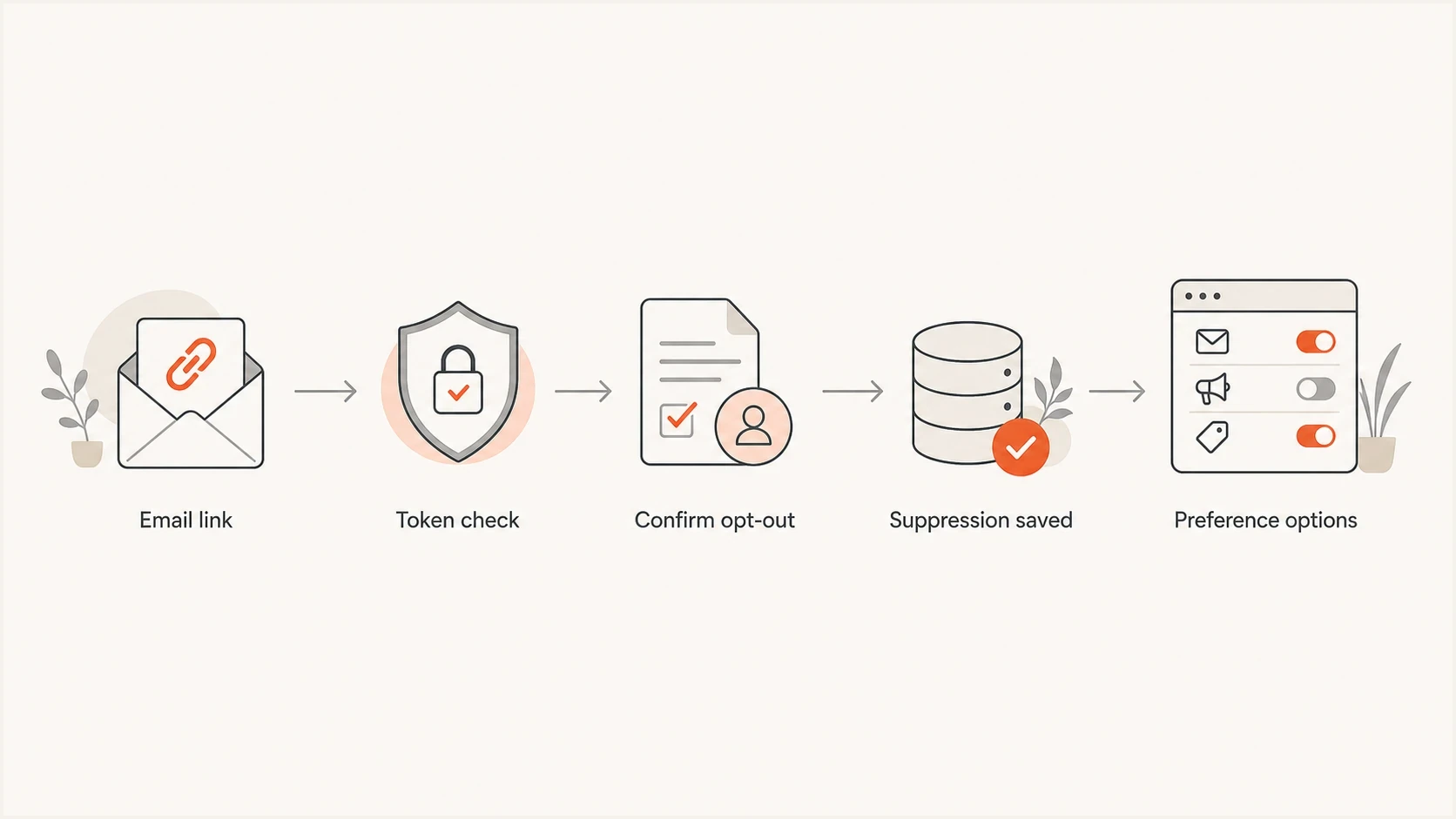
No-login unsubscribe flow with token check, confirmation, suppression, and optional preferences.
Example List-Unsubscribe headerstext
List-Unsubscribe: <https://example.com/u/abc123>,
 <mailto:unsubscribe@example.com>
List-Unsubscribe-Post: List-Unsubscribe=One-Click
One-click headers do not replace the visible body link, and the visible body link does not replace one-click headers for senders that need to meet mailbox-provider bulk-sender requirements. Treat them as two paths to the same suppression state.
- Create token: Generate an opaque or signed token that identifies the recipient without exposing the address.
- Verify token: Reject tampered values, but keep valid links working throughout every applicable legal validity period.
- Separate methods: Treat the visible link as a GET page and the one-click header as a POST endpoint.
- Save opt-out: Write the unsubscribe to a central suppression store before showing surveys.
- Offer choices: Let the recipient reduce frequency or choose topics only after full opt-out is available.
- Handle failures: Give invalid or expired links a no-login fallback for submitting the address to suppress.
- Log evidence: Record timestamp, address, source, IP, user agent, and final suppression state.
Do not over-secure the wrong thing
Security matters, but unsubscribe is not the place to expose account data. The token page should show only the minimum needed confirmation, such as the email address or masked address, and it should not reveal billing, profile, order, or private account information.
Keep a durable suppression record
Deleting a contact is not enough. An address can return through a list import, account sync, restored backup, or new lead form. Keep a minimal suppression record separate from active marketing audiences so the opt-out survives those routes. In EU and UK privacy workflows, retaining limited data for this purpose can prevent the address from being used for direct marketing again.
- Store the minimum: Keep the address, opt-out scope, timestamp, source, and current suppression status.
- Check centrally: Screen every campaign audience and imported list against the suppression store before sending.
- Respect scope: Record whether the request stops all marketing email or only a clearly named message category.
- Restrict use: Use suppression data only to prevent unwanted sends, with limited access and defined retention controls.
- Require new intent: Remove suppression only after a clear resubscription action, then record when and how it occurred.
Make suppression a final send-time check, not only a CRM field. That protects against delayed exports and disconnected campaign systems. If a vendor sends on your behalf, your organization still needs evidence that the same opt-out state reached that sending path.
How to test unsubscribe safely
Testing should include the email body, the raw headers, the landing page, and the downstream suppression store. Do not stop at clicking the footer link in a staging email. Send a real campaign-style message through the same infrastructure that production uses.
Suped's product can help with the operational side. Run an email test to inspect a real message, then check whether the List-Unsubscribe headers are present, whether authentication passes, and whether the template includes a visible opt-out path. Suped is not a substitute for legal review, but it gives teams a repeatable way to catch technical mistakes before a campaign goes out.
Email tester
Send a real email to this address. Suped shows a results button when the test is ready.
?/43tests passed
After the message test, click the body link as a recipient would. Confirm that the page does not require login, the full opt-out is obvious, and the suppression system updates immediately after confirmation. A page refresh or scanner-style GET should not create a new state change. Then send a second test to the same address through every marketing stream. The address should be suppressed everywhere marketing is sent.
For the final check, test a tampered token, an already-unsubscribed recipient, and a token near the end of every required validity period. Then test an expired token and confirm that it offers a no-login fallback. Each path should end with a clear status and no login demand. Error states matter because recipients often land there after forwarding, bot clicks, or delayed opens.

Email tester sample report showing total score, email preview, issue summary, and per-section results
Authentication and reputation still matter
Unsubscribe compliance and authentication are separate controls, but they meet in the inbox. A campaign can pass SPF, DKIM, and DMARC while still producing spam complaints because the unsubscribe path is broken. A compliant unsubscribe flow can also underperform if authentication fails and mailbox providers distrust the sender.
A login wall does not directly change DMARC pass or fail results. DMARC checks whether the visible From domain is authenticated through SPF or DKIM with the right domain relationship. Login friction affects reputation and complaints, not the DMARC authentication test itself.
That is where Suped's product fits the workflow. It combines DMARC monitoring, SPF and DKIM visibility, hosted DMARC, hosted SPF, hosted MTA-STS, alerts, and MSP-friendly multi-tenancy in one place. If broken opt-out flows increase complaints, blocklist monitoring also helps teams watch for domain or IP reputation fallout across major blocklist (blacklist) sources.
Unsubscribe handling targets
Operational thresholds for applying marketing opt-outs across sending systems.
Strong
0-2 hours
The request is saved and synced without waiting for a batch job.
Acceptable
Same day
The request is honored well inside the strictest common legal limits.
Risky
2-5 days
Batch delays create repeat sends after the recipient opted out.
Bad
Over 10 days
The flow misses common sender and mailbox-provider expectations.
The legal deadline should be treated as the outer limit, not the operating target. A modern system should suppress immediately, then reconcile across vendors, data warehouses, CRM exports, and scheduled campaigns. Review unsubscribe timeframes if you send across multiple countries.
Views from the trenches
Best practices
Let the email link complete a full opt-out before showing preferences or account controls.
Keep the unsubscribe token scoped, expiring, and tied only to the recipient address.
Apply suppression centrally so every sender and campaign respects the same opt-out state.
Test both body links and List-Unsubscribe headers before each major template change.
Common pitfalls
Sending users to a sign-in wall turns a simple opt-out into an avoidable spam complaint.
Letting preference pages fail on expired sessions leaves recipients with no valid opt-out.
Treating account status emails as marketing gives teams false confidence about exemptions.
Forgetting shared suppression across ESPs creates repeat sends after a valid unsubscribe.
Expert tips
Record the opt-out timestamp, source campaign, and final suppression state for audits.
Use one-click headers plus a visible footer link so mailbox and human flows both work.
Make survey questions optional and show them only after the unsubscribe is already saved.
Monitor spam complaints after form changes because friction shows up in reputation data.
Expert from Email Geeks says requiring login to unsubscribe from commercial email violates core CAN-SPAM and CASL expectations and should not be shipped.
2021-10-22 - Email Geeks
Marketer from Email Geeks says web teams often route every account setting through authentication, but unsubscribe needs a separate path.
2021-10-22 - Email Geeks
The practical bottom line
Requiring login to unsubscribe from marketing email is the wrong design. Build the unsubscribe link as a recipient-right workflow, not an account settings workflow. Use a secure token, show a simple confirmation page, give a full opt-out, apply suppression across every marketing sender immediately, and show confirmation on the page instead of sending a follow-up marketing email.
The compliant path is also the better deliverability path. When recipients can leave cleanly, they have less reason to complain, mailbox providers see fewer negative signals, and your remaining audience is more likely to want the mail.
Implementation rule
If the unsubscribe journey ever asks for a password, account creation, support ticket, payment, survey answer, or extra personal information before the opt-out is saved, fix the flow before sending another marketing campaign.




