
What are common email bounce messages and what do they mean?


Updated on 28 Sep 2026: We updated this guide with clearer enhanced bounce codes, authentication diagnostics, and bounce-rate calculations.
Common email bounce messages tell you whether the recipient address failed, the mailbox had a temporary problem, the receiving server blocked the message, or your sending setup failed authentication or routing checks. Read the SMTP reply code, enhanced status code, and human-readable diagnostic together, not just the label hard bounce or soft bounce.
A bounce message, also called a non-delivery report (NDR) or delivery status notification (DSN), reports that a message was not delivered or was delayed. It can arrive immediately or after the sending system has exhausted its retries. Treat it as evidence, not as a final verdict. A line like 550 5.1.1 usually points to an invalid address, while 451 4.7.1 usually points to temporary deferral or rate limiting. The words after the code explain the provider-specific reason.
- Invalid recipient: The address does not exist, has a typo, or was disabled.
- Mailbox problem: The mailbox is full, unavailable, or temporarily not accepting mail.
- Policy block: The receiving server rejected the message because of reputation, content, authentication, or recipient policy.
- Sending setup issue: Your DNS, sender identity, mail route, or platform configuration caused the rejection.
The short answer
Most bounce messages fit into a small set of patterns. The three-digit SMTP reply code gives the broad result, and the enhanced status code gives the finer reason. A 5xx code means resending the same message to the same destination is unlikely to work without a change. It does not automatically mean the address is invalid. A 4xx code means a temporary failure and should trigger a limited retry with backoff. The phrase after the code tells you whether the problem is the address, mailbox, message, server, reputation, authentication, or sender configuration.
|
|
|
|---|---|---|
550 5.1.1 no such user | Recipient not found | Suppress |
452 4.2.2 mailbox full | Temporary quota issue | Retry with limits |
552 5.3.4 message too large | Receiver size limit | Reduce and resend |
451 4.7.1 rate limited | Temporary throttling | Pause and back off |
550 5.7.1 policy block | Policy or reputation rejection | Read diagnostic |
SPF, DKIM, or DMARC failure | Authentication failed | Fix source or DNS |
Domain or mail route not found | No usable destination | Verify domain and DNS |
Common bounce meanings by message pattern.
Use the raw bounce, not the summary label
A platform label such as hard bounce or soft bounce is useful for automation, but it does not explain why delivery failed. Look for the raw SMTP response first, then decide whether to suppress, retry, reduce volume, fix authentication, reduce message size, or investigate a blocklist (blacklist) issue.
How to read a bounce message
A bounce message usually has four useful parts: the SMTP reply code, the enhanced status code, the provider text, and the host that returned the answer. Read the code and provider text together. The text often says exactly what happened, such as address not found, mailbox unavailable, message too large, unauthenticated sender, spam content, or relay access denied.
Example raw bounce messagestext
smtp;550 5.1.1 The email account that you tried to reach does not exist
smtp;550 Requested action not taken: mailbox unavailable
smtp;552 5.3.4 Message size exceeds fixed limit
smtp;550 Mail content denied
smtp;554 5.7.1 Relay access denied
smtp;451 4.7.1 Try again later, rate limited
smtp;421 4.4.2 Connection dropped, try again later
The first number matters. 550 is a common permanent rejection. 552 often identifies a storage or message-size limit. 554 is a broad transaction failure, often used for policy, content, reputation, or relay problems. 421 and 451 normally mean the receiving system wants the sender to pause and try again later.
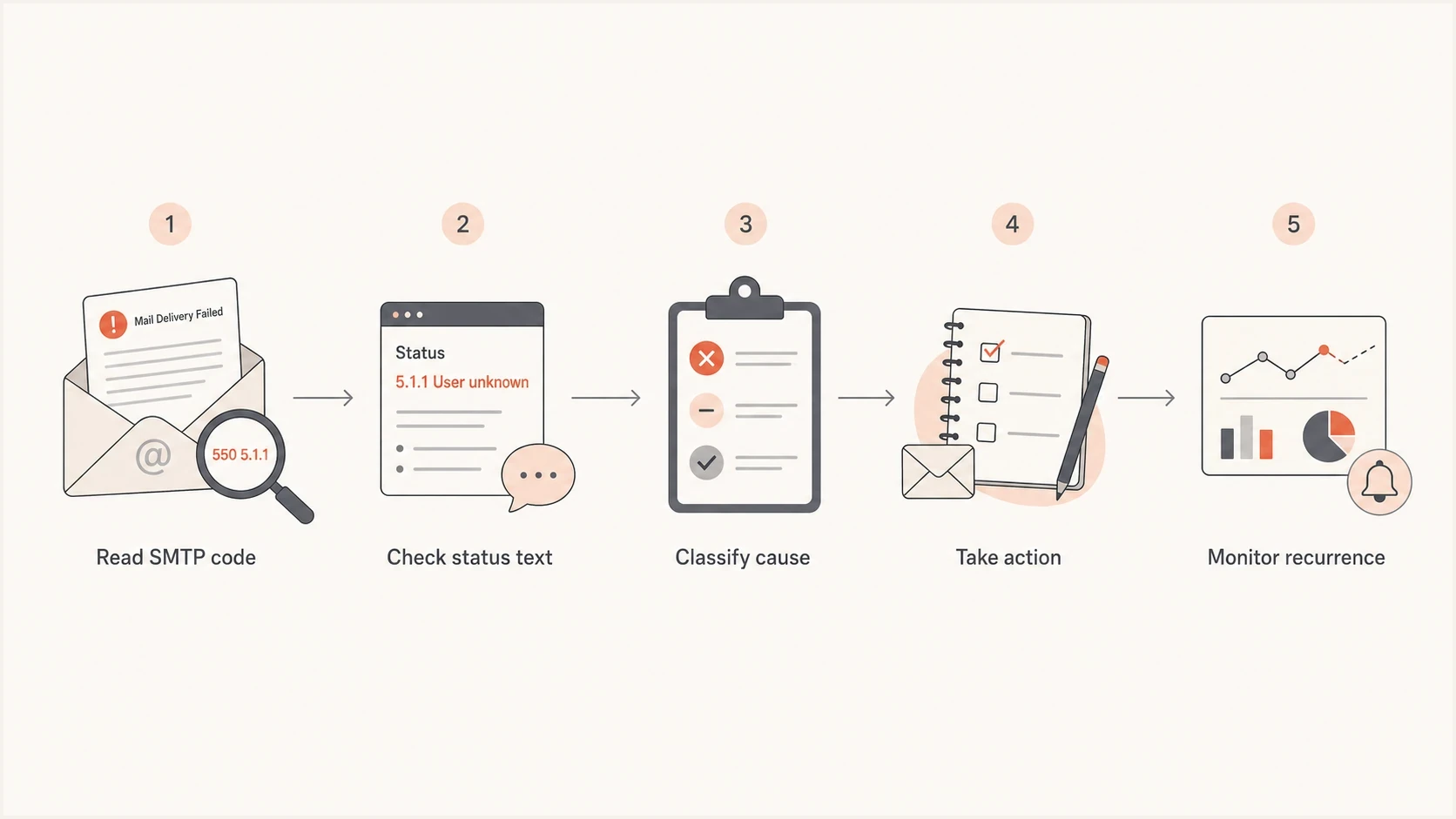
Email bounce troubleshooting flow from SMTP code and status text to action.
For deeper investigations, group raw responses by provider and exact wording. A Microsoft rejection, a Gmail rejection, and a corporate gateway rejection can have different causes even when the campaign, sender, and template are the same. A guide to SMTP bounce codes is useful when the wording is vague.
What enhanced status codes mean
Enhanced status codes use the pattern class.subject.detail. In 5.1.1, the first digit says the failure is permanent, the second places it in the addressing category, and the last identifies a bad destination mailbox address. In 4.7.1, the first digit says the failure is temporary and the second places it in the security or policy category.
|
|
|
|---|---|---|
X.0.X | Other or undefined | Provider diagnostic text |
X.1.X | Addressing | Sender or recipient address |
X.2.X | Mailbox | Quota, status, or mailbox limits |
X.3.X | Mail system | Destination system or configuration |
X.4.X | Network or routing | DNS, route, connection, or timeout |
X.5.X | Delivery protocol | SMTP command or protocol handling |
X.6.X | Content or media | Message format or conversion |
X.7.X | Security or policy | Authentication, filtering, or authorization |
The second digit groups an enhanced status code by subject.
The class does not identify the fix by itself
The enhanced code narrows the category, but the provider diagnostic supplies the operational context. A permanent 5xx response can require an address correction, a smaller message, an authentication repair, or a policy change. Use the full response before suppressing a recipient.
Read the DSN fields
A standards-based DSN has a human-readable explanation and a machine-readable delivery-status part. One message sent to several recipients can contain a separate result for each address, so troubleshoot the per-recipient fields instead of assuming every recipient failed for the same reason.
- Final-Recipient: The address whose delivery result this entry describes.
- Action: The outcome, commonly failed, delayed, delivered, relayed, or expanded.
- Status: The enhanced status code, such as 5.1.1 for a bad destination mailbox.
- Remote-MTA: The remote mail server involved in the delivery attempt, when available.
- Diagnostic-Code: The original SMTP response, which usually provides the most useful provider-specific detail.
Example DSN delivery-status parttext
Reporting-MTA: dns; outbound.example

Final-Recipient: rfc822; user@example.net
Action: failed
Status: 5.1.1
Remote-MTA: dns; mx.example.net
Diagnostic-Code: smtp; 550 5.1.1 User unknown
A rejection and a bounce are related
A receiving server can reject a message during the SMTP conversation. The sending system then reports that rejection to the sender as a bounce or DSN. If a server accepts the message first and delivery fails later, that server can generate the DSN instead. This difference explains why some failures appear immediately and others arrive after retries.
Hard bounce messages
A hard bounce is an operational label for a permanent delivery failure that the sending platform will not retry. It does not always mean the address is invalid. Suppress an address after one clear permanent recipient failure, but investigate and fix permanent policy, routing, content, or authentication failures instead of suppressing valid recipients.
- 550 5.1.1 user unknown: The recipient account does not exist. Suppress it unless there is a strong reason to verify a typo manually.
- 550 5.1.1 mailbox unavailable: The mailbox cannot receive mail because it is disabled, closed, or invalid. Generic 550 wording can also describe policy failures, so confirm the enhanced code and diagnostic.
- 553 invalid recipient: The recipient syntax, domain, or local mailbox failed validation at the receiving server.
- No usable mail route: The domain does not resolve, explicitly publishes that it accepts no mail, or has no reachable mail destination. A missing MX record alone is not conclusive because SMTP can fall back to the domain's address records.
Do not keep mailing clear hard bounces
A clean suppression rule is better than repeated retries. If a checkout flow or welcome flow keeps hitting 550 5.1.1 responses, the list capture path needs attention. Check form validation, typo correction, double opt-in, bot protection, and imported list sources.
Hard bounces can still happen for addresses that look legitimate. People mistype addresses, abandon inboxes, use disposable addresses, or give an address that later gets closed. The raw bounce matters more than whether the address looks real to a human.
Soft bounce messages
Soft bounce messages usually mean the recipient server did not accept the message this time, but the address is not necessarily invalid. Retry with limits and increasing delays, watch repeated failures, and fix the cause when the same message appears across a provider or domain.
Temporary delivery problems
- Mailbox full: Retry for a short period, then pause if the same address keeps failing.
- Server busy: Retry using exponential backoff instead of pushing more volume.
- Network timeout: Check whether failures cluster around one provider or one sending IP.
Sender-side pressure
- Rate limited: Pause affected traffic, then resume more slowly without bursts.
- Greylisted: Allow retries. Greylisting expects a later delivery attempt.
- Reputation delay: Reduce volume, mail engaged recipients first, and monitor recurrence.
A 552 5.3.4 message-size failure is permanent for that copy of the message, but it does not mean the recipient address is invalid. Reduce the body or attachment size and resend only after the message fits the receiving system's limit.
Soft bounces become a list hygiene issue when they repeat. Do not remove every address after one 421 or 451 response, but stop mailing addresses that repeatedly soft bounce across multiple sends. The practical threshold depends on cadence. A daily sender can decide faster than a monthly newsletter.
If soft bounces spike across one mailbox provider, the problem is usually sending pattern, reputation, content, authentication, or a temporary provider-side filter. A focused bounce troubleshooting process helps keep that investigation grounded in the actual responses.
Authentication and policy bounces
Some bounce messages are not about the recipient at all. They mean the receiving server did not trust the sender identity, route, or policy. Treat these as broad-impact failures because they can affect many recipients at once.
- SPF fail: The sending server is not authorized in the SPF record, or SPF returned an error such as exceeding DNS lookup limits.
- DKIM fail: The signature is missing, the public key cannot be retrieved, the signature is invalid, or signed message content changed in transit.
- DMARC fail: Neither SPF nor DKIM produced a passing result aligned with the visible From domain.
- Relay denied: The sender tried to use a server or route that does not permit that transaction.
Authentication-related bounce examplestext
smtp;550 5.7.20 No passing DKIM signature found
smtp;550 5.7.23 SPF validation failed
smtp;451 4.7.24 SPF validation error
smtp;550 5.7.26 Multiple authentication checks failed
smtp;554 5.7.1 Relay access denied
Use the specific enhanced code when the receiver provides one. 5.7.20 points to no passing DKIM signature, 5.7.23 to an SPF fail result, 5.7.24 to an SPF evaluation error, and 5.7.26 to multiple authentication failures. Code 5.7.26 alone does not prove that DMARC caused the rejection, so confirm the provider text and authentication results.
For this class of bounce, check the domain setup before editing copy or changing subject lines. Suped's product connects DMARC monitoring with SPF and DKIM visibility, hosted SPF, hosted DMARC, hosted MTA-STS, real-time alerts, and automated issue detection. The workflow is to identify the failing source, confirm whether it is authorized, fix the DNS or platform settings, then watch the next reports for a passing aligned result.
?
What's your domain score?
Deep-scan SPF, DKIM & DMARC records for email deliverability and security issues.
A broad domain health check is a good first pass when bounces mention SPF, DKIM, DMARC, TLS, or DNS. If the issue recurs, ongoing DMARC monitoring is better than waiting for the next campaign to expose the problem.

Issue steps to fix dialog showing the issue overview, tailored fix steps, and verification action
Content and reputation bounces
Content and reputation bounces often look less precise than address bounces. Messages such as spam content denied, message refused, blocked due to policy, or IP frequency limited tell you the recipient server made a risk decision. Do not immediately delete images, remove every link, or strip formatting. Find the pattern first.
|
|
|
|---|---|---|
Content denied | Content filter | Test content |
Message refused | Policy block | Group by provider |
IP limited | Rate control | Slow volume |
Blocked sender | Reputation | Check blocklists |
Policy bounce patterns and practical fixes.
A new domain sending sudden volume can trigger rate limits even when the mail is wanted. Low daily volume can still have high bounce rates when the list source has typos, checkout addresses are stale, or a small number of providers are rejecting most of the mail. The denominator matters. Five bounces out of 50 sends is a serious signal even if the absolute count is small.
Calculate bounce rate as (bounced messages / attempted sends) x 100. Track hard and soft bounce rates separately because a list-quality problem needs a different fix than temporary throttling. Keep the denominator consistent when comparing campaigns or providers.
Bounce rate triage bands
Use these as internal operating thresholds, not protocol limits, then adjust for list age, cadence, and provider mix.
Healthy
Under 2%
Normal list churn with no obvious provider cluster.
Investigate
2-5%
Review raw messages, signup sources, and recent changes.
Stop and fix
Over 5%
Pause risky sends until the cause is clear.
When the wording points to sender reputation, check whether the sending IP or domain appears on a blocklist or blacklist, then compare that with the provider-specific bounce text. Suped's blocklist monitoring can track IP and domain listings alongside authentication and deliverability signals, so a listing can be investigated in the context of the affected sender and time period.
A blocklist monitoring workflow is especially useful when bounces mention blocked sender, poor reputation, spam source, or policy refusal.
What to do after a bounce
The right response depends on the exact message. Use a simple decision path: suppress clear hard bounces, retry temporary bounces with limits, investigate provider-level spikes, and fix authentication or reputation issues before scaling volume.
- Collect raw responses: Export the SMTP response, enhanced status code, recipient domain, campaign or flow name, send time, and sending domain.
- Group by wording: Count exact messages before making broad assumptions about hard and soft bounce labels.
- Segment by provider: A Gmail-only issue, Microsoft-only issue, or corporate-domain issue points to different causes.
- Check recent changes: Review DNS edits, sender domain changes, platform migrations, template updates, message size, and volume increases.
- Apply the fix: Suppress, retry with backoff, reduce volume or message size, repair DNS, adjust content, or isolate a problematic list source.
Email tester
Send a real email to this address. Suped shows a results button when the test is ready.
?/43tests passed
Before sending another campaign after a bounce spike, send a real test message and inspect the result. Suped's email tester can help catch content, DNS, and authentication issues before they show up as failed delivery at scale.
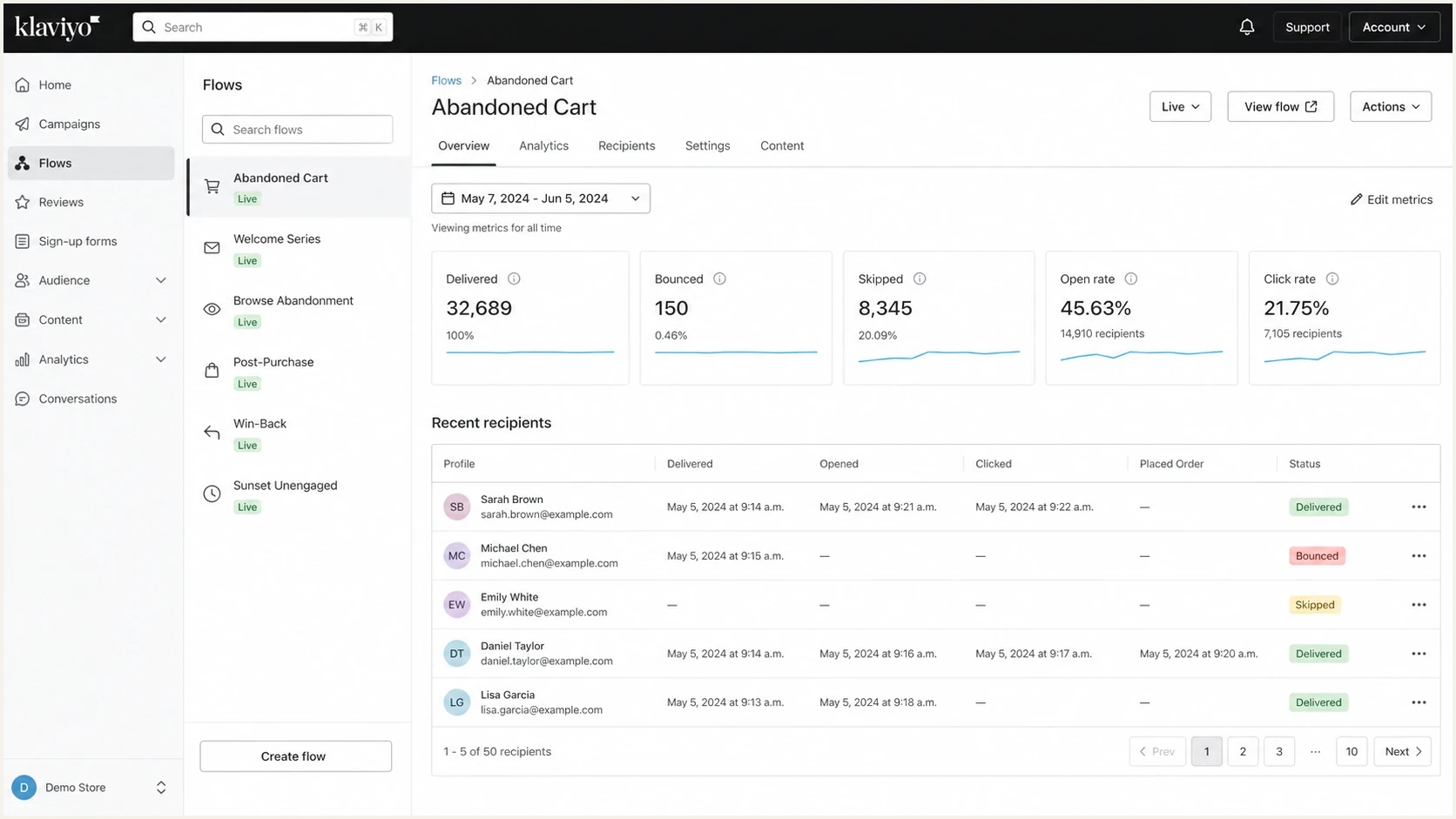
Klaviyo flow analytics with delivered, bounced, and skipped recipient statuses.
For ecommerce flows, pay close attention to checkout and footer signup sources. These paths can collect addresses that look valid but contain typos, role accounts, abandoned inboxes, or bot submissions. A dedicated sending domain helps reputation separation, but it does not fix bad addresses or broken authentication by itself.
How Suped fits into bounce investigations
Bounce logs tell you what the receiving server said. Suped's product helps with the domain and authentication side of the investigation: which sources are sending as your domain, whether they pass SPF and DKIM, whether DMARC alignment is working, whether a sending source is unauthorized, and whether blocklist or blacklist signals changed around the same time.
Bounce log alone
- Specific error: Shows the receiving server's rejection text.
- Limited context: Often misses domain-wide sender and authentication patterns.
- Manual grouping: Requires exports and spreadsheet work to find repeated causes.
Suped workflow
- Source visibility: Shows verified and unverified senders using your domain.
- Actionable fixes: Turns DMARC, SPF, and DKIM issues into clear steps.
- Ongoing alerts: Flags authentication and reputation changes before they spread.
For teams using Suped, the practical workflow joins signals that usually live in separate places. Marketing platforms show the bounce, DNS shows the sender setup, DMARC reports show domain authentication results, and blocklist monitoring shows reputation changes. Suped puts those signals into one investigation path for individual domains and MSP-managed domain portfolios.
Views from the trenches
Best practices
Collect exact SMTP replies before changing flows, templates, volume, or suppression rules.
Group bounces by mailbox provider so one local issue does not look like a global failure.
Suppress clear invalid-address bounces quickly and retry temporary failures with limits.
Common pitfalls
Treating hard and soft labels as root causes hides the actual provider rejection text.
Changing subject styling before checking list source quality wastes investigation time.
Moving to a new sending domain without fixing bad addresses repeats the same problem.
Expert tips
Track bounce rate against total daily volume because small lists can show sharp swings.
Use flow-level reporting to find whether one signup source creates most bad addresses.
Separate authentication bounces from recipient bounces before applying suppression rules.
Marketer view
Marketer from Email Geeks says raw bounce messages are needed before anyone can diagnose a deliverability problem with confidence.
2022-09-26 - Email Geeks
Marketer view
Marketer from Email Geeks says overall daily volume matters because a few failures on a small send can still create a high bounce rate.
2022-09-26 - Email Geeks
A practical way to handle bounces
Common bounce messages usually mean one of four things: the recipient address failed, the mailbox or server had a temporary issue, the receiving server blocked the message, or your sender setup failed a trust check. The raw SMTP response and per-recipient DSN fields are the deciding evidence.
The practical workflow is to collect exact bounce messages, classify them by code and wording, group them by provider, and then act. Suppress invalid addresses, retry temporary failures with backoff and limits, reduce oversized messages, slow down when rate limited, check blocklist or blacklist context when reputation messages appear, and fix SPF, DKIM, and DMARC when authentication appears in the rejection.
Bounce labels alone do not show whether a source, DNS record, or aligned identity changed. Suped's product gives teams domain-side visibility into authentication, sending sources, DNS, and reputation signals before a repeated issue affects more recipients.




