
How to troubleshoot and resolve Yahoo TSS04 delivery errors for shared IP pools?

Published 13 May 2025
Updated 10 Oct 2026
14 min read
Summarize with
Updated on 10 Oct 2026: We updated the recovery steps for Yahoo retries, sender requirements, and shared versus dedicated IP decisions.
To troubleshoot and resolve Yahoo TSS04 delivery errors on a shared IP pool, treat the first few hours as a containment job: reduce Yahoo-bound traffic, stop rapid retry pressure, identify the tenant or stream that changed, then rebuild volume with engaged recipients. Yahoo groups TS* errors as temporary deferrals on its Yahoo error-code page. A fast retry loop adds connection pressure and makes it harder to tell whether the receiving conditions have improved.
The caveat with shared pools is attribution. A pool can send steady daily volume for months, then one customer imports a weak list, removes segmentation, changes content, or increases Yahoo volume enough to tip the entire pool into deferral. Yahoo can also have a temporary receiving issue. The response still starts the same way: reduce pressure, collect evidence, and show what changed on the pool.
Classify Yahoo traffic by the receiving MX or provider mapping, not only by addresses ending in yahoo.com. Yahoo's requirements and reporting cover consumer brands hosted by Yahoo Mail, including AOL, while Yahoo Japan is separate.
- Pause bulk retries and preserve the queued mail while replacing rapid attempts with controlled backoff.
- Split Yahoo traffic by customer, sending domain, DKIM domain, IP, campaign, and first error time.
- Resume with small batches for recipients who consented and recently clicked, purchased, or used an account, plus recipients of explicitly requested transactional mail.
- Contact Yahoo after documenting timestamps, affected IPs, complete SMTP replies, queue depth, and mitigation.
What TSS04 means on a shared IP pool
TSS04 commonly appears within a 421 4.7.0 temporary SMTP response, often with wording about unexpected volume or user complaints. Yahoo's public TS* guidance lists complaints, unusual traffic, message content, and poor IP or subnet reputation as possible causes. Temporary receiver load is discussed separately in its general 4XX guidance. Retain the complete SMTP reply because TSS04 alone does not establish the root cause.
Treat it as pool pressure
A growing queue of Yahoo deferrals needs containment. Queued messages do not create connection pressure until delivery is attempted, but frequent retries keep that pressure high. Preserve retry state, extend the backoff, and stop new bulk traffic while the cause is investigated.
- Triage large deferred queues before normal campaign traffic continues.
- Use progressive backoff with jitter instead of rapid repeated attempts.
- Keep only wanted, recent, and necessary mail in the recovery stream.
Illustrative TSS04 SMTP replytext
421 4.7.0 [TSS04] Messages from 192.0.2.10 temporarily deferred due to unexpected volume or user complaints
Do not treat TSS04 as a DNS-only problem. Authentication still matters, but recipient complaints, traffic shape, IP or subnet reputation, unknown recipients, compromised accounts, and content signals can all contribute. In a shared pool, the first task is finding which sender changed the signal.
First-hour Yahoo TSS04 response
The first hour is about containing delivery pressure while the root cause is investigated. Isolate traffic for every Yahoo-managed receiving domain and keep necessary transactional mail under the same destination limits until acceptance improves.
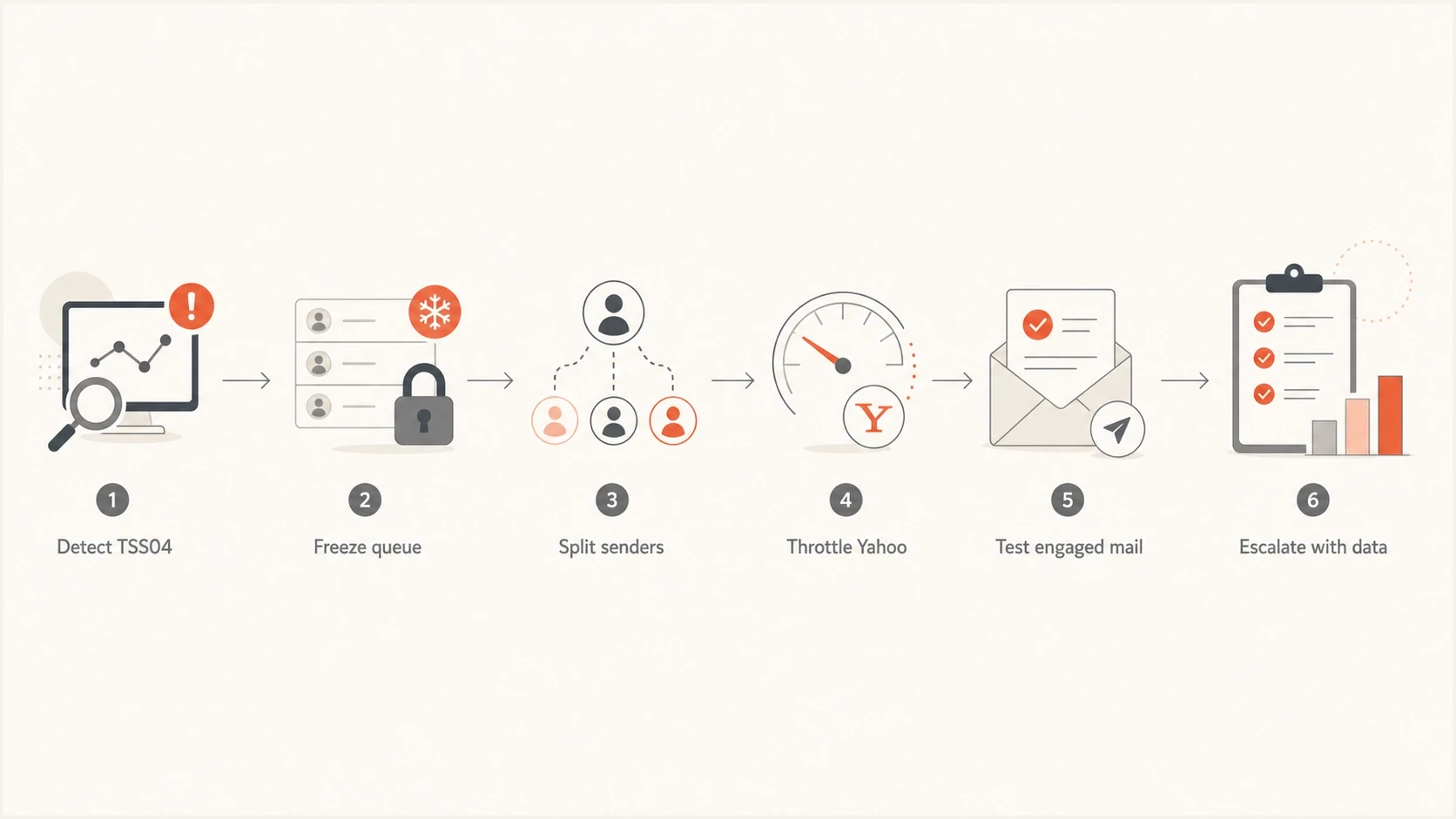
Yahoo TSS04 shared IP pool recovery flowchart with queue containment and escalation steps
- Freeze bulk Yahoo retries, preserve queue state, and stop new campaigns to Yahoo-managed receivers.
- Lower connection concurrency and hourly volume well below the pool's normal Yahoo baseline.
- Separate transactional mail from marketing by sending IP pool or DKIM domain, rather than only by queue priority; both streams still need Yahoo destination limits.
- Restart with recipients who consented and show recent clicks, purchases, or account activity, plus explicitly requested transactional mail.
- Track attempts, acceptances, deferrals, permanent failures, complaints, and queue age by time window.
After the pool is quiet, send a representative message through the Suped email tester to inspect headers, authentication, visible content, unsubscribe headers, and obvious deliverability issues before Yahoo volume resumes.
Email tester
Send a real email to this address. Suped shows a results button when the test is ready.
?/43tests passed
A test message does not prove Yahoo will accept a full batch. It gives you a clean baseline for comparing accepted and deferred examples.
Find the customer or stream that changed
Pool averages can hide a customer-specific problem. Compare each customer with its own baseline for the day of the first TSS04 and the preceding clean period. Check for a Yahoo-specific change within a campaign, DKIM domain, or sending domain before attributing the incident to total pool volume.
|
|
|
|---|---|---|
Yahoo volume | Client change | Throttle |
First TSS04 | Sender order | Isolate |
New list | Import timing | Suppress |
Segmentation | Recent change | Restore |
Complaints | Rate spike | Pause sender |
Unknown users | Failure jump | Clean list |
Authentication | Failing source | Fix setup |
Use compact pool signals to find the likely trigger.
Suped's DMARC monitoring groups reported sending sources, authentication results, and aggregate message counts for a domain. Compare those reports with MTA logs and Yahoo complaint data when investigating a configuration failure or pool reputation event. DMARC reports are delayed and do not contain TSS04 replies or tenant-level campaign logs.
Suped DMARC dashboard showing email volume, authentication health, and source breakdown
For a pool with hundreds of clients, add a tenant-level stop control. If one customer imported a stale list or removed segmentation, pause that customer before the rest of the pool resumes. If several customers changed at once, isolate the riskiest streams first and let only clean, engaged traffic test the recovery.
Throttle and retry strategy
Start by reducing Yahoo-bound volume and concurrency and sending only wanted mail. If otherwise comparable small batches are accepted while larger ones are deferred, investigate rate limiting alongside reputation; this pattern does not prove volume is the only cause.
What keeps the pool stuck
- Normal retry cadence can pile repeated attempts into the same reputation problem.
- Pool averages can hide one sender with a list, cadence, or segmentation change.
- A full campaign sent before small batches pass can extend the incident.
What gets delivery moving
- Limited batches to engaged Yahoo users show whether acceptance is recovering.
- Connection and hourly-volume caps well below baseline reduce receiver pressure.
- Step increases after several clean windows avoid overreacting to one successful test.
Yahoo deferral response bands
Set response bands against the pool's normal Yahoo deferral baseline instead of treating one universal percentage as safe.
Normal monitoring
At baseline
Continue tracking by sender and receiving domain.
Investigate
Sustained rise
Find the tenant and stream behind the change.
Throttle
Rising after backoff
Reduce concurrency and Yahoo hourly volume.
Containment
Persistent and widespread
Freeze bulk traffic and prepare evidence.
Keep valid 4XX-deferred mail queued until its configured expiry, apply progressive backoff with jitter, and prevent duplicate campaign injection. Choose a small recovery sample based on the affected IP's Yahoo acceptance history, then increase gradually after several stable windows. A fixed 5,000-message batch is not a universal safe starting point. Respect application expiry for time-sensitive messages, such as password-reset links, so recovery does not release obsolete requests.
After a 421 reply, end that SMTP session and delay the next connection. Coordinate destination-wide backoff across sending workers so one worker does not undo another's throttle. Yahoo does not publish a universal safe TSS04 sending rate or a guaranteed recovery time. Retry temporary 4XX failures, but do not automatically retry a message rejected with 5XX. Suppress confirmed nonexistent recipients; investigate policy or authentication rejections without classifying every 5XX as an invalid address. Follow the reply classifications in Yahoo's error-code guidance.
Check Yahoo sender requirements and reputation
Verify Yahoo's sender requirements while investigating TSS04; authentication fixes alone do not establish that delivery has recovered. Run a domain health check across affected domains, confirm DMARC aggregate reports are arriving, and keep blocklist monitoring active for the IPs and sending domains in the pool.
- For bulk mail, pass SPF and DKIM. For DMARC to pass, either the SPF-authenticated envelope sender domain or the DKIM signing domain must match the visible From domain under DMARC's strict or relaxed matching rules.
- Publish a valid DMARC policy of at least p=none, with a working rua destination recommended for monitoring.
- Use DKIM keys of at least 1024 bits; Yahoo recommends 2048 bits where the sender supports them.
- Publish a meaningful reverse DNS (PTR) hostname for each sending IP and ensure its forward DNS resolves back to that IP.
- Keep Yahoo's spam complaint rate below 0.3%; Yahoo calculates it against mail delivered to the inbox.
- For bulk marketing and subscribed mail, provide a functioning one-click List-Unsubscribe header and a clearly visible unsubscribe link in the message body. Honor requests within two days; a body link alone does not replace the header.
- Check relevant domain and IP blocklist (blacklist) entries, but a clean result does not rule out Yahoo's own reputation-based deferrals. TSS04 does not itself confirm a public listing.
- Validate RFC 5321 and RFC 5322 formatting, including headers, MIME structure, and resolvable sender domains.
?
What's your domain score?
Deep-scan SPF, DKIM & DMARC records for email deliverability and security issues.
Suped's product can centralize DMARC aggregate reports, authentication issues, source alerts, and blocklist or blacklist monitoring for the domains and IPs in a shared pool. Use it to compare the affected source with the preceding clean period and assign remediation to the right tenant. Yahoo TSS04 still requires MTA logs and Yahoo data, so DMARC evidence is one part of the investigation.

Blocklist monitoring page showing domain and IP checks across blocklists with importance and status
For MSP and ESP operations, the same workflow has to answer which domains are authenticated and which customer is creating pool-level risk. Suped's multi-tenancy view groups domain evidence and ownership without replacing the tenant-level delivery logs needed for TSS04 analysis.
Use Yahoo complaint data by DKIM domain
Yahoo's Complaint Feedback Loop is domain-based and only covers DKIM-signed mail. Yahoo Sender Hub Insights also reports delivered volume and spam complaint rate for verified DKIM domains. This matters on a shared pool because one platform-wide DKIM domain can roll several customers into the same view, hiding the tenant that caused the change.
- Verify each reporting DKIM domain in Yahoo Sender Hub and enroll active DKIM domains in the Complaint Feedback Loop.
- Process ARF complaint reports promptly and suppress the complaining recipient from that sender's future campaigns.
- Map each DKIM domain and selector to tenant, sending IP, campaign ID, message ID, and traffic type in internal logs.
- Use a tenant-specific DKIM domain or reliable internal mapping when a shared platform signature would combine customers.
- Compare Yahoo's complaint rate with internal records because Yahoo uses inbox deliveries as its denominator.
- Treat Sender Hub data as delayed evidence, then use live SMTP logs for immediate containment decisions. Missing or zero dashboard data does not prove that Yahoo accepted no mail or received no complaints.
Preserve attribution before the next incident
Record tenant and campaign ownership when a message enters the MTA. After TSS04 begins, an IP-only log can show the affected pool but cannot identify the customer that changed complaints, list quality, or traffic cadence.
Should you leave the shared IP pool?
If another tenant repeatedly triggers deferrals, ask the sending provider to review pool membership and isolate the affected customer. Yahoo's error guidance identifies shared IP reputation as a possible delivery problem. A dedicated IP separates your sending IP from other tenants, but domain reputation and recipient complaints still matter. Changing IPs does not repair poor subscription practices.
- Keep a well-managed shared pool when your volume is low or irregular and tenant controls can contain the incident.
- Ask about a managed pool reassignment when your own traffic is compliant and logs show repeated disruption linked to other tenants.
- Consider a dedicated IP when you have consistent volume and the operational capacity to manage IP warming, complaint handling, and destination throttles.
- Keep transactional and marketing streams separate, and fix consent or list-hygiene problems before transferring traffic.
Treat a migration as a planned operational change. Warm a new IP gradually with wanted mail and assess Yahoo acceptance separately from other providers. Keep per-tenant stop controls and avoid rotating IPs or moving the deferred backlog at full speed to bypass the deferral.
When to contact Yahoo
Contact Yahoo when TSS04 continues despite containment and corrective work. If you use a shared pool managed by a sending provider, involve its deliverability team because it controls the IPs, retry settings, and pool membership. A Sender Support Request should include affected IPs, the full unedited SMTP reply, UTC timestamps, sending hostnames, sender and DKIM domains, volume before and after throttling, and representative message IDs.
Evidence to include
- List each affected IP, reverse-DNS hostname, pool name, and whether the stream is shared or dedicated.
- Include the first TSS04 time, complete response text, deferral rate, queue depth, and queue age by hour.
- State which customers changed volume, list source, cadence, content, DKIM domain, or sending domain.
- Explain throttles, pauses, complaint handling, authentication checks, and list cleanup already completed.
- Provide message IDs and SMTP snippets for both accepted and deferred mail without including message content or recipient data unless requested securely.
Support update templatetext
Subject: TSS04 deferrals continue after mitigation

Affected IPs: x.x.x.x, x.x.x.x
Reverse-DNS hostnames: mail1.example.com, mail2.example.com
First seen: YYYY-MM-DD HH:MM UTC
Full SMTP reply: 421 4.7.0 [TSS04] ...
Yahoo volume before issue: [actual daily volume]
Current controls: reduced concurrency, engaged recipients only
Actions taken: paused bulk traffic, isolated client streams
Current deferral rate: [rate] over the last [window]
Sample message IDs: [accepted ID], [deferred ID]
Request: Please review whether the temporary deferral remains expected.
If Yahoo first sends general best-practice guidance, keep the ticket factual and update the same thread after each corrective pass. Yahoo can confirm that a receiving issue contributed, but the containment runbook stays the same because the evidence supports both sender-side diagnosis and Yahoo review.
Keep the pool healthy after recovery
After Yahoo acceptance recovers, track TSS04 beside other 421 responses, click and transaction engagement, complaint changes, unknown-recipient failures, and queue age. A shared pool needs automated isolation rules and daily visibility, not only a monthly review.
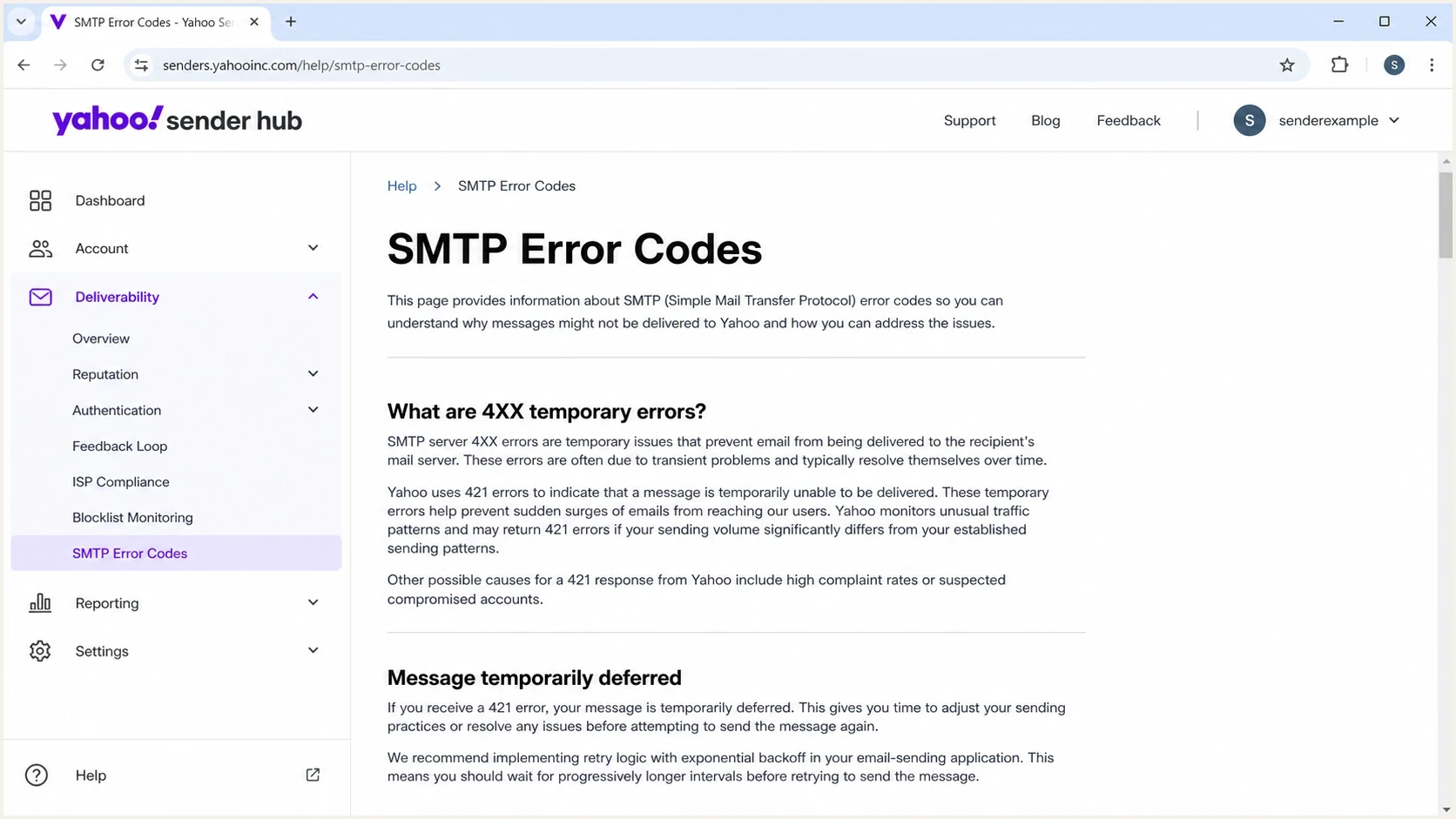
Yahoo Sender Hub SMTP error guidance for 421 temporary email deferrals
- Score Yahoo deferrals, complaint rate, unknown recipients, queue age, and recent engagement per customer.
- Use confirmed opt-in for new subscribers, require clear consent for imported contacts, and suppress inactive recipients according to the sender's cadence. Do not restart an inactive-list reengagement campaign during TSS04 recovery.
- Pause abusive or compromised senders until corrected. Introduce new customers through controlled warming pools before granting normal volume; moving abusive traffic does not make it acceptable.
- Trigger alerts when deferrals rise above the pool baseline across consecutive time windows.
- Classify Yahoo-managed traffic by receiving MX so alternate consumer domains are included in throttles.
- Review pool health weekly and record tenant ownership for every DKIM domain and campaign stream.
For managed service providers, the operational issue is scale. Suped's MSP and multi-tenancy dashboard can group domains, alerts, reports, and sender ownership in one place, while MTA logs retain the IP, response, queue, and campaign details required for Yahoo troubleshooting.
Keep the related TSS04 delivery errors reference beside the shared-pool process so support and engineering teams classify incidents consistently.
Views from the trenches
Best practices
Cut Yahoo volume fast, then restore it only after clean engagement data supports each step.
Review client-level Yahoo volume, new lists, complaints, and first TSS04 hits together.
Keep support tickets factual, with timestamps, IPs, errors, queue depth, and fixes made.
Common pitfalls
Letting retries pile up keeps pressure on a pool that already has poor temporary signals.
Pool averages hide the sender that changed data, segmentation, cadence, or consent quality.
Assuming TSS04 is always sender-side delays escalation when Yahoo has a platform issue.
Expert tips
Throttle connections and hourly volume before testing whether small Yahoo batches recover.
Separate transactional and marketing streams so one client's list does not slow every tenant.
Compare DMARC sources with SMTP logs to investigate which domains and IPs changed in the pool.
Expert view
Expert from Email Geeks says the issue often clears after reducing traffic, sending wanted email, and monitoring complaints, then replying with evidence if it remains.
2024-10-23 - Email Geeks
Marketer view
Marketer from Email Geeks says a large deferred queue should be paused quickly because repeated retries make the pool look worse to Yahoo.
2024-10-23 - Email Geeks
Confirm recovery before restoring normal volume
Increase Yahoo volume only after several stable observation windows show acceptance recovering and queue age falling without a fresh complaint spike. An SMTP 250 acceptance confirms that Yahoo accepted the message, not that it reached the inbox. Check available placement and complaint data before restoring normal campaigns. If deferrals rise again, return to the last stable sending rate and recheck the affected tenant.




