
How to add users to Yahoo Sender Hub and what visibility does it offer compared to Google Postmaster Tools?

Updated on 8 Oct 2026: We clarified Yahoo team access and CFL report routing, and added current Google Postmaster Tools v2 diagnostics and API details.
You cannot add extra named users to a Yahoo Sender Hub domain in the same way you can in Google Postmaster Tools. Use a business-controlled team identity for shared access. Domain verification is account-specific, and Yahoo has no delegated invite flow.
The visibility is also different. Yahoo Sender Hub covers Yahoo sender services, Complaint Feedback Loop management, and Insights for verified DKIM domains. Google Postmaster Tools has a broader Gmail-specific dashboard set and delegated access for Google accounts. Google is moving users to Postmaster Tools v2, where the existing Domain and IP Reputation dashboards are due to retire while spam rate, authentication, encryption, feedback loop, delivery errors, and compliance reporting continue.
Treat both as first-party signals, not complete deliverability monitoring. Daily operations still need DMARC monitoring, DNS validation, campaign data, blocklist or blacklist checks, and real message testing around them.
Can you add users to Yahoo Sender Hub?
Yahoo Sender Hub does not provide a Google Postmaster Tools-style user management screen where a domain owner adds separate people with their own logins. For a team or agency that needs the same domain data, the practical workaround is a business-controlled team account with documented access.
Current access reality
Google Postmaster Tools lets a verified owner add Google or Google Workspace accounts to a verified domain. Yahoo Sender Hub does not have that delegated-user model. A domain's data is visible only in the Sender Hub account that added and verified it through DNS.
- Adding users: There is no native per-user invite flow for a Yahoo Sender Hub domain.
- Team workaround: Use a business-controlled team account for Sender Hub access.
- Main visibility: Use Yahoo Sender Hub for CFL enrollment, domain management, and Yahoo Insights.
- Google difference: Google Postmaster Tools has delegated access and a broader set of Gmail dashboards.
That answer changes the operating model. A team account needs documented ownership, recovery details, credential controls, and a review schedule. Spending a few minutes on that register prevents the only login from remaining with a former employee or an agency inbox the business no longer controls.
How to give a team access safely
Since Yahoo Sender Hub access is account based, establish a business-controlled team account before domain verification. The identity should belong to the business, not one person. Route recovery messages to a monitored group and keep the credential in the access-control process used for production email systems.
- Create the account: Use a business-controlled Yahoo account for the Sender Hub login, with a monitored company role address for recovery.
- Secure recovery: Set business-controlled recovery details, enable two-step verification, and document who can approve access.
- Verify domains: Publish the Yahoo verification record in DNS and record who made the change.
- Limit sharing: Give access only to people who need Yahoo CFL or Insights data, using a controlled credential-sharing process.
- Review access: Check access after role changes, agency changes, and security incidents.
Shared account registertext
Yahoo Sender Hub login: <team Yahoo account>
Business owner: Email operations
DNS owner: Platform engineering
Recovery route: deliverability-team@example.com
Review cadence: Quarterly
Domains verified: example.com, mail.example.com
Avoid personal ownership
A personal account creates handoff risk. If that person leaves, loses access, or changes recovery details, the team can lose the dashboard and CFL management path when a complaint issue needs investigation.
What Yahoo Sender Hub can show
Yahoo Sender Hub started as the newer home for Yahoo sender services, especially Complaint Feedback Loop management. Yahoo later added Insights, which shows aggregated delivery statistics for verified DKIM domains. The Yahoo Postmaster blog describes spam complaint rate, delivered messages, trend changes, UTC timestamps, and a minimum daily volume threshold. Yahoo does not publish the threshold value.
Identity matters. Insights is tied to the DKIM signing domain, the d= value in the DKIM-Signature header, rather than the selector in s=. If several sending domains use the same DKIM domain, Yahoo rolls their data into that DKIM-domain view. The dashboard shows the average spam complaint rate and sum of delivered messages for the selected period, plus the percentage change against the preceding period of the same length.
Insights covers Yahoo-managed recipient domains, including Yahoo Mail and AOL, but not the separate Yahoo Japan service. It does not require CFL enrollment, because Insights and CFL are separate services. It has no public API. Each account can view Insights only for domains verified within that account; a CFL reporting address does not grant dashboard access.
|
|
|
|---|---|---|
Access | Account-specific verification | Shared viewing |
CFL | DKIM domain | ARF routing |
Insights | DKIM rollup | Complaints and volume |
Volume | Unpublished threshold | Explain gaps |
Time | UTC | Period trends |
Yahoo Sender Hub data and access scope.
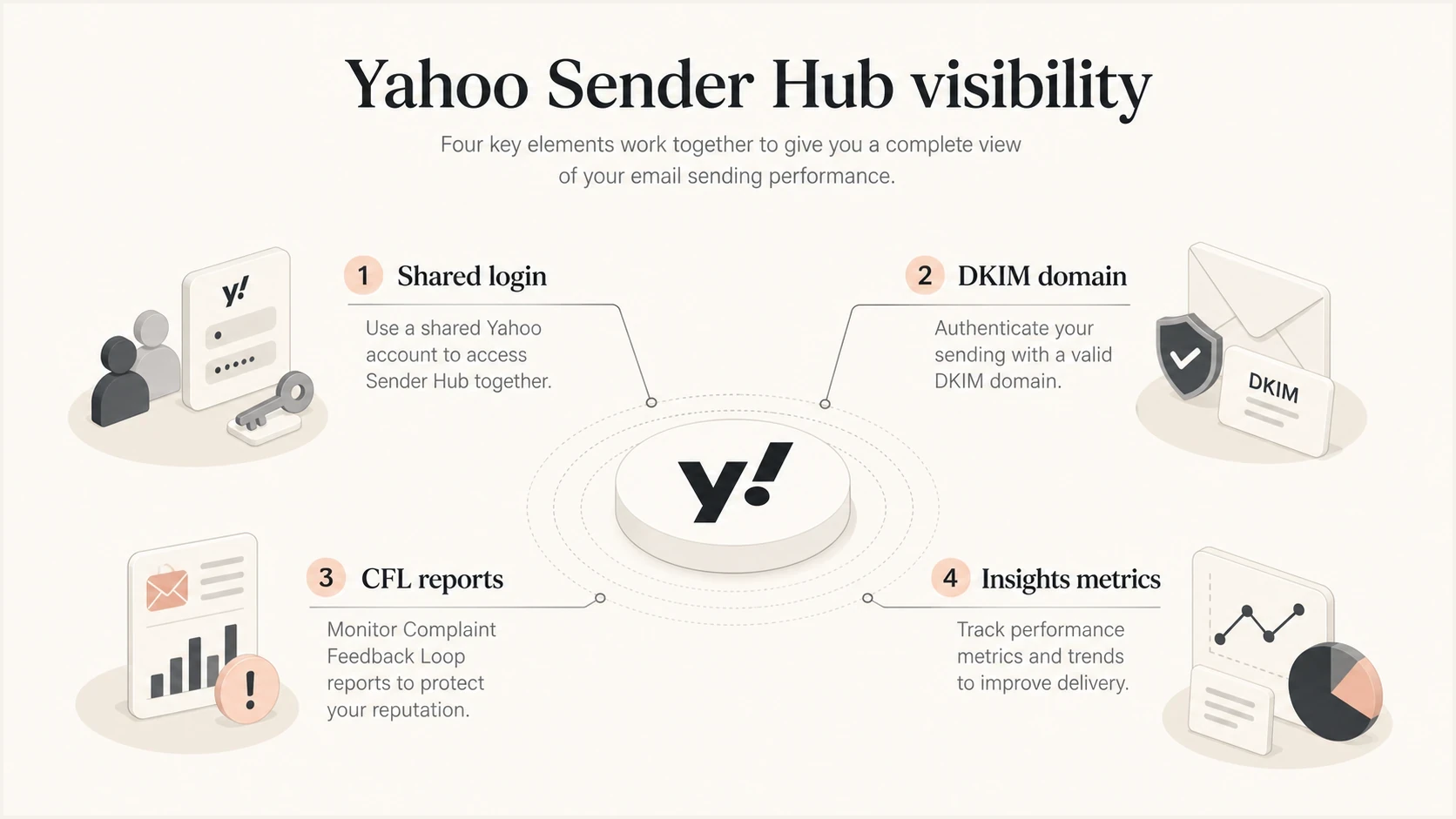
Yahoo Sender Hub shared account access, DKIM domain verification, CFL reports, and Insights metrics.
How to route Yahoo CFL reports
Dashboard access and complaint-report delivery are separate. Yahoo's Complaint Feedback Loop (CFL) sends Abuse Reporting Format (ARF) reports to an enrolled address so complaints can be processed without giving everyone the Sender Hub login.
- Check whether your email service provider already enrolls your DKIM domain and processes Yahoo complaints before creating another enrollment.
- Under Manage Services, open Complaint Feedback Loop and enroll each verified DKIM d= domain you actually use. Do not assume enrolling the root domain covers every signing subdomain.
- Choose a reporting address your business controls and verify it with Yahoo's emailed code. It does not need to match the From or DKIM domain, and the verified address can be reused for additional domains.
- Confirm enrollment status and connect ARF processing to your suppression workflow so recipients who report unwanted campaigns stop receiving them.
Yahoo's CFL documentation explains the report workflow, and its enrollment FAQ covers reporting-address verification. Gmail's feedback loop provides aggregate campaign spam rates through Feedback-ID identifiers, rather than Yahoo-style ARF reports.
How it compares with Google Postmaster Tools
Google Postmaster Tools has more dashboard categories and a delegated access flow. From Manage Domains, a verified owner can choose More options, Manage users, and New user, then enter the person's Google or Google Workspace account address and click Add. The person is not notified automatically, so send them the access details. Google's setup instructions and the separate guide to sharing access cover that workflow in detail.
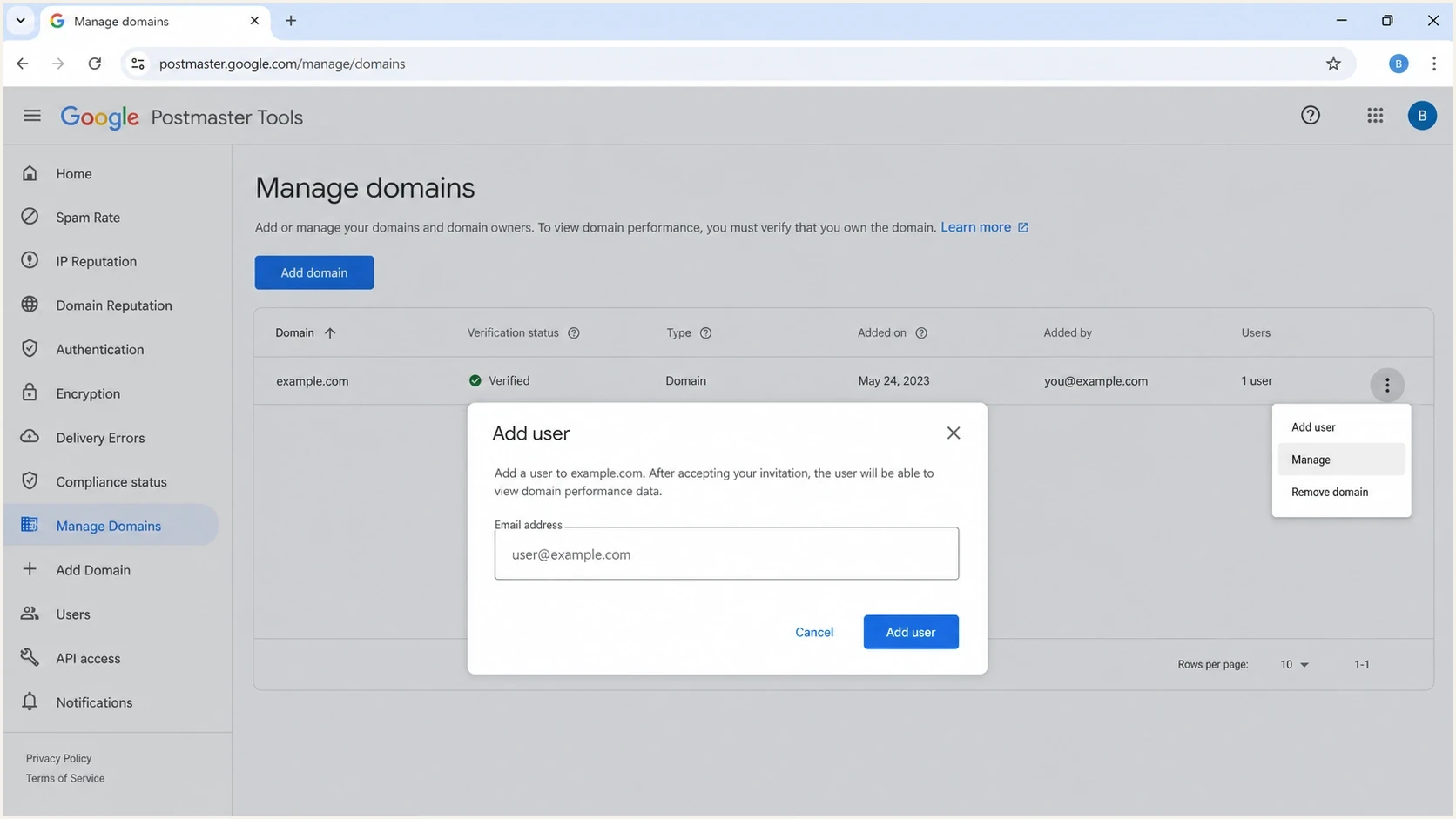
Google Postmaster Tools domain management and delegated user access controls.
Yahoo Sender Hub
- User access: Shared access uses a business-controlled team identity.
- Main data: Average spam complaint rate and total delivered messages for verified DKIM domains.
- Scope: Yahoo-managed recipient domains and Yahoo sender services.
- Best use: CFL setup, Yahoo complaint trends, and DKIM-domain monitoring.
Google Postmaster Tools
- User access: Verified owners can add Google or Google Workspace accounts.
- Main data: Spam rate, feedback loop, authentication, encryption, delivery errors, and compliance.
- Scope: Messages sent to personal Gmail and Googlemail recipients.
- Transition: Existing Domain and IP Reputation dashboards are due to retire as Google completes the move to v2.
The main differences are dashboard depth and how each provider defines identity and privacy thresholds. Legacy documentation still describes Domain and IP Reputation categories, but those dashboards are not part of v2. Yahoo Insights centers on verified DKIM domains and complaint behavior for inbox-delivered mail. Yahoo's complaint rate can therefore look higher than an internal rate that divides complaints by all accepted mail.
|
|
|
|---|---|---|
Team users | Shared account | Named Google accounts |
Identity | DKIM d= domain | DKIM or SPF domain |
Complaints | Complaints / inbox deliveries | User-reported inbox spam rate |
Feedback loop | ARF reports | Feedback-ID campaign aggregates |
Low volume | Gaps | Gaps |
API access | No public Insights API | Postmaster Tools API v2 |
High-level comparison for sender operations.
How Google Postmaster Tools v2 affects the comparison
Google is moving senders from legacy Postmaster Tools to Postmaster Tools v2. Google has postponed retirement of the legacy web interface, but it still says v1 will eventually be retired. Google says all legacy dashboards are available in v2 except Domain and IP Reputation. Those existing reputation dashboards will be retired and replaced with more actionable reporting. See Google's transition guidance for the current retirement policy; Google has not announced a new web-interface retirement date in that guidance.
Compare current and transitional data separately
Reputation tiers still appear in legacy documentation. The Postmaster Tools API v2 is available, and Google says v1 integrations must migrate. V2 uses a different data schema and omits Domain and IP Reputation metrics.
- Use durable dashboards: Track spam rate, feedback loop, authentication, encryption, delivery errors, and compliance.
- Treat reputation tiers as transitional: Record them when available, but do not use them as the only measure of Gmail delivery health.
- Allow for delay: Google says dashboard data usually updates within 24 hours, but compliance changes can take up to seven days to appear.
- Read compliance at the right level: The compliance dashboard reports primary-domain status while using relevant subdomain data in its calculation.
The v2 transition does not make Yahoo Insights equivalent to Google Postmaster Tools. Yahoo still exposes two current Insights signals, complaint rate and delivered messages. Google's Compliance status dashboard also includes Deliverability analysis, with recommendations for low volume or delivery failures. See Google's dashboard documentation for these diagnostics.
How to set up Yahoo data before comparing it
Before comparing Yahoo with Google, confirm that the underlying authentication is clean. Provider dashboards are downstream signals. Broken SPF, DKIM, or DMARC can explain poor results, but the dashboards do not identify every DNS or sending-source issue on their own.
- Verify the DKIM domain: Add the production DKIM d= domain to Sender Hub, copy Yahoo's supplied TXT verification record into DNS, and complete verification. This is separate from the DKIM public-key record.
- Activate Insights: Open Dashboard, select the verified DKIM domain, and click Activate.
- Check DMARC: Make sure the From domain has a DMARC record and reports go to a monitored destination.
- Map streams: Separate marketing, transactional, lifecycle, and sales mail in the analysis.
- Allow for thresholds: Yahoo says data begins populating within 24 to 48 hours after activation when the domain meets its unpublished minimum daily volume threshold. Missing data does not mean zero complaints.
Illustrative DNS records, replace all placeholdersdns
_dmarc.example.com TXT "v=DMARC1; p=none; rua=mailto:dmarc@example.com"
example.com TXT "v=spf1 include:_spf.example.net -all"
selector1._domainkey.example.com TXT "v=DKIM1; k=rsa; p=MIIB..."
A quick domain health check catches these basics before dashboard gaps consume investigation time. Yahoo and Google both suppress some data when volume is too low or privacy thresholds are not met.
?
What's your domain score?
Deep-scan SPF, DKIM & DMARC records for email deliverability and security issues.
After the DNS layer is clean, send a controlled message and inspect it with an email tester. This provides message-level authentication and header results, while Yahoo and Google provide aggregated recipient-provider signals after mail has flowed.
Where Suped fits
Yahoo Sender Hub and Google Postmaster Tools are worth using because they provide first-party recipient data. Neither has a complete cross-provider operating console for authentication, sending sources, blacklist and blocklist monitoring, issue assignment, and alerts.
Issues page showing top issues, verified sources, unverified sources, and authentication pass rates
Suped is our DMARC reporting and email authentication product for that operating layer. It combines authentication monitoring with alerts, automated issue detection, and remediation steps. Agencies and MSPs can keep client domains separated in a multi-tenant dashboard.
Use Suped to investigate sending sources and authentication failures when Yahoo complaints rise or Google's compliance status needs work, then verify the results in the provider dashboards.
A practical workflow uses Yahoo Sender Hub for Yahoo-owned signals, Google Postmaster Tools for Gmail-owned signals, and Suped for the daily queue of authentication and reputation work. Suped's blocklist monitoring catches domain and IP blocklist (blacklist) issues, while its DMARC reporting shows authentication results and helps the team classify known and unknown sending sources. A DMARC pass alone does not establish that a source is authorized by the business.
Complaint rate action bands
The 0.1% warning band is an internal monitoring suggestion. Yahoo requires bulk senders to stay below 0.3%; compare provider and internal data before changing infrastructure.
Low complaints
Under 0.1%
Keep monitoring and hold sending quality steady.
Investigate
0.1% to under 0.3%
Review list source, content, frequency, and recent campaign changes.
Yahoo threshold
0.3% or higher
Pause high-complaint campaigns and investigate the complaint source.
Yahoo's sender requirements specify the below-0.3% complaint-rate requirement. A low complaint rate alone does not prove good inbox placement.
Common visibility gaps
The most common mistake is expecting one dashboard to answer every deliverability question. Yahoo shows Yahoo complaint behavior and delivered volume for verified DKIM domains. Google shows Gmail spam rate, authentication, compliance, and other provider-specific diagnostics. Neither proves that every recipient provider places every message in the inbox.
Do not compare rates blindly
Yahoo calculates its complaint rate against inbox-delivered mail, while an internal complaint rate often uses all sent or accepted mail. That denominator difference can make Yahoo's number look higher without making either calculation wrong. Gmail also measures user-reported inbox spam, so a low or zero Gmail rate does not rule out automatic spam-folder filtering.
Do not treat delivered count as inbox placement. Yahoo Insights reports aggregate delivered volume, not a folder-by-folder placement breakdown. Campaign engagement, bounce logs, authentication reports, and real test messages still matter.
|
|
|
|---|---|---|
Yahoo high | Inbox denominator | Segment list |
Google needs work | Compliance detail | Fix requirement |
No data | Volume, activation, DKIM domain | Verify scope and wait for data |
Auth fail | Message headers and DNS | Fix signing or authorization |
Blocked | Blacklist or blocklist | Investigate listing |
What to check when dashboards disagree.
Team access practices
Best practices
Use a shared Yahoo account only after documenting owner, recovery address, and access rules.
Compare Yahoo complaint changes with Gmail trends before changing sending infrastructure.
Keep DKIM domains stable, because Yahoo Insights is tied to the verified DKIM signing domain.
Common pitfalls
Using a personal Yahoo login creates handoff risk when an employee leaves the team later.
Treating delivered counts as inbox placement hides filtering that still affects revenue.
Expecting low-volume domains to show daily data leads to false confidence and delays.
Expert tips
Separate CFL routing from dashboard access so reports keep flowing during staff changes.
Use provider dashboards as directional signals, then confirm fixes with authentication data.
Record each verified domain and DKIM selector so audits do not depend on memory later.
Keep Yahoo and Google access documented
For Yahoo Sender Hub, use a business-controlled team account, verify the DKIM domains that matter, enroll the required domains in CFL, activate Insights, and document ownership. For Google Postmaster Tools, verify the same sending identities where appropriate and delegate access to the Google accounts that need it.
Use Suped to organize authentication findings and assigned remediation work across your domains. Keep the Yahoo and Google account owners in the same access register so provider-side investigations reach the right people.
- For access: Yahoo access is account based; Google supports delegated users.
- For visibility: Yahoo provides complaint rate and delivered volume for verified DKIM domains.
- For operations: Use Suped to monitor authentication, sources, issues, and reputation signals each day.




