
How do Outlook's new MX hostnames affect mail shaping?

Published 19 Nov 2026
Updated 19 Nov 2026
8 min read
Summarize with

Outlook's new MX hostnames change which mail shaping rules match consumer destinations. A host such as hotmail-nl.b-v1.mx.microsoft falls outside the old consumer suffix and also matches the suffix used for Microsoft 365 DANE endpoints. Consumer mail then risks inheriting the wrong provider limits or missing provider rules entirely.
I fix this with exact consumer-hostname matches, coverage for old and new MX records, and verified rule precedence. The hostname change alone does not establish a new sending-rate limit. It also does not prove that DANE or MTA-STS has failed.
Which MX changes affect shaping?
Concrete examples recorded on November 11, 2026 are hotmail.nl, hotmail.cz, and outlook.cz. Their new endpoints use the same naming structure as Microsoft 365 endpoints under .mx.microsoft. That suffix no longer reliably distinguishes consumer destinations from business tenants.
The public KumoMTA hostname matching proposal documents these cases and the resulting classification errors. It was still open when checked on November 19, 2026. I treat its examples as regression cases and check live DNS before deployment.
Observed MX snapshot, November 11, 2026dns
hotmail.nl.  MX 0  hotmail-nl.b-v1.mx.microsoft.
hotmail.cz.  MX 0  hotmail-cz.f-v1.mx.microsoft.
outlook.cz.  MX 0  outlook-cz.d-v1.mx.microsoft.
outlook.cz.  MX 10 eur.olc.protection.outlook.com.
In the reported configuration, hotmail.nl and hotmail.cz matched office365-dane instead of outlook. That changes the provider grouping used for shared connection limits and automation, even if the numerical settings initially look identical.
outlook.cz exposed a different failure: its MX set contained both hostname families. KumoMTA requires every MX hostname to match at least one rule within a provider. Neither old provider definition covered the entire set, so no provider matched. MX priority determines delivery preference; it does not remove backup hosts from that classification test.
A missing provider match does not necessarily stop delivery. The MTA can fall back to defaults, losing expected provider-specific controls. Assigning consumer traffic to a business provider can instead make unrelated queues compete for a shared throttle.
|
|
|
|---|---|---|
hotmail.nl | office365-dane | outlook |
hotmail.cz | office365-dane | outlook |
outlook.cz | No match | outlook |
Business DANE | office365-dane | office365-dane |
Expected classifications for the reported MX snapshot.
Update exact matches and provider precedence
Keep the legacy consumer suffix and add exact HostName entries for confirmed consumer endpoints. Preserve the Microsoft 365 suffix rule for business destinations. Reassigning every .mx.microsoft host to outlook would incorrectly sweep business tenants into consumer shaping.
In the reported KumoMTA configuration, matching providers apply in first-definition order, and the last matching provider sets provider_name. Place the outlook provider's first definition after office365-dane. This is provider-rule precedence, separate from the numeric preferences in DNS MX records.
Relevant provider blocks in the required ordertoml
[provider."office365-dane"]
match = [{MXSuffix=".mx.microsoft"}]
max_deliveries_per_connection = 50
provider_connection_limit = 5

[provider."outlook"]
match = [
  {MXSuffix=".olc.protection.outlook.com"},
  {HostName="hotmail-nl.b-v1.mx.microsoft"},
  {HostName="hotmail-cz.f-v1.mx.microsoft"},
  {HostName="outlook-cz.d-v1.mx.microsoft"},
]
max_deliveries_per_connection = 50
provider_connection_limit = 5
Edit the existing blocks and retain your other settings and automation. Do not append duplicate TOML table definitions. The values above reproduce the proposal's settings; they are configuration examples, not Microsoft-wide sending allowances.
Check the complete loaded configuration, including community files and local overrides. Adding matches in a later file does not necessarily change where a provider was first defined. Also check your installed version: HostName matching requires KumoMTA 2025.01.23-7273d2bc or newer.
A correct hostname match is only half the fix
If the broad Microsoft 365 rule still wins, consumer mail keeps the wrong provider_name. Verify the effective result after loading the configuration, rather than assuming an exact match automatically takes precedence.
Verify the effective routing before changing throughput
I record the resolved MX set and provider assignment before editing anything. That gives me a reproducible before-and-after comparison. Query DNS through the resolver path used by the sending MTA, because another workstation can have a different cached answer.
Review the actual diff for both changes: the new HostName entries and the moved provider block. A file containing the right strings can still produce the wrong result if provider order or local overrides differ.
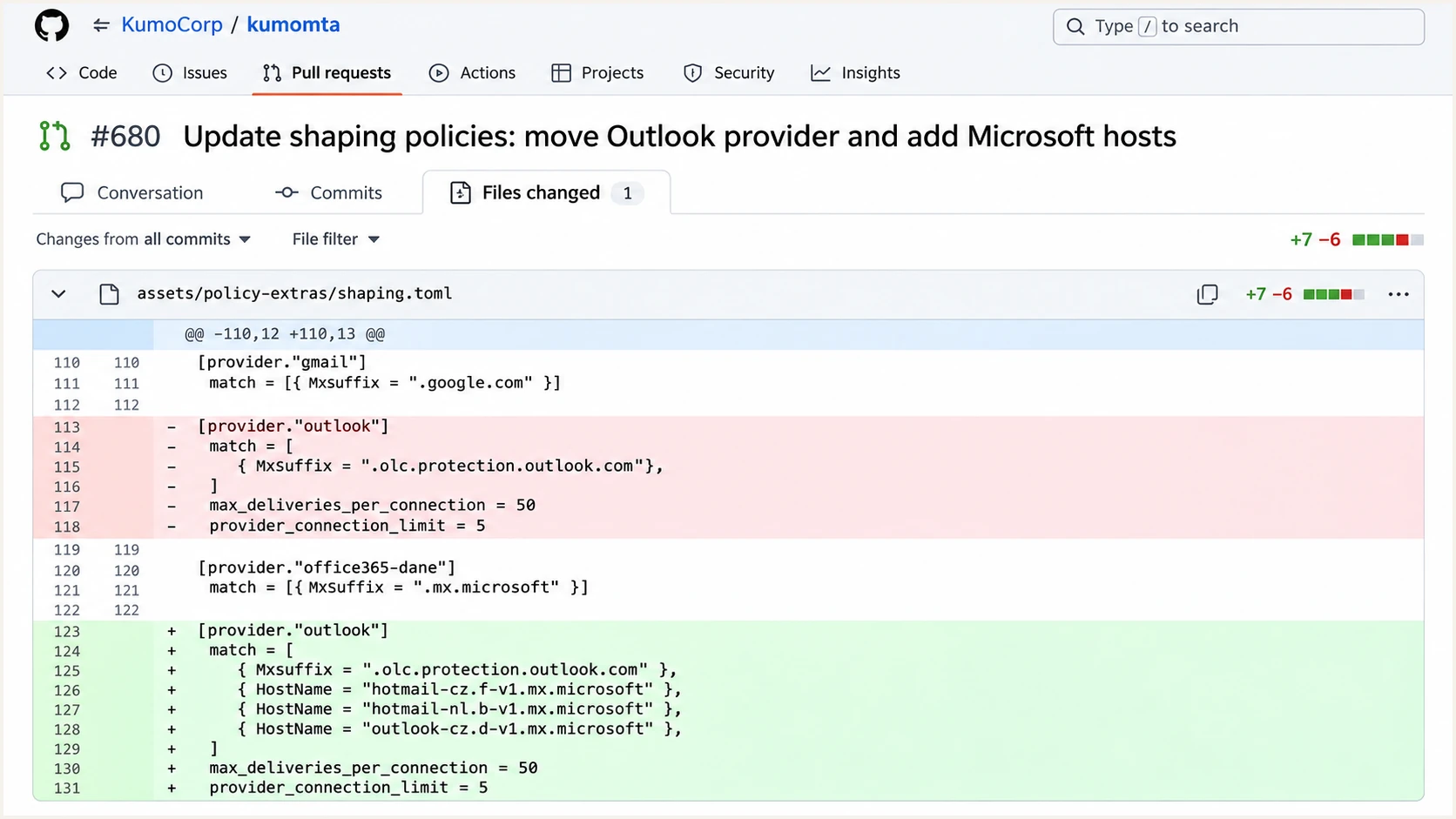
Illustration of the proposed hostname entries and provider ordering in GitHub.
Run configuration resolution against the running server after the normal reload process. On builds with resolve-egress-path, the command evaluates the callbacks and MX lookup used for the effective egress configuration. Supply the real egress source when source-specific rules matter.
If your build lacks that command, use its supported shaping diagnostics and inspect the resulting ready queues. A successful DNS lookup alone does not establish which shaping settings the MTA applies.
DNS and runtime checks, using your actual egress sourcebash
dig +noall +answer MX hotmail.nl
dig +noall +answer MX hotmail.cz
dig +noall +answer MX outlook.cz

# Replace source1 with your configured egress source.
kcli resolve-egress-path --json hotmail.nl source1
kcli resolve-egress-path --json hotmail.cz source1
kcli resolve-egress-path --json outlook.cz source1
Keep the approved configuration available for rollback if classification changes unexpectedly. Repeat diagnostics after relevant DNS caches expire so a successful test against an older answer does not hide a missing rule.
My rollout checks cover affected destinations and controls that should retain their existing provider:
- Consumer checks. Confirm the migrated consumer domains resolve to outlook, including any mixed old and new MX set.
- Business controls. Confirm a known Microsoft 365 DANE tenant still resolves to office365-dane, and a legacy tenant retains office365.
- Limit scope. Inspect provider-wide limits separately from per-queue limits. A provider definition does not merge every ready queue.
- Delivery evidence. Start with limited traffic, then compare queue age, connection throttles, and SMTP responses before increasing volume.
Check DANE and MTA-STS separately
The apparent DANE clash starts with hostname classification. A provider named office365-dane is a local configuration label; its name does not establish that DNSSEC or TLSA validation succeeded.
A real transport-security failure needs separate evidence. I inspect the selected destination and the validation error before changing TLS settings. Renaming a shaping group does not repair an invalid security policy.
DANE validation
SMTP DANE uses DNSSEC-authenticated DNS data and TLSA records to authenticate the receiving server. TLSA lookups use the actual MX hostname, prefixed with _25._tcp.
Check the DNSSEC chain and TLSA validation result. A .mx.microsoft suffix alone proves neither DANE deployment nor validation success.
MTA-STS policy coverage
An enforcing recipient policy must cover the MX hostnames used for delivery. A policy that only covers legacy Outlook hostnames excludes newly introduced hosts.
The receiving domain owner must update its policy and account for cached policies during migration. Senders should investigate the mismatch and retain required TLS protections.
For a domain you administer, compare the complete MX set with the published policy's mx entries and review TLS-RPT failures. Suped's MTA-STS checker checks policy coverage and SMTP TLS support. It addresses a different question from provider classification.
DNS TTL and MTA-STS max_age are separate timers. Refreshing an MX answer does not expire a cached MTA-STS policy. When delivery differs across sending nodes, compare each node's MX answer and cached policy. The newest DNS answer alone is insufficient to explain the transport decision.
When sending to Microsoft-owned consumer domains, you do not control their policies. Record the hostname and precise failure, then escalate the transport issue through the appropriate support route. Do not disable certificate verification or DNSSEC validation to compensate for an incorrect shaping match.
Keep authentication evidence beside routing diagnostics
MX migration changes the receiving route. It does not itself change the sending domain's SPF authorization, DKIM signatures, or DMARC policy. Authentication failures and reputation deferrals still need their own diagnosis after provider matching is correct.
Suped is our DMARC and email authentication platform. In its DMARC monitoring workflow, inspect the source table, open a failing record, and review SPF and DKIM results against the visible From domain. This helps isolate sender-side failures while MTA logs establish the recipient route.
DMARC record detail view showing SPF, DKIM, DMARC, rDNS diagnostics, and DNS records
Send a representative message through Suped's email tester to inspect authentication and encryption on that test delivery. Treat it as evidence about that route; it cannot establish the provider assignment or TLS outcome for an unrelated Microsoft destination.
If Microsoft still defers mail after the routing fix, investigate the exact SMTP response and sending-IP history. The next checks for Microsoft email delays concern reputation and recipient engagement. Repeatedly increasing concurrency can worsen an existing throttle.
Views from the trenches
Best practices
Match confirmed consumer MX hosts explicitly, then verify the provider selected at runtime.
Test mixed old and new MX sets so backup hosts do not silently defeat provider matching.
Common pitfalls
Treating every .mx.microsoft host as Microsoft 365 misclassifies migrated consumer mail.
Adding exact hostname matches without checking rule order can leave the wrong provider.
Expert tips
Keep consumer and business control domains in a regression set for shaping file updates.
Compare loaded provider settings with queue behavior before changing sending rate limits.
Marketer view
Marketer from Email Geeks says hotmail.nl, hotmail.cz, and outlook.cz were identified using the new MX hostnames, so consumer destinations also require coverage.
2026-11-11 - Email Geeks
Marketer view
Marketer from Email Geeks says provider ordering mattered because the last matching provider won, and hostname additions alone left classification mismatches.
2026-11-11 - Email Geeks
Make provider classification a deployment check
I keep expected provider assignments alongside each shaping change and review newly unmatched Microsoft destinations. Record the domain, full MX set, and effective provider so future hostname migrations produce an actionable exception.
Approve throughput changes only after the intended provider rules are demonstrably active.
Frequency asked questions
No. Microsoft 365 business tenants also use that suffix. Add exact matches for confirmed consumer endpoints and preserve separate business-provider rules.
In KumoMTA hostname-based provider matching, every hostname in the MX set must match a rule within that provider. A backup using a different hostname family can leave the full set unmatched.
No. A DNS hostname change is not a published rate allowance. Preserve approved limits while correcting classification, then use observed SMTP responses and queue behavior to assess throughput.
No. Validate DNSSEC and the relevant TLSA records, then inspect the SMTP TLS result. Hostname patterns and local provider names are not security validation results.