
How do I contact Videotron Postmaster and resolve bounce issues?

Published 8 Aug 2025
Updated 1 Oct 2026
11 min read
Summarize with

Updated on 1 Oct 2026: We clarified Videotron contact routes, EML-050 capacity checks, and the evidence needed for a bounce investigation.
A community-reported contact path for Videotron delivery issues is abuse@videotron.ca, with postmaster@videotron.ca as another technical mailbox to try. For the bounce pattern 452 4.1.0 and AUP#EML-050, treat it as a temporary delivery failure. Videotron community guidance associates this code with capacity conditions such as oversized attachments or too many recipients. Start by collecting the bounce, testing those limits, validating your sending setup, and sending a concise report with the exact SMTP response.
Reported outcomes differ. Videotron corrected a recipient-side mail handling error in one documented investigation, while its community guidance also points to message size or recipient count. Test both paths before requesting a filtering change or suppressing recipients.
Direct answer
- Technical contact: Try abuse@videotron.ca for a delivery investigation; this route is based on a reported response, not a published postmaster process.
- Secondary contact: Try postmaster@videotron.ca if the abuse route does not respond.
- Best evidence: Include the full SMTP bounce, timestamps with timezone, sender IP, message size, and recipient count.
- First test: Send an attachment-free message to one recipient before assuming a filtering or reputation problem.
Use the right Videotron contact
For a deliverability issue, try abuse@videotron.ca. A sender reported receiving a response there for a Videotron bounce investigation, but Videotron does not publish it as a dedicated inbound-delivery channel. Try postmaster@videotron.ca as a secondary technical route, and keep the full bounce available if either team replies.
Videotron's published abuse-reporting form is for complaints about users of its services, not sender delivery cases. A Videotron customer whose mailbox is affected can use Videotron support or the Videotron contact page for account-level troubleshooting or escalation.
|
|
|
|---|---|---|
abuse@videotron.ca | Deliverability | Community-reported route |
postmaster@videotron.ca | Mail operations | Secondary route |
Customer support | Recipient account issue | Use official pages |
Complaint route | Unresolved customer case | Use the complaint form |
Use technical mailboxes for sender bounces and customer support for recipient account issues.
Short outreach templatetext
To: abuse@videotron.ca
Cc: postmaster@videotron.ca
Subject: Delivery issue to Videotron recipients, AUP#EML-050

Hello Videotron Postmaster team,

We are seeing temporary bounces when sending legitimate mail to
Videotron recipients. The bounce text is below.

SMTP response:
452 4.1.0 q3VMpDbC5P4quq3VMpnx1Z service temporarily unavailable AUP#EML-050

Sender domain: example.com
Sending IP: 203.0.113.10
Time window: YYYY-MM-DD HH:MM-HH:MM UTC
Message size: 84 KB
Recipients in the SMTP transaction: 1
Message type: opted-in transactional mail

Could you check whether this is a capacity condition, recipient-side
mail handling issue, or filtering decision tied to our sender?

Thank you.
Decode the bounce first
The leading 452 and the 4.x.x class indicate a temporary failure. Within 4.1.0, the 1.0 detail means other address status, so it does not identify a specific cause. The phrase service temporarily unavailable supports a controlled retry. Quote AUP#EML-050 exactly so Videotron can locate the applicable rule or event in its logs.
Observed Videotron bouncetext
452 4.1.0 q3VMpDbC5P4quq3VMpnx1Z service temporarily unavailable AUP#EML-050
Do not treat this like a normal hard bounce. Permanently suppressing every affected recipient can remove reachable subscribers because the condition is temporary. Compare the response with common bounce messages before deciding whether to retry, pause, or suppress.
|
|
|
|---|---|---|
452 | Temporary SMTP reply | Retry with backoff |
4.1.0 | Other address status | Do not infer one cause |
AUP#EML-050 | Videotron code | Quote exactly |
Read the complete SMTP response before changing sending behavior.
Test EML-050 capacity limits
A Videotron community moderator described EML-050 as a capacity error and suggested large attachments or too many recipients as possible causes. Test those variables before assuming the sending IP or domain has a reputation issue or appears on a blocklist (blacklist). The provider-specific token still needs Videotron's logs when a minimal test message fails.
- Send to one recipient: Use a recent Videotron address that expects the message.
- Remove attachments: Retry with a short plain-text body and record the total encoded message size.
- Reduce the batch: Split multi-recipient transactions and campaigns into smaller controlled tests.
- Compare results: Record which change clears the 452 response and include that result in the ticket.
If an attachment-free message to one recipient succeeds, investigate message size or batching before requesting a reputation review. If one affected recipient can help, ask them to check available mailbox space in Videotron WebMail and test a message there. A full mailbox is a separate possibility, not a diagnosis from EML-050 alone. If the minimal message still receives the same 452 across recent samples, escalate with timestamps, SMTP transaction identifiers, message size, and recipient count.
Separate recipient-side errors from sender-side problems
After testing message size and recipient count, split the remaining Videotron bounces into two operational buckets. The first bucket is recipient-side handling, where the remote system has a temporary issue, a bad rule, or a mailbox routing problem. The second bucket is sender-side reputation or authentication, where the IP, domain, headers, volume, or message content gives the receiver a reason to defer mail.
Looks recipient-side
- Pattern: One or a few Videotron recipients fail while others accept the same mail stream.
- Timing: Bounces start suddenly without a new domain, IP, campaign, or message-size change.
- Response: A minimal one-recipient test still receives the temporary response.
Looks sender-side
- Pattern: Multiple mailbox providers defer the same mail stream at the same time.
- Authentication: SPF, DKIM, or DMARC fails on real messages sent through the affected path.
- Reputation: The sending IP or domain appears on a blocklist or blacklist at the same time.
These patterns guide the investigation but do not prove which side caused the deferral. For recipient-side evidence, ask Videotron to check mail handling for the affected recipients. For sender-side evidence, state what changed, when it changed, and ask whether they still see a reason to defer the mail.
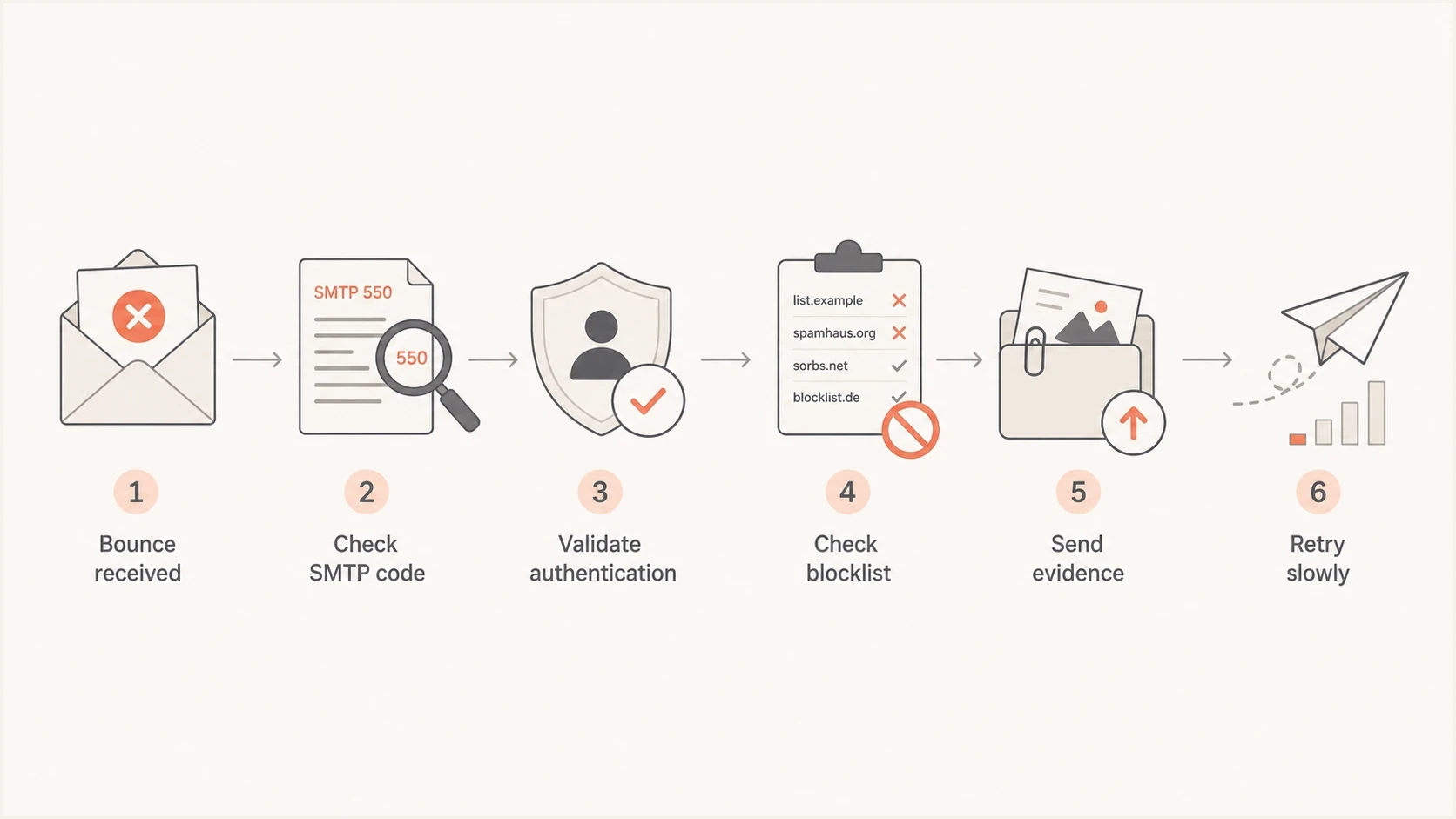
Flowchart for handling a Videotron bounce from SMTP code to controlled retry.
Gather evidence before sending the ticket
A useful postmaster ticket is short, but it cannot be thin. Videotron needs enough data to find the event in logs. Include the exact SMTP response, SMTP transaction identifier, sender IP, envelope sender, header From domain, timestamps with timezone, affected recipient domains, message size, recipient count, and mail type. Videotron community guidance asks for a recent example message, ideally no older than three days, when a generalized block needs investigation.
Send a fresh message through the same route and inspect the result before contacting them. A live email tester run gives you proof of headers, authentication, and content-level issues in the mail that would otherwise be guessed at.
Email tester
Send a real email to this address. Suped shows a results button when the test is ready.
?/43tests passed
- Bounce sample: Keep the full SMTP response and transaction identifier, not only the short error shown by your sending platform.
- Message sample: Save full headers for a recent message that used the same domain and sending IP.
- Volume context: State the recipient count per transaction and whether this affects one message or a broad Videotron segment.
- Recent changes: List new IPs, new domains, DNS edits, template edits, attachment changes, and volume increases.
If the test exposes a failing signature, a broken return-path, or a header From mismatch, fix that before asking Videotron to investigate. Include the post-fix result in your report if the bounce continues.
Check authentication and reputation
Before sending a postmaster request, confirm the affected mail path. For DMARC to pass, SPF or DKIM must pass with an authenticated domain matching the visible From domain under the published policy. Check the sending IP and domain for relevant blocklist (blacklist) listings, but do not treat a listing alone as the cause of EML-050.
Use a domain health check for a quick snapshot, then keep longer-term evidence in DMARC monitoring and blocklist monitoring. Suped's product brings DMARC, SPF, DKIM, hosted SPF, hosted DMARC, hosted MTA-STS, SPF flattening, alerts, and blocklist visibility into one operational view.

Issue steps to fix dialog showing the issue overview, tailored fix steps, and verification action
Suped can detect authentication issues, show fix steps, alert when failures rise, and group multiple domains for ongoing review. Use those results as evidence of the sender's condition, not as proof that Videotron must accept the mail.
Do this before escalation
- SPF: Confirm the live sender is authorized and SPF passes for the envelope sender domain.
- DKIM: Confirm the live message has a valid signature and that its signing domain matches the visible From domain under the published DMARC policy if DKIM provides the match.
- DMARC: Confirm that at least one passing SPF or DKIM domain matches the visible From domain under the published policy and review reports for unknown-source spikes.
- Reputation: Check whether the same IP or domain appears on a blocklist or blacklist.
Write a message Videotron can act on
The best postmaster message is specific and narrow. Do not ask a broad question like "why are our emails blocked?" Ask them to review a defined SMTP response for a defined sender and time window. Avoid attachments unless requested because plain text is easier to route internally and less likely to be filtered.
Evidence-first message bodytext
Hello Videotron Postmaster team,

We are seeing temporary bounces to Videotron recipients from one
legitimate mail stream. Authentication passes on current samples.

Error:
452 4.1.0 q3VMpDbC5P4quq3VMpnx1Z service temporarily unavailable AUP#EML-050

Sender IP: 203.0.113.10
Envelope sender: bounces@example.com
Header From: example.com
Time window: YYYY-MM-DD HH:MM-HH:MM UTC
Message size: 84 KB
Recipients in the SMTP transaction: 1
Mail type: opted-in transactional notices
Affected recipients: videotron.ca addresses only

Could you check whether AUP#EML-050 points to a capacity condition,
recipient-side issue, temporary filtering rule, or sender reputation
decision?

We can provide full headers or additional samples if needed.
If the failure affects only a handful of recipients, say that. If it affects every Videotron recipient, say that too. A precise scope helps the receiver decide whether to inspect one mailbox, one MX path, one filter rule, a capacity threshold, or sender reputation.
Keep the tone factual. Clear logs are more useful than pressure. If the first response asks for more samples, send the newest examples and keep unrelated providers out of the thread.
Retry without creating a new problem
Because 452 4.1.0 is temporary, your system can retry. Aggressive retries can turn a temporary condition into reputation damage. Use backoff, cap retries, and pause high-volume campaign mail if the bounce rate climbs for Videotron recipients.
- Transactional mail: Retry with normal backoff because the recipient still needs the message.
- Marketing mail: Pause the affected segment if the issue is broad and unresolved.
- Hard bounces: Suppress a recipient when the full response confirms an invalid address; other permanent rejections need cause-specific handling.
- Post-fix test: Resume slowly and watch accepted, deferred, and bounced counts by recipient domain.
If Videotron does not respond, do not resend the same vague request. Send a shorter case summary with newer samples and a clear question. Prove the problem, show the checks completed on your side, and provide exact log anchors.
Do not over-correct
A temporary Videotron bounce is no reason to delete recipients, rotate IPs, or weaken DMARC. Fix clear sender-side issues, then use controlled tests, the postmaster investigation, and measured retries to confirm the outcome.
Views from the trenches
Best practices
Send the exact SMTP response and transaction ID so Videotron can search its logs without guessing.
Use abuse and postmaster routes together when Videotron provides no dedicated delivery form.
Confirm SPF, DKIM, DMARC, and blocklist status before asking Videotron to review the bounce.
Test one recipient without large attachments before treating EML-050 as a reputation block.
Common pitfalls
Do not treat a 4.1.0 temporary error as a permanent invalid-address bounce or suppress it.
Do not open a postmaster case without timestamps, sender IPs, transaction IDs, and bounce text.
Do not retry high-volume campaigns fast enough to turn a temporary failure into a reputation issue.
Do not assume every EML-050 response proves a blacklist listing without a controlled test.
Expert tips
Quote provider-specific codes exactly because internal teams can map them to rules.
Separate Videotron-only failures from wider provider failures before escalation.
Resume mail slowly after a fix and monitor accepted, deferred, and bounced counts by domain.
Record message size and recipient count so Videotron can test reported capacity conditions.
Marketer view
Marketer from Email Geeks says abuse@videotron.ca has been a workable contact route for Videotron mail delivery investigations.
2023-04-27 - Email Geeks
Marketer view
Marketer from Email Geeks says postmaster@videotron.ca is worth trying, but abuse@videotron.ca produced the successful response.
2023-04-27 - Email Geeks
Contact Videotron with tested evidence
Try abuse@videotron.ca for a delivery investigation, then copy or separately try postmaster@videotron.ca, and lead with the exact bounce. For 452 4.1.0 AUP#EML-050, do not assume the recipient address is bad or the sender is blacklisted. Test a small attachment-free message to one recipient, validate authentication and reputation, then ask Videotron to check the internal code against its logs.
Suped helps with the parts you control: proving DMARC passes, finding broken SPF or DKIM paths, detecting blocklist and blacklist issues, and turning authentication failures into concrete fix steps. That evidence makes a Videotron postmaster request easier to act on and keeps the fix focused on the tested cause.




