How can non-customers report DNSSEC issues to email providers?

Non-customers can report DNSSEC issues through a provider's postmaster contact, a public operational reporting channel, or an affected customer's support ticket. For Proofpoint, ask the recipient organization's authorized support contact to escalate suspected DNS infrastructure faults. Include the failing hostname, UTC timestamps, and reproducible DNS queries.
I start with evidence that separates DNS validation trouble from an SMTP rejection. A vague "your email is broken" report is difficult to route. A comparison showing validation failure on specific lookups gives the receiving team something concrete to investigate.
Who to contact without a customer account
Use the provider's published postmaster destination first when it accepts operational reports. The standard address pattern is postmaster@example.com, replacing the example domain with the provider's actual mail domain. A postmaster mailbox is an operational contact, not a promise of customer support access or a response deadline.
RFC 5321 requires postmaster support for SMTP systems that accept mail, with limited exceptions. That requirement does not establish a DNSSEC incident desk. Understanding postmaster role addresses helps distinguish operational mail from abuse reporting.
- Postmaster: Send a concise report to the published operational address. Use abuse contacts for actual abuse, rather than ordinary DNS maintenance faults.
- Recipient administrator: Ask an affected recipient's IT team to open a customer case and attach your evidence.
- DNS operator: Report a signing fault to the authoritative DNS host; route a parent DS mismatch through the domain owner and registrar.
- Public contact: Ask an employee who publicly offers operational help to route the report. Keep the formal case active.
For Proofpoint, distinguish its public sender reputation process from customer support. A blocklist (blacklist) removal request does not repair broken DNSSEC. Its published support guidance directs outside senders with unresolved, non-reputation delivery problems to the recipient organization. The Proofpoint support routes depend on customer status and the failure involved.
If the affected mail route also prevents your report from arriving, contact the recipient through an established phone number or another agreed channel. Ask for the case reference so subsequent evidence reaches the same investigation.
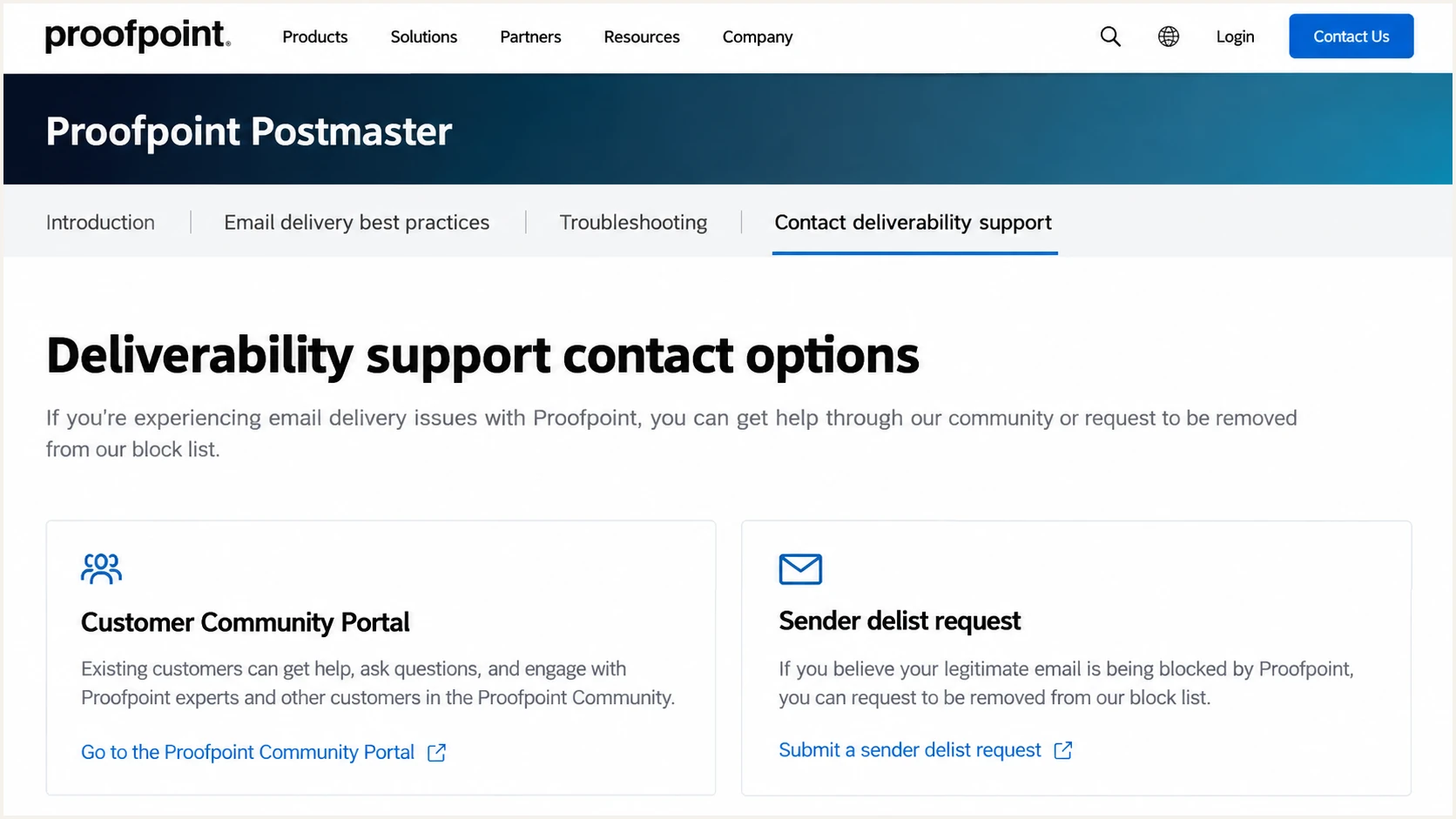
Proofpoint separates customer support access from public sender delisting.
Confirm which DNS lookup is failing
DNSSEC authenticates DNS data using signatures and a chain of trust. A broken chain causes validating resolvers to reject affected answers. An unsigned domain is different: the absence of DNSSEC alone does not normally stop email delivery. Internic's DNSSEC setup documentation explains the relationship between DNS signing and registrar-submitted DS records.
Identify the exact failed query. The recipient's MX lookup can succeed while an A or AAAA lookup for its mail gateway fails. A TXT lookup used for authentication is another separate dependency. For Proofpoint, preserve the full hostname, including whether the relevant name uses pphosted.com or gpphosted.com.
Suspected validation failure
A validating resolver returns SERVFAIL, while the same query succeeds with checking disabled. Extended DNS Error details can identify an expired signature or another validation problem.
Other delivery failures
A timeout also fits network trouble. NXDOMAIN indicates a negative DNS answer. An SMTP reputation rejection requires its own evidence and remediation path.
One SERVFAIL is insufficient to identify the cause. Repeat the query using another independent validating resolver and capture any Extended DNS Error text. RFC 8914 defines errors including "DNSSEC Bogus" and "Signature Expired", which provide more detail than SERVFAIL alone.
I also check scope: one recipient, several domains using the same gateway, or every lookup through our resolver. Failures confined to one local resolver warrant checking its clock and trust-anchor configuration before attributing the fault to the provider.
Collect reproducible DNS evidence
Compare normal validation with checking disabled on the same resolver. In dig, +dnssec requests DNSSEC records; it does not perform cryptographic validation itself. The +cdflag option asks the recursive resolver to disable validation for that query. Use it only as a diagnostic comparison.
The following commands are examples, not observed incident results. Replace the reserved names and IP addresses before running them. Use the actual failing name and record type for lookups, and the enclosing zone apex for NS and DNSKEY queries.
Example DNS diagnostic queriesbash
# Replace all example names and reserved IP addresses.
# Compare two independent validating recursive resolvers.
dig @192.0.2.53 example.com MX +dnssec
dig @192.0.2.53 example.com MX +dnssec +cdflag
dig @192.0.2.54 example.com MX +dnssec
dig @192.0.2.54 example.com MX +dnssec +cdflag

# Inspect the zone and query each actual authoritative server.
dig example.com NS
dig example.com DS +dnssec
dig @198.51.100.53 example.com MX +dnssec +norecurse
dig @198.51.100.54 example.com MX +dnssec +norecurse
dig @198.51.100.53 example.com DNSKEY +dnssec +norecurse
dig @198.51.100.54 example.com DNSKEY +dnssec +norecurse
dig @198.51.100.53 example.com SOA +norecurse
dig @198.51.100.54 example.com SOA +norecurse
Capture complete output, including response flags, TTLs, signatures, and server addresses. For DS records, verify the parent-side delegation if investigating a key mismatch. Direct authoritative queries show what each server publishes; successful answers there do not establish a valid chain of trust.
If authoritative servers return different signatures or zone versions, include both responses. Intermittent failures can follow inconsistent publication and resolver caches. Do not infer a precise failure percentage from the number of nameservers: resolver selection and retry behavior are more complicated.
|
|
|---|---|
Lookup | Full name and type |
Timing | UTC and recurrence |
Resolver | IP and error detail |
Authority | Server IP and replies |
Mail impact | Queue IDs and failures |
Keep the summary compact and attach full diagnostic output.
Preserve the sending MTA's error alongside DNS output. If DNS fails before an SMTP connection, there is no remote SMTP rejection to attach. Say that explicitly and include the local queue diagnostic instead.
Redact message content and unrelated recipient details. Retain enough information for the provider to correlate the affected domain, timestamps, and delivery attempts. A DNS-only fault rarely requires a full customer message body.
Write a report that reaches DNS operations
Lead with the affected service and reproducible behavior. State that you are an external sender and request routing to DNS operations. Separate observations from your proposed explanation, especially when the evidence has not yet established the root cause.
Use a report like this only after replacing every bracketed field with verified observations. Include whether messages remain queued and the approximate business impact. Let an affected customer request incident priority under its support agreement.
DNSSEC issue report templatetext
Subject: Suspected DNSSEC fault affecting [hostname]

We are an external sender reporting a reproducible DNS issue.
Affected query: [full name] [record type]
First observed UTC: [timestamp]
Latest observed UTC: [timestamp]
Mail impact: [affected domains and queued message count]

Validating resolver [IP]: [status and Extended DNS Error]
Same resolver with checking disabled: [status]
Second validating resolver [IP]: [status]
Authoritative server observations: [IPs and differences]
Sending MTA diagnostic: [exact local error or SMTP response]

Full DNS output is attached. Please route to DNS operations
and confirm whether this matches an active infrastructure incident.
Customer case reference, if available: [reference]
Reply contact: [working address or alternate channel]
Keep follow-ups in the same case. Add fresh UTC observations and changes in scope instead of repeatedly submitting identical reports. An employee contact can help route evidence, but personal availability is not a reliable incident response channel.
Only the authorized domain operator can repair its signing configuration or coordinate parent DS changes. Reporting a fault does not give an outside sender authority to change the provider's DNS.
Verify recovery without weakening validation
Keep normal DNSSEC validation enabled while the operator repairs the fault. Repeat the original queries through validating resolvers and inspect the affected authoritative servers again. Cache expiration means a published correction and restored delivery are not always simultaneous.
SMTP senders should queue and retry temporary DNS failures under RFC 5321. Check your actual queue lifetime and retry policy. After repair, verify queued messages resume delivery; messages that have already expired require separate handling.
Do not turn a diagnostic into a workaround
A successful query with checking disabled is evidence for investigation. Disabling validation in production or replacing provider MX records with guessed IP addresses removes safeguards and creates routing risks.
Check authentication separately with Suped's domain health checker, which audits published SPF, DKIM, and DMARC records. Those checks provide useful configuration context, but they do not establish that the provider's DNSSEC chain is repaired.
Once DNS resolution recovers, send a fresh message through your normal sending service. Our email tester checks the received message's authentication and transport details. Treat that result as a separate test; also verify delivery to an affected recipient.
Email tester
Send a real email to this address. Suped shows a results button when the test is ready.
?/43tests passed
Suped's DMARC monitoring provides received-report context for authentication changes by source. Our platform's issue diagnostics and failure notifications support follow-up when authentication problems persist after DNS recovery.
DMARC reports are delayed and cannot account for every message that failed before reaching a receiver. Use DNS validation results and MTA logs to confirm incident recovery, then use authentication reporting to investigate remaining failures.
Views from the trenches
Best practices
Send reproducible DNS output with UTC timestamps so operations can investigate the fault.
Ask an affected customer to attach your evidence to a case through its support account.
Common pitfalls
Treating one SERVFAIL response as proof of a provider fault skips essential DNS checks.
Relying on an individual contact delays escalation when that person is away or offline.
Expert tips
Include the full gateway hostname so support can identify the affected service and zone.
Compare each authoritative server because inconsistent signed answers can hide failures.
Marketer view
Marketer from Email Geeks says publicly listed employer information can help identify a willing contact who can route an operational report.
2026-10-18 - Email Geeks
Marketer view
Marketer from Email Geeks says postmaster is a sensible first reporting route when a direct company contact is unavailable.
2026-10-19 - Email Geeks
Close the case with verifiable results
Ask the operator to identify the repair window and any remaining cache considerations. Record the last failed lookup and the first successful delivery through the affected route.
I close the case once the original failure no longer reproduces and affected mail is moving again. Retain the evidence packet so a recurrence starts with comparable observations.