Why are abuse@ and postmaster@ email addresses important for email sending?

Updated on 17 Jul 2026: We clarified the RFC requirements for abuse@ and postmaster@ and added safer routing guidance for sending subdomains.
Abuse@ and postmaster@ email addresses are important because they give mailbox providers, receiving mail admins, security teams, and recipients a standard way to reach the domain owner when email causes a problem. If those addresses bounce or nobody reads them, a solvable issue can turn into a sender reputation problem, a blocklist (blacklist) listing, or a direct block.
Treat these role accounts as basic sending infrastructure, not optional inboxes. They do not create inbox placement by themselves, but they reduce operational risk because they keep complaint handling, provider verification, and postmaster contact paths open.
- Abuse reports: Use abuse@ for spam, phishing, malware, compromised accounts, broken unsubscribe links, and policy complaints.
- Mail operations: Use postmaster@ for routing, bounce, authentication, DNS, and mail acceptance problems.
- Sender trust: A working role account tells receivers that the sender has a real escalation path.
The direct answer
Plain-language explanation for a client
Domains that provide SMTP mail service need a working postmaster@ address, while the organization's top-level domain should support abuse@ for reports about inappropriate activity. Abuse@ receives complaints about unwanted or harmful mail. Postmaster@ receives operational reports about delivery failures, authentication problems, and routing issues. If those addresses bounce, the sender loses the standard escalation path, and a receiver can block mail or escalate the domain for review.
The key point is not that everyone writes to these addresses every day. The people who use them include mailbox provider staff, corporate mail administrators, security teams, postmasters, and reputation teams. When they cannot reach a sender through the expected channel, their next practical option is to protect their own users.
That protection can mean a temporary block, a stricter spam filter decision, a blocklist or blacklist report, or a refusal to approve a feedback loop. Those outcomes are harder to unwind than reading and acting on a complaint while the issue is still small.
When the addresses work
- Early warning: A recipient or mail admin can report a problem before it spreads.
- Clear ownership: The complaint reaches the team that can fix sending behavior.
- Faster repair: Issues such as bad links, bad lists, or bad DNS get handled quickly.
When the addresses bounce
- Escalation risk: The reporter has fewer soft options left before blocking mail.
- Reputation damage: Unanswered complaints look like poor sender governance.
- Missed evidence: The sender loses examples that would explain what went wrong.
What the RFCs actually require
RFC 2142 standardizes mailbox names for common roles. It places abuse@ at the organization's top-level domain when the abuse function exists and encourages support on appropriate subdomains. It also requires well-known mailbox names to work regardless of capitalization.
|
|
|
|---|---|---|
Abuse@ | RFC 2142 role mailbox | Organizational domain when the abuse role applies; subdomains are encouraged where useful |
Postmaster@ | RFC 5321 SMTP requirement | Every domain for which an SMTP server provides mail relay or delivery |
Capitalization | Case-insensitive local name | POSTMASTER, Postmaster, and postmaster must reach the same mailbox |
The standards use different scopes for abuse@ and postmaster@.
RFC 5321 requires an SMTP server that supports mail relay or delivery to accept postmaster@ for every domain it serves, plus an unqualified Postmaster recipient. A server that rejects all mail when the connection opens falls outside that requirement. This is why a domain that sends mail but intentionally accepts no mail is different from a domain served by an inbound SMTP system.
Do not add MX records blindly
A dedicated sending, bounce, or tracking domain can be intentionally non-receiving. Do not publish an inbound MX record only to create role aliases. That change can alter routing or break provider-managed bounce handling. Use a null MX for a domain that intentionally accepts no mail, or configure aliases only where inbound service is meant to exist.
What abuse@ is for
Abuse@ is the address people use when they believe mail from a domain is unwanted, harmful, misleading, or technically broken enough to create a complaint. That includes spam, phishing, malware, account compromise, harassment, list bombing, and unsubscribe failures. It also includes polite reports from people who want to give the sender a chance to fix the issue before they block mail.
A common mistake is to treat abuse@ as only a security inbox. It is also a deliverability inbox. A broken unsubscribe link, a campaign sent to an old list, or a third-party sender using the wrong audience can all create abuse reports. Those reports often contain the domain, sender, header clues, timestamps, and the original message. Automated complaint feedback can arrive in Abuse Reporting Format (ARF), so retain the report intact and restrict access to any recipient data it contains.
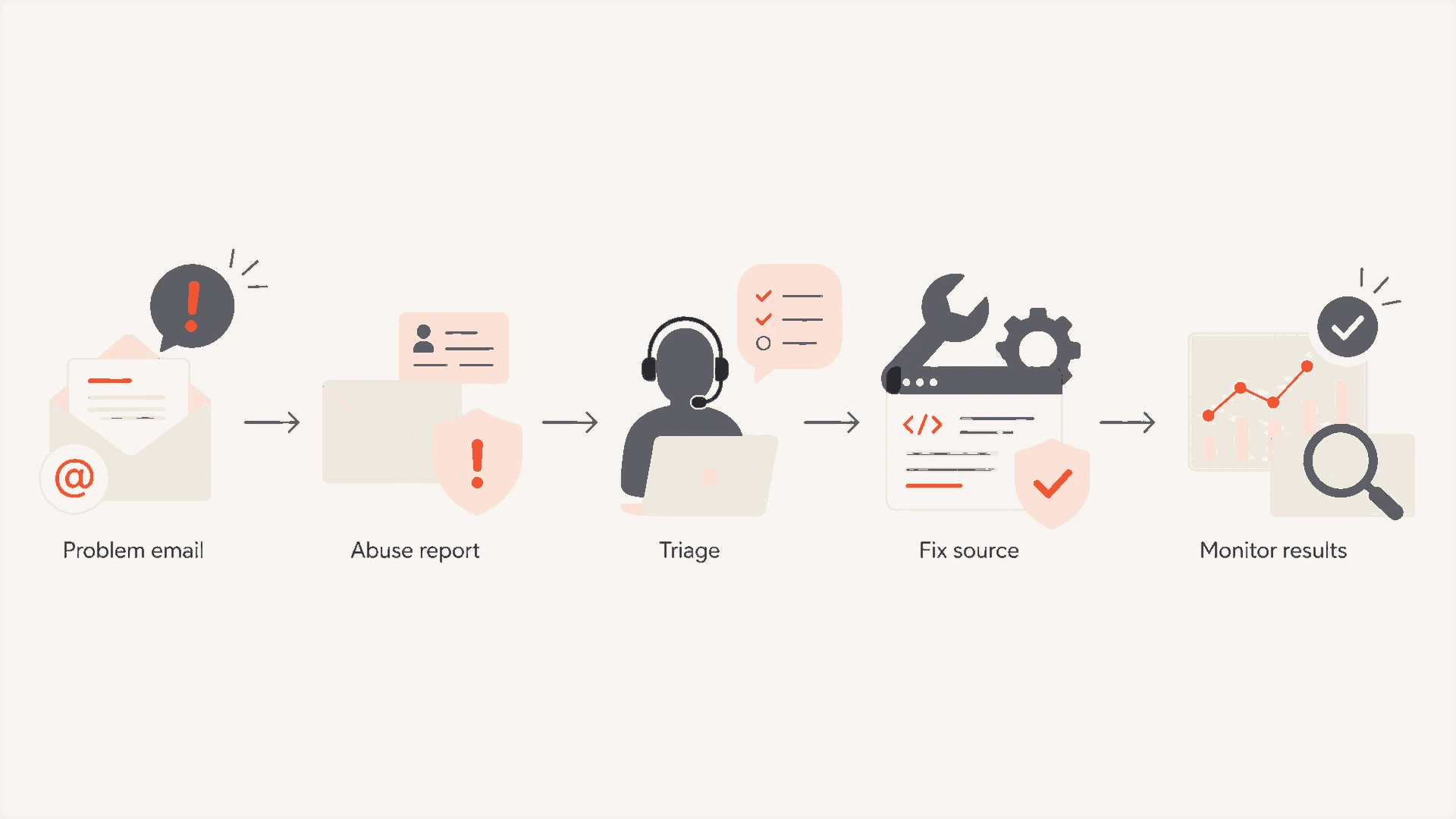
Email abuse complaint workflow covering reporting, triage, source remediation, and follow-up monitoring.
Route abuse@ to people who can act, not just archive. The person reading it needs access to campaign data, sender logs, suppression controls, and service ownership. If the inbox only sends an auto-reply and nobody investigates, it is not doing the job.
What postmaster@ is for
Postmaster@ is the operational contact for mail delivery. Use it for issues such as bounce handling, SMTP failures, TLS errors, DNS mistakes, reverse DNS mismatches, authentication failures, feedback loop verification, and questions about why mail is being accepted or rejected.
Postmaster@ has a long history in internet mail operations. Mailbox providers and corporate mail teams still expect it to exist. Some feedback loop and postmaster processes ask for postmaster@ or abuse@ and verify ownership by sending mail to the address.
Do not leave role addresses unreachable
If a domain accepts inbound mail, its required postmaster@ address needs to work. A non-existent role address removes the path mail operators use to resolve problems before they escalate. This requirement does not mean that every sending-only hostname must start accepting mail.
Keep the two aliases separate because the work is different. Abuse@ needs complaint triage and enforcement. Postmaster@ needs mail operations skill. In a small team they can forward to the same queue, but the queue still needs clear labels, filters, and ownership.
Which domains need these addresses
Start with the organizational domain. Make abuse@ valid there, and make postmaster@ work for every domain handled by an inbound SMTP server. Add role aliases on active sending subdomains when their use can generate complaints and inbound routing already exists. Do not assume that every bounce or tracking hostname needs its own inbox.
|
|
|
|---|---|---|
Organizational domain | Yes | Monitored abuse@; postmaster@ if SMTP service is provided |
Marketing subdomain | Depends | Add aliases when inbound mail is supported |
Transactional subdomain | Depends | Add aliases when inbound mail is supported |
Provider-managed bounce domain | Provider-specific | Preserve the provider's MX and return-path routing |
Tracking domain | Usually no | Use the organizational abuse contact |
Unused parked domain | No | Publish a null MX if the domain accepts no mail |
Use this as a routing checklist alongside the RFC scope.
Where several domains accept inbound mail, route their role addresses to one monitored operations queue, then use filters to tag the source domain and issue type. That keeps setup manageable while giving reporters the standard address they expect.
Role address routing patterntext
abuse@example.com -> deliverability@example.com
postmaster@example.com -> deliverability@example.com
abuse@mail.example.com -> deliverability@example.com
postmaster@mail.example.com -> deliverability@example.com
abuse@txn.example.com -> deliverability@example.com
postmaster@txn.example.com -> deliverability@example.com
For a subdomain that should accept inbound mail, add proper MX routing or use the mail platform's alias routing. Do not change MX records on a provider-managed bounce domain. Do not rely on a catch-all that nobody monitors. A catch-all can accept the message while the report still gets ignored.
How they affect deliverability
Abuse@ and postmaster@ do not act like SPF, DKIM, or DMARC. There is no simple pass or fail in the message header. Their effect is operational: they keep complaint resolution and provider communication possible. That matters because deliverability problems often start as small signals before they become inbox placement failures.
Review these addresses beside authentication and reputation data. If a domain is failing SPF alignment, failing DKIM, and bouncing required role mail, the sender has both technical and process gaps. A domain health checker helps validate the DNS side while the role accounts handle the human escalation side.
Suggested role inbox response targets
These are internal service targets for complaint handling, not RFC deadlines.
Good
< 24h
Read and triaged on the same business day.
Watch
24-48h
Still workable, but complaints can stack up.
Risky
> 48h
Reporter escalation becomes more likely.
When a complaint names a source, campaign, IP, or sending service, use it as evidence. Find the traffic, confirm whether it was authorized, suppress affected recipients where needed, and document the fix. For repeat issues, combine role inbox review with DMARC monitoring so unauthorized sources and authentication failures are not handled by inbox triage alone.
Email tester
Send a real email to this address. Suped shows a results button when the test is ready.
?/43tests passed
After configuring the role aliases, test each address externally and confirm that a monitored queue receives the message. Separately, send a real message through an email tester and inspect the authentication result, visible From domain, bounce domain, and DKIM signing domain. Use that inventory to identify ownership, but do not infer that every exposed hostname needs an inbound role inbox.
What to do with messages that arrive
A working address is only half the setup. The harder part is deciding what happens after a report arrives. Use a small process that makes ownership obvious and keeps evidence available for later troubleshooting.
- Acknowledge receipt: Send a short response when appropriate, but suppress auto-replies to automated reports so mail loops do not form.
- Preserve headers: Keep full headers, timestamps, links, sending IPs, and message IDs where available.
- Classify quickly: Separate spam complaints, security reports, unsubscribe issues, bounces, and misroutes.
- Assign ownership: Route the report to the team responsible for deliverability, security, marketing operations, or engineering.
- Close the loop: Record the fix and monitor complaints, bounces, and blocklist or blacklist status.
Blocklist monitoring is relevant here because some reporters move fast when abuse@ bounces or repeat reports go unanswered. Suped includes blocklist monitoring alongside DMARC, SPF, and DKIM monitoring, so a team can connect complaint reports with reputation changes instead of checking them separately.
Issues page showing top issues, verified sources, unverified sources, and authentication pass rates
This is where Suped's product fits the workflow: DMARC monitoring shows which services are sending, issue detection highlights authentication problems, alerts flag spikes, and hosted SPF or hosted DMARC reduces DNS maintenance when the sending setup changes. The role accounts remain the human reporting channel, while Suped provides the technical evidence needed to fix the source.
Common setup mistakes
Most failures are not complicated. The address exists, but mail goes to an unmonitored shared inbox. The auto-reply works, but nobody has authority to stop a campaign. The organizational domain has abuse@, but a subdomain served by the same inbound SMTP system rejects postmaster@. These are small gaps until a receiver needs help.
Problems that create real risk
- Bouncing aliases: A required role address that rejects mail makes the sender unreachable.
- No owner: A mailbox without an accountable person turns reports into archive noise.
- Poor filtering: Missing tags make it hard to separate urgent abuse from routine mail.
- Overblocking: Aggressive spam filters can discard the reports the sender needs to read.
Create the applicable aliases, test them externally, route expected report formats through safe attachment scanning, and review the queue daily. Add backup owners for holidays and staff changes. If the sending volume is high, use ticketing or shared mailbox rules so nothing depends on one person's inbox.
Simple mailbox filterstext
To: abuse@* -> tag: abuse-report
To: postmaster@* -> tag: mail-ops
Subject contains "phish" -> priority: high
Subject contains "unsubscribe" -> priority: medium
Has attachment -> keep original message
A practical rollout checklist
For a new sender or a cleanup project, use a short rollout. It keeps the work small and gives the team a concrete reason for each address.
- Inventory domains: List the organizational domain, visible From domains, bounce domains, DKIM domains, tracking domains, and domains served by inbound SMTP.
- Apply RFC scope: Create abuse@ on the organizational domain and postmaster@ for domains served by SMTP; add other aliases where useful.
- Route centrally: Forward configured aliases to a monitored queue with labels for domain and issue type.
- Test externally: Send test messages from outside the organization and confirm delivery without changing provider-managed routing.
- Document response: Write down who triages, who investigates, and when escalation happens.
The minimum setup is small: applicable aliases, one shared queue, basic filters, and a person who checks it. Larger senders need stronger routing, backup coverage, and integration with authentication and reputation monitoring.
Practical monitoring setup
Suped's product can connect DMARC, SPF, DKIM, MTA-STS, alerts, issue detection, and blocklist signals in one monitoring workflow. Pair that technical monitoring with applicable role aliases and a shared queue that has daily ownership.
Views from the trenches
Best practices
Route each configured role address to one monitored queue with clear daily ownership.
Keep full headers and message IDs so abuse reports can be traced to sources fast.
Test aliases externally after DNS or mail platform changes to catch routing gaps.
Common pitfalls
Creating aliases without a reader leaves serious complaints sitting unseen too long.
Blocking attachments too aggressively can remove the evidence needed for triage.
Rejecting postmaster@ on an SMTP-served domain closes a required contact path for operators.
Expert tips
Use filters to split abuse, unsubscribe, phishing, and bounce reports at intake.
Keep backup owners documented so holiday cover does not delay report handling for teams.
Review role inbox trends beside DMARC failures and blocklist or blacklist events.
Marketer from Email Geeks says abuse@ gives polite reporters a place to raise problems before they block all mail from a sender.
2020-12-08 - Email Geeks
Marketer from Email Geeks says unreachable abuse contacts can hurt delivery when postmasters or reputation teams are the ones reporting.
2020-12-08 - Email Geeks
Keep the contact path open
Abuse@ and postmaster@ matter because they give other mail operators a clean way to reach the sender before they choose a harsher action. They are small pieces of infrastructure, but they protect the sending program by keeping complaint handling and operational escalation available.
Set up abuse@ on the organizational domain and postmaster@ on every domain served by inbound SMTP. Add sending-subdomain aliases where they fit the routing design, test each configured address, and review the queue. Pair that process with authentication and reputation monitoring so reports turn into fixes instead of slow reputation loss.




