
How can I determine the ISP or mailbox provider of an email address?

Published 18 May 2025
Updated 24 Oct 2026
16 min read
Summarize with
Updated on 24 Oct 2026: We updated Microsoft MX patterns and clarified how to confirm mailbox providers behind gateways or split delivery.
The direct way to identify the mailbox provider behind an email address is to look up the recipient domain's MX records, then classify the MX hostnames. For person@example.com, ignore the person part and query example.com. If the MX points at Google, Microsoft, Yahoo, Apple iCloud, or another recognizable mailbox network, use that inbound route as the starting point for segmentation and warmup planning.
The caveat is important: MX lookup tells you where the domain routes inbound mail, not always the final mailbox a human reads. Custom domains can use Google Workspace, Microsoft 365, forwarding, or a gateway in front of the real mailbox. Do not confuse this with the DNS provider or registrar. Nameservers show who hosts DNS; MX records show where inbound mail is routed. An internet service provider (ISP) supplies internet access and sometimes email hosting, but MX records do not reveal the user's internet connection or physical location.
- Start with the domain: Strip the local part, lowercase the exact domain after @, and query MX records.
- Classify the MX: Group common host patterns such as Google, Microsoft, Yahoo, Apple iCloud, AOL, and legacy ISP mail.
- Read priority correctly: Lower MX preference numbers are tried first, while matching numbers act like the same priority pool.
- Add confidence levels: Treat a known MX match as evidence of the inbound route; a gateway match leaves the mailbox host unresolved.
- Use it for warmup: Group traffic by receiving platform, then set sending rates using actual delivery responses.
Identify the provider with MX records
To identify the mailbox provider of an address, use the recipient domain's MX record. That record names the mail exchangers designated to receive mail for the domain. If a custom domain has MX records under Google, it uses Google's inbound servers even when the address is not @gmail.com. Recognized Microsoft MX hostnames identify a Microsoft-operated inbound route, but the mailboxes can be hosted in Microsoft 365 or on an organization's own servers. Microsoft's mail flow documentation describes these routing arrangements.
When several MX records exist, the preference number matters. Mail senders try the lowest-numbered MX records first. If several records have the same preference, they belong to the same priority group, so classify the whole group before you assign a provider bucket. Higher-numbered records are backup routes, so store their providers separately instead of treating every listed host as the primary destination.
Treat the result as a provider bucket, not as absolute proof of the user account type. A domain can route mail through a security gateway, a forwarding service, or a legacy host before delivery. A mailbox can also forward to a second mailbox after SMTP delivery. Public DNS will not expose that final handoff.
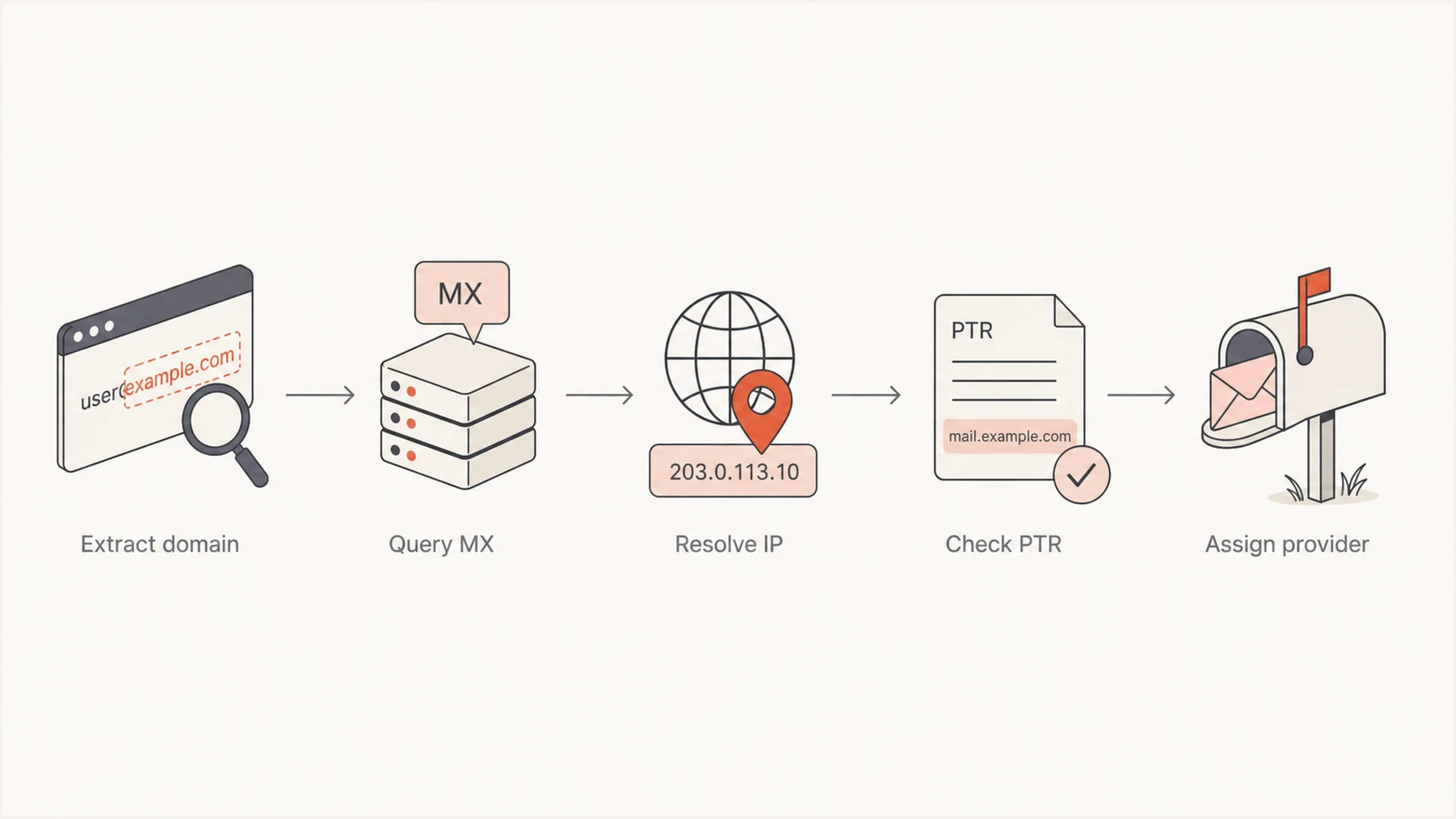
Flowchart showing domain extraction, MX lookup, IP resolution, PTR lookup, and provider assignment.
What the answer proves
DNS shows the published receiving route for a domain. It does not prove the recipient's personal mailbox brand, subscription plan, inbox interface, or forwarding destination. A valid MX record also does not prove that an individual email address exists or is active.
- High confidence: The MX hostname directly matches a known provider's inbound route; final mailbox hosting is a separate finding.
- Medium confidence: A gateway is identifiable, but there is insufficient evidence to name the mailbox provider behind it.
- Low confidence: The MX is private, generic, parked, missing, or only traceable through PTR clues.
Look up MX records on Windows, macOS, or Linux
For a small list, run DNS lookups manually and record the MX hostnames. For a larger list, batch domains, cache answers, and classify results with a rule table. Deduplicate domains first because a list of 200,000 addresses often has far fewer unique recipient domains. Convert internationalized domains to their ASCII A-label form before querying DNS so equivalent Unicode and punycode forms enter the same bucket. Store the DNS response status, lookup time, and time to live (TTL) with the raw answer. Reuse cached answers until their TTL expires, then refresh active domains.
Run the lookup against the exact domain after the @ sign. For you@example.com, query example.com, not www.example.com. For you@mail.example.com, query mail.example.com first because subdomains can have separate mail routing. NXDOMAIN means the queried name does not exist. After following any CNAME alias, a successful NOERROR response with no MX data means there is no MX record at that name. SERVFAIL and timeouts are lookup failures, not evidence that mail service is absent. Retry through another resolver; investigate persistent failures before classifying the domain. Replace example.com in the commands with the actual email domain. The dig example retains response status and TTL values that +short hides.
Handle null MX explicitly. A sole MX record with preference 0 and a dot as its target, 0 ., declares that the domain accepts no mail, as defined by RFC 7505. If no MX record exists, SMTP instead uses the domain's A or AAAA addresses as an implicit MX route under RFC 5321. Investigate that host before assigning a provider. This fallback does not apply when null MX or unusable explicit MX records are present.
Start with MX hostnames. Resolve them to A or AAAA addresses to check their DNS configuration; PTR and IP RDAP or WHOIS are optional supporting checks when the host pattern is unclear. A recognizable MX hostname usually needs no further network-ownership research. PTR can reveal a network naming convention, but registry and ASN ownership identify the network operator, which can differ from the mailbox operator. A separate reverse DNS check helps when a mailbox host uses a generic name.
MX lookup and optional network checks on macOS or Linuxbash
recipient_domain=example.com
dig MX "$recipient_domain" +noall +comments +answer

# Optional checks: replace these placeholders with an MX host and its IP.
mx_hostname=mx.example.net
mx_ip=192.0.2.25
dig +short A "$mx_hostname"
dig +short AAAA "$mx_hostname"
dig +short -x "$mx_ip"
whois "$mx_ip"
MX lookup in Windows Command Prompt or PowerShellpowershell
nslookup -type=MX example.com
Do not classify broken MX answers
Do not assign a high-confidence provider label until the MX targets resolve and the DNS answer is internally consistent. Put the domain into a review bucket when a target is malformed, lacks A or AAAA records, times out from multiple resolvers, uses a lookalike hostname, publishes null MX beside another MX record, or places an unknown host at the lowest preference number.
- Check target records: Resolve every MX hostname before assigning high confidence.
- Check priority: An unfamiliar low-number MX target can receive mail before the expected provider.
- Check null MX: A valid null MX is the only MX record, has preference 0, and has a dot as its target.
- Check ownership: Treat PTR and registry or ASN ownership as supporting clues because the network operator can differ from the mailbox operator.
- Check twice: Repeat timeouts through another resolver before treating records as absent.
If you are checking your own sending domain at the same time, use the domain health checker to validate the authentication side before ramping volume. Recipient provider grouping solves one part of warmup; your own DNS and authentication must also pass cleanly.
?
What's your domain score?
Deep-scan SPF, DKIM & DMARC records for email deliverability and security issues.
At scale, keep recipient provider classification separate from sender authentication checks. One tells you where mail is going. The other tells you whether your own domain has the DNS foundation to earn delivery.
One-off checks
- Best fit: A single domain, a support ticket, or a quick sales ops check.
- Process: Query MX, inspect the hostname, then save the provider label.
- Risk: Manual labels drift when providers change routing patterns.
List-scale checks
- Best fit: Warmup planning, segmentation, routing analysis, and list hygiene.
- Process: Deduplicate domains, cache DNS answers, then classify with rules.
- Risk: Uncached lookups can overload resolvers and slow the job.
Classify common providers
After the lookup, the useful work is classification. Maintain a simple mapping of MX host patterns to provider buckets, then keep the raw DNS answer beside the label. That raw value matters when a rule needs review later.
For obvious consumer addresses, the domain suffix can be enough to choose a provider family: @gmail.com maps to Google, @icloud.com, @me.com, and @mac.com map to Apple iCloud, and @outlook.com, @hotmail.com, @live.com, and @msn.com map to Microsoft. For ISP-branded or migrated addresses, confirm with MX because the visible brand and mailbox operator can differ.
For Google, Google's MX setup documentation specifies smtp.google.com and confirms that legacy aspmx.l.google.com and related alt hosts remain supported. Neither pattern proves an account's age or subscription. Use known consumer address domains to distinguish Gmail audiences from Google-hosted custom domains; MX hostnames alone do not reliably establish the account type.
|
|
|
|---|---|---|
smtp.google.com or aspmx.l.google.com and its alt hosts | Use the address domain to separate Gmail from custom-domain audiences. | |
Hosts ending in .mail.protection.outlook.com or .mx.microsoft | Microsoft inbound routing; cloud or on-premises mailbox hosting remains unconfirmed. | |
Recognized Yahoo-operated mail exchangers | Confirm current routing rather than relying on a migrated ISP brand. | |
iCloud mail hosts | Usually clear for personal domains using iCloud mail. | |
AOL or legacy ISP | Recognized AOL or ISP mail exchangers | Classify by MX, not only by the address suffix. |
Gateway | Security MX host | Shows the front door, not the final inbox. |
Null MX | 0 . | Domain says it accepts no mail. |
No MX | NOERROR with no MX data | Inspect the domain's A or AAAA addresses for an implicit MX route. |
Common MX clues and how to classify them.
Microsoft also documents mx.microsoft targets for supported routing configurations. Include this suffix in provider rules alongside established Outlook MX patterns so these domains are not marked unknown.
Lowercase MX hostnames and remove their final DNS dot before matching. Match hostname boundaries, not loose substrings: a suffix rule for mail.protection.outlook.com should match that name or a hostname ending in .mail.protection.outlook.com, but not notmail.protection.outlook.com. Keep reseller and white-label patterns in separate rules when ownership evidence does not identify the mailbox operator.
Illustrative provider matching rulesyaml
# exact_mx matches complete normalized hostnames.
# mx_suffixes matches the value itself or a dot-delimited subdomain.
google:
  exact_mx:
    - smtp.google.com
    - aspmx.l.google.com
    - alt1.aspmx.l.google.com
    - alt2.aspmx.l.google.com
    - alt3.aspmx.l.google.com
    - alt4.aspmx.l.google.com
  mx_suffixes:
    - gmail-smtp-in.l.google.com
  classify_as: Google inbound route
microsoft:
  mx_suffixes:
    - mail.protection.outlook.com
    - olc.protection.outlook.com
    - mx.microsoft
  classify_as: Microsoft inbound route
no_mail:
  require_only_mx: true
  preference: 0
  exchange: "."
  classify_as: Does not accept mail
Store confidence beside the label and state whether it describes the inbound route or the mailbox host. A direct Google or Microsoft MX match gives high confidence in the visible route. A known gateway identifies that gateway, while its underlying mailbox host remains unresolved. A PTR-only clue gets low confidence because IP naming can lag behind routing changes.
Provider confidence bands
Rate the evidence for the visible receiving route; a gateway match does not identify the final mailbox host.
Direct MX match
High
A known provider handles the published inbound route; final mailbox hosting still requires confirmation.
Gateway match
Medium
The gateway is identifiable, but the mailbox provider behind it is unresolved.
PTR-only clue
Low
The provider label comes mainly from reverse DNS naming.
No stable clue
Unresolved
DNS does not expose a provider with enough reliability.
What MX records cannot confirm
Custom domains can use inbound filtering, forwarding, or split delivery across different mailbox systems. Multiple MX records describe priority and failover; they do not map individual recipients to those systems. DNS reveals the public receiving route, which is useful for traffic grouping but insufficient for a complete mailbox census.
The DNS provider is a separate finding. Nameservers and SOA records can identify where DNS is managed, but they do not identify the mailbox provider unless the MX target points to that same provider. An email client is separate too: Outlook or Apple Mail can access mailboxes hosted by another provider.
Message headers provide evidence about a particular delivery. A message received from someone reveals their outgoing route, which can differ from their inbound mailbox host. A copy obtained from the target recipient's mailbox also contains receiving-system headers that help corroborate its delivery route. Return-Path, DKIM d=, and SPF mailfrom mainly describe the sending side.
Microsoft is a good example. Consumer Outlook.com and Microsoft 365 business mail are useful separate audience groups when the address domain and routing evidence support the distinction. Do not infer the user's email app or final mailbox location solely from a Microsoft MX match.
What MX lookup can tell you
- Receiving route: Which hosts accept inbound mail for the domain.
- Provider family: Whether the route appears to use Google, Microsoft, Yahoo, Apple, AOL, or another provider.
- Routing confidence: Whether the evidence supports a provider label or is too weak to use.
What MX lookup cannot tell you
- Final inbox: Forwarding after delivery is usually invisible in public DNS.
- User plan: DNS rarely proves the subscription type or mailbox interface.
- Filtering result: MX lookup does not show whether your next message will hit spam.
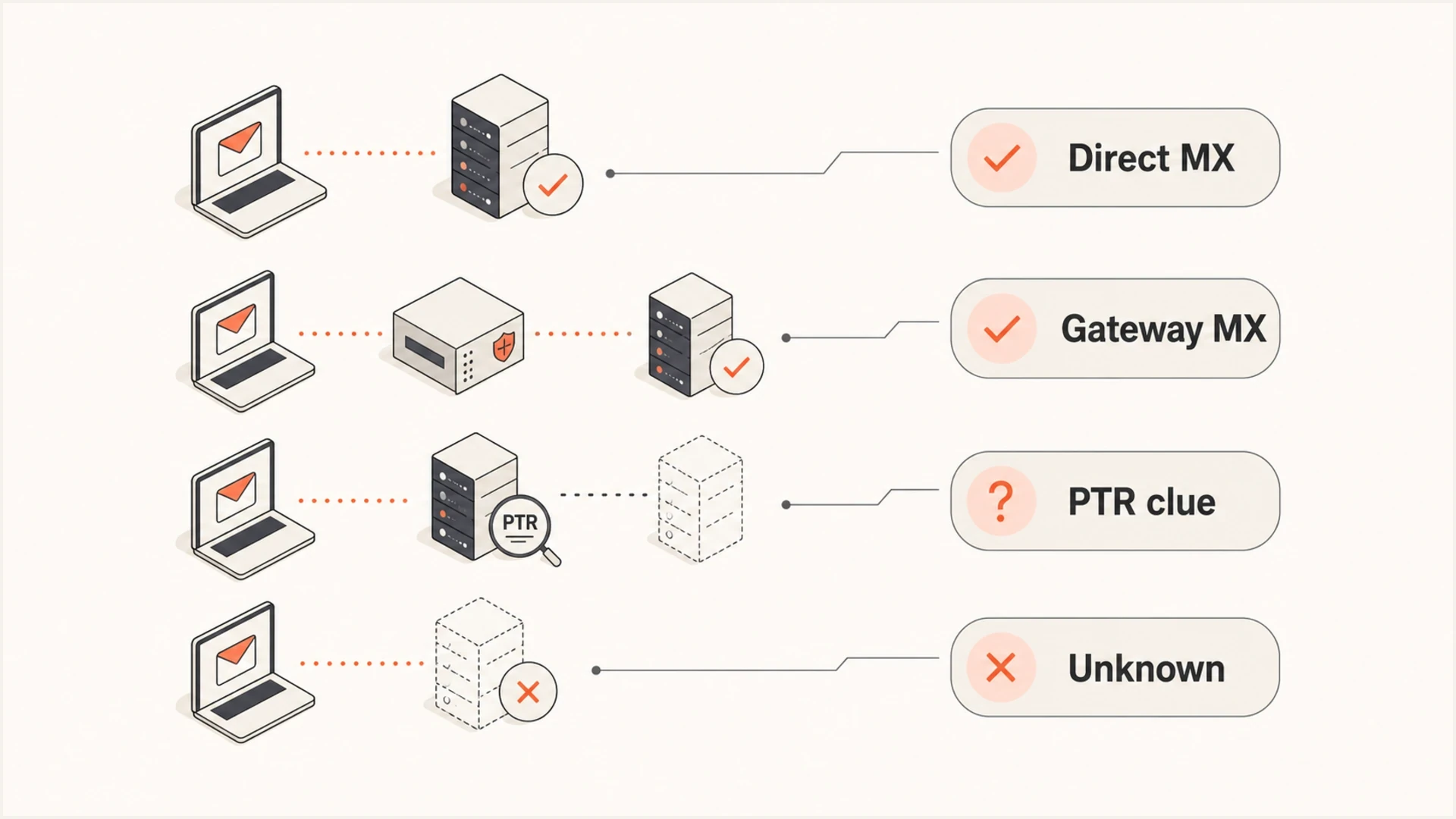
Provider confidence levels for direct MX matches, gateway MX records, PTR clues, and unknown results.
Do not overfit the labels
A provider label should guide throttling. It should not permanently suppress a recipient or override live engagement data. If the DNS clue is weak, send in a conservative mixed bucket and use delivery responses to decide what to investigate.
Confirm the provider when MX is inconclusive
When MX exposes only a gateway, seek account-level evidence before naming the underlying mailbox host. Split delivery can put alice@example.com on Google and bob@example.com on another system despite a shared public MX route. Google's split delivery documentation describes this arrangement.
- For your own account, check the mailbox admin portal or configured incoming IMAP/POP server. Ask the administrator to confirm the host when settings use a custom server name.
- Obtain the full headers of a message as stored in the target mailbox. In Gmail on the web, open the message, select More beside Reply, then Show original. Google's header instructions show these steps.
- In new Outlook or Outlook on the web, select More actions > View > View message details. Microsoft's header instructions cover these versions and classic Outlook.
- Inspect the receiving system's own Received entries, particularly the 'by' hostname, for evidence of delivery after a gateway. Trust entries added by the recipient's infrastructure; earlier, untrusted header text is forgeable.
SPF includes and DKIM signing domains are supporting clues about authorized sending infrastructure. They do not prove where incoming mailboxes are hosted. If the account owner or administrator cannot confirm the mailbox host, retain the known gateway label and mark the underlying provider as unknown.
Use the result for warmup
There are real warmup concerns when a hidden share of a list uses the same mailbox provider. If you ramp based only on visible domains, you can send too much volume into Gmail or Outlook without noticing it. The receiving provider still sees the aggregate traffic across its hosted domains.
Warmup buckets usually start with Google family, Microsoft family, Yahoo family, Apple family, AOL or legacy ISP, business gateway, and unknown. Then apply daily caps by bucket and raise caps only when deferrals, bounces, complaints, and engagement stay stable. Before ramping a new stream, send a real message through an email tester and inspect the headers for authentication results, then review the message content. MX records do not disclose a provider's sending limits; use live SMTP responses to set rates and reduce volume when deferrals increase.
Keep this separate from sender-side IP reputation DNS checks. Recipient-provider lookup starts with the address domain and MX records. IP reputation checks start with the sending IP, sometimes by reversing IP octets into a DNS query, and they help explain reputation trends, not which provider receives a recipient's mail.
- Normalize first: Lowercase domains, convert internationalized labels to ASCII A-labels, remove invalid addresses, and deduplicate recipient domains.
- Query DNS: Fetch MX answers and cache them with their response status, timestamp, and TTL.
- Assign buckets: Use provider rules and confidence levels rather than one flat label.
- Throttle by bucket: Keep Gmail, Outlook, Yahoo, Apple, AOL, gateway, and unknown traffic within planned limits.
- Refresh regularly: Recheck active domains because MX routing changes after migrations.
A practical warmup rule
When the provider label is high confidence, use the provider bucket for throttling. When confidence is low, use a conservative unknown bucket and let live delivery signals decide when to increase volume.
Also watch your sending reputation. If bounces or deferrals cluster around one provider bucket, slow that bucket rather than slowing every recipient. If an IP or domain appears on a blocklist (blacklist), investigate whether the listing affects the failing route and resolve the underlying cause before increasing affected traffic. Our platform, Suped, includes blocklist monitoring so teams can see IP and domain listing problems beside authentication data.
Monitor sender authentication with Suped
Suped is our DMARC reporting and email authentication platform. After grouping recipient domains by MX, use Suped to review authentication for your own sending domains before increasing volume.
Suped's DMARC monitoring turns aggregate reports into sending-source and authentication results. Use those reports to investigate legitimate senders failing DMARC and check SPF or DKIM configuration. Aggregate DMARC reports do not identify individual recipients' mailbox providers.
Suped DMARC dashboard showing email volume, authentication health, and source breakdown
For multiple domains or client accounts, review each domain's authentication results separately. If one provider group shows more deferrals, compare its SMTP responses with the affected sending domain's authentication results and blacklist or blocklist alerts before changing sending rates.
Views from the trenches
Best practices
Normalize recipient domains first, then group MX answers before assigning provider labels.
Store raw MX, A, AAAA, and PTR answers so provider rules can be reviewed when routing changes.
Keep freemail and business-hosted variants separate for warmup and reputation analysis.
Common pitfalls
Treating every custom-domain Google MX as consumer Gmail creates poor warmup buckets.
Grouping only by visible domain names misses custom domains hosted by Google or Microsoft.
Running huge DNS jobs without caching creates slow results and avoidable resolver pressure.
Expert tips
Check MX hostnames first, then use PTR or Whois only when the host pattern is unclear.
Maintain a rule table with examples, owner notes, confidence, and last-checked dates.
Separate provider detection from throttling logic so bad labels do not block good mail.
Marketer view
Marketer from Email Geeks says MX, A, PTR, and occasional Whois lookups are enough to group most recipient domains into useful provider buckets.
2021-03-04 - Email Geeks
Marketer view
Marketer from Email Geeks says basic scripts plus a spreadsheet work well for raw DNS collection, but cached automation is better for large files.
2021-03-05 - Email Geeks




