
Do tracking pixels directly cause emails to be marked as spam?

Published 1 Jul 2025
Updated 2 Oct 2026
12 min read
Summarize with
Updated on 2 Oct 2026: We clarified when tracking pixels affect placement, what an image request reveals, and how to test the pixel without relying on open rate.
No. A tracking pixel does not directly cause an email to be marked as spam just because it exists in the HTML. Mailbox providers can detect remote images, including 1-by-1 open tracking images, but detection alone does not establish a spam decision. A normal marketing email with a reputable tracking domain, working authentication, reasonable content, and a healthy sending history is not sent to spam merely because it has a pixel.
The caveat is that a pixel can sit inside a message that already has other problems. If the tracking domain has poor reputation, the email is image-heavy, the sender has complaint issues, or the links use a shared domain with bad history, then the pixel can be part of the evidence a filter sees. Treat the pixel as a clue to inspect, not as the root cause.
- Direct answer: The tracking pixel alone is not a direct spam trigger.
- Real risk: Bad sender reputation, bad tracking domain reputation, and weak authentication matter more.
- Metric caveat: Open tracking is noisy because of image proxies, privacy systems, and automated scanners.
- Practical move: Test placement, authentication, content, links, and reputation before removing pixels.
The bigger mistake is treating open rate as proof of inbox placement. An open can be inflated by Gmail image caching, privacy prefetching, security scanning, or a user opening the message in a spam folder. A missing open can also mean images were blocked, not that the message never reached the inbox.
Why the pixel itself rarely causes spam placement
A tracking pixel is usually just an HTML image tag that points to a unique URL. When the recipient's email client loads remote images, the sender records a request. That request is often counted as an open, even when a proxy or scanner fetched it. The tiny dimensions, unique path, and tracking host make the mechanism easy to detect.
Spam filtering is not a single yes-or-no check for one HTML element. Filters weigh authentication, sender and domain reputation, recipient complaints, message structure, URL reputation, volume patterns, and content signals. A pixel can be one small input, but it does not override the rest of the evidence.
What the pixel does
- Loads remotely: The email client requests a small image from a tracking host.
- Identifies the event: The URL often contains a unique ID for the send or recipient.
- Creates a signal: The sender can record time, user agent, and proxy behavior.
What filters weigh harder
- Reputation: The sender, IP, domain, and link hosts carry history.
- Recipient response: Recipient complaints affect sender reputation and future placement.
- Authentication: SPF and DKIM should pass, with a DMARC domain match through at least one.
Tracking pixel risk by condition
The pixel becomes more relevant when surrounding reputation and structure are weak.
Normal pixel
Low
Reputable tracking host, balanced HTML, authenticated sender.
Weak setup
Watch
Shared tracking host, low text, new sender, uneven volume.
Bad reputation
High
Poor tracking host reputation, high complaints, failing authentication.
Do not remove open tracking as the first fix. That often hides the symptom instead of fixing the sender. If removing the pixel appears to improve placement, compare the full HTML, link hosts, image count, sending domain, audience, and send timing before calling the pixel the cause.
Why blocked images do not prove the pixel caused spam
Gmail's published image guidance says it does not automatically show external images when it considers a sender or message suspicious. That sequence matters. Gmail can decide that a message is suspicious first and then suppress remote images. A blocked pixel therefore does not prove that the pixel caused spam placement.
Other image behavior also breaks the assumption. A recipient can block remote images, while Apple Mail Privacy Protection privately downloads remote content in the background when a message arrives, rather than when the recipient views it. One path produces no pixel request after delivery; the other can produce a request without a human open.
- Pixel not loaded: Remote images might be blocked or never requested.
- Pixel loaded: The request might come from a proxy, privacy preload, security scanner, or human.
- Spam-folder open: A person can open a filtered message and trigger the pixel there.
- Cold outreach: Unsolicited mail can generate complaints, so consent and targeting matter more than the pixel.
Claims that Gmail 'blocks tracking pixels in cold email' need careful wording. Gmail documents suppressing images for suspicious senders or messages, not a public rule that a tracking pixel automatically makes a message spam. Treat image blocking as an outcome to investigate.
What opening a tracked email reveals
A unique pixel URL can tell a sender that the URL was requested. If an untrusted sender tied that URL to your address, a direct image load can confirm activity and inform later targeting. That is a recipient privacy concern, not evidence that the pixel made the original message land in spam.
- If you do not trust the sender, avoid loading remote images or use your mail app's image controls.
- In Apple Mail, Protect Mail Activity loads content privately in the background, while Block All Remote Content stops downloads until you choose to load them.
- In Gmail, Ask before displaying external images gives you control over when images load; Gmail also withholds images it considers suspicious.
A request still does not prove that a person read the message. Proxies and background loading separate the request from the reader, and blocking images can prevent a request even when the message was read.
When tracking can become part of the problem
Tracking becomes a deliverability concern when the tracking infrastructure has its own reputation problem. A pixel hosted on a domain that appears on a blocklist (blacklist), a shared tracking domain abused by other senders, or a link host that redirects through risky URLs can add weight to a negative decision.
The content around the pixel also matters. A message that has almost no readable text, several remote images, a thin plain text part, and multiple redirected links gives filters less positive context. That does not mean images in emails are automatically bad. It means the whole email must look like something a real recipient asked to receive.
|
|
|
|---|---|---|
Pixel only | Low | Controlled test |
Poor tracking host reputation | High | Host reputation |
Little readable text | Medium | Rendered message |
Failing authentication | High | SPF, DKIM, DMARC |
Complaints | High | Audience source |
Common causes that get blamed on tracking pixels
Do not overfit the test
If you remove the pixel and also change the subject line, template, links, send time, and audience, the test no longer tells you anything about the pixel. Keep one variable changed at a time.
Minimal open tracking pixelHTML
<img
  src="https://t.example.com/open/abc123.gif"
  width="1"
  height="1"
  alt=""
  style="display:none"
/>
That small image tag is rarely the worst thing in the email. The tracking host, surrounding HTML, sender history, and recipient reaction usually tell the clearer story.
How to test whether the pixel is the problem
Run a controlled comparison with two comparable, randomly assigned recipient groups. Version A has the pixel. Version B removes only the pixel. Keep the subject, body, links, other images, headers, sending domain, and sending IP the same. Check placement with real test mailboxes in each group, and repeat the comparison across sends and mailbox providers. Do not use open rate to judge the test, because removing the pixel removes the open signal. If the pixel version repeatedly lands in spam more often, inspect the tracking host reputation before blaming the image tag itself.
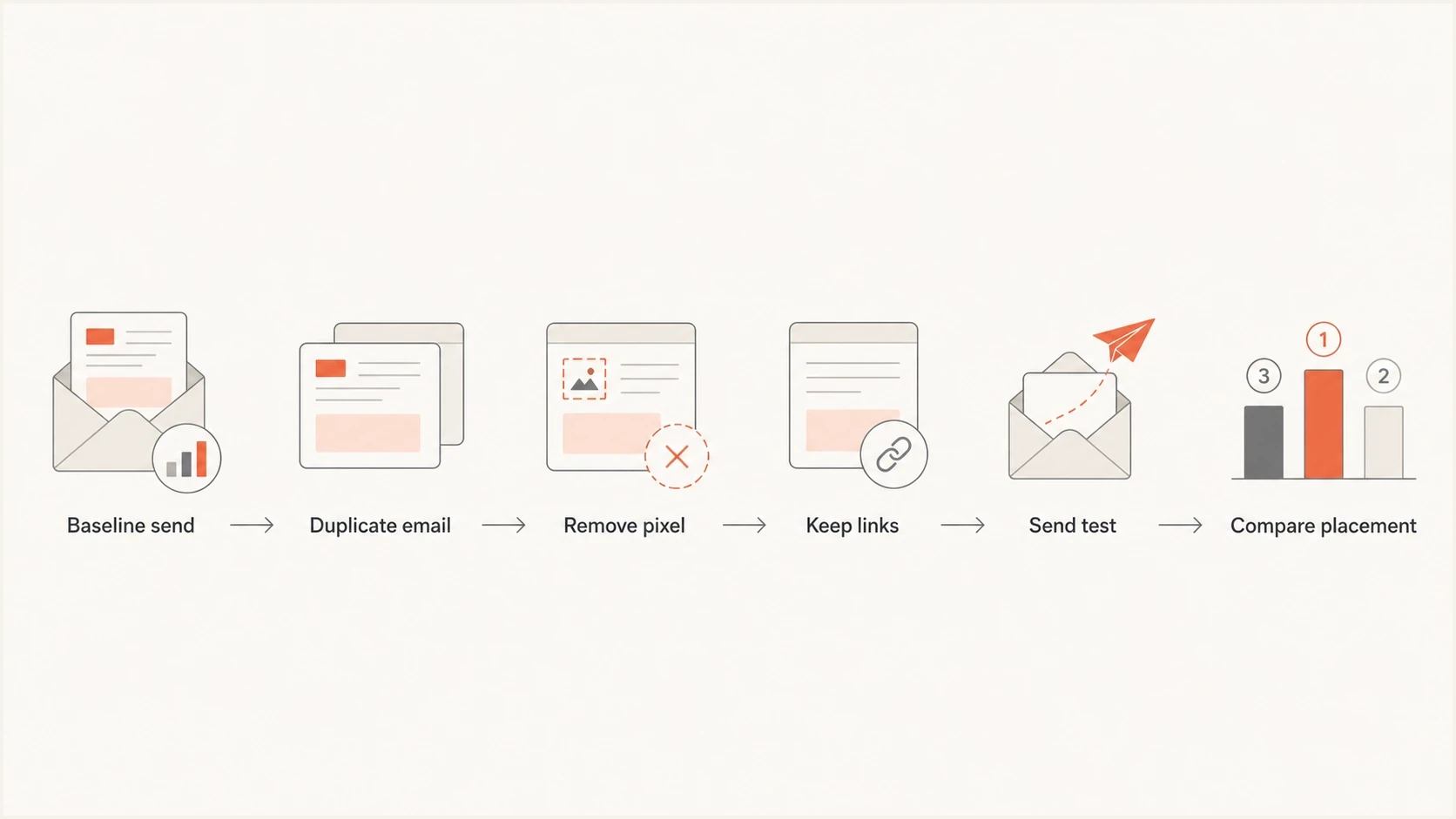
A flowchart showing a controlled test that removes only the tracking pixel.
Send a real message to a mailbox and inspect headers, authentication, rendered HTML, link hosts, and placement. Suped's email tester is useful here because it tests the actual message instead of relying on theory. A synthetic HTML scan misses problems that show up only after the message is sent.
Email tester
Send a real email to this address. Suped shows a results button when the test is ready.
?/43tests passed
The next step is domain-level testing. Run a domain health check and confirm that SPF and DKIM pass, while DMARC sees the expected domain match. If those checks fail, fixing the pixel will not solve the deliverability problem.

Email tester sample report showing total score, email preview, issue summary, and per-section results
A good test also checks the click tracking domain. Open tracking gets the attention because it is easy to explain, but click tracking domains and redirects often carry more visible reputation risk. If a provider distrusts the link chain, the message can be filtered even when the pixel is harmless.
What to fix before removing the pixel
Before removing open tracking, check the areas that actually move placement. Most pixel blame starts when a team sees poor open rates and assumes the tracking mechanism caused the poor placement. That reverses the diagnosis. Poor placement lowers real human opens. Bad open data makes that harder to see.
- Authentication: SPF and DKIM should pass, and DMARC should see a domain match through at least one.
- Reputation: Check the sending domain, IPs, tracking domains, and blocklist or blacklist status.
- Audience quality: A cold, stale, or scraped list creates complaints and low engagement.
- Consent and opt-out: Send wanted mail and use one-click unsubscribe for bulk promotional messages.
- HTML quality: Use readable copy, a useful plain text part, and links that match the brand.
- Send pattern: Watch sudden volume jumps, new domains, new IPs, and uneven campaign cadence.
For mail sent to personal Gmail accounts, keep the daily user-reported spam rate below 0.1% and prevent it from reaching 0.3% or higher. A pixel test cannot compensate for complaint levels that already damage placement.
Suped's product connects DMARC monitoring, SPF and DKIM results, and blocklist monitoring in one workflow. For teams managing multiple domains, the dashboard helps trace a failing source or reputation warning before changing campaign HTML.
Where Suped helps
Suped's product helps when the question is broader than one pixel. It groups failing sources, authentication gaps, policy issues, and reputation warnings into concrete fix steps. This workflow helps fix the sending system before changing campaign tracking.

Issue steps to fix dialog showing the issue overview, tailored fix steps, and verification action
If the only weak point is a shared tracking domain, check whether the sender supports a branded tracking domain, secure it with HTTPS, keep redirect chains short, and monitor reputation. If authentication is failing, fix that first. If complaints are high, list acquisition and consent need attention before template tweaks.
How to use open data without overtrusting it
Open rates still have some value, but use them as a directional metric. They are useful for comparing similar campaigns over time, spotting large drops, and checking whether an audience segment is going quiet. They are weak as a precise measure of human attention.
A campaign can show opens and still have placement problems. A campaign can show fewer opens because image loading changed. A privacy proxy can load the pixel before a human reads the message. A security scanner can touch the message before delivery decisions are visible to the sender.
Better operating rule
Keep open tracking if it helps your reporting, but do not use it as the primary deliverability diagnosis. Pair it with authentication data, complaint data, inbox tests, click quality, unsubscribe behavior, and reply signals.
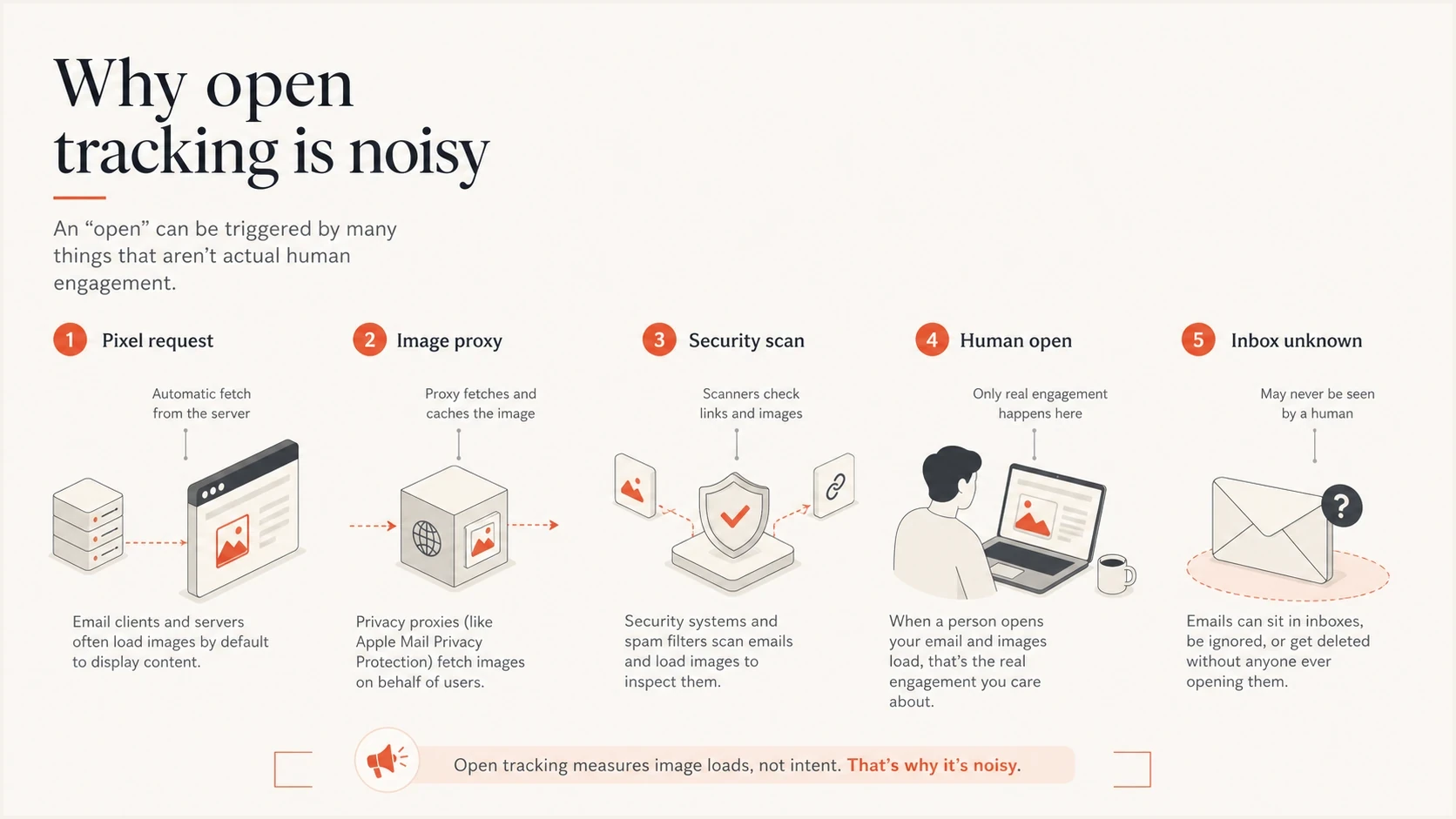
An infographic showing that pixel requests can come from proxies, scanners, and humans.
The answer to the title question stays the same after all the nuance: a tracking pixel does not directly send emails to spam. It can expose a weak tracking setup, and it can produce misleading open data. Test the sending path before changing the HTML.
Views from the trenches
Best practices
Keep pixels on a reputable HTTPS tracking domain that matches your brand and sender domain.
Use open tracking as a directional signal, then confirm inbox placement with real tests.
Investigate authentication, complaints, and blocklist status before removing pixels.
Common pitfalls
Blaming the pixel first wastes time when list quality or authentication is the root issue.
Treating every open as human activity leads to false confidence in inbox placement.
Removing all images from HTML can leave the real deliverability problem untouched for weeks.
Expert tips
Compare sends with identical audiences before deciding that a pixel changed placement rates.
Watch reputation on tracking domains as closely as sending domains during large campaigns.
Keep the plain text part useful, even when the HTML version carries the pixel and branding.
Expert view
Expert from Email Geeks says a tracking pixel alone is not a reason to expect spam placement. Reputation still does the heavy work.
2023-06-27 - Email Geeks
Marketer view
Marketer from Email Geeks says some senders remove images, signatures, links, and pixels while the real problem remains the sender.
2023-06-27 - Email Geeks
The practical answer
Do not treat a tracking pixel as a direct spam switch. Treat it as one small technical element in a much larger filtering decision. If the sender is trusted, the tracking host is reputable, the email is wanted, and authentication is healthy, the pixel is not the reason the message lands in spam.
If placement is bad, work through the evidence in order: authentication, domain and IP reputation, blocklist or blacklist status, list quality, complaint rate, link reputation, HTML quality, and volume pattern. Suped's DMARC and deliverability workflows support that diagnosis with alerts and fix steps that point to the actual problem.




