
Can I skip a day during email warm up without hurting my IP reputation?

Updated on 5 Oct 2026: We updated our restart advice for weekend pauses and corrected bounce handling and bulk sender requirements.
Yes. In most cases, a single skipped email warm up day does not erase a healthy IP reputation. If the choice is between sending a dirty 10,000-recipient batch or pausing for 24 to 48 hours while you remove hard-bounce addresses, pause. Mailbox providers judge patterns over time. One missed day is not the same as abandoning a warm up.
The bigger risk is continuing to send into a list you already know has fake internal addresses, typo domains, unapplied suppression records, and low-quality recipients. A warm up should create a clean sending sample. Sending bad data just to keep the calendar full gives Gmail, Microsoft, and other mailbox providers the wrong sample.
After the pause, do not restart at an arbitrary tiny volume. Resume near the last clean volume, or one step below it, after removing the problem records. Before scaling again, send a real campaign-style message through Suped's email tester so you can inspect authentication, headers, content, and rendering before the next increase. A successful test does not establish campaign-wide inbox placement.
How a skipped day affects IP reputation
A one-day pause does not automatically reset IP reputation. A two-day pause normally does not either. Reputation systems evaluate recent sending history, including authentication, complaints, recipient behavior, volume, bounces, and deferrals. They also evaluate the sending domain and IP address separately. Providers do not publish a universal inactivity threshold, so use recent results and your sending platform's limits to decide how to resume.
If a 10,000-recipient send produced a 6% hard-bounce rate, treat that as a data quality warning, not as a reason to force another 10,000 out today. Clean the list first. Then use your most engaged recipients for the next send and continue the ramp with smaller increases until the bounce rate is back under control.
- Pause for 24 to 48 hours when hard bounces come from obvious data defects.
- Exclude invalid domains and internal test accounts, apply prior suppression lists, and hold inactive segments.
- Resume with the most engaged group near the last safe volume, then increase more slowly.
- Track bounces, complaints, deferrals, recipient activity, DMARC pass rates, and blocklist (blacklist) status.
Do not warm into a known bad list
Warm up volume is only useful when the audience quality is strong. If automated test records or typo domains are inside the segment, the next send should wait until those records are excluded.
Dedicated IP warm up versus mailbox warm up
IP warmup is the gradual increase in legitimate sending through a new or inactive dedicated IP. The volume examples below apply to that setup. With a shared IP pool, other customers continue sending when you pause, and your sending platform manages the pool's IP reputation. Your own domain reputation still depends on your mail.
A new mailbox or sending domain needs a gradual sending ramp even on an established shared IP. Follow the account's sending limits and use opted-in recipients; a 10,000-message dedicated IP example is unsuitable for an individual mailbox. For low or irregular sending volumes, check whether a shared IP pool better fits your schedule. Use wanted mail to real recipients: manufactured opens and replies do not establish normal campaign performance.
When skipping is better than sending
Skipping is the right move when the issue is temporary and fixable. A pause gives you time to remove addresses that never should have entered the sending platform. Continuing to send through a known defect is different. It tells mailbox providers that your new IP or sending domain is associated with poor list hygiene. Planned weekend breaks can fit a consistent sending cadence. Daily sending provides feedback sooner; a weekday-only schedule needs a slower ramp and should resume at the previous clean step after a healthy send, without a catch-up batch.
The key distinction is the last clean send. If 10,000 recipients were valid and engaged with low complaint activity, that is a useful step in the warm up. If 10,000 included hard bounces, fake internal records, stale recipients, or other weak data, do not use it as the new baseline.
Pause for cleanup
- Use a pause when the bounce cause is known and can be fixed within one or two days.
- Common examples include internal test addresses and invalid top-level domains in the send list.
- Protect the next reputation sample by sending only to cleaner recipients.
- Resume near the last clean step, not the last dirty step.
Keep sending
- Keep sending when the list is clean and bounce behavior is within your normal range.
- Use a recent engaged segment with low complaints and steady delivery.
- Keep the ramp consistent without adding known bad records.
- Increase gradually and wait for delivery data before each step.
How much volume to send after a skipped day
After a one-day pause, resume at the last clean volume or slightly below it. If the most recent 10,000-recipient send had a low hard-bounce rate, no complaint spike, no throttling, and a similar provider mix, the next send can be close to 10,000. If the same send had many hard bounces, step down and choose the most engaged recipients; 5,000 to 8,000 is only an illustrative range, and ongoing failures call for a smaller send or another pause.
Follow your sending platform's warm up limits, but do not send to invalid recipients just to meet a daily target. When you resume, spread traffic steadily instead of compressing the missed volume into a burst. Check whether an automatic warm up schedule advanced during the pause, and hold the next increase until actual sending results support it.
Suggested restart approach by pause length
These are planning examples, not mailbox-provider thresholds. Adjust them to recent results, IP history, and your platform's warm up limits.
0-2 days
Resume
Resume near the last clean volume when provider results remain healthy.
3-7 days
Step down
Consider a lower restart volume and review the most engaged cohort first.
8-14 days
Rebuild
Use a smaller sample if recent sending history is limited.
15-29 days
Re-warm
Review whether a cautious re-warm is needed, especially for a new IP.
30+ days
Review plan
Check the platform's re-warm requirements and rebuild cautiously.
Resume by mailbox provider, not only total volume
A total of 10,000 messages can hide very different traffic levels at Gmail, Microsoft, Yahoo, and smaller mailbox providers. Sending limits, deferrals, and reputation decisions are provider-specific. After a pause, compare each provider cohort with its own last clean send instead of treating the combined count as one safe ceiling.
Domain reputation also matters alongside IP reputation. A new IP does not erase the history of the DKIM signing domain, and a new domain does not inherit the full reputation of an established IP. Keep the sending domain, authentication domains, IP pool, message type, and traffic pattern stable while you assess the restart.
- Group recipients by the mailbox provider behind their MX records, not only by the visible recipient domain.
- Review 4xx deferrals, 5xx rejection reasons, complaint data, and accepted volume for each provider. SMTP acceptance alone does not confirm inbox placement.
- Reduce or hold the cohort where temporary failures rise while healthy cohorts continue cautiously.
- Avoid changing sending infrastructure or message format at the same time as a large volume increase.
Fix the list before the next send
Hard bounces during warm up deserve immediate attention. A .con ending is not delegated in the public DNS root, so delivery fails during public DNS resolution before a receiving mailbox provider sees the message. It still pollutes your platform metrics and can trigger platform-side limits. Typos that point to real domains are riskier because the message can reach an unintended recipient and produce a complaint.
Start with suppressions from the previous sending platform. Then remove generated test accounts, invalid top-level domains, domains with no usable mail route, addresses without clear consent, and recipients with no recent activity. Address verification can help at the edges, but engagement segmentation usually matters more during warm up. Do not automatically suppress every catch-all or unknown result as a hard bounce. Hold those records until the warm up is stable or you have stronger evidence. Under RFC 5321, a missing MX record still permits delivery through a usable A or AAAA record. A null MX explicitly declares that the domain does not accept email; suppress confirmed undeliverable addresses rather than every domain without an MX record.
|
|
|
|---|---|---|
Fake internal | automatedtest | Confirm test source, then suppress |
Bad TLD | .con | Block invalid domains |
Old suppression | Prior ESP | Import before sending |
No usable mail route | NXDOMAIN or null MX | Suppress confirmed failures; validate missing MX |
No engagement | Cold record | Hold until stable |
Common warm up list defects and the cleaner action.
Illustrative suppression rulestext
suppress if address is in prior-esp suppression-file
suppress if address source equals "internal-test"
suppress if address is in confirmed-internal-test-list
block if email_domain ends with ".con"
suppress if domain returns NXDOMAIN or null MX
hold if no recent clicks, replies, purchases, or account activity
Signals that matter more than the missed day
The skipped calendar day matters less than what receiving systems saw in the most recent sends. A stable send with clear recipient activity and low complaints can tolerate a short pause. A send full of invalid or unwanted mail should stop immediately.
- Suppress addresses confirmed as nonexistent, such as a 5.1.1 recipient error. Investigate 5.7.x policy or authentication failures instead of treating every 5xx rejection as an invalid address.
- Keep Gmail's user-reported spam rate below the recommended 0.1% target and avoid ever reaching 0.3%. Compare the provider's own rate with your platform data because the denominators differ.
- Treat rising 4xx deferrals and throttling as reasons to reduce the next provider-specific step.
- Prioritize recent clicks, replies, purchases, logins, and recipient-initiated messages when building the restart segment.
- Use open data as supporting context, not the only engagement filter, because privacy protections can distort it.
- Confirm SPF and DKIM authentication, DMARC alignment, forward and reverse DNS, and TLS before increasing volume.
- For bulk marketing and subscribed messages, support one-click unsubscribe and include a visible unsubscribe link in the body. Honor unsubscribe requests within two days.
- Check IP and domain blocklist (blacklist) status when bounces, deferrals, or delivery patterns change.
Gmail, Yahoo, and Outlook.com's bulk sender rules require SPF and DKIM authentication plus DMARC. Their published minimum DMARC policy is p=none, and messages must pass DMARC through SPF or DKIM with a domain that matches the visible From domain under the applicable DMARC alignment mode.
For a fast technical check, Suped's domain health checker checks published SPF, DKIM, and DMARC records before you resume. Confirm authentication on a real message too. Suped's DMARC monitoring gives you source-level visibility into which systems are sending mail for your domain. Suped's blocklist monitoring (blacklist monitoring) is useful when a warm up starts producing unusual deferrals or sudden delivery drops.
Suped DMARC dashboard showing email volume, authentication health, and source breakdown
Suped's DMARC reports help identify sending sources and authentication failures during warm up. Aggregate reports arrive after receiving providers process mail, so use them alongside SMTP logs and complaint data from your sending platform when deciding on the next volume increase. A DMARC pass does not establish inbox placement.
A simple restart plan after one skipped day
The safest restart plan is straightforward: pause the bad send, fix the list, test the message, then send to engaged recipients first. Add stricter controls when the pause was long, the complaint rate was high, mailbox providers were already throttling you, or the sending infrastructure changed.
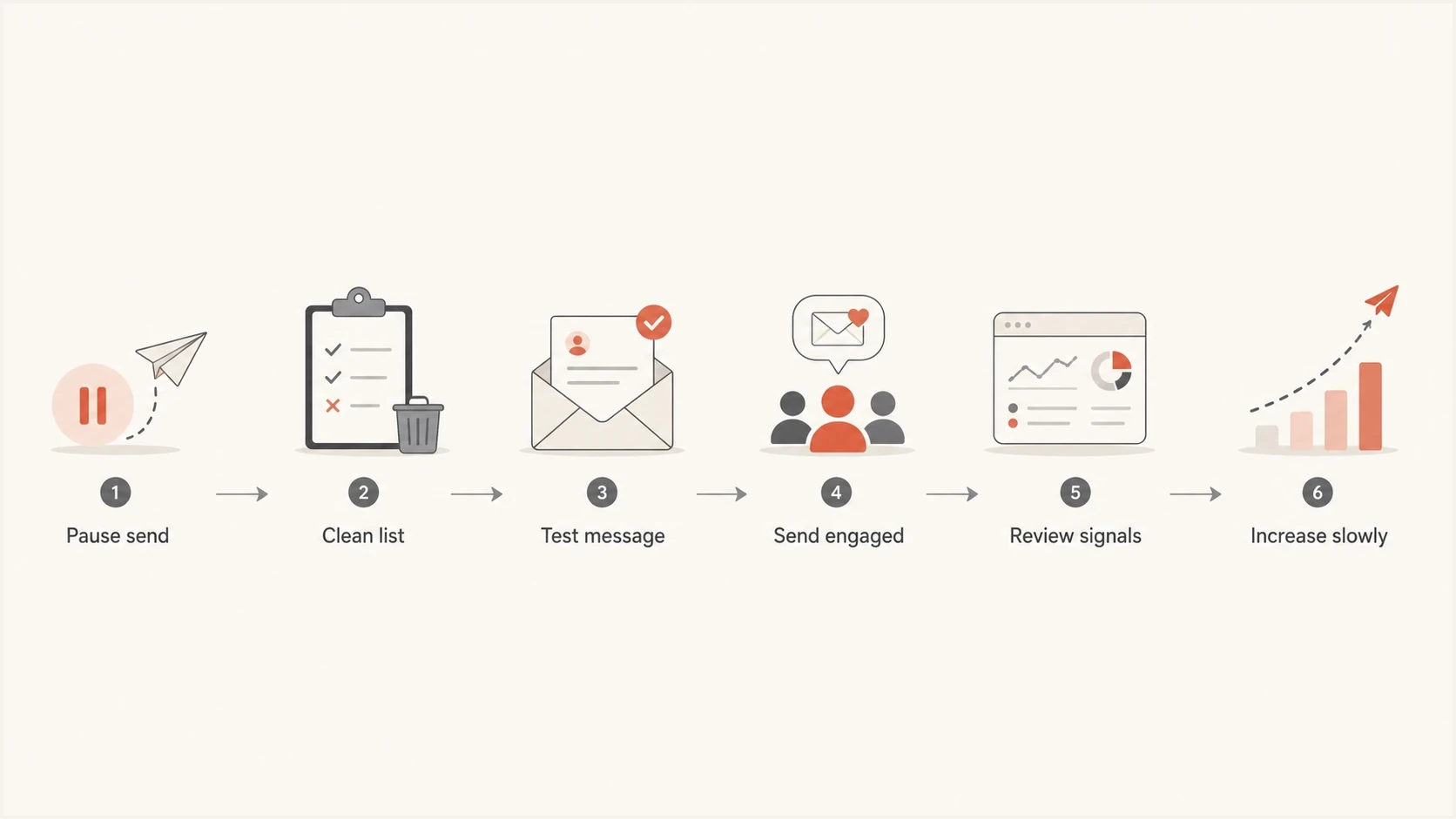
Six-step email warm up restart flowchart covering list cleanup, message testing, engaged recipients, delivery review, and gradual volume increases.
Use this workflow when the pause is short and the list cleanup is complete. The goal is to avoid giving mailbox filters another noisy sample.
Email tester
Send a real email to this address. Suped shows a results button when the test is ready.
?/43tests passed
Once the message and authentication look clean, follow the last clean baseline. If the last clean step was 10,000 and the provider mix remains similar, 8,000 to 10,000 is an illustrative next step after a one-day pause when results remain healthy. If the last step was dirty, drop below it and rebuild with a better audience.
- Pause scheduled warm up batches until the affected segment is excluded.
- Import every suppression from the old sending platform.
- Remove confirmed undeliverable addresses and internal test records; validate domains with missing MX records before suppressing them.
- Build the send group from opted-in recipients with recent clicks, replies, purchases, logins, or other account activity.
- Send one real message and inspect authentication, headers, content, and rendering.
- Resume at the last clean step when metrics are healthy. If recent metrics were poor, choose a lower volume based on their severity and your platform's limits.
- Wait for bounce, complaint, deferral, and recipient-activity data before increasing.
Practical volume examples
These examples assume a new or recently moved dedicated IP that is still warming. The numeric rows assume 10,000 was a genuinely clean earlier baseline. The ranges are illustrations, not provider limits or a promise of safe delivery; choose a smaller send or pause again if failures continue. Longer inactivity requires a review of sending history and your platform's re-warm guidance.
|
|
|
|
|---|---|---|---|
10k | 1 day | 8k-10k | Clean metrics |
10k | 1 day | 5k-8k | Poor results after clean baseline |
10k | 2 days | 5k-10k | Use engagement |
10k | 7 days | 2.5k-5k | Rebuild sample |
10k | 15-29 days | Cautious re-warm | Recent history is weak |
10k | 30+ days | Review re-warm plan | Follow platform guidance |
Illustrative restart choices; adjust to provider results and platform guidance.
If one mailbox provider returns more 4xx deferrals or rate-limit responses, slow that provider-heavy cohort. If permanent bounces exceed normal levels, stop and remove the cause. If complaints spike, pause and change the audience before sending again. A short delay is easier to recover from than a second bad sample.
For a deeper ramp plan, the related warm up timeline explains how long warming takes and when to slow down.
Views from the trenches
These community comments describe individual experiences. Base restart decisions on current provider requirements and your own sending results.
Best practices
Pause for short cleanup windows when bad data is known and the next clean send can wait.
Use the last clean volume as the restart baseline after a pause, then review delivery data.
Import old suppressions before a warm up send, then exclude confirmed internal test records.
Prioritize recent clicks and account activity when restarting after a pause or a poor send.
Common pitfalls
Repeating a dirty send to preserve schedule creates a worse sample than a short pause.
Treating every 5xx rejection as an invalid address hides authentication and policy failures.
Doubling the next send to catch up after a weekend break creates an avoidable volume spike.
Relying only on address checks misses consent and the recipient activity needed for warm up.
Expert tips
Keep a saved exclusion segment for invalid TLDs, confirmed test records, and old suppressions.
Step down by signal severity and review each provider's results after complaints or throttling.
Review provider-specific delivery results before sending again to Microsoft-heavy segments.
Document each pause reason so future warm up decisions use evidence and data, not habit.
Marketer view
Marketer from Email Geeks says a one or two day pause during warm up is acceptable and does not create a penalty by itself.
2024-03-04 - Email Geeks
Marketer view
Marketer from Email Geeks says mailbox providers judge a broader statistical sample, so one missed day matters less than several poor sends.
2024-03-04 - Email Geeks




