
Are Google's spam filters multi-lingual and how cautious should I be with different languages?

Published 20 May 2025
Updated 24 Oct 2026
15 min read
Summarize with
Updated on 24 Oct 2026: We updated the multilingual filtering guidance with Google's RETVec research and corrected the pre-send checks.
Yes. Gmail has multilingual spam filtering: Google documents RETVec, a text-processing component used in its spam classifier that supports every language and all UTF-8 characters. That support is not a guarantee of equal spam-detection accuracy in every language. Treat Finnish and other non-English mail as subject to content analysis alongside authentication, sender reputation, links, and recipient feedback.
The practical answer is this: be as careful in Finnish as you are in English, but focus that caution on consent, relevance, list quality, authentication, sender reputation, link safety, and recipient feedback. Language is part of the message context, and Google does not publish its weight in spam decisions.
- Direct answer: Gmail uses multilingual text processing in spam classification, but Google does not publish equal accuracy claims for every language.
- Main risk: A Finnish email sent to a poorly sourced or stale list with mixed language preferences is riskier than one sent to an engaged Finnish audience.
- Best test: Send real test messages, check placement, inspect headers, and review authentication results before the main send.
- Best copy choice: Use natural local wording instead of awkward substitutes chosen only to avoid old trigger-word lists.
How Gmail handles multilingual email
Gmail does not work like a simple English keyword list. Google describes thousands of signals across its email protections and uses recipient feedback to improve spam classification. Its multilingual text processing does not establish that every spam model performs identically in every language.
For a Finnish campaign to Finnish subscribers, do not rewrite normal Finnish copy just because a translated word resembles a classic English spam trigger. Check whether the offer is clear, whether the recipients asked for it, whether the links and landing page match the sender, and whether the domain has clean authentication and a stable sending history.
A useful rule
Do not write around individual words first. Write for the recipient first, then test the full message as Gmail will see it: content, sender, domain, authentication, links, and recipient feedback together.
There is still a sensible level of caution. An unexpected language often causes recipients to ignore, delete, or report a message. That response can damage results, but it is not proof that Gmail applies an automatic language-mismatch penalty.
What Google's RETVec research confirms
Google explains in its RETVec announcement that Gmail uses a multilingual text vectorizer, a component that converts text into numerical input for a classifier. Google says it supports every language and all UTF-8 characters without text preprocessing. This is direct evidence of multilingual text processing within spam filtering, rather than an inference based on Gmail translation.
The research also addresses altered text, including lookalike characters and invisible characters used to evade detection. Keep normal Finnish accents and other local characters. Replacing letters or inserting hidden characters to disguise promotional words is not a reliable way to improve delivery.
The practical inference is that switching languages does not remove content scrutiny. The announcement does not provide Finnish-specific accuracy results or prove that Gmail judges every language equally. Continue testing with recipients who expect the language.
What Gmail evaluates
Google describes thousands of signals across Gmail, including message origin and the relationship between sender and recipient. Content matters alongside sender behavior and user feedback. A phrase in wanted mail from an established sender has different context from the same phrase in unsolicited bulk mail with failed authentication and a high complaint rate.
|
|
|
|---|---|---|
Language | Expected language and consistent message wording | Medium |
Consent | Whether recipients subscribed and expect the email | High |
Recipient feedback | User-reported spam and mailbox-specific handling | High |
Authentication | SPF and DKIM results, plus DMARC domain matching | High |
Links | URL safety and clear destinations | High |
HTML | Rendering, formatting, and hidden content | Medium |
Practical review priorities, not published Gmail signal weights.
There is no published Gmail rule that a word like "free", "winner", or "prize" automatically causes spam placement. Review the surrounding message for exaggerated claims, misleading subject lines, unrelated landing pages, and poor list quality rather than treating a translated word as a diagnosis.
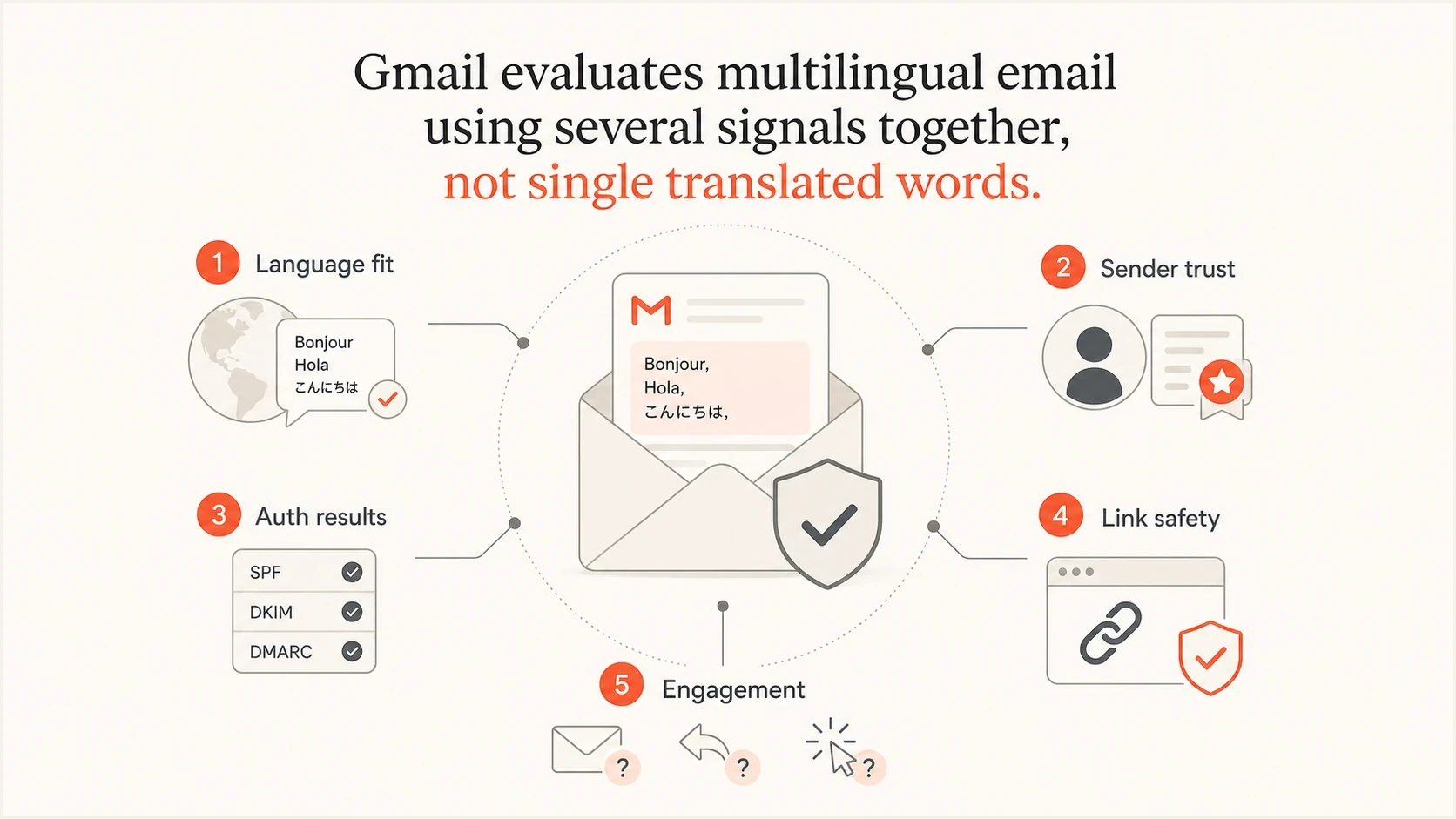
Gmail multilingual spam filtering signals: language fit, sender trust, authentication, link safety, and engagement.
For multilingual campaigns, the content question usually sits behind two more important questions: does the recipient expect this language, and has the sender earned enough trust for Gmail to treat the message as wanted mail?
How cautious to be with Finnish and other languages
Use the same checks for Finnish as for English. If recipients selected Finnish, the signup journey was in Finnish, and the campaign is relevant to them, the language itself is not a reason to expect trouble. If the list is old, bought, scraped, or mixed across language preferences, the same Finnish message becomes riskier.
Lower risk
- Audience match: Recipients signed up in Finnish or regularly engage with Finnish content.
- Clear offer: The subject line and body describe the same promotion without bait.
- Known sender: The domain has consistent volume, authentication, and recipient feedback.
Higher risk
- Audience mismatch: Recipients usually receive English email, then suddenly get Finnish bulk mail.
- Offer pressure: The message combines urgency with prize language and unclear eligibility.
- Weak identity: The domain has failed authentication, poor domain matching, or unrelated visible links.
For the specific "prize" example, keep the word if it is the accurate Finnish word and the campaign involves a prize. Be more careful with the surrounding message: explain who is eligible, why the recipient is receiving the email, who is running the campaign, and what happens after the click.
Multiple languages in one email are not a deliverability issue by default. They become risky when the added language looks unrelated, makes the message harder to understand, or changes recipient behavior in a negative direction.
This is also where plain-language translation matters. Literal translations can create unnatural copy and reduce recipient response. Use replies, clicks, unsubscribes, and complaints to assess audience fit; open rates alone do not establish a language-related filtering problem.
What to check before a multilingual send
Before sending a Finnish or other non-English campaign, run the same checks used for English campaigns, with a few language-specific additions. The goal is to remove avoidable ambiguity.
- Confirm audience language: Prioritize a stated language preference or signup form language. Country alone does not establish which language a recipient wants.
- Use a native review: Have a fluent speaker check the subject line, preheader, offer terms, and call to action for natural wording.
- Validate language markup: For mixed-language HTML, set one primary lang value and tag translated blocks separately. This supports accessibility and is not a spam-filter bypass.
- Use UTF-8: Confirm MIME headers, HTML, and the plain text version preserve local characters after sending. For right-to-left languages, also check text direction and layout.
- Check authentication: Aim for SPF and DKIM to pass, and verify DMARC passes through at least one authenticated domain that matches the visible From domain under the configured matching mode.
- Meet Gmail sender requirements: All senders to personal Gmail accounts need SPF or DKIM, valid forward and reverse DNS, TLS, RFC 5322 formatting, and a user-reported spam rate below 0.3%.
- Apply bulk-sender requirements: At close to 5,000 messages or more to personal Gmail accounts in 24 hours, counted across the same primary domain and its subdomains, use SPF and DKIM, publish DMARC with at least p=none, and meet From-domain matching and unsubscribe requirements.
- Review links: Use branded HTTPS links, avoid unexpected redirects, and keep landing page language consistent with the email.
- Send real tests: Use Suped's email tester to inspect authentication and headers, then check rendering in Gmail.
- Watch early results: Start with the most engaged recipients, then expand only if complaints, delivery errors, and bounces stay low.
Google recommends keeping its user-reported spam rate below 0.1% and never reaching 0.3%. Once Gmail classifies a sender as a bulk sender, that status is permanent. For bulk senders, marketing and promotional messages need RFC 8058 one-click unsubscribe through both List-Unsubscribe and List-Unsubscribe-Post headers, plus a clearly visible unsubscribe link in the body. Honor unsubscribe requests within 48 hours. See Google's sender guidelines and bulk-sender FAQ.
Email tester
Send a real email to this address. Suped shows a results button when the test is ready.
?/43tests passed
For mixed-language HTML, do not put two language values on the root tag. Use one primary language for the document, then apply lang attributes to translated paragraphs, modules, or footers. Test the final sent MIME message after personalization, link wrapping, and footer injection.
Also check whether the sender domain has a clean baseline before attributing any issue to language. Suped's domain health checker can surface DNS authentication configuration problems. Inspect a sent message as well, because published records alone do not prove that a campaign passes SPF, DKIM, and DMARC.
The most useful testing comes from comparing versions against the same audience type. Test the original language and the final localized version while keeping the sender, offer, and template stable. If the localized version performs worse, look first at audience match, translation quality, offer clarity, rendering, and authentication before blaming a translated trigger word.
Check authentication before blaming translated words
Authentication failures are a concrete problem to investigate in any language. DMARC passes when at least one of SPF or DKIM passes and its authenticated domain meets the required match with the visible From domain. An SPF failure alone does not mean DMARC fails if DKIM provides that match. Successful authentication does not guarantee inbox placement.
Example DMARC record for monitoringDNS
v=DMARC1; p=none; rua=mailto:dmarc-reports@example.com
A monitoring policy is a starting point when you are still discovering senders; p=none does not request quarantine or rejection. The example uses DMARC's default relaxed domain matching. Use strict matching only when the domain has a specific reason and every legitimate source has been tested. Once legitimate sources pass with matching domains, stage stronger enforcement after checking the reports. Suped's DMARC monitoring gives you source-level reporting and steps to investigate failed authentication.

Issue steps to fix dialog showing the issue overview, tailored fix steps, and verification action
Suped's DMARC reporting and email authentication platform fits into this workflow by showing which sources send for the domain and whether their messages pass DMARC. Compare source-level failures before and after a localized campaign to investigate SPF lookup limits or DKIM setup errors. DMARC reports do not show message language or whether a message reached the inbox.
Check DMARC domain matching
For DMARC, the visible From domain must share the same organizational domain with either the SPF-authenticated envelope sender domain or the authenticated DKIM signing domain under relaxed matching. Strict matching requires the domains to be identical. Tracking links do not affect this test. See the DMARC specification.
How to handle words like prize, free, win, and reward
Do not remove commercial words just because they appear on spam trigger-word lists. Those lists are often too simplistic. Gmail cares about whether the message looks wanted and trustworthy. A loyalty program email can say "reward". A competition email can say "prize". A discount email can say "free shipping" if that is the real offer.
Review vague claims and pressure alongside sender identity and recipient trust. Use spam trigger words as a copy review aid, not as a final deliverability diagnosis.
Acceptable wording
Use the normal local word when it accurately describes the offer. Make the eligibility, sender, deadline, and action clear.
- Plain subject: Your member reward is ready.
- Clear body: Explain why the recipient qualifies and what the next step is.
Risky wording
Avoid vague or exaggerated copy that makes the recipient doubt why they received the email.
- Vague subject: Claim your prize now before it disappears.
- Unclear body: Missing sender context, hidden terms, or unrelated landing pages.
For Finnish specifically, avoid over-localizing into awkward phrasing. Use the word a Finnish recipient expects. A strange synonym chosen only to avoid a perceived trigger can make the message less clear, and unclear messages get fewer positive interactions.
Testing language fit in Gmail
Test accounts can catch authentication, encoding, and rendering problems, but one seed inbox cannot predict placement for a full audience. Use Gmail accounts configured for the target locale to check translation prompts and rendering, then validate results with a small group of real recipients who asked for that language.
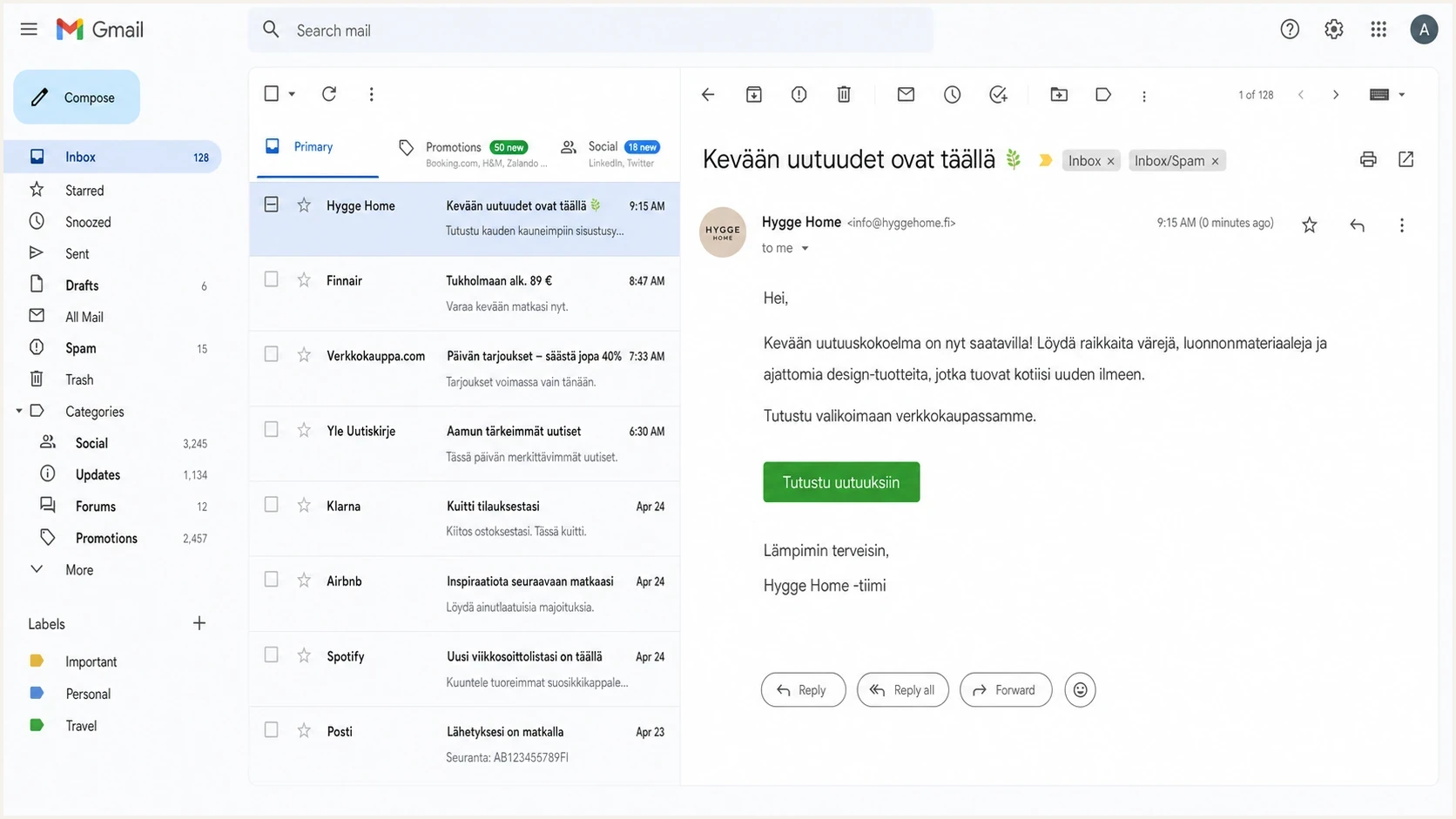
Google Gmail inbox showing a Finnish marketing email used for spam placement testing.
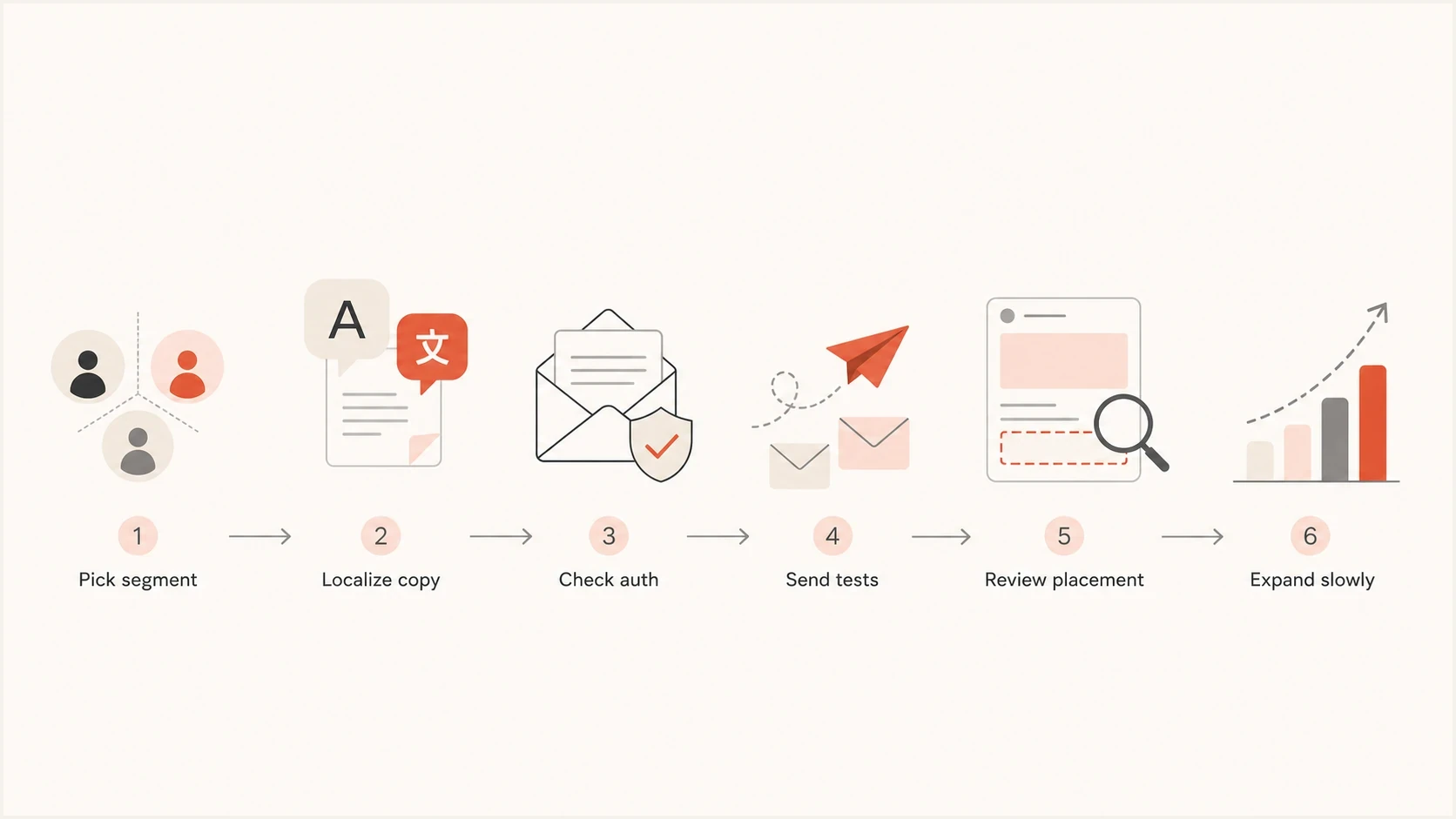
Multilingual email testing flow from audience segment to gradual rollout.
Use seed tests as a signal, not a verdict. Sender-reported opens and clicks can help assess campaign fit, but Google's sender guidance says Google does not track open rates and cannot verify third-party open-rate accuracy. Low open rates alone do not establish a spam problem. Record Promotions-tab placement separately: Promotions is an inbox category, not the Spam folder.
- Use matched test accounts: Configure accounts for the target locale to check encoding, rendering, and translation prompts.
- Compare versions: Keep sender, template, and links stable while changing only the language version. Compare recipients with similar language preferences and engagement.
- Read the headers: In Gmail, open the message menu and select "Show original" to inspect SPF, DKIM, and DMARC results before judging the copy.
- Monitor reputation: Watch bounces, complaints, blocklist (blacklist) status, and Gmail delivery errors after launch.
If placement drops after a language change, do not assume translation caused it. Check whether the segment changed, the offer changed, the link domain changed, the volume jumped, or authentication began failing. Use Suped's DMARC reports to investigate authentication changes, and check Gmail placement separately.
Can Gmail block email by language?
Gmail does not provide a documented search operator or filter condition that blocks every message by detected language. Older suggestions such as lang:en or -lang:en are not supported language-filter instructions in Google's documented Gmail search operators. Changing Gmail's display language or translation settings does not create a spam rule.
Google Search's language results filter applies to web results. It does not configure Gmail spam filtering or create a rule for non-English email.
- Report unwanted messages as spam so Gmail receives direct feedback about those messages and similar mail.
- Create narrow filters around stable senders, domains, subject phrases, or repeated terms when the unwanted mail follows a reliable pattern.
- Avoid broad filters based only on an alphabet or common foreign words because they can remove receipts, account notices, support replies, and legitimate personal mail.
- Mark a legitimate message as not spam when Gmail gets the classification wrong for that mailbox.
For senders, this makes consent and language preference more important. Recipients should not need custom filters to separate wanted localized mail from unexpected campaigns.
When recipients see an unexpected language
Gmail can show a translation prompt when a message language differs from the recipient's preferred settings, as Google documents for message translation. That banner is separate from spam classification. Google has not documented a rule that sends mail to spam solely because its language differs from a user's settings.
- For senders, reduce mismatch by sending localized campaigns to people who selected, used, or engaged with that language.
- For legitimate recipients, marking the message as not spam, adding the sender to contacts, or creating a narrow Gmail filter can improve handling for that mailbox.
- For support teams, document the expected From address, sender name, and language version so recipients know what to trust.
- For deliverability teams, do not rely on recipient filters as a sending strategy. Fix audience choice, sender identity, and authentication first.
This distinction matters for global senders. A multilingual legal footer, a short translated paragraph, or a full localized campaign can be legitimate, but recipients still judge whether that message fits their expectations and whether they trust the sender.
When language becomes a real deliverability issue
Language becomes a real deliverability issue when it conflicts with recipient expectation. Spam reports directly affect Gmail's view of a sender. Ignoring and deleting are also useful warnings for the sender that the audience or localization is wrong, even though Google does not publish them as language-specific ranking signals.
Language risk levels
Practical audience-risk categories for planning tests, not Gmail thresholds or scores.
Low
Expected
Same language as signup and previous engagement
Medium
Test first
Known audience, but first campaign in this language
High
Segment
Mixed or stale list with no clear language consent
Critical
Do not send
Cold or purchased list with translated bulk copy
The same logic applies to regional variations. A French email to subscribers who selected French is expected. A French email to a global English list needs a language preference check. For bilingual email, lead with the recipient's expected language and clearly separate the secondary language.
If you send multiple languages from the same domain, keep the sender identity stable and segment carefully. Sudden volume spikes to a new locale can look different from your normal pattern. A gradual rollout to engaged recipients produces cleaner evidence before the broader send.
A practical rollout plan
For a Finnish campaign, use this rollout pattern to check audience fit before expanding the send.
- Start with proof: Confirm the list source, language preference, and recent activity before approving the audience.
- Validate identity: Check SPF, DKIM, DMARC domain matching, tracking domains, and landing page domains.
- Localize the offer: Use natural Finnish, clear terms, and an expected sender name.
- Pilot first: Send to recent responders and subscribers who confirmed a Finnish language preference before expanding.
- Watch signals: Monitor complaints, unsubscribes, bounces, authentication failures, and Gmail delivery errors.
Recommended choice
If the list is Finnish and opted in, send the Finnish copy with the normal word for prize after native review and authentication checks. Avoid changing accurate language into awkward copy just to dodge a theoretical filter.
Before expanding the campaign, use Suped's source-level reports to confirm that legitimate sending sources pass DMARC. If failures appear after the pilot, fix the affected sender before continuing. Keep the audience's language preference available in the unsubscribe or preference-management flow so recipients can choose the messages they want.




