Why is Google Postmaster Tools showing SPF misalignment despite passing DMARC for subdomain, and how to fix DMARC for root domain?

Published 18 Jul 2025
Updated 31 Jul 2026
11 min read
Summarize with
Updated on 31 Jul 2026: We updated this guide for Google's primary-domain compliance scope and the current DMARC standard.
Google Postmaster Tools can show SPF misalignment while DMARC still passes because DMARC does not require SPF and DKIM to both match the visible From domain. DMARC passes when either SPF passes with an aligned envelope domain or DKIM passes with an aligned signing domain. In this case, SPF is probably authenticating a vendor bounce domain, while DKIM is authenticating the sending subdomain used in the visible From address.
The root-domain fix is separate because Google's Compliance status dashboard reports status for the primary domain and includes traffic sent by its subdomains. If the subdomain has working DMARC but the organizational domain does not, publish a valid TXT DMARC record at _dmarc for the root domain. Do not let a wildcard DNS record or web-hosting CNAME answer for that name. Confirm the result with message headers and aggregate reports. Suped's DMARC monitoring turns those reports into source-level authentication results and fix steps.
- Direct answer: SPF can pass authentication and still be misaligned for DMARC when the Return-Path domain belongs to the sending platform.
- Deliverability risk: If DKIM passes and aligns with the visible From domain, the SPF warning is usually not the immediate problem.
- Root-domain risk: A missing or broken root DMARC record creates a compliance gap and should be fixed by the DNS owner.
- Vendor ask: Ask the sending platform to confirm the Return-Path, DKIM signing domain, visible From domain, and whether a custom bounce domain is available for SPF alignment.
Why SPF can be misaligned while DMARC passes
The key point is that SPF and DMARC evaluate different identifiers. SPF checks whether the sending IP is allowed by the envelope sender domain, also called MAIL FROM or Return-Path. DMARC checks whether an authenticated SPF or DKIM domain aligns with the visible From domain that recipients see. Those domains are often different when a marketing platform sends mail on your behalf.
A Salesforce Marketing Cloud setup, for example, can send a message with a visible From address at a branded subdomain while the Return-Path points at an ExactTarget bounce domain. SPF can pass for the bounce domain, but that SPF result does not count toward DMARC for the branded From domain. If DKIM signs with the branded subdomain and passes, DMARC still passes.
SPF view
- Checked domain: SPF checks the envelope sender, not the visible From address.
- Common result: The vendor bounce domain passes SPF because the vendor controls that path.
- DMARC effect: That SPF result does not help DMARC when the domains lack alignment.
DMARC view
- Checked domain: DMARC compares authenticated domains with the visible From domain.
- Passing path: A DKIM pass with the branded subdomain is enough for DMARC success.
- Bad sign: DMARC fails when neither SPF nor DKIM produces an aligned authenticated domain.
Read four values in the same message header: smtp.mailfrom, header.d, header.from, and the final DMARC result. Under relaxed alignment, a passing DKIM domain can be a subdomain of the same organizational domain as the visible From. Strict alignment requires an exact domain match.
Example authentication result
Authentication-Results: mx.google.com;
       spf=pass smtp.mailfrom=bounce.s7.exacttarget.com;
       dkim=pass header.d=email.example.com;
       dmarc=pass header.from=email.example.com
Why Google reports the root-domain warning
Google Postmaster Tools' Compliance status dashboard applies to primary domains, not separate subdomain views. It uses mail sent by subdomains when calculating the primary-domain status. A sending subdomain can therefore pass message-level DMARC while the dashboard still shows that the primary domain has no valid DMARC record or DNS returns another record at that name.
Postmaster data is aggregated and not real time. Google says dashboard data typically updates within 24 hours, while a Compliance status fix can take up to seven days to appear because it uses a rolling multi-day average. The Compliance status and Authentication dashboards also use slightly different datasets. Judge one message by its headers, then use the dashboards to assess patterns.
|
|
|
|---|---|---|
Lower SPF rate | Third-party envelope domains | Check header alignment |
DKIM pass | Signing domain authenticated | Confirm alignment |
DMARC pass | One aligned path worked | Verify aggregate reports |
Root CNAME | DMARC TXT is absent | Publish valid TXT |
Compact interpretation of common Google Postmaster Tools signals
Google says correctly configured senders typically reach DKIM and DMARC pass rates of 95% or higher. SPF rates are often lower when third parties send mail. That difference can be normal, but every direct bulk message still needs SPF and DKIM authentication, with at least one path aligned to the visible From domain.
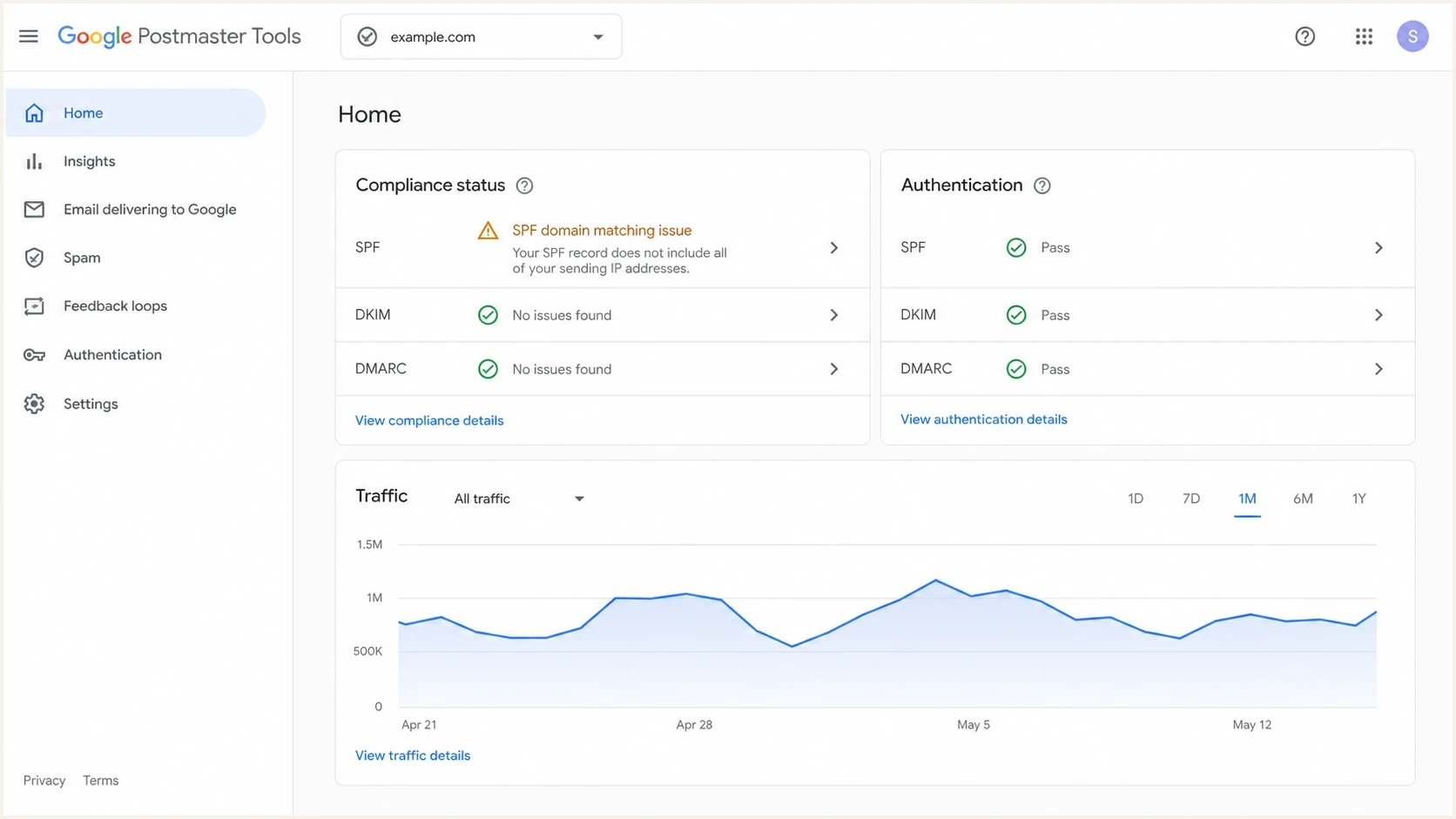
Google Postmaster Tools showing SPF warning with DKIM and DMARC passing
Fix the root domain DMARC record
For the root domain, the DNS name must be _dmarc followed by the organizational domain. If the organizational domain is example.com, the DMARC host is _dmarc.example.com. The record must be a TXT record, not a web-hosting CNAME. Some DNS panels append the zone name automatically, so enter only _dmarc when the provider expects a relative host name.
Start with a monitoring policy if the root domain has not been through a full authentication review. Use p=none, send aggregate reports to a dedicated mailbox or reporting platform, then review legitimate sources before enforcement. If the reporting address uses a different domain, that destination domain must publish the required external-report authorization record. Validate the syntax with the DMARC checker after DNS publishes.
Root domain DMARC starter record
Host: _dmarc.example.com
Type: TXT
Value: v=DMARC1; p=none; rua=mailto:dmarc-reports@example.com;
       adkim=r; aspf=r
Do not let wildcard DNS hide DMARC
If a TXT lookup for _dmarc returns a CNAME to a web host, the DMARC record is not being published at the name Google checks. Create an explicit TXT record for _dmarc to override a wildcard. If an exact CNAME already exists at that name, remove or replace it because a CNAME cannot coexist with a TXT record at the same owner name.
Problem lookup
;; ANSWER SECTION:
_dmarc.example.com. 300 IN CNAME wp.wpenginepowered.com.
That lookup result means the DNS provider is answering the DMARC name with a web-hosting target. It does not mean the web host controls your DMARC policy. It means the DNS zone needs a specific _dmarc TXT record for the root domain.
DMARC checker
Look up a domain's DMARC record and catch policy issues.
?/7tests passed
How root and subdomain DMARC policies interact
A DMARC record published directly on the visible From subdomain takes precedence for that subdomain. If no valid record exists there, receivers discover a parent policy. Publishing a root record therefore does not replace a working subdomain record. It covers the organizational domain and supplies policy for subdomains that do not have their own record.
- Direct subdomain record: The record at _dmarc.email.example.com controls mail with email.example.com in the visible From domain.
- Parent discovery: When no direct record exists, the receiver looks up the DNS tree for an applicable DMARC policy.
- Subdomain policy: The sp tag can set a different requested policy for subdomains without direct DMARC records.
- Google compliance: The root record still matters because Compliance status reports against the primary domain.
RFC 9989 is the current DMARC protocol standard. It replaced Public Suffix List policy discovery with a DNS Tree Walk. The standard removed the pct tag, and introduced t=y for testing. Google's current setup documentation still describes pct, so deployed guidance is in transition. A simple p=none starter record needs neither tag.
What to ask Salesforce Marketing Cloud to confirm
Salesforce Marketing Cloud usually controls the sending subdomain setup, such as the private domain, DKIM keys, bounce handling, and tracking domain. It usually does not control the root domain's DMARC record unless your DNS is delegated in a specific way. The escalation should separate the subdomain question from the root-domain DNS question.
Ask for evidence, not a general pass or fail statement. A useful response includes a recent message header and identifies the visible From domain, DKIM signing domain, Return-Path domain, DKIM result, SPF result, and DMARC result. If DKIM passes and aligns with the branded subdomain, the DMARC path works even when SPF is not the aligned path.
- Header proof: Ask them to provide a full Authentication-Results header for a recent Gmail-delivered message.
- DKIM domain: Confirm the DKIM d= domain shares the visible From organizational domain under relaxed alignment, or matches it exactly under strict alignment.
- Bounce domain: Confirm whether the Return-Path uses the branded subdomain or a vendor bounce domain.
- Root DNS: Tell them root-domain DMARC is owned by your DNS team unless SFMC has explicit DNS delegation.
Push the sender
- DKIM failure: DKIM fails or signs with a domain outside your organizational domain.
- Wrong From: Messages use a visible From domain that was not part of the setup.
- Bad private domain: The platform cannot show a clean DKIM and DMARC pass in real headers.
Fix your DNS
- Missing root: The organizational domain has no DMARC TXT record.
- Wildcard catch: A wildcard record sends the DMARC host name to web hosting.
- Policy staging: The root domain needs monitoring before quarantine or reject.
How to verify the fix
Verify the fix in two layers. First, send a real message to Gmail and read its headers. Second, monitor aggregate DMARC reports over several days. Postmaster Tools normally updates within 24 hours, but the Compliance status can take up to seven days to reflect a change.
Suped's product supports this workflow by connecting the root-domain record, subdomain sources, SPF and DKIM results, and alerts in one place. It turns aggregate report data into identified sources and specific fix steps. For teams that need policy staging without repeated DNS changes, Hosted DMARC keeps the root-domain rollout manageable.

Issue steps to fix dialog showing the issue overview, tailored fix steps, and verification action
After publishing the root record, confirm that aggregate reports arrive, legitimate sources pass DMARC, remaining failures map to known sources, and Google's primary-domain compliance signal improves after fresh traffic enters the rolling window. Fix a failing source directly instead of weakening policy for every sender.
DMARC rollout stages
Use report evidence to decide when the root-domain policy is ready for the next stage.
Monitor
p=none
Collect reports and identify every legitimate sender.
Partial protection
p=quarantine
Apply quarantine after legitimate traffic is passing.
Full protection
p=reject
Reject unauthenticated mail after reporting is clean.
Recommended record and rollout
For a domain that is still being audited, start with relaxed SPF and DKIM alignment unless strict alignment has a documented operational reason. Relaxed alignment accepts authenticated subdomains under the same organizational domain, which is usually what marketing and transactional mail need.
Use a record generator to avoid syntax mistakes before handing the DNS change to IT. The DMARC record generator can build a starter record with reporting addresses and policy options.
Staged root-domain record
v=DMARC1; p=none; rua=mailto:dmarc-reports@example.com;
adkim=r; aspf=r
What good looks like
A healthy setup has DMARC on the root domain, DKIM passing for each real sender, aggregate reports flowing into a monitored system, and no wildcard DNS response at the DMARC host name. SPF alignment is helpful when available, but DKIM is often the cleaner DMARC path for hosted sending platforms.
Views from the trenches
Best practices
Verify Header From, Return-Path, DKIM d=, and DMARC result in the same email message.
Publish a root-domain DMARC TXT record before escalating vendor-specific SPF warnings.
Use aggregate reports to confirm every legitimate source before tightening DMARC policy.
Common pitfalls
Treating SPF pass as DMARC success when the envelope domain belongs to a vendor.
Letting wildcard DNS answer for _dmarc, which hides the missing root-domain record.
Asking SFMC to fix a root DNS record that only the domain owner can publish correctly.
Expert tips
Start with p=none on the root, then use report data before moving enforcement forward.
Keep relaxed alignment unless strict alignment has a clear operational reason documented.
Track Postmaster signals against real headers because compliance status can lag seven days.
Expert from Email Geeks says SPF can pass authentication while still failing domain matching, so the DKIM domain decides DMARC.
2024-04-08 - Email Geeks
Marketer from Email Geeks says a root domain without DMARC can explain compliance warnings even when the subdomain passes.
2024-04-08 - Email Geeks
The practical answer
Do not treat a Google Postmaster Tools SPF-misalignment warning as proof that DMARC is failing. If DKIM passes with an aligned branded domain, DMARC can pass correctly. Publish DMARC at the organizational domain, make sure _dmarc is not caught by a wildcard or web-hosting CNAME, and verify real traffic with headers and aggregate reports.
Once the root record is in place, escalate to the sending platform only if real headers show DKIM or DMARC failures for the branded sending domain. Otherwise, correct the domain-owner side: clean DNS, monitor reports, fix named sources, and stage enforcement when legitimate mail passes.




