Why are Microsoft DMARC reports missing during outages?

Microsoft DMARC reports go missing during outages when messages stop reaching DMARC evaluation, report generation is disrupted, or report emails cannot reach your collection address. A gap alone proves neither an authentication failure nor successful delivery.
I first compare Microsoft reporting with other receivers and check SMTP delivery logs. If other reports arrive normally while Microsoft traffic is deferred, a Microsoft-side disruption is a stronger working explanation than a sudden domain-wide DNS problem. Confirm the affected stage before changing anything.
Why an outage interrupts DMARC reporting
DMARC aggregate reporting has several dependencies. A receiver evaluates messages using your domain, groups results into a reporting period, and sends an XML report to the address requested by your DMARC record. Your collector then accepts and processes that report email.
If a connection fails or Microsoft defers a message before receiving its headers, the receiver cannot discover the visible From domain for DMARC. That attempt produces no DMARC result for your domain. An outage later in processing can instead leave evaluated messages waiting for report generation or transmission.
Messages never reach evaluation
Early SMTP failures leave mail in the sender's queue. There is no DMARC observation to include for those attempts. Check connection failures and the stage of any temporary response.
Reports fail after evaluation
Authentication results exist, but report creation, outbound delivery, or collector processing is interrupted. Check report receipt logs and ingestion status separately from message delivery.
These are diagnostic possibilities, not a confirmed description of Microsoft's internal systems. An Exchange Online incident does not establish which reporting component failed. I treat the timing as evidence to investigate, rather than proof of a particular root cause.
Also distinguish the report's origin from the sender being reported. A Microsoft sending source in another receiver's report does not mean Microsoft generated that report. Filter by reporting organization when investigating Microsoft's missing data.
What missing reports tell you
Compare Outlook.com and enterprise Microsoft reporting separately when your collector distinguishes them. They do not have to stop or resume together. Google's or Yahoo's continued reporting helps narrow the investigation, but it does not rule out Microsoft-specific filtering at your collection mailbox.
Missing data is not a zero-failure result. Removing one receiver's traffic changes the denominator behind an overall pass rate. A higher percentage during an outage can therefore describe a different mix of reporters rather than an authentication improvement.
|
|
|---|---|
Only Microsoft missing | Incident and filtering |
All reporters missing | DNS and collector |
SMTP deferrals rising | Queues and reply stage |
XML received, no data | Import processing |
Recent DNS change | RUA and authorization |
Use these patterns to choose the next check, not to declare a root cause.
Check service health and SMTP evidence first
For an incident such as EX1550543, open Health > Service health in the Microsoft 365 admin center. Check active issues or issue history, affected services, and tenant-specific impact. A service recovery update is a checkpoint; verify that your own delivery queues recover too.
I record the last report arrival and its reporting window separately. Then I compare those times with sender logs using UTC. An email received this morning can summarize yesterday's traffic, so arrival time alone gives an incomplete outage timeline.
- Identify scope. Compare reporting organizations across affected domains and retain the last complete Microsoft report.
- Inspect replies. Save SMTP response text and transaction stage. A 4xx response requests retry; a 5xx response rejects that attempt permanently.
- Check receipt. Inspect collection mailbox logs, quarantine, attachment limits, and report import errors.
- Preserve evidence. Keep message identifiers, UTC timestamps, incident references, and relevant DNS changes for escalation.
A final 250 response after message data means the receiving server accepted responsibility for the message. It does not prove inbox placement. Conversely, a timeout or temporary deferral before message data tells you nothing about that message's DMARC result.
A message evaluated and then rejected because of DMARC can still appear in an aggregate report. Microsoft's policy handling announcement describes rejection and quarantine behavior for authentication failures. Do not confuse that behavior with mail deferred before authentication during an outage.
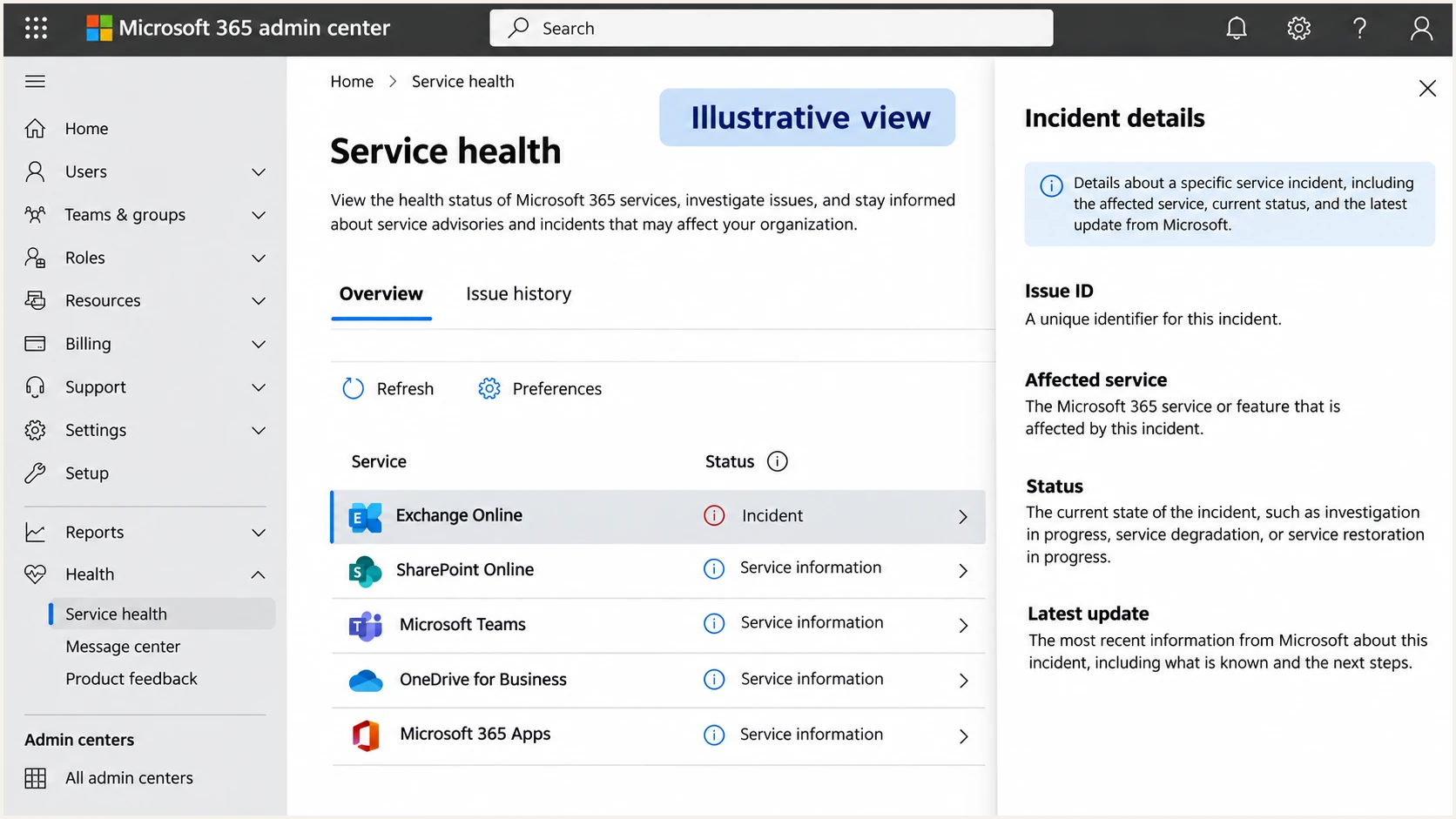
Illustrative Microsoft 365 admin center view showing where to inspect Exchange Online service health.
An administrator for a receiving Microsoft 365 tenant can also inspect message trace for messages that reached that environment. A sender delivering to another organization's tenant usually needs that recipient administrator's help. Start with the sending system's logs when receiving-side access is unavailable.
Avoid repeatedly resending a deferred campaign. Let the sending system apply its retry policy while you track queue age. Manual resends create duplicate deliveries if the original queued messages succeed later.
Validate reporting DNS without weakening enforcement
If the gap persists, verify the effective DMARC record for the actual From domain, including an explicit subdomain record where applicable. Check the RUA address, recent DNS edits, and external reporting authorization when the destination uses a different organizational domain.
This example assumes reject enforcement has already been validated. The reporting address is illustrative; retain the working destination and policy for your own domain.
Example DMARC record with aggregate reportingdns
_dmarc.example.com. TXT "v=DMARC1; p=reject; rua=mailto:rua@example.com"
Use Suped's DMARC checker to validate the published record and reporting configuration. A valid record confirms configuration, not whether Microsoft generated a report. For an external destination, verify the authorization record at the destination domain as well.
Check the collector independently: mailbox routing, storage limits, report attachment handling, and ingestion health. If the reporting mailbox itself relies on an affected Microsoft service, that is another dependency to investigate.
DMARC checker
Look up a domain's DMARC record and catch policy issues.
?/7tests passed
Keep an established quarantine or reject policy unless separate evidence identifies a legitimate authentication problem that requires a controlled change. Switching to monitoring mode does not restore unavailable SMTP infrastructure or deliver a report stuck elsewhere.
Microsoft 365 documents aggregate reporting when the receiving tenant's MX points directly to Microsoft 365. Routing through another gateway changes expected reporting coverage. This concerns the recipient tenant's inbound route, not a requirement to move your own domain's MX. Check reporting coverage requirements before treating a longstanding absence as an outage.
Measure recovery by reporting windows
Aggregate reporting is usually daily, with additional time needed for generation, delivery, and processing. An overnight gap is therefore not automatically abnormal. Compare it with Microsoft's usual arrival pattern for your domain and the latest complete reporting period.
When reports resume, inspect the XML date_range begin and end values. Use Suped's XML analyzer to inspect a received report's metadata and authentication results. Check whether it fills an older gap or covers only a newer period.
Recovery does not guarantee backfill
Normal mail flow can resume before reporting catches up. Some missing reporting periods remain unfilled. Treat a recovered service and a complete reporting history as separate checks; do not promise a fixed report recovery deadline.
I use two missed normal reporting cycles after confirmed mail-flow recovery as an escalation trigger, not a Microsoft guarantee. Escalate sooner when SMTP failures continue or the collector rejects reports. Include the affected domain, last complete window, and receiving logs.
Queued mail delivered after recovery can appear in the period when Microsoft evaluated it, rather than when the sender first attempted delivery. Preserve the gap in your incident notes and avoid interpreting later volume changes as an immediate reputation or authentication shift.
Use Suped to compare reporters and DNS changes
Our DMARC monitoring platform, Suped, helps investigate the data that receivers actually deliver. Filter the Data view by reporter and time period, then compare Microsoft coverage with other reporting organizations. Export relevant records as CSV for the incident record.
Check Suped's DNS history for changes near the gap, then inspect detailed authentication results for failures that are present. This keeps a missing reporter separate from a verified SPF or DKIM problem and gives the team specific evidence for its next action.
DMARC records drawer showing filters, record rows, authentication results, and CSV export
Suped's issue detection and notification settings support ongoing authentication work, but report-derived findings depend on incoming data. Suped cannot reconstruct reports that Microsoft never generated. Use SMTP evidence alongside the dashboard during a reporting interruption.
Once reporting resumes, review Microsoft records by source before changing policy. Investigate new failures against message headers and DNS history, and keep the outage period annotated so an incomplete baseline does not drive an unnecessary configuration change.
Views from the trenches
Best practices
Compare Microsoft reporting with other receivers before changing a working DNS record.
Track report arrival times separately from the reporting periods recorded in the XML.
Preserve SMTP replies and queue details to distinguish deferrals from authentication failures.
Common pitfalls
Treating missing Microsoft reports as evidence that all mail passed authentication checks.
Assuming every rejected message was evaluated for DMARC before the SMTP session ended.
Changing an enforced DMARC policy to fix a reporting gap without checking mail flow first.
Expert tips
Check consumer and enterprise Microsoft reporting separately when your collector permits it.
Review the first returning report's time window before deciding an outage gap has been filled.
Escalate with UTC timestamps and collector logs after normal reporting cycles remain absent.
Marketer view
Marketer from Email Geeks says that Microsoft reporting stopped while other receivers continued sending reports, helping narrow the investigation.
2026-11-13 - Email Geeks
Marketer view
Marketer from Email Geeks says that interrupted mail acceptance leaves fewer messages available for receiver-side authentication reporting.
2026-11-13 - Email Geeks
Keep enforcement stable while investigating the gap
Record the last complete Microsoft reporting window now, preserve SMTP evidence, and verify the collector. Keep an incident open until mail delivery and reporting have each been checked.
When complete data returns, compare like-for-like reporting periods before approving the next policy change. If a period remains missing, document that limit in any authentication or incident report shared with stakeholders.
Frequently asked questions
No. Reports disappear when evaluation, generation, delivery, or collection is interrupted. Check sender logs for the actual SMTP response and transaction stage. A missing report cannot establish a message's delivery outcome.
Yes. A receiver can evaluate DMARC, reject a message, and include the result in an aggregate report. Attempts blocked before the receiver obtains the message headers do not supply the same DMARC evidence.
There is no guaranteed complete backfill. Inspect the reporting periods in returning reports and record any remaining gaps. Restored mail delivery does not establish that historical report generation or delivery has recovered.
Keep a working enforcement policy. Change it only when separate evidence identifies legitimate authentication failures and supports a controlled adjustment. A reporting interruption alone does not justify weakening protection.