Which ISPs deliver DMARC reports and what configuration is needed?

Updated on 23 Sep 2026: We updated this guide for current DMARC reporting standards, clarified receiver coverage, and added a field-by-field RUA reference.
Google, Yahoo, Microsoft 365, Zoho, Seznam, Mail.ru, Rackspace's emailsrvr.com platform, and many regional or corporate mailbox providers send DMARC aggregate reports when they receive mail using your domain. Apple does not publicly document RUA generation, so treat Apple/iCloud reporting as variable rather than guaranteed. The configuration needed is a valid DMARC TXT record with a rua destination. If the reporting address uses a different organizational domain, the destination domain also needs external reporting authorization, often called EDV.
If Google is the only reporter after a week, do not treat that as proof that nobody else supports DMARC reporting. It usually means your mail mostly went to Google recipients, another receiver saw no mail using your domain or does not generate reports, the DMARC record has a syntax or delivery issue, or the external destination verification record is missing at the report receiver domain.
Microsoft 365 needs a current caveat. Older operational advice often said Microsoft did not send aggregate reports. Microsoft 365 now documents aggregate report delivery for domains with a valid rua value, provided the recipient domain routes inbound internet mail directly to Microsoft 365. Microsoft 365 still does not send DMARC forensic reports.
Short answer
Expect reports from large mailbox providers, but do not expect a complete report from every ISP. DMARC reporting is receiver-side behavior. The receiver has to support report generation, receive mail using your domain during the report window, accept your rua destination, and successfully deliver the XML report email.
- Common reporters: Google, Yahoo and AOL-managed mail, Microsoft 365, Zoho, Seznam, Mail.ru, and Rackspace commonly appear in RUA data.
- Variable reporting: Apple/iCloud, corporate gateways, regional ISPs, universities, and security appliances vary by implementation and policy.
- Rare reports: Failure reports sent through RUF are uncommon because they can expose message-level data and create privacy risk.
- Best signal: Report diversity follows recipient diversity. A domain that sends mostly to Gmail gets mostly Google reports.
The key rule
A DMARC report is not sent by your email platform. It is sent by the receiving side after that receiver evaluates messages claiming to be from your domain. That is why one domain can see Google, Yahoo, and Microsoft reports while another domain sees only Google during the same week.
Which providers usually send reports
Provider support falls into two practical categories: aggregate reporting and failure reporting. Aggregate reporting is the normal RUA feed that most DMARC monitoring workflows depend on. Failure reporting is the RUF feed, and it is far less dependable. For most domains, RUA is the feed worth designing around.
|
|
|
|
|---|---|---|---|
Google / Gmail | Yes | No | Needs valid RUA; EDV if external |
Yahoo / AOL | Yes | Do not rely on it | Reports follow observed traffic |
Microsoft 365 | Yes | No | Recipient domain's MX must point directly to Microsoft 365 |
Apple / iCloud | Not publicly documented | Do not rely on it | Treat observed reports as variable |
Zoho | Yes | Do not rely on it | Depends on traffic |
Seznam | Yes | Do not rely on it | Regional signal |
Mail.ru | Yes | Do not rely on it | Regional signal |
Other ISPs | Mixed | Rare | Receiver-specific |
Typical DMARC report behavior by receiver type.
This table is a working expectation, not a guarantee. The reporting organization named in the XML can also differ from the recipient domain because one provider can host mail for many domains. A proper DMARC monitoring workflow should show reporting organizations, source IPs, authentication alignment, and policy disposition together.
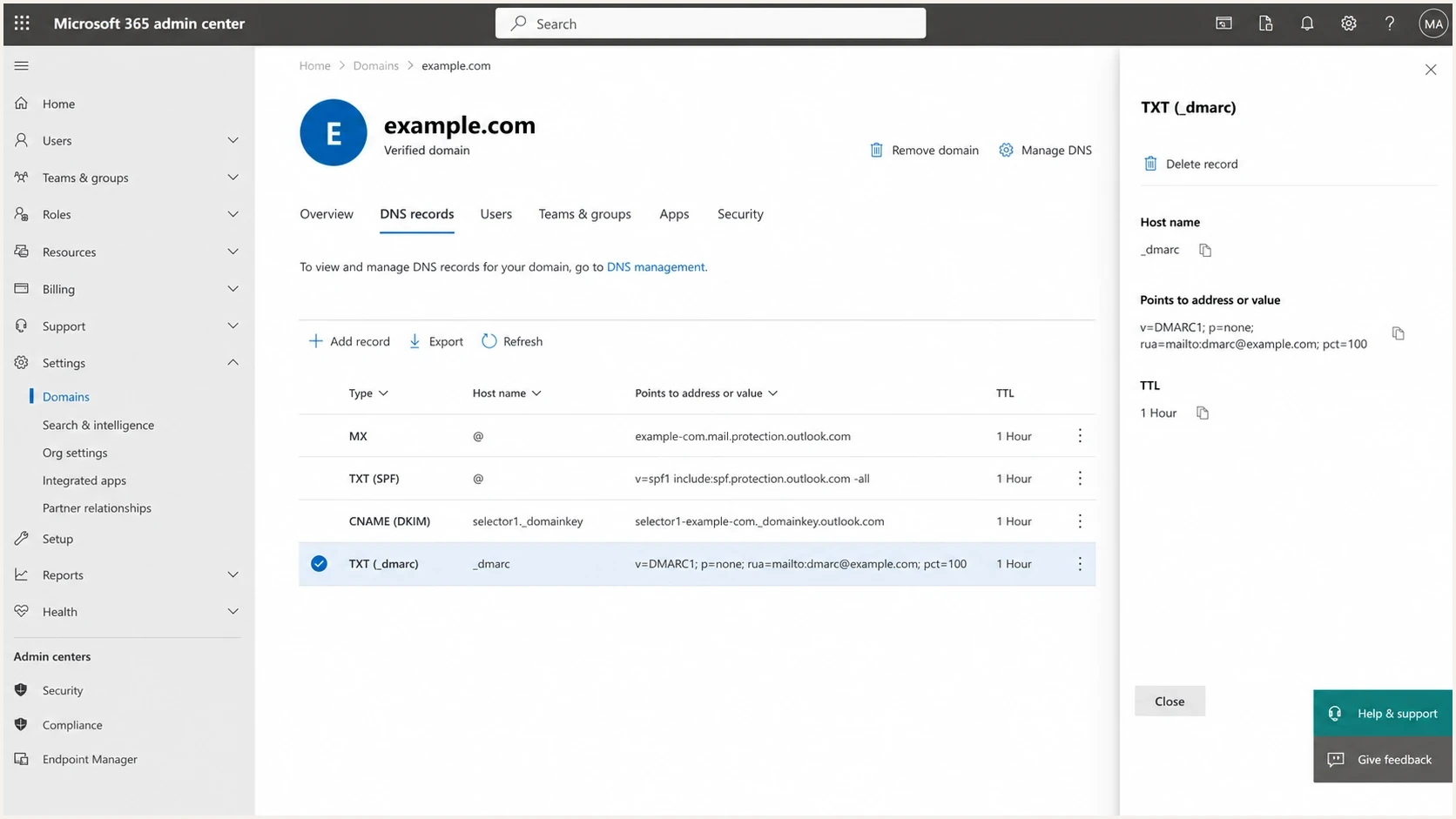
Microsoft 365 admin center showing a legacy pct=100 DMARC TXT record with an RUA address.
What a DMARC aggregate report contains
Each RUA XML file is one reporting organization's summary for one DMARC policy domain and reporting window. It groups messages with the same source and evaluation results instead of listing individual messages. The most useful fields show who generated the report, what policy the receiver found, which IPs used the domain, whether SPF or DKIM authenticated and passed alignment, and what disposition the receiver applied.
|
|
|
|---|---|---|
Report metadata | Organization name, report ID, and date range | Identify the reporter, reporting window, and duplicates |
Published policy | Policy domain and the DMARC settings the receiver observed | Check whether DNS changes had propagated during the window |
Message row | Source IP, message count, disposition, and DMARC evaluation | Measure traffic and find known or unknown sending sources |
Identifiers | Header From, envelope From, and optional envelope To domains | Compare the visible sender domain with SPF identity |
Authentication results | SPF domain and result; DKIM domain, selector, and result | Separate raw authentication from DMARC alignment |
Override reason | Local policy, mailing list, policy test mode, trusted forwarder, or other | Explain why disposition differs from the published policy |
Core fields in a DMARC aggregate report.
What RUA data does not prove
A DMARC pass confirms that use of the visible From domain was authorized through SPF or DKIM alignment. It does not prove inbox placement or that the message content was safe. A missing row also does not prove that no mail was sent, because RUA only covers traffic observed and reported by participating receivers.
Configuration that enables reports
The practical setup is one DMARC TXT record at the protected domain. The record must start with v=DMARC1. Include an explicit policy tag even though RFC 9989 treats a missing p tag as p=none, and include a rua tag when you want aggregate reports. A sensible rollout starts with p=none, confirms the legitimate senders, then moves toward quarantine or reject after the reporting data is clean.
Basic DMARC record with aggregate reportingDNS
Host: _dmarc.example.com
Type: TXT
Value: v=DMARC1; p=none; rua=mailto:dmarc@reports.example.net
Before changing policy, check the record syntax with a DMARC checker. The v=DMARC1 tag must be first, but other valid tags can follow in any order. A missing mailto prefix, duplicated DMARC TXT record, invalid tag value, or malformed destination can stop receivers from sending reports even when another receiver still sends one.
SPF and DKIM do not have to pass, or even be fully deployed, before RUA reports can arrive. Receivers report the authentication results they observe, so early reports often expose the SPF, DKIM, and alignment work that remains.
DMARC checker
Look up a domain's DMARC record and catch policy issues.
?/7tests passed
A report destination also has to accept the volume and attachment types. If you send to many domains, you can receive many XML files, usually daily. RFC 9990 specifies plain .xml or GZIP-compressed .xml.gz attachments; legacy senders can still deliver ZIP files. Report email must itself pass DMARC, so filtering should accept authenticated report traffic without broadly bypassing normal checks. Check mailbox size limits, attachment filtering, spam handling, and automatic replies. A personal mailbox is the wrong place for this. A parser or monitoring platform should deduplicate reports, normalize provider naming, and keep history long enough to spot sender changes.
What RFC 9989 and RFC 9990 changed
|
|
|
|---|---|---|
pct | Removed | Do not depend on fractional policy rollout |
t | New testing tag | Signals testing; the expected policy is one level lower |
ri | Removed | Participating receivers control batching and arrival time |
RUA size suffix | Obsolete | Do not depend on legacy values such as !10m |
RUA file | XML, preferably GZIP | Accept .xml and .xml.gz, with legacy ZIP support during transition |
Current DMARC configuration and report-delivery changes.
Do not use pct for staged enforcement
Remove pct from new records. Use p=none while monitoring, then change the policy after legitimate sources pass. The t=y tag is available for testing quarantine or reject behavior, but it does not affect report generation and it has no effect when p=none. Provider documentation and receiver implementations can lag the current standard, so do not depend on t=y as the only rollout safeguard.
How external destination verification works
External destination verification matters when the rua address uses a different organizational domain from the protected domain. If example.com sends DMARC aggregate reports to dmarc@reports.example.net, the reports.example.net DNS zone needs to prove that it accepts reports for example.com. Without that proof, a conforming receiver must ignore the external reporting URI.
External reporting authorization recordDNS
Host: example.com._report._dmarc.reports.example.net
Type: TXT
Value: v=DMARC1
This is the record people often miss. It is not published in the sender's DNS zone. It is published in the domain that receives the DMARC reports. A report consumer that accepts reports for any domain can instead publish a wildcard TXT record at *._report._dmarc on its reporting domain.
Do not infer EDV from one reporter
A receiver can send reports even when another receiver rejects the same external destination. One arriving report does not prove your EDV is correct. Test the authorization record directly in DNS, then compare reports from more than one receiver.
For a deeper look at the exact DNS name format, use the external reporting reference. It is the quickest way to confirm whether the record belongs under the sender domain or the reporting destination domain.
Why only Google appears first
Seeing only Google in the first week is common because Google is often the largest recipient base, it processes high volumes quickly, and its reports are easy to recognize. That does not mean Microsoft, Yahoo, Apple, or regional providers failed. It means the early sample is narrow or some receivers do not generate RUA reports.
First-week report coverage
Use these bands as operational signals, not hard pass or fail rules.
Healthy
Several reporters
Several reporting organizations appear after broad recipient traffic.
Investigate
1 reporter
Only one large provider appears despite diverse outbound mail.
No signal
0 reports
No RUA reports arrive after real mail, valid DNS, and 48 hours.
Normal reasons
- Recipient mix: Your recent mail mostly reached Gmail or Google Workspace users.
- No observed traffic: Another provider did not receive mail claiming your domain during the window.
- Timing: Different receivers batch and deliver reports on their own schedules.
- Reporter grouping: One hosting network can report for many recipient domains under one name.
Configuration problems
- Missing EDV: External RUA delivery is not authorized at the destination domain.
- Bad syntax: The DMARC record has invalid tags, duplicated records, or malformed destinations.
- Mail routing: A security gateway in front of Microsoft 365 prevents Microsoft reports.
- Mailbox filtering: The destination rejects report size, compression, or attachment type.
When Google and Yahoo behavior needs separate troubleshooting, compare the raw XML metadata and receiver names with Google and Yahoo reports. The report source name, date range, and policy evaluation fields usually show whether the issue is missing traffic or broken configuration.
How to troubleshoot missing reports
Use a simple sequence because report gaps are easy to overthink. Start with DNS, then confirm traffic, inspect the mailbox or parser, and compare receiving providers.
- Validate DMARC: Confirm there is exactly one DMARC TXT record at the protected domain.
- Check RUA: Confirm every aggregate destination uses mailto and accepts inbound report email.
- Check EDV: Publish the authorization TXT record at the external reporting domain.
- Send traffic: Send real mail to recipients across Google, Yahoo, Microsoft 365, Apple/iCloud, and regional providers.
- Allow delivery time: Wait 24 to 48 hours after DNS propagation and real recipient traffic.
- Review parsing: Check rejected attachments, XML/GZIP and legacy ZIP handling, size limits, and duplicate grouping.
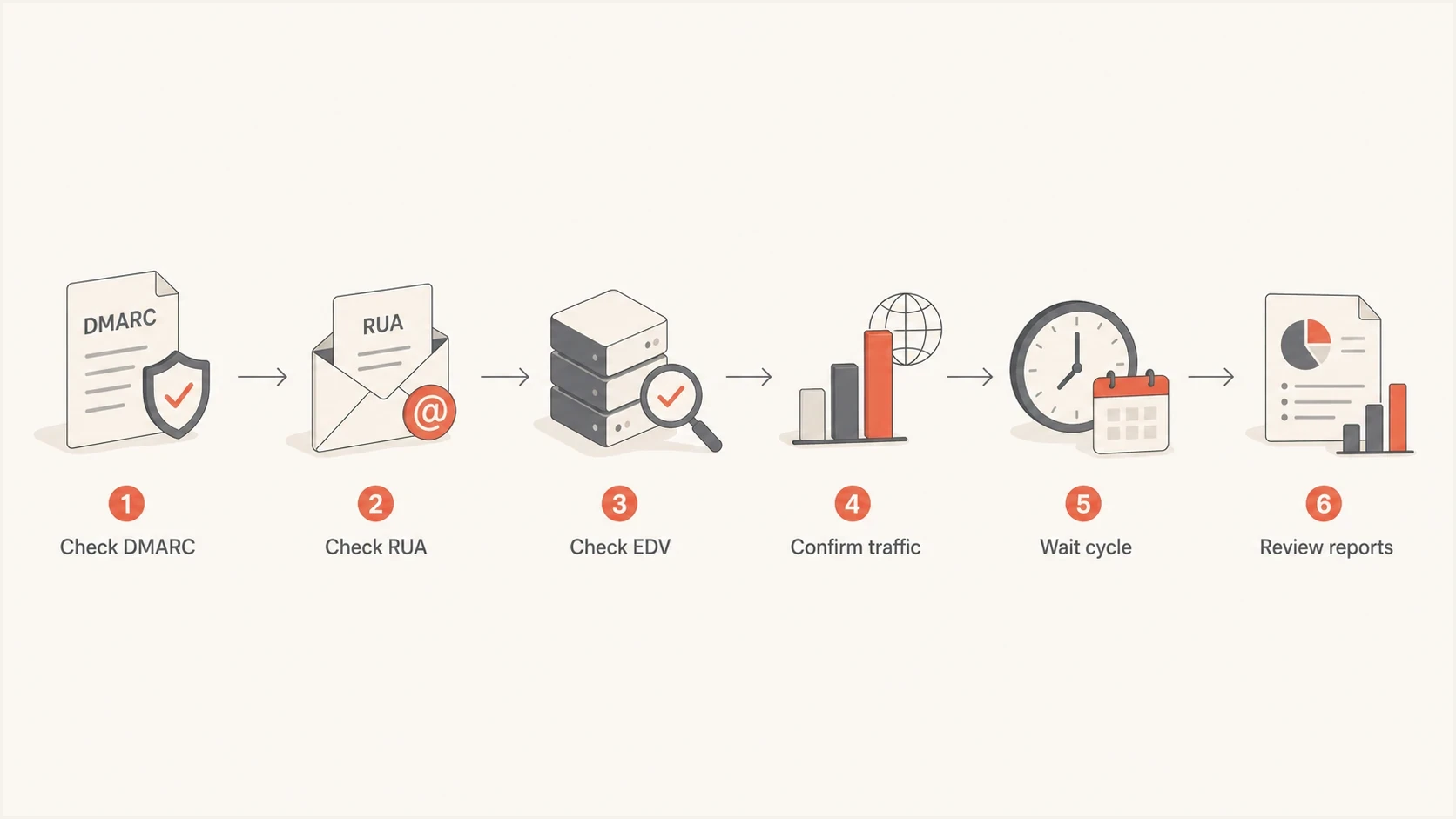
DMARC RUA troubleshooting flowchart for DNS, traffic, EDV, and report parsing.
For broader checks across DMARC, SPF, and DKIM, run a domain health check. That catches related issues, such as SPF lookup problems or DKIM records that exist but lack alignment with the visible From domain.
Where Suped fits
Suped's platform is relevant when the question moves past "who sent the XML files" and becomes "which senders are legitimate, what is broken, and what should change next." Suped ingests aggregate reports, groups providers and source IPs, detects authentication issues, and turns the report feed into repair tasks.
DMARC record detail view showing SPF, DKIM, DMARC, rDNS diagnostics, and DNS records
For teams managing several domains, Suped keeps DMARC reporting beside SPF, DKIM, hosted SPF, hosted DMARC, hosted MTA-STS, blocklist (blacklist) monitoring, real-time alerts, and multi-domain management. Report delivery issues often involve sender inventory, DNS control, authentication alignment, and reputation checks at the same time.
A practical Suped workflow
- Add domain: Monitor the DMARC record and confirm reports are arriving.
- Verify sources: Separate approved senders from unknown or spoofed traffic.
- Fix DNS: Use diagnostics to correct SPF, DKIM, DMARC, and EDV problems.
- Stage policy: Move from monitoring toward enforcement when the data is stable.
Views from the trenches
Best practices
Publish the external reporting TXT record before expecting full provider coverage.
Use a dedicated RUA mailbox or platform so raw XML files do not bury personal inboxes.
Compare report volume against real recipient traffic, not against a fixed provider list.
Keep RUA reporting active through policy changes so failures stay visible during rollout.
Common pitfalls
Assuming Microsoft is silent can hide MX routing limits in front of Microsoft 365 tenants.
Missing EDV records cause some receivers to skip external RUA destinations without notice.
Using one personal inbox for reports creates noisy storage and weak operational ownership.
Treating Google as the only signal misses regional providers and hosted mailbox traffic.
Expert tips
Check DNS at the report destination, because the protected domain is only half the setup.
Expect RUA reports only from receivers that actually accepted mail using the domain that day.
Remove pct from new records because RFC 9989 replaced percentage rollout with testing mode.
Validate reports after each DNS edit, because old cached records can delay results for hours.
Marketer from Email Geeks says Microsoft reporting behavior should be checked against current tenant routing, because old assumptions about no aggregate reports are out of date.
2024-10-09 - Email Geeks
Marketer from Email Geeks says a missing external reporting authorization record can explain why some providers ignore a RUA destination while Google still sends files.
2024-10-09 - Email Geeks
What to expect from DMARC reporting
Many ISPs and mailbox providers deliver DMARC aggregate reports. Google is usually the first one people notice, but Yahoo, Microsoft 365, Zoho, Seznam, Mail.ru, emailsrvr.com, and other receivers also show up when they process mail using your domain and the reporting path is valid. Apple/iCloud reporting should be treated as variable rather than guaranteed.
The required configuration has to be exact: one valid DMARC record, a working rua mailbox or platform address, and EDV when reports go to another domain. Once those records are right, report coverage depends on where your mail actually lands and which receivers participate.
Treat DMARC reports as a data feed, not as inbox messages. Parse them, monitor trends, fix authentication alignment issues, and keep the reporting destination stable while policy moves toward enforcement.




