
What causes DMARC bounces and SendGrid authentication issues?

Published 10 Jul 2025
Updated 8 Oct 2026
14 min read
Summarize with

Updated on 8 Oct 2026: We clarified SendGrid DMARC failures, added DNS validation checks, and tightened the recovery and resend steps.
DMARC bounces happen when a receiving server checks the visible From domain, gets a DMARC fail result, and factors the domain's published policy into its handling decision. With SendGrid, a common cause is authentication with a SendGrid-controlled domain instead of your domain, so SPF or DKIM can pass technically while DMARC still fails for the sender identity the recipient sees.
A sudden burst of DMARC bounces with p=reject can follow a missing domain authentication, failed or unaligned DKIM, an unaligned SPF bounce domain, or a change in the sending path. DMARC fails only when neither SPF nor any valid DKIM signature provides the required domain alignment.
- Reject policy: A domain at p=reject raises the chance that an authentication break becomes a visible SMTP rejection.
- Wrong DKIM domain: The DKIM signature can show a SendGrid domain where your own sending domain should appear.
- SPF path mismatch: SPF can pass for the return-path domain while DMARC fails against the visible From domain.
- DNS drift: Changed CNAMEs, missing selectors, stale sender authentication, or DNS outages can break a domain that worked for years.
- Temporary incident: A time-boxed spike across many domains points toward sender infrastructure or a receiver-side rule change.
DMARC monitoring helps connect bounce spikes with failing sources. Aggregate reports show receiver-reported authentication results and dispositions; message headers identify signing domains and selectors, while SendGrid logs provide the exact SMTP rejection.
Why a DMARC bounce happens
DMARC does not simply ask, "Did SPF pass?" or "Did DKIM pass?" It requires at least one passing authentication result whose domain is aligned with the visible From domain. Under the default relaxed mode, the organizational domains must match. Under strict alignment, the domains must match exactly. If neither authentication method supplies a passing aligned result, DMARC fails.
That detail is the reason SendGrid problems can feel confusing. The headers can show dkim=pass and spf=pass, but DMARC can still fail if those passes belong to an unaligned SendGrid domain or do not satisfy strict alignment. Check every DKIM signature: an additional signature with d=sendgrid.net does not cause DMARC failure if another valid signature is aligned.
Header pattern that fails DMARCtext
Authentication-Results: receiver.example;
  dkim=pass header.d=sendgrid.net;
  spf=pass smtp.mailfrom=bounces.sendgrid.net;
  dmarc=fail header.from=example.com
Split the bounce type first
Two different problems get called "DMARC bounces." They need different fixes.
- Message bounce: The recipient rejected your campaign, transactional email, or notification because DMARC failed.
- Report bounce: A mailbox that receives DMARC aggregate reports rejected the XML report delivery.
- Fix path: Message bounces require header and DNS checks; report bounces require mailbox and delivery-log checks. If reports are missing without a bounce, check the reporting URI and any required external-destination authorization.
Policy impact during an authentication break
The same technical failure has a different likely result depending on the published DMARC policy and the receiver's broader delivery decision.
Monitor
p=none
The domain owner requests no special DMARC handling; reporting depends on a valid rua destination and receiver participation.
Quarantine
p=quarantine
The domain owner asks receivers to treat failing mail as suspicious.
Reject
p=reject
The domain owner asks receivers to reject failing mail, subject to the receiver's other checks.
How SendGrid domain authentication fails
SendGrid sends on behalf of many domains. For your mail to pass DMARC, SendGrid must produce an aligned SPF or DKIM result for the domain in the visible From address. With Automated Security enabled, domain authentication uses CNAMEs for DKIM selectors and the bounce subdomain. Single Sender Verification confirms access to one address; it does not configure domain authentication and is intended for testing.
If a message falls back to a SendGrid domain in both the DKIM signature and return path, receivers can reject it when your domain publishes p=reject. SendGrid's support material on DMARC bounces also addresses sending with a free mailbox From address such as @gmail.com. Use an authenticated domain you control for From, and put the original mailbox in Reply-To when replies need to reach it.

SendGrid Sender Authentication screen showing domain verification and DKIM CNAME records.
|
|
|
|---|---|---|
Wrong DKIM domain | d=sendgrid.net | Check the applied domain authentication and every DKIM signature |
Strict SPF misalignment | From example.com, Return-Path em123.example.com | Check aligned DKIM first; use a matching custom return path if SPF must be aligned |
Unverified From address | API/SMTP sender-identity error before delivery | Verify the sender identity or authenticate its domain; this is a SendGrid submission error |
Subuser mismatch | Only one subuser fails | Check the subuser's domain setup |
Provider incident | A narrow cross-domain time spike | Preserve evidence and open a ticket |
Common SendGrid-related DMARC failure causes.
SendGrid first selects a valid authenticated domain matching From, then the default domain. Subusers also have their own matching and default domains before a parent-assigned domain is considered. Check those assignments when only one account or subuser fails.
The strongest clue is scope. One domain failing after a DNS change points toward your configuration. Many unrelated, mature domains failing during the same window points toward a shared sending path, account-level setting, or temporary provider issue.
How strict alignment changes the fix
Check the aspf and adkim tags before treating a SendGrid return-path subdomain as a failure. Both default to relaxed alignment when omitted. Relaxed alignment accepts example.com and em123.example.com because they share an organizational domain. Strict alignment requires exact equality. Strict SPF misalignment alone does not fail DMARC when a valid DKIM signature is aligned under adkim.
|
|
|
|---|---|---|
aspf=r | From example.com, Return-Path em123.example.com | Aligned when SPF passes |
aspf=s | From example.com, Return-Path em123.example.com | Not aligned |
adkim=r | From example.com, d=mail.example.com | Aligned when DKIM passes |
adkim=s | From example.com, d=mail.example.com | Not aligned |
How DMARC alignment modes compare SendGrid authentication domains.
If SPF must satisfy strict alignment, create a SendGrid Custom Return Path that exactly matches the subdomain in the From address. An existing domain authentication cannot simply be edited into that configuration, so plan a new authentication and DNS change. If mail must use the root domain with aspf=s, review whether strict SPF alignment is necessary before asking SendGrid about Preserve Sender.
Preserve Sender is a last resort
Preserve Sender keeps the return path equal to the From address, but SendGrid warns that it prevents SendGrid from capturing bounces and spam reports. Use it only with a separate process for feedback and suppression management, and ensure the resulting MAIL FROM domain's SPF record authorizes the sending infrastructure.
How to diagnose the failure
Start with the full SMTP response and SendGrid Email Activity event. A 550 5.7.26 response that explicitly names the domain's DMARC policy indicates a DMARC rejection, but that code also appears in other authentication errors. A 4xx response is a temporary deferral. If the recipient rejected the message before delivery, there is no delivered copy with its Authentication-Results; use the original sent message, logs, and a controlled test.
- Confirm policy and alignment: Check p, aspf, and adkim for the exact From domain. For a subdomain, check its own DMARC record and any inherited policy, including sp.
- Read headers: Use a trusted receiver's Authentication-Results when available, the visible From domain, DKIM-Signature d= and s= values, and the MAIL FROM domain shown as Return-Path after delivery. Check every DKIM signature.
- Compare domains: Apply organizational-domain matching for relaxed alignment or exact matching for strict alignment.
- Check SendGrid: Verify the sending domain, account, subuser, sender identity, and domain authentication selected for the message.
- Check DNS: Confirm the DKIM key, bounce-domain SPF answer, and applicable DMARC record resolve publicly. Match CNAME or TXT/MX checks to the account's Automated Security setting.
- Check scope: Group failures by time, receiver, sending domain, template, and SendGrid account or subuser.
Quick DNS checksbash
dig TXT _dmarc.example.com
dig CNAME s1._domainkey.example.com
dig TXT s1._domainkey.example.com
dig CNAME s2._domainkey.example.com
dig TXT s2._domainkey.example.com
dig CNAME em123.example.com
dig TXT em123.example.com
Replace the example selector and return-path label with the values SendGrid generated for your authentication. With Automated Security off, also check the generated DKIM TXT and bounce-domain MX records. SPF is evaluated at the MAIL FROM domain; adding include:sendgrid.net to the root domain does not repair an unaligned return path. If you do not have the original headers, a domain health checker run helps find current DNS mistakes but cannot reconstruct a past incident.
?
What's your domain score?
Deep-scan SPF, DKIM & DMARC records for email deliverability and security issues.
A clean DNS result only tells you the current domain state. For a time-bound incident, compare current DNS with available headers and SendGrid logs from the failure window. If direct delivery passes but forwarding fails, forwarding can break SPF and message changes can invalidate DKIM. For a deeper checklist, use the DMARC troubleshooting process after collecting the available evidence.
Why SendGrid DNS records do not validate
A successful Sender Authentication validation does not guarantee DMARC passes for each message. For validation failures, compare the public records with the hostnames and values SendGrid generated, then check these common DNS mistakes.
- Check hostname entry conventions. A DNS host that appends example.com needs s1._domainkey rather than s1._domainkey.example.com; otherwise the record can become s1._domainkey.example.com.example.com.
- Check record conflicts. A CNAME cannot coexist with a TXT or MX record at the same hostname. Resolve collisions before adding SendGrid's record; keep records used by other senders at their intended names.
- Check DNS propagation and caching. Compare authoritative answers with recursive-resolver answers and respect the existing TTL. SendGrid advises allowing up to 48 hours for validation, but waiting will not correct a wrong hostname.
- Check the record type. Automated Security uses CNAME delegation; with it disabled, follow SendGrid's generated DKIM TXT and bounce-domain TXT/MX records. If selectors clash with another sender, configure a custom DKIM selector rather than overwriting its key.
Keep one SPF record at each evaluated MAIL FROM domain and one DMARC policy record at each _dmarc hostname. An SPF evaluation exceeding the limit of 10 DNS-querying terms returns permerror. Extra TXT records for unrelated purposes are valid.
After correcting records, select Verify in SendGrid and send a test through the affected account or subuser. SendGrid's authentication troubleshooting documents the hostname and record-conflict checks.
What to fix first
Fix the cause that matches the scope. A single domain failure needs DNS and sender-authentication repair. A cross-domain spike needs evidence collection first, because random DNS changes can make a short incident last longer.
When it is your setup
- CNAMEs: Repair missing or changed DKIM and return-path CNAMEs for the exact SendGrid authenticated domain.
- Sender identity: Make the From domain match the SendGrid domain authentication assigned to the sender under the published alignment mode.
- Subuser: Check whether the message was sent through a subuser without the right domain setup.
- Alignment mode: Use a matching custom return path when strict SPF alignment is required.
When a shared sending issue is suspected
- Scope: Look for the same failure across many domains during the same time window.
- Headers: Save original sent-message headers and any delivered comparison samples, including DKIM domains and MAIL FROM values.
- Ticket: Give SendGrid UTC timestamps, message IDs, the full SMTP response, affected domains, account or subuser, and header samples.
- Rollback: Restore a recent configuration change only when the evidence ties it to the failure.
Use testing mode carefully
RFC 9989 removed the percentage-based pct tag and introduced t=y for testing. It asks receivers to apply one policy step lower to failures, so p=reject; t=y requests quarantine and p=quarantine; t=y requests no special DMARC handling. Receivers using older DMARC implementations can ignore t=y and apply the published enforcement policy, so confirm actual receiver behavior before relying on testing mode.
Short-term testing mode exampletext
v=DMARC1; p=reject; t=y; rua=mailto:dmarc@example.com
Our Hosted DMARC controls let you stage policy changes and record a rollback point. Temporary relaxation affects the domain's protection; restore enforcement after every legitimate sending source has a passing aligned result.
How Suped helps with this workflow
Suped is our DMARC reporting and email authentication platform. During a bounce spike, use it to identify the failing source and evaluated domain, compare receiver-reported results, and track repairs. Use SendGrid's SMTP logs to confirm the rejection reason for an individual message.
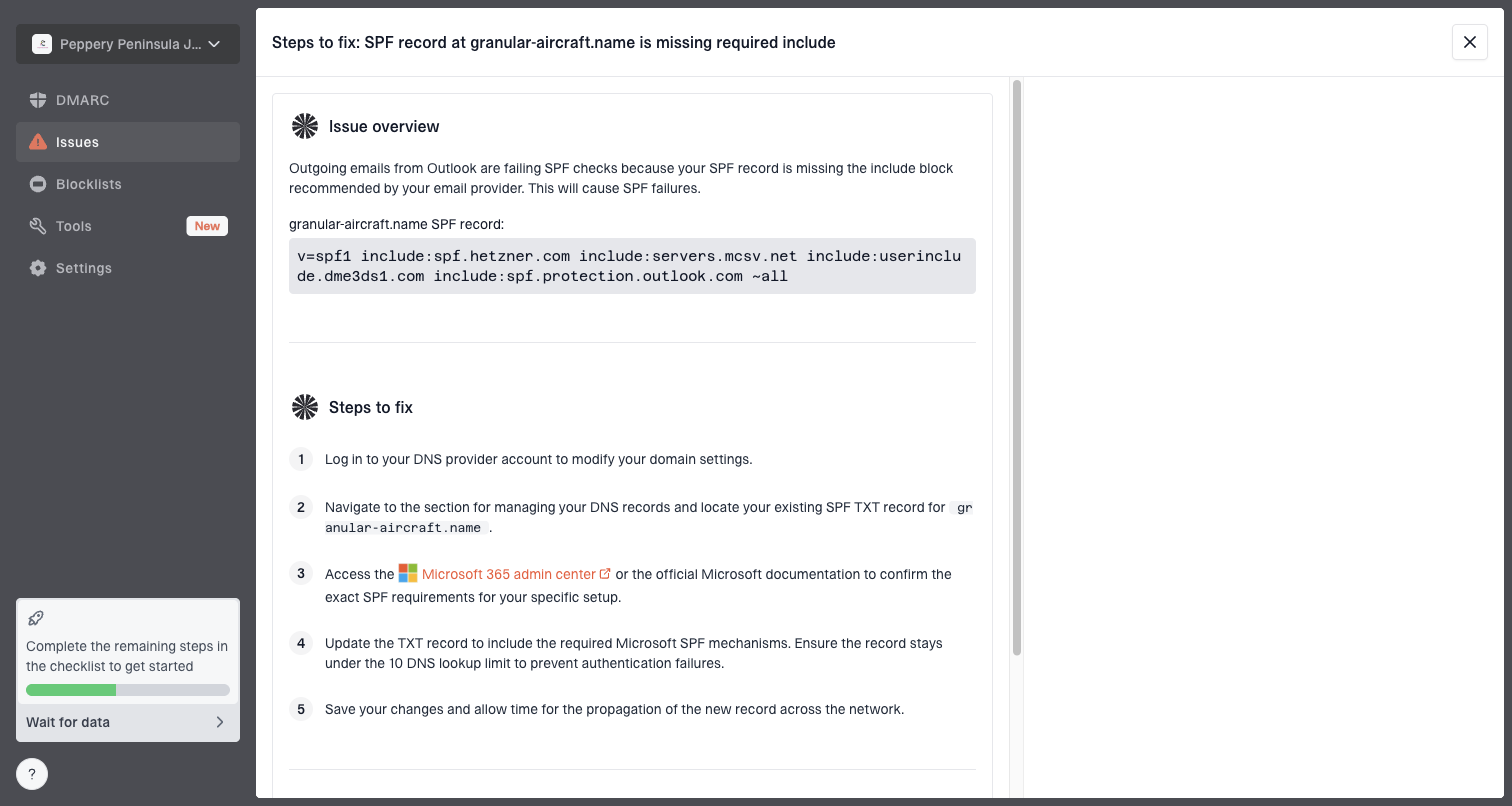
Issue steps to fix dialog showing the issue overview, tailored fix steps, and verification action
Suped connects record state with sender sources and failure patterns, then turns that evidence into repair steps. That matters when SendGrid is only one of several legitimate senders on a domain.
- Issue detection: Suped flags failing sources and gives practical steps to fix SPF, DKIM, and DMARC issues.
- Alerts: Suped flags authentication changes as reporting data arrives. Aggregate reports usually cover daily periods, so use SendGrid logs for immediate incident evidence.
- Hosted DMARC: Stage temporary policy changes with a rollback point, then confirm authentication recovery before restoring enforcement.
- Separate reputation checks: A blocklist (blacklist) listing needs its own investigation when the SMTP response names reputation rather than DMARC.
- MSP scale: Agencies and managed service providers can manage many client domains in one dashboard.
Decision path for sudden bounces
When a domain that has worked for years suddenly starts bouncing, do not assume the old setup is wrong. Start with timing and scope, then prove the failing authentication path.

Flowchart for diagnosing sudden DMARC bounces in SendGrid.
The most useful evidence packet has the original sent message or delivered comparison headers, the SendGrid message ID, the full SMTP response, the From and MAIL FROM domains, every DKIM signing domain and selector, and the recipient domain. Record the exact bounce time in UTC and the sending account or subuser. Compare failed and successful samples before concluding that routing or signing changed.
Evidence to include in a SendGrid ticket
- Message IDs: Provide failed and successful examples from the same domain and time period.
- Headers: Include the original sent-message source and any delivered comparison headers showing authentication results, MAIL FROM, DKIM d=/s= values, and From.
- Scope: List affected domains, recipients, subusers, and templates, plus start and end times in UTC and the complete SMTP response.
- DNS proof: Attach current DNS results so support can separate DNS state from sending behavior.
Views from the trenches
Best practices
Separate report-delivery bounces from message bounces before changing DNS or policy.
Save full headers during the failure window; later checks only show the current state.
Group failures by sender, receiver, domain, subuser, and time before opening tickets.
Common pitfalls
Treating SPF pass as DMARC pass hides cases where the return-path domain differs.
Changing long-working DNS during a shared outage can create a second failure mode.
Missing subuser differences causes teams to fix the wrong SendGrid configuration.
Expert tips
Compare failed and successful samples from the same domain to isolate routing changes.
Check relaxed versus strict alignment before treating a bounce subdomain as wrong.
Use aggregate reports to verify recovery, not only lower bounce volume in logs alone.
Marketer view
Marketer from Email Geeks says DMARC bounces are often specific to a sending domain, and receiver-specific causes are less common but still worth checking.
2024-07-23 - Email Geeks
Marketer view
Marketer from Email Geeks says the first diagnostic split is whether DMARC reports bounced or whether normal mail failed authentication.
2024-07-23 - Email Geeks
Verify recovery before resending
Send a controlled test through the same production API key or SMTP account, subuser, From address, and template as the failed mail. Inspect the delivered Authentication-Results to confirm a passing aligned SPF result or at least one valid aligned DKIM signature, and check SendGrid Email Activity for the recipient server's response.
After fixing authentication, resend messages that received a permanent DMARC rejection only when they are still relevant. SendGrid records these failures as Blocks and does not automatically replay them after a DNS fix. Temporary 4xx deferrals are retried by SendGrid. If a new attempt is dropped, inspect its suppression reason before changing recipient status.
Use subsequent DMARC reports to confirm recovery across legitimate sources and affected receivers. A delivered event means the recipient server accepted the message; it does not guarantee inbox placement.
Frequently asked questions
Yes. SPF or DKIM can pass for a SendGrid domain while DMARC fails for your visible From domain. DMARC needs a pass from at least one aligned domain, not a basic SPF or DKIM pass somewhere in the path.
Do not make that the first fix. RFC 9989 testing mode uses t=y to request one policy step lower, but older receivers can ignore it and enforce p=reject. If important mail remains blocked, use a controlled temporary policy change with a documented rollback point, then restore enforcement after all legitimate sources pass with domain alignment.
Use a trusted receiver's Authentication-Results for its verdict, and compare the visible From domain with DKIM-Signature d= and the SPF smtp.mailfrom domain. The DKIM s= value identifies the selector. Apply the published aspf and adkim modes, and check every signature because one valid aligned DKIM signature is enough for DMARC.
A return path such as em123.example.com has relaxed SPF alignment with From domain example.com, but fails aspf=s because strict mode requires an exact match. DMARC still passes if a valid DKIM signature is aligned. If SPF must satisfy strict alignment, use a matching Custom Return Path and From subdomain, or review whether strict SPF alignment is necessary.
Save the full SMTP response and SendGrid message ID first, then compare available headers with current DNS. A mature domain can fail after routing changes, subuser configuration changes, selector or key problems, or a temporary provider issue. Use a controlled test through the same sending path when no delivered copy exists.
Start with the DMARC checker for the exact From domain, then inspect aggregate reports and headers to identify the failing source.