How can I troubleshoot DMARC failures and identify the cause of authentication issues?

Published 5 May 2025
Updated 30 Jul 2026
11 min read
Summarize with
Updated on 30 Jul 2026: We updated the troubleshooting steps for RFC 9989, clearer report diagnostics, and receiver policy overrides.
Troubleshoot DMARC failures by separating two questions: is the domain's DMARC record valid, and which mail source is sending messages without an SPF or DKIM pass that aligns with the visible From domain? Start with DMARC aggregate reports, then confirm the failing source with message headers and DNS. If the pass rate drops only on certain days, the cause is usually a specific mail stream, campaign, workflow, or forwarded path rather than the DMARC record itself.
A proper DMARC monitoring setup turns raw receiver reports into source names, authentication results, trends, and fix priorities. Suped's product supports this workflow with source discovery, SPF and DKIM checks, failure alerts, and hosted records.
- Find the source: Group failures by sending IP, provider, envelope domain, DKIM domain, and visible From domain.
- Check identifier alignment: DMARC passes when SPF or DKIM passes for a domain that has relaxed or strict alignment with the visible From domain.
- Fix the mail stream: Most failures need a sender-specific SPF change, DKIM setup, custom Return-Path, or a decision to stop that source using your domain.
What DMARC failure means
DMARC does not simply ask whether SPF passed or DKIM passed. It asks whether at least one passing check used an authenticated domain that aligns with the visible From domain. Relaxed alignment accepts domains with the same organizational domain. Strict alignment requires an exact domain match. This explains cases where a mail provider reports SPF pass and DKIM pass, but DMARC still fails.
The published DMARC record lives in DNS for the domain, normally at _dmarc.example.com. You do not create a different DMARC policy inside every sending platform. Instead, every platform that sends with your domain has to authenticate in a way DMARC accepts.
|
|
|
|---|---|---|
SPF fail | No passing SPF result for the checked identity | Check IP authorization, DNS lookups, and the Return-Path |
DKIM fail | No signature validates | Check signing, selector DNS, and message changes |
DMARC fail | Neither SPF nor DKIM produced an aligned pass | Align the Return-Path or DKIM signing domain |
DMARC permerror | Policy evaluation has a persistent error | Fix malformed or multiple DMARC records |
Unknown IP | Source is not cataloged | Identify the owner before authorizing it |
Compact DMARC failure map
A receiver dashboard pass rate is an aggregate symptom. It does not prove that your main marketing platform is broken. It counts mail using the domain that reached that receiver, including employee mail, transactional mail, billing notices, support tools, forwarded mail, and any source you forgot existed.
Follow this troubleshooting sequence
Use the same sequence every time because random DNS changes make DMARC harder to debug. First validate the policy, then use reports to identify the failing source, inspect headers for that exact source, and change the sender setup.
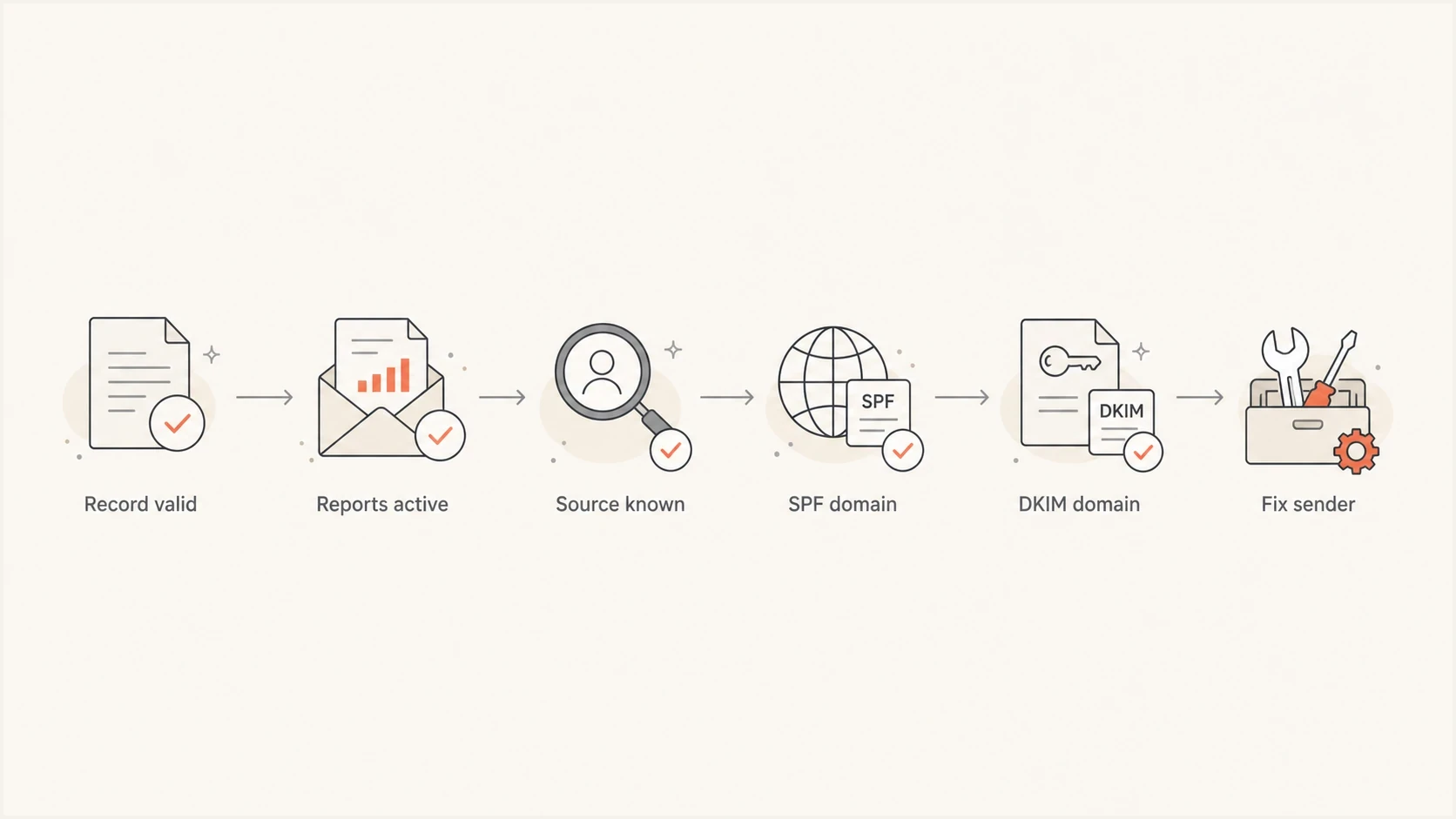
Flowchart showing the order for troubleshooting DMARC failures.
- Validate DNS: Confirm there is one DMARC TXT record, the syntax is valid, DNS changes have propagated, and aggregate reporting is authorized when rua uses an external domain.
- Sort by source: Group report rows by source IP and sending service, then look for volume spikes on the bad days.
- Inspect headers: Use a failed sample to confirm what SPF, DKIM, DMARC, and ARC did for that message.
- Fix ownership: Assign each failing source to an internal owner before changing DNS, because each platform has different setup steps.
Before investigating every sender, run a broad check against the domain. Suped's domain health checker is a quick way to inspect DMARC, SPF, and DKIM basics before you ask engineering to change records.
?
What's your domain score?
Deep-scan SPF, DKIM & DMARC records for email deliverability and security issues.
If the domain check is clean and the failure rate still drops, move to the reports. A clean record only proves the policy can be read. It does not prove that every source sending as your domain is configured correctly.
Read the reports before changing DNS
DMARC aggregate reports are the fastest way to find the source of authentication issues because receivers group messages by source IP, policy result, SPF result, DKIM result, and visible From domain. Raw XML is hard to read by hand, so a reporting platform should translate it into source names and trends.
The most useful report view answers four questions: who sent the mail, how much did they send, which check failed, and whether the source is allowed to send for the domain. Under RFC 9990, the policy-evaluated SPF and DKIM values are alignment-aware, while the authentication-results fields contain the underlying raw checks. If you need a deeper breakdown, the page on DMARC reports covers sender identification and failure types.
Suped DMARC dashboard showing email volume, authentication health, and source breakdown
In Suped, filter failures by date, then open the source breakdown to find the rows that changed. Suped's issue detection links the failing source to its authentication and alignment results, which gives the source owner a specific configuration to verify instead of raw XML.
|
|
|---|---|
Source IP | Maps volume to a sender or network |
Header From | Confirms the domain DMARC protects |
Policy evaluated | Shows alignment-aware SPF and DKIM results |
Authentication results | Shows raw SPF and DKIM checks and their domains |
Disposition | Shows none, quarantine, or reject after receiver handling |
Reason or error | Explains policy overrides or record-processing problems |
Report fields worth checking first
Separate failures, evaluation errors, and policy overrides
A DMARC fail means evaluation completed and neither SPF nor DKIM produced an aligned pass. A permerror means evaluation hit a persistent problem, such as an invalid policy record. A temperror means a temporary problem, usually a DNS lookup failure, prevented a final result. These results need different fixes.
|
|
|
|---|---|---|
dmarc=fail | No aligned SPF or DKIM pass | Trace the source, Return-Path, DKIM d= domain, and From domain |
dmarc=permerror | Policy evaluation cannot recover without a change | Check syntax and multiple TXT records at the same DMARC name |
dmarc=temperror | Evaluation hit a temporary DNS or retrieval error | Check authoritative DNS health, then test again |
DMARC fail, mail accepted | The receiver overrode or did not enforce the requested disposition | Inspect policy override reasons, ARC, forwarding, and local rules |
DMARC pass, mail filtered | Authentication passed, but another delivery signal caused filtering | Investigate content, reputation, recipient response, and receiver policy |
Result and disposition diagnostic map
Disposition is not the same as the DMARC authentication result. A receiver can accept a failing message because of a local policy, a trusted forwarding path, or a valid ARC chain. ARC preserves evidence about earlier authentication so the final receiver can make an override decision; it does not change the original DMARC fail into a pass.
Use headers to confirm the break
Reports tell you where to look. Headers tell you what happened on a real message. Ask the source owner for a raw message sample from the failing stream, or send a test message through the same workflow to a mailbox where you can view full headers.
The Authentication-Results header usually gives the clearest answer. Do not stop when you see SPF pass or DKIM pass. Compare smtp.mailfrom and header.d against header.from, then inspect the Received chain and ARC headers when the path includes forwarding or a mailing list.
Header result that still fails DMARCtext
Authentication-Results: mx.example;
  dmarc=fail header.from=example.com;
  spf=pass smtp.mailfrom=bounces.vendor.example;
  dkim=pass header.d=vendor.example
In that example, SPF and DKIM pass, but neither authenticated domain aligns with example.com. The fix is not to loosen the DMARC policy. The sender needs to use an aligned Return-Path, sign with an aligned DKIM domain, or use a visible From address that matches its authenticated domain.
If the header shows spf=pass and dkim=pass but dmarc=fail, the problem is usually identifier alignment. The detailed guide on why SPF and DKIM pass but DMARC fails explains that case.
Common causes and fixes
The cause is usually clear once the source is known. Common patterns include a platform that was never authenticated, a rotated DKIM selector, an external envelope domain, an SPF DNS lookup error, or a forwarded path where SPF breaks and content changes invalidate DKIM.
Failure pattern
- Unknown source: A service is sending as the domain without being in the inventory.
- Unaligned signer: DKIM passes with a domain outside the visible From domain's alignment boundary.
- SPF limit: The SPF record exceeds the DNS lookup limit and returns a permanent error.
- Forwarded mail: The forwarding server changes the delivery path, so SPF no longer passes in alignment.
Practical fix
- Assign owner: Document the business owner, purpose, From domain, and sending volume.
- Enable aligned DKIM: Publish the platform's selector records and confirm the d= domain aligns.
- Reduce SPF: Remove stale includes, reduce lookups, or use Suped's hosted SPF when centralized management fits the domain.
- Check DKIM and ARC: Keep DKIM valid through forwarding and inspect ARC before treating the path as unauthorized.
A valid DMARC record does not have to be complex. Start with reporting and a non-enforcing policy, then raise enforcement after known sources pass consistently. Under RFC 9989, the pct tag is obsolete. The t=y tag signals testing, but it does not request percentage-based enforcement. Use the DMARC checker to validate syntax before you assume the issue is with a sender.
Basic reporting recorddns
_dmarc.example.com TXT "v=DMARC1; p=none; rua=mailto:d@example.com"
If engineering changes DNS slowly or several teams share the domain, Hosted DMARC gives the team a controlled way to stage policy changes without repeated manual edits. In Suped, hosted DMARC connects the policy change to monitoring data and issue status, so enforcement moves only after known sources are verified.
DMARC pass rate triage
Use these internal operating bands as triage signals, then confirm every cause by source.
Healthy
98-100%
Minor failures exist, but known sources pass.
Investigate
90-97%
A source, forwarding path, or low-volume sender needs review.
Urgent
Under 90%
A major stream is failing or unknown senders are active.
What to ask engineering to check
A useful engineering ticket should be specific. Asking for a general DMARC review often turns into checking the DNS record and stopping there. Ask the team to review every active mail source that uses the domain and confirm how each one authenticates.
Ticket template
- Scope: Review all systems sending with the visible From domain example.com.
- Confirm SPF: Check whether each source uses an aligned Return-Path domain and stays within the SPF lookup limit.
- Confirm DKIM: Check whether each source signs with an aligned DKIM domain and a current selector.
- Collect samples: Provide raw headers for one passing and one failing message from each source.
- Update inventory: Record the owner, use case, DNS records, setup URL, and risk rating.
Keep the sender inventory close to the DMARC data. Product teams, finance tools, HR systems, support workflows, and other business systems add mail streams over time. A spreadsheet records known sources; Suped can alert the team when report data shows a new source that nobody documented.
|
|
|---|---|
Owner | Lifecycle team |
Purpose | Receipts |
From domain | example.com |
DKIM | Enabled |
Risk | High volume |
Sender inventory fields
Where Suped fits
For this troubleshooting workflow, Suped groups source discovery, issue diagnosis, sender ownership, DNS validation, alerts, and policy staging in one operational view. The aim is to move from a pass-rate change to the specific source and configuration that needs attention.
Suped connects DMARC report analysis with SPF and DKIM checks plus hosted records. Blocklist (blacklist) monitoring is available when the message passes authentication but reputation appears to be the delivery issue, which keeps that diagnosis separate from an alignment failure.
A practical Suped workflow is to add the domain, collect reports, filter the failure period, verify each known source, assign unexpected sources, record the fix, and watch subsequent reports for recovery. MSPs and agencies can keep client domains in separate workspaces while using the same process.
Views from the trenches
Best practices
Start with aggregate reports, then confirm every suspected source with real headers.
Keep a sender inventory with owner, purpose, DNS records, and current status noted.
Use DKIM with your domain for each major source so forwarding has less impact later.
Common pitfalls
Treating a valid DMARC record as proof that all sending platforms are configured.
Ignoring low-volume tools until a campaign or workflow turns them into a visible spike.
Checking SPF pass without checking whether the SPF domain matches the From domain.
Expert tips
Review failure dates against campaign calendars and system-triggered workflow logs.
Document every newly found sender immediately so the same source is not rediscovered.
Use alerts for new sources, because unknown mail streams are common on shared domains.
Marketer from Email Geeks says a DMARC reporting dashboard makes source discovery far easier than manually guessing which platform caused the failures.
2023-12-21 - Email Geeks
Marketer from Email Geeks says DMARC is published once in DNS, but every source using the domain needs correct authentication.
2023-12-21 - Email Geeks




