
How to troubleshoot DKIM alignment for MSP clients

Published 30 Jul 2026
Updated 4 Oct 2026
9 min read
Summarize with
Updated on 4 Oct 2026: We clarified DKIM alignment checks and added a practical way to triage failures in DMARC aggregate reports.
DKIM alignment for an MSP client fails when no passing DKIM signature has a d= domain that aligns with the visible From domain under the client's adkim setting. Fix it by identifying the actual signing domain, confirming that DKIM passes, changing the sender to sign with the client's domain, and testing a new message against the DMARC result.
For MSP operations, the important distinction is authentication versus alignment. A message can have dkim=pass and still fail DKIM alignment because a vendor signed it with the vendor's domain. DMARC still passes if SPF both authenticates and aligns with the From domain, but that path often fails during forwarding. A durable repair gives the client an aligned DKIM signature and records the sending source, selector, owner, and validation result.
What DKIM alignment checks
DMARC compares the visible RFC5322.From domain with the d= domain of each DKIM signature that passes verification. One passing and aligned signature is enough for the DKIM path. A message with several signatures can therefore pass even when one vendor signature is misaligned, provided another valid signature uses an aligned client domain.
Relaxed alignment
Relaxed mode is the DMARC default. The organizational domains must match. A signature using mail.client.example aligns with a visible From domain of client.example.
- Used when adkim is absent or set to r.
- Allows signing with a controlled subdomain.
Strict alignment
Strict mode requires an exact domain match. A signature using mail.client.example does not align with client.example when the applicable DMARC record contains adkim=s.
- The d= and visible From domains must be identical.
- Each legitimate sender needs exact-domain signing.
The selector does not participate in alignment. It tells the receiver where to find the public key, such as s1._domainkey.client.example. Replace a selector when retiring a key or correcting a key publication problem, but selector changes alone cannot fix a vendor d= domain that differs from the client's From domain.
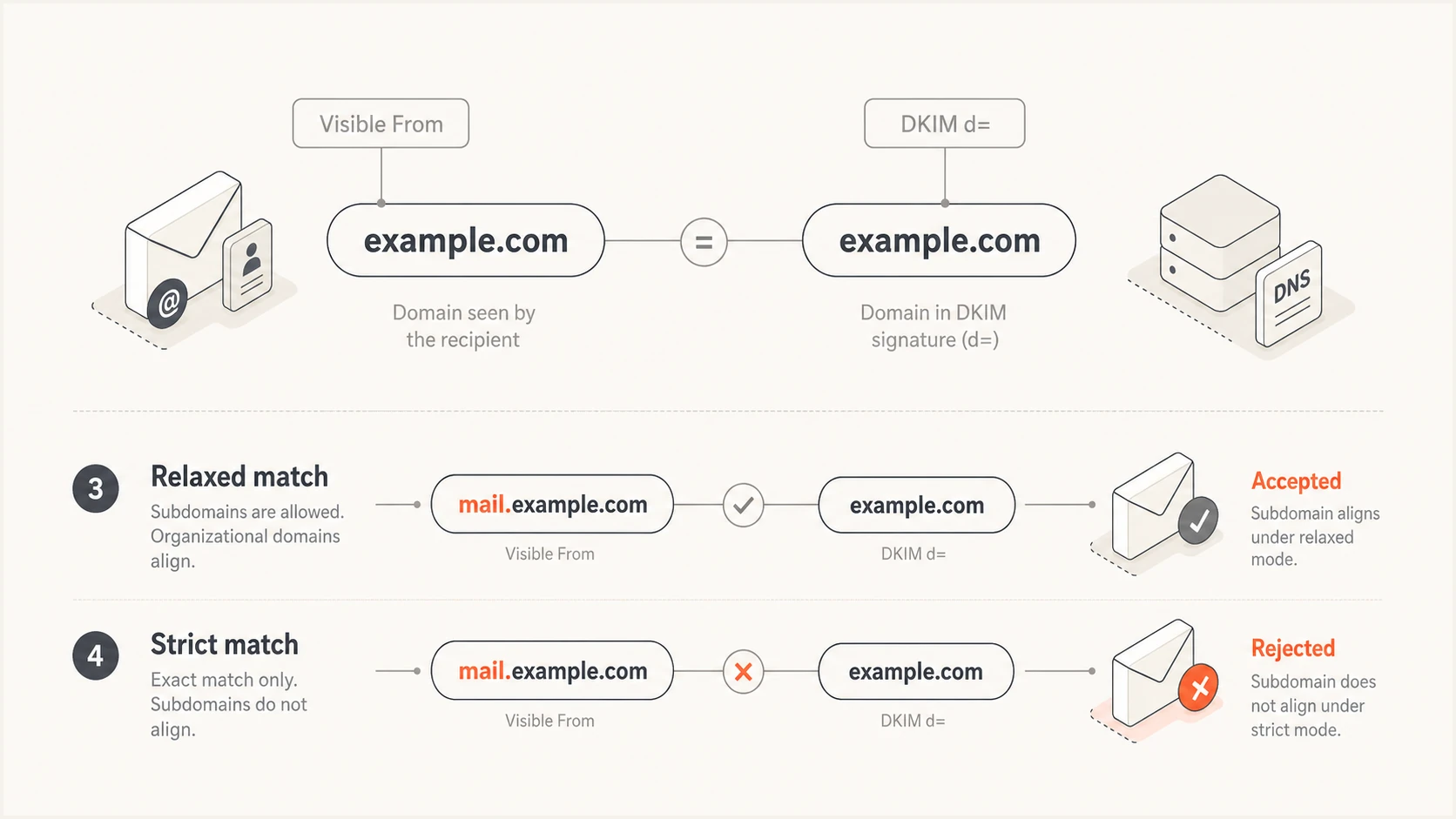
Subdomain DKIM signature aligns in relaxed mode but fails strict alignment
Use a repeatable MSP troubleshooting workflow
Start with one failed sample from the client and the matching DMARC aggregate data. The sample explains what happened to one message. Aggregate data shows whether the same source and result affect a meaningful share of the client's traffic. Keep the evidence tied to the exact From domain because sibling domains can use different senders and policies.
- Save the raw headers, sending time, recipient, visible From domain, and sending application.
- Find dkim=, header.d=, header.s=, and header.from= in the trusted receiver's Authentication-Results header. If header.s= is absent, read s= in DKIM-Signature.
- Decide whether DKIM authentication failed, DKIM passed but misaligned, or no signature exists.
- Map the source IP and d= domain to the client's mail system or an approved third-party sender.
- Enable custom-domain signing, publish the required selector record, or correct an unintended From domain.
- Send a fresh message, confirm dkim=pass, then confirm the d= domain aligns under the client's adkim setting.
Do not treat a DNS lookup alone as proof of success. A selector record can be valid while the application signs with another selector, another domain, or no key at all. Likewise, an aggregate report can show DKIM failure without revealing whether a gateway changed the signed body. Header evidence and DNS validation answer different parts of the incident.
Use the focused checker after extracting both d= and s= from a real header. Enter the signing domain and selector exactly as observed. This confirms key publication and syntax before the next send, but the final delivery test still determines whether the sender uses that key.
DKIM checker
Check selector records and public key configuration.
?/7tests passed
For a client with several sending systems, repeat the test by source rather than by domain alone. Transactional mail, user mail, billing systems, and support applications often use separate selectors and signing controls. Mark each source verified only after a live message produces the expected aligned result.
If SPF also fails or uses the wrong organizational domain, handle that as a separate work item. The related SPF alignment workflow helps keep the two authentication paths distinct.
Read the header before changing DNS
Authentication-Results states the receiver's verdict and the domains used for DMARC evaluation. Read the header added by the trusted final receiving system, since intermediate systems can add their own results. Then compare header.d with header.from and check the client's adkim setting.
Aligned DKIM resulttext
Authentication-Results: mx.receiver.example;
 dkim=pass header.d=mail.client.example header.s=s1;
 spf=fail smtp.mailfrom=client.example;
 dmarc=pass header.from=client.example
This example passes relaxed alignment because mail.client.example and client.example share the same organizational domain. Under strict mode, it fails DKIM alignment even though the signature remains cryptographically valid. The operational fix is either exact-domain signing or a deliberate return to relaxed mode after assessing the client's requirements.
Authenticated but misaligned resulttext
Authentication-Results: mx.receiver.example;
 dkim=pass header.d=vendor.example header.s=service;
 spf=fail smtp.mailfrom=vendor.example;
 dmarc=fail header.from=client.example
A valid signature can still use the wrong domain
In the second result, publishing a new key under client.example changes nothing unless the sending application actually signs with d=client.example. Configure custom-domain DKIM in the sending system first, publish its prescribed DNS record, and confirm the new d= value in a delivered message.
Use aggregate reports to prioritize fixes
Read each aggregate report row as grouped receiver observations, then use a raw message header to diagnose a specific send. The row count and source IP show the scale of a pattern. The header_from value identifies the client domain used in the visible From address. A source IP can belong to a forwarder, so confirm the route before assigning a sender owner.
- Check policy_evaluated.dkim for the DMARC DKIM alignment result. A fail here does not prove that the signature itself failed.
- Check auth_results.dkim for the verification result and d= domain. A pass here with an alignment fail points to the signing domain or strict alignment setting.
- Compare the source IP and From domain with the client sender register before approving a new service or changing DNS.
- Use the DKIM selector in the report when present; read s= from a live DKIM-Signature when the report omits it.
RFC 9990 requires the selector in each reported DKIM result, while older aggregate report formats allowed it to be omitted. A p=none policy also records alignment failures; it changes the requested handling of failed mail, not whether DKIM aligns. Prioritize approved senders with repeated failures, then investigate unknown sources before treating them as configuration errors.
Match the symptom to the root cause
Most incidents fit a small set of patterns. Classify the symptom before assigning work, since the owner might be the MSP DNS team, the client's application owner, or the sender's administrator. The table keeps labels compact while the detailed change stays in the ticket.
|
|
|
|---|---|---|
Pass, wrong d= | Vendor signing | Enable client-domain signing |
Key not found | Missing selector record | Publish prescribed DNS record |
Body hash failed | Message changed | Trace mail path |
No signature | Signing disabled | Enable DKIM |
Subdomain mismatch | Strict mode | Use exact signing domain |
Common DKIM alignment symptoms and actions
A CNAME at the selector is normal when a sender hosts the public key. The CNAME target does not decide alignment. The d= tag in the signature does. Follow the sender's required hostname exactly, avoid adding the domain twice in a DNS portal, and allow for the client's actual DNS TTL before retesting.
If dkim=fail reports a body hash or bad signature, inspect systems that modify mail after signing. Footers, subject tags, MIME rewriting, and some forwarding paths can invalidate the signature. Move signing to the last controlled outbound hop when practical, or stop the downstream modification. Do not rotate keys until the evidence points to a key problem.
Handle forwarding without confusing the diagnosis
Forwarding commonly breaks SPF because the forwarder's IP is not authorized by the original domain. DKIM can survive forwarding when the signed headers and body remain unchanged, which makes aligned DKIM especially important for client domains. If the forwarder adds a footer or rewrites signed content, DKIM fails authentication before alignment is evaluated.
Compare a direct delivery with a forwarded delivery of the same message type. If direct mail has dkim=pass with the correct d= domain and forwarded mail reports a body hash failure, the client's signing setup is working. The break occurs later in the route. Use the dedicated forwarding failure workflow to separate source configuration from transit changes.
Record both authentication paths
- For DKIM, document pass or fail, d=, selector, and alignment mode.
- For SPF, document the return-path domain, source IP, and alignment result.
- For DMARC, state which authenticated and aligned path produced the final pass.
- For the route, note whether direct and forwarded deliveries produce different results.
Operationalise the fix across client tenants
A one-off header repair does not scale into a managed service. Keep a sender register per client with the visible From domains, approved source, expected d= domain, active selectors, DNS owner, application owner, and last successful test. Add a change record whenever a provider rotates keys or a client introduces another mail stream.
Suped is our DMARC reporting and email authentication platform. Its MSP dashboard keeps client workspaces separate and groups sending sources by client domain. Use its alignment results and issue alerts to identify an affected source, assign the right owner, and track the fix through a new live send.

Issue steps to fix dialog showing the issue overview, tailored fix steps, and verification action
Use the issue view to connect a failed source with its evidence and repair steps, then verify the source after a live send. The broader DMARC monitoring workflow helps show whether the fix persists across reporting periods instead of closing the ticket after one clean sample.
For onboarding, pair the source register with a broad domain health check. This catches missing records and obvious syntax problems before production troubleshooting begins. Suped's DMARC for MSPs workflow provides client switching, multi-domain visibility, and reports for service reviews.
Make DKIM alignment repeatable
Prove the receiver's result, separate DKIM authentication from alignment, correct the signing system that owns d=, and verify a newly delivered message. DNS changes matter when they support the selector and signing domain the application actually uses.
Close the ticket with the raw header, earlier and verified results, DNS change reference, source owner, and monitoring status. That evidence gives the next technician a known-good baseline and turns recurring client incidents into a controlled service process.




