How to handle Google Workspace DMARC issues for MSP clients

Published 31 Jul 2026
Updated 6 Oct 2026
11 min read
Summarize with
Updated on 6 Oct 2026: We updated the troubleshooting workflow and policy rollout guidance to help protect legitimate client mail.
Handle a Google Workspace DMARC issue by identifying the failing message stream, checking SPF and DKIM against the visible From domain, fixing the responsible sender, and only then advancing the client's DMARC policy. A Google Workspace tenant can send legitimate mail through Gmail while scanners, billing systems, support platforms, website forms, and forwarding paths use the same client domain. Each stream needs its own authentication path.
For an MSP, the difficult part is rarely publishing one TXT record. The work is controlling change across many domains, proving who owns each sender, and giving the client a clear rollback condition. A repeatable DMARC for MSPs workflow turns scattered delivery complaints into an incident with an owner, evidence, and a safe next action.
Triage the failing mail stream
Start with one affected message, its full headers, the client domain, the sending application, the approximate send time, and the receiving provider. In Gmail, open Show original to copy the headers. Read the receiving server's Authentication-Results and compare header.from with smtp.mailfrom and the DKIM d= domain. DMARC passes when either SPF passes with SPF alignment or DKIM passes with DKIM alignment. A raw SPF pass for an unrelated bounce domain does not satisfy DMARC.
Capture evidence before DNS changes
- Message identity: Record the visible From address, Return-Path, Message-ID, DKIM d= domain, and selector (s=).
- Authentication result: Copy the SPF, DKIM, and DMARC results plus the stated failure reason; distinguish fail, permerror, and temporary DNS errors.
- Sending path: Identify Gmail, SMTP relay, a third-party sender, a forwarder, or an unknown source.
- Change context: Check recent DNS edits, key rotation, routing changes, and newly enabled applications.
Do not add an IP address or include mechanism to SPF merely because it appears in a report. Confirm the service, owner, expected volume, and client approval first. Unknown traffic can be spoofed mail, an abandoned application, or a legitimate service the client forgot to disclose. Google's own DMARC setup guidance also places third-party authentication before policy enforcement.
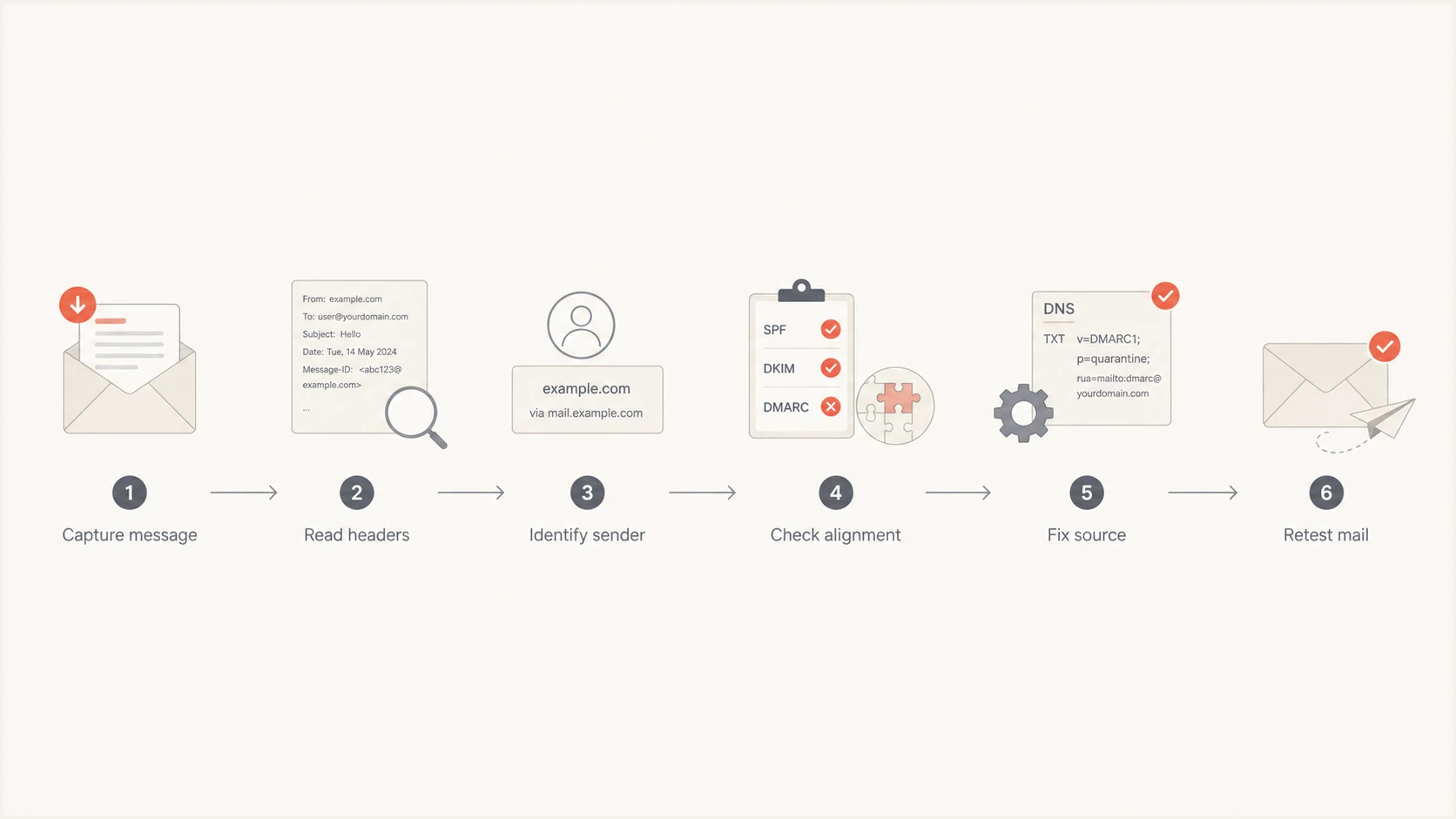
MSP workflow to diagnose and fix Google Workspace DMARC failures
Trace Google Workspace delivery errors in Email Log Search
Use Google's Email Log Search in the Admin console to trace an affected message by sender, recipient, time range, or Message-ID. Confirm whether Google handled the message and inspect each recipient's delivery status. Capture detailed delivery logs within 30 days; older searches provide more limited mailbox status.
- Confirm whether the failure concerns outgoing client mail, incoming external mail, or a forwarded message. This determines whose authentication configuration needs attention.
- Save the full 550 5.7.26 rejection text. Google uses this code for DMARC-policy failures, missing authentication, and SPF hard-fail cases. Match the wording against its SMTP error reference before changing DNS.
- If the rejection names an external sender's domain, investigate that sender or its forwarding path. Editing the client's SPF or DKIM records does not authenticate incoming mail from another domain.
- If the message is absent, check application or relay logs and the route before Google. Mail sent directly by an external application will not have a Workspace outbound log.
Attach the delivery status and exact remote-server response to the incident ticket. A DMARC pass confirms authentication; inbox placement also depends on recipient filtering and sender reputation.
Separate Google Workspace mail from other senders
Treat Google Workspace as one authorized source within the client's mail estate. For mail sent directly by Gmail, confirm that the domain has Google DKIM signing enabled and that the current selector resolves in public DNS. Test secondary domains and domain aliases using their actual visible From identities, then verify the DKIM d= domain and selector on each message. A working key on the primary domain does not prove that every client domain signs correctly.
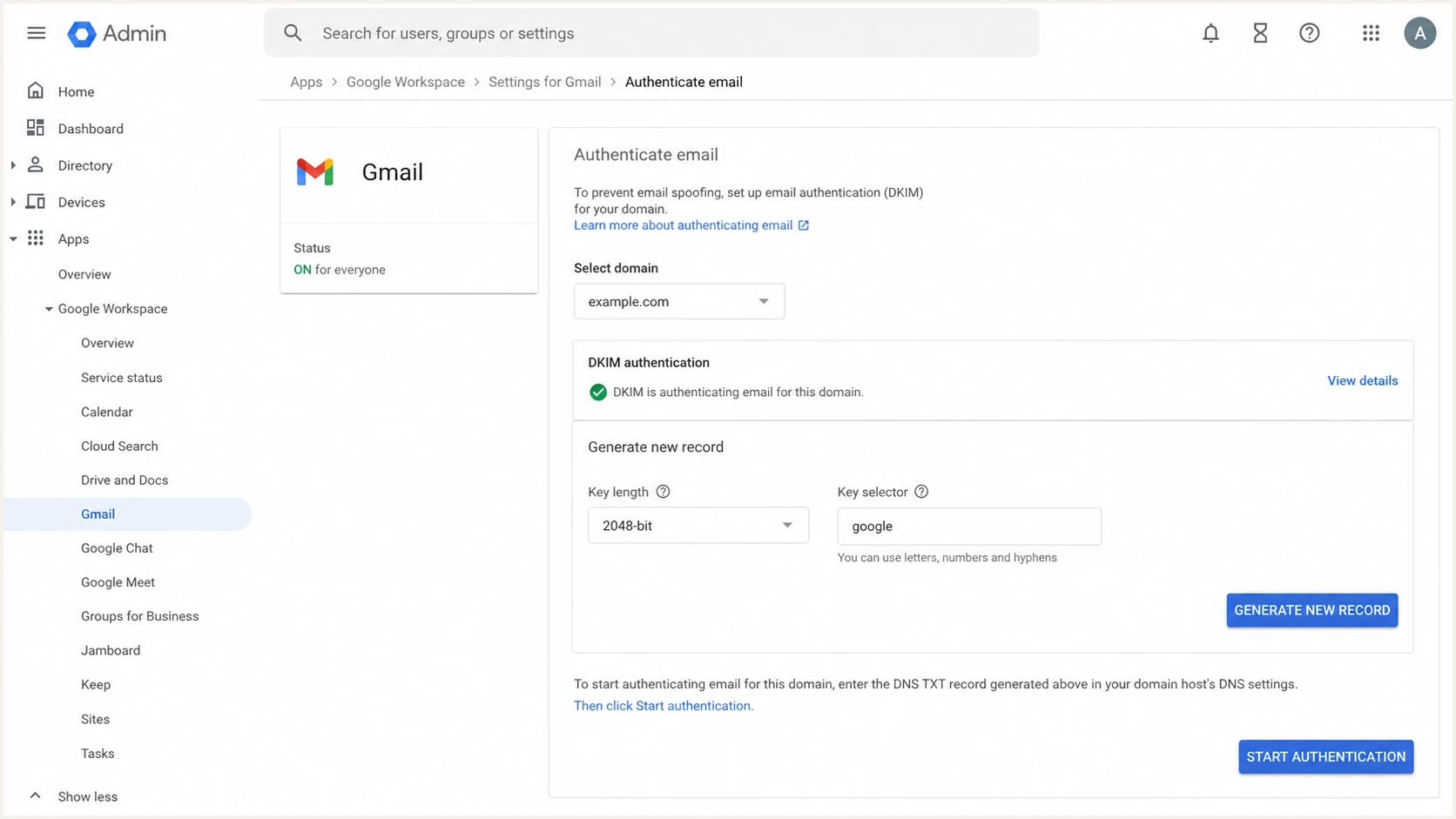
Google Admin console DKIM setup for a Google Workspace client domain
Then inventory every non-Google sender. Common client sources include accounting mail, customer support notifications, marketing campaigns, monitoring systems, multifunction devices, website contact forms, and line-of-business applications. For each source, choose a stable DMARC pass path. Domain-aligned DKIM is usually the most durable choice because forwarding often breaks SPF. A custom envelope sender can provide SPF alignment where the application supports it. For contact forms, send with an authenticated client address in From and put the visitor's address in Reply-To; using the visitor's domain in From creates an authentication problem the client cannot fix in its own DNS.
|
|
|
|---|---|---|
Gmail | DKIM d= and selector s= | Enable signing |
SMTP relay | Relay route and DKIM d= | Verify client-domain signing |
SaaS sender | Custom domain | Configure DKIM |
Forwarded mail | DKIM survival | Inspect changes |
Unknown IP | Owner evidence | Verify or deny |
Evidence to collect for each client mail stream
Fix authentication at the responsible source
For Google Workspace, publish the Google SPF include only when Google sends mail for the domain, and keep one SPF record at each envelope-sender domain, including the root when it is used. Duplicate SPF TXT records cause a permanent error. SPF permits at most ten evaluated terms that cause DNS lookups, including nested includes; exceeding the limit causes permerror. For DKIM, open Apps > Google Workspace > Gmail > Authenticate email, select the client domain, and generate a 2048-bit key where supported. Publish the supplied selector._domainkey TXT record, wait for it to resolve, then click Start authentication. The SPF example below covers Google-only sending; merge the Google include into an existing record while retaining other approved senders.
Basic Google Workspace SPF recorddns
v=spf1 include:_spf.google.com ~all
Google's DKIM setup guidance specifies a 24-72 hour wait after first enabling Gmail before key generation and up to 48 hours for authentication to start after adding the DNS key. Verify a new message instead of relying only on the Admin console status.
For a third-party platform, prefer a vendor-supported DKIM configuration that signs with the client's domain or a subdomain under it. If the service only offers SPF, configure a custom bounce domain under the same organizational domain as the visible From address for relaxed alignment. With aspf=s or adkim=s, the relevant authenticated domain must exactly match the visible From domain; a related subdomain is insufficient. The detailed SPF and DKIM alignment work includes the sender configuration and the DMARC record's relaxed or strict settings.
Google Workspace stream
- SPF: Authorize Google once in the client's single record.
- DKIM: Use a current key and enable signing for each required domain.
- Test: Send through the user's normal Gmail route and inspect headers.
- Owner: MSP administrator controls the tenant and DNS change.
Third-party stream
- SPF: Use a documented include or custom envelope sender.
- DKIM: Publish the service selector under the client domain.
- Test: Trigger the application's real production message type.
- Owner: Client application owner approves sender use and test coverage.
Retest with a newly generated message after each fix. Old headers only describe the old state, and DNS checkers only prove that records exist. A live message proves the exact application, route, signature, and receiver evaluation used in production. For clients sending more than 5,000 messages daily to personal Gmail accounts, Gmail sender requirements require SPF and DKIM plus DMARC, with p=none permitted. DMARC itself still needs just one passing path with the required domain alignment.
Handle forwarding, groups, and rewritten messages
Forwarding commonly breaks SPF because the forwarder's IP is not authorized by the original sender. DKIM can preserve a DMARC pass when the forwarded message remains unchanged. Mailing lists, security gateways, and footers can alter signed headers or the message body, which breaks that DKIM signature too. The result is a legitimate message that fails both available DMARC paths.
Compare direct and forwarded copies
First confirm that direct messages pass, then compare the direct and forwarded copies. Check whether DKIM survived, whether the forwarding system rewrote content, and whether the receiver recorded ARC results. ARC supplies handling context to the receiver, but it does not change the client's DMARC configuration or guarantee acceptance.
For recurring paths, document the forwarding system, message modifications, affected recipients, and business requirement. Then adjust the intermediary if possible, preserve DKIM, or change the sending workflow. The separate process for forwarding failures helps assess indirect-mail delivery risks before changing the client domain's policy.
Stage DMARC policy changes by domain
Use p=none to collect discovery data before deciding on enforcement. Move only after all known legitimate sources, including infrequent billing jobs, pass DMARC in representative live tests and aggregate reports. Define the approval owner, observation window, pilot domain, rollback trigger, and next review date in the change ticket. This makes policy movement a documented operational decision.
RFC 9989 removed pct, so percentage settings are unsuitable rollout controls. Pilot a verified sending domain or subdomain with its own DMARC record and check inherited policies. RFC 9989 advises against p=reject for general-purpose email domains because of mailing-list and forwarding disruption. For restricted sending domains, consider reject only after testing those paths and verifying DKIM signing.
Practical policy change gates
Choose policy by domain use and verified delivery paths, with client approval at each gate.
Discover
p=none
Inventory and verify legitimate sources.
Pilot domain
p=quarantine
Test quarantine on a verified sending subdomain.
General-purpose mail
none or quarantine
Assess mailing-list and forwarding impact before enforcement.
Restricted sending
p=reject
Require working DKIM and tested indirect delivery paths.
Observation policy at _dmarc.example.comdns
v=DMARC1; p=none; rua=mailto:dmarc@example.com
Replace example.com and the reporting mailbox with the client's actual values. Before changing policy, validate the published record, confirm that only one DMARC record exists at the relevant _dmarc hostname, and check that the reporting address is authorized when it uses another domain. Record syntax validation does not replace message testing, but it catches duplicate tags, invalid values, and DNS publication mistakes before they affect the client.
DMARC checker
Look up a domain's DMARC record and catch policy issues.
?/7tests passed
After publication, test Gmail mail and every approved external stream again. Watch aggregate reports for new failures, sharp volume shifts, and unknown sources. Restore the previous policy only when the agreed trigger is met, then fix the affected stream and repeat the test. Avoid deleting the DMARC record during an incident because that removes reporting at the moment it is most useful.
Operate the service across client tenants
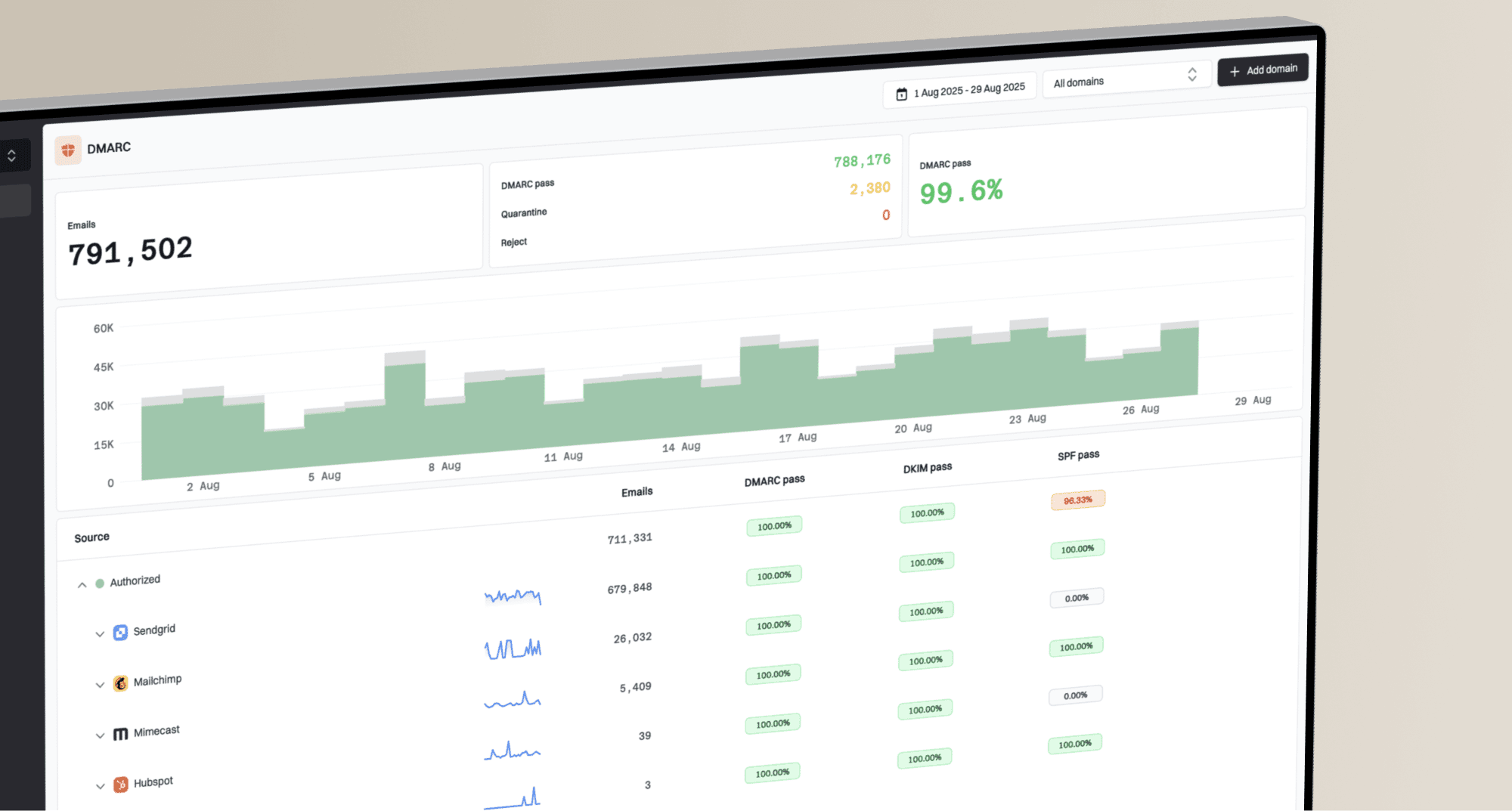
An MSP needs separation between organizations, repeatable alerts, and client-ready evidence. Suped is our DMARC reporting and email authentication platform. Its MSP workflow groups client domains separately, identifies sending sources, and provides remediation steps and client reports. Use blocklist (blacklist) monitoring alongside authentication evidence when a delivery complaint persists after DMARC passes.

Issue steps to fix dialog showing the issue overview, tailored fix steps, and verification action
Use DMARC monitoring to group source evidence by client and surface authentication regressions. Hosted DMARC reduces direct DNS edits during policy changes after initial DNS setup, while Hosted SPF helps maintain approved senders after initial DNS delegation, reducing routine DNS requests. Each option still needs an owner, change record, and production test.
- Client boundary: Keep domains, contacts, approvals, reports, and incident history in the correct organization.
- Source register: Track service owner, authentication method, selector, expected volume, and review date.
- Alert route: Send urgent regressions to operations and scheduled summaries to the client owner.
- Access control: Grant least-privilege access and remove staff access during client offboarding.
The MSP remains responsible for interpreting the evidence and coordinating change. Review alerts when receiver reports arrive and use the issue evidence to choose the next step, while client owners confirm whether a sender is legitimate and whether its business process can tolerate a policy change.
Close the issue with proof
Close a Google Workspace DMARC issue only after a new production message passes, the aggregate data confirms the expected source, and the client owner accepts the result. Attach the before-and-after headers, DNS change, test time, affected stream, and rollback outcome to the ticket. If a required source remains unauthenticated, record the unresolved risk and keep remediation open; enforcement does not exempt that source automatically.
|
|
|---|---|
New headers | Live DMARC pass |
DNS record | Published configuration |
Report trend | Stable source behavior |
Client approval | Business acceptance |
Minimum incident closure record
Keep monitoring after closure. A DKIM selector can be removed, a vendor can change its return path, or a client can adopt a new sender without notifying the MSP. Review new sources and authentication regressions as reports arrive, using the same evidence-first response process.
Frequently asked questions
SPF can pass for the Return-Path domain while that domain lacks alignment with the visible From domain. DMARC still passes if DKIM succeeds with an aligned d= domain. Inspect both paths in the message headers before changing DNS.
Use p=none when the MSP needs discovery data or has not verified all legitimate senders. Preserve a working stronger policy when taking over an already verified domain. The decision still needs testing, client approval, and a rollback trigger.
No. The Google include authorizes Google sending infrastructure for SPF. It does not configure third-party services, repair DKIM, guarantee SPF alignment, or protect a forwarded message. Diagnose the actual stream and failure result first.
Match the source against client applications, message samples, vendor documentation, sending patterns, and an accountable business owner. Do not authorize it until ownership is confirmed. If nobody claims it and no legitimate sample exists, keep it unauthorized and monitor the effect of enforcement.
A new message sent through the affected production path should show DMARC pass through aligned SPF or DKIM. Aggregate reports should then show the source behaving as expected. DNS syntax alone does not prove end-to-end authentication. Receiver reports arrive on reporting schedules, so use live headers and delivery logs for immediate verification.