Does Cvent support SPF and DKIM alignment?

Published 14 Jul 2025
Updated 21 Oct 2026
13 min read
Summarize with
Updated on 21 Oct 2026: We updated Cvent's envelope-domain setup guidance and clarified how to verify SPF and DKIM alignment.
Yes, Cvent supports DKIM alignment when custom DKIM signing is enabled for your sending domain. SPF alignment depends on the envelope sender configured for the mail stream. A Cvent-controlled Return-Path does not match your domain, even when SPF passes. A custom envelope domain can satisfy SPF alignment when SPF passes and the domain matches the visible From domain under your DMARC policy.
Get Cvent to sign with DKIM using a domain that matches your From domain, then verify that DKIM passes DMARC alignment. Adding Cvent IP addresses to your visible From domain's SPF record does not change the envelope sender or the DKIM signing domain. IP allowlisting affects local filtering, not DMARC alignment.
Direct answer
- DKIM alignment: Supported when Cvent signs mail with your domain in the DKIM d= value.
- SPF alignment: Requires SPF to pass for an envelope domain that matches your From domain under your DMARC alignment mode.
- DMARC pass path: One aligned pass is enough, so DKIM alignment can carry Cvent through DMARC.
- Best next step: Confirm the envelope-domain configuration, request custom DKIM, and verify live message headers.
What Cvent supports
For DMARC, custom DKIM is an important Cvent setup step. At least one authentication method must pass and match the visible From domain. Where custom envelope setup is available, configure and verify SPF alignment as well.
|
|
|
|---|---|---|
Vendor sender | Cvent sends event and campaign mail for your brand. | |
SPF | Can pass | A Cvent server can be permitted, but that alone does not satisfy DMARC. |
SPF alignment | Depends on envelope setup | A Cvent-owned Return-Path fails alignment; a matching custom envelope domain can provide it when SPF passes. |
DKIM | Supported | Cvent support can help enable custom domain signing. |
DKIM alignment | Supported | DMARC passes when DKIM authenticates with a matching domain. |
Cvent alignment support at a glance.
Cvent has a DKIM request form, and the support route matters because DKIM signing is not the same as adding a generic DNS include. Cvent needs to issue the selector details, tell you which records to publish, and sign outgoing messages with your domain.
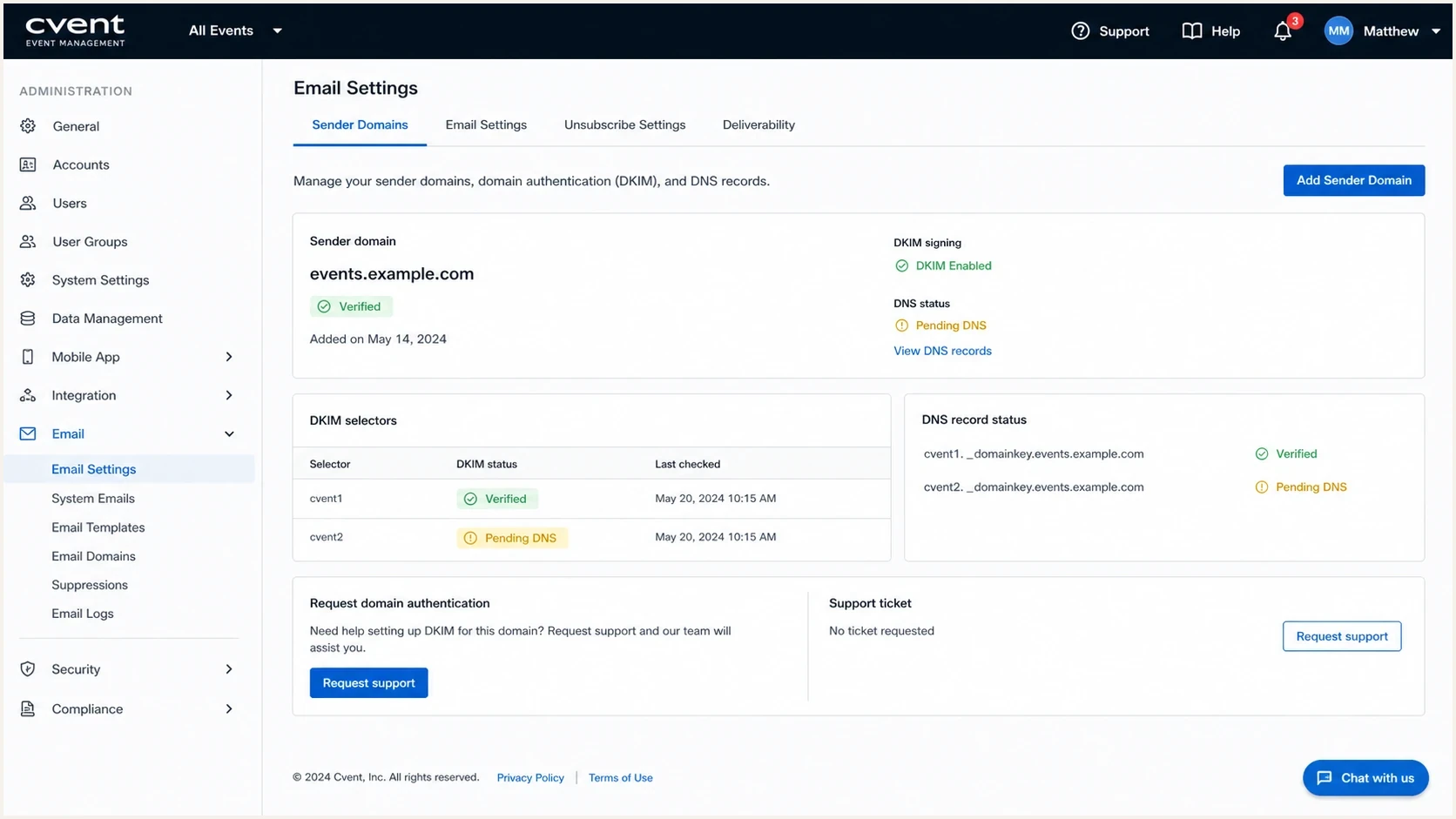
Illustration of Cvent DKIM setup with sender-domain and DNS verification fields.
How to configure a custom envelope domain
Cvent's June 2026 Registration release describes self-service planner and envelope domain management. The announcement covers SPF-based setup; it does not confirm self-service DKIM availability.
- Open Admin > Data Lists > Planner Domain, then select Add New Domain.
- Add your planner domain and corresponding envelope domain.
- Publish the exact CNAME or TXT records Cvent provides in your DNS.
- After DNS propagation, return to the setup page and verify the domain before using it.
For DMARC, the implication is conditional: a custom bounce domain only provides SPF alignment when live mail uses it, SPF passes, and its domain matches the visible From domain under the selected alignment mode. Confirm smtp.mailfrom in received headers. Ask your administrator or Cvent support whether this workflow covers each product you use, and confirm DKIM activation separately.
Why SPF authorization does not guarantee alignment
The common mistake is treating SPF authorization and SPF alignment as the same thing. They are different checks. SPF authentication asks whether the sending server is allowed by the domain used in the envelope sender. DMARC SPF alignment asks whether that envelope sender domain matches the visible From domain.
SPF authorization
This is the basic SPF pass check. It confirms that the sending IP is allowed by the SPF record of the envelope sender domain.
- Domain checked: Return-Path or envelope sender domain.
- Cvent result: Often passes using Cvent-controlled infrastructure.
- DMARC value: Useful only when the SPF domain also matches the From domain.
SPF alignment
This is the DMARC domain match check. It compares the SPF-authenticated domain against the visible From domain.
- Domain checked: The SPF-authenticated MAIL FROM domain, normally shown in Return-Path.
- Cvent result: Fails if your From domain and the Cvent-owned Return-Path have different organizational domains.
- DMARC value: Requires a matching domain under the aspf mode, plus an SPF pass.
If you want a deeper explanation of that distinction, the guide on SPF authentication and alignment breaks it down. For Cvent, the outcome is clear: SPF can look healthy in a header and still fail DMARC alignment. With aspf=r (the default), bounce.events.example.com and events.example.com share example.com and satisfy relaxed domain matching. With aspf=s, those different domains fail the exact-match requirement. Changing Reply-To does not affect SPF or DKIM alignment.
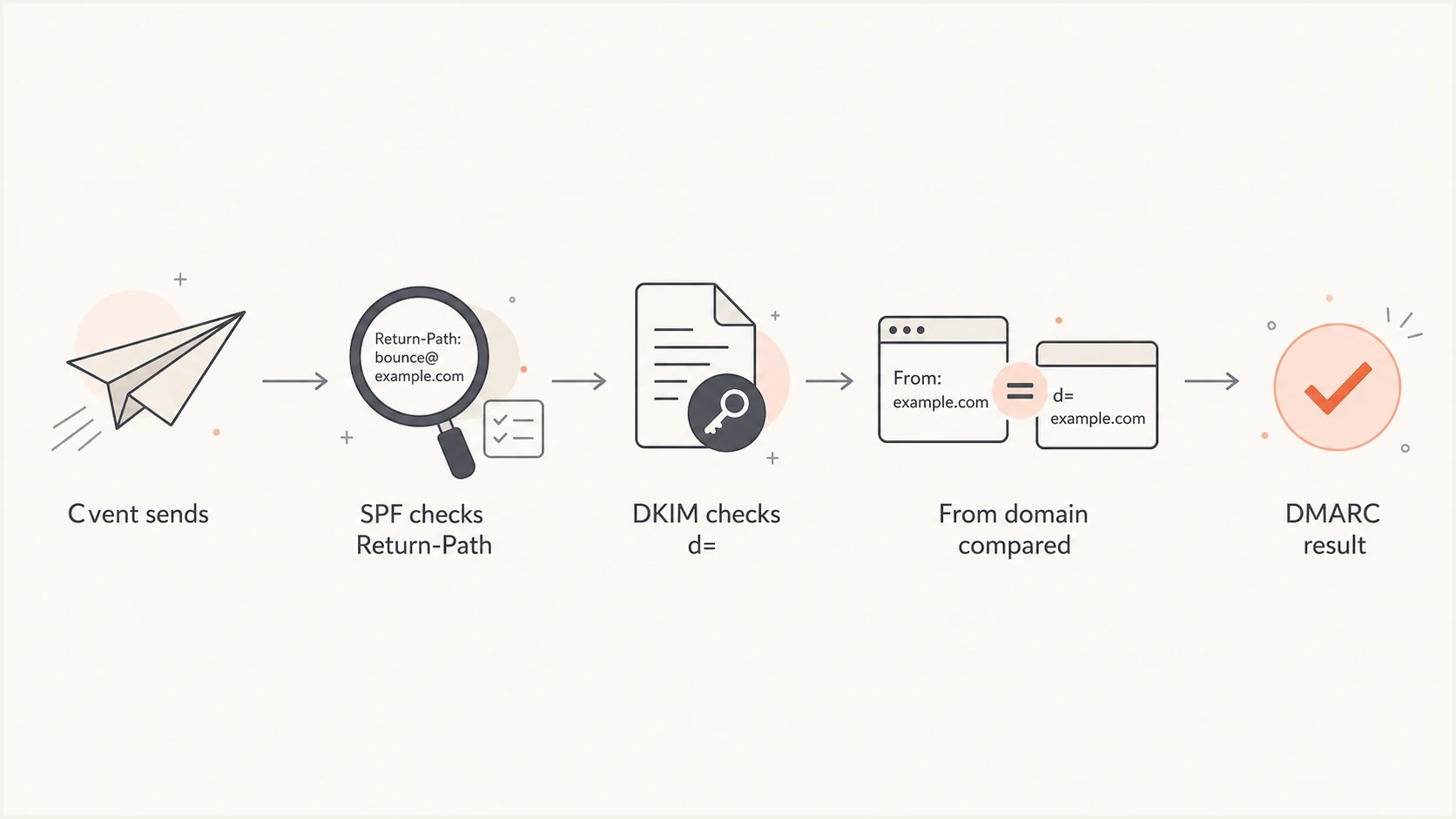
Cvent DMARC flow comparing the Return-Path and DKIM signing domain with the From domain.
How to request DKIM for Cvent
The safest Cvent setup starts with a specific sending identity. Decide whether Cvent will send as your root domain or a subdomain such as events.example.com. A dedicated subdomain gives event traffic a distinct policy and reporting scope.
- Choose the From domain: Pick the exact domain Cvent will show in the visible From address.
- Ask for custom DKIM: Request DKIM signing for that same domain or a relaxed-aligned subdomain.
- Publish the records: Add the selector records Cvent supplies, using the exact TXT or CNAME type and value provided.
- Confirm public DNS: Verify that each selector resolves publicly after cached DNS responses expire; there is no fixed waiting period for every DNS change.
- Confirm signing activation: Ask Cvent to enable or confirm custom DKIM after DNS verification. Publishing a DNS key does not itself start message signing.
- Send a live test: Send a real Cvent email to an external mailbox and inspect the full headers.
- Monitor reports: Confirm Cvent passes DKIM alignment before enforcing quarantine or reject.
Illustrative DKIM CNAME placeholder, not a Cvent recorddns
selector-provided-by-cvent._domainkey.events.example.com CNAME target-provided-by-cvent
Do not guess the record type, selector hostnames, or target values. Cvent must provide them. If Cvent supplies a TXT record instead of a CNAME, publish that TXT record exactly as instructed. If your organization has several Cvent accounts, brands, or regional sender domains, ask whether each one needs separate selectors. That avoids the common failure where one event type signs correctly and another sends without the expected DKIM domain. Cvent keeps the private signing key; publish only its supplied public DNS records. Check that your DNS provider has not appended the domain twice to the selector hostname.
Questions to ask support
- Signing domain: Which exact DKIM d= domain will Cvent use after setup?
- Selectors: How many selectors are required, and how does key rotation work?
- Products: Does the setup cover every Cvent module that sends mail for the account?
- Return-Path: Can the account use a custom bounce domain for SPF alignment?
DMARC settings for Cvent
Your DMARC record does not need a special Cvent setting. Keep one valid DMARC record at each published _dmarc name, and update it instead of adding a conflicting second record. A sending subdomain can inherit an applicable parent policy when it has no record of its own. Before increasing enforcement, use real headers and aggregate reports to prove that each expected Cvent mail stream passes through aligned DKIM or SPF.
Monitoring-stage DMARC recorddns
_dmarc.events.example.com TXT "v=DMARC1; p=none; rua=mailto:d@example.com"
Enforcement-stage DMARC recorddns
_dmarc.events.example.com TXT "v=DMARC1; p=quarantine; rua=mailto:d@example.com"
RFC 9989 classifies the old pct tag as historic because receivers applied percentage sampling inconsistently. Stage enforcement on a dedicated Cvent subdomain. Monitor the full stream and change the policy only when legitimate traffic is ready. The newer t=y tag requests reduced policy enforcement for testing, but older receivers can ignore it and apply the stated policy, so do not treat it as a universal safety switch.
The defaults for DMARC alignment are relaxed. A passing DKIM d= domain matches when it shares the same organizational domain as the visible From domain. The adkim=s setting requires an exact DKIM domain match; aspf=s does the same for SPF. Use strict alignment only after proving every legitimate sender uses the exact domain expected. RFC 9989 also cautions against p=reject on general-purpose email domains where indirect mail can be affected, so assess those domains separately from a dedicated Cvent subdomain.
Cvent enforcement readiness
Use these checkpoints before changing the whole policy on a dedicated Cvent sending domain.
Discovery
p=none
Aligned authentication is not proven for every expected Cvent mail stream.
Quarantine ready
p=quarantine
Expected Cvent streams pass DMARC across normal sending cycles.
Reject assessed
p=reject
A dedicated Cvent domain remains aligned and indirect mail risk has been reviewed.
What not to do
Follow Cvent's account-specific DNS instructions. An SPF include does not create alignment when the Return-Path stays on a Cvent-owned domain. Keep one SPF record at each hostname that needs SPF, and avoid unnecessary includes: RFC 7208 limits SPF evaluation to 10 DNS-querying terms, including terms reached through nested includes.
How to verify the result
Verification has two parts: DNS validation and real-message validation. DNS validation proves the records resolve publicly after propagation. Real-message validation proves Cvent is signing live messages with the expected domain and using the configured envelope sender.
Start with a DNS check using Suped's domain health checker. Then use the DMARC checker for the policy record. After that, send a Cvent message and inspect the authentication results. A setup guide on how to verify DMARC, DKIM, and SPF is useful when you want a repeatable checklist.
?
What's your domain score?
Deep-scan SPF, DKIM & DMARC records for email deliverability and security issues.
In the received email, inspect the receiving mailbox's own Authentication-Results header and the DKIM-Signature header. Check the DKIM result, the signature's d= signing domain and s= selector, smtp.mailfrom, the Return-Path, the visible From domain, and the final DMARC result. The key line goes beyond "dkim=pass". Confirm that a passing d= domain matches the visible From domain under your DMARC alignment mode. Use the actual s= and d= values to look up s._domainkey.d, as defined in RFC 6376.
- Good result: DKIM passes, d= matches your From domain, and DMARC passes.
- SPF result: Check smtp.mailfrom. A Cvent-owned domain is unaligned with your domain; a custom bounce domain must match your From domain and pass SPF.
- DKIM issue: No passing signature matches your From domain. Check signing activation, d= and the DNS selector.
- Escalation trigger: Cvent sends production mail without either aligned DKIM or aligned SPF.
Illustrative received headers: DMARC passes through DKIMtext
From: events@events.example.com
Return-Path: <bounce@provider.example.net>
Authentication-Results: mx.example.org;
    spf=pass smtp.mailfrom=provider.example.net;
    dkim=pass header.d=events.example.com header.s=example-selector;
    dmarc=pass header.from=events.example.com
Monitor Cvent authentication in Suped
Monitor Cvent through aggregate DMARC data after the initial setup. Ongoing checks establish whether authentication keeps working across event types and account or sender-domain changes.
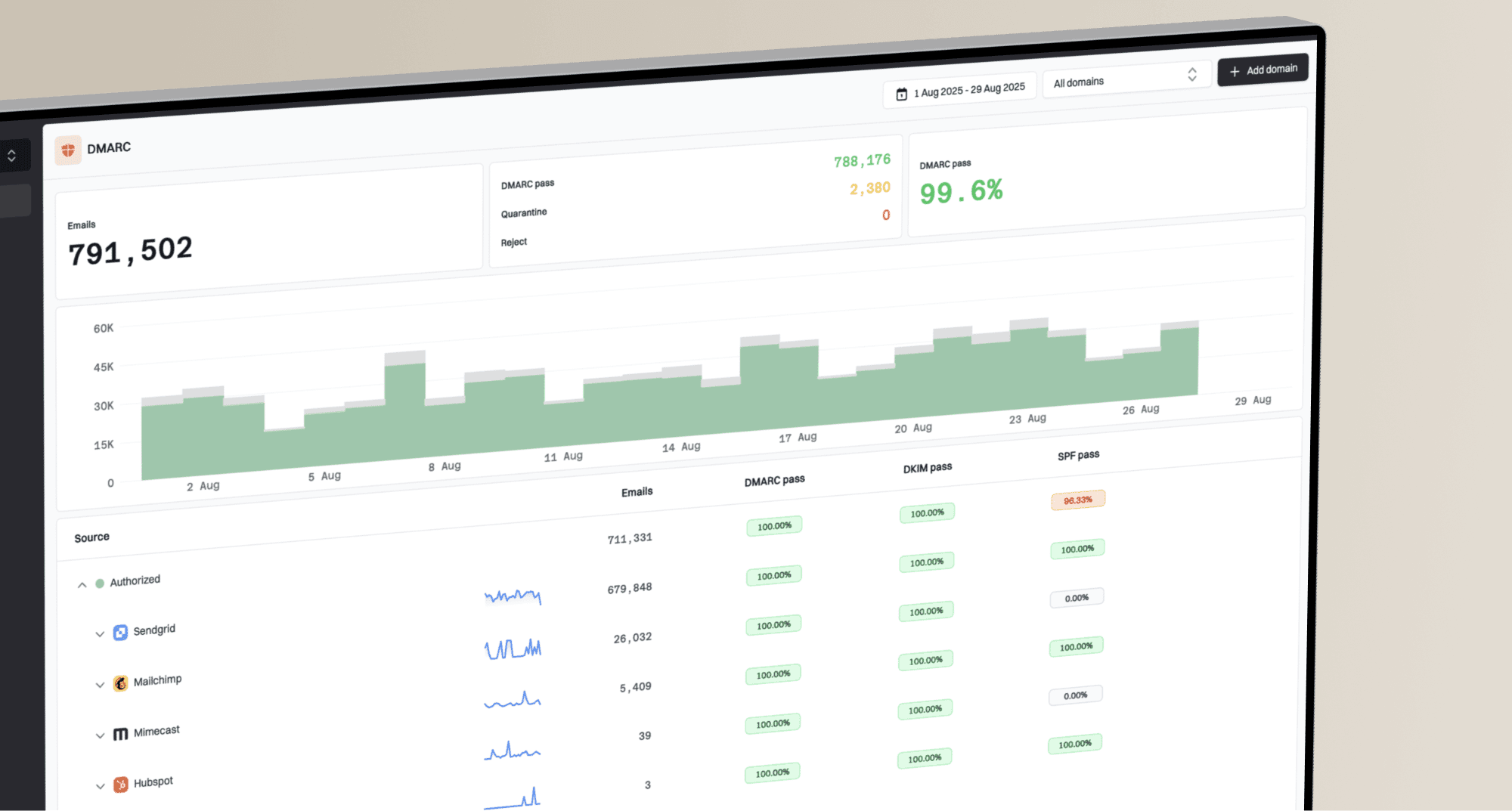
Suped's product provides DMARC monitoring that turns aggregate reports about Cvent traffic into authentication pass rates and source-level fix steps. Marketing and events teams can check whether expected Cvent sources keep passing DMARC as policies change.
Suped DMARC dashboard showing email volume, authentication health, and source breakdown
Suped also supports policy staging through Hosted DMARC. Use policy management alongside Cvent source reports to check authentication before enforcement changes.
- Source tracking: Confirm which Cvent sources pass DMARC through DKIM or SPF over time.
- Issue detection: Catch missing DKIM, wrong d= domains, and unauthenticated sources.
- Policy staging: Move toward enforcement after Cvent and other senders are stable.
- Multi-domain work: Manage multiple brands, client domains, or event subdomains in one place.
Troubleshooting Cvent alignment
When Cvent fails DMARC, the cause is usually one of a small set of issues. Start with the real header, then compare it with the DMARC aggregate reports. The header tells you what happened to one message. The reports tell you whether the issue is systemic.
|
|
|
|---|---|---|
DMARC fails | DKIM missing and SPF unaligned | Ask Cvent to enable custom DKIM signing. |
SPF passes but is unaligned | Cvent Return-Path | Keep aligned DKIM working; verify a custom envelope domain if supported for this mail stream. |
DKIM passes but is unaligned | Wrong d= domain | Have Cvent sign with your From domain. |
Some mail fails | Mixed Cvent modules | Verify the required authentication configuration separately for each product and sending domain. |
DKIM selector does not resolve | Wrong hostname, missing record or duplicate domain suffix | Check the exact s._domainkey.d hostname against Cvent's supplied DNS instructions. |
Policy rejects mail | Enforcement too early | Correct the affected stream; scope any temporary policy change to its dedicated sending subdomain. |
Common Cvent DMARC symptoms and fixes.
Separate SPF alignment from the final DMARC result. If DKIM alignment passes consistently, unaligned SPF does not cause DMARC failure. Before increasing enforcement, check every expected Cvent stream and investigate any failures instead of assuming one working module covers the whole account.
Working state
A healthy Cvent setup has DKIM pass, DKIM alignment pass, DMARC pass, and a predictable source footprint in aggregate reports. SPF alignment is not required when DKIM carries the DMARC result.
Views from the trenches
The comments below date to March 2021 and describe older Cvent configurations. Use current account settings and live headers to establish envelope-domain support for each mail stream.
Best practices
Verify Cvent with live message headers before moving the domain beyond monitoring policy.
Use a branded event subdomain when Cvent mail ownership needs clean report separation.
Ask Cvent for the exact DKIM signing domain, not only the selector records to publish.
Common pitfalls
Treating a Cvent SPF pass as DMARC success hides the Return-Path mismatch problem.
Enforcing DMARC before either method passes alignment can reject legitimate event messages.
Adding SPF includes for every vendor can create lookup pressure without alignment gains.
Expert tips
Track Cvent as a distinct source so one event module does not hide another failing stream.
Keep alignment relaxed until every legitimate sender has proven exact-domain signing.
Document Cvent DKIM ownership so future DNS or account changes do not break signing.
Marketer view
Marketer from Email Geeks says Cvent DKIM can be enabled for a custom domain through support, so DKIM should be the first route to verify.
2021-03-26 - Email Geeks
Marketer view
Marketer from Email Geeks says Cvent SPF alignment was not a committed option, so teams should not rely on Return-Path matching without account confirmation.
2021-03-26 - Email Geeks
Keep Cvent authentication working
Keep the Cvent-supplied DNS records in place and document who owns the sender-domain configuration. Retest each mail stream after account changes or a change to the visible From domain. When Cvent rotates DKIM selectors, publish replacement records as instructed and confirm passing signatures before removing old records.
Frequently asked questions
Cvent passes DMARC when DKIM or SPF passes with a domain that matches the visible From domain under your DMARC alignment mode. Custom DKIM provides that path. An SPF pass for a Cvent-owned Return-Path does not match your domain; test custom envelope-domain configurations before relying on SPF alignment.
Follow the exact DNS instructions for your envelope-domain configuration. If Cvent uses its own Return-Path, your visible From domain's SPF record is not the record checked. A custom envelope setup needs the supplied records at the specified hostname. Do not add a second SPF record or assume a root-domain include changes the Return-Path.
Yes. A passing DKIM signature with a matching signing domain is enough for DMARC, even when SPF is unaligned. Keep DKIM enabled if you also configure SPF alignment: forwarding can break SPF, while DKIM can survive when the signed message content is unchanged.
Use relaxed alignment first unless you have verified the exact-domain requirements for every legitimate Cvent mail stream. adkim=s requires the passing DKIM d= domain to equal the From domain. aspf=s separately requires an exact match for the SPF-authenticated envelope domain.
Send a real Cvent message, inspect the headers, and confirm DKIM passes with the expected d= domain. Then check DMARC aggregate reports to confirm the same result across normal Cvent traffic.
No. Aligned DKIM gives Cvent mail a valid DMARC path, but inbox placement also depends on sending reputation, complaint rates, message content, recipient response, and mailbox-provider filtering.