How to verify DMARC, DKIM, and SPF setup?

Updated on 20 Aug 2026: We added subdomain report checks and corrected DMARC test-mode guidance.
The reliable way to verify DMARC, DKIM, and SPF is to check three layers: DNS records, real email headers, and DMARC aggregate reports. A single green result is not final, because some checks only inspect DNS, some only inspect one test message, and some miss the specific selector or sending domain used by your platform.
For a fast first pass, Suped's domain health checker checks DMARC, SPF, and DKIM together. For ongoing verification, Suped's product turns those checks into daily source-level evidence, alerts, and fix steps through DMARC monitoring, instead of leaving the team with a one-time pass or fail.
The short answer is this: DNS tells you what is published, headers tell you what happened to a sent email, and DMARC reports tell you whether all legitimate senders keep passing over time. You need all three to say the setup is working.
What verification actually means
A verified setup requires more than a record existing in DNS. SPF, DKIM, and DMARC each answer a different question, and DMARC only passes when SPF or DKIM passes with an authenticated domain that has relaxed or strict alignment with the visible From domain. Relaxed alignment means the domains share the same organizational domain. Strict alignment means the domains are identical.
- SPF verifies that the sending IP is authorized by the domain in the envelope sender, also called MAIL FROM.
- DKIM verifies that the message has a valid cryptographic signature and that the public key exists at the selector named in the header.
- DMARC verifies that at least one of SPF or DKIM passes and the authenticated domain matches the visible From domain closely enough for DMARC.
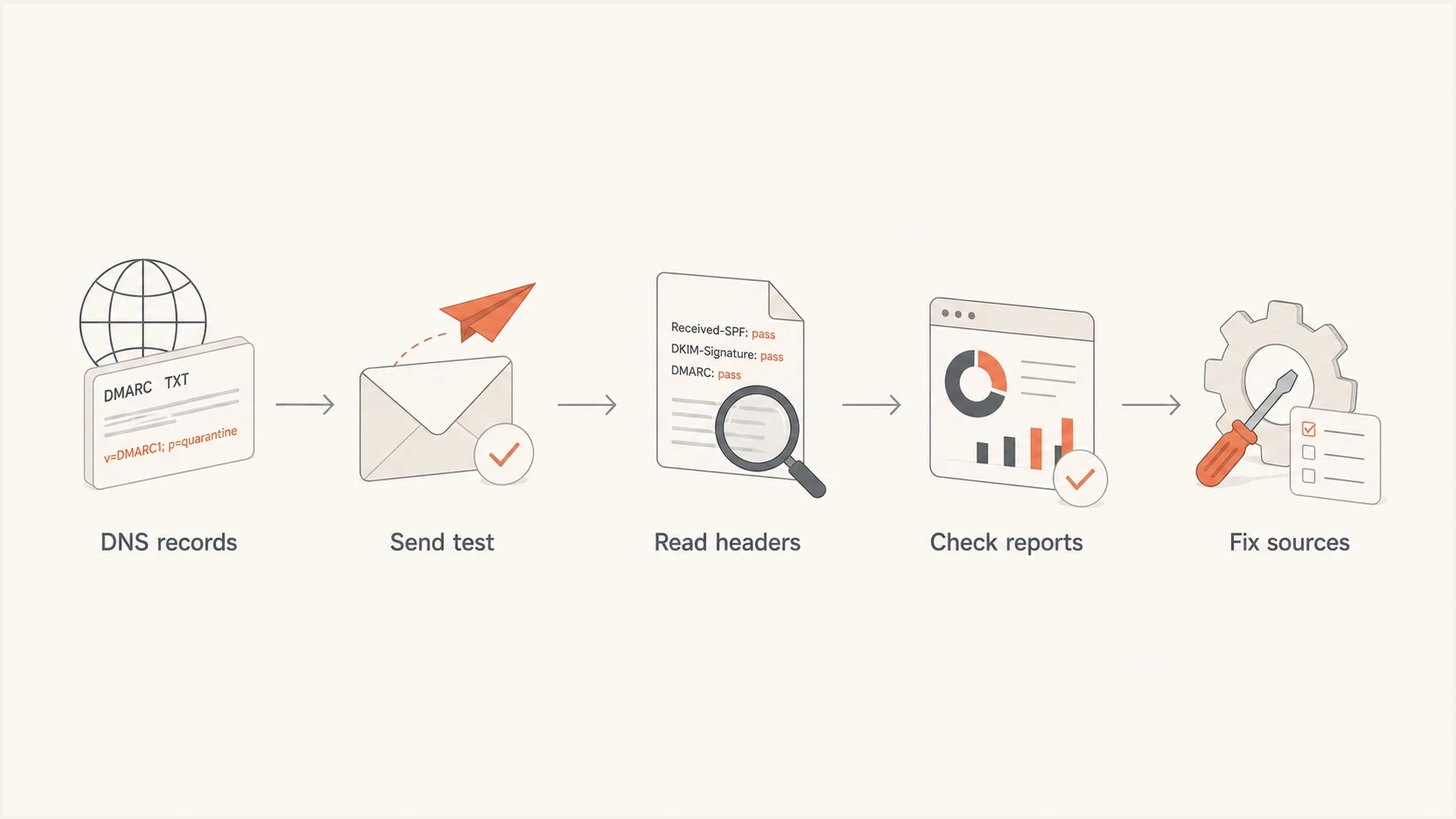
DMARC verification flow from DNS records to headers, reports, and source fixes
That distinction matters when a checker says DMARC is missing while a test email says DMARC passed. They can both be reacting to different evidence. A domain-level checker looks for a TXT record at _dmarc.example.com. A message test reads the actual authentication result added by the receiving mailbox.
One pass is not enough
Treat a domain as verified only when the DNS record is valid, at least one real message passes DMARC, and reporting shows the normal production senders passing.
For Gmail and Yahoo bulk sending, verification also means every sending domain has SPF and DKIM, DMARC is published at least at p=none, and direct mail passes alignment for the From domain. Marketing and subscribed mail also need one-click unsubscribe, but that sits outside SPF, DKIM, and DMARC themselves.
Run the DNS checks first
Start with DNS because every later test depends on the records being in the right place. DMARC is queried below _dmarc for the visible From domain or through its inherited policy path. SPF is a TXT record on the domain evaluated from MAIL FROM, while DKIM publishes a public key below the selector and _domainkey for the signing domain. Check the actual From domain, return-path domain, DKIM signing domain, and selector used by each production sender. Do not stop at the root domain.
DNS lookup commandsBASH
dig TXT _dmarc.example.com

dig TXT example.com

dig TXT selector1._domainkey.example.com
If you prefer a guided check, Suped's DMARC checker parses the DMARC record and shows the policy, reporting addresses, and syntax issues. That is faster than reading a long TXT value by eye, especially when you are checking multiple domains.
Example authentication recordsDNS
_dmarc.example.com TXT "v=DMARC1; p=none; rua=mailto:dmarc@example.com"

example.com TXT "v=spf1 include:_spf.example.net -all"

selector1._domainkey.example.com TXT "v=DKIM1; k=rsa; p=MIIBIjAN..."
Common DNS failures
- More than one SPF record at the same domain causes an SPF permanent error.
- A DMARC record belongs at _dmarc.example.com, not at the root record by itself.
- A DKIM checker needs the selector used by the sender. Without it, DKIM can look missing.
- SPF evaluation stops after 10 DNS lookups, so nested includes need attention.
- Use at least 1024-bit DKIM keys for Gmail and Yahoo, and prefer 2048-bit keys where your DNS provider supports them.
- A branded CNAME for tracking or platform verification does not prove SPF, DKIM, or DMARC alignment.
DMARC checker
Look up a domain's DMARC record and catch policy issues.
?/7tests passed
After DNS is correct, wait for the relevant TTL to expire before judging the next result. If the change followed a DNS provider move and mail went out while records were broken, also allow for receiver caches and negative answers, such as a missing DKIM selector that returned NXDOMAIN. Unknown TTLs or one-day TTLs justify waiting 24 hours before bulk sends, then sending a controlled test before normal volume.
Verify subdomain policies and report delivery
Check DMARC at the exact visible From domain before assuming the organizational-domain record applies. RFC 9989 uses policy discovery through the DNS hierarchy when no record exists at that From domain. An exact subdomain record takes precedence. Otherwise, an existing subdomain uses sp= when present or inherits p= from the applicable organizational-domain record.
- Publish a separate subdomain record when that mail stream needs a different policy or reporting address.
- Check sp= for existing subdomains and np= for nonexistent subdomains under the organizational domain.
- If rua points to another organizational domain, confirm that destination has authorized reports in DNS.
Subdomain and report authorization checksBASH
dig TXT _dmarc.news.example.com

dig TXT example.com._report._dmarc.reports.example.net
The external authorization record must begin with v=DMARC1. Without that record, conforming receivers ignore the external destination and reports do not arrive there. Not every receiver sends aggregate reports, so the absence of a report from one receiver does not prove that the setup is wrong.
Confirm results in real headers
Next, send a real email from each production system to a mailbox you control and inspect the full headers. The key header line is Authentication-Results. It shows the receiving system's SPF, DKIM, and DMARC judgment for that message. Compare header.from with smtp.mailfrom and the DKIM header.d value. In the DKIM-Signature header, d= identifies the signing domain and s= identifies the selector. In Gmail, use Show original to see the authentication summary and raw headers.
Passing header exampleTXT
Authentication-Results: mx.example.net;
 spf=pass smtp.mailfrom=bounce.example.com;
 dkim=pass header.d=example.com;
 dmarc=pass header.from=example.com
If SPF passes for a bounce domain that does not match the visible From domain, DMARC still needs DKIM to pass with the right domain. If DKIM passes with a vendor domain rather than your domain, DMARC can fail even though the message has a valid DKIM signature.
|
|
|
|---|---|---|
pass | Authentication succeeded. | Check domain match. |
fail | Authentication failed. | Fix DNS or sender. |
none | No applicable result or record. | Check method and record location. |
permerror | A permanent record error occurred. | Repair the TXT value. |
temperror | A temporary DNS or lookup error occurred. | Retest after DNS recovers. |
Header outcomes to check before trusting the result
One test message is still only one test. Repeat this for newsletters, invoices, password resets, sales automation, support replies, and any web server that sends mail. A setup can be correct for one sender and broken for another.
Email tester
Send a real email to this address. Suped shows a results button when the test is ready.
?/43tests passed
A sent-message test is useful because it checks the path that DNS alone cannot see: the return path, the DKIM selector actually used, and the final DMARC result after the receiver evaluates the message.
Check real traffic with DMARC reports
The most important verification happens after real mail has flowed. Participating receivers usually generate aggregate reports at least daily, but the first useful data can take 24 to 48 hours to arrive. The reports show which IPs sent mail using your domain, how SPF and DKIM evaluated, and whether each source passed DMARC.
Suped DMARC dashboard showing email volume, authentication health, and source breakdown
Suped's product groups report data by sending source, separates verified traffic from failures, and gives fix steps for each issue. This turns raw aggregate reports into an ongoing check of the production systems that use the domain.
DMARC pass rate thresholds
Use these thresholds as a practical operating guide after normal traffic has been observed.
Healthy
98-100%
Most legitimate mail is passing and remaining failures are explainable.
Investigate
95-97.9%
One or more senders need DNS, selector, or return-path cleanup.
Do not enforce
Below 95%
Move slowly until failures are tied to known sources or abuse.
For teams managing more than one domain, the reporting layer matters more than another manual lookup. It is where you find the forgotten helpdesk, old billing system, or regional marketing tool that never made it into the SPF record or never got a DKIM key.
When checkers disagree
Disagreement usually means the checks are looking at different inputs. A domain checker can say DKIM is missing because it does not know your selector. A message test can show DKIM pass because it read the selector from the actual email header. An SPF check can pass while DMARC fails because SPF passed for a return-path domain that does not match the visible From domain.
DNS checker
- Use it to confirm records exist at the right host.
- It cannot prove a production sender uses the record.
- Run it when you need to validate syntax, policy, and DNS location.
Message test
- Use it to confirm what happened to a real email.
- It only proves that one sender and one message path worked.
- Run it when you need the SPF, DKIM, and DMARC result from headers.
When results conflict, ask which domain was checked, which selector was used, which sender sent the test, and what the final Authentication-Results header said. If the underlying concepts are unclear, this standards guide explains how SPF, DKIM, and DMARC work together.
Do not judge from spam placement
A message can pass SPF, DKIM, and DMARC and still land in spam. Authentication proves identity, not inbox placement. Content, reputation, complaints, and recipient engagement still affect filtering.
Fix the gaps before moving policy
After verification finds gaps, fix each source before tightening policy. A safe rollout keeps p=none while legitimate sources are being fixed, then moves deliberately to quarantine or reject after reports are clean. RFC 9989 makes pct historic and defines t=y as a test signal. Older receivers can ignore that new tag and apply p as published, so do not rely on t=y as a universal rollout safety control.
Policy staging examplesDNS
_dmarc.example.com TXT "v=DMARC1; p=none; rua=mailto:dmarc@example.com"

_dmarc.example.com TXT "v=DMARC1; p=quarantine; t=y; rua=mailto:dmarc@example.com"

_dmarc.example.com TXT "v=DMARC1; p=reject; rua=mailto:dmarc@example.com"
If you need to create or rebuild a record, use Suped's DMARC record generator so the syntax is correct before you publish it. Then verify the record in DNS and watch reports before increasing enforcement.
- Inventory every system that sends mail using the domain, including web apps and billing tools.
- Authenticate each sender with the right SPF include or DKIM signing setup.
- Verify each source by sending real messages and inspecting headers.
- Monitor DMARC reports until normal mail is clean.
- Move policy only after the remaining failures are known and acceptable.
Where Suped fits
Suped's product helps when verification needs to stay accurate after the first check. Automated issue detection, real-time alerts, Hosted SPF, Hosted DMARC, and source-level reports make it easier to keep policy changes controlled.
A practical verification checklist
A repeatable checklist is simple: check DNS, send mail, read headers, read reports, then fix what the data proves. It keeps the work grounded in evidence instead of tool disagreement.
- Confirm one DMARC TXT record at _dmarc.example.com with a valid policy and reporting address.
- Confirm one SPF record, no lookup-limit failures, and no stale senders.
- Confirm every sender has a valid DKIM selector and signs with your domain where possible.
- Confirm spf=pass, dkim=pass, and dmarc=pass in real messages.
- Confirm normal production sources keep passing after several reporting cycles.
This checklist also explains why a sender representative can say DMARC is missing while your test email says it passed. They were likely checking a different domain, missing a DKIM selector, or relying on a DNS-only view. The fix is not to argue with the checker. The fix is to gather the exact DNS record, the exact header, and the report evidence.
Views from the trenches
Best practices
Start with DNS, then verify a real message header from each system that sends mail for the domain.
Keep a sender inventory so every platform has a clear SPF path and DKIM selector in DNS.
Move DMARC policy only after reports show trusted sources passing for normal production mail.
Common pitfalls
Checking only the root domain misses subdomains that send mail with separate DNS records.
Assuming SPF pass means DMARC pass hides the visible From domain matching requirement.
Publishing two SPF TXT records breaks SPF even when each individual record looks valid.
Expert tips
Treat t=y as a test signal, not universal rollout control; older receivers can ignore it.
Review failures by source IP and DKIM domain before changing policy to quarantine.
Test password resets, invoices, support tools, and newsletter campaigns separately.
Marketer from Email Geeks says DNS lookup for the DMARC TXT record is the cleanest first check when a tool gives mixed results.
2024-09-12 - Email Geeks
Marketer from Email Geeks says real message headers are needed because SPF and DKIM results show what happened to the sent email.
2024-10-03 - Email Geeks
When to trust the setup
Trust the setup when DNS, headers, and DMARC reports agree. A domain checker alone is useful, but incomplete. A sent-message test is useful, but narrow. Aggregate reporting is the evidence that normal mail keeps working after setup changes.
For a one-time verification, use the checklist above and inspect the actual headers. For a domain that sends real business mail, Suped's product keeps checking every sender, flags new failures, and gives specific steps to fix the source before enforcement breaks legitimate mail.




