
Why is Orange.fr throttling my legitimate emails and how can I resolve it?

Published 8 Jun 2025
Updated 16 Oct 2026
12 min read
Summarize with

Updated on 16 Oct 2026: We clarified Orange's SMTP codes and sending rules, with practical steps for retries and recovery.
Orange.fr throttles legitimate email when its local reputation systems see risk that is specific to Orange and Wanadoo, even when Gmail, Microsoft, Yahoo, and other mailbox providers are accepting the same traffic. The usual causes are high complaint signals, too many invalid recipients, rapid connection patterns, sudden volume changes, authentication mismatches, blocklist (blacklist) listings, or a brand reputation problem tied to another stream using the same visible domain.
Start by capturing the exact SMTP response, slowing only Orange and Wanadoo traffic, checking SPF, DKIM, and DMARC domain matching, suppressing confirmed invalid recipients, reviewing complaint-prone streams, checking IP and domain blocklists, and contacting Orange with evidence once the sender has fixed the obvious causes. Orange's postmaster page is the official place to check current SMTP guidance and error-code meanings.
Why Orange throttles otherwise good mail
Orange and Wanadoo do not have to agree with the reputation score you see at other mailbox providers. A sender can look healthy elsewhere and still hit Orange-specific rate limits because Orange weighs its own complaint feedback, recipient quality, delivery history, authentication, and policy rules. If only Orange.fr and Wanadoo.fr are deferring messages, treat it as an Orange-local issue first, not a global deliverability collapse.
The strongest clue is the full SMTP response. A leading 4xx SMTP status, such as 421 or 451, means a temporary failure that should be retried later. A leading 5xx status means a permanent rejection of that delivery attempt; do not retry it unchanged. The OFR suffix is a separate Orange reason code, so OFR_416 means an invalid recipient, not a temporary SMTP 4xx failure. Read both parts before changing DNS or sending rates. Do not average all French providers together. Free.fr, SFR, La Poste, and Orange have different filtering paths, so mixing them hides the useful signal.
Do not treat other inbox success as proof
A clean result at Gmail or Microsoft is useful, but it does not prove Orange has the same view of your mail. Orange throttling should be diagnosed with Orange-specific bounce logs, recipient engagement, complaint history, and authentication results.
|
|
|
|---|---|---|
104 | Too many simultaneous connections | Reduce concurrency |
109 | Too many messages per connection | Limit each connection to 100 messages |
107 / 20x | PTR or HELO/EHLO problem | Verify reverse DNS and the resolving HELO hostname |
416 | Invalid recipient | Suppress that address |
515 | DMARC failure rejected under the domain's policy | Repair authentication and domain matching |
519 | Sending IP not authorized by SPF | Correct the envelope-sender domain's SPF record |
535 | Missing DKIM signature | Enable DKIM signing |
988 | Message rate limited for low reputation | Use your own DKIM domain and retry later |
989 / 990 | Sending domain rate limited for low reputation | Slow delivery and clean the stream |
99 / 103 | Orange's internal IP blocklist | Contact Orange after remediation |
100-102 / 425 | Public IP or domain blacklist | Fix the cause before requesting delisting |
506 | Message classified as suspected spam | Review the message and escalate persistent rejection |
Orange reason codes are distinct from the leading SMTP status. Use the exact response before changing DNS, volume, or content.
These meanings follow Orange's official error-code table. Temporary receiver or DNS failures also cause deferrals, so a 4xx response alone does not prove a reputation problem.
Start with the fastest diagnosis
Before changing infrastructure, send a fresh test email through the exact production path that Orange is throttling. Use the same envelope sender, return-path domain, DKIM selector, content family, and unsubscribe headers. A synthetic message from a different system gives you a clean-looking result that does not explain the failing traffic.
Use Suped's email tester to inspect a real message for authentication, DNS, content, and header issues. That gives you a sender-side baseline before you compare Orange-specific deferrals against the same message path.
Email tester
Send a real email to this address. Suped shows a results button when the test is ready.
?/43tests passed
The goal is to separate four different problems that often look identical in a dashboard: a message-level rejection, an IP reputation issue, a domain reputation issue, and a send-rate issue. Each one has a different fix.
- Bounce evidence: Capture the full SMTP response, SMTP stage, remote host, timestamp with timezone, sending IP, envelope sender, and message category.
- Provider split: Break Orange.fr and Wanadoo.fr out from other French mailbox providers so the trend is not diluted.
- Header check: Confirm SPF pass, DKIM pass, DMARC pass, return-path domain, visible From domain, and DKIM signing domain.
- Complaint review: Compare recent complaint rates for price alerts, lead capture, reactivation, and partner traffic separately.
- List quality: Suppress confirmed invalid addresses and opted-out recipients. Pause inactive or unverified marketing cohorts; retain valid recipients on backoff when Orange returns temporary deferrals.
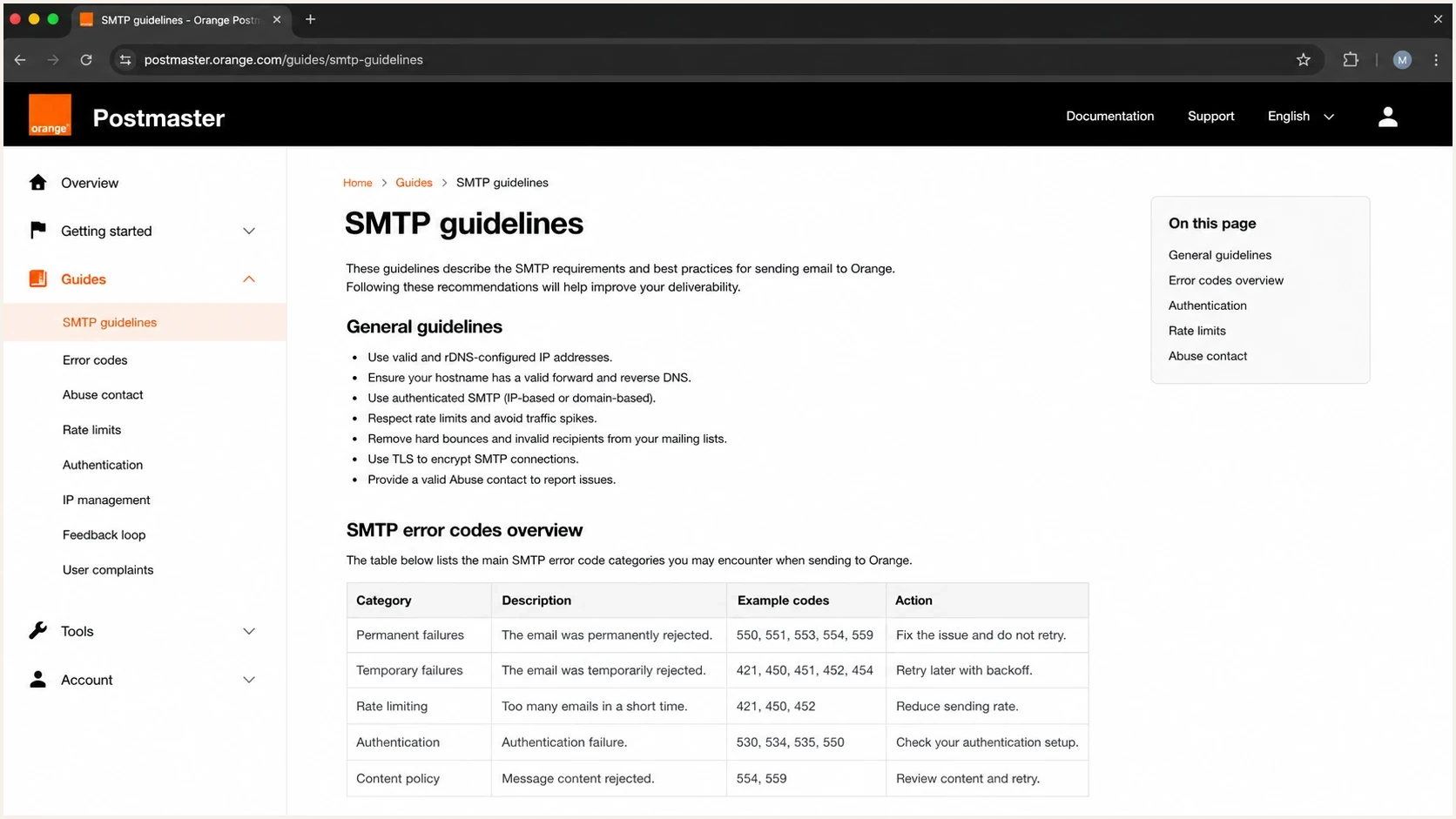
Orange Postmaster SMTP guidance and error codes for Orange.fr and Wanadoo.fr.
Match Orange's acceptance rules
Orange publishes specific mechanical rules for Orange.fr and Wanadoo.fr delivery. Use a static sending IP, configure a PTR whose hostname resolves back to that IP, present a fully qualified HELO or EHLO name that resolves in DNS, keep valid A or MX records on the sender domain, and enable TLS 1.2 or newer, which Orange strongly recommends. Orange requires SPF, DKIM, and DMARC to pass, and it strongly recommends ARC sealing for forwarded messages.
Keep each message at 45 MB or less. Orange recommends no more than 100 messages per connection, two simultaneous connections per sending IP, and 100 recipients per message. Reputation can cause Orange to apply tighter limits, so treat those figures as ceilings rather than guaranteed capacity.
Orange's postmaster guidance says spam-report rates of 0.6% or higher can trigger protection and describes a gradual move toward 0.3%, without a completion date. Keep complaints below 0.3% as a conservative operating target, not a guaranteed acceptance threshold.
Orange complaint-rate triage
Orange publishes 0.6% as a possible protection trigger and a planned move toward 0.3%. These are triage bands, not guaranteed delivery thresholds.
Lower complaint risk
Below 0.3%
Continue checking authentication and delivery logs; low complaints do not guarantee acceptance.
Review
0.3% to below 0.6%
Segment the stream, reduce riskier cohorts, and inspect acquisition source.
Stop and fix
0.6% or higher
Pause weak cohorts and send only recent, consented, engaged recipients.
Use Orange-specific throttles
- Connections: Keep Orange and Wanadoo concurrency lower than your global default while reputation recovers.
- Retries: Use patient retry intervals instead of hammering a deferred queue every few minutes.
- Cohorts: Send recent clickers and account-event mail before low-engagement promotional mail.
For a conservative setup, put Orange.fr and Wanadoo.fr in one destination group with a shared per-IP connection budget. Count every worker using the same public sending IP, including servers behind shared NAT, so separate queues do not multiply the limit. Translate the illustrative profile below into your mail server's actual configuration.
Illustrative shared Orange and Wanadoo profileyaml
# Pseudoconfiguration: translate into your mail server settings.
orange_wanadoo:
  recipient_domains: ["orange.fr", "wanadoo.fr"]
  max_connections_per_public_sending_ip: 2
  max_messages_per_connection: 100
  max_recipients_per_message: 100
  retry_backoff: ["30m", "60m", "120m"]
Meet Orange's large-sender requirements
Orange applies an additional checklist when a sender delivers more than 1,000 messages per day. Passing authentication remains necessary, but Orange also evaluates whether the identity, consent path, complaint handling, and unsubscribe process make the sender accountable to recipients.
- Authenticated identity: Make SPF, DKIM, and DMARC pass, and match the Header From domain to an authenticated domain.
- Visible sender: Use a display name that identifies the entity holding the recipient's consent.
- Domain website: Host a working site on the Header From domain with company identity, consent information, and required legal notices.
- Feedback data: Add a stable Feedback-ID header and use Orange's authorized feedback-loop route when eligible.
- List controls: Integrate bounces, suppress invalid recipients, avoid purchased lists, and verify opt-in with a confirmation email.
- One-click opt-out: Add RFC 8058 one-click unsubscribe to eligible subscription mail and process requests promptly.
The threshold is per daily sender volume
Treat the checklist as applicable once traffic exceeds 1,000 messages per day. Do not wait for an OFR rejection before adding the identity, consent, feedback, and unsubscribe controls.
Fix the sending pattern first
When throttling is already happening, the fastest way to make it worse is to keep sending every segment at the same cadence. Orange sees more retries, more queued mail, and more users marking delayed or unexpected messages as unwanted. Slow the traffic, then choose the cleanest mail to continue.
Pause or reduce
- Cold cohorts: Stop sending to recipients with no recent clicks, purchases, logins, or other reliable activity.
- Lead generation: Separate partner-acquired and co-registration traffic from owned opt-in mail.
- Bulk retries: Prevent deferred queues from retrying in tight loops against Orange MX hosts.
Keep sending
- Transactional mail: Prioritize requested transactional mail within the same reduced connection budget and retry backoff.
- Recent engagement: Prioritize users who clicked, purchased, logged in, or requested alerts recently.
- Stable streams: Keep streams with low complaints, low unknown users, and consistent volume history.
This is also the point where brand-level reputation matters. If the same visible domain is used for clean price alerts and aggressive acquisition mail elsewhere, Orange can throttle the brand broadly. Separate mail streams by purpose, make consent traceable, and keep the visible From domain tied to the user's expectation.
Manage deferred mail and verify recovery
A temporary 4xx deferral is a delay, not proof that an address is invalid. Keep the message queued and let the mail server retry. RFC 5321 recommends a general retry interval of at least 30 minutes, with variable strategies where the failure reason is known.
- Increase retry delays after repeated failures and spread attempts across the queue. Avoid manual queue flushes that create another burst.
- Do not automatically retry unchanged messages after permanent 5xx rejections. Suppress invalid recipients, but repair authentication or policy failures without deleting valid subscribers.
- Track Orange/Wanadoo deferrals, acceptance rates, and the age of the oldest queued message. A final 250 response after message submission means acceptance, not confirmed inbox placement.
- Increase volume in small steps only after deferrals fall and the backlog drains. Reduce it again if the same OFR codes return.
Audit authentication and domain identity
Authentication problems do not always cause immediate rejection. Sometimes they reduce trust enough that a sender gets deferred instead. Check the message exactly as Orange receives it, including SPF result, DKIM result, DMARC result, reverse DNS, HELO name, envelope sender, visible From domain, and DKIM signing domain.
Under the DMARC specification, DMARC passes when at least one successful SPF or DKIM identity matches the visible From domain under the published domain-matching rules. Orange separately requires SPF and DKIM to pass. Check SPF on the envelope-sender domain, not only the visible From domain. For OFR_988, configure DKIM signing with your own domain. After DNS changes, allow the previous records' cache lifetimes to expire before retesting.
Suped's domain health checker checks DMARC, SPF, DKIM, DNS, and common domain setup issues in one pass. For ongoing operations, Suped's DMARC monitoring shows which sources are authenticated, which are failing, and which ones need a DNS or sending-platform fix.
DMARC record detail view showing SPF, DKIM, DMARC, rDNS diagnostics, and DNS records
A safe DMARC rollout starts with visibility before enforcement. If Orange is throttling, do not jump straight to a stricter policy without knowing every legitimate source. Use aggregate reporting to identify legitimate sending sources, fix their failures, then strengthen the policy. Aggregate reports cover only traffic reported by participating receivers; they are not a complete delivery log.
Visibility-first DMARC recorddns
_dmarc.example.com. 3600 IN TXT (
  "v=DMARC1; p=none; rua=mailto:dmarc@example.com"
)
Where Suped fits
Suped is our DMARC and email authentication platform. During an Orange incident, use it to map aggregate DMARC data to sending sources, find SPF or DKIM failures, monitor domain and IP blocklist (blacklist) status, and alert on authentication failures or blocklist changes. Keep Orange SMTP responses with these signals because DMARC reports do not contain OFR throttling codes.
Check blocklists and reputation
Orange error responses distinguish its internal IP blocks, codes 99 and 103, from public blocklist (blacklist) listings affecting an IP or sender domain. A clean public check does not rule out an Orange-internal block. Use the exact code to choose between listing remediation and an Orange support request.
Check both IP and domain reputation, especially when the same brand sends mail across multiple vendors or dedicated IPs. Suped's blocklist monitoring helps teams catch listings early and see which domains or IPs need action.
Blocklist checker
Check your domain or IP against 144 blocklists.







When a listing exists, do not request delisting before fixing the cause. Remove bad acquisition sources, stop mail to unknown users, reduce complaint-heavy campaigns, and document the remediation. A delisting request without operational change gives Orange little reason to trust the next retry.
Contact Orange with useful evidence
Contact Orange after you have slowed the stream, checked authentication, cleaned weak recipients, and gathered representative logs. For a delivery problem, use the contact form linked from Orange's postmaster page and select "Un problème d'envoi d'emails vers les adresses Orange ou Wanadoo (deliverability issue)". Reserve abuse@orange.fr for reporting abuse. Keep the report technical and concise.
- Identity: State the sending brand, visible From domains, envelope domains, DKIM domains, and sending IPs.
- Evidence: Include exact SMTP responses, timestamps with timezone, queue IDs, and a small set of sample message IDs.
- Controls: Explain current rate limits, retry backoff, recipient suppression rules, and complaint handling.
- Remediation: List the fixes already made, including stream pauses, list cleanup, authentication repairs, and delisting work.
- Request: Ask whether the domain, IP, or message stream has a specific reputation or policy issue.
Illustrative contact template; replace sample logstext
Subject: Orange.fr throttling review request for example.com

Hello Orange postmaster team,

We are seeing Orange.fr and Wanadoo.fr deferrals for legitimate
price-alert mail from example.com.

Sending IPs: 192.0.2.10, 192.0.2.11
Visible From domain: example.com
Envelope domain: bounce.example.com
DKIM domain: example.com

Illustrative SMTP responses (replace with full, unedited log lines):
2026-05-28 09:14 UTC, 421 Too many connections, OFR002_104
2026-05-28 09:22 UTC, 421 Message rate limited, OFR_988

Actions taken:
- Limited Orange/Wanadoo to 2 total connections per public IP
- Paused inactive recipients and partner-acquired cohorts
- Confirmed SPF, DKIM, and DMARC pass on production mail
- Checked IP and domain blocklist status

Can you confirm whether this is an IP, domain, rate, or content issue?

Regards,
Postmaster team
If the brand has obvious spam or uncontrolled lead-generation traffic, do not expect Orange to explain every filter decision. Fix the sender first. Orange is more likely to review a case when the message stream is clearly requested, technically authenticated, and already operating under conservative limits.
Views from the trenches
Best practices
Separate Orange and Wanadoo metrics before changing global throttles or sender policy.
Contact Orange only after capturing SMTP logs, timestamps, IPs, domains, and fixes.
Review brand-level acquisition mail when clean streams are throttled at Orange only.
Common pitfalls
Treating Gmail or Microsoft success as proof that Orange reputation is also healthy.
Retrying deferred Orange mail too aggressively and turning throttling into pressure.
Asking for escalation before suppressing weak recipients and complaint-heavy cohorts.
Expert tips
Group Orange and Wanadoo together, but keep Free, SFR, and La Poste in separate views.
Use a short French or English technical report with exact errors and remediation steps.
Look for hidden lead-generation traffic using the same brand domain before escalating.
Marketer view
Marketer from Email Geeks says Orange-only throttling should be separated from Free, SFR, and La Poste because shared French-provider reporting hides the cause.
2022-03-21 - Email Geeks
Marketer view
Marketer from Email Geeks says Orange can react to brand-level reputation when lead-generation traffic elsewhere uses the same visible identity.
2022-03-21 - Email Geeks




