
What could cause a sudden increase in DNS failure and hard bounces in email delivery?

Published 12 Jul 2025
Updated 27 Oct 2026
15 min read
Summarize with
Updated on 27 Oct 2026: We clarified DNS failure diagnosis, queue expiry, and when to retry delivery or suppress an invalid address.
A sudden increase in DNS failure and hard bounces usually points to recipient-domain routing problems, bad or stale addresses entering your list, or changes in your email service provider (ESP). DNSSEC validation errors and IPv6-specific failures are other possibilities. A change in recipient mix can raise the overall rate even when sending settings stay the same.
The label "DNS failure" does not automatically mean your own DNS records are broken. In many delivery reports it means the sender could not resolve a usable route to the recipient domain. The label "hard bounce" is even less diagnostic because ESPs use it as a broad bucket for permanent failures. Start with the raw non-delivery report (NDR), including the SMTP reply and enhanced status code, then group the bounces by recipient domain, recipient MX, sending source, campaign, and bounce code. When DNS resolution fails before a connection is made, there is no recipient-server SMTP reply; request the sending system's lookup error instead.
If the spike is large while volume is almost flat, treat it as a real incident. For example, moving from 2,176 DNS failures on 1.42 million sends to 28,909 DNS failures on 1.57 million sends is not explained by volume. That is a jump from about 0.15% to 1.84%. These are illustrative figures, not an industry benchmark. At that point, use message-level evidence instead of a dashboard summary. Suped's email tester can also check authentication results and headers on a test message.
What the spike usually means
The direct answer is that a sudden DNS failure and hard bounce spike is usually caused by a recipient-domain lookup or routing failure, or by a change in what your ESP counts as a permanent failure. The sender's SPF, DKIM, and DMARC can still pass while recipient-domain lookup fails. That is why a domain can look healthy in authentication checks but still have high DNS-related bounces.
Example bounce-rate movement
These illustrative category rates show a change that deserves log-level investigation. DNS failures and hard bounces can overlap in ESP reports; do not add them together unless the categories are mutually exclusive.
Nov DNS failure
0.15%Jan DNS failure
1.84%Nov hard bounce
0.36%Jan hard bounce
2.37%Do not assume it is a seasonal quirk unless the raw data supports that. In the example above, send volume increased by only about 10%, while DNS failures increased more than twelvefold. Investigate a sharp rise against your normal rate even below 2%; there is no universal bounce-rate threshold that guarantees good deliverability. Compare equivalent audiences and sending streams.
- Recipient route: The recipient domain is invalid, publishes a null MX, or has missing, misdelegated, expired, or unreachable routing records.
- Bad addresses: A new import, old segment, typo-heavy form, or reactivated audience can add domains that no longer receive mail.
- DNSSEC: A broken signature chain can make validating resolvers reject records that appear to exist through a non-validating lookup.
- IPv6: A mail path that tries IPv6 can expose broken AAAA records, connectivity problems, or sender PTR and policy failures. Connection or TLS failures after resolution are separate from DNS lookup failures.
- ESP routing: A different smarthost pool, resolver, retry policy, or bounce parser can change outcomes without a visible campaign change.
- Traffic mix: A high-volume send can reach a different provider, segment, region, or source list even when account settings stayed the same.
Separate recipient DNS from your sending DNS
The first split is simple: is the failure about finding the recipient's receiving server, or is it about your domain proving that the message is legitimate? Those are different problems, even though both involve DNS.
Likely recipient-side issue
- Mail route: The sending system cannot find a usable MX target or implicit A or AAAA route for the recipient domain.
- Domain status: The recipient domain has expired, changed DNS providers, published a null MX, or removed its mail service.
- Resolver path: Your ESP's resolver sees DNSSEC, timeout, or delegation errors that another resolver misses.
Likely sending-side issue
- Authentication: SPF, DKIM, or DMARC stopped passing for one stream, subdomain, or third-party sender.
- DNS edits: A TXT, CNAME, DKIM selector, or envelope domain record changed during an authentication update.
- Reputation: A blocklist or blacklist listing, complaint spike, or policy rejection started being counted as a hard bounce.
This split prevents a common mistake: checking only your SPF, DKIM, and DMARC, seeing green results, and concluding that the bounce report is wrong. A passing test confirms authentication for that message. It does not prove that every sending stream passes or that every recipient domain has a usable MX target or implicit A or AAAA route.
Do not diagnose from the label alone
A report label such as hard bounce or DNS failure is a starting point. The useful evidence is the exact SMTP reply, enhanced status code, DNS response, recipient domain, sending IP or pool, retry history, and timestamp.
If your team recently changed DNS for large-mailbox-provider sender requirements, check your own records too. But keep the investigation anchored to the actual rejection text. A sender-side DNS mistake often shows up as authentication failure, policy rejection, or missing reverse DNS. A recipient-side routing problem shows up as a lookup or next-hop failure for the address domain.
Email tester
Send a real email to this address. Suped shows a results button when the test is ready.
?/43tests passed
Causes that fit a sudden DNS failure spike
The causes below explain a fast jump without requiring an obvious content or volume change.
|
|
|
|---|---|---|
Many NXDOMAIN | Invalid domains | List source |
Null MX | Domain accepts no mail | Raw MX answer |
No MX answer | Implicit route or bad DNS | A and AAAA records |
DNSSEC fail | Bad signing | Resolver logs |
IPv6 only | Broken path | AAAA/PTR |
One ESP pool | Routing change | Source IPs |
One source list | Audience change | Import history |
Compact diagnosis map for DNS failure and hard bounce spikes.
List quality is often the most direct cause. If a January segment included old subscribers, recently imported leads, suppressed contacts that were accidentally reactivated, or addresses collected through a form without enough validation, invalid recipient domains can rise quickly. That produces hard bounces even if your infrastructure is unchanged. Validate new imports and re-check stale segments before a high-volume send. Use double opt-in for new subscribers to confirm access to the submitted address, and preserve suppression lists during imports so confirmed invalid addresses are not reactivated.
Recipient DNS can also break in clusters. If many failed addresses share the same corporate domain, regional domain pattern, or disposable domain group, the problem can be concentrated even when total send volume looks normal. Pull the top 50 recipient domains by DNS failure count before changing any sender configuration.
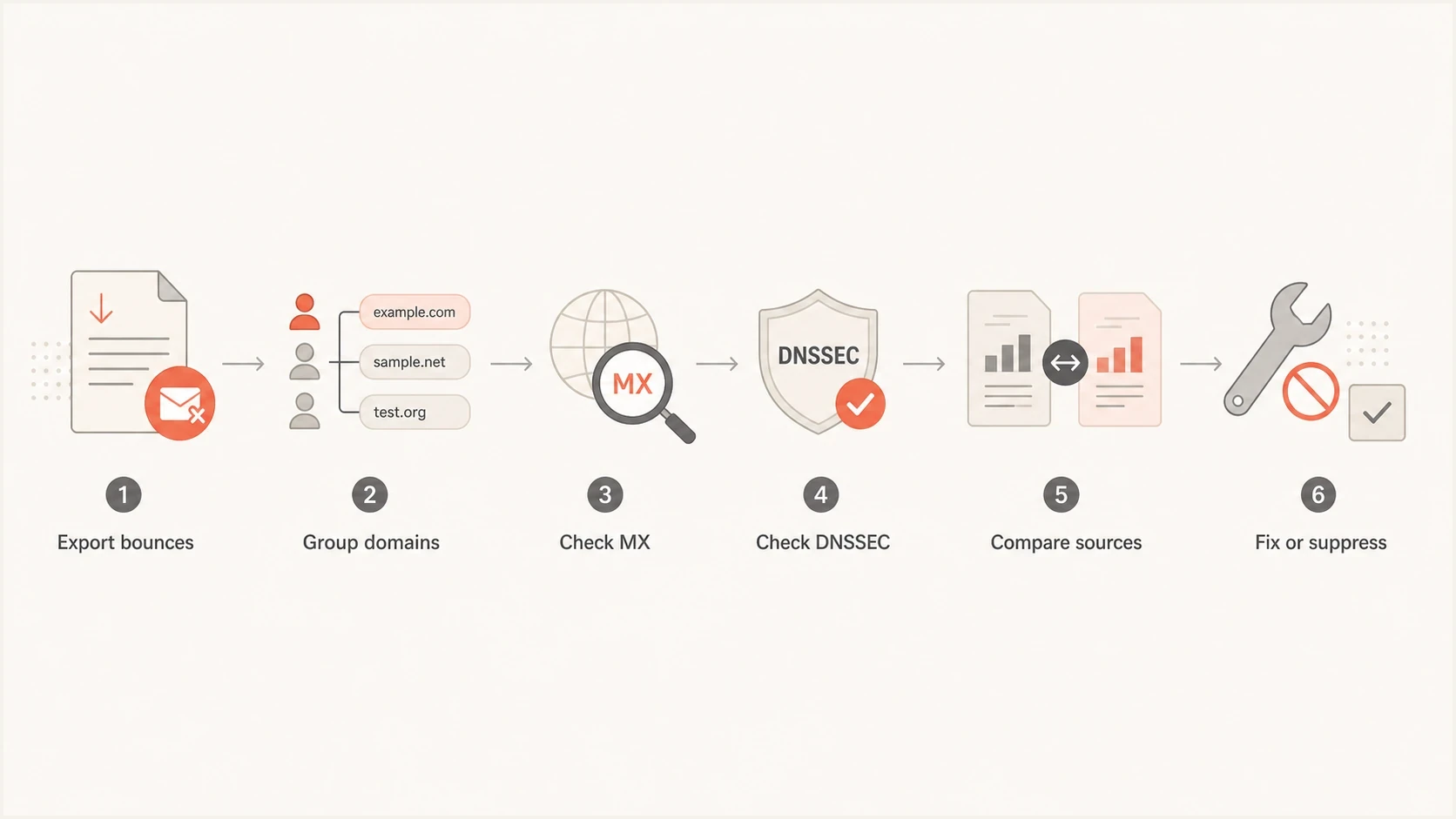
Six-step flowchart for diagnosing email DNS failures and hard bounces.
DNSSEC and IPv6 deserve specific attention because they create confusing results. A domain can appear to have records through a non-validating lookup, then return SERVFAIL when a validating resolver checks signatures. Check for a stale parent-zone DS record after a DNS hosting change or expired signatures. A host can work over IPv4, then fail when the mail path prefers IPv6. For DANE-enabled delivery, a DNSSEC or TLSA problem can also block delivery even when MX records exist. RFC 7672 specifies DNSSEC and TLSA checks for SMTP DANE.
Do not ignore reputation either. Blocklist (blacklist) events usually do not produce "DNS failure" wording by themselves, but ESPs sometimes map policy rejections and permanent failures into broad hard-bounce categories. If hard bounces jump faster than clear DNS failures, check blocklist and blacklist signals in parallel with DNS.
How to read DNS lookup outcomes
The DNS response tells you whether to suppress, retry, or keep investigating. Read it with the SMTP reply or sender-generated delivery status because ESP labels can hide the distinction between a permanent recipient-domain failure and a temporary resolver failure. A 5.x.x enhanced status code indicates a permanent failure for the current delivery, while a 4.x.x code indicates a persistent transient failure. A final failure does not, by itself, prove that the recipient address is permanently invalid.
|
|
|
|---|---|---|
NXDOMAIN | The queried name does not exist. Confirm whether it is the recipient domain or an MX target. | Suppress a confirmed nonexistent recipient domain; investigate a missing MX target as a routing fault. |
SERVFAIL | The resolver could not complete the lookup, often because of DNSSEC, delegation, or authoritative-server trouble. | Retry with limits and compare resolver results before deciding on suppression. |
Timeout | The resolver or authoritative server did not answer in time. | Retry with backoff and check whether failures follow one resolver or time window. |
NOERROR, no MX answer | There is no explicit MX answer, but SMTP can fall back to the domain's A or AAAA records. | Check A and AAAA records before calling it a hard bounce. |
Null MX: 0 . | The domain explicitly states that it accepts no email. | Treat 5.1.10 or equivalent evidence as a permanent failure. |
MX target has no address | An MX record exists, but its target has no usable A or AAAA address. | Check every MX target. If MX records exist, do not fall back to the recipient domain's own A or AAAA records. |
DNS outcomes and the safest first action.
No MX does not always mean no mail
When a domain has no MX record, SMTP uses the domain's A or AAAA records as an implicit MX route. A null MX is different: the record MX 0 . explicitly states that the domain accepts no mail. RFC 7505 defines this distinction.
After a DNS edit, compare authoritative answers with the resolver your ESP uses and record the TTL (time to live). Cached NXDOMAIN or NODATA answers can outlast a correction until their negative-cache TTL expires. Resolvers also cache resolution failures, so one successful lookup elsewhere does not prove that the sending path has recovered. RFC 9520 specifies caching of DNS resolution failures.
Why temporary DNS errors can end in final bounces
A temporary lookup failure can remain in the sending queue until its delivery lifetime expires. The sender then returns a final non-delivery report even though the underlying cause was SERVFAIL or a timeout. RFC 3463 defines X.4.7 as delivery time expired. A final bounce ends that message's delivery attempt; it does not establish that the mailbox is invalid.
- Compare the first failed attempt with the final NDR timestamp. A spike in reported bounces can follow an outage that started earlier.
- Ask for the original DNS error, queue age, retry schedule, and configured delivery lifetime, rather than only the final status.
- Separate exhausted delivery attempts from confirmed nonexistent addresses in your suppression rules.
- After the fault is repaired, confirm recovery before authorizing a new send. Check pending queues first to avoid duplicate delivery.
Let the ESP manage retries for queued temporary failures. Do not assume a universal retry count or a fixed 24-72 hour window. RFC 5321 requires temporary DNS errors to be queued and retried; the provider's queue policy determines when it stops.
How to triage DNS failures and hard bounces
Use a short triage path so the investigation does not turn into random DNS checking. Pause new sends to the affected segment or sending pool while a large unexplained spike is investigated. The goal is to isolate whether the spike follows recipients, campaigns, sending pools, provider segments, workflows, or time windows.
- Normalize rates: Divide unique failed messages by messages attempted in the same cohort, then multiply by 100. Do not count each retry as a new message or add overlapping bounce categories.
- Export evidence: Get a sample with SMTP reply text, enhanced code, DNS response, recipient domain, source IP, campaign ID, retry history, and DSN or NDR detail.
- Group recipients: Sort by recipient domain and MX host to find a concentration before editing sender DNS.
- Compare sources: Check whether one ESP account, smarthost pool, subdomain, IP range, template, source list, or transactional or marketing workflow drives the increase.
- Split bounce types: Separate confirmed hard bounces from temporary DNS failures, mailbox-full replies, throttling, and policy rejections.
- Check authentication: Verify SPF, DKIM, DMARC, return-path, and reverse DNS for each active sending stream. Change sender DNS only when the rejection or lookup evidence points there.
- Suppress carefully: Suppress confirmed invalid addresses and null MX domains. Retry SERVFAIL and timeout results within the delivery window, and investigate queue expiry separately from address validity.
For your own domain, Suped's domain health check checks published authentication records and related DNS signals. Pair those checks with a test message for each active sending stream; DNS records alone do not prove that live messages pass authentication.
Useful fields to request from your ESPtext
timestamp
first_attempt_at
last_attempt_at
final_bounce_at
queue_age
message_id
recipient_email
recipient_domain
recipient_mx
dns_query_name
dns_query_type
dns_response
resolver
source_ip
source_pool
campaign_id
bounce_category
smtp_reply
enhanced_status_code
dsn_or_ndr_detail
attempt_count
Once you have those fields, the pattern becomes easier to identify. If nearly all failures involve confirmed nonexistent recipient domains or null MX domains, review list quality. If failures cluster on one ESP pool, ask your ESP about resolver or routing changes. If a single date or hour starts the spike, compare DNS edits, imports, campaign launches, provider incidents, and provider-segment volume around that time. After remediation, send a controlled test across the affected recipient groups and confirm that the rate returns toward its normal level. One successful message is not enough.
What to ask your ESP for
A basic ESP bounce report often hides the answer. Ask for a large sample of raw bounces, including DSN or NDR detail, DNS response, and attempt history, rather than a rollup. A few hundred rows can be enough if the spike is concentrated, but a few thousand is better when the traffic is spread across many domains.
Example raw rejection texttext
550 5.1.2 The recipient domain does not exist
451 4.4.3 Temporary DNS lookup failure
556 5.1.10 Recipient address has null MX
550 5.4.4 Unable to find a mail route
554 5.7.1 Message rejected due to policy
Those lines point to different actions. A 5.1.2 bad-destination-system response supports suppression once you confirm that the recipient domain is invalid; a 5.1.10 null MX response indicates that the domain accepts no mail. A 4.4.3 temporary DNS failure supports retry and monitoring. A 5.7.1 policy rejection pushes the investigation toward authentication, sender reputation, or content rules, even if the ESP dashboard groups it with hard bounces.
Questions for the ESP
- Routing: Did any sending pool, smarthost cluster, resolver, retry policy, or bounce parser change?
- Classification: Which SMTP replies map into DNS failure, hard bounce, soft bounce, and policy rejection?
- Evidence: Can they provide raw SMTP replies and DNS responses for the highest-volume recipient domains and time windows?
- Retrying: Are temporary DNS failures retried with backoff, and does the final bounce mean queue expiry rather than a permanently invalid address?
- Recipient mix: Did one mailbox provider, source list, region, or corporate-domain segment change sharply?
If your ESP cannot provide raw responses, treat its bounce category as a hint only. You can still group by recipient domain, campaign, list source, and time, but the investigation takes longer because you are missing the evidence recorded by the sending and receiving systems.
When to suppress and when to retry
After the raw bounce data is classified, suppress confirmed invalid recipients, let the ESP retry temporary failures within its delivery window, and escalate policy or infrastructure failures to the owner of that stream. A 5xx rejection ends the current delivery attempt; it does not automatically justify permanent suppression of the address. This protects list hygiene without removing reachable recipients after a short-lived DNS or routing issue.
|
|
|
|---|---|---|
Invalid recipient or domain | 550 5.1.1, confirmed invalid-domain 550 5.1.2, 556 5.1.10, recipient-domain NXDOMAIN, or null MX | Suppress after confirmation and review the list source. |
Temporary DNS failure | 451 4.4.3, SERVFAIL, timeout, or resolver error | Let the ESP retry with backoff until its queue limit. Investigate expiry before deciding on permanent suppression. |
Mailbox full | 4.2.2 or 5.2.2 mailbox storage reply | Retry 4xx within queue limits. Stop the current attempt after 5xx; review a new send only after the capacity problem is resolved. |
Policy rejection | 554 5.7.1, authentication, reputation, or content wording | Correct the identified policy or sender issue before a new send; do not mark the address invalid solely from this rejection. |
Route or ESP issue | One source IP, pool, resolver, or campaign path | Pause the affected stream, repair the route, and re-test. |
Action rules after bounce classification.
Avoid automatic over-suppression
A DNS failure spike can include real hard bounces and temporary failures in the same export. Suppressing every affected address at once can remove valid subscribers, especially when the common factor is one resolver path, one ESP pool, or one temporary recipient-domain outage.
Where DMARC and Suped fit
DMARC aggregate reports show authentication results and sending sources observed by reporting receivers. They do not show recipient DNS lookup failures or messages that never reached a receiving system. Reports arrive after processing, so use ESP logs for immediate incident timing and DMARC data to investigate sender-side authentication changes.
Suped's DMARC monitoring is our product for reviewing reported authentication results, sending sources, and issue alerts. Compare the affected sending IPs and domains with Suped's source reports, then check whether DKIM failures or SPF errors increased during the same reporting period. Use the ESP's raw rejection to confirm whether authentication caused a particular bounce.
Issues page showing top issues, verified sources, unverified sources, and authentication pass rates
For reputation checks, Suped's blocklist monitoring helps investigate blocklist or blacklist listings alongside policy rejections. A listing alone does not establish the cause of a bounce; confirm that the receiving system's reply identifies a reputation or policy block.
Views from the trenches
Best practices
Request raw SMTP replies before changing DNS, because bounce labels hide key detail.
Group failures by recipient MX and sending pool to find shared technical causes fast.
Check DNSSEC and IPv6 paths when normal SPF, DKIM, and DMARC checks still pass cleanly.
Common pitfalls
Treating hard bounce as a root cause leads teams away from the actual rejection text.
Checking only sender DNS misses recipient-domain MX failures and stale email addresses.
Suppressing whole domains too early can remove reachable users after temporary DNS issues.
Expert tips
Compare rates, not counts, then inspect the first hour where the failure curve changed.
Ask your ESP how it maps raw SMTP replies into DNS failure and hard bounce categories.
Separate invalid recipient domains from policy rejections before making list decisions.
Marketer view
Marketer from Email Geeks says a sudden hard-bounce jump often starts with bad or stale addresses entering the send file.
2024-02-14 - Email Geeks
Marketer view
Marketer from Email Geeks says the next step is to find what the bounces share, such as recipient MX, source, or smarthost cluster.
2024-02-14 - Email Geeks




