
What are typical bounce rates after email validation?


Updated on 11 Oct 2026: We revised the post-validation bounce targets and clarified soft bounces, delayed delivery, and suppression handling.
After email validation, aim for a first-send hard bounce rate below 1 percent for newly collected, permission-based addresses that the validator marked deliverable. After that first send and normal suppression, target an ongoing hard bounce rate below 0.5 percent. A strong opt-in list with recent engagement and clean collection paths can land closer to 0.1 to 0.3 percent. These are practical operating targets, rather than measured industry averages or validation guarantees; 1 to 3 percent on a freshly validated list deserves review.
Validation reduces bad addresses, but it does not prove the mailbox will accept your message at send time. A mailbox can disappear after validation, a domain can reject mail during a policy change, a recipient server can treat your traffic differently than the validator did, and your email service provider (ESP) can classify the same SMTP response differently than another ESP.
- Target under 1 percent: for first-send hard bounces on fresh, validated opt-in addresses.
- Target under 0.5 percent: for ongoing hard bounces after invalid addresses have been suppressed.
- Investigate at 2 percent or higher: and review any sustained rise, because source quality, stale data, catch-all risk, or sender-side rejections need attention.
Hard bounce benchmarks after validation
The cleanest way to set expectations is to split the metric into two cohorts: addresses receiving their first message after validation, and addresses that have already survived at least one send. Mixing those two groups hides the cause, because first sends catch the addresses that validation missed, while repeat sends measure list decay and sender-side problems.
|
|
|
|
|---|---|---|---|
New validated opt-in | Under 1% | First-send operating target | Watch by source |
Mature active list | Under 0.5% | Ongoing operating target | Keep suppressions |
Strong engaged list | 0.1 to 0.3% | Illustrative low result | Maintain process |
Any validated segment | 2% or higher | List or sending issue to investigate | Pause affected segment and inspect |
Use separate hard bounce targets for first-send and repeat-send cohorts.
Separate first-send and repeat-send rates
A blended bounce rate looks simple, but it hides whether the issue is bad collection, list aging, sender reputation, or ESP suppression logic. Compare both cohorts by collection source and recipient domain, because policy rejections affect first sends and repeat sends alike.
The number also changes by list origin. A double opt-in product list should perform better than a list built through older event registrations. A fresh transactional recipient list should perform better than a list reactivated after a long silence. If the acquisition source is different, keep the benchmark separate.
How to calculate bounce rates after validation
Use message-recipient pairs that your ESP actually attempted to send as the denominator, excluding pre-send suppressions and internal rejections. Count each pair once, even if delivery is retried. A hard bounce rate measures permanent non-delivery, including invalid addresses and permanent policy rejections; separate those causes when assessing validation quality. A final soft bounce rate measures temporary failures that remain undelivered after the retry window closes. Track temporary deferrals separately, because a deferred message can still be delivered. A new suppression rate measures recipients your ESP stops mailing because of this send.
Bounce rate calculation
hard bounce rate = final hard-bounced message-recipient pairs / attempted message-recipient pairs * 100
final soft bounce rate = final soft-bounced message-recipient pairs / attempted message-recipient pairs * 100
total bounce rate = all final bounced message-recipient pairs / attempted message-recipient pairs * 100
new suppression rate = unique recipients newly suppressed because of this send / attempted message-recipient pairs * 100

Exclude pre-send suppressions and internal rejections. Count one final outcome per message-recipient pair, not each SMTP retry.
Use the same reporting window and ESP classification rules. Keep first-send and repeat-send cohorts separate.
Only add hard and final soft bounce rates when their categories are mutually exclusive.
For example, 10,000 attempted deliveries with 40 hard bounces and 20 final soft bounces give rates of 0.4 percent and 0.2 percent, or 0.6 percent total. Spam-folder delivery is not a bounce, and server acceptance does not prove inbox placement. Include counts alongside percentages: one bounce among 100 attempts is 1 percent, while one among 1,000 is 0.1 percent.
Some ESPs suppress a recipient after repeated soft bounces across separate messages. The cutoff is provider-specific, and retries for one message are separate from failed campaigns. That local suppression list is sometimes called a blacklist inside an ESP account, but it is different from a public blocklist (blacklist) that affects domain or IP reputation.
Do not compare local suppression to public blocklists
Local suppression means your ESP stopped sending to a recipient after repeated delivery failures or a hard rejection. Public blocklist monitoring tracks whether a domain or IP is listed by external reputation systems. The terms blocklist and blacklist often get mixed together, so label the metric before comparing numbers.
For a broader benchmark, compare the same metric with an acceptable bounce rate threshold. Separate hard and soft bounces before making suppression changes, and check your ESP's reporting definition.
Soft bounce rates and delayed delivery after validation
Email validation mainly reduces invalid-address hard bounces. Full mailboxes, recipient-server outages, and throttling still cause soft bounces. Compare the final soft bounce rate with your recent baseline for the same sending stream and recipient domains. Investigate a sustained rise even when hard bounces remain low; the hard bounce targets above do not set a universal soft bounce limit.
SMTP 4xx replies indicate temporary failure and allow retries; 5xx replies reject the request permanently until the cause changes. Let the ESP manage its retry queue and wait for its documented retry window to close before comparing final rates. These response classes are defined in RFC 5321.
|
|
|
|---|---|---|
4.2.2 | Mailbox full | Allow queued retries; review persistent failures |
4.4.1 | No answer from destination host | Check recipient-domain outages and retry outcome |
5.1.1 | Destination mailbox does not exist | Suppress the invalid recipient |
5.7.1 | Delivery not authorized, message refused | Review sender authentication and recipient policy before resending |
Example enhanced status codes; inspect the response text as well as the code.
These address, mailbox, network, and policy categories are described in RFC 3463. A 5xx policy rejection does not prove the recipient address is invalid. Delayed delivery status notifications (DSNs) also change campaign totals after launch, so match them to the original message and recipient.
Why validation still lets bounces through
Email validation, also called email verification, checks a snapshot. Delivery happens later, through a different system, under recipient-side rules that change. That is why a validated email can still hard bounce. Depending on the service, validation checks syntax, domain existence, DNS mail routing, disposable-address patterns, and sometimes mailbox behavior, but it cannot guarantee future acceptance by every mailbox provider.
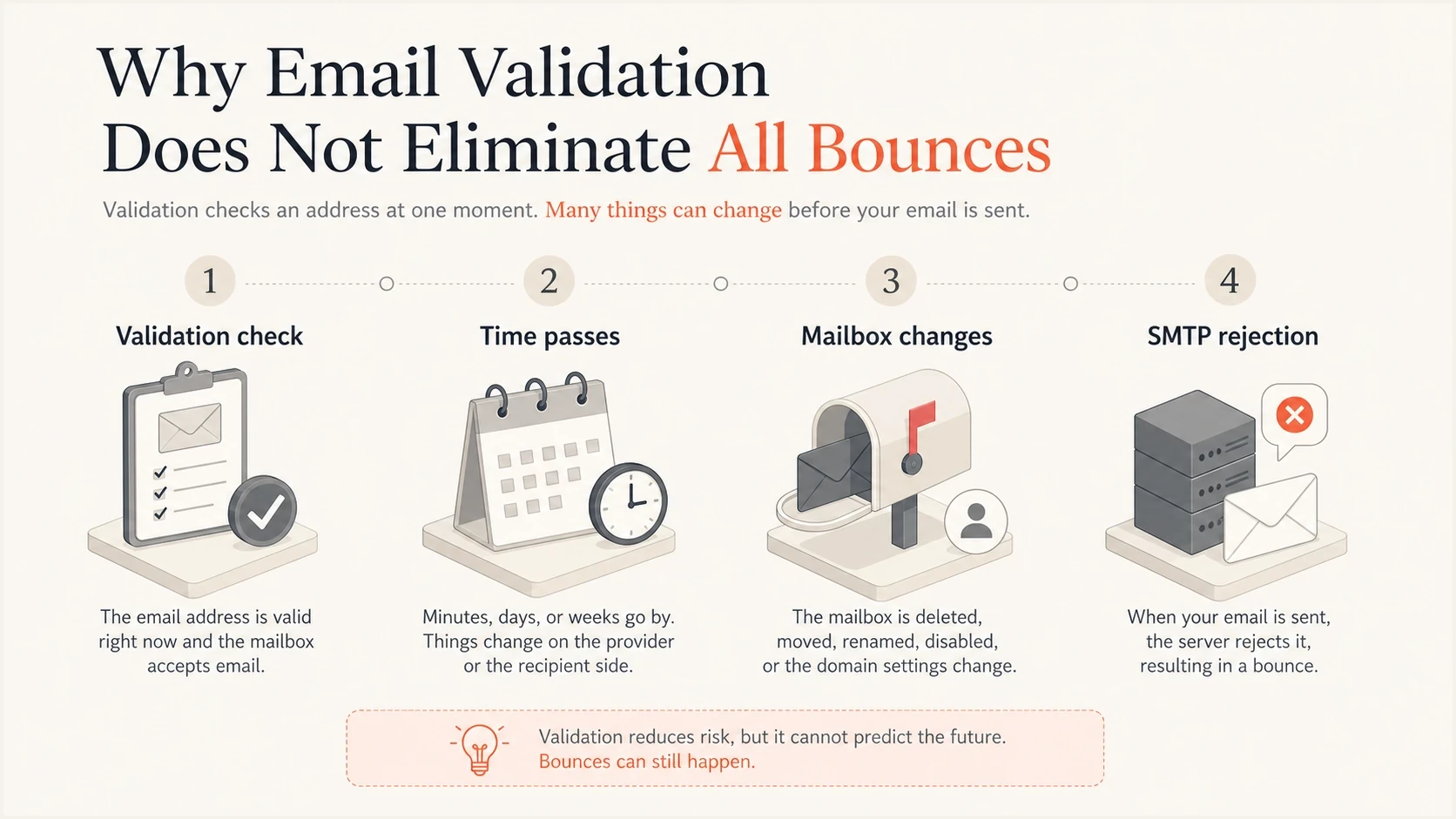
Why validated emails still bounce: validation checks, time passing, mailbox changes, and SMTP rejection.
- Mailbox churn: people leave jobs, close accounts, lose access to a mailbox, or abandon temporary inboxes.
- Provider behavior: some domains accept validation probes but reject later marketing or bulk traffic.
- Catch-all domains: the domain accepts probes without confirming individual mailboxes; a real message then faces rejection or a delayed bounce after initial acceptance.
- ESP logic: one provider's soft bounce can become another provider's hard bounce or suppression.
The phrase "valid email" is narrower than many teams assume. It usually means the address looked deliverable at validation time. It does not prove consent to receive marketing or guarantee inbox placement, and a successful check must never override an unsubscribe or complaint suppression.
Segment by validation result
A post-validation bounce rate is useful only when the validation result categories are consistent. Keep deliverable, catch-all or accept-all, unknown, and invalid results separate. Invalid results should remain suppressed and should not enter the send denominator.
|
|
|
|---|---|---|
Deliverable | Passed the available address and domain checks | Send only with permission and measure the first-send cohort |
Catch-all or accept-all | The domain accepts probes without confirming the mailbox | Hold uncertain results or use a small, permission-based cohort |
Unknown | The check was inconclusive or temporarily blocked | Revalidate or hold outside the main cohort |
Invalid | The syntax, domain, or mailbox check failed | Suppress before sending |
Keep validation outcomes separate before applying a bounce benchmark.
Do not apply one rate to every result
Catch-all or accept-all and unknown cohorts have less predictable bounce rates than addresses marked deliverable. If they are mixed into the same campaign, the aggregate rate measures the cohort mix as much as validation quality.
First send versus ongoing sends
The first campaign to a newly validated cohort measures first-contact delivery quality. Address-validation misses often appear there. After confirmed invalid recipients are suppressed and sending problems are corrected, the next sends should improve. If they do not, review collection quality and sender-side failures together.
Hard bounce operating targets after validation
First-send and ongoing bars mark target ceilings; aim below them. The 0.3% bar is an illustrative low result, rather than a measured average.
First-send target ceiling
1%Ongoing target ceiling
0.5%Illustrative low rate
0.3%First-send rate
- Purpose: measures the quality of new addresses after validation.
- Operating target: under 1 percent hard bounces for fresh, validated opt-in addresses.
- Warning sign: one source or form produces most of the bad addresses.
Ongoing rate
- Purpose: measures ongoing email list hygiene and sender-side failures.
- Operating target: under 0.5 percent hard bounces after prior failures are removed.
- Warning sign: repeat sends stay above the cohort's established baseline.
If a repeat-send cohort stays above 0.5 percent, pull the raw SMTP response text before changing policy. The same visible bounce category can contain very different causes: user unknown, mailbox disabled, domain not found, temporary deferral, full mailbox, content rejection, or authentication failure.
How ESP suppression changes the number
ESPs classify bounces using the SMTP code and response text, then apply provider-specific retry and suppression rules. Some also consider prior failures or engagement. The exact mapping is not always exposed, so compare events with the same definitions before benchmarking across ESPs.
Working hard bounce thresholds after validation
Editorial operating targets and review triggers for validated opt-in lists; compare each cohort with its own baseline.
Very clean
0.1 to 0.3%
An illustrative low rate for engaged, permission-based traffic.
Ongoing target
Under 0.5%
Target after confirmed invalid recipients are suppressed.
Review first sends
1% to under 2%
Elevated result on freshly validated addresses; inspect the causes.
Investigate
2% or higher
Pause the affected segment and check list and sending failures.
The total size of an ESP suppression list accumulates across campaigns and includes reasons such as unsubscribes or complaints. It cannot be compared directly with one campaign's hard bounce rate. A campaign's new suppressions also depend on prior failures and provider rules, so they are not necessarily higher than its hard bounce count.
Ask for the raw response mapping
When an ESP gives only "hard" and "soft" labels, request a sample export with SMTP code, enhanced status code, response text, retry count, and final action. Without that mapping, a benchmark becomes guesswork.
What to check when the number rises
A rising bounce rate after validation usually has a concrete cause. Start with source-level segmentation, because one form, campaign, integration, region, or age band often explains the increase. Then compare bounce text by recipient domain, because one provider-specific policy change can distort the aggregate rate.
- Segment source: group new addresses by form, integration, import, campaign, and country.
- Split age: compare time since validation and last successful send; revalidate stale or reactivated cohorts before sending.
- Read SMTP text: do not rely only on the ESP's hard or soft label.
- Check authentication: review SPF and DKIM results and whether DMARC passes for the visible From domain on the affected sending stream.
- Review reputation: check whether domain or IP blocklist and blacklist entries coincide with the bounce spike.
Use an email tester to inspect the actual message path, headers, authentication result, and obvious content or DNS issues. That does not replace bounce analysis, but it gives a fast way to find sending problems that validation never sees.
Email tester
Send a real email to this address. Suped shows a results button when the test is ready.
?/43tests passed
If the test message passes cleanly and the bounce spike remains isolated to one source, inspect that collection path. Add double opt-in where risk is high and assess disposable or role-based addresses by permission and use case; those labels alone do not make an address invalid. Revalidate stale imports close to send time and sync confirmed invalid-recipient suppressions across every system that sends to the list.
Use Suped to investigate authentication failures
Email validation is only one part of delivery health. If bounce rates rise after validation, the next checks are authentication, domain reputation, public blocklist or blacklist status, and whether a specific sender source has started failing.
Issues page showing top issues, verified sources, unverified sources, and authentication pass rates
Suped is our DMARC reporting and email authentication platform. It brings DMARC monitoring, SPF and DKIM diagnostics, sender-source visibility, alerts, and blocklist monitoring into the same workflow. Match the sending source and failure period in Suped with your ESP's SMTP bounce export to investigate authentication or reputation issues. DMARC aggregate reports do not measure recipient-level bounce rates or inbox placement.
Validation workflow
- Input quality: checks syntax, domain, mailbox signals, disposable patterns, and risk.
- Main metric: first-send hard bounce rate by collection source.
- Limit: does not prove future acceptance by every recipient server.
Suped workflow
- Domain health: monitors DMARC, SPF, DKIM, MTA-STS, and sending sources.
- Main metric: authentication results, verified sources, alerts, and reputation signals.
- Strength: connects technical failures to source-level fix steps.
For MSPs and teams managing many domains, Suped's multi-tenant dashboard keeps authentication sources, alerts, and fix steps together. Compare those findings with each client's ESP bounce data when recurring spikes affect the same sending service.
Views from the trenches
The following June 2024 practitioner comments are anecdotal. The reported 1 to 3 percent first-send range describes one working expectation; use the lower operating targets above for freshly validated opt-in addresses and investigate elevated results.
Best practices
Separate first-send and repeat-send cohorts before setting a post-validation bounce target.
Track local ESP suppression separately from public blacklist and blocklist status.
Keep raw SMTP response text so hard and soft labels can be audited across ESP exports.
Common pitfalls
Treating validation as a guarantee hides mailbox churn and changing recipient-side policies.
Comparing cumulative suppression counts with campaign hard bounces mixes different metrics.
Using one account-wide bounce rate hides a single bad form, import, or acquisition source.
Expert tips
Target under 1 percent for fresh first sends and under 0.5 percent for ongoing hard bounces.
Ask the ESP for response codes, enhanced status codes, retry counts, and final action.
Build a baseline only after segmenting by source, domain, age, and first-send status.
Marketer view
Marketer from Email Geeks says validation effort and list quality drive the bounce rate more than generic benchmarks.
2024-06-24 - Email Geeks
Marketer view
Marketer from Email Geeks says the metric should distinguish local suppression after 5xx rejections from public blacklists.
2024-06-24 - Email Geeks




