
How to resolve spam filtering issues with seznam.cz?

Updated on 25 Oct 2026: We updated our Seznam.cz advice for current authentication requirements, bulk-mail headers, sending limits and support procedures.
To resolve spam filtering issues with Seznam.cz, first confirm whether messages are in Hromadné, in Spam, or rejected during delivery. Check SPF and DKIM on received messages, then review consent and sender reputation. For genuine bulk mail, Seznam recommends Precedence: bulk and one-click unsubscribe alongside authentication.
A much lower open rate at Seznam than Gmail or Yahoo does not prove spam filtering. Messages in Hromadné or Spam, audience behavior, and tracking-image loading all affect opens. Confirm the issue with seed inboxes, click logs, complaint data, bounce logs, queue behavior, and real message headers.
Fast answer
Fix authentication first, register for Seznam feedback data, and test a segment of consenting Seznam recipients. Contact Seznam with exact sending IPs, message headers, timestamps and the fixes already completed if filtering persists.
Seznam authentication and sender reputation requirements
Seznam.cz has its own filtering behavior. A sender can look healthy in global reporting while still performing poorly at Seznam. Separate Seznam traffic in reporting so its bounce rate, complaint rate, open trend, click trend, authentication pass rate, and queue behavior are visible. Include Seznam-related domains such as Email.cz and Post.cz in this review when they appear in the list, then break them out if behavior differs.
Seznam stated in 2015 that mass email without a valid DKIM signature would be rated as spam. Its DKIM policy established that baseline. The current authentication guidance requires valid SPF and DKIM and strongly recommends DMARC. Missing or incorrect authentication risks Spam placement or messages being discarded. A valid signature alone does not guarantee inbox placement.
- DKIM: Use a signing domain associated with your brand. Keep Seznam feedback-loop registration current when selectors change.
- SPF: Authorize every sending IP for the envelope-sender domain and stay within the limit of 10 DNS-lookup-causing terms, including nested checks.
- DMARC: Collect reports and verify that at least one passing SPF or DKIM result meets the visible From domain's DMARC domain-matching rules.
- Reputation: Track complaints, bounces, inactive recipients, and any blocklist (blacklist) listing for the sending IP.
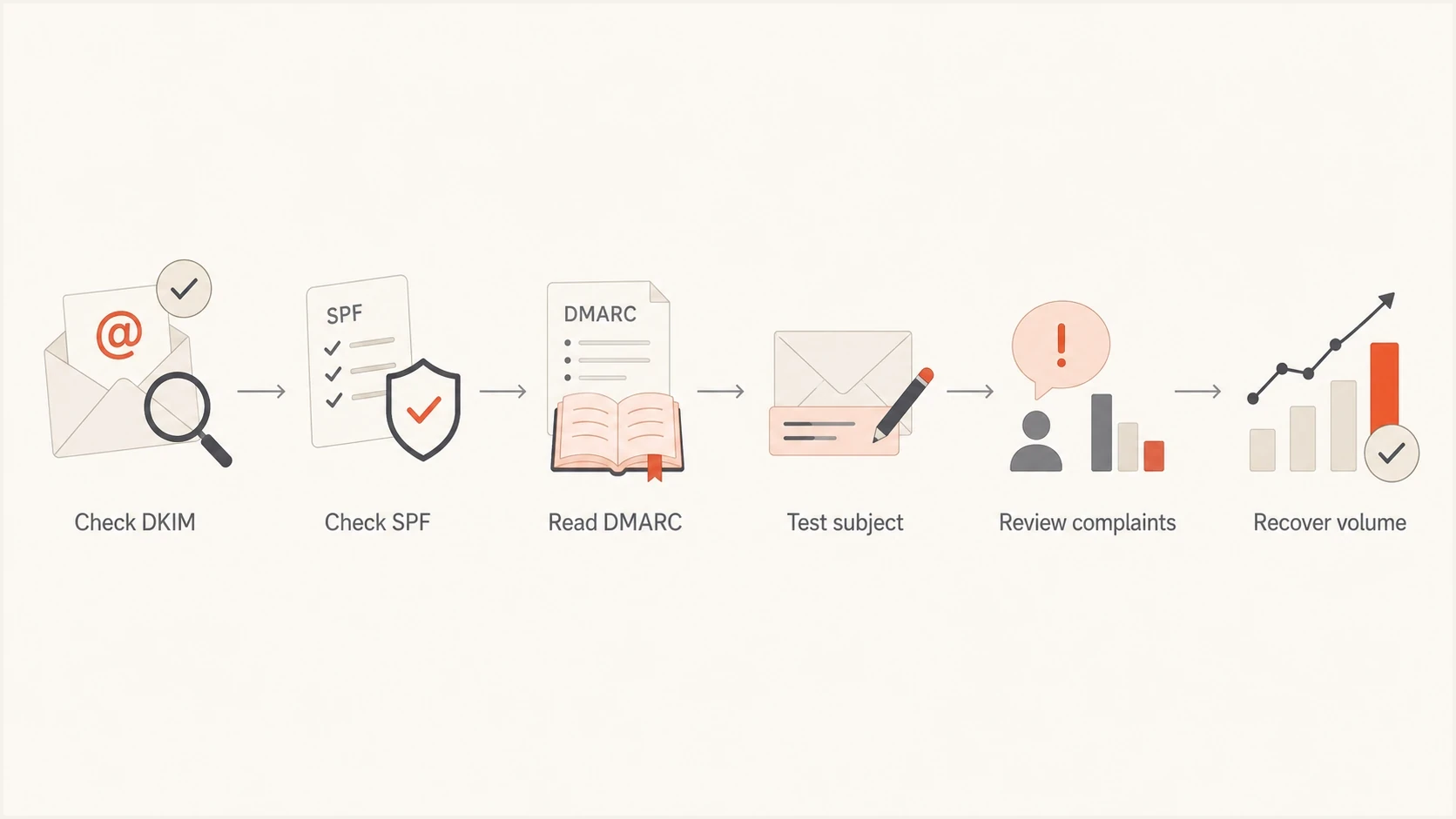
Seznam.cz spam filtering workflow: DKIM, SPF and DMARC checks, subject testing, complaint review and volume recovery.
Separate Hromadné from Spam
Seznam's Hromadné folder is a category for bulk and commercial messages. It is separate from Spam, and placement there does not by itself mean authentication or reputation has failed. Seznam says users can move a message from Hromadné to Doručené to teach the mailbox where future mail from that sender belongs. Marketing senders should respect this classification; Seznam warns that attempts to bypass it can harm deliverability. See Seznam's message classification guidance.
- Hromadné: Confirm the message is accepted, authenticated, and visible in the bulk-mail folder. Treat this as classification before starting reputation recovery.
- Spam: Review consent, complaint feedback, DKIM, sender reputation, content, and unsubscribe handling. Repeated user spam reports can affect placement for other recipients.
- Missing or deferred: Read the SMTP response and queue history. Do not diagnose a delivery failure with open tracking.
For a wanted message incorrectly placed in Spam, the recipient can select "Není spam" or move it to Doručené. Seznam describes these actions in its message handling instructions. If only one mailbox is affected, check its custom rules and blocked and trusted addresses in Settings. These preferences affect that mailbox and do not prove a wider sender reputation issue.
Use controlled Seznam seed accounts to record placement for each test, but pair those results with real-recipient complaints and clicks. A seed result shows what happened to that message and account; it does not measure every recipient's personalized placement.
Read SMTP errors and respect Seznam sending limits
Save the complete SMTP response, receiving server, sending IP, recipient domain, message ID and timestamp with time zone. Interpret the reply together with its explanatory text. The SMTP specification distinguishes temporary failures that need retries from permanent failures that need correction.
|
|
|
|---|---|---|
250 after message data | The receiving server accepted responsibility for the message. | Check Hromadné and Spam placement; acceptance does not confirm inbox placement. |
4xx temporary failure | Delivery is deferred. | Keep the message queued, retry with backoff, and reduce sending pressure if deferrals rise. |
5xx invalid recipient | The address is rejected as invalid. | Suppress the invalid address; do not keep retrying it. |
5xx authentication or policy failure | The message or sender was rejected. | Correct the stated cause before resending. A policy rejection alone does not prove the recipient is invalid. |
SMTP outcomes and the next troubleshooting action.
Seznam's published sending limits allow no more than 1,500 connections per sending IP in five minutes, with at most 100,000 messages and 1 GB of total data in that window. Seznam recommends reusing SMTP connections, for example for 100 messages per connection, and spreading bulk campaigns over time. These are infrastructure ceilings, not recovery targets. Follow deferrals and keep recovery volume below those limits.
If a message is blocked while sending through a Seznam account, identify whether the error came from the outgoing server or the destination server. An outgoing-account failure needs its own account or SMTP investigation; it does not establish poor placement for a brand sending to Seznam recipients.
Fix authentication before content
Start with DNS and received-message headers because Seznam requires sender authentication for bulk mail. If the campaign fails SPF or DKIM, correct the sending configuration before testing copy. Use DMARC reports to investigate unknown sending sources separately.
Run a domain health check for the exact From domain, then inspect the envelope-sender domain shown in Return-Path and the DKIM d= value. SPF is checked against the envelope sender, while DMARC compares the From domain with a passing SPF or DKIM domain. A sending service can legitimately manage the Return-Path domain; configure a brand DKIM domain rather than assuming every domain must be identical.
Illustrative DNS baseline, replace all placeholdersDNS
example.com TXT "v=spf1 include:send.example.net -all"
selector1._domainkey.example.com TXT "v=DKIM1; k=rsa; p=MIIB..."
_dmarc.example.com TXT "v=DMARC1; p=none; rua=mailto:dmarc@example.com"
These are examples, not records to publish unchanged. Use the SPF include supplied by your sending service and the complete DKIM public key. Publish SPF at the actual envelope-sender domain and add authorized senders to its existing SPF record. The example p=none DMARC policy collects reports; it does not request quarantine or rejection.
Do not skip the basic checks
The sending IP needs a PTR record whose hostname resolves back to that IP through an A or AAAA record. Use a valid HELO/EHLO hostname, valid DNS for the From domain, and a working reply address. Ask the sending-IP owner to correct reverse DNS if you cannot edit it.
|
|
|
|---|---|---|
DKIM | Signature verifies on received mail | Check the selector, public key and message changes after signing. |
SPF | Envelope-sender authorization and lookup limit | Authorize legitimate IPs and repair excessive nested lookups. |
DMARC | A passing SPF or DKIM domain matches From under DMARC rules | Compare reported results with received-message headers. |
rDNS | PTR hostname resolves back to sending IP | Ask the IP owner to correct PTR and forward DNS. |
A compact Seznam troubleshooting matrix.
Test the message Seznam receives
Once DNS is clean, test the actual email. DNS records can be valid while a campaign still looks risky because the subject, HTML, tracking domains, reply path, unsubscribe path, or image mix sends the wrong signals. Seznam specifically advises senders not to hide the real sender or the destination behind a link, so inspect redirects and final landing domains as well as visible copy.
Send the exact campaign to an email tester and to a real Seznam.cz mailbox. Compare the headers, placement, links, image loading, and final HTML. A successful test does not rule out campaign-specific authentication failures, audience quality, volume, cadence, or a content variant; compare the production sending IP and headers too.

Email tester sample report showing total score, email preview, issue summary, and per-section results
Test the subject separately if recent changes coincide with poor placement. Earlier sender reports describe problems with special characters or excessive punctuation, but those observations do not establish a universal Seznam rule. Keep the subject relevant to the message and change only the subject during that test.
Message fixes
- Subject: Test one plain subject against the current version before changing anything else.
- HTML: Avoid image-only content, hidden text, broken tags, concealed destinations, and tracking links that redirect too many times.
- Unsubscribe: Include a visible unsubscribe link and implement one-click unsubscribe for bulk marketing mail using both List-Unsubscribe headers shown below.
Sender fixes
- Identity: Keep the same From address for a stream so Seznam can build history.
- Replies: Use a monitored reply address instead of no-reply for marketing streams.
- Volume: Send to active, consenting Seznam recipients first, then expand only when complaint data stays clean.
Email tester
Send a real email to this address. Suped shows a results button when the test is ready.
?/43tests passed
Use that test result as a baseline, then change only one thing at a time. Changing the subject and sender domain together prevents you from identifying which change affected Seznam placement.
Use feedback data instead of guessing
Register the DKIM signing domain with Seznam's feedback loop using the domain from d= and the selector from s=. Registration uses a Seznam account and a confirmation message sent to abuse@ or postmaster@ on the domain. Each domain can sit under only one managing account, although access can be shared for reporting. Seznam's feedback-loop registration instructions describe the managing-account and confirmation requirements. When rotating DKIM keys, register the new selector or use the documented wildcard selector to cover all selectors on that signing domain.
For a registered signing domain, Seznam sends a report for each message a recipient marks as spam. Route the report to suppression automation, identify the recipient and campaign, and stop mailing that address. The report includes complaint fields and the original message headers, which makes it useful for tracing the source IP, signing domain, subject, recipient, and send time.
Track temporary 4xx deferrals, queue time, and delivery expiry by Seznam-domain group. If queue time grows, hold volume instead of increasing pressure while the next content or authentication test runs. Shorter queue time at the same volume is a better recovery signal than one higher delivered count.
Feedback loop data identifies reported complaints; automatic Spam placement does not itself generate a user complaint report. Pair it with DMARC aggregate data where available, bounce logs, engagement by domain, and blocklist monitoring. A blacklist listing on the sending IP is evidence to investigate, but a clear result does not guarantee Seznam delivery.
Seznam recommends double opt-in and list hygiene and warns against purchased recipient lists. Keep subscription evidence, suppress complaints promptly, and remove invalid addresses. Judge recovery using your Seznam segment's complaint trend and placement evidence rather than borrowing another provider's percentage thresholds.
- Segment Seznam.cz, Email.cz, and Post.cz traffic so the issue is measurable without blended provider averages; group other domains only after confirming Seznam handles their mail.
- Suppress hard bounces, complainers, and long-term inactive recipients before the next test.
- Test a small authenticated campaign with one clean subject and a working unsubscribe path.
- Scale volume only after placement, complaints, queue time, and click data improve for that segment.
How Suped helps with the workflow
Suped is our DMARC and email authentication platform. For Seznam issues, use reported source IPs and SPF/DKIM results to identify sending services that need authentication fixes. Reporting coverage depends on which receivers send aggregate reports.
Use Suped's DMARC monitoring to review those results and blocklist monitoring to investigate listings affecting sending IPs or domains. Keep Seznam campaign logs alongside this evidence.

Issue steps to fix dialog showing the issue overview, tailored fix steps, and verification action
Suped turns reported authentication issues into an issue list with steps to fix and verification actions. DMARC aggregate reports do not show Hromadné or Spam placement or identify whether a subject change caused filtering.
Practical Suped setup
Add the sending domain, enable DMARC reporting, verify SPF and DKIM, and turn on authentication alerts. Compare new report results with the corrected campaign headers, Seznam complaints and queue behavior.
When to contact Seznam
Contact Seznam technical support with evidence when Spam placement persists or transactional messages are incorrectly classified as Hromadné. Seznam's classification guidance directs senders to support for those cases. Seznam does not accept whitelisting requests, so request investigation of specific messages.
- Identifiers: Include sending IPs, From domains, DKIM signing domains and selectors, Return-Path domains, message IDs, and campaign IDs.
- Evidence: Attach full headers or the original .eml message, timestamps with time zones, complete SMTP responses, and the observed folder placement.
- Remediation: State exactly what you fixed: DKIM, SPF, list hygiene, subject tests, and volume reduction.
- Ask: Request investigation of the supplied message examples and any persistent rejection or classification error.
Recommended headers for genuine bulk marketing mailtext
Precedence: bulk
List-Unsubscribe: <https://example.com/unsubscribe/opaque-token>, <mailto:unsubscribe@example.com>
List-Unsubscribe-Post: List-Unsubscribe=One-Click
Seznam's sender-domain recommendations call for separate marketing and transactional subdomains, each with its own DKIM signature, and different sending IPs. They also recommend Precedence: bulk and one-click unsubscribe for bulk messages. Apply bulk headers to the appropriate message stream.
For RFC 8058 one-click unsubscribe, the HTTPS endpoint must process an unsubscribe POST without a login or confirmation step. Both List-Unsubscribe and List-Unsubscribe-Post must be covered by a valid DKIM signature. Keep the visible unsubscribe link in the message body as well.
Views from the trenches
The December 2021 Email Geeks comments describe individual sender experiences. Subject-character and signup observations should be tested against the current sending setup and Seznam guidance.
Best practices
Keep Seznam traffic on stable senders and review DKIM, SPF, DMARC, rDNS, and HELO together.
Register for Seznam feedback data early, then route complaints into suppression rules.
Change one variable per test so subject, header, content, and sender changes stay readable.
Common pitfalls
Adding Precedence: bulk without fixing SPF and DKIM leaves authentication failures unresolved.
Treating a subject-line anecdote as a universal Seznam filter rule can misdirect recovery.
Waiting for a postmaster reply before fixing list quality wastes time during recovery.
Expert tips
Test subject lines without emojis, all caps, or symbols before changing infrastructure.
Keep abuse@ or postmaster@ working so the feedback-loop confirmation message can be received.
Separate transactional and marketing streams before judging whether Seznam dislikes the brand.
Marketer view
Marketer from Email Geeks says Seznam filtering should be investigated with feedback data, authentication checks, consent review, targeting review, and recent change history before making header changes.
2021-12-22 - Email Geeks
Marketer view
Marketer from Email Geeks says the Precedence: bulk header is low risk to test, but it should not be treated as a magic fix for inbox placement.
2021-12-22 - Email Geeks
Prevent recurring Seznam filtering issues
For ongoing prevention, keep Seznam.cz as its own reporting segment, alert on authentication changes, watch 4xx deferrals, and review complaints after every campaign to Seznam recipients. Record the sending IP, authentication results and placement for each controlled test so the next investigation has a baseline.




