
What are best practices for managing bounced, unsubscribed, and spam-complaint users in email marketing?

Published 26 Apr 2025
Updated 10 Oct 2026
13 min read
Summarize with
Updated on 10 Oct 2026: We clarified bounce handling, complaint-rate limits, and the safeguards that keep opt-outs effective across sending systems.
The best practice is to keep an email suppression list for permanently bounced, unsubscribed, and spam-complaint users. Keep a durable record that says why the address cannot receive marketing, when the event happened, where it came from, and what consent evidence exists. That record should stop future campaigns, prevent accidental re-imports, and still allow a clean double opt-in resubscription path where that path is appropriate.
The caveat is privacy. Keeping every field forever is bad data hygiene. Keep a minimal suppression record with a clear retention policy and a process that prevents accidental marketing sends.
Gmail and Yahoo do not see your internal unsubscribe and resubscribe history. They see recipient behavior, authentication, complaints, engagement, bounce patterns, and reputation. If a person unsubscribes and later confirms a fresh signup through double opt-in, that is normally fine. If you re-add people without consent, complaints rise, and that is what mailbox providers act on.
How to handle each suppression event
Treat each event with a different level of severity. A hard bounce caused by an invalid address means the address should stop receiving mail immediately. A soft bounce needs retry logic and a threshold. An unsubscribe means no more marketing within the opt-out scope unless the person gives new consent. A spam complaint means global marketing suppression by default, because the recipient used the strongest negative signal available to them.
- Hard bounce: Suppress confirmed nonexistent mailboxes or invalid domains immediately. Check SMTP status codes before classifying a 5xx response: 5.1.1 indicates a bad destination mailbox, while 5.7.1 indicates a policy rejection and does not prove the address is invalid.
- Soft bounce: Retry temporary failures with backoff for a defined window, then pause addresses with repeated mailbox-specific failures. Investigate domain-wide throttling separately.
- Unsubscribe: Keep the opt-out and stop marketing within its recorded scope until a new, provable opt-in happens.
- Spam complaint: Suppress globally for marketing and require a deliberate review before any future marketing re-entry.
Complaints need a stricter rule
A spam complaint is not the same as an unsubscribe. The recipient told their mailbox provider the message was unwanted. Treat that as a high-risk signal even when the address later appears in another import or signup flow. Where supported, confirm that your sending provider receives feedback loop (FBL) reports and automatically suppresses identifiable complainants. Gmail reports aggregate complaint data rather than individual complaining addresses, so missing recipient-level reports do not prove there were no complaints.
- Default action: Block marketing across every list and tool used by the complained-about sender identity. Extend the block across brands only when they share the same consent scope and suppression policy.
- Evidence rule: Keep the complaint date, sending source, campaign ID, and feedback loop source when available.
- Re-entry rule: Allow marketing only after clear new consent and only if your legal and risk policy supports it.
Why suppression beats deletion
Deleting records feels clean, but it removes the memory that protects the list. The next CRM import, ecommerce sync, platform migration, or CSV upload can put the same address back into marketing. That is how old bounces, old complaints, and old unsubscribes return months later as new deliverability problems.
Delete the record
- Short-term result: The database looks smaller and simpler.
- Operational risk: Imports can recreate the user without the old suppression reason.
- Audit gap: The team loses proof of why the address stopped receiving mail.
Suppress the record
- Short-term result: The address stays visible but cannot enter campaigns.
- Operational control: The source of truth blocks re-imports and platform sync mistakes.
- Audit value: The team can prove opt-out, bounce, complaint, and resubscribe history.
There is still a place for deletion, especially when privacy law, internal retention rules, or user deletion requests require it. The key is sequence. Where retention is lawful, delete or minimize the profile after moving the minimum suppression state into a durable record that your sending systems respect. The ICO's retention guidance makes this distinction for UK direct marketing.
For deeper bounce-specific thresholds, use a separate operating rule for hard and soft bounces so permanent failures and temporary failures do not get handled with the same logic.
Recommended suppression actions
A good suppression system has explicit states. Use event-based records rather than one generic "do not email" flag, because a spam complaint, hard bounce, and unsubscribe have different operational meaning.
|
|
|
|
|---|---|---|---|
Hard bounce | Stop now | Verify first | SMTP code and reason |
Soft bounce | Retry window | Resume after recovery | Failure code, count, and last success |
Unsubscribe | Stop marketing | Double opt-in | Consent change |
Complaint | Global marketing block | Reviewed new consent | FBL source |
Practical suppression handling by event type.
Suppression urgency
A simple operating model for deciding how quickly an address leaves marketing audiences.
Immediate
Immediately
Suppress confirmed invalid addresses and spam complaints immediately; stop covered marketing after an unsubscribe.
Monitored
Defined retry window
Use backoff and review repeated mailbox-specific temporary failures.
Allowed
Verified new consent
Use for renewed consent after an unsubscribe only if no other suppression applies.
Set the soft-bounce retry window using the delivery reason and sending cadence; there is no universal failure-count threshold. Count distinct failed deliveries rather than duplicate event notifications, and reset the consecutive-failure count after successful delivery. Use recency and consecutive failure count together, because a single temporary failure should not remove a good subscriber forever.
Monitor bounce and spam complaint rates
Review hard-bounce and soft-bounce rates separately, and track unsubscribe patterns by campaign, signup source, and receiving domain. A list-wide average can hide a faulty import or a problem at one mailbox provider.
- For Gmail, follow Gmail's sender guidance: keep its daily user-reported spam rate below 0.1% and avoid reaching 0.3% or higher. Investigate a rising rate before it reaches either threshold.
- For Yahoo, follow Yahoo's sender requirements: keep spam complaint rates below 0.3%. Yahoo uses inbox-delivered mail as the denominator, so a rate calculated across all attempted sends is not directly comparable.
- Bounce monitoring: Calculate each bounce rate using failed deliveries divided by attempted messages, and document how retries are counted. Compare with your normal baseline and sending provider's policy; there is no universal safe bounce percentage.
- Investigating spikes: Pause the affected import or campaign when failures or complaints surge. Review consent and signup expectations, and separate invalid-address failures from authentication or throttling problems before resuming.
Separate marketing and transactional mail
Suppression needs a defined scope. An unsubscribe or spam complaint should stop marketing, but it does not automatically cancel receipts, security alerts, password resets, or other messages the person requested or needs to use a service. Keep those messages strictly operational. Do not turn a receipt or account notice into a promotion to bypass an opt-out.
- Unsubscribe: Stop the covered marketing stream and provide an easy global marketing opt-out.
- Spam complaint: Suppress marketing by default and keep any essential transactional stream isolated.
- Hard bounce: Stop all mail to that address until the user provides a corrected, verified address.
- Preference change: Honor the selected topic or frequency without hiding the full unsubscribe option.
Process one-click unsubscribe requests
For bulk marketing and subscribed mail, support RFC 8058 one-click unsubscribe and keep a visible unsubscribe link in the message body. Use an HTTPS URL in List-Unsubscribe and List-Unsubscribe-Post: List-Unsubscribe=One-Click, with both headers covered by a valid DKIM signature. Accept the HTTPS POST without login or confirmation. Process the resulting request into the central suppression source immediately and no later than 48 hours to meet Gmail and Yahoo bulk-sender expectations. A preference center can sit behind the body link, but it does not replace the one-click header workflow.
Use separate sending addresses or streams for marketing and transactional mail, and test both paths. That separation reduces the chance that an opt-out blocks a required account message or that a promotional campaign inherits the reputation and policy expectations of operational mail.
How to store the data safely
The safest structure is a central suppression table or service that every sending workflow checks immediately before each message is handed to the sending provider, including queued campaigns. It should sit upstream of campaign tools, lifecycle messaging, and data exports. If suppression lives only inside one email platform, a migration or CRM sync can bypass it.
Suppression event examplejson
{
  "email_hash": "hmac-sha256:v1:9f2a...",
  "status": "suppressed",
  "reason": "spam_complaint",
  "scope": "marketing_global",
  "source": "feedback_loop",
  "event_at": "2026-05-27T10:15:00Z",
  "campaign_id": "spring_sale_0426",
  "consent_version": "newsletter_v4",
  "resubscribe_allowed": false
}
Use a keyed hash (HMAC) for address matching in the working suppression layer, with the secret key stored separately. Unkeyed email hashes are vulnerable to guessing known addresses. Apply the same documented address-normalization rule when matching new imports. Hashing is pseudonymization, not anonymization, when the value can still be matched back to a person. You still need a controlled matching process and a lawful basis for retained personal data.
- Minimum fields: Store status, reason, timestamp, source, scope, and consent evidence.
- Access control: Limit export rights and log all suppression-list downloads.
- Retention rule: Keep enough data to honor opt-outs and defend consent, then minimize the rest.
- Source sync: Push suppression state back to the CRM, app database, and warehouse.
Privacy and deliverability need the same source of truth
A suppression record is useful only when every sending system obeys it. A deletion rule is useful only when every data source follows it. The dangerous middle ground is deleting in the email platform while the CRM keeps the same address as marketable.
What to do when someone resubscribes
If someone unsubscribed and later completes a double opt-in signup, restore only the marketing scope covered by the new consent, after checking for active complaint or invalid-address suppression, while retaining the old unsubscribe event in the audit trail. The old event does not need to block the new consent forever. It does need to remain visible so the team can explain the change. Do not send re-permission campaigns to suppressed addresses; wait for a signup the recipient initiates.
Gmail and Yahoo are not reading your CRM state. They care whether the recipient wants the mail. Fresh double opt-in, accurate expectations at signup, and a visible unsubscribe link are the safeguards. A small resubscription cohort can still have a high complaint rate, so restore only confirmed subscribers and monitor the next sends.
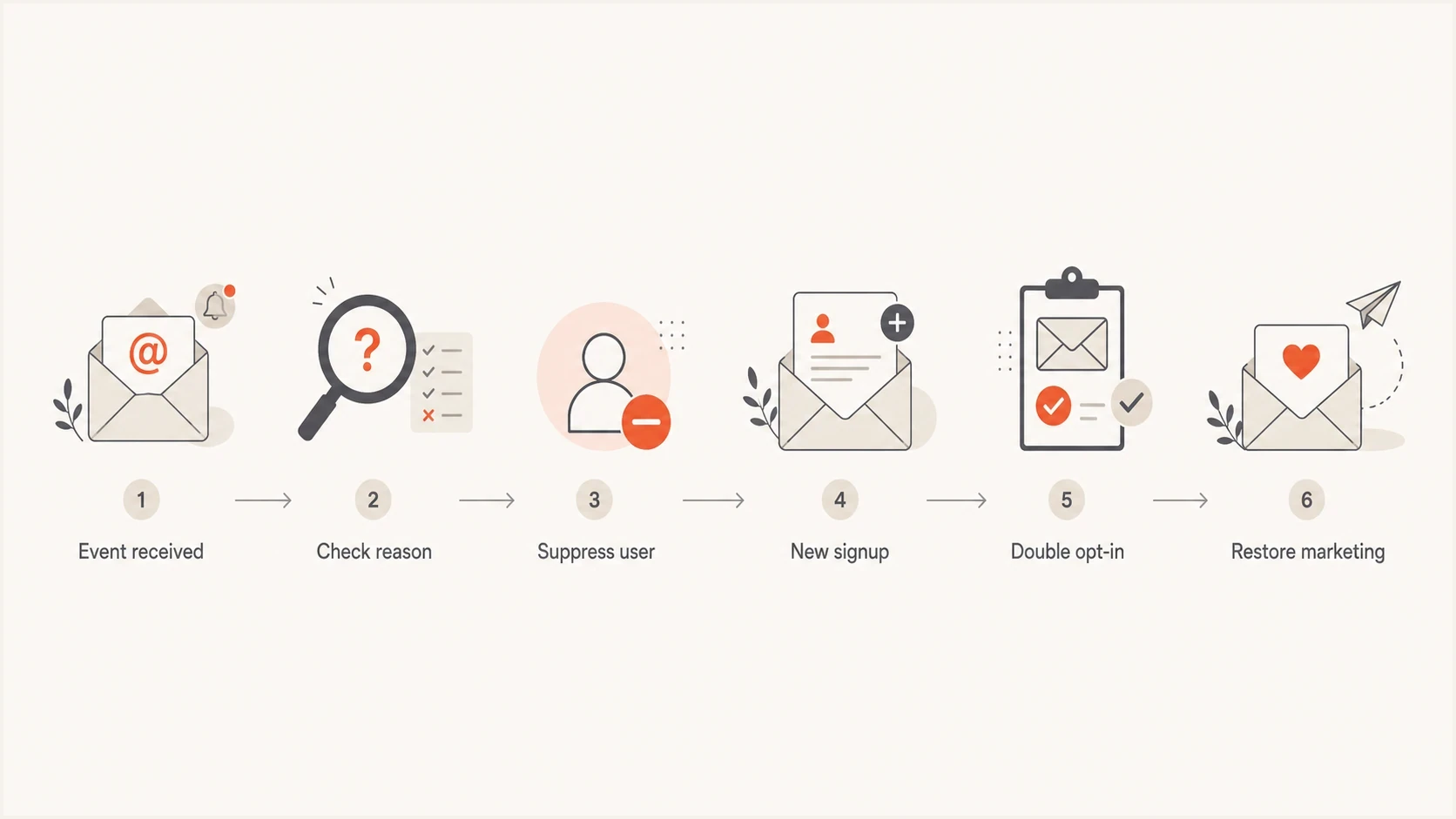
Email suppression and double opt-in resubscription workflow for marketing subscribers.
- Unsubscribe history: Allow re-entry only for the renewed consent scope after clear double opt-in, check for other active suppressions, and keep both events.
- Hard-bounce history: Require address verification or a new confirmed signup before marketing.
- Complaint history: Keep global suppression unless the business has a strict, reviewed re-entry policy.
This is also where unsubscribe implementation matters. Bot clicks, list-unsubscribe headers, and preference-center choices can complicate consent records, so keep separate handling rules for unsubscribe link handling rather than treating every click as the same kind of user intent.
Protect sender reputation around list hygiene
Suppression logic protects the list. Authentication and reputation monitoring protect the domain. Check both because a clean suppression process will not save a domain that has broken SPF, missing DKIM signing, a DMARC identity mismatch, or a sudden spike in unknown sending sources.
Before a large reactivation, platform migration, or audience cleanup, send a real message through an email tester and verify the message headers, authentication results, content signals, and inbox-facing issues. That test does not replace production monitoring, but it catches obvious mistakes before volume hits the mailbox providers.
Email tester
Send a real email to this address. Suped shows a results button when the test is ready.
?/43tests passed
Pair list hygiene with DMARC monitoring to identify sending sources that appear in DMARC aggregate reports. Suped's product helps review SPF and DKIM authentication results by source and investigate new or unauthorized senders. DMARC aggregate reports do not contain recipient-level bounce, unsubscribe, or spam-complaint events; keep those events in the suppression workflow.
Issues page showing top issues, verified sources, unverified sources, and authentication pass rates
Run a domain health check before major sending changes, then watch blocklist (blacklist) status through blocklist monitoring. Suped's product can keep these checks tied to issue detection, alerts, and documented remediation steps for the team.
Build an enforceable suppression workflow
The policy needs to be boring and enforceable. The answer should stay the same every time an address hits a bounce processor, unsubscribe endpoint, feedback loop, CRM import, or manual upload. The marketing platform should not be the only place that knows an address is suppressed.
- Collect events: Ingest hard bounces, soft bounces, unsubscribes, complaints, manual suppressions, and resubscribe confirmations. Verify incoming event authenticity and deduplicate by event ID.
- Normalize reasons: Map vendor-specific codes into a small internal set that everyone understands.
- Apply precedence: Retain every event and calculate the most restrictive current state. An import must never overwrite a complaint, bounce, or opt-out. A verified resubscribe can supersede an unsubscribe only when policy permits. Use event timestamps rather than arrival order when resolving consent changes.
- Sync outward: Update the CRM, warehouse, marketing platform, and product database with the final suppression state.
- Audit regularly: Sample campaign audiences before send time and confirm suppressed addresses are excluded. Test opt-outs received after audience creation, and alert on event-processing failures.
The rule that prevents most mistakes
Make suppression an exclusion layer, not a normal audience segment. A user should qualify for marketing only after passing consent, suppression, bounce, complaint, and domain policy checks.
This policy also helps with migrations. Before switching platforms, export active subscribers and suppression records, reconcile them against the CRM, and run a dry audience build. The most expensive mistake is importing only the marketable list and forgetting the reasons people stopped being marketable. Include the sending provider's own suppression records in the reconciliation; clearing a local flag does not remove a provider-side block.
Views from the trenches
Best practices
Keep a suppression record with reason, source, timestamp, and the latest consent proof.
Honor double opt-in resubscription, but keep the prior event in the audit trail for context.
Use keyed hashes or restricted exports so working suppression data cannot become a mailing list.
Common pitfalls
Deleting suppression rows during migrations can reintroduce bad addresses through source systems.
Treating a spam complaint like a normal unsubscribe keeps too much risk in future campaigns.
Keeping raw PII forever without a retention rule creates privacy and security exposure.
Expert tips
Make the suppression table easier to query than campaign audiences, but harder to export.
Store minimal identifiers in the live workflow and keep full PII only where legally needed.
Test every signup path so old opt-outs cannot be overwritten by imports or CRM syncs.
Marketer view
Marketer from Email Geeks says suppression should be kept, and a confirmed double opt-in resubscription should be honored when the consent trail is clear.
2024-11-20 - Email Geeks
Marketer view
Marketer from Email Geeks says Gmail and Yahoo care about recipient happiness and complaint behavior, not whether a CRM has an old unsubscribe row.
2024-11-20 - Email Geeks
Suppression policy summary
The safest default is simple: hard bounces stop immediately, soft bounces follow a threshold, unsubscribes stay suppressed until fresh consent, and spam complaints stay globally suppressed unless a reviewed policy says otherwise. Before releasing a campaign, test that a new opt-out excludes the address even if the audience was built earlier.