What are the best practices for managing hard and soft bounces in daily email campaigns?

Published 7 May 2025
Updated 20 Aug 2026
14 min read
Summarize with

Updated on 20 Aug 2026: We updated our bounce guidance to prevent duplicate retries, classify SMTP failures precisely, keep suppressed contacts out of daily sends, and recover from receiver-wide deferrals safely.
The best practice for daily email campaigns is simple at the policy level: suppress clear permanent hard bounces immediately, handle soft bounces by reason over a rolling time window, and never let a high send frequency turn one temporary delivery problem into five separate penalties in the same day.
For a daily sender, especially one sending up to five messages per day based on preferences, count bounce days rather than raw bounced messages. One recipient who gets five campaigns on Monday and has a full mailbox should usually register one soft-bounce day, not five strikes. Pending retries from the mail server should stay tied to the same recipient-day until they resolve, so a temporary deferral or pending bounce does not become a separate strike every time the server retries. A subsequent accepted delivery can reset the live counter. A recent click can support a manual review, but it should not replace delivery evidence or erase the historical bounce log.
- Hard bounce rule: Suppress after one confirmed permanent recipient failure, such as a clearly invalid user, invalid domain, disabled mailbox, or closed account.
- Soft bounce rule: Pause or suppress after repeated bounce days, usually 7 to 10 consecutive days for mailbox full and 3 to 5 bounce days for generic temporary failures.
- Retry rule: Keep temporary deferrals in a pending state during the retry window. Do not count each retry attempt as a new bounce.
- Policy bounce rule: Do not treat authentication, reputation, throttling, or blocklist (blacklist) failures as proof that the recipient address is bad.
- Reset rule: Reset the active counter after accepted delivery, but do not erase the raw events.
The practical starter rule set
A good bounce policy has two goals. First, it protects sender reputation by stopping mail to addresses that receivers have told you are bad. Second, it avoids suppressing real subscribers because of temporary mailbox, network, rate-limit, or sender-side problems. Those goals conflict when the rule is too blunt.
The first change is to stop treating "mailbox full" as an instant removal event. A full mailbox is a strong warning sign, but it is not the same as an invalid user. On a daily program, handle it with a pause, then suppression if the condition repeats for enough days without a delivery or fresh engagement.
|
|
|
|---|---|---|
Invalid user | 5.1.1 | Suppress now |
Invalid domain | 5.1.2 | Suppress now |
Disabled mailbox | disabled or closed | Suppress now |
Mailbox full | 4.2.2 | Pause, then suppress |
Message too large | 5.2.3 or 5.3.4 | Fix message size |
Rate limit | 4.7.28 or explicit throttle reply | Throttle sending |
Policy block | 5.7.x | Investigate source |
Unknown text | No DSN | Quarantine |
A starting point for daily campaign bounce handling.
Do not wait for three clean hard bounces
If the receiving server clearly says the user or domain does not exist, suppress that address after one event. Waiting for three confirmed hard bounces adds avoidable negative signals. The exception is an ambiguous hard-classified response, where the address should be quarantined and the raw reply reviewed before permanent suppression.
That distinction matters because a bounce label is often a product decision, not a universal truth. One sending platform can classify a response as hard while another calls the same reply soft, and receivers do not always return clean enhanced status codes. Treat the label as a starting point, then store the raw SMTP reply, the enhanced status code, the receiver family, and the sending IP or stream.
Classify by cause and bounce label
The most important operational habit is classification. Hard and soft are useful labels for reporting, but they are not detailed enough for automation. A failed delivery can mean the recipient address is gone, the mailbox is full, the message is too large or complex, the receiver is greylisting or throttling you, DNS or routing is temporarily failing, your sending IP has a reputation problem, the message failed a policy check, or the response text is too vague to trust.
When a bounce report or non-delivery report is available, keep it with the event. The text often explains whether the failure came from the recipient mailbox, receiver security policy, message size, or a sender authentication problem.
Use 4.x and 5.x as classes, not final actions. A 4.x class usually means persistent transient failure and a 5.x class usually means permanent failure, but the subject family matters: X.1.x points to addressing, X.2.x to mailbox status, X.4.x to network or routing, X.6.x to content or media, and X.7.x to security or policy. Greylisting normally returns a 4.x deferral, so keep it in the retry state instead of counting it as a bad recipient.
For SMTP suppression rules, start with the receiver's reason rather than only the first digit of the code. A 5.x response often means permanent failure, but 5.7.x can also mean a policy or reputation issue. A 4.x response often means temporary failure, but repeated mailbox-full responses can still justify suppression after a reasonable window.
Weak bounce logic
- One label: Only stores hard or soft, with no raw reply or receiver context.
- Message count: Counts every failed campaign as a separate strike, even on the same day.
- Substring match: Matches partial codes and turns similar policy replies into wrong actions.
Better bounce logic
- Reason family: Stores invalid user, disabled mailbox, mailbox full, rate limit, policy, and unknown.
- Bounce day: Counts one failed recipient-day, even when several campaigns are sent.
- Retry state: Keeps deferred attempts separate from final bounce events.
- Exact parsing: Uses exact code tokens plus raw text and receiver-specific exceptions.
The common parsing mistake is substring matching. If a rule looks for 5.7.6 anywhere in the reply, it can match a longer provider-specific policy code and mark a temporary IP block as a permanent user failure. That is how good subscribers disappear from the list for the wrong reason.
A disabled mailbox response belongs in the permanent recipient bucket when the raw text clearly says the mailbox is disabled, inactive, closed, or unavailable for that user. If an ESP labels it as a soft bounce because the top-level code is broad, send eligibility should still become suppressed after the first clear recipient-level event.
Example bounce classification modeljson
{
  "recipient": "user@example.com",
  "eventDate": "2026-05-23",
  "smtpCode": "550",
  "enhancedCode": "5.1.1",
  "receiverFamily": "consumer_mailbox",
  "reasonFamily": "invalid_user",
  "rawReply": "550 5.1.1 user unknown",
  "action": "suppress_permanent",
  "counterScope": "recipient_day"
}
Separate user-level failures from sender-level failures. Invalid user and disabled mailbox belong to the recipient. Rate limiting, authentication failure, reputation blocking, and content rejection belong to the sending stream, domain, IP, or campaign. Suppressing individual users does not solve a sender-level issue.
How to count bounces for a daily sender
Frequency changes the math. If a subscriber can receive five messages per day, a raw "10 bounces" rule can suppress someone after only two bad days. That is too aggressive for mailbox full, transient network errors, and rate-limit responses. Use a rolling window based on calendar days with a cap of one counted strike per recipient per day per reason family.
Separate temporary deferrals from final bounces. The retry window is implementation-specific. Some campaign systems keep trying for up to 72 hours, while mail transfer agents can use longer queues. Record the actual queue expiry for each sending path, tie every retry to the original send, and count the final outcome once.
A reasonable soft bounce tolerance depends on failure reason. Give mailbox full more time than a generic repeated failure, because it often has a clear user-side explanation. Give rate limits no recipient penalty at all, because the fix is volume shaping and reputation work.
Campaign bounce review thresholds
Use these internal operating guardrails for campaign-level review, not as universal receiver limits or automatic recipient-suppression rules.
Healthy
0-2%
Normal variation for a clean active list.
Review
2-5%
Investigate source, segment, or acquisition channel.
Stop and fix
5%+
Pause affected stream until cause is known.
|
|
|
|
|---|---|---|---|
Hard | Permanent | Manual review | Suppress |
Mailbox | Bounce days | Delivery | Pause first |
Transient | Bounce days | Delivery | Suppress later |
Rate limit | Receiver | Throttle | Do not suppress |
Recommended counters for high-frequency daily mail.
A practical default for a daily sender is one confirmed hard bounce equals permanent suppression, 3 consecutive transient bounce days equals a temporary pause, 7 consecutive mailbox-full days equals a pause from high-frequency campaigns, and 10 to 14 consecutive mailbox-full days equals suppression from routine sends unless the recipient has recent business-critical activity.
A clean reset still needs audit history
A successful delivery can reset the live soft-bounce counter. A click can support a manual review when it happened after the bounce sequence began, but do not treat it as proof that a later message was accepted. Keeping the raw event trail helps when a receiver changes behavior or a campaign stream starts failing again.
Retry soft bounces without creating duplicate sends
A 4.x response leaves the original message eligible for another delivery attempt, but it does not justify launching a new campaign send while that message remains queued. Give one system ownership of retries for each message. Otherwise, the mail server can deliver its queued copy after a campaign workflow has already sent a replacement.
- Record queue state: Store the original message ID, first attempt, next attempt, queue expiry, and final delivery status.
- Back off by receiver: Slow connections and volume for explicit throttling, greylisting, or temporary receiver failures instead of repeatedly hitting the same domain.
- Deduplicate campaigns: Before the next daily send, check whether the recipient still has an active retry for the same campaign or time-sensitive message.
- Count the final outcome: Mark one delivery, one final soft bounce, or one permanent bounce. Keep intermediate deferrals as attempts, not separate bounce strikes.
- Escalate patterns: Move repeated receiver-wide deferrals to sender-side investigation and move repeated recipient-level failures to the soft-bounce counter.
Wait for the active queue to finish
Do not clone and resend a soft-bounced campaign while its original delivery attempt remains pending. Resend only after the queue has ended, the failure reason still supports a retry, and the content is still useful to the recipient.
Prevent avoidable bounces before sending
Bounce management starts before the SMTP failure. For daily campaigns, the cleanest bounces are the ones prevented by stronger address capture, validation at signup, double opt-in for risky sources, and inactive segmentation before send.
- Validate entry points: Catch syntax errors, domain typos, and obvious bad addresses before they enter the production list.
- Confirm consent: Use double opt-in for high-risk forms, paid acquisition, imported lists, and sources with repeated hard bounces.
- Pause stale records: Hold long-inactive subscribers before daily campaigns instead of waiting for bounces to identify abandoned addresses.
- Centralize suppression: Feed hard bounces, persistent soft bounces, inactive records, expired consent, and import failures into one send-time suppression source.
- Track source quality: Trend bounce rate by form, import, partner, campaign, and recipient domain so one bad source does not damage the whole program.
Do not make deletion the first control. Keep a central suppression table keyed by recipient ID or email, apply it after every import and before every campaign send, and store the suppression reason, source, first suppressed date, and last evaluated date. Keep inactive suppression separate from hard bounces, complaints, and unsubscribes. This keeps list management auditable and stops an import from re-enabling addresses that should stay out of daily campaigns.
Unengaged subscribers need a separate rule before they become bounce data. Define inactivity, run a short re-engagement path, then keep nonresponders out of routine daily campaigns. A purchase or account event does not restore marketing consent or prove that promotional mail will be accepted, so require a clear marketing opt-in before returning the contact to high-frequency sends.
This prevention layer also makes daily bounce rules fairer. A clean acquisition source can use patient soft-bounce windows, while an imported or dormant segment with rising hard bounces should be slowed or cleaned before more volume.
When a bounce is not a list hygiene problem
Some bounces look like recipient failures in a dashboard, but the real issue is authentication or reputation. A policy rejection, a DMARC identifier mismatch, a DKIM signature failure, a broken SPF change, a sudden rate-limit wave, or a blocklist (blacklist) listing should trigger sender-side investigation before recipient suppression.
This is where Suped's product fits the workflow. Suped brings DMARC monitoring, SPF and DKIM visibility, blocklist monitoring, real-time alerts, hosted DMARC, hosted SPF, SPF flattening, and hosted MTA-STS into one place. For bounce review, that means authentication issues can be grouped by source and fixed without confusing them with recipient-list hygiene.
Issues page showing top issues, verified sources, unverified sources, and authentication pass rates
Before changing bounce thresholds, check the domain and authentication baseline. A quick domain health review catches broken DNS records and sender setup issues that can cause delivery failures across many recipients. If the failure is broad by domain, receiver, IP, or campaign, it is not a recipient hygiene problem.
If an ESP exposes a shared, global, or account-level bounce status, treat it as a platform suppression state rather than a local list rule. Reactivate only when the recipient is proven valid, the blocking cause is fixed, and the raw reply supports the change.
Treat 5.7.x with care
A 5.7.x response often points to policy, authentication, permissions, reputation, or abuse controls. Do not mark those recipients as invalid without evidence that the address itself is bad. Pause the affected stream, group events by receiver, and inspect authentication plus blocklist or blacklist status.
When bounces or deferrals rise across one receiver, reduce and pace that stream until SMTP error rates fall, then increase volume gradually while watching the same response family. Continuing at the original rate can extend throttling and create more duplicate retry traffic.
A good rule engine should let you split these events into recipient actions and sender actions. Recipient actions include suppress, pause, retry, or review. Sender actions include throttle, fix authentication, rotate away from a problematic content pattern, investigate list source, or contact the provider through the correct channel.
A daily bounce workflow that holds up
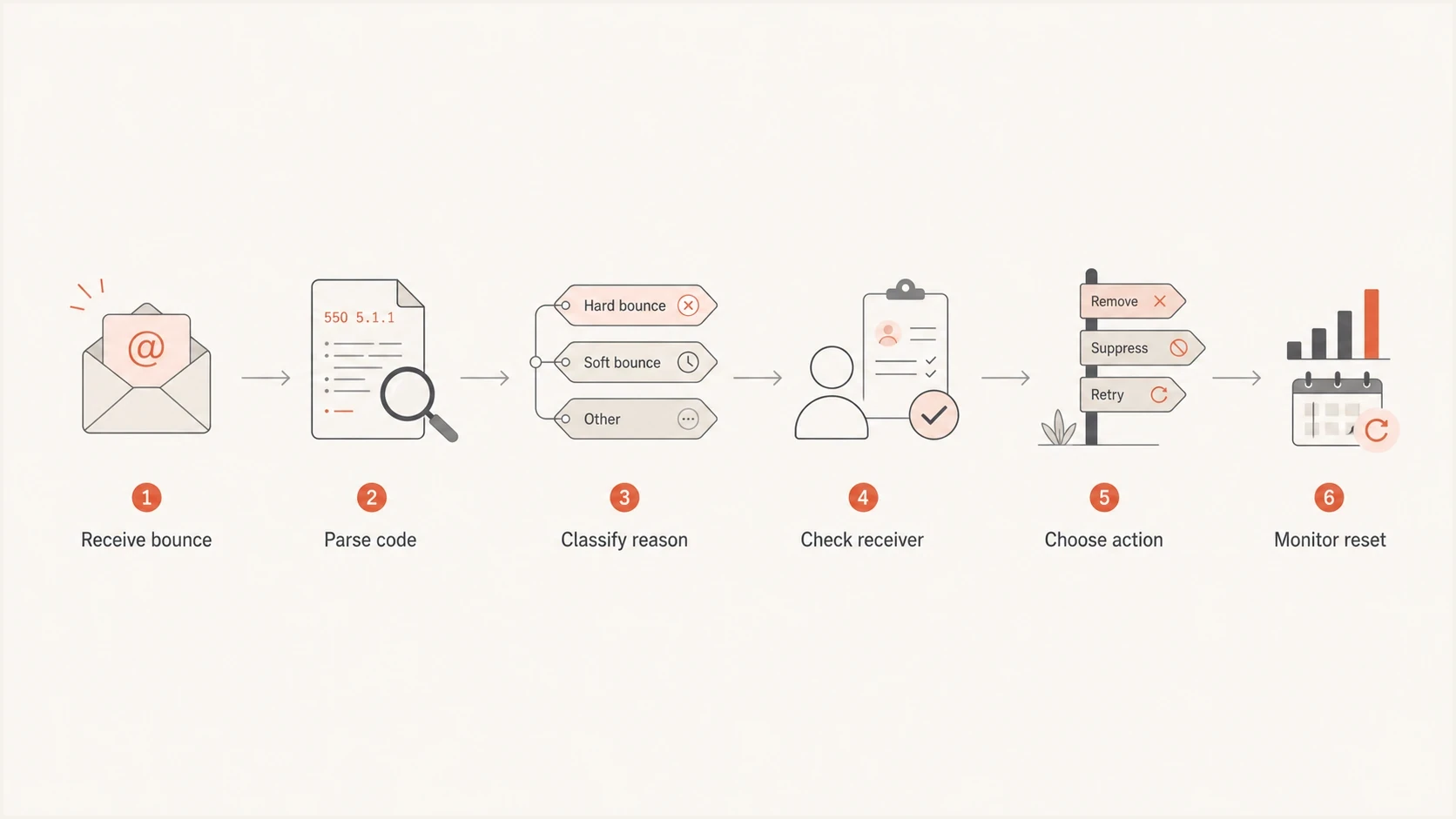
Flowchart showing a daily email bounce classification workflow for SMTP codes, receiver checks, and suppression decisions.
The safest workflow is repeatable and reviewable. The system should make obvious decisions automatically, quarantine ambiguous cases, and give the deliverability owner enough evidence to tune rules without guessing.
- Parse first: Capture SMTP code, enhanced code, NDR or raw reply, receiver family, campaign, IP, domain, and message stream.
- Classify reason: Map the event to invalid user, invalid domain, disabled mailbox, mailbox full, transient, rate limit, policy, or unknown.
- Pick scope: Decide if the action belongs to the recipient, sending IP, domain, campaign stream, or receiver grouping.
- Apply window: Use consecutive bounce days for soft failures, the actual queue expiry for pending retries, and immediate suppression for confirmed permanent failures.
- Review drift: Sample raw replies each week so provider-specific text changes do not silently break your rules.
Testing matters because bounce handling is downstream of delivery setup. When DNS, sender identity, content templates, or routing changes, send a real test and inspect headers, authentication, and visible failures before blaming the list. That does not replace production bounce logs, but it catches obvious configuration problems early.
Email tester
Send a real email to this address. Suped shows a results button when the test is ready.
?/43tests passed
For daily campaigns, split rules by mail stream. Transactional mail, preference-based alerts, newsletters, and promotional campaigns should not always share the same suppression timing. A subscriber who cannot receive a marketing campaign can still need account or purchase mail, and a transactional hard bounce can tell you more about address quality than a one-off promotional deferral.
Example daily sender suppression policytext
confirmed_invalid_user: suppress immediately
confirmed_invalid_domain: suppress immediately
confirmed_disabled_mailbox: suppress immediately
mailbox_full: pause after 7 bounce days
mailbox_full: suppress after 10-14 bounce days
transient_failure: pause after 3-5 bounce days
rate_limit: throttle stream, do not suppress recipient
policy_or_auth_failure: investigate sender, do not suppress recipient
unknown_response: quarantine and sample raw replies
Views from the trenches
Best practices
Count one bounce day per recipient so high frequency does not overstate failures.
Separate disabled mailboxes, rate limits, policy blocks, and invalid users before suppression.
Reset active counters after accepted delivery, while retaining older failures for review.
Common pitfalls
Treating every 5.x response as permanent can suppress valid users during policy blocks.
Substring matching turns similar codes into wrong actions, especially in 5.7.x failures.
Removing mailbox full immediately is too strict for subscribers who receive daily mail.
Expert tips
Review bounce reasons by receiver family before changing thresholds across all streams.
Quarantine unknown replies first, then promote only verified patterns into automation.
Audit old rule maps quarterly because receiver messages and provider behavior change.
Marketer from Email Geeks says classification decides the next action because failed mail can mean invalid user, temporary limits, or a sender-side policy problem.
2026-02-14 - Email Geeks
Marketer from Email Geeks says a mailbox that stays full for 10 days in a daily program often looks abandoned, but immediate removal is too strict.
2026-02-16 - Email Geeks
Bottom line
For daily campaigns, use decisive suppression for confirmed hard bounces and slower, reason-based handling for soft bounces. Mailbox full should not be an instant removal. Repeated mailbox-full days can justify suppression, but the counter should run by day, not by message, when a subscriber can receive multiple campaigns per day.
The strongest bounce programs store the raw reply, classify by reason and receiver, separate recipient problems from sender problems, and keep the rule map under review. That gives you clean lists without hiding authentication, reputation, or strategy issues behind a generic hard-bounce label.




