
How to set up DMARC/DKIM/SPF for Zimbra

Published 22 Nov 2026
Updated 22 Nov 2026
13 min read
Summarize with
To set up DMARC/DKIM/SPF for Zimbra, authorize your outbound servers in SPF, generate a DKIM key on a Zimbra MTA, publish its public key in DNS, and add a DMARC TXT record. I then send a real message to verify authentication and domain matching at the receiving server.
These steps cover Zimbra Collaboration with administrator and server access. With hosted Zimbra, ask your hosting provider for its outbound SPF instructions and your domain's DKIM record. Zimbra supports a Return-Path using your domain, but a relay can change it.
Add your domain
I first check whether the sending domain already exists in Zimbra. Adding it again is unnecessary. Have access to the Zimbra Administration Console, the sending MTA, and your domain's authoritative public DNS.
- Open Domains. In the Zimbra Administration Console, go to Configure > Domains. If your domain is absent, open the gear menu and select New.
- Create the domain. Enter example.com as the Domain name, replacing it with your actual domain. Complete the wizard with your intended authentication and GAL settings, then select Finish.
- Confirm provisioning. Check that the domain appears with Active status. Under Manage > Accounts, confirm that a mailbox exists on that domain.
- Confirm DNS access. For hosted Zimbra, complete any ownership check required by your provider. Publish only its actual verification token, rather than inventing a Zimbra verification TXT record.
The self-hosted New Domain wizard provisions the domain in Zimbra. It does not publish SPF, DKIM, or DMARC in public DNS. Zimbra's Daffodil administrator guide documents domain administration separately from DKIM signing.
Keep existing mail routing unless you are migrating it. For a new receiving domain, its MX must point to the intended inbound server, with working address records. MX configuration alone does not authorize outbound mail.
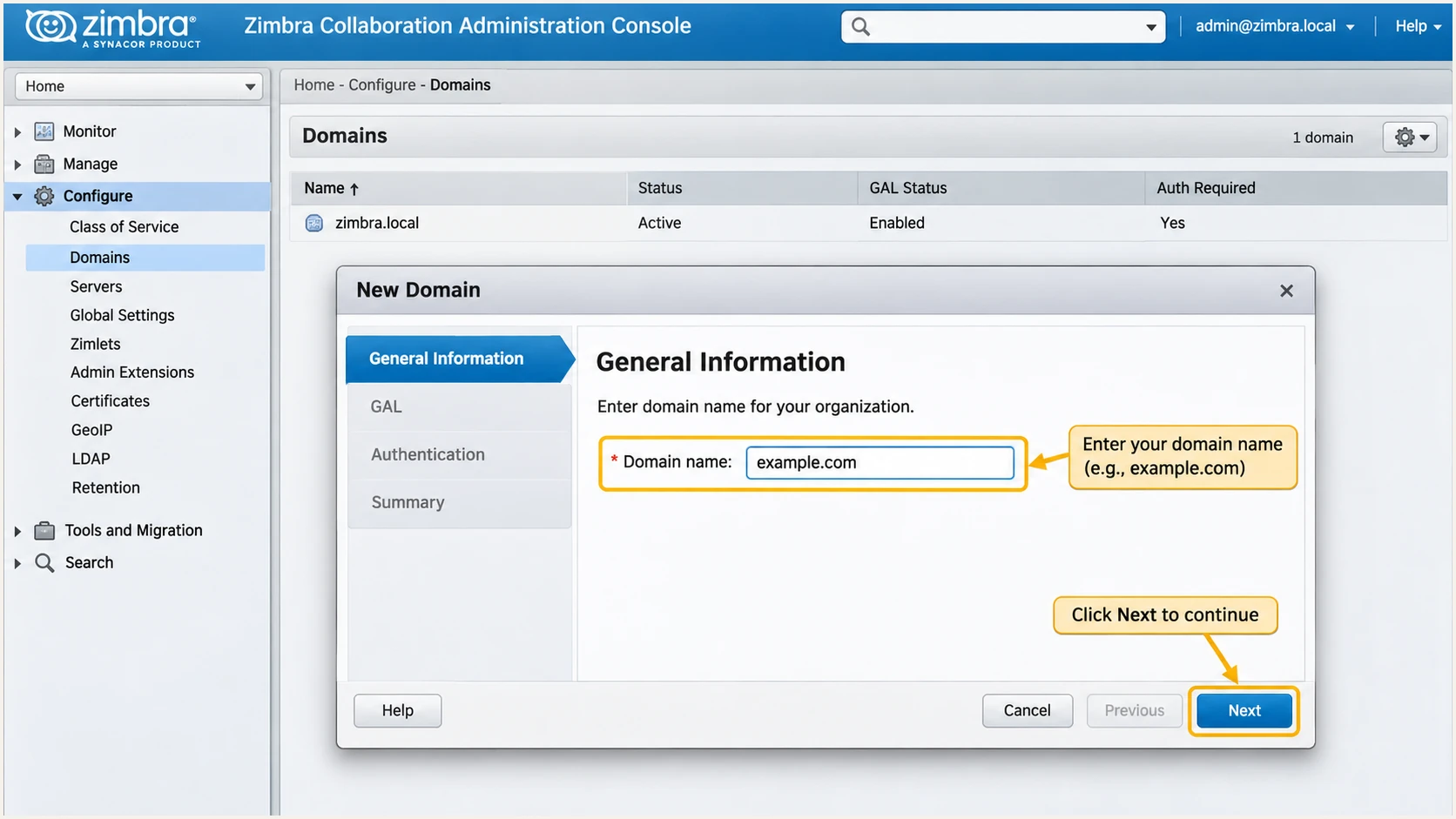
Zimbra's New Domain wizard with the domain name field highlighted.
Verify provisioning locally as the zimbra operating-system user. The domain query should return Active. The DNS queries should show the public inbound route you intend to use.
Replace every example domain and address below with your own values. DNS records belong at your DNS host, even when the mailbox is hosted on Zimbra.
Confirm the Zimbra domain and public mail routebash
# As root, enter the Zimbra service account.
su - zimbra
zmprov gd example.com zimbraDomainStatus
dig +short MX example.com
dig +short A mail.example.com
dig +short AAAA mail.example.com
Set up SPF
SPF authorizes the public server that delivers your message to the recipient. I use the final outbound IP, including NAT or an outbound relay, rather than the Zimbra server's private address.
- Identify the envelope domain. Inspect a delivered message's Return-Path. For ordinary mail sent as user@example.com, use example.com when that is also the envelope sender domain.
- Inventory outbound routes. List every public IPv4 and IPv6 address used for delivery. For hosted Zimbra or a relay, obtain the exact authorized addresses or include mechanism from that provider.
- Merge the SPF record. At the envelope domain, edit the existing TXT record starting with v=spf1. Keep one SPF record and preserve all other authorized senders.
- Limit DNS lookups. Keep the entire SPF evaluation within 10 DNS-querying mechanisms and modifiers, including nested includes. Explicit ip4 and ip6 entries do not consume that limit.
For a Zimbra MTA delivering directly through one IPv4 address, the following is a starting example. The 203.0.113.10 address is reserved for documentation; replace it with your actual public sending address.
This is a complete example record, not an extra record to publish alongside an existing SPF policy. The ~all ending produces SPF softfail for unlisted senders; it does not command recipients to put messages in spam.
Example SPF TXT record at example.comdns
example.com. 3600 IN TXT "v=spf1 ip4:203.0.113.10 ~all"
There is no universal Zimbra SPF include to paste into every domain. An MX-based mechanism is appropriate only when those MX hosts also send outbound mail. Add ip6 authorization only for IPv6 routes that actually send.
If a hosted relay forces a provider-owned Return-Path, changing your domain's SPF cannot repair SPF alignment for that route. The provider maintains SPF for its envelope domain. Your domain still passes DMARC through a valid DKIM signature using your domain.
SPF checker
Find SPF syntax issues, lookup limits, and weak records.
?/16tests passed
Enter the actual Return-Path domain into the SPF checker after saving DNS. Check the resulting policy and lookup count. Query a separate bounce subdomain separately if your outbound route uses one.
A valid SPF record is only the DNS half of the check. Send a real message and confirm that the recipient reports spf=pass for the expected envelope domain.
Set up DKIM
Zimbra signs outgoing messages per domain. Its public 'Configuring for DKIM Signing' documentation places key generation on a Zimbra MTA. Hosted customers need their provider to generate and enable the signing key.
- Inspect existing signing. As the zimbra user, run zmdkimkeyutil with -q for your domain. Keep this output local because it includes private-key material.
- Generate only when needed. If the domain has no DKIM data, run -a with a 2048-bit key. Do not use -u as a verification command; it replaces signing data.
- Publish the public record. Create a TXT record at the generated selector followed by ._domainkey.example.com. Copy the complete public signature value from Zimbra's output.
- Preserve the TXT value. Use one TXT record for the key. DNS can split a long value into quoted character strings within that record; the joined value must retain every key character.
Run the query first. Run the add command only after confirming that no key is configured. Zimbra's zmdkimkeyutil stores signing data in LDAP; only the public DNS value belongs in your DNS zone.
If your DNS editor appends the zone automatically, enter only the selector and ._domainkey in its host field. Avoid creating a duplicated name ending in example.com.example.com.
Inspect DKIM, then generate a key only for an unconfigured domainbash
# Run as the zimbra user on a Zimbra MTA.
# This query exposes private material: keep the output local.
/opt/zimbra/libexec/zmdkimkeyutil -q -d example.com

# Run this only if the domain has no existing DKIM data.
/opt/zimbra/libexec/zmdkimkeyutil -a -d example.com -b 2048
After publishing DNS, replace the selector placeholder below with Zimbra's generated selector. Check the record and key before enabling signing on a previously unsigned route.
Run the service check on every outbound Zimbra MTA. If opendkim is absent from its enabled services, add it after the public key is available. The bundled opendkim-testkey command validates the key configuration; a received-message test confirms actual signing.
Validate the published key and enable a missing signing servicebash
selector='REPLACE_WITH_GENERATED_SELECTOR'
dig +short TXT "${selector}._domainkey.example.com"
/opt/zimbra/common/sbin/opendkim-testkey \
  -d example.com -s "$selector" \
  -x /opt/zimbra/conf/opendkim.conf

zmprov gs "$(zmhostname)" zimbraServiceEnabled
# Only if opendkim is not enabled, enable and start it.
zmprov ms "$(zmhostname)" +zimbraServiceEnabled opendkim
zmopendkimctl restart
For mail with From: user@example.com, confirm that a valid DKIM-Signature uses d=example.com. Configure and test each domain used in the visible From address, including sending aliases.
When rotating keys, keep the previous selector's DNS record available while previously signed messages remain in transit. A DNS lookup succeeding does not prove that every MTA has begun using the new signing data.
Publish only the public key
Never copy the DKIM Private Key into DNS, a support ticket, or an image. The -q query contains sensitive signing material. If that private key is exposed, replace it and publish the replacement public record.
Set up DMARC
DMARC is a public DNS policy for the domain in the visible From address. There is no separate outbound DMARC switch to enable in Zimbra. I first confirm that the report mailbox exists and can receive external mail.
- Check the current policy. If the domain already uses p=quarantine or p=reject, keep that policy and its reporting destinations while fixing Zimbra.
- Start new deployments with monitoring. For a domain without an enforced policy, publish the p=none record below. Use the DMARC record generator to build a record for your actual domain.
- Publish one policy. Create one DMARC TXT record at _dmarc.example.com. In DNS editors that append your domain, the host field is usually _dmarc.
- Use a working destination. Replace dmarc@example.com with your real report mailbox. Keep the default relaxed alignment settings unless you have a documented reason for strict matching.
For a new deployment, the exact starting TXT value is below. Replace its example reporting address before publishing. The address must receive DMARC aggregate reports, usually compressed XML attachments.
If reporting goes to another organization's domain, follow that destination's external reporting authorization instructions. Preserve existing report recipients when adding another destination.
Starting TXT value at _dmarc.example.comtext
v=DMARC1; p=none; rua=mailto:dmarc@example.com
The p=none policy requests reporting without asking recipients to quarantine or reject messages because of DMARC failure. Recipients still apply their own spam and delivery rules.
DMARC passes when SPF passes with a matching envelope domain or a valid DKIM signature has a matching signing domain. A generic SPF or DKIM pass using an unrelated provider domain is insufficient.
DMARC checker
Look up a domain's DMARC record and catch policy issues.
?/7tests passed
Check the visible From domain after DNS updates. Confirm that the checker finds one valid policy and the intended reporting address. Recheck authoritative DNS if cached results still show an older value.
Reports normally arrive on a daily cycle. Allow roughly 24-48 hours after actual sending for initial data, and remember that not every recipient sends aggregate reports.
Verify and troubleshoot
I verify mail that has crossed the real outbound route. A message exchanged between two local Zimbra mailboxes can bypass the delivery path that external recipients evaluate.
- Send a test. Use the email tester below to obtain a destination, then send to it from your Zimbra mailbox. The result provides a diagnosis of the received message.
- Check domain matching. Look for spf=pass on the expected envelope domain, dkim=pass with your signing domain, and dmarc=pass for the visible From domain.
- Exercise every route. Repeat with each sending MTA, SMTP application, outbound relay, and sending alias. Include automatic replies and messages with attachments.
- Separate authentication from delivery. A DMARC pass does not guarantee inbox placement. Review recipient rejection details when authentication passes but delivery still fails.
The tester checks the message as received, so it is quicker than inferring success from DNS alone. A key can be published correctly while Zimbra sends unsigned mail through a different MTA.
If SPF fails, compare the recipient-visible sending IP with the SPF record for the Return-Path domain. If DKIM fails, compare the received selector and signing domain with the public key you published.
Email tester
Send a real email to this address. Suped shows a results button when the test is ready.
?/43tests passed
Use the receiving system's Authentication-Results header for the final result. Your Sent folder does not contain the external recipient's authentication verdict.
To inspect a received message in the Zimbra Classic Web App, right-click it and select Show Original. Zimbra's administrator guide documents this menu. For outbound validation, retain the external tester's diagnosis or the external recipient's received headers.
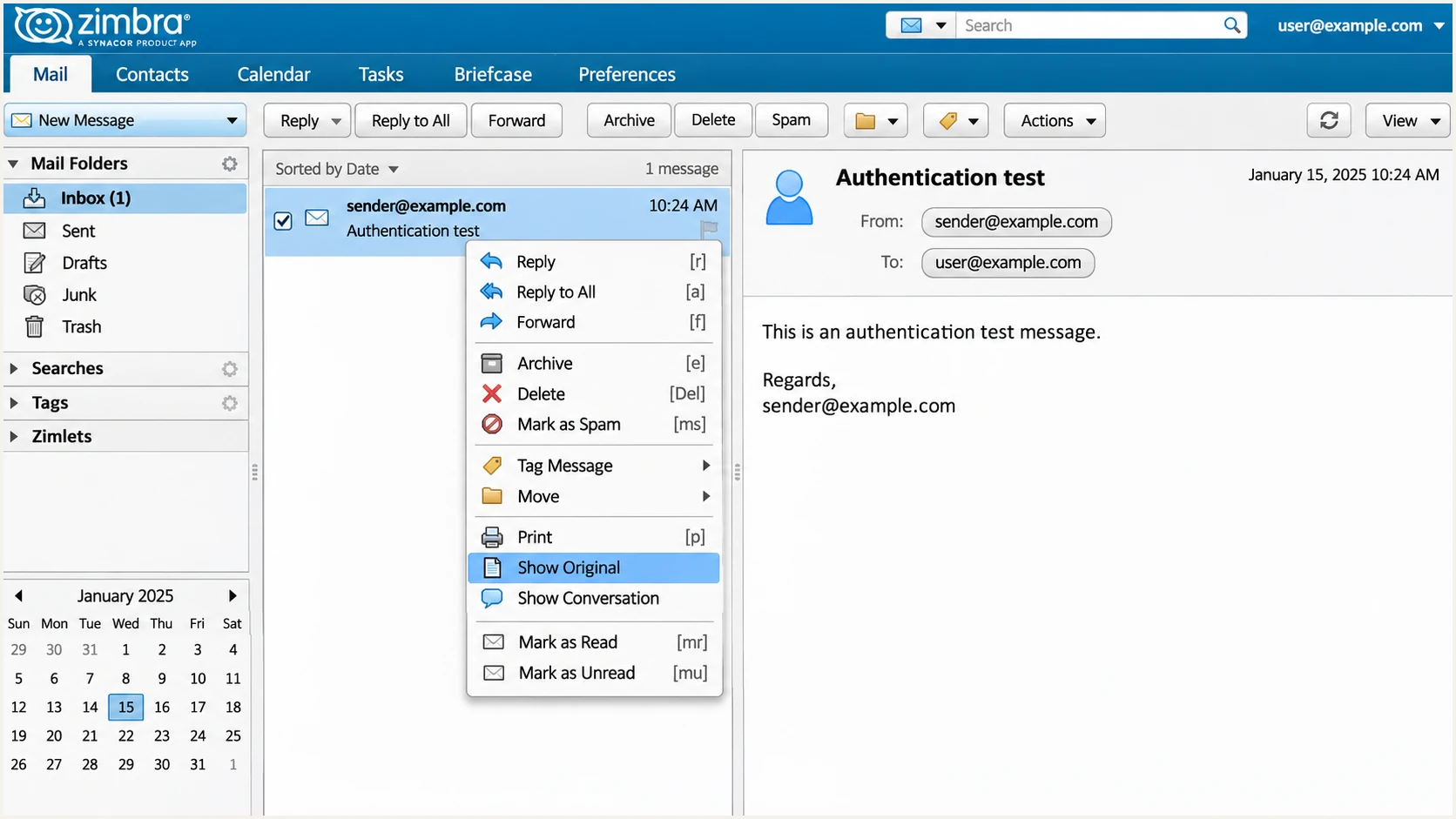
Zimbra Classic Web App: select Show Original on a received message.
For a missing signature, check the opendkim service on the actual outbound MTA and whether the sender domain has DKIM data. For a bad signature, check selector DNS and any relay that modifies the message after Zimbra signs it.
If SPF and DKIM pass but DMARC fails, compare their authenticated domains with the visible From domain. If DNS reports a syntax error, remove duplicate SPF or DMARC records and check for automatically appended domain names.
- Forwarded messages. SPF often fails after forwarding. A valid DKIM signature with the correct domain can still produce a DMARC pass.
- Reverse DNS. Have the IP owner set PTR for your public outbound IP, and confirm that the returned hostname resolves back to it. PTR is separate from DMARC.
- Delivery rejections. Use the receiving server's error and Zimbra queue logs to distinguish an authentication failure from an IP blocklist (blacklist) listing.
- Alias failures. Check the actual From domain and DKIM d= value when sending through aliases. A key for the primary domain does not automatically authenticate an unrelated alias domain.
Get alerted when it breaks
Suped is our DMARC platform for tracking Zimbra authentication after the initial setup. Its reports and issue notifications help catch a changed outbound IP or a missing signing key before failures go unnoticed.
- Enable issue notifications. In Suped's notification settings, enable Issues detected and Sending sources need verification. Keep DMARC summary emails enabled for periodic review.
- Review source changes. Compare new source IPs with your Zimbra MTAs and approved relays. Verify ownership before treating an unfamiliar source as authorized.
- Investigate the affected mail. Use Data view filters for source, reporter, and IP. Open Detail view to compare SPF, DKIM, and DMARC results with the observed DNS records.
- Confirm the repair. Follow the issue's fix steps, correct Zimbra or DNS, and send another external test. Confirm the improved result when fresh reports arrive.
These workflows require aggregate reports to reach Suped's assigned reporting destination. A rua value pointing only to a local Zimbra mailbox leaves those reports in that mailbox. Preserve your existing policy when adjusting report delivery.
Suped's DMARC monitoring combines source history with detected issues. Aggregate-report alerts depend on recipients sending data, so they do not provide an instant verdict for every message.
Zimbra logs and tests
Use MTA logs to trace queues, relays, and local signing behavior.
Use an external received-message test to confirm the result of a specific change.
Suped reports and alerts
Review recipient-reported authentication across your sending sources.
Use issue notifications and source verification to investigate changes over time.
Use Suped's DNS history when an authentication change coincides with a record edit. Compare the previous and current values before changing Zimbra settings.
Assign an owner to investigate issue notifications. After an IP migration or key change, run an immediate email test and review the next reporting cycle.
Secure your domain with p=reject
I move toward p=reject only after legitimate Zimbra mail has dependable DKIM signing and the other authorized senders are understood. RFC 9989 requires domains using p=reject to avoid relying solely on SPF.
- Inventory legitimate senders. Use Suped's source table to identify Zimbra, application relays, and other approved systems. Verify sources against your own infrastructure records.
- Repair legitimate failures. Use Suped's issue details to fix missing signatures and domain mismatches. Require a valid DKIM signature with the appropriate domain on every authorized route.
- Stage the policy. Keep a new deployment at p=none while observing representative traffic, then evaluate p=quarantine. Compare reports and user delivery problems before proceeding.
- Enforce after review. Change the existing record to p=reject when legitimate traffic is ready. Retain reporting and keep Suped's issue notifications enabled.
For domains whose users post to mailing lists, RFC 9989 advises against p=reject because intermediaries can break authentication. If considering it, evaluate at least a month at p=none and an equally long period at p=quarantine, including list traffic.
Suped's hosted DMARC supports managing the policy and staging changes through the dashboard. Use the authentication evidence to decide when to change policy; a dashboard setting cannot repair an unsigned Zimbra message.
|
|
|---|---|
p=none | Monitor |
p=quarantine | Quarantine |
p=reject | Reject |
DMARC policies request handling of messages that fail DMARC.
The policy does not change which messages pass DMARC. Receivers make the final delivery decision and can apply local handling. Do not authorize an unknown IP just to improve a pass-rate percentage.
Review subdomains before enforcement. A parent policy can affect subdomains without their own policy. For a simple new setup, keep default relaxed alignment rather than introducing strict matching during the rollout.
Final TXT value after legitimate traffic is readytext
v=DMARC1; p=reject; rua=mailto:dmarc@example.com
Keep your actual reporting address and any existing required tags when editing the record. Check the published policy again and send an external test through each Zimbra outbound route.
After enforcement, review fresh aggregate reports in Suped for legitimate failures. Before a later MTA replacement or relay change, repeat the SPF and DKIM checks on that route.
Frequency asked questions
Zimbra has no universal SPF include for every installation. For direct delivery, authorize your own public outbound addresses. For hosted Zimbra or an outbound relay, use the exact SPF instructions supplied by that provider, merged into one record.
Yes. A valid DKIM signature whose signing domain matches the visible From domain can produce a DMARC pass despite failed SPF alignment. Zimbra supports your own Return-Path domain, so check whether an outbound relay changed the envelope sender before accepting that limitation.
Publish them in the authoritative public DNS zone. SPF belongs at the envelope sender domain, DKIM at the generated selector under _domainkey, and DMARC under _dmarc for the visible From domain. Creating a domain in the Zimbra console does not publish these records.
Zimbra installations do not share a universal rDNS suffix. Self-hosted and hosted installations use hostnames controlled by the operator, such as mail.example.com. An rDNS hostname alone does not prove that Zimbra sent the mail. Confirm the sending IP against your infrastructure, received headers, and MTA logs.
A DKIM pass proves the signature is valid for its signing domain. DMARC also requires that domain to match the visible From domain under the published alignment mode. Check the received DKIM d= value, especially for aliases and mail sent through a relay.
Keep an existing p=reject or p=quarantine policy while fixing Zimbra authentication. Diagnose the failing outbound route, repair its SPF or DKIM configuration, and retest. Use p=none as the starting policy for a new deployment without enforcement.




