How to set up DMARC/DKIM/SPF for YourNet by FreeBit

Published 15 Nov 2026
Updated 15 Nov 2026
9 min read
Summarize with
To set up DMARC, DKIM, and SPF for YourNet by FreeBit, have your provider provision your sending domain, authorize its outbound servers in SPF, publish its DKIM DNS records, and add a DMARC TXT record at _dmarc on your domain. Verify a real message passes DMARC before increasing enforcement.
I start with the account-specific DNS values supplied by FreeBit or the ISP selling the service. YourNet CloudMail supports custom domains, but an ISP-owned mailbox address gives you no authority to change that ISP's DNS. The steps below apply to a custom domain you control.
Add your domain
Have FreeBit or your contracted ISP add the custom domain to your CloudMail service. FreeBit's public CloudMail service description confirms custom-domain support and separate operator and domain versions of StaffTools.
The published legacy StaffTools domain-admin manual documents the domain list and detail controls below. Use your provider's current manual when its reseller portal differs.
- Provisioning: Request activation of the exact sending domain, such as example.com, and a mailbox that can send through your assigned SMTP service.
- Domain access: Sign in to the supplied StaffTools URL with the domain name, administrator account, and password. Open ドメイン情報 一覧 (domain information list), then 詳細 (details) beside your domain.
- Service check: Confirm the domain is active and record the SMTP or VSMTP settings shown in the domain details. Send a message through that assigned service.
- DNS ownership: Identify the authoritative DNS operator. FreeBit's DNS SERVICE specification says record edits are requested through FreeBit when it hosts your DNS.
- Authentication values: Ask for the outbound SPF mechanism, supported MAIL FROM domain, and DKIM selector with its exact DNS name, type, and target. Request any ownership-verification record required for your account.
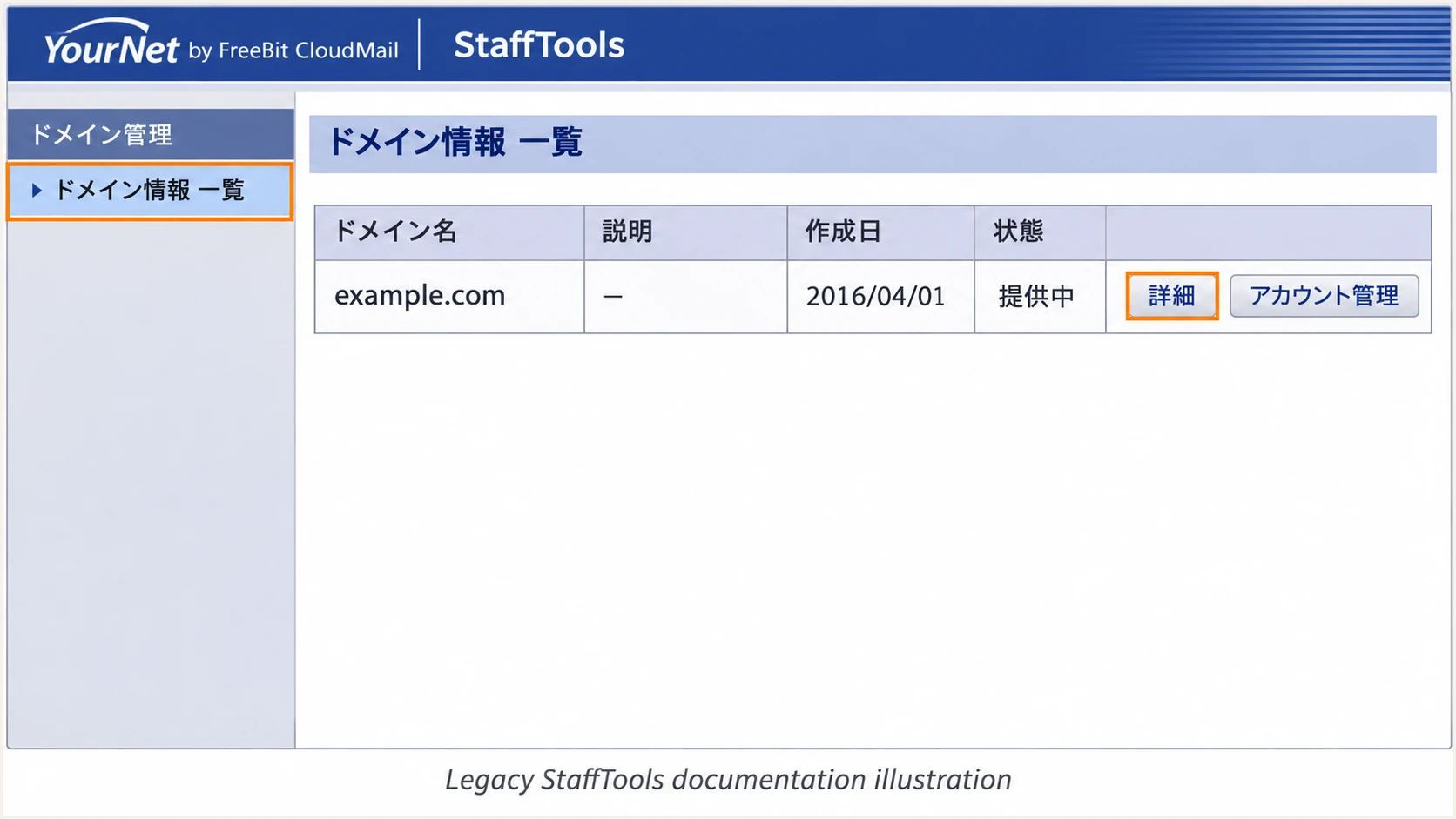
Illustrated legacy CloudMail StaffTools domain list; reseller layouts differ.
Publish any provider-issued verification record exactly and ask the provider to confirm domain activation. Keep existing MX records unless you are also performing a planned mailbox migration.
Set up SPF
YourNet supports return-path alignment. I check the actual SMTP MAIL FROM domain, normally visible in the delivered Return-Path header, before editing SPF. SPF is evaluated at that domain, which is not necessarily the visible From domain.
The public YourNet pages do not supply a universal customer SPF include. Get the mechanism or address ranges assigned to your service rather than copying another customer's policy.
- Return path: Have the provider configure MAIL FROM using your sending domain or a suitable subdomain. For example, bounce.example.com matches example.com under relaxed SPF alignment.
- Existing policy: Retrieve TXT records at the MAIL FROM domain. Edit the single record beginning v=spf1 and preserve authorization for other legitimate senders using that same domain.
- Provider values: Insert the supplied mechanism before the final all mechanism. If no SPF policy exists, have the provider confirm the complete initial TXT value before publication.
- Lookup limit: Keep DNS-querying SPF terms within the 10-term evaluation limit, including nested includes. Publishing a second SPF policy causes a permanent error.
- DNS scope: Publish at the exact MAIL FROM domain. A subdomain does not inherit its parent's SPF policy. Check that domain with the SPF checker below.
SPF checker
Find SPF syntax issues, lookup limits, and weak records.
?/16tests passed
A valid SPF record does not prove that YourNet is using the intended return path. Confirm both the SPF result and the authenticated domain in a newly delivered message.
Set up DKIM
Ask your provider to enable outbound DKIM signing with your domain. FreeBit's 2024 JPAAWG presentation describes generating keys per domain and having operators publish CNAME records pointing to its key-hosting infrastructure.
I use the selector and delegation target issued for the account. Publishing a key by itself does not activate signing on the sending server.
- Signing identity: Confirm the signing domain, shown as d= in DKIM-Signature, matches your visible From domain under the configured DMARC alignment mode.
- DNS publication: Add the supplied CNAME at the supplied selector._domainkey name. If your provider instead issues a TXT public key, follow that account's instructions exactly.
- Record integrity: Avoid other record data at a DKIM CNAME name. Check whether your DNS interface appends the zone name so you do not publish the domain suffix twice.
- Live verification: Send a fresh message and inspect DKIM-Signature for d= and s=. Require dkim=pass in the receiving server's Authentication-Results header, then verify domain matching.
Passing DKIM with domain matching
The visible From domain is example.com. DKIM passes with d=example.com. That signature satisfies DMARC even when forwarding breaks SPF.
Passing DKIM with a different domain
The visible From domain is example.com. DKIM passes only for a provider-owned domain. That signature does not satisfy DMARC; SPF must pass with a matching domain instead.
Set up DMARC
Publish the policy for the domain in the visible From address. For mail using example.com, the DNS name is _dmarc.example.com. DMARC passes when SPF or DKIM passes with the required domain match.
Keep an existing p=quarantine or p=reject policy. I use p=none for a domain starting DMARC monitoring, then assess legitimate traffic before tightening the policy.
- Policy lookup: Check for an existing DMARC record before making changes. Update its current management method instead of creating a duplicate policy.
- DNS entry: For a new direct TXT setup, use host _dmarc within the example.com zone, or the full name if your DNS operator requires it. Set the type to TXT.
- Report recipient: Replace dmarc@example.com in the example with a working mailbox that accepts aggregate XML reports, or the reporting address assigned for your domain.
- External reporting: When reports go to another domain, have the report destination operator publish the required external-report authorization.
Initial DMARC TXT value at _dmarc.example.comtext
v=DMARC1; p=none; rua=mailto:dmarc@example.com
The example address is a placeholder. Keep the record on one logical line and retain your existing report destinations when editing a current policy.
Use the DMARC record generator to prepare the value. After publication, check the visible From domain below for syntax and policy discovery.
DMARC checker
Look up a domain's DMARC record and catch policy issues.
?/7tests passed
A successful DNS check confirms publication. It does not prove that YourNet messages pass authentication; send a message through the production route next.
Verify and troubleshoot
I test the same route that sends normal mail, including applications that submit through YourNet SMTP. Testing an unrelated mailbox or sending platform does not validate this setup.
The email tester gives a quicker configuration diagnosis: send a message to the address it supplies, then inspect the authentication results.
- Test message: Send directly to the tester's generated address using your custom From address and assigned YourNet service. Repeat for each distinct sending workflow.
- SPF identity: Check spf=pass and smtp.mailfrom. Compare that domain with the visible From domain under the policy's SPF alignment mode.
- DKIM identity: Check dkim=pass and header.d. Use s= from DKIM-Signature to find the actual selector; guessing a selector is not a signing test.
- DMARC result: Require dmarc=pass for your visible From domain. An SPF alignment error is acceptable for DMARC when a passing DKIM signature has the required domain match.
- Escalation evidence: For failures, give the provider the Message-ID, UTC send time, connecting source IP, and complete received headers. Request its SMTP logs for the same message.
Email tester
Send a real email to this address. Suped shows a results button when the test is ready.
?/43tests passed
Use the receiving server's trusted authentication results. A header inserted earlier in the message path is not sufficient evidence of a successful receiving-side check.
After DNS edits, allow existing and negative cache entries to expire according to their TTLs, then send a fresh message. Use the failure pattern below to choose the next check.
|
|
|
|---|---|---|
SPF fail | Sender missing | Outbound IP |
SPF mismatch | Return path | MAIL FROM |
DKIM absent | Signing inactive | Provider setup |
DKIM fail | Key or content | Selector DNS |
DMARC fail | No matching pass | Both identities |
Checks for common YourNet authentication failures.
Get alerted when it breaks
Our Suped platform turns aggregate DMARC reports into source-level diagnostics and failure notifications. Its DMARC monitoring helps track YourNet authentication after the initial test.
I keep an initial passing message as a reference and investigate changes against it. This helps distinguish a new outbound server from a changed return path or missing DKIM signature.
- Failure alerts: Enable DMARC failure alerts in Suped's notification settings and configure the available thresholds for your traffic. Keep summary emails enabled for periodic review.
- Source verification: Mark YourNet as a verified source only after matching its reported sending IPs and authentication identities to your provider-confirmed traffic.
- Failure diagnosis: Open affected DMARC records in Suped to compare SPF and DKIM results. Use DNS history to check whether a record change explains the failure.
- Provider follow-up: Send confirmed configuration failures to your ISP with the diagnostic evidence. After the fix, repeat the message test and check subsequent report data.
Report-based alerts have a reporting delay
Suped alerts depend on receiving and processing DMARC reports. Aggregate reporting is commonly daily, so use the email tester and provider SMTP logs for immediate troubleshooting.
Secure your domain with p=reject
Move to p=reject after legitimate sending workflows consistently pass DMARC. I assess known senders separately from unauthorized traffic; a low overall pass rate caused by impersonation is not a reason to authorize those sources.
Suped's verified-source views and issue diagnostics help identify legitimate failures before enforcement. Our hosted DMARC supports managing policy changes through the dashboard, with reporting available to assess their effect.
- Complete inventory: Check YourNet mail alongside billing systems, website forms, support applications, and infrequent campaigns using the same From domain.
- Resolve failures: Fix legitimate SPF or DKIM domain-matching failures. Keep working DKIM signing because forwarding often breaks SPF.
- Observe normal traffic: Collect reports across the full sending cycle, including infrequent business processes. In Suped, investigate remaining failures for verified sources before changing policy.
- Stage enforcement: For a domain starting at p=none, move to p=quarantine, review legitimate delivery, then change to p=reject. Keep an existing enforcement policy while correcting individual senders.
- Check subdomains: Review subdomain senders and any separate DMARC records before enforcing the parent policy. Keep reporting enabled after the change.
Final DMARC TXT value, after legitimate traffic is verifiedtext
v=DMARC1; p=reject; rua=mailto:dmarc@example.com
Replace the example reporting address with your actual destination and preserve other intentional policy settings. Continue checking Suped for new sources and authentication changes after enforcement.
FAQ
These distinctions matter when the mailbox is sold through an ISP or the authentication results identify shared FreeBit infrastructure.
Only the domain's DNS administrator can publish its authentication records. If your address uses a domain owned by the ISP, ask that ISP to manage authentication. Use your own custom domain when you need control over its DMARC policy.
Get the exact SPF mechanism or approved outbound address ranges for your account from FreeBit or your contracted ISP. The public YourNet service pages do not establish one universal include for every customer. Publish the policy at the domain actually used in MAIL FROM.
SPF authenticates the MAIL FROM domain. If that domain does not match the visible From domain under your policy's alignment mode, SPF does not satisfy DMARC. A passing DKIM signature with the required domain match also satisfies DMARC.
The cloud-mail.jp domain is associated with FreeBit's CloudMail infrastructure used by ISP email services. That suffix is an attribution clue, not proof that a message is authorized or that a particular reseller sent it. Confirm the connecting IP and authentication identities with your provider before verifying the source.
Ask your provider whether custom-domain DKIM signing is enabled for your service. Creating a DNS key alone does not make its server sign messages. SPF with a matching MAIL FROM domain can satisfy DMARC, but DKIM provides another authentication path when forwarding breaks SPF.