
How to set up DMARC/DKIM/SPF for Yotpo

To authenticate Yotpo Reviews or Loyalty emails, request your domain-specific CNAME records from Yotpo support, publish the return-path and DKIM records, and add a DMARC TXT record for your From domain. I verify an original Yotpo email before changing DMARC enforcement.
These steps apply to Reviews and Loyalty & Referrals. Yotpo announced December 31, 2025 as the retirement date for its standalone Email and SMS products, so their old campaign setup screens are no longer the appropriate starting point.
Add your domain
I start with the domain in Yotpo's sender address. Domain authentication requires DNS access and Yotpo support validation.
- Open Reviews settings. Go to Settings > Email Settings > General Settings in Yotpo Reviews.
- Save the sender. Set From name, From email, and Reply email, then click Save Changes. For example, use reviews@example.com as From email and a monitored mailbox as Reply email.
- Request authentication. Ask Yotpo Reviews Support or Yotpo Loyalty Support for the DNS records for the exact From domain. Flag any existing DKIM selector conflicts.
- Complete validation. Publish the assigned records using the steps below, then reply to support and ask them to validate and activate domain authentication.
Yotpo's support article 'Authenticate Yotpo emails on your domain' documents this process. Its sample DNS values are illustrations; the hostnames and destinations assigned to your domain are the values to publish.
For Loyalty & Referrals, open Communication > Settings and check Sender's name and Sender's email address. If an integrated platform actually sends the message, authenticate that sending platform separately.
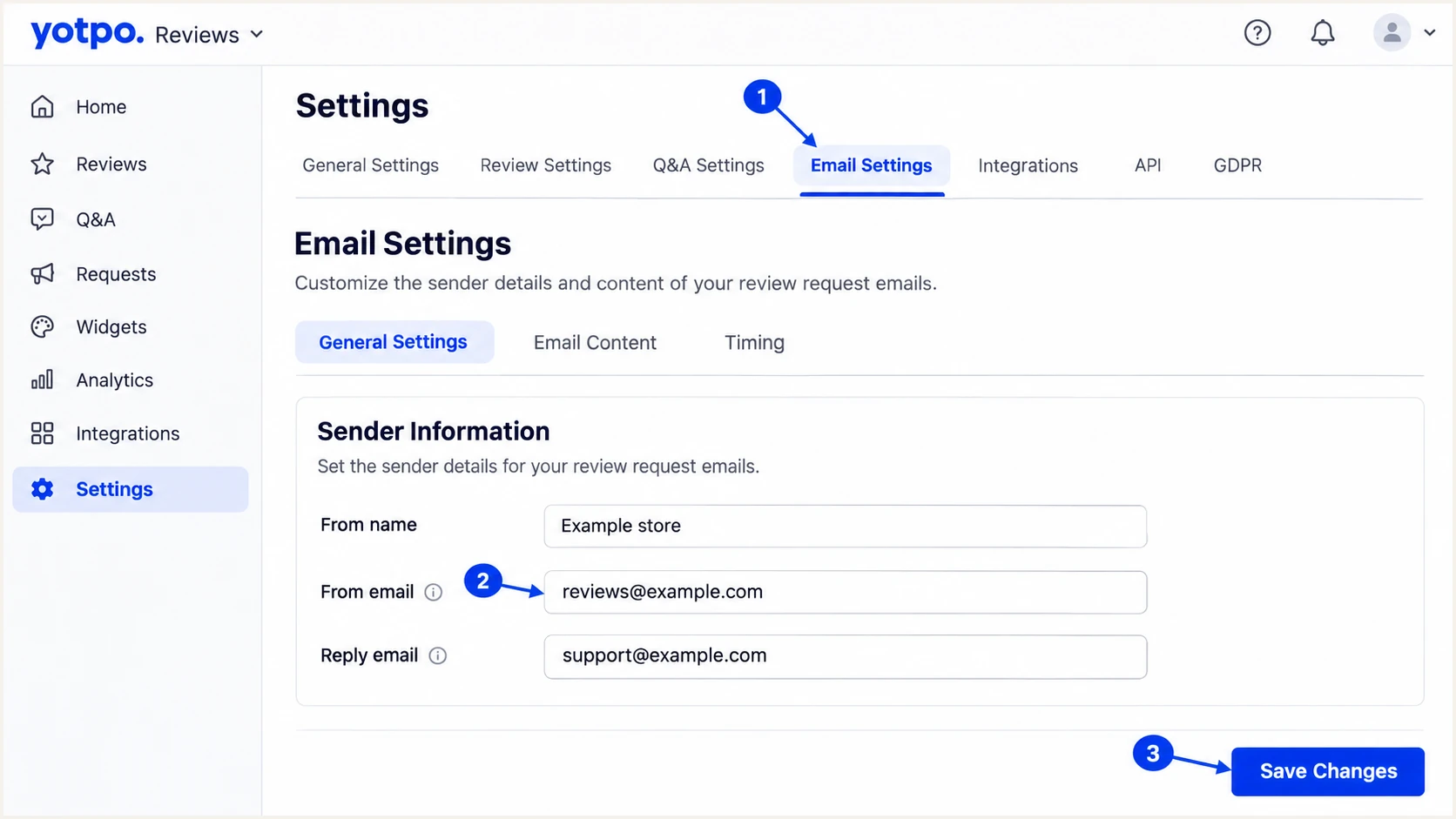
Yotpo Reviews sender fields and Save Changes button.
Set up SPF
Yotpo supports a branded return-path through its assigned CNAME. That subdomain is the SPF identity; this setup does not require adding a generic Yotpo include to your root SPF record.
- Publish the return-path. Add the non-DKIM CNAME supplied by support. Use DNS-only mode if your DNS provider offers HTTP proxying.
- Keep records separate. Preserve the root SPF record used by your mailbox service. Do not add a TXT or MX record at the hostname occupied by this CNAME.
- Check domain matching. A return-path such as em2645.example.com matches a From domain of example.com under relaxed SPF alignment. The default DMARC setting is aspf=r.
- Review strict settings. With aspf=s, those domains differ. Keep DKIM passing with the required domain matching, and review the strict policy before changing it.
The following record shows the documented structure. Replace both names with the exact values from Yotpo support.
Illustrative return-path CNAMEdns
em2645.example.com. CNAME u246613.wl114.sendgrid.net.
SPF checks the SMTP MAIL FROM domain, which normally appears in the received Return-Path header. The CNAME lets Yotpo's sending infrastructure maintain SPF at the delegated destination.
Enter the assigned return-path hostname in the SPF checker below. Checking only example.com tests a different SPF identity and does not verify Yotpo's return-path.
SPF checker
Find SPF syntax issues, lookup limits, and weak records.
?/16tests passed
Confirm that the lookup follows the alias to a valid SPF policy. Then check an actual message to establish that Yotpo uses that return-path when sending.
If support supplies a manual TXT-based configuration instead, use those instructions. Publish one SPF policy per hostname and keep evaluation within the limit of 10 DNS-querying SPF terms, including nested includes.
Set up DKIM
I publish both assigned DKIM CNAMEs so the sending infrastructure can rotate signing keys. Yotpo manages message signing and the private keys.
- Add both records. Create each selector CNAME exactly as supplied. Preserve the underscore in _domainkey and disable HTTP proxying.
- Resolve collisions. If a selector hostname already belongs to another sender, ask Yotpo support for alternative selectors. Preserve the working record.
- Confirm activation. After DNS resolves, ask support to complete validation for the configured From domain.
- Inspect the signature. On a received message, check dkim=pass and the DKIM signature's d= domain. It must match your From domain under the DMARC policy's DKIM alignment mode.
Use these example shapes to recognize the records. The selector names and destinations in your support response take precedence.
Illustrative DKIM CNAMEsdns
s1._domainkey.example.com. CNAME s1.domainkey.u246613.wl114.sendgrid.net.
s2._domainkey.example.com. CNAME s2.domainkey.u246613.wl114.sendgrid.net.
A sendgrid.net CNAME destination is a DNS delegation target. The signing identity used by DMARC is the domain in the message's DKIM signature, so inspect that identity on the received email.
Keep both assigned selectors published even when only one appears on a test message. One passing signature with the required domain matching is sufficient for DKIM to satisfy DMARC.
Set up DMARC
For a domain without DMARC, I start with p=none and reporting. If the domain already uses quarantine or reject, keep that enforcement policy and fix Yotpo authentication within it.
- Find the current policy. Check _dmarc at the actual From domain and review any inherited parent-domain policy before publishing a new record.
- Prepare reporting. Create a working report mailbox or use your reporting platform's assigned address. Replace the example reporting address before publishing.
- Build the value. Use the DMARC record generator to configure policy and aggregate reporting.
- Publish one record. Create a TXT record at _dmarc.example.com for a From domain of example.com. Edit an existing record rather than adding a duplicate, and preserve intentional policy settings.
For a new monitoring deployment, use this starting value with your real reporting address.
Starting DMARC TXT valuedns
v=DMARC1; p=none; rua=mailto:dmarc@example.com
The DNS host field is usually _dmarc when editing the example.com zone. If the From domain is reviews.example.com, a policy published directly for it belongs at _dmarc.reviews.example.com.
Use the DMARC checker below to confirm the effective policy and reporting destination. A monitoring policy requests reporting without requesting quarantine or rejection for DMARC failures.
DMARC checker
Look up a domain's DMARC record and catch policy issues.
?/7tests passed
If reports go to another domain, confirm that the reporting destination provides the required external reporting authorization. A valid policy alone does not establish that reports reach their destination.
DMARC passes when SPF passes with the required domain matching or a DKIM signature does. Both mechanisms passing without that domain relationship is insufficient.
Verify and troubleshoot
I check public DNS and a received Yotpo message. DNS validation establishes that records exist; the message establishes which identities Yotpo actually uses.
- Send a Reviews test. Open Emails > Email Setup > Review request email > Edit, then select Send test email. Choose a verified recipient and click Send.
- Verify the recipient. For a new test address, use Manage Emails and complete Yotpo's verification flow. The test dropdown accepts verified addresses only.
- Test Loyalty separately. In the relevant Loyalty email editor, use Send Preview Email. Yotpo sends that preview to the Contact email configured in General Settings.
- Read received headers. Check Authentication-Results for SPF, DKIM, and DMARC results. Compare the From domain with the Return-Path domain and the passing DKIM signature's signing domain.
- Fix DNS mismatches. Check for a duplicated zone suffix, an incorrect target, a selector collision, or a proxied CNAME. Allow cached DNS answers to expire, then ask support to retry validation.
Yotpo's 'Creating a Review Request' support article documents the test-email path. Authentication testing should use the same From domain as production.
After sending, check the Emails Dashboard's Failed metric and investigate delivery errors. A successful authentication result does not guarantee inbox placement.
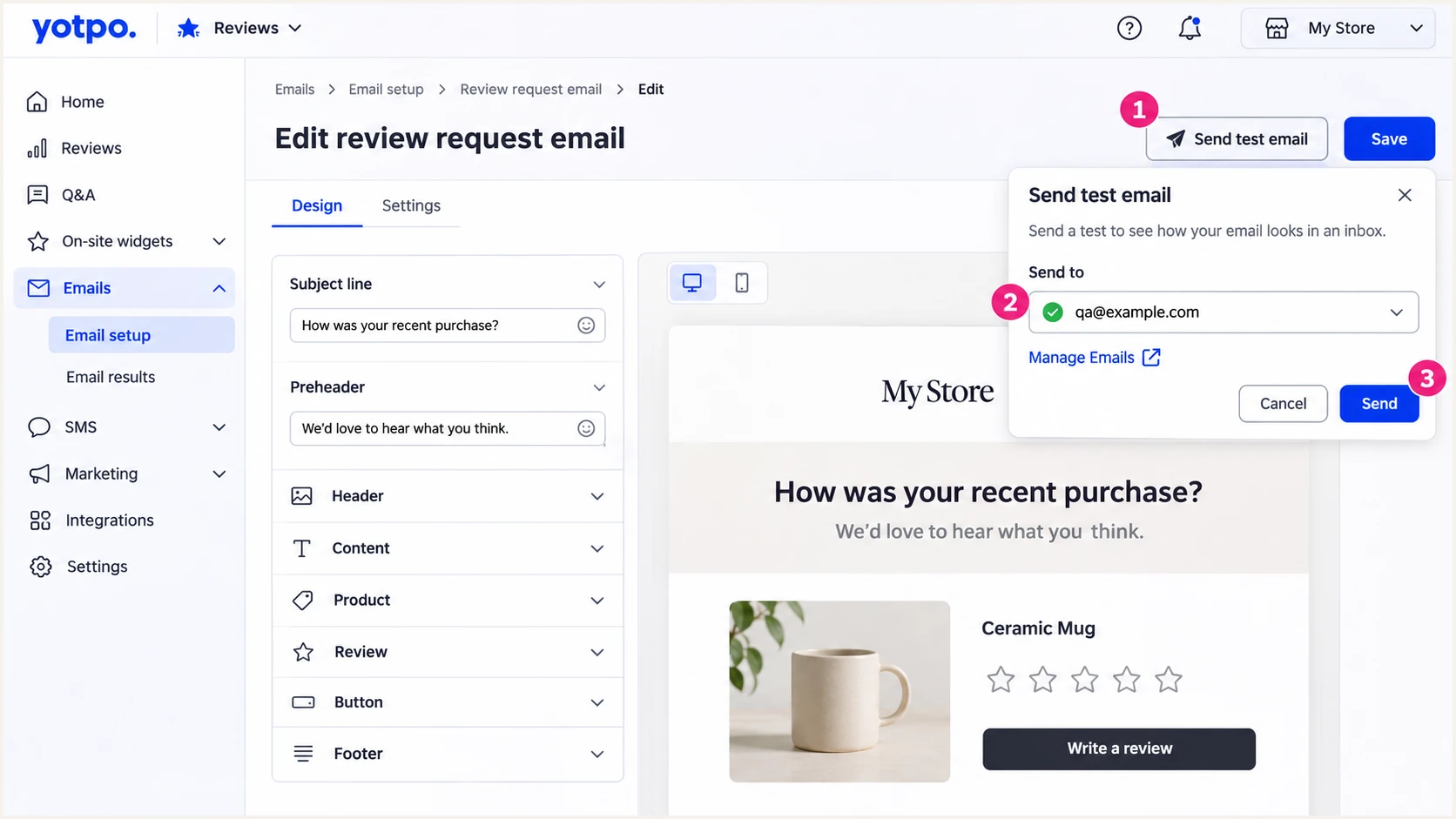
Yotpo Reviews test-email controls and verified recipient selection.
The email tester below prompts you to send a message to its diagnostic address and returns a full diagnosis. A direct Yotpo message is the quickest way to check the combined configuration.
If Yotpo cannot verify the diagnostic address for its test dropdown, use an authorized live review request to a controlled recipient through the tester, where your workflow permits. Otherwise, inspect the original headers in your verified inbox. An ordinary forwarded message changes the SPF sending route.
Email tester
Send a real email to this address. Suped shows a results button when the test is ready.
?/43tests passed
Look for a DMARC pass and confirm which mechanism supplied the required domain matching. An SPF domain-matching failure does not fail DMARC when a valid DKIM signature matches correctly, but Yotpo's supported branded return-path is still worth fixing.
Use the failure type to choose the next action. Escalate signing or return-path activation problems to Yotpo support after confirming public DNS.
|
|
|
|---|---|---|
No CNAME | Host or cache | Check DNS name |
SPF error | Invalid policy | Check return-path |
DKIM fail | Selector or signing | Confirm activation |
DMARC fail | Domain mismatch | Inspect identities |
No reports | Reporting setup | Check rua delivery |
Common Yotpo authentication failures
Get alerted when it breaks
Suped is our DMARC and email authentication platform. Its DMARC monitoring connects Yotpo's reported sending activity with authentication failures and steps to fix them.
- Route aggregate reports. Use Suped's assigned reporting destination in your existing DMARC rua setting, preserving other required destinations.
- Enable failure alerts. Configure DMARC failure notifications and summary emails for the people responsible for DNS and Yotpo.
- Investigate the source. Inspect the reported From domain, source IP, and authentication results. Use Suped's detail view to diagnose SPF or DKIM problems before changing records.
- Verify the repair. Correct the DNS or Yotpo sender setting, send another original message, and confirm recovery in subsequent reports.
Suped's issue detection and DNS history help connect a failure with a removed selector or changed DNS value. Keep review-request and Loyalty sending streams under observation after any sender-domain change.
Use Yotpo's delivery results alongside the authentication reports. A delivery rejection and a DMARC failure require different investigations.
Aggregate reports have a delay
Suped's DMARC alerts depend on reports received from mailbox providers. Reports commonly arrive on a daily cycle, so use a direct message test to verify an urgent repair.
Secure your domain with p=reject
I move to rejection after legitimate sending streams pass with the required domain matching. Suped's Hosted DMARC lets teams manage policy changes in the dashboard after the initial DNS setup, while monitoring the effect on Yotpo and other senders.
- Inventory legitimate mail. Use Suped's source view to identify Yotpo Reviews, Loyalty emails, mailbox traffic, and other authorized sources. Confirm ownership before treating a source as legitimate.
- Repair every stream. Require valid DKIM with the correct signing domain. Verify Yotpo's branded return-path too, and test representative production messages rather than relying on a DNS check alone.
- Stage enforcement. Observe a complete business sending cycle, including infrequent mail. Move a new monitoring deployment to quarantine, review failures, and proceed to reject when legitimate flows are accounted for.
- Preserve policy scope. Change the existing policy to p=reject, retain reporting, and review subdomain policies before saving. Keep existing quarantine or reject enforcement during Yotpo onboarding.
The policy affects all mail using the covered From domain. A high overall pass rate is insufficient if an infrequent legitimate sender still fails.
Suped provides the source-level evidence for each policy decision. Review forwarded mail separately because forwarding often breaks SPF while a valid DKIM signature survives.
Monitor with p=none
Collect reports and identify legitimate senders. This policy does not request quarantine or rejection for DMARC failures.
Enforce with p=reject
Request rejection of messages that fail DMARC. Receivers apply their own handling rules, and legitimate mail must authenticate correctly.
Keep Suped's failure alerts enabled after enforcement. Recheck Yotpo whenever the From domain, DKIM selectors, or return-path changes.
If legitimate mail fails after a change, use its original headers and the source's report details to repair the affected configuration. Preserve reporting throughout the investigation.
Frequently asked questions
An rDNS hostname ending in sendgrid.net indicates shared sending infrastructure and does not uniquely identify Yotpo. Yotpo's documented authentication records point to that infrastructure, but DNS delegation targets and rDNS are different records. Confirm Yotpo activity using known sending events, message headers, and support confirmation.
The include:sendgrid.net mechanism belongs to shared sending infrastructure used by multiple platforms, including Yotpo's documented delivery infrastructure. It is not a unique Yotpo identifier. For Yotpo's CNAME-based setup, publish the records assigned by support; do not add this include just because it appears in an SPF lookup.
Yes. A passing DKIM signature whose signing domain matches the From domain under the published alignment mode is sufficient for DMARC. Yotpo supports a branded return-path, so investigate unexpected SPF domain-matching failures as a separate setup issue.
Keep the existing records and ask Yotpo support for alternative selector names. Two independent CNAME destinations cannot occupy the same selector hostname. Replacing another sender's selector breaks that sender's DKIM validation.
Obtain Yotpo support's validation after publishing DNS, then send an original Reviews or Loyalty message. Inspect the receiver's Authentication-Results and confirm that DMARC passes through a valid SPF or DKIM identity with the required domain matching. Test the actual production sending flow as well as previews.
Keep the existing enforcement policy. Configure and validate Yotpo's sender domain, publish its assigned CNAMEs, and verify a controlled message before enabling broader sending. An existing quarantine policy should also remain in place during setup.