
How to set up DMARC/DKIM/SPF for VIPRE

To authenticate outbound email through VIPRE Email Security Cloud, verify your domain in VIPRE, authorize its sending servers in SPF, enable 2048-bit outbound DKIM signing, and publish a DMARC TXT record. I test a message through the actual outbound relay before enforcing DMARC, because published DNS records alone do not prove that messages pass.
These steps apply to VIPRE's outbound email gateway. If VIPRE only filters incoming mail, configure outbound SPF and DKIM at the service that sends your messages. Changing inbound MX records does not route outbound mail through VIPRE.
Add your domain
I start with domain ownership and working mail routing. Have VIPRE administrator access and permission to edit the domain's authoritative DNS.
- Open Domains: Sign in to VIPRE Email Security Cloud, select the correct customer account, open Domains, and click the plus sign at the top right.
- Save the domain: Complete the required domain fields, then click Save & Continue.
- Publish verification: Select DNS TXT Record. Copy the exact DNS name and verification value displayed by VIPRE into a separate TXT record at your DNS host. Preserve existing SPF records.
- Verify ownership: Click Verify Now after the TXT record is publicly visible. If you chose Verify Later, reopen the domain under Domains Pending Verification and run Verify Now.
If verification fails, check the requested name at the authoritative DNS provider and retry after the cached answer expires. VIPRE documents propagation delays of up to 72 hours; verify the published value before waiting.
For a new gateway deployment, complete VIPRE's user and inbound routing setup before changing MX records. Copy the region-specific outbound smart host from Get Started when configuring your sending server's connector.
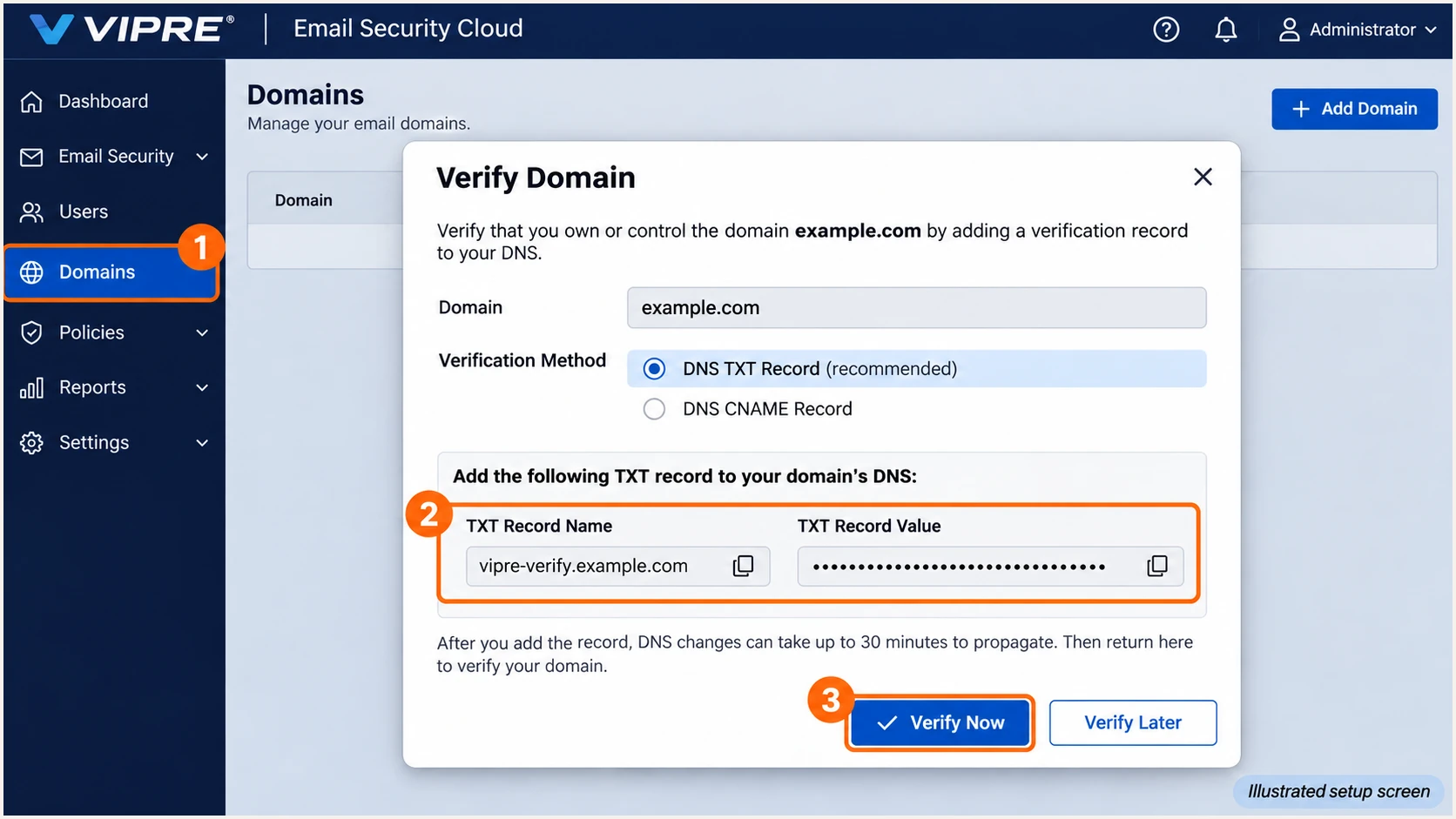
Illustrated VIPRE domain verification screen with DNS TXT Record and Verify Now.
Set up SPF
VIPRE supports SPF alignment when the SMTP MAIL FROM domain uses your domain. Its documented SPF authorization is the include shown below; add it only when VIPRE sends your outbound mail.
- Route outbound mail: In your mail platform, send outbound traffic through the regional VIPRE smart host shown in Get Started. For a self-managed server, authorize its public sending IP under Service Settings > Outbound Relay.
- Authenticate cloud traffic: For Microsoft 365 or Google Workspace, copy Outbound Email Token under Service Settings > Outbound Relay. Configure an enabled outbound transport or compliance rule to add the X-Vipre-Tenant-Key header with that exact value before relaying.
- Find the SPF domain: Inspect a delivered message's Return-Path or the receiver's smtp.mailfrom result. Edit SPF at that domain, usually your root domain. A subdomain needs its own SPF record.
- Merge authorization: Insert include:spf.mailanyone.net before the existing all mechanism. Keep other authorized senders. Publish only one TXT record beginning with v=spf1 at each SPF domain.
The examples are complete SPF values for different mail flows. Choose the relevant pattern and merge it with your current authorizations; do not publish both records.
SPF examples, publish one value appropriate to your mail flowtext
VIPRE-only outbound delivery:
v=spf1 include:spf.mailanyone.net -all

Microsoft 365 and VIPRE outbound delivery:
v=spf1 include:spf.protection.outlook.com include:spf.mailanyone.net -all
The combined example retains Microsoft 365 authorization for mail that also leaves directly. Do not remove existing senders or change an existing softfail policy until you have audited every outbound route.
Enter the actual MAIL FROM domain below. Check syntax and the 10-term DNS lookup limit, including nested includes. A short SPF record still exceeds the limit if its included records require too many lookups.
SPF checker
Find SPF syntax issues, lookup limits, and weak records.
?/16tests passed
A passing DNS check confirms the published authorization, not SPF alignment on delivered email. I also compare the MAIL FROM domain with the visible From domain; relaxed DMARC alignment requires the same organizational domain.
Verify cloud token injection in the sending platform's rule execution logs. VIPRE removes this token before final delivery, so its absence in the recipient's headers is expected. This relay authorization is separate from SPF.
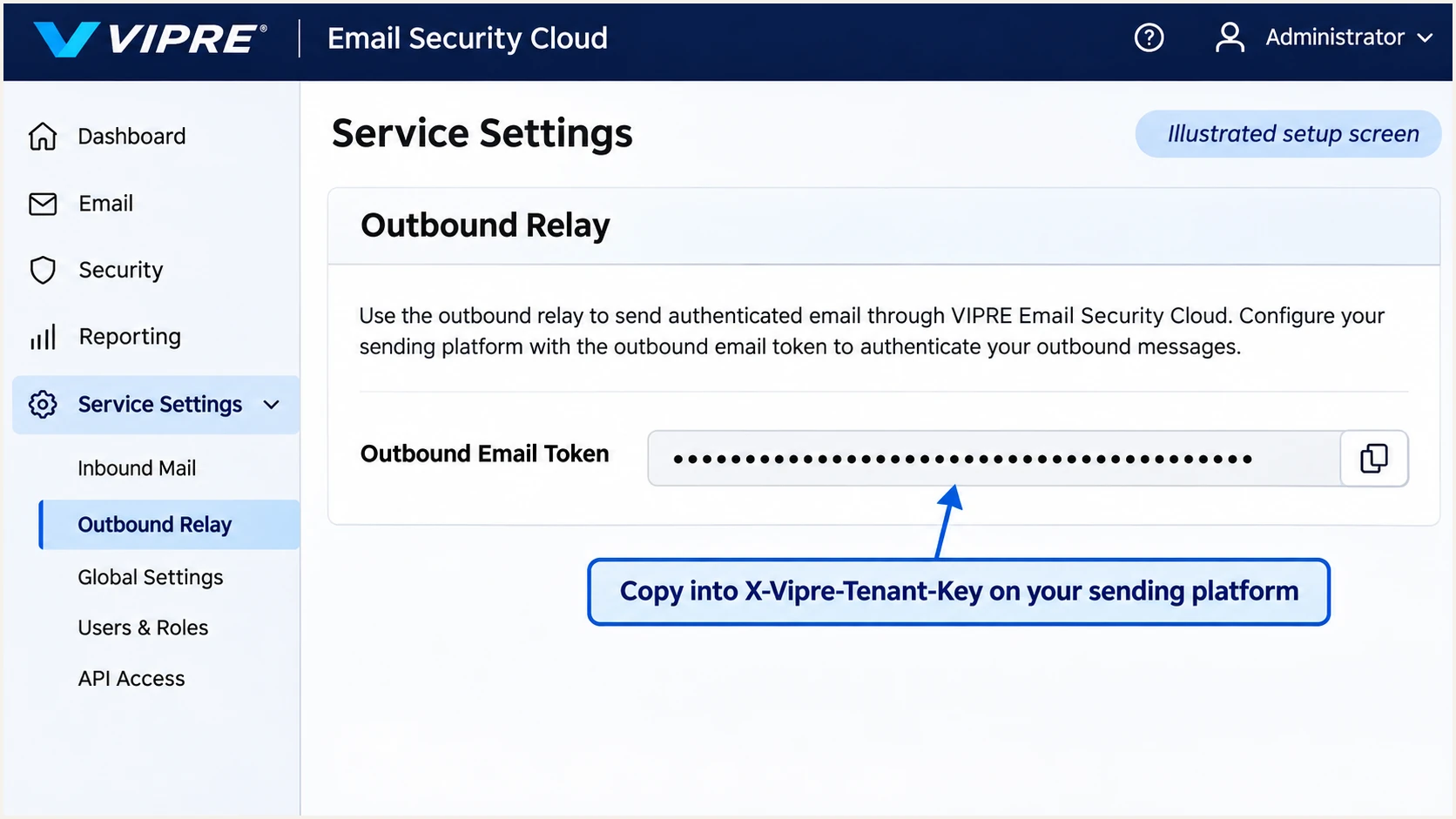
Illustrated VIPRE Outbound Relay screen showing the account's Outbound Email Token field.
Set up DKIM
I enable VIPRE's own outbound DKIM signing so that messages have a signature after gateway processing. VIPRE configures this globally at the customer/site level, with DNS records required across the registered domains.
- Open signing settings: Go to Service Settings > Outbound Relay > Outbound DKIM Signing.
- Generate the key: For a new setup, select 2048 bits and click Generate. If signing already works, use the current selector and public key rather than generating replacements.
- Publish every domain: At each registered domain's DNS provider, create a TXT record named with VIPRE's Key Selector followed by ._domainkey. Paste the complete TXT value from VIPRE without changing its public key.
- Validate and enable: Return to VIPRE and click Validate. Fix every domain reported with an error, then repeat validation. Once all domains pass, select Enable DKIM.
- Test the signature: Send through VIPRE and check for dkim=pass with a signing domain that matches your From domain under the published DMARC alignment mode.
For example, if VIPRE displays mailanyone22012018 as Key Selector, the relative DNS name is mailanyone22012018._domainkey. Use the selector actually shown in your account. Do not append the root domain twice when your DNS provider adds it automatically.
Copy the entire generated public key. DNS providers that split long TXT values must keep the chunks inside one TXT record. When adding another domain later, publish its DKIM record too.
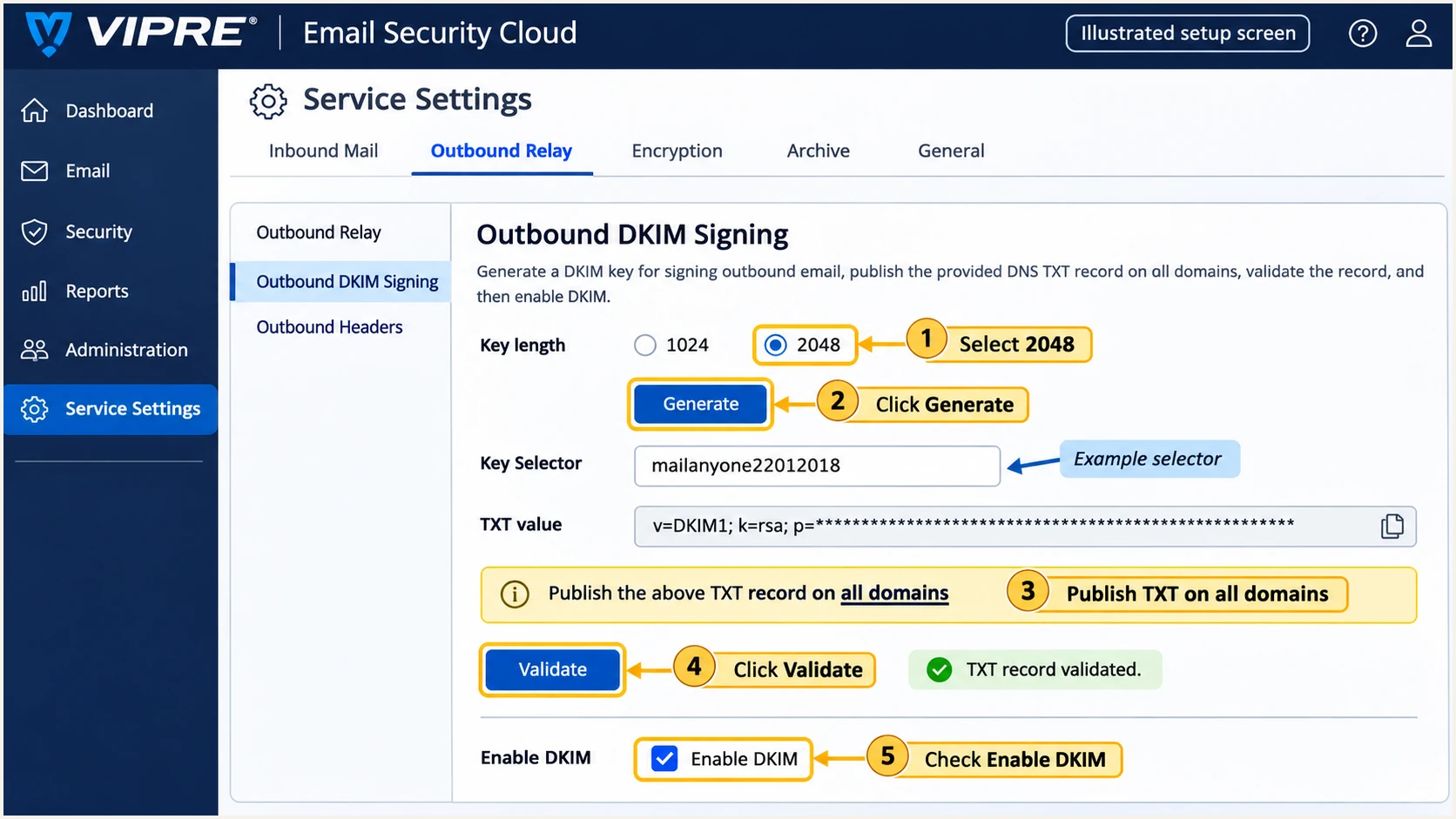
Illustrated VIPRE outbound DKIM settings with 2048-bit keys, Validate, and Enable DKIM.
If Enable DKIM stays unavailable, inspect every registered domain rather than only the domain you are testing. A missing TXT record on another domain prevents initial validation from completing.
Keep existing mailbox-provider DKIM records that use different selectors. Test the signature added by VIPRE at the final recipient, especially when the gateway adds disclaimers or changes message content.
Set up DMARC
Publish DMARC in your domain's DNS. VIPRE's inbound DMARC filtering switch controls checks on received mail; it does not publish a policy for your outgoing domain.
- Inspect the current policy: Look up TXT at _dmarc.example.com, replacing example.com with your visible From domain. Edit the existing DMARC record instead of adding a second one.
- Start monitoring: If there is no existing enforced policy, create the p=none record below. If the domain already uses p=quarantine or p=reject, keep that policy.
- Choose a report destination: Replace dmarc@example.com with a working aggregate-report mailbox or your reporting platform's assigned address. Complete external reporting authorization when required.
- Keep defaults initially: Leave relaxed SPF and DKIM alignment in place unless you have a documented reason for strict matching. Review separate DMARC records on sending subdomains.
Initial DMARC TXT record at _dmarc.example.comtext
v=DMARC1; p=none; rua=mailto:dmarc@example.com
This is a template, not a working report destination for your domain. Publish the TXT value at the host _dmarc, or its full domain name if your DNS provider requires that format.
Use the DMARC record generator to build the value with your actual reporting address. Then check the domain below to confirm that one valid policy is visible.
DMARC checker
Look up a domain's DMARC record and catch policy issues.
?/7tests passed
A valid DMARC record does not guarantee a message passes. A DMARC pass requires SPF or DKIM to pass with the required domain alignment. I configure both methods and verify DKIM before enforcement.
Aggregate reports arrive after receiver reporting cycles, commonly after 24-48 hours. For immediate message-level evidence, use the email test in the next section.
Preserve existing enforcement
Do not replace p=quarantine or p=reject with p=none just to connect VIPRE. Authenticate and test VIPRE's outbound route while retaining the domain's existing policy.
Verify and troubleshoot
I test a newly sent message through the same VIPRE route used by staff and applications. A test sent through a different SMTP service proves a different configuration.
- Send a real test: Use the tester below and send to its generated address through VIPRE. Review the full diagnosis rather than checking DNS alone.
- Read trusted results: Inspect the final receiver's Authentication-Results. Check spf=pass, dkim=pass, and dmarc=pass, plus the domains attached to those results.
- Inspect the route: Compare the receiver's connecting IP and Received headers with your configured VIPRE relay. Internal-only messages and traffic bypassing the connector do not test the external route.
- Retest each path: Test each sending domain and any application using different routing. After a DNS fix, allow the previous answer's TTL to expire and send a fresh message.
The email tester prompts you to send a message and returns a diagnosis of its authentication and delivery configuration. This is the quickest check that the DNS and outbound signing work together.
Email tester
Send a real email to this address. Suped shows a results button when the test is ready.
?/43tests passed
If SPF fails, compare the actual connecting IP with authorization at the MAIL FROM domain. If DKIM fails, query the exact selector from the signature and check whether the message changed after it was signed.
An SPF alignment error is compatible with a DMARC pass when DKIM passes with the correct domain alignment. For VIPRE, first investigate why the configured route is using a different MAIL FROM domain; publishing SPF at the From domain does not change that envelope address.
|
|
|---|---|
SPF permerror | Duplicates or lookup limit |
SPF fail | MAIL FROM and relay IP |
DKIM missing | Signing enabled; route |
DKIM fail | Selector, key, content changes |
DMARC fail | Authentication domain mismatch |
Relay rejected | Connector and outbound token |
Use the observed result to select the next check.
Use DNS queries to confirm the record names and values independently of VIPRE's validation screen. Replace the sample domain and selector in the commands with your actual values.
A public resolver can retain an earlier answer until its TTL expires. Query the authoritative nameserver when you need to distinguish a publication error from a cached response.
DNS checks and message checks are different
A DKIM TXT record proves that a public key is published. Only a signed test message proves that VIPRE uses the matching key and that its signature survives delivery.
DNS queries, replace the sample domain and selectorbash
dig +short TXT example.com
dig +short TXT mailanyone22012018._domainkey.example.com
dig +short TXT _dmarc.example.com
Get alerted when it breaks
For ongoing checks, our Suped platform's DMARC monitoring connects receiver reports with source-level authentication issues. I use that evidence to investigate VIPRE failures after connector changes or new domain onboarding.
- Review notifications: In Suped's Notifications settings, enable Issues detected, Sending sources need verification, and DMARC summary emails for the people responsible for email authentication.
- Verify the source: Confirm VIPRE is an authorized outbound source using your connector configuration and test message. Mark the source verified only after this review.
- Investigate failures: Filter Data view by the affected source, domain, reporter, or sending IP. Open Detail view to inspect SPF, DKIM, and DMARC results, then follow the issue's repair steps.
- Check recent changes: Compare DNS history with the failure window. Correct the relevant DNS record, VIPRE signing setting, or outbound connector, then repeat the message test.
Suped is our product. Its issue detection and DNS history give the team a concrete investigation path instead of leaving aggregate XML in a mailbox. Report-based alerts follow the arrival of receiver data; they are not instant notifications for every failed message.
Keep VIPRE's operational mail-flow checks active too. A rejected outbound connection requires connector or token troubleshooting even when yesterday's DMARC reports show passing traffic.
One message test
Confirms authentication for one domain and one outbound route at the time of the test.
Repeat after a connector, DKIM, or DNS change.
Ongoing Suped monitoring
Shows reported authentication results across sending sources and reporting periods.
Use issue alerts to find recurring failures that a single test misses.
Secure your domain with p=reject
I move to p=reject after legitimate sending routes pass with dependable DKIM domain alignment. VIPRE's SPF include is one part of that work; it does not authenticate other services using your domain.
- Cover all senders: Review enough reporting history to include infrequent jobs, such as monthly invoices. Confirm VIPRE and every other legitimate sender before increasing enforcement.
- Resolve legitimate failures: Use Suped's source verification and record diagnostics to separate unauthorized traffic from broken authentication. Fix missing DKIM and incorrect return paths before changing policy.
- Stage enforcement: For a domain starting at p=none, move to p=quarantine, observe reports and support cases, then change to p=reject once legitimate failures are resolved. Use a low-volume sending subdomain to pilot changes when practical.
- Keep reporting active: Continue reviewing Suped's issue alerts after enforcement. If using our Hosted DMARC, stage and manage policy changes through the dashboard while checking the publicly resolved record.
Suped brings source review and the policy workflow together, so the enforcement decision rests on observed mail rather than a fixed waiting period. Keep the current reporting destination when updating your policy.
The example below uses a placeholder mailbox. Replace it with your working destination. Review inherited policy on subdomains and any explicit subdomain overrides before publishing.
Require DKIM before enforcement
Confirm domain-matching DKIM signatures survive VIPRE processing. Forwarding often breaks SPF, so SPF alone is a fragile basis for an enforced domain. A p=reject policy requests rejection of DMARC failures; receivers retain their own handling policies.
Enforced DMARC TXT record at _dmarc.example.comtext
v=DMARC1; p=reject; rua=mailto:dmarc@example.com
After publishing the policy, rerun the DMARC check and send a fresh message through VIPRE. Confirm the receiver reports dmarc=pass and the publicly visible policy is p=reject.
For each domain added to VIPRE later, repeat DNS verification and DKIM publication before sending production mail. Keep enforcement in place while preparing the new route.
Frequency asked questions
VIPRE documents include:spf.mailanyone.net for outbound delivery. Merge it into the existing SPF TXT record at the actual MAIL FROM domain, before the all mechanism. Keep other authorized senders and check nested DNS lookups.
VIPRE requires initial DKIM DNS validation across all registered domains. Publish the displayed selector and TXT value for every domain, click Validate, repair every reported failure, and enable signing once validation succeeds.
No. That setting controls how VIPRE checks incoming messages. Your outbound domain's DMARC policy is a TXT record in your DNS under _dmarc. You still need working outbound authentication and a report destination.
A mailanyone.net hostname is consistent with VIPRE Email Security Cloud's documented mail infrastructure. I confirm the source using the connecting IP and the configured outbound route. The rDNS suffix identifies infrastructure; it does not prove that the message is authorized to use your domain.
Yes, if DKIM passes with the required domain alignment. VIPRE supports a domain-matching MAIL FROM, so investigate a mismatch rather than assuming it is required. Adding an SPF include does not change the Return-Path domain.
VIPRE removes its outbound authentication token before final delivery. Verify header injection in your sending platform's transport or compliance rule logs. The token authorizes relay use; it does not replace SPF, DKIM, or DMARC.