
How to set up DMARC/DKIM/SPF for VinSolutions

Published 22 Nov 2026
Updated 22 Nov 2026
11 min read
Summarize with
Set up VinSolutions email authentication by obtaining the DNS requirements for your dealership from VinSolutions support, configuring SPF for the actual return-path domain, and publishing DMARC for your visible From domain. VinSolutions supports return-path alignment, so a passing SPF check with a matching domain can satisfy DMARC.
I start with that SPF route and ask support to confirm whether custom-domain DKIM is available for the account. A DKIM signature using a provider domain does not authenticate your dealership domain for DMARC. The finished setup needs a fresh VinSolutions message showing DMARC pass, not just valid DNS records.
Add your domain
Have VinSolutions support configure the dealership sender domain. Its public "Email Deliverability Best Practices" recommends authentication, but does not document a self-service domain verification screen or a universal set of customer DNS records.
- Identify the sender: Record the dealership ID and the exact From addresses used for sales replies and automated follow-ups. Include every dealership domain that sends through this account.
- Request setup: Open VinSolutions' Contact Us form, complete First Name, Last Name, Email, Phone and Dealership, then describe the authentication request in Comments and select Submit. For immediate software support, call (800) 980-7488.
- Specify the requirement: Ask for the authorized SPF mechanism, the DNS record owner, and provisioning of a return-path domain under your dealership domain. Request confirmation of custom-domain DKIM availability and the required verification records.
- Verify ownership: Publish any ownership records supplied for your account at the specified DNS names. Ask support to confirm verification and activate the sender configuration, then send a test message.
I give support the visible From domain explicitly. Changing only the display name or Reply-To address does not change the domain that DMARC evaluates.
Keep the support response with your DNS change request. It must identify each record's type, full owner name and value, plus any activation step VinSolutions needs to complete.
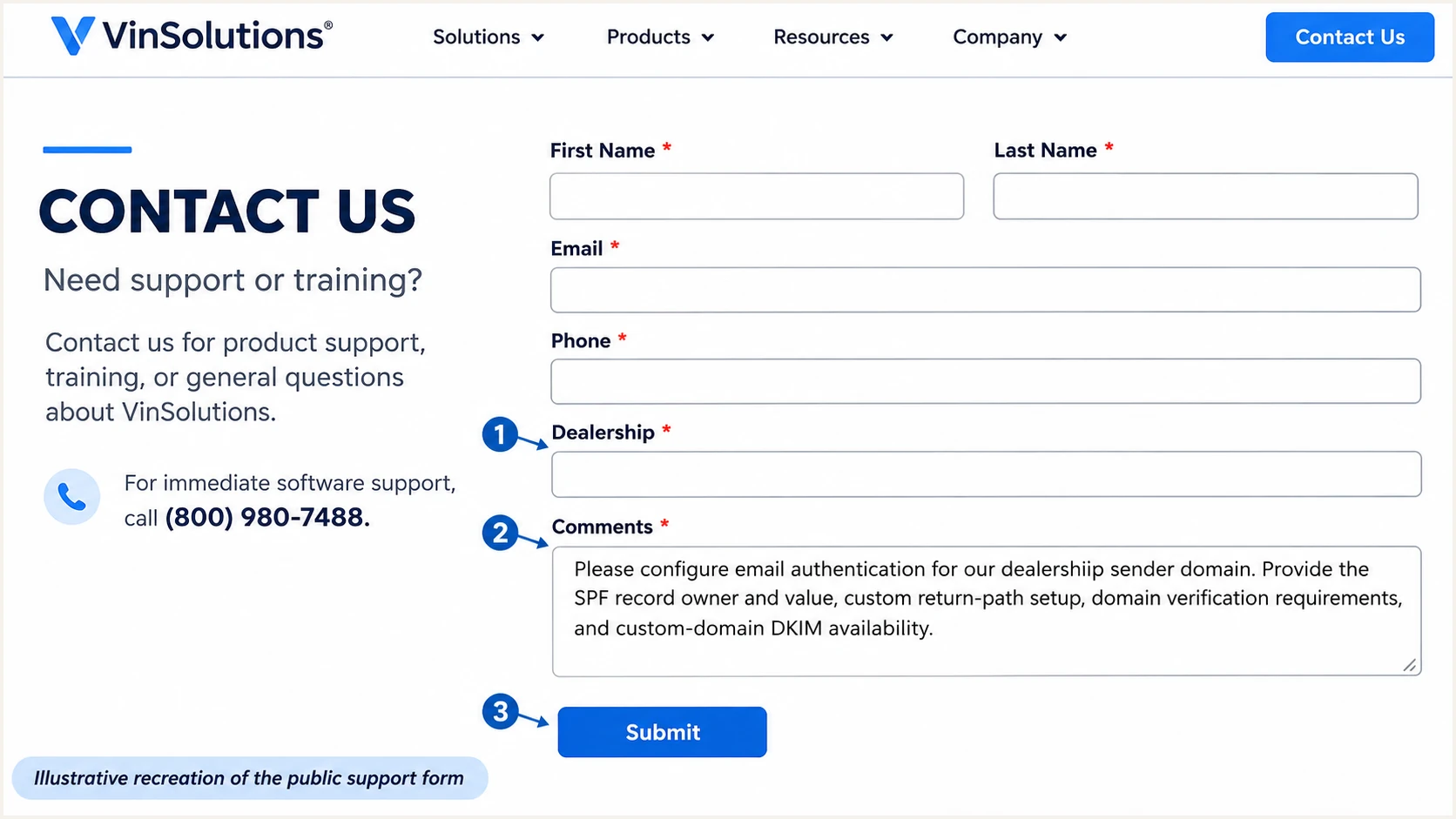
Illustrative VinSolutions support form for requesting sender domain authentication.
After support activates the configuration, inspect a newly delivered message. The Return-Path must use the domain support configured; a sender profile alone does not prove activation.
Set up SPF
SPF checks the envelope sender, normally visible in the delivered Return-Path header. I publish VinSolutions' supplied authorization at that domain, rather than assuming the dealership's root SPF record is always the right location.
- Confirm the domain: Ask support which MAIL FROM domain VinSolutions will use. With relaxed SPF alignment, a return path under example.com can match a visible From address at example.com. An existing aspf=s setting requires an exact domain match.
- Use official values: Copy the SPF include or IP authorization confirmed by VinSolutions for your sending route. Do not copy the provider's corporate SPF record or guess an include hostname.
- Preserve existing senders: If the required owner already has an SPF TXT record, merge the authorization into that record before its final all mechanism. Keep exactly one SPF record at each owner name.
- Respect delegation: If support supplies a CNAME for the return-path hostname, publish that delegation exactly. A CNAME cannot coexist with an SPF TXT record at the same name.
- Check the limit: Keep SPF evaluation within the limit of 10 DNS-querying terms, including nested includes. Preserve the existing final all policy unless a reviewed change requires otherwise.
Adding VinSolutions to the root SPF record does not fix DMARC if the actual return path still uses an unrelated provider domain. Ask support to correct the envelope sender configuration when those domains do not match.
Enter the actual MAIL FROM domain in the SPF checker below. If a delegated hostname is involved, check the resulting SPF policy as well as the published delegation.
SPF checker
Find SPF syntax issues, lookup limits, and weak records.
?/16tests passed
A valid SPF record is a DNS check. The final test must also confirm that the IP used by a new VinSolutions message is authorized and that the authenticated domain matches the visible From domain under your DMARC settings.
Set up DKIM
Ask VinSolutions support whether your sending route supports DKIM with your dealership domain in the signature's d= value. Its public guidance does not provide a universal customer selector or public key, so I do not invent one.
- Confirm availability: Request custom-domain DKIM support for each relevant sending route. A passing signature with a provider-owned d= domain is different from DKIM alignment with your From domain.
- Publish supplied records: If custom DKIM is supported, copy the supplied TXT key or CNAME delegation at the exact selector name. Preserve unrelated selectors used by other senders.
- Activate signing: Ask support to verify the DNS records and enable signing with the corresponding private key. Creating a public key yourself does not configure VinSolutions to sign with it.
- Inspect a fresh message: Read d= and s= in DKIM-Signature. Confirm DKIM pass in the receiving system's Authentication-Results and a matching d= domain under your adkim setting.
If support confirms that custom-domain DKIM is unavailable, document that limitation and complete the supported SPF alignment route. DMARC needs a passing, matching SPF identity or a passing, matching DKIM signature.
I still request provider-side DKIM signing where available. It protects signed content, but a provider-domain signature does not replace the dealership domain match that DMARC requires.
SPF route
A passing SPF result with a matching MAIL FROM domain satisfies DMARC. Forwarding often changes the sending IP or envelope sender, breaking this route.
DKIM route
A passing DKIM signature with a matching d= domain satisfies DMARC. It can survive forwarding when the signed content remains intact, provided this signing option is available.
For this source, treat SPF alignment as a setup requirement until custom-domain DKIM has been confirmed and tested. An unrelated-domain DKIM pass is not a fallback if SPF stops satisfying DMARC.
Set up DMARC
Publish DMARC in your dealership's DNS, at the policy location for the visible From domain. Start with p=none when the domain has no enforcement policy. If it already uses p=quarantine or p=reject, keep that policy while configuring VinSolutions.
- Inspect existing DNS: Check the current DMARC TXT record before making changes. Edit the existing policy instead of adding a second DMARC record at the same name.
- Generate the policy: Use the DMARC record generator to configure the policy and reporting mailbox. Keep existing reporting destinations that your team still uses.
- Publish monitoring: For an initial policy at example.com, add one TXT record at _dmarc.example.com with the example value below. Replace the example domain and reporting address before publication.
- Retain domain matching: Leave relaxed alignment defaults unless your organization requires strict matching. Check existing aspf and adkim settings before changing the return-path configuration.
Initial DMARC TXT record valuetext
v=DMARC1; p=none; rua=mailto:dmarc@example.com
The reporting address must be a mailbox or reporting service you control that can receive aggregate XML reports. If the destination is on an external domain, complete the report authorization required by that destination.
VinSolutions does not need a separate DMARC policy for each message type using the same From domain. Use the checker to confirm the effective policy for the exact sending domain, including any inherited policy when a subdomain is involved.
DMARC checker
Look up a domain's DMARC record and catch policy issues.
?/7tests passed
Monitoring mode requests reporting without requesting quarantine or rejection for DMARC failures. It does not fix SPF or DKIM, and it does not prevent receivers from filtering mail using their own rules.
Verify and troubleshoot
I test the actual VinSolutions sending paths, including a salesperson reply and an automated follow-up. A message sent directly through your normal mailbox does not verify the CRM's outbound configuration.
- Send fresh samples: Use a controlled test customer or recipient. Trigger each relevant workflow after DNS changes resolve, keeping the dealership From address unchanged.
- Read receiver results: Inspect the final receiver's Authentication-Results. Record SPF result and smtp.mailfrom, DKIM result and signing domain, plus DMARC result and header.from.
- Check identity matching: SPF pass with an unrelated MAIL FROM domain does not satisfy DMARC. DKIM pass with an unrelated signing domain does not satisfy it either.
- Escalate with evidence: Give support the full message headers, UTC send time, dealership ID and exact sending workflow. Request correction of the failing route and repeat the same test afterward.
Use these symptoms to choose the next check. A valid DNS policy cannot compensate for an inactive sender configuration or a message leaving through a different route.
If a fresh message passes DMARC but lands in spam, inspect delivery errors and recipient complaints separately. Authentication is one input to delivery decisions, not an inbox guarantee.
|
|
|---|---|
SPF permerror | Duplicates or lookup limit |
SPF pass, DMARC fail | MAIL FROM domain match |
DKIM pass, DMARC fail | Signing domain match |
DKIM missing | Signing activation |
DKIM fail | Selector and message changes |
DMARC pass, spam | Reputation and complaints |
Check each sending path independently.
The email tester is the quicker way to check a real message. It prompts you to send a test email and returns a diagnosis of authentication and other delivery checks.
Use the destination generated below as the recipient of a new VinSolutions email. Send through the same account and workflow your dealership uses for customer communication; forwarding an old message changes the test.
Email tester
Send a real email to this address. Suped shows a results button when the test is ready.
?/43tests passed
Review the reported SPF identity and DKIM signing domain alongside DMARC. If SPF alignment fails but a matching DKIM signature passes, DMARC can still pass. If custom-domain DKIM is unavailable, fix SPF alignment before treating the route as ready.
A successful sample validates that message and route. Keep the original headers with the support ticket and repeat the test for other dealership domains and automated workflows.
Get alerted when it breaks
Our Suped platform provides ongoing DMARC monitoring after the VinSolutions setup passes. It collects aggregate reports and detects authentication issues, so a changed sending route or broken DNS record does not depend on someone noticing a missed customer email.
- Enable issue notifications: In Suped notification settings, enable Issues detected and Sending sources need verification. Keep DMARC summary emails enabled for routine review.
- Confirm the source: Review the VinSolutions source against your support ticket and known test messages before verifying it. Source recognition alone is not authorization to send for your domain.
- Investigate failures: Open the issue's steps to fix and inspect the affected DMARC records by source, reporting receiver and IP. Compare the SPF identity and DKIM results with your working sample.
- Check DNS history: Compare old and new record values after an unexpected failure. Send VinSolutions support the affected route and message evidence, then retest after the fix.
This is particularly useful when VinSolutions relies on SPF for DMARC: a return-path change needs investigation even when provider-side DKIM continues passing. Suped's source data and record diagnostics help isolate that change.
Aggregate reports arrive after receivers process mail, and reporting coverage varies. Suped's alerts act on available evidence; they are not a live event for every VinSolutions message.
Do not wait for a missing email
Combine issue notifications with a fresh test after DNS changes or VinSolutions sending changes. A clean historical report does not validate a newly changed route.
Secure your domain with p=reject
Move to p=reject after legitimate sending routes pass DMARC and the reports cover a full business sending cycle. I check infrequent campaigns as well as daily VinSolutions replies before changing the domain's policy.
- Inventory legitimate senders: Use Suped source reports to account for VinSolutions and other authorized systems using the same From domain. Confirm unfamiliar sources with the dealership before approving them.
- Fix failures first: Resolve VinSolutions SPF errors and domain mismatches. If custom-domain DKIM is unavailable, assess forwarding failures explicitly rather than assuming a DKIM fallback exists.
- Stage enforcement: Move a monitoring domain to quarantine, watch legitimate traffic, then move to reject when unexplained legitimate failures are resolved. Keep an existing enforcement policy while fixing the sender configuration.
- Verify the change: Confirm the effective DNS policy, send fresh VinSolutions samples and continue reviewing Suped issues. Check subdomain policy coverage before assuming every dealership sender is protected.
Our Hosted DMARC lets your team manage the policy in Suped after the initial DNS setup. Use its policy controls alongside source verification and issue diagnostics to manage the move to rejection with evidence.
For a domain ready for enforcement, the following is the reject policy value. Keep the working reporting destination and any reviewed policy settings when updating the existing record.
DMARC TXT record value after verificationtext
v=DMARC1; p=reject; rua=mailto:dmarc@example.com
Replace the example reporting address before publication. The reject policy requests rejection of messages that fail DMARC; receivers retain their own handling rules. Keep issue notifications enabled after enforcement.
If a legitimate workflow fails after enforcement, preserve its headers and isolate the affected sender configuration. Revalidate the return path and signing domain before changing authorization records or the domain-wide policy.
Frequency asked questions
Obtain the exact SPF authorization, record owner and return-path setup from VinSolutions support for your account. Ask whether custom-domain DKIM is available and request its selector records if supported. The public setup guidance does not provide a universal customer SPF include or DKIM selector to copy.
Yes. SPF pass with a MAIL FROM domain that matches the visible From domain under your DMARC alignment setting is sufficient. VinSolutions supports return-path alignment. Forwarding can break the SPF route, so assess that limitation if no matching DKIM signature is available.
SPF authenticates the envelope sender domain. If that domain does not match your visible From domain, its SPF pass does not satisfy DMARC. Without a passing DKIM signature whose d= domain also matches, DMARC fails. Ask support to verify the custom return path and check existing strict alignment settings.
Look up the PTR hostname for the sending IP, then compare the IP and message headers with a known VinSolutions test message and support confirmation. The public authentication guidance does not publish an authoritative rDNS suffix list. A PTR hostname is a source clue, not proof of authorization or a reason to add an IP to SPF.
No. Keep your existing quarantine or reject policy and correct the VinSolutions sending configuration. Start with p=none only when introducing monitoring on a domain without an existing enforcement policy. Test a controlled VinSolutions message before sending customer campaigns.
Check DNS after the relevant cached records expire, then ask VinSolutions to verify and activate any pending configuration. Test a newly sent message immediately afterward. Aggregate DMARC reports commonly arrive on a daily cycle, but receiver participation and delivery timing vary.




