
How to set up DMARC/DKIM/SPF for Verizon

Published 22 Nov 2026
Updated 22 Nov 2026
11 min read
Summarize with
For an @verizon.net mailbox, SPF, DKIM and DMARC are managed by the domain operator, not by individual account holders. Verizon retired its consumer email service in 2017; surviving accounts use AOL or Yahoo. You cannot publish authentication records for verizon.net yourself. For a separate domain you own, configure authentication with the service that actually sends its mail, even when your internet connection is Verizon.
I start by checking the visible From address and the sending account. A Verizon internet subscription, a verizon.net mailbox, and a business domain have different authentication responsibilities.
Confirm your Verizon email service
There is no custom-domain onboarding step in the retired consumer email service. I verify which account is sending before changing DNS.
- Identify the address. For user@verizon.net, use the AOL or Yahoo account that already hosts that mailbox. For user@example.com, identify the current business mail host and the administrator with DNS access.
- Verify account access. Sign in with the full verizon.net address, including the domain. Confirm that the mailbox can send a new message through its current webmail provider.
- Check the connection. For AOL-hosted verizon.net accounts, AOL documents smtp.verizon.net, port 465, with SSL/TLS. Use the full email address for authentication. Yahoo-hosted legacy accounts require their own published settings.
- Confirm domain support. For a separate business relay contract, obtain its domain-verification and authentication instructions. Consumer mailbox settings do not establish support for a custom Return-Path or DKIM signing domain.
Verizon's public "Email Policy" and email retirement FAQ explain the move to AOL and the separate treatment of existing Yahoo accounts.
Use that distinction to choose the correct support team. Adding a TXT record to an unrelated domain cannot change how a verizon.net mailbox is authenticated.
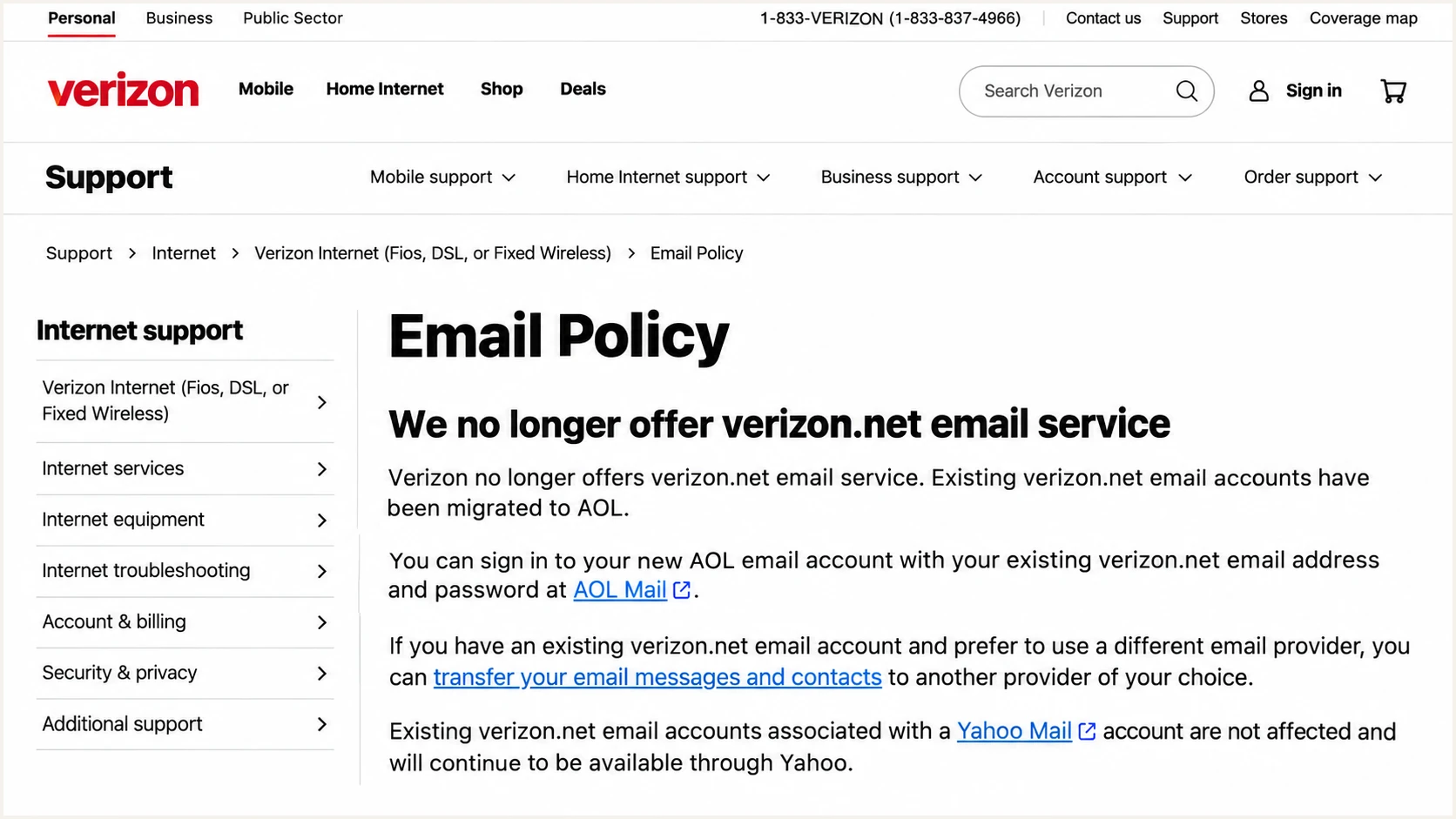
Verizon's email policy explains that its consumer email service was retired.
The remaining DNS steps apply only to domains you control. For verizon.net itself, inspect delivered messages and escalate authentication failures to the mailbox provider.
If webmail sends successfully but a desktop app fails before submission, troubleshoot the client connection first. That failure is separate from receiver-side SPF or DMARC evaluation.
Set up SPF
SPF authorizes sending servers for the SMTP envelope domain, normally visible in the delivered Return-Path. I check that domain before editing the SPF record.
- Leave provider DNS alone. For @verizon.net mail, the operator maintains SPF. Do not copy its record into your own domain or guess a Verizon include value.
- Inspect the Return-Path. Send a message through the actual application and inspect the received headers. For your business domain, check whether the envelope domain matches the visible From domain under your DMARC matching settings.
- Use documented authorization. If your contracted sender supports a custom envelope domain, complete its verification and use its exact SPF instructions. Obtain these values from that service rather than inferring them from smtp.verizon.net.
- Maintain one SPF record. In the authoritative DNS zone, edit the existing v=spf1 TXT record at the required envelope domain. Merge authorized senders into that record, preserve legitimate services, and stay within the 10 DNS-lookup limit, including nested lookups.
Adding an SPF record at example.com has no effect when the message is evaluated against a provider-owned envelope domain.
Enter the actual envelope domain in the SPF checker below. For a provider-owned domain, the lookup is diagnostic; it does not grant permission to edit its records.
SPF checker
Find SPF syntax issues, lookup limits, and weak records.
?/16tests passed
Resolve duplicate SPF records or lookup-limit errors before retesting. Query the envelope domain again after the DNS cache lifetime has expired.
If the sender does not support a custom Return-Path, expect an SPF alignment failure when its envelope domain differs from your From domain. DMARC still passes when DKIM passes with a matching signing domain. Changing your own SPF record cannot repair that domain mismatch.
Set up DKIM
DKIM requires the sending system to sign the message and publish a corresponding public key. I inspect a real message rather than assuming that a DNS record enables signing.
The DKIM signing domain is the d= value, and the selector is the s= value. The public key is looked up at selector._domainkey.signing-domain.
Verizon.net mailbox
- Send through the host. Use the current AOL or Yahoo mailbox service. Account holders do not administer the signing keys for verizon.net.
- Inspect the signature. Check DKIM-Signature and the receiving server's Authentication-Results. If signing is missing or broken, send the full headers to the mailbox provider.
Business domain you own
- Obtain the records. Ask the actual sender for its selector and exact TXT value or CNAME target for your domain. Publish those values in authoritative DNS.
- Verify active signing. Complete the sender's verification and enable signing where required. Retest for dkim=pass with a d= domain that matches the From domain under your DMARC settings.
The public consumer-mail documentation provides connection settings, not a self-service custom-domain DKIM procedure. A custom From address in a mail client does not establish DKIM support for that domain.
If the service cannot sign with your business domain and cannot provide matching SPF, use a sending service that supports authentication for your domain before enforcing DMARC.
Publishing a key does not enable signing
A manually generated DKIM DNS record is ineffective unless the sending system uses the matching private key. Do not invent Verizon selectors or replace provider-managed keys.
When DKIM fails, inspect the exact selector and signing domain in the delivered message. Check for a missing key, an incorrect CNAME target, or a record published under the wrong DNS name.
A passing signature for an unrelated domain is insufficient for DMARC. At least one passing DKIM signature must meet the From-domain matching requirement, unless matching SPF already passes.
Set up DMARC
I publish DMARC at the visible From domain that I control. These steps are for a business domain such as example.com, never for an individual verizon.net account.
- Read the existing policy. Look up _dmarc.example.com before making changes. Edit the existing DMARC TXT record; do not add a second policy record.
- Preserve enforcement. If the domain already uses p=quarantine or p=reject, keep that policy while fixing the sender. Start with p=none only when introducing DMARC without an existing enforcement policy.
- Prepare reporting. Choose a working aggregate-report destination. The example mailbox below is a placeholder. If the reporting domain differs from your domain, complete any required external reporting authorization.
- Publish and validate. Add the TXT value at _dmarc in the correct DNS zone. If the editor appends your domain automatically, enter only _dmarc in its host field.
For a new monitoring policy, the starting record is v=DMARC1; p=none; rua=mailto:dmarc@example.com.
The name and value below are an example for a domain you own. Preserve an existing stronger policy and its other required tags.
Example DMARC monitoring recordtext
Name: _dmarc.example.com
Type: TXT
Value: v=DMARC1; p=none; rua=mailto:dmarc@example.com
Replace dmarc@example.com with your actual report destination before publishing. A normal personal inbox receives XML attachments rather than an interpreted authentication dashboard.
Use the DMARC record generator to build the value, then enter your domain in the DMARC checker below to inspect the published policy.
DMARC checker
Look up a domain's DMARC record and catch policy issues.
?/7tests passed
Confirm that the checker finds one valid DMARC policy and the intended reporting destination. A DNS lookup verifies publication; a delivered test message verifies whether the sender actually passes DMARC.
The p=none policy requests reporting without requesting quarantine or rejection for DMARC failures. It does not exempt messages from other spam or security checks.
Verify and troubleshoot
I test the same From address and sending route used in production. A successful webmail test does not verify a website, device, or application using a different relay.
- Test the real route. Send an original message through each sending application. Avoid forwarding the test, because forwarding changes the route and often changes SPF results.
- Read trusted results. Inspect Authentication-Results added by the receiving system. Record spf, dkim and dmarc results alongside smtp.mailfrom, header.d and header.from.
- Compare the domains. Under default relaxed matching, a subdomain and its organizational domain can match. Strict matching requires identical domains. An SPF pass alone does not prove DMARC success.
- Separate login failures. For an AOL-hosted account, use supported AOL sign-in or an app password when the client requires one. SMTP password errors occur before receiver authentication checks; DNS changes do not fix them.
The email tester below gives a quicker check: send a message to the address it provides, then review the authentication diagnosis.
Use a separate test for every application and From domain. Check the exact identities in the results before treating a pass as evidence for another sending route.
Email tester
Send a real email to this address. Suped shows a results button when the test is ready.
?/43tests passed
Read SPF and DKIM results together with the domain-matching checks. DMARC requires a passing, matching SPF result or a passing, matching DKIM signature.
These examples show why two authentication passes can still produce a DMARC failure, while one matching pass is sufficient.
|
|
|
|
|---|---|---|---|
Pass | Pass | Fail | Neither domain matches |
Fail | Pass | Pass | DKIM domain matches |
Pass | Fail | Pass | SPF domain matches |
Fail | Fail | Fail | Repair authentication |
Example receiver results, with domain matching evaluated separately.
For persistent failures, provide the mailbox host with the full received headers, sending timestamp and recipient domain. Remove message-body content that support does not need.
For mail sent directly from your own server over a Verizon connection, verify the server's public sending IP and reverse DNS with the network operator. An ISP hostname does not authorize the visible From domain.
Get alerted when it breaks
For domains you own, Suped is our DMARC monitoring platform for tracking sending sources and diagnosing authentication failures. I use report data to check whether a change affects legitimate mail before changing policy.
- Keep reports flowing. Retain a working rua destination in the domain's existing DMARC record. For Suped monitoring, use the report destination supplied for that domain.
- Enable issue notifications. In Suped notification settings, enable Issues detected and Sending sources need verification. Configure DMARC summary emails for ongoing review.
- Review unknown senders. Inspect the source, connecting IP and authentication details before marking a source as verified. A Verizon-associated IP or rDNS name alone does not prove it is authorized.
- Resolve and retest. Use the issue's fix instructions, correct the sender or DNS configuration, and send another test. Review subsequent report data to confirm that the affected legitimate stream recovers.
Suped's detail view exposes SPF, DKIM and DMARC diagnostics for individual report records. DNS history helps connect a failure with a recently changed authentication record.
I keep immediate testing and ongoing report review separate. A test checks one message; aggregate reports show behavior across the reporting receivers.
Alerts depend on incoming reports
DMARC aggregate reports commonly cover a daily interval and arrive afterward. Suped notifications depend on the data it receives and processes; they are not a live inspection of every message. Use the email tester for an immediate configuration check.
Keep the reporting destination active after a successful repair. New applications and key changes introduce new authentication paths that need verification.
A personal verizon.net account does not give you control of verizon.net aggregate reporting. For that mailbox, monitor your own test results and escalate provider-side failures to AOL or Yahoo.
Secure your domain with p=reject
Only the domain owner can set p=reject. I move a business domain to enforcement after its legitimate sending routes are accounted for and authentication works consistently.
- Inventory legitimate traffic. Review every authorized sender, including low-volume applications and scheduled messages. Use Suped source data to identify unfamiliar streams and verify their owners.
- Repair matching failures. Require at least one passing authentication method with a domain that matches the From domain. Prefer working DKIM for resilience through forwarding; satisfy any separate receiver requirements for SPF and DKIM.
- Stage the change. For a new policy, observe p=none across a complete sending cycle, then use p=quarantine before p=reject. Base each change on legitimate traffic and failures, rather than a fixed waiting period or an overall pass percentage.
- Keep enforcement and reporting. If quarantine or reject is already active, retain it while repairing the source. After moving to reject, keep rua reporting enabled and review inherited subdomain coverage and any explicit subdomain policies.
Suped's Hosted DMARC lets teams manage policy through our dashboard after its DNS setup. Pair those policy changes with the source diagnostics and issue notifications above.
For manually managed DNS, update the existing record. This example keeps the reporting destination while changing the requested treatment of DMARC failures.
Example enforced DMARC recordtext
Name: _dmarc.example.com
Type: TXT
Value: v=DMARC1; p=reject; rua=mailto:dmarc@example.com
Replace the example domain and reporting address, and preserve any existing tags required by your deployment. Retest every legitimate sending route after the change.
The reject policy asks receivers to reject messages that fail DMARC, subject to receiver policy. It does not repair a sender that cannot authenticate your domain or prevent impersonation using a different domain.
Frequency asked questions
The retired consumer email service has no new custom-domain onboarding process. Existing verizon.net accounts use AOL or Yahoo. For a business domain, obtain domain-verification and signing instructions from the service that actually sends its mail; a Verizon internet subscription does not provide those controls.
Do not guess an include value or copy the verizon.net policy. For a verizon.net mailbox, the operator maintains SPF. For a business relay, use only the SPF authorization documented for your specific service and envelope domain. A provider-owned Return-Path cannot be made to match your From domain by editing your own SPF record.
SPF validates the envelope domain, which can differ from the visible From domain. DMARC fails when neither a passing SPF identity nor a passing DKIM signing identity matches the From domain under the published matching settings. I compare smtp.mailfrom, header.d and header.from in the receiver's results before changing DNS.
A verizon.net rDNS suffix indicates a hostname under Verizon's domain, not a unique sending application or proof of authorized mail. A Verizon internet connection and a migrated Verizon mailbox are different sources. Check the connecting IP and trusted received headers to identify the route. Current legacy mailboxes are hosted by AOL or Yahoo; verify authentication before approving a source.
No. Individual mailbox users cannot edit DNS for verizon.net or change its DMARC policy. Publish a policy only for a domain you own. If mail sent through the proper provider fails authentication, provide its support team with a fresh message's full received headers.
No. Authentication is one part of delivery evaluation. A correctly authenticated message still faces recipient filtering and reputation checks. If it passes authentication but is rejected or filtered, inspect the receiving server's error and the sending history before changing SPF or DKIM.




