
How to set up DMARC/DKIM/SPF for TNT

For TNT email using your domain in the visible From address, configure SPF for the actual Return-Path domain, arrange DKIM signing with your domain, and publish DMARC in your DNS. Obtain the exact sending records from TNT before editing DNS. For messages sent using a TNT-owned From domain, TNT manages that domain's authentication.
I start with a received message because TNT notification flows use different sender identities. TNT's ExpressConnect Shipping Integration Guide, version 3.23, documents a custom EMAILFROM value for returns paperwork, but does not publish a customer SPF include, DKIM selector, or domain verification procedure. The account-specific values below must come from TNT.
Confirm your TNT sending domain
There is no documented public TNT "Add domain" verification flow to follow. I first identify whether TNT is using my domain as the message sender, then request authentication provisioning for that specific service.
- Identify the flow. Open an original notification or returns-paperwork email and record the visible From address and Return-Path. A shipment contact address is not evidence that TNT sends using your domain.
- Check the sender field. For ExpressConnect returns paperwork, EMAILFROM inside PRINT controls the documented From value. EMAILTO is the destination. Booking confirmations are a separate flow; the guide shows collection.request@tnt.com as their sender.
- Request provisioning. Give TNT support your account identifier, sending domain, message type, and a sample Message-ID. Request custom Return-Path details, DKIM records, and the method TNT uses to verify domain ownership.
- Confirm activation. Publish only the verification records TNT supplies. Have TNT confirm ownership verification and signing activation, then inspect a newly generated message. Entering EMAILFROM alone does not verify the domain.
ExpressConnect PRINT fragment, within an existing requestxml
<PRINT>
  <CONNOTE>
    <CONREF>existing-reference</CONREF>
  </CONNOTE>
  <EMAILTO>recipient@example.net</EMAILTO>
  <EMAILFROM>shipping@example.com</EMAILFROM>
</PRINT>
This fragment is a sender-field example, not a complete shipping request. Replace the example addresses and use the reference from your established workflow.
Use the documented request editor to inspect the XML your integration already sends. The illustration below highlights the sender field; it does not imply that TNT has a self-service authentication screen.
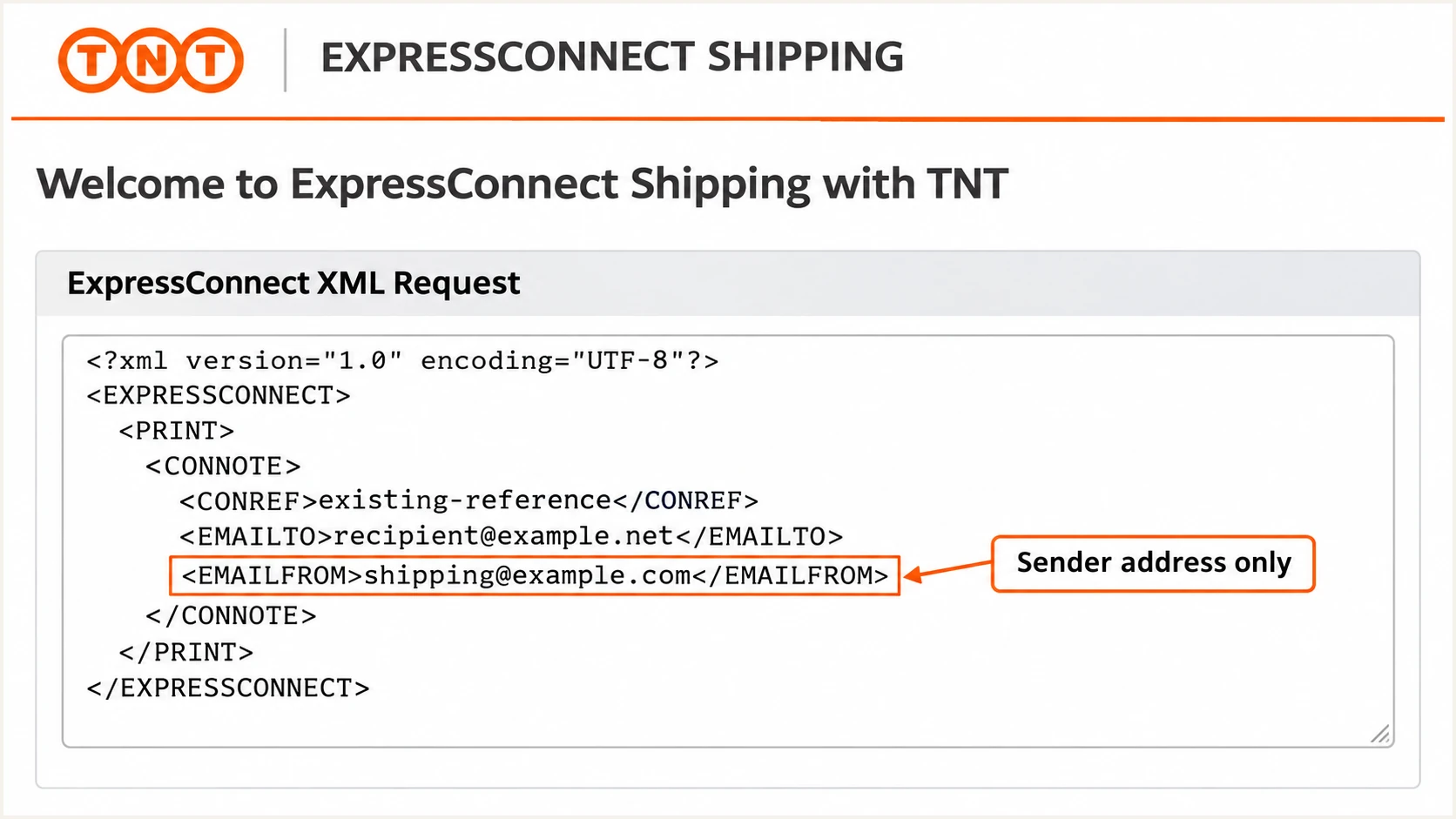
Illustration of the TNT ExpressConnect XML editor with EMAILFROM inside a PRINT request.
If TNT cannot provision a matching Return-Path or DKIM signing domain, ask for a supported sender identity. Do not keep your domain in From without a working DMARC authentication path.
For a TNT-owned From address, leave authentication changes to TNT. Your own domain's SPF record cannot repair a message authenticated under TNT's domain.
Set up SPF
I configure SPF against the envelope sender, shown as Return-Path after delivery. Changing the visible From address does not change this domain.
- Confirm the Return-Path. Request the custom Return-Path configuration for your TNT service. Have TNT confirm the exact hostname, required record types, and authorization values before assuming the setting is active.
- Publish at the correct name. For a Return-Path such as bounces.example.com, configure the records at that hostname. SPF at example.com is not inherited by bounces.example.com. Follow any TNT-provided delegation instructions exactly.
- Keep one SPF record. If TNT supplies a TXT mechanism for a name that already has SPF, merge it into the existing record before the terminal all mechanism. Preserve other authorized senders. Do not add TXT data alongside a CNAME at the same name.
- Check lookup limits. Keep evaluation within 10 DNS-lookup-causing SPF terms, including nested includes and redirects. Never guess include:tnt.com or copy TNT's corporate SPF record into your DNS.
Inspect the example Return-Path domainbash
dig +short TXT bounces.example.com
dig +short CNAME bounces.example.com
Replace bounces.example.com with the actual envelope domain. The lookup commands inspect DNS; their output does not prove that TNT has activated your custom Return-Path.
Enter that envelope domain in the SPF checker. Check for duplicate SPF records and lookup errors, then confirm SPF pass on a fresh message sent by TNT.
SPF checker
Find SPF syntax issues, lookup limits, and weak records.
?/16tests passed
With default relaxed SPF alignment, bounces.example.com and a From address at example.com share an organizational domain. A strict aspf=s policy requires an exact domain match.
If your particular TNT flow keeps a TNT-owned Return-Path, adding TNT to your root SPF does not fix SPF alignment. An SPF alignment warning is acceptable for DMARC when DKIM passes with a signing domain that matches From under your policy.
Set up DKIM
I ask TNT to enable DKIM for the domain actually used in From. A valid signature under an unrelated TNT domain does not authenticate your From domain for DMARC.
- Obtain the records. Request the signing domain, selector, full DNS hostname, record type, and exact public key or CNAME target. Use a 2048-bit RSA key where TNT supports it; do not invent a selector.
- Publish the selector. Add the supplied TXT or CNAME record in authoritative DNS. Check whether your DNS editor appends the zone name so the hostname is not duplicated. Keep CNAME records DNS-only if your host offers proxying.
- Activate signing. Ask TNT to verify the published record and activate signing for the relevant message flow. Publishing a public key without sender-side signing is incomplete.
- Inspect a fresh signature. Read d= and s= in DKIM-Signature. Confirm dkim=pass in the receiving system's Authentication-Results and confirm that the signing domain matches From under your adkim setting.
Inspect an illustrative selector, replace it with TNT's valuebash
dig +short CNAME selector._domainkey.example.com
dig +short TXT selector._domainkey.example.com
The hostname above is an example, not a published TNT selector. Query the selector TNT actually provisions, and follow its CNAME target when checking the public key.
DKIM signing belongs on the sending system. Keep private keys out of DNS and support tickets; a locally generated key is useless unless TNT supports installing its matching private key.
DNS publication is only half the setup
Do not move to enforcement while TNT is using your From domain and neither SPF nor DKIM supplies a matching pass. Ask TNT to complete authentication or change the sender identity.
Set up DMARC
For a domain without DMARC, I start with p=none and aggregate reporting. If the domain already uses p=quarantine or p=reject, keep that policy while fixing TNT authentication.
- Inspect the current policy. Query _dmarc at the visible From domain and review any inherited policy. Edit an existing record rather than publishing a second DMARC record.
- Create the TXT record. For example.com, publish the record at _dmarc.example.com. A DNS editor managing example.com usually expects _dmarc in its name field.
- Set a working report address. Replace dmarc@example.com with a mailbox or reporting destination you control. Aggregate reports contain XML data. For an external reporting domain, confirm that its required reporting authorization exists.
- Preserve existing settings. Retain working reporting destinations and intentional subdomain policies. Do not change strict alignment settings simply to hide a TNT configuration failure.
Initial DMARC TXT value at _dmarc.example.comtext
v=DMARC1; p=none; rua=mailto:dmarc@example.com
Use the DMARC record generator to build the record with your real reporting destination. The example value is for a domain beginning in monitoring mode.
Enter the visible From domain in the DMARC checker. Confirm one valid policy is discoverable and that its reporting address is correct.
DMARC checker
Look up a domain's DMARC record and catch policy issues.
?/7tests passed
A valid policy record does not enable SPF or DKIM. DMARC passes when at least one of those methods passes and its authenticated domain matches the visible From domain under the applicable alignment mode.
The p=none policy requests monitoring without DMARC enforcement. It does not guarantee delivery; receiving systems still apply their other filtering rules.
Verify and troubleshoot
I test the exact TNT message flow that will run in production. A test from your normal mailbox does not validate TNT's sending configuration.
- Generate an original message. Use an existing supported notification or paperwork workflow and send directly to a test destination. For returns paperwork, use EMAILTO in the established PRINT request. Ask TNT for a supported test method if recipient control is unavailable.
- Read receiver results. Inspect the original source and the receiving system's Authentication-Results. Compare header.from with smtp.mailfrom and header.d. At least one authenticated domain must match under your DMARC settings.
- Check failure details. For SPF permerror, inspect duplicate records and lookup limits. For DKIM failure, compare the signature selector with DNS and check for message changes after signing.
- Save evidence. Record the Message-ID, timestamp, sending IP, From domain, Return-Path, and DKIM selector. Give TNT those details when the sender-side configuration differs from the records it supplied.
Illustrative receiver results for a successful setuptext
Authentication-Results: mx.receiver.example;
  spf=pass smtp.mailfrom=bounces.example.com;
  dkim=pass header.d=example.com header.s=selector;
  dmarc=pass header.from=example.com
These are example results, not a measurement of TNT. For your own message, confirm that the receiving system reports dmarc=pass for the intended From domain.
The email tester gives you a destination address. Send an original TNT-generated email to it to get an authentication diagnosis. This is the quickest check of the configuration on the actual sending path.
Email tester
Send a real email to this address. Suped shows a results button when the test is ready.
?/43tests passed
Send directly rather than manually forwarding a received message. Forwarding changes the delivery path, and copying a message into a new email tests your mailbox instead of TNT.
Repeat the check for each enabled TNT flow. Returns paperwork and booking confirmations do not necessarily share a sender identity; record the result separately for each.
|
|
|
|---|---|---|
SPF permerror | Duplicates or limit | Repair SPF |
SPF mismatch | Envelope domain | Check DKIM path |
DKIM failure | Selector and key | Confirm signing |
DMARC failure | Domain matching | Fix a matching pass |
Common authentication results and the next check.
A passing DNS lookup and a passing message test establish different facts. Keep both results so a later DNS change can be distinguished from a sending-system change.
Get alerted when it breaks
Our DMARC platform, Suped, turns aggregate reports into source-level authentication issues and fix steps. Use DMARC monitoring to watch TNT messages using your From domain after the initial test.
- Enable notifications. In Suped's notification settings, enable Issues detected and Sending sources need verification emails. Enable DMARC summaries for a regular review of authentication results.
- Verify the source. Check a TNT-labelled source against your original message headers and TNT support's sending details before marking it as verified. A recognizable label or rDNS suffix alone is insufficient.
- Inspect failures. Filter Suped's Data view by source, reporter, or IP address. Open Detail view to inspect SPF and DKIM results and determine which domain match failed.
- Compare DNS history. Review old and new record values after an alert. Restore an accidentally removed authorization or DKIM record, then send another original TNT message to verify the repair.
Keep an accountable owner for the alert mailbox. The useful follow-up is a repaired record or a TNT support case with message evidence, followed by a successful retest.
Suped monitors the reports received for your domain. It cannot change TNT's signing configuration or collect reports for a TNT-owned From domain that you do not control.
Aggregate reporting has a delay
Suped sends issue notifications when problems are detected in available data. Receivers generally send aggregate reports in batches, often daily, so these alerts are not an immediate delivery receipt for every TNT message. Use an original-message test for immediate verification.
Secure your domain with p=reject
I move a dedicated transactional sending domain to p=reject only after every legitimate sender has a working DMARC path and indirect delivery has been checked. A successful TNT test alone is not enough to tighten a domain shared with other senders.
- Review every sender. Use Suped's source table to identify legitimate senders beyond TNT. Investigate failures by source instead of requiring a perfect overall pass rate that also counts unauthorized traffic.
- Observe a full cycle. Include infrequent notifications and monthly workflows in the review. Keep reporting active until representative legitimate traffic is accounted for, then review the impact of quarantine before progressing.
- Stage the policy. For a new deployment, progress through none, quarantine, and reject, reviewing source failures and delivery complaints at each stage. Check parent and subdomain policies before applying a change.
- Keep a recovery path. Retain the previous working policy and DNS values. If authorized traffic breaks, repair its authentication or restore the last working enforcement setting for the affected domain, then retest.
Ready for enforcement
Every legitimate source is identified. TNT messages using your domain have a matching SPF or DKIM pass, and quarantine results show no unresolved delivery problem.
Keep investigating
TNT uses your From domain without a matching authentication pass, an active sender remains unidentified, or indirect delivery fails. Fix the specific path before tightening policy.
Use a dedicated shipping subdomain when separation is practical. General-purpose domains with mailing-list participation need a separate interoperability review; do not apply reject solely because transactional TNT email passes.
Our Hosted DMARC lets you manage policy in Suped after its DNS setup. Review the source diagnostics before each policy change, keep reporting enabled, and use alerts to catch later authentication failures.
Example final TXT value at _dmarc.shipping.example.comtext
v=DMARC1; p=reject; rua=mailto:dmarc@example.com
Publish this subdomain example only when shipping.example.com is the visible From domain and its legitimate traffic is ready for enforcement. Replace the report address and preserve your intentional policy tags.
Reject requests stricter handling for messages that fail DMARC; receivers make the final delivery decision. Keep monitoring authorized TNT traffic after the change.
Frequency asked questions
There is no verified universal customer SPF include in the reviewed TNT integration guide. Obtain the exact authorization and Return-Path configuration for your service from TNT. Do not assume include:tnt.com is a supported customer setting.
No. Your SPF record authorizes outbound use of your envelope domain. It does not control incoming TNT notifications. TNT manages authentication for messages using its own From domain.
Yes. DKIM must pass with a signing domain that matches the visible From domain under your adkim setting. A passing signature under an unrelated TNT domain does not meet that requirement.
No. ExpressConnect documents EMAILFROM as the From value for returns paperwork. Domain ownership verification, custom Return-Path provisioning, and DKIM signing are separate tasks that require confirmation from TNT.
Keep an established quarantine or reject policy while onboarding TNT. Complete authentication before using your domain in TNT messages. The p=none example is for a new monitoring deployment, not a reason to weaken a working setup.
A PTR hostname ending in .tnt.com is a clue about the hostname namespace, not proof of an authorized TNT message or a specific sending workflow. Confirm the connecting IP with TNT and inspect the receiving system's authentication results. Do not authorize a sender using rDNS alone.