
How to set up DMARC/DKIM/SPF for Telia

Published 21 Nov 2026
Updated 21 Nov 2026
13 min read
Summarize with
Set up Telia email authentication by authorizing your actual Telia sending service in SPF, activating DKIM signing for your own domain where the service supports it, and publishing a DMARC TXT record at _dmarc.example.com. I begin new DMARC deployments with p=none, test real messages, then move to enforcement after legitimate senders pass.
Telia's email services differ by country and contract. There is no single SPF value or DKIM selector to copy across every Telia service. These changes apply to a domain you control. For an address ending in @telia.com, Telia manages the domain's authentication records.
Add your domain
I first confirm the Telia service, the sending domain, and who hosts its authoritative DNS. Registering a domain with Telia and activating it for a Telia mail service are separate tasks.
- Confirm the service. Find the product name and country on your Telia order. Record the outgoing SMTP server and the address you intend to use in the visible From field.
- Activate the domain. For a new custom-domain mail service, ask Telia to provision your domain and mailboxes on that service. Complete the ownership evidence Telia requests, including any account-specific DNS verification record.
- Open DNS management. For Swedish Telia hosting, sign in to the hosting control panel with the supplied credentials. Open DNS, then DNS-editor, and use the domain selection icon to choose your domain.
- Verify control. Confirm the domain is attached to the correct mail service. Check its public nameservers before editing records. If another provider hosts DNS, publish the authentication records there.
The Swedish navigation labels follow Telia's support instructions, 'Ändra pekare i DNS'. If the domain is missing, have Telia check the service assignment and your administrator access. A registrar transfer is unnecessary just to edit authentication at your existing DNS host.
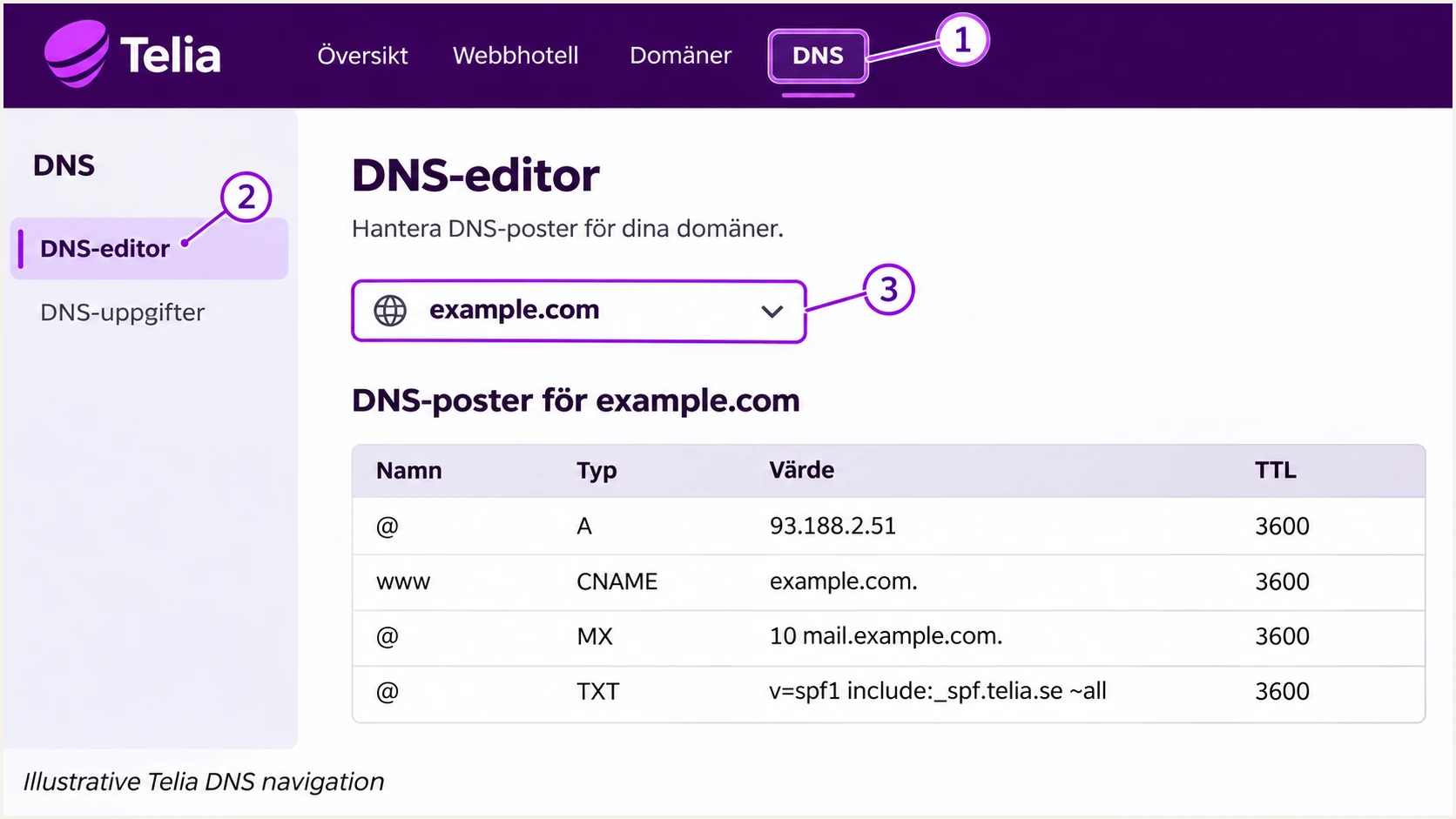
Illustrative Telia DNS navigation: open DNS, select DNS-editor, and choose the domain.
For the Swedish mail service documented by Telia, outgoing mail uses mailout.telia.com on port 465 with SSL/TLS and SMTP authentication enabled. The username is the full email address. Confirm different regional services against their own Telia settings.
Set up SPF
I configure SPF for the domain in the envelope sender, exposed as the Return-Path after delivery. Telia supports matching Return-Path domains, but the actual message must confirm which domain your service uses.
- Get the authorization. Ask Telia for the SPF mechanisms for your exact mail product and country. Do not copy Telia's corporate SPF record or turn the SMTP server name into an include without Telia's instructions.
- Edit one record. At the DNS host, edit the existing TXT record beginning v=spf1 at the envelope sender domain. Merge the confirmed Telia mechanisms before the final all mechanism, preserving other legitimate senders.
- Check the sender domain. Send a message and inspect Return-Path. Its domain must match the visible From domain under your DMARC matching rules for SPF to contribute a DMARC pass.
- Validate the lookup budget. Keep one SPF record at each evaluated domain. Stay within the limit of 10 DNS-querying mechanisms and modifiers, including nested includes, and check for missing include records.
For Telia Estonia's Kodulehe Majutus mailboxes with DNS hosted elsewhere, Telia publishes this SPF value. Use this complete value only when that is your service and it covers every sender using the same envelope domain.
SPF TXT value for Telia Estonia Kodulehe Majutustext
v=spf1 mx include:_netblocks.neti.ee include:teliaklm.ee -all
Telia's Estonian DNS guide separately lists include:_spf.mlxplus.com for Telia MLX. That mechanism belongs to that service. For Swedish mailout.telia.com or another Telia relay, obtain the service's confirmed SPF instructions before changing DNS.
Run the lookup below against the envelope sender domain. If your message uses a dedicated bounce subdomain, check that subdomain's SPF record as well as the main domain used by other senders.
SPF checker
Find SPF syntax issues, lookup limits, and weak records.
?/16tests passed
A valid SPF record does not prove that the delivered message passes SPF. I compare the receiving server's SPF result with the actual connecting IP and envelope domain after every change.
If your particular sending route uses a Telia-owned Return-Path and offers no custom-domain setting, changing your own domain's SPF will not fix that mismatch. Expect SPF alignment warnings on that route. DMARC still passes when DKIM passes with a signing domain that matches your visible From domain.
Set up DKIM
I obtain DKIM details for the exact Telia mail service before creating DNS records. Telia's public documentation does not establish a universal selector or a single activation screen for every service.
- Request signing details. Ask Telia whether the service signs outbound messages with your domain. Request the selector, DNS owner name, TXT public key or CNAME target, and any activation step required after publication.
- Publish the supplied record. In DNS-editor, use Lägg till for a new record or Redigera for an existing one. Copy Telia's exact record type and value at the supplied selector under _domainkey. Avoid duplicating the domain suffix.
- Activate the signer. Complete Telia's service-specific activation or have support enable signing. Request a 2048-bit RSA key where supported. Keep the private key in the signing system; publish only the public DNS material.
- Check a new message. Inspect DKIM-Signature for d= and s=. Confirm d= matches your visible From domain under DMARC rules and that the recipient reports dkim=pass for that signature.
Publishing a public key alone does not make Telia sign mail. I verify a message sent after activation, using the same mailbox or application route that will send production mail.
Under default relaxed DMARC matching, a signing subdomain and the visible From domain can share the same organizational domain. A signature using Telia's own unrelated domain does not authenticate your domain for DMARC.
SPF passes for Telia's domain
SPF validates the Telia-owned envelope domain. If your visible From address uses example.com, that result supplies no matching SPF authentication for example.com.
Request a custom Return-Path or rely on a passing DKIM signature using your domain.
DKIM passes for your domain
A valid DKIM signature using d=example.com matches a visible From address at example.com. This gives DMARC a passing authentication path.
DMARC can pass through this signature even when SPF fails or uses an unrelated envelope domain.
If Telia confirms that your service cannot sign with your domain, ask for a supported signing route. DMARC can pass through matching SPF alone, but forwarding often disrupts SPF. Verify DKIM support before treating the configuration as complete.
Set up DMARC
I publish DMARC for the visible From domain after identifying its legitimate senders. Keep an existing p=quarantine or p=reject policy while fixing Telia's authentication; do not weaken it just to add a sending source.
- Choose the DNS name. For mail sent as sender@example.com, create one TXT record at _dmarc.example.com. In an editor that appends the zone automatically, enter only _dmarc.
- Start new monitoring. If the domain has no DMARC policy, use the p=none example below. Edit an existing DMARC record instead of adding a second one.
- Set a working report address. Replace dmarc@example.com with a mailbox or aggregate-report destination you control. Keep existing report destinations that are still needed.
- Save and test. Save the record, wait for the previous DNS cache lifetime to expire, and run the DMARC lookup below against the visible From domain.
Initial DMARC TXT value for a new deploymenttext
v=DMARC1; p=none; rua=mailto:dmarc@example.com
The example address is a placeholder. A reporting address on a different domain requires the report recipient's external reporting authorization in DNS. Confirm that authorization with the recipient before expecting aggregate reports.
Use the DMARC record generator to construct the value with your actual reporting destination. Keep default relaxed domain matching unless your organization has a tested requirement for strict matching.
DMARC checker
Look up a domain's DMARC record and catch policy issues.
?/7tests passed
Check that the lookup finds a single valid policy and the intended reporting destination. A DNS lookup validates publication; the email test in the next section checks what happens to a real Telia message.
In the Swedish Telia DNS editor, use Redigera beside an existing record or Lägg till for a new one, then save. Other Telia portals use different controls, so keep the DNS name and TXT value separate when entering them.
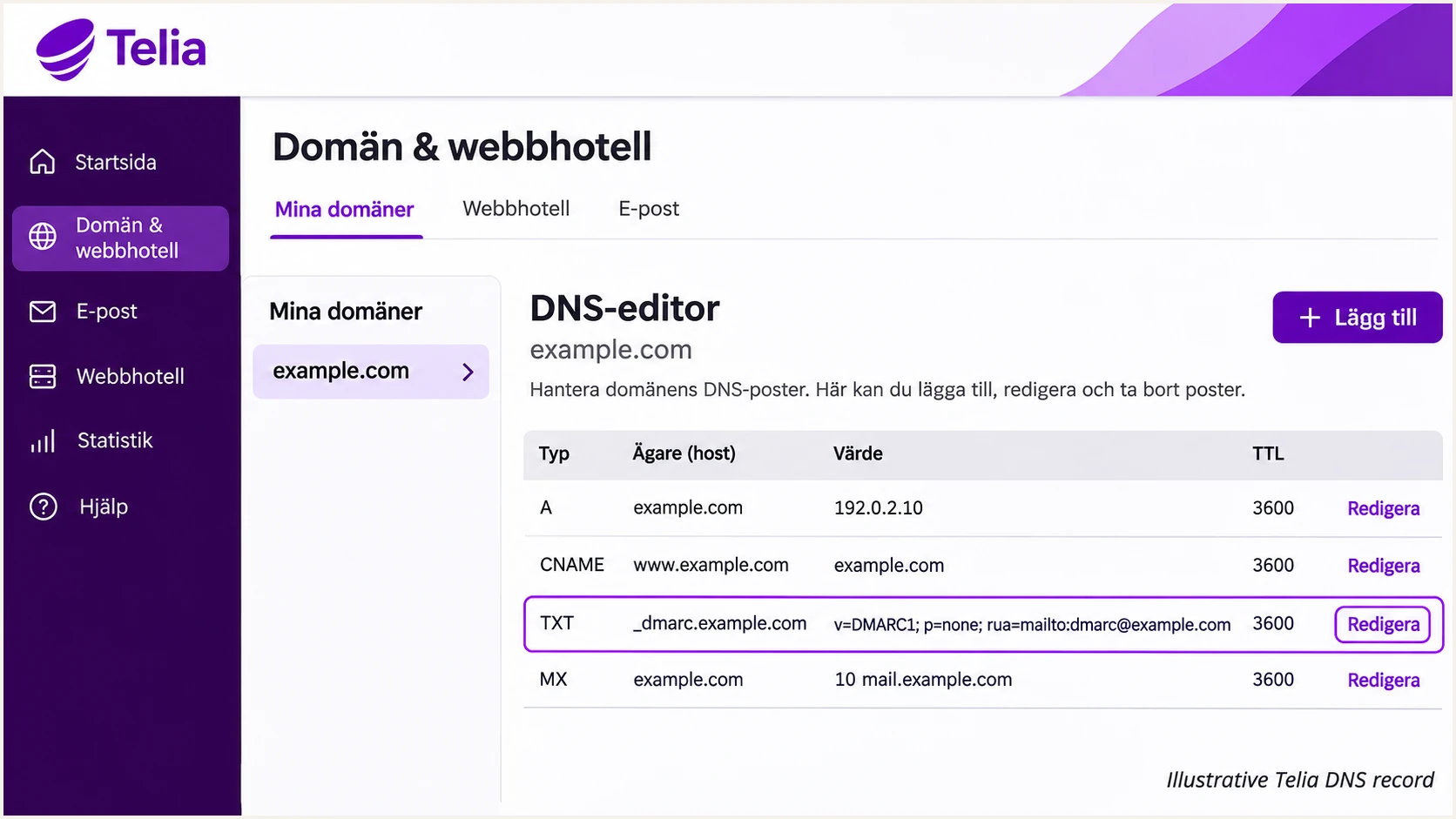
Illustrative Telia DNS record: edit the existing DMARC TXT row with Redigera.
Save the old value before editing. For a sending subdomain, check whether it already has its own DMARC record and which parent policy applies before changing the organizational domain's policy.
Verify and troubleshoot
I test a newly sent message through the actual Telia sending route. A test from a different mailbox, website, or SMTP server does not validate the route you changed.
- Send the test. Use the email tester below to obtain a destination address, then send a message to it through Telia with your normal From address. The report diagnoses authentication and delivery-related checks for that message.
- Read the identifiers. Compare the visible From domain with smtp.mailfrom in the receiver's Authentication-Results and d= in a passing DKIM signature. Record the connecting IP and selector.
- Repeat every route. Test Telia webmail, your configured email client, and each application that sends as your domain. Include aliases and sending subdomains where they use different configurations.
- Escalate with evidence. For a failure, give Telia the timestamp, sender, recipient, connecting IP, full message headers, and any SMTP rejection code. State whether SPF, DKIM, or domain matching failed.
The tester prompts you to send us a test email and returns a diagnosis. This is the quickest way to check the delivered message after a DNS edit or a Telia signing change.
Email tester
Send a real email to this address. Suped shows a results button when the test is ready.
?/43tests passed
DMARC needs at least one passing authentication method with a domain that matches the visible From domain. Both SPF and DKIM passing independently is insufficient when both authenticate unrelated domains.
I use the receiver's Authentication-Results to distinguish a cryptographic or SPF failure from a domain mismatch. The cases below show the next action for each result.
|
|
|
|---|---|---|
SPF pass, matching domain | Passing SPF path | Check DKIM too |
SPF pass, unrelated domain | No matching SPF path | Check Return-Path |
DKIM pass, matching domain | Passing DKIM path | Keep signing active |
No DKIM signature | No DKIM path | Ask Telia to sign |
Both matching paths fail | DMARC fails | Fix authentication |
Authentication results for the message's visible From domain.
For DNS troubleshooting, replace YOUR_SELECTOR below with the s= value in a real DKIM signature. Query the Return-Path domain instead of example.com for SPF if it differs.
Compare the answers with your authoritative DNS host and account for the old TTL. An empty answer or an unexpected owner name often exposes a record entered in the wrong zone or with the domain suffix appended twice.
Check the published authentication recordsBASH
dig +short TXT example.com
dig +short TXT _dmarc.example.com
dig +short TXT YOUR_SELECTOR._domainkey.example.com
dig +short CNAME YOUR_SELECTOR._domainkey.example.com
If DNS is correct but DKIM fails, check that the selector and public key match the active signer and that the message was not changed after signing. If SPF reports permerror, investigate duplicate SPF records, invalid includes, and the lookup limit before adding more mechanisms.
Get alerted when it breaks
Suped is our DMARC reporting and email authentication platform. For ongoing Telia monitoring, I recommend its issue notifications so the team responsible for DNS and mail configuration sees authentication failures and the steps to fix them.
- Enable issue notifications. In Suped's notification settings, enable Issues detected for the people responsible for the domain. Use the issue's diagnostic details to identify the affected sending route.
- Review new sources. Enable Sending sources need verification. Investigate each unfamiliar source against your Telia contract, application inventory, and message evidence before marking it as verified.
- Read the summaries. Enable DMARC summary emails and compare legitimate sending volume with authentication results. Investigate a new failure pattern even if total delivery volume looks normal.
- Verify the fix. After correcting DNS or having Telia repair signing, send another test message and check subsequent aggregate reports for the same source.
Suped's DMARC monitoring connects the source table with detailed SPF and DKIM diagnostics. I use that evidence to decide whether the next action belongs with the DNS administrator or Telia support.
Aggregate reports depend on receiving providers and commonly arrive on a daily cycle. Issue notifications follow detection, so I use a fresh test message for an immediate check of one sending route.
Keep the evidence with the alert
Record the affected From domain, source IP, envelope domain, DKIM signing domain, selector, and failure time. Marking a source as verified in Suped records your assessment of that source; DNS authorization and Telia's signing configuration still need their own checks.
A useful alert ends with a confirmed repair. Keep the original failing result and the successful retest together when closing the operational task.
Secure your domain with p=reject
I move to p=reject after every legitimate sending route has a verified DMARC pass. A high overall pass rate alone is insufficient if a low-volume but important application still fails.
- Inventory the senders. Use Suped's source and data views to investigate every source. Confirm Telia mailboxes and any invoice, website, or other application using the same From domain.
- Cover a business cycle. Collect enough reports to include infrequent legitimate mail, such as monthly invoices. Resolve failures on known senders and investigate unknown sources before tightening the policy.
- Stage enforcement. For a new rollout, move to p=quarantine once legitimate routes pass, review subsequent reports and delivery failures, then change to p=reject. Keep reporting active throughout.
- Check subdomains. Review inherited policy and existing subdomain records before enforcement. Keep relaxed matching unless strict matching has been tested on every affected route.
Check every legitimate route before enforcement
p=reject requests rejection of messages that fail DMARC. Keep existing quarantine or reject protection in place when onboarding Telia, and repair the affected sender. Enforce a new policy only after your legitimate sources have a tested passing path.
Suped's Hosted DMARC lets your team manage the published policy through our dashboard after the hosted DNS setup. Combined with source diagnostics, this gives you a practical workflow for reviewing failures before each policy change.
For a directly managed TXT record, replace the policy value while preserving your working reporting destination. The example below assumes dmarc@example.com has been replaced with your actual report address.
DMARC TXT value after verification and staged enforcementtext
v=DMARC1; p=reject; rua=mailto:dmarc@example.com
Keep Suped's issue notifications active after enforcement. Retest when Telia changes your sending route, a DKIM key rotates, or another application starts sending with your domain.
A successful DMARC test confirms domain authentication for the tested message. Receiving systems also apply their own delivery and filtering policies, so investigate recipient rejections even when DMARC passes.
Frequency asked questions
No. Telia controls DNS and signing for telia.com. Send Telia support the full headers and rejection details for a failing message. Publish your own authentication records only for a domain you control.
Use the authorization for your specific Telia service. Telia Estonia publishes the Kodulehe Majutus value shown above, while its DNS guide lists a separate include for Telia MLX. Confirm the mechanism for Swedish and other Telia relays with Telia support, and merge it into one SPF record at the envelope sender domain.
There is no universal selector established by the public Telia documentation. Obtain your service's selector and public DNS record directly from Telia, or read s= in a signed message. A selector used by another Telia customer is insufficient evidence for your configuration.
Yes. DMARC passes if a valid DKIM signature has a signing domain that matches the visible From domain under the policy's matching rules. A passing signature for an unrelated Telia-owned domain does not satisfy that requirement.
Those suffixes point to Telia-associated infrastructure, but a reverse DNS name alone does not identify the customer or application responsible for a message. I check the connecting IP, message headers, and authentication results before attributing a source or authorizing it in DNS.
DNS visibility depends on the previous TTL and cached negative answers. DKIM also needs active signing on the sending service. I send a fresh message once DNS is visible, then check later aggregate reports, which commonly arrive daily, to verify other sending routes.




