
How to set up DMARC/DKIM/SPF for STRATO

For STRATO-hosted email, enable the standard STRATO SPF rule, use STRATO's automatic DKIM signing, and publish a DMARC TXT record at _dmarc.yourdomain. If other services also send for your domain, combine their SPF permissions in one custom record instead.
I verify the actual messages before tightening DMARC. A website hosted at STRATO does not automatically send through STRATO's authenticated SMTP service, and a published DNS record alone does not prove that its mail passes authentication.
Add your domain
I start with a domain in the STRATO hosting package and a working mailbox. STRATO manages signing for its hosted mail service; a self-managed VPS needs its own mail-server authentication configuration.
- Select the package. Sign in to STRATO Kunden-Login and open the package containing your sending domain.
- Add only if needed. For a new domain, use Domains bestellen and complete registration or your authorized transfer. For an existing domain, open Domains > Domainverwaltung.
- Create the sender. Open E-Mail > Verwaltung > + Neu anlegen. Create a mailbox on the sending domain, set its password, and save.
- Verify access. Sign in to STRATO Webmail with that mailbox and send a message to an external address. Check that the visible From uses your domain.
STRATO's mailbox setup does not require a separate SPF or DKIM ownership-verification token. I confirm that the mailbox works, then test authentication at the receiving end.
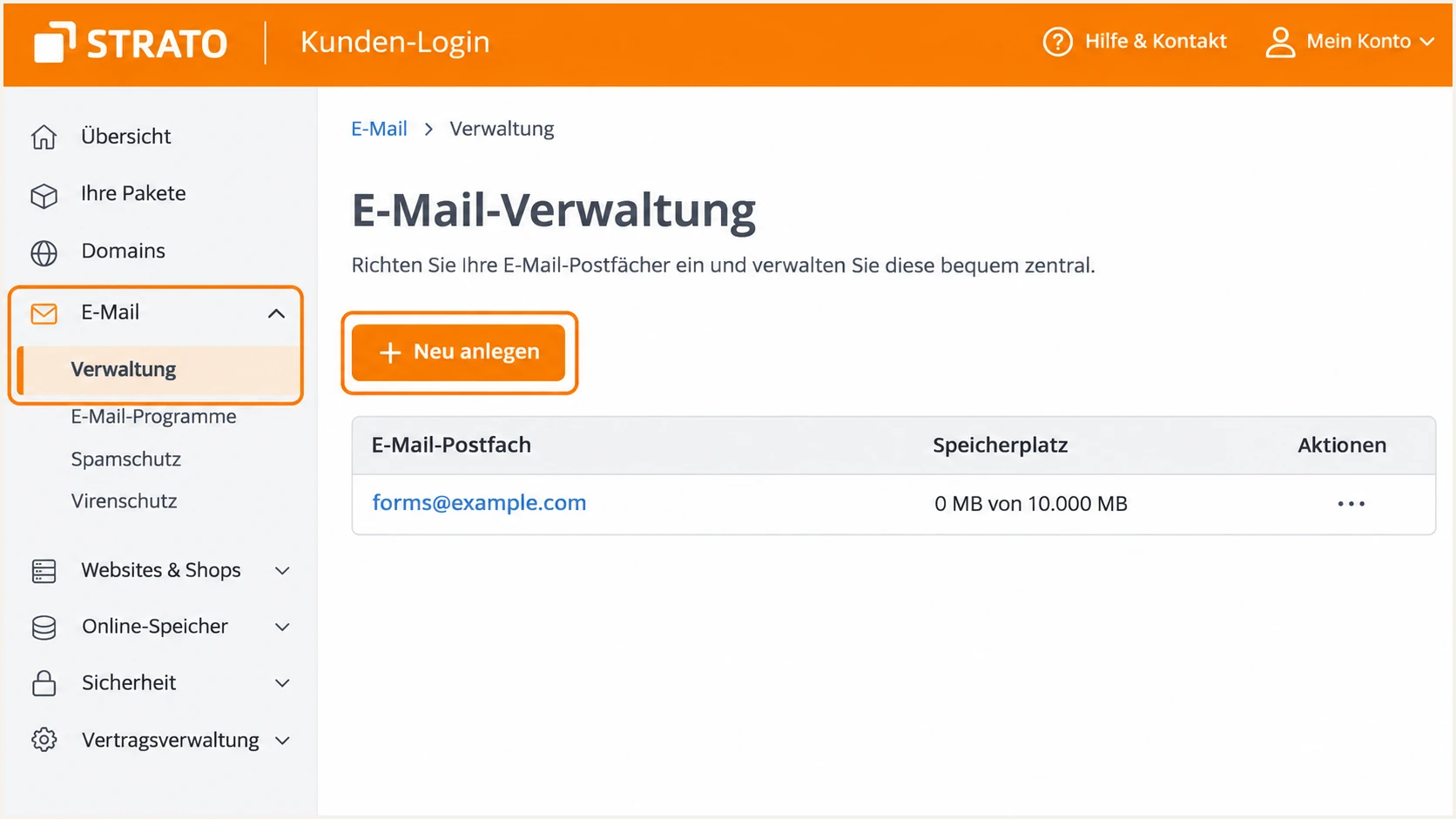
STRATO mailbox creation under E-Mail > Verwaltung.
For a website or application, use the SMTP settings below. Set its envelope sender and visible From to your STRATO-domain address; put a form visitor's address in Reply-To.
I check which nameservers are authoritative before changing records. When DNS is hosted elsewhere, publish the records there, even though STRATO handles the mailbox.
STRATO authenticated SMTP settingstext
Server: smtp.strato.de
Port: 465
Encryption: SSL/TLS
Authentication: Password
Username: forms@example.com
Password: Your STRATO mailbox password
From: forms@example.com
Envelope sender: forms@example.com
Set up SPF
SPF checks the envelope-sender domain, shown in the delivered Return-Path. STRATO supports using your domain here; I check the application's envelope-sender setting as well as its visible From.
- Open DNS. Go to Domains > Domainverwaltung, click the domain's cogwheel, select DNS, then TXT- und CNAME-Records > verwalten.
- Choose the standard rule. If only STRATO sends, select Standard STRATO Mailserver. With external DNS, publish the equivalent TXT value below at the domain root.
- Merge other senders. If you need a custom record, choose Keine STRATO SPF-Regel, then Weiteren Record erstellen. Select TXT, leave Präfix empty for the root, and merge include:_spf.strato.com with the other authorized senders before the final all mechanism.
- Save and check. Click Einstellung übernehmen. Keep exactly one TXT record beginning v=spf1 at each envelope-sender domain, and stay within SPF's 10 DNS-lookup limit, including nested lookups.
STRATO-only SPF value at the domain roottext
v=spf1 redirect=_spf.strato.com
Use redirect for the standalone STRATO-only policy above. Do not append an all mechanism to it, because that would prevent the redirect from being evaluated.
Check the published envelope-sender domain below. For a custom record, keep your other legitimate senders' permissions; replacing everything with STRATO's rule would exclude them.
SPF checker
Find SPF syntax issues, lookup limits, and weak records.
?/16tests passed
A passing lookup confirms the DNS configuration. I still send a message to verify that the actual outbound IP is authorized.
SPF records do not inherit to subdomains. If your application uses bounce.example.com in the envelope sender, check SPF at that name too.
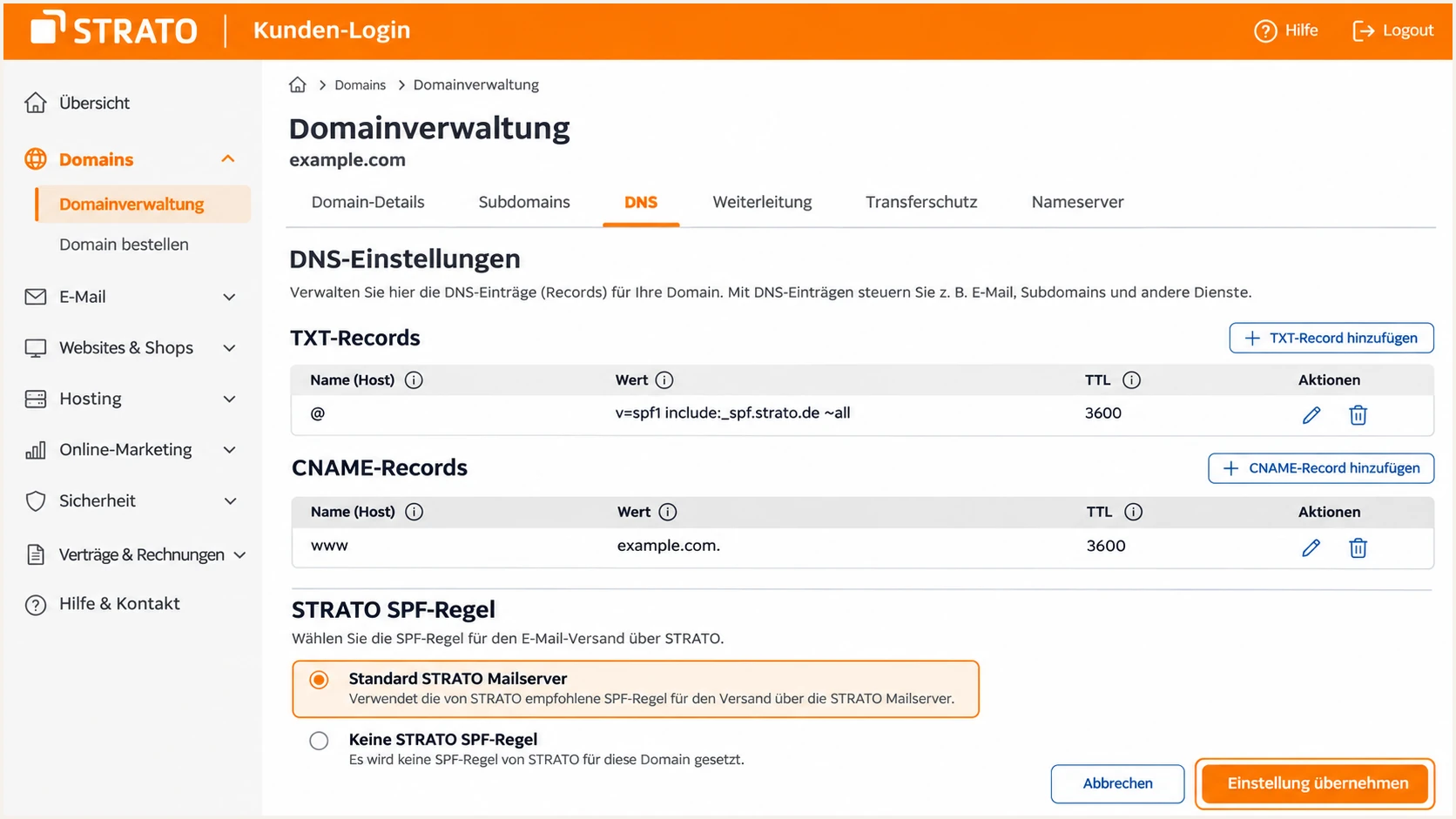
Select Standard STRATO Mailserver when STRATO is the only sender.
After saving, reopen the settings and confirm the choice persisted. If an old custom SPF record remains, consolidate it before switching back to the standard rule.
Do not add a website IP just because the site is hosted at STRATO. Authorize the system that actually sends the email.
Set up DKIM
STRATO automatically signs outgoing mail submitted through its hosted SMTP service. I use that signing service rather than generating a separate key that STRATO's mail servers cannot use.
- Use the signed route. Send through authenticated smtp.strato.de with your own domain address. Test website forms separately instead of assuming local PHP mail uses the same route.
- Check the signature. Open a delivered message's full headers. Find DKIM-Signature, read its d= signing domain and s= selector, then confirm the receiver reports dkim=pass.
- Maintain external DNS. If your authoritative DNS is elsewhere, add STRATO's documented CNAME selectors below in that DNS zone. Retain both for key rotation and recheck the active selector when troubleshooting.
External DNS: relative names within the example.com zonedns
strato-dkim-0002._domainkey CNAME strato-dkim-0002._domainkey.rzone.de.
strato-dkim-0003._domainkey CNAME strato-dkim-0003._domainkey.rzone.de.
With STRATO-managed DNS, check the existing selector records before adding anything. A CNAME cannot share its DNS name with a TXT record.
For DMARC, a passing DKIM signature must also have a signing domain that matches the visible From under your DMARC alignment mode.
STRATO SMTP submission
STRATO manages the signing key. Verify a passing signature for your domain on a real message.
Direct application delivery
A local mail process needs its own authentication setup. Route the application through STRATO SMTP to use STRATO's hosted signing service.
If another sender uses a provider-owned Return-Path, adding its SPF include to your domain does not fix SPF alignment. That sender needs a supported custom envelope domain or a passing DKIM signature for your domain.
An SPF alignment failure is compatible with a DMARC pass when DKIM passes with a matching domain. I distinguish that condition from an actual DKIM or DMARC failure.
Set up DMARC
I inspect the existing DMARC policy first. Keep p=quarantine or p=reject if either is already working; use the monitoring record below when starting without enforcement.
- Inspect the existing record. Query TXT at _dmarc.example.com. Preserve the current enforcement policy and valid reporting destinations.
- Choose a custom rule. In STRATO's DNS settings, select Keine STRATO-DMARC-Regel when replacing the managed rule with your own TXT record. Keep one DMARC record at the name.
- Enter the record. Under TXT- und CNAME-Records, select TXT, set Präfix to _dmarc, and paste the value below. STRATO appends the domain automatically.
- Set the report destination. Replace dmarc@example.com with your working report mailbox or assigned reporting address, then click Einstellung übernehmen. For custom values, use the DMARC record generator.
Starting DMARC value at _dmarc.example.comtext
v=DMARC1; p=none; rua=mailto:dmarc@example.com
The address is an example, not a working report destination. If the report address belongs to another domain, its operator must publish the required external-report authorization.
Use the check below to confirm that receivers can retrieve one valid policy at the correct name. An accidental _dmarc.example.com.example.com entry will not configure your intended domain.
DMARC checker
Look up a domain's DMARC record and catch policy issues.
?/7tests passed
A valid DMARC record still needs authenticated messages. DMARC passes when SPF or DKIM passes and the corresponding domain matches the visible From under the selected alignment mode.
I leave the default relaxed alignment unless there is a specific need for exact domain matching. Strict alignment can fail legitimate mail that uses a subdomain.
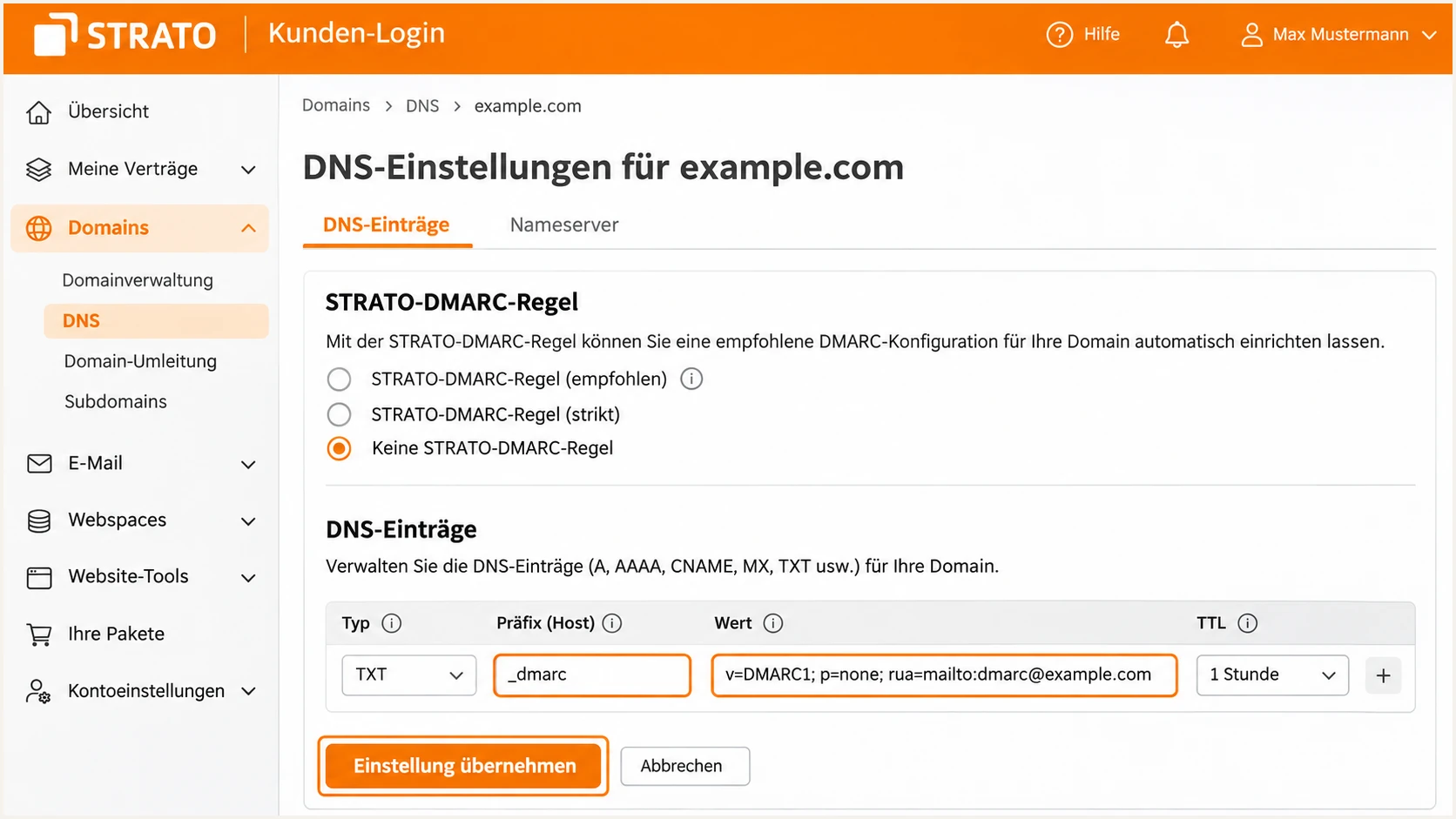
STRATO custom DMARC TXT record with the _dmarc prefix.
Replace the example address before saving. If your domain already enforces DMARC, keep that policy while adding or correcting its reporting address.
Aggregate reports describe mail seen by participating receivers. STRATO states that its own receiving mail servers do not send these reports, so reporting coverage will not include every recipient.
Monitoring does not request blocking
p=none collects authentication feedback without requesting quarantine or rejection. Keep it only while identifying legitimate senders and fixing failures.
I create or update the existing policy rather than adding a second record. Multiple DMARC policy records at one name prevent normal policy evaluation.
Keep report collection running during every policy change. A clean DNS check does not establish that every sending workflow is ready for enforcement.
Verify and troubleshoot
I test the exact sending workflow after the DNS change, including website-generated mail. STRATO advises allowing up to 24 hours for DNS changes to become fully active.
- Check public DNS. Run the commands below with your domain. Confirm one SPF policy, one DMARC policy, and resolvable DKIM records for the selector in the message.
- Send a real test. Send through STRATO Webmail and separately through your website or application. Use the email tester below for a full diagnosis of each route.
- Read the receiver's results. Inspect Authentication-Results for spf=pass, dkim=pass, and dmarc=pass. Check the evaluated domains, not just the pass labels.
- Fix the actual failure. For SMTP errors, check the full mailbox username and password, plus port 465 with SSL/TLS. For missing DKIM, confirm the message used STRATO SMTP before changing DNS.
The tester prompts you to send a message to its generated address. Send directly through the route being checked so forwarding does not change the test.
A full message test is quicker than guessing from DNS alone: it checks what the receiving system actually sees.
Email tester
Send a real email to this address. Suped shows a results button when the test is ready.
?/43tests passed
Retest after a fix with a new message. A previously delivered message keeps its original authentication results.
Use this table to select the next check. Keep delivery failures separate from failures of domain authentication.
|
|
|
|---|---|---|
SPF permerror | Duplicate or costly SPF | Record count and lookups |
DKIM fail | Key or message mismatch | Active selector and route |
DMARC fail | No matching pass | From and signing domains |
SMTP error | Submission problem | Credentials and TLS |
Checks for STRATO mail authentication and submission failures.
SPF is evaluated at the envelope domain. A pass for an unrelated provider domain does not authenticate your visible From for DMARC.
These commands check DNS, not message signatures. Substitute the selector shown in your live message if STRATO has rotated to another one.
Inspect your published authentication recordsbash
dig +short NS example.com
dig +short TXT example.com
dig +short TXT _dmarc.example.com
dig +short CNAME strato-dkim-0002._domainkey.example.com
dig +short TXT strato-dkim-0002._domainkey.example.com
Get alerted when it breaks
Suped is our platform for ongoing DMARC monitoring. It turns receiver reports into source-level results and detected issues, so authentication changes have a follow-up workflow.
- Enable notifications. In Suped's notification settings, enable Issues detected and Sending sources need verification. Turn on DMARC summary emails for regular review.
- Review the source. Check STRATO traffic in the source table. Mark a source verified only after confirming that your organization uses it.
- Investigate the failure. Filter Data view by source or IP, then open Detail view to inspect SPF and DKIM results against the From domain. Follow the issue's steps to fix.
- Compare DNS changes. Use DNS history to compare current records with the previous working values, then send a fresh test after applying the correction.
I use detected-issue notifications for action and summaries to review recurring failures. New source activity needs investigation before it is treated as authorized.
A report-based alert depends on when the receiving provider submits its report. An immediate post-change message test remains useful.
Report timing affects alert timing
Aggregate reports usually arrive on a daily cycle. Suped processes the reports it receives; report-based alerts are not a live feed of every message.
If a failure appears after a DNS edit, compare the changed value with the affected messages' domains. This connects the configuration change to the sending route that broke.
Keep reporting enabled even when authentication is stable. A new application or a DKIM key rotation changes what needs to be checked.
Secure your domain with p=reject
I advance the policy when every legitimate sending workflow has a passing DMARC path. In Suped, I review each source and resolve its authentication issues before requesting stricter handling.
- Cover a full sending cycle. Include infrequent workflows such as monthly invoices. Review source-level results in Suped instead of relying on the overall pass rate.
- Fix legitimate failures. Confirm STRATO messages have matching SPF or DKIM domains. Check forwarded mail separately, since forwarding often breaks SPF while an unchanged DKIM signature still passes.
- Stage enforcement. Update the same record to p=quarantine, observe legitimate delivery, then change it to p=reject when failures are understood. Preserve the reporting destination.
- Monitor after rollout. Keep Suped's issue notifications active and investigate new sources. Review subdomain policies separately, because an explicit subdomain record can override the parent policy.
Our Hosted DMARC manages policy changes in Suped after its DNS delegation is configured. With a directly published STRATO TXT record, make the policy change in STRATO's DNS settings instead.
The final value below requests rejection of DMARC-failing mail. Replace the example reporting address and keep your existing valid optional settings.
Enforcement value after legitimate senders are verifiedtext
v=DMARC1; p=reject; rua=mailto:dmarc@example.com
I keep relaxed alignment unless exact matching is required. Tightening the policy and tightening domain matching are separate changes.
p=reject requests receiver enforcement against mail that fails DMARC; receivers retain their own handling decisions. It does not guarantee inbox placement or stop abuse of a compromised authorized mailbox.
Frequency asked questions
STRATO signs mail sent through its hosted SMTP service automatically. With external DNS, publish the documented selector records. I verify a delivered message's signature rather than looking for an activation switch.
Select it when maintaining a custom SPF TXT record. If STRATO is your only sender and manages DNS, use Standard STRATO Mailserver. A custom record must retain every legitimate sender's permissions.
SPF can pass for a Return-Path domain unrelated to the visible From. DMARC needs a passing SPF or DKIM result with a matching domain. A passing provider-domain signature alone is insufficient.
Check the rua destination, external-report authorization if applicable, and whether mail reached a reporting receiver. Reports generally arrive on a daily cycle, and STRATO says its receiving servers do not generate them. Missing reports alone do not prove delivery failure.
Hostnames under smtp.rzone.de are associated with STRATO's mail infrastructure. I confirm attribution with the source IP and authentication results. The rDNS suffix alone does not establish that a sender is authorized for your domain.




