
How to set up DMARC/DKIM/SPF for SMTP2GO


Set up SMTP2GO by verifying your sender domain, publishing its three generated CNAME records, and adding a separate DMARC TXT record in DNS. The return-path CNAME handles SPF; the DKIM CNAME enables signing with your domain. The third CNAME handles tracking.
I use domain verification rather than single sender verification so authentication matches the visible From domain. For SMTP2GO's standard setup, leave your existing root SPF record unchanged.
Add your domain
I start with access to the SMTP2GO account that sends the messages and the authoritative DNS zone for the From domain.
- Open the page. Go to Sending > Verified Senders > Sender domains in SMTP2GO.
- Enter the domain. Click "Add sender domain", enter example.com for a sender such as notifications@example.com, then click "Continue with this domain".
- Publish DNS. Copy all three generated CNAME hostnames and targets into your DNS provider. Preserve the existing MX records.
- Confirm verification. Return to SMTP2GO and click "Verify". Require the domain Status to show "Verified"; hover over warning icons for lookup errors.
The generated hostnames belong to your account. I copy those values exactly rather than guessing the number in a return-path hostname or DKIM selector.
Single sender email verification authorizes an address but uses SMTP2GO-owned authentication domains. That does not establish DMARC alignment for your own From domain.
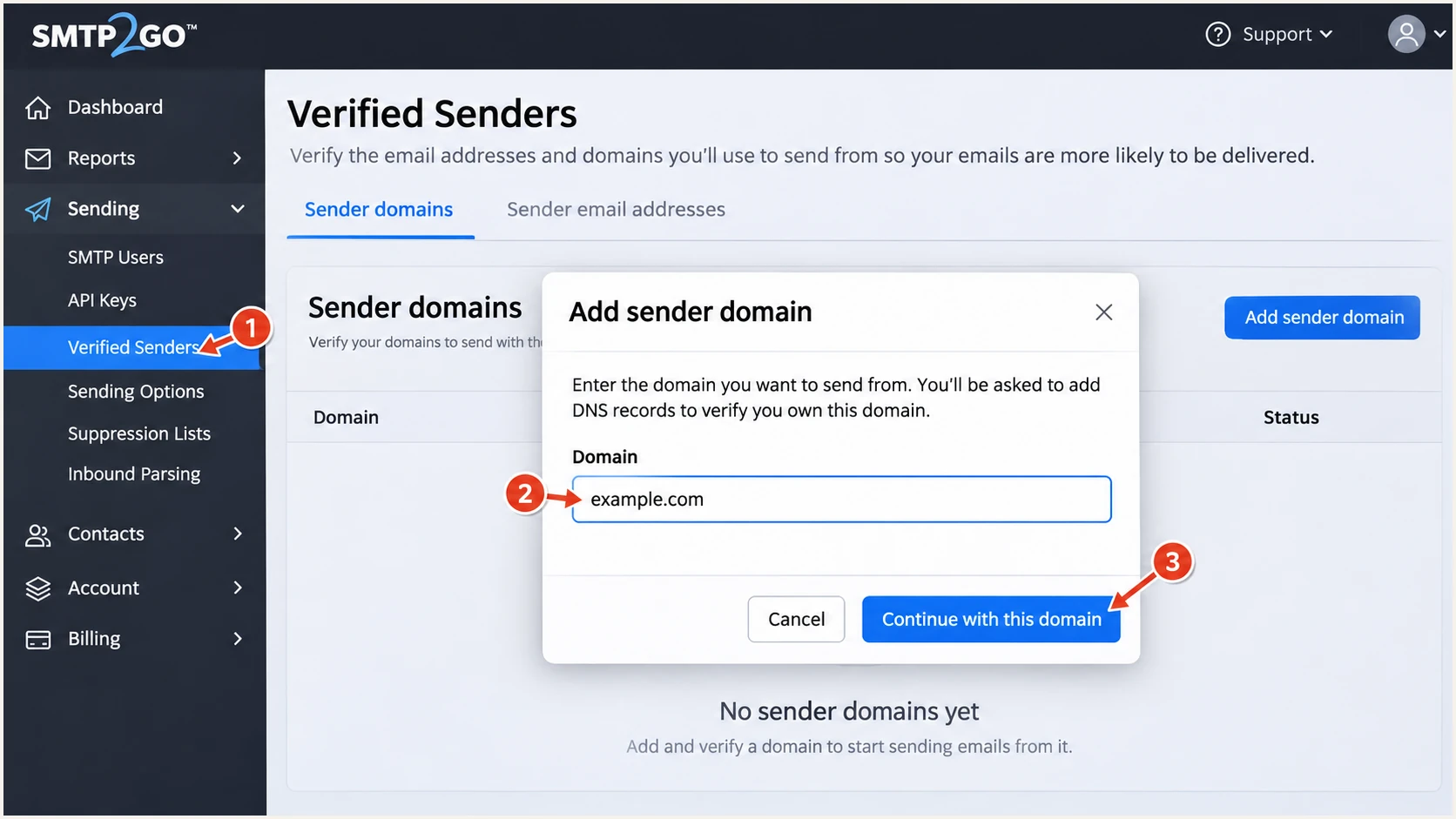
SMTP2GO sender domain dialog with example.com entered.
Set up SPF
SMTP2GO supports a custom return path through its first CNAME. SPF checks this envelope-sender domain, rather than the visible From address.
- Use the first CNAME. Publish the generated return-path hostname, typically em followed by an account-specific number, with the target SMTP2GO displays.
- Check the right domain. Enter the generated return-path hostname in the SPF checker below. A lookup of example.com alone does not test SMTP2GO's delegated SPF.
- Preserve other senders. Keep the root SPF policy for services that use it. Do not add a second SPF record or an SMTP2GO include for the standard CNAME setup.
For example, em12345.example.com points to return.smtp2go.net, which supplies the SPF policy. The authenticated identity remains em12345.example.com, so relaxed SPF alignment works with a From domain of example.com.
SPF checker
Find SPF syntax issues, lookup limits, and weak records.
?/16tests passed
I verify both SPF authorization and its relationship to the From domain on a delivered message. A valid DNS policy alone does not prove that the application used this return path.
SMTP2GO's documented exception is Maintain Return-Path under Settings > Sending Options > Advanced. It is for specific legacy recipient systems that cannot process its normal variable envelope return path.
Only add an SPF include for the documented exception
If SMTP2GO support directs you to use Maintain Return-Path, its instructions require include:spf.smtp2go.com in the existing SPF record for the original envelope-sender domain. Merge it into that record, check the 10-lookup limit, and expect reduced visibility into delayed bounces. Leave this exception disabled for normal sending.
Set up DKIM
I use SMTP2GO's generated DKIM selector. SMTP2GO manages signing and the key behind the CNAME; there is no separate private key to install in the sending application.
- Copy the selector. Use the second CNAME hostname from the domain's DNS instructions, including the ._domainkey portion.
- Publish the target. Copy its displayed target exactly. Do not replace an unrelated selector used by another sender.
- Check signing. After verification, send through SMTP2GO and confirm a passing DKIM result whose signing domain matches the From domain under your DMARC alignment mode.
These are illustrative DNS entries, not values to paste unchanged. Replace the numbered hostnames and tracking hostname with the values in your account.
Illustrative SMTP2GO CNAME recordsdns
em12345.example.com. CNAME return.smtp2go.net.
s12345._domainkey.example.com. CNAME dkim.smtp2go.net.
link.example.com. CNAME track.smtp2go.net.
The tracking record is separate from DKIM and SPF, but I publish all three records to complete SMTP2GO's setup. Keep authentication CNAMEs visible in public DNS.
If your DNS provider appends example.com automatically, enter only the relative hostname, such as s12345._domainkey. Preserve the underscore. With Cloudflare, use DNS only and disable CNAME flattening for these records.
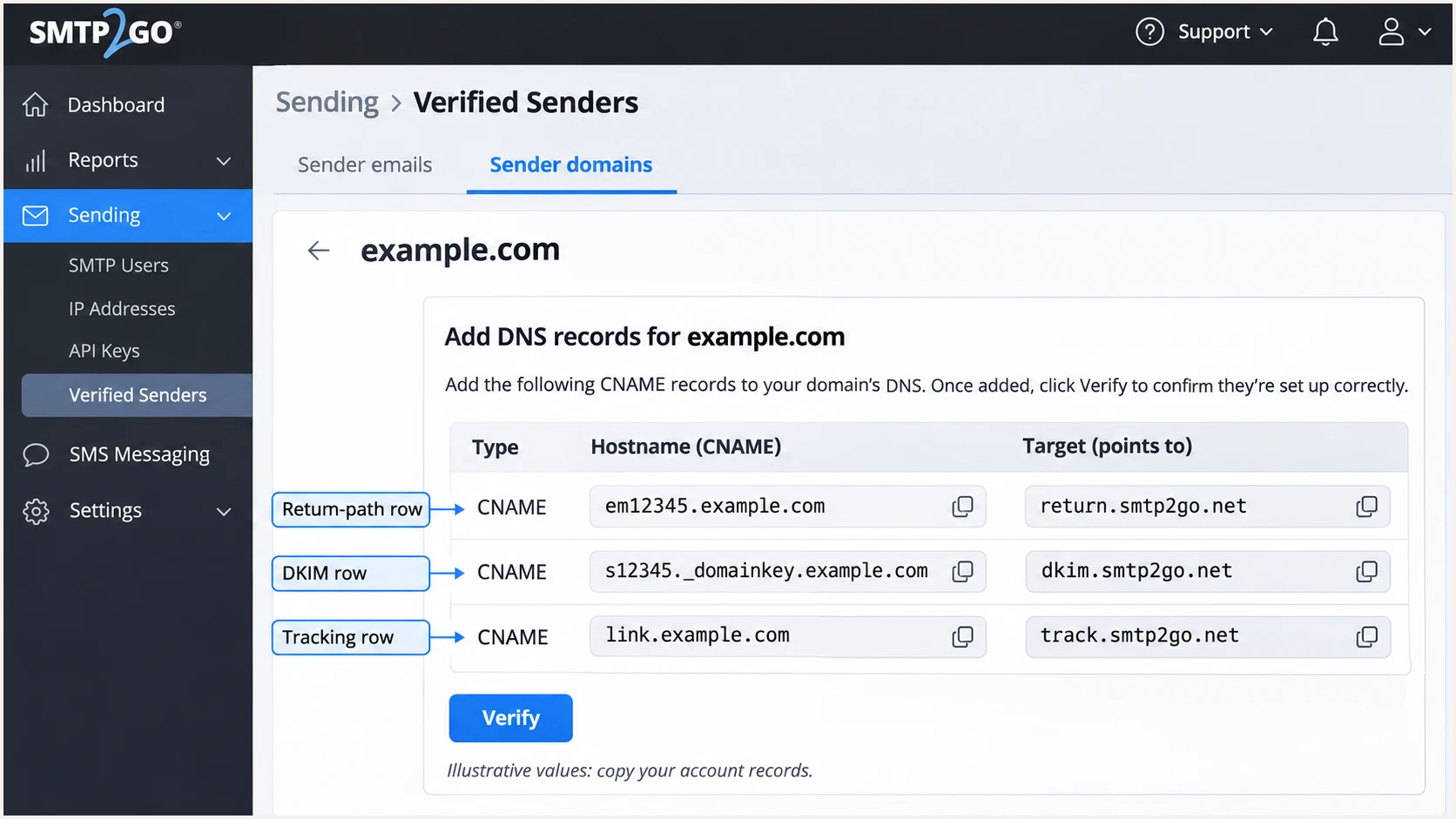
SMTP2GO DNS instructions showing return-path, DKIM, and tracking CNAMEs.
Set up DMARC
DMARC is a TXT record in your DNS, outside SMTP2GO. I start new deployments with p=none; if you already use p=quarantine or p=reject, keep that policy while fixing SMTP2GO authentication.
Use the DMARC record generator to build the record. Publish it at _dmarc.example.com for a From domain of example.com.
- Inspect first. Look up the existing DMARC TXT record before changing DNS. Edit the existing record if one is present.
- Set the host. Select TXT and enter _dmarc if your DNS provider appends the domain automatically.
- Set reporting. For a new policy, use the value below, replacing dmarc@example.com with a mailbox or reporting destination you control.
- Keep one policy. Publish only one DMARC policy record at that name. Preserve existing reporting destinations unless intentionally changing them.
Initial DMARC TXT valuedns
v=DMARC1; p=none; rua=mailto:dmarc@example.com
The record uses relaxed alignment by default. I retain relaxed SPF alignment because em12345.example.com and example.com share an organizational domain but are different DNS names. A reject policy does not require strict alignment.
Check the domain in the visible From header below. This verifies policy publication and syntax; the message test in the next section verifies actual authentication.
DMARC checker
Look up a domain's DMARC record and catch policy issues.
?/7tests passed
A p=none policy requests monitoring without a DMARC enforcement action. It does not guarantee delivery or disable the receiver's spam filtering.
For a reporting address outside your domain, confirm that the reporting provider has the required external destination authorization. Allow at least 24-48 hours of active sending before investigating missing aggregate reports.
Verify and troubleshoot
I test the real application or relay path after DNS verification. Sending through a different mail service does not test SMTP2GO's configuration.
- Send a test. Use the email tester below, copy its generated recipient address, and send to it through your SMTP2GO integration with your normal From address.
- Read the diagnosis. Require DMARC pass and passing DKIM with domain alignment. Check SPF and the actual return-path domain as well.
- Trace delivery. In SMTP2GO, open Reports > Activity, find the recipient, and click its address. Use Timeline for delivery responses, Headers for original headers, and Details for the sending IP and SMTP user.
- Check receiver headers. Inspect Authentication-Results on the received test message. The receiving system's results are the evidence for SPF, DKIM, and DMARC acceptance.
The tester gives a full diagnosis of the submitted message, including authentication. I run it again after changing the From domain, DNS records, or SMTP2GO account used by the application.
Email tester
Send a real email to this address. Suped shows a results button when the test is ready.
?/43tests passed
These illustrative headers show the expected identities for relaxed alignment. Use the receiver's trusted Authentication-Results header rather than a similarly named header inserted by the sender.
Forwarding often breaks SPF. A valid DKIM signature with domain alignment can still produce DMARC pass, so an isolated SPF failure does not automatically mean DMARC failed.
Illustrative passing authentication resultstext
From: notifications@example.com
Return-Path: <bounce@em12345.example.com>
Authentication-Results: mx.example.net;
    spf=pass smtp.mailfrom=em12345.example.com;
    dkim=pass header.d=example.com header.s=s12345;
    dmarc=pass header.from=example.com
For failed DNS verification, query the generated names directly. Check for an accidentally doubled domain suffix, conflicting records at a CNAME owner, and inconsistent authoritative nameserver answers.
If SPF passes but DMARC fails, compare the envelope-sender domain and DKIM signing domain with the From domain. With aspf=s, SMTP2GO's return-path subdomain fails SPF alignment for a root-domain From address; passing DKIM with alignment remains sufficient.
|
|
|
|---|---|---|
Unverified | CNAME lookup | Correct host or target |
SPF mismatch | Strict alignment | Review aspf mode |
DKIM failure | Selector and signature | Check DNS and signing |
DMARC failure | Both authentication paths | Fix domain alignment |
Quick checks for common SMTP2GO authentication failures.
A Delivered event means the recipient server accepted the message. It does not prove inbox placement or show the receiver's final authentication assessment.
When troubleshooting a bounce, save its exact SMTP response and the event time. I compare those with the sending IP and DNS state before changing authentication records.
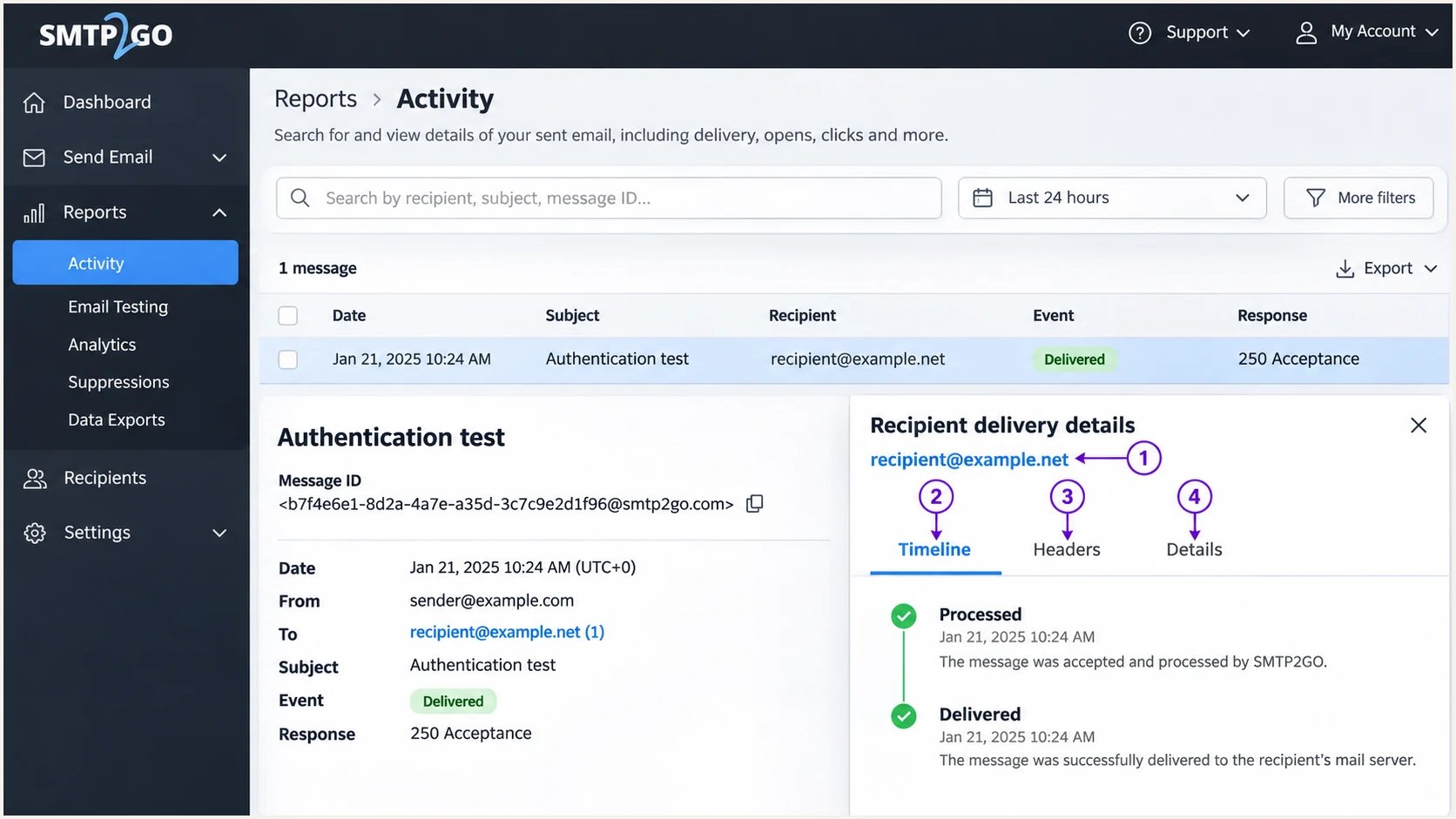
SMTP2GO Activity report with message timeline and delivery detail tabs.
Get alerted when it breaks
A successful test covers one message. Our platform, Suped, provides ongoing DMARC monitoring so changes to SMTP2GO authentication appear in reported traffic, with detected issues and steps to fix them.
- Enable issue alerts. In Suped notification settings, enable "Issues detected" and "Sending sources need verification" for the people responsible for email.
- Review source changes. Check unexpected SMTP2GO volumes and new source IPs against your account's Activity records. Verify only sources your organization authorizes.
- Investigate failures. Use the report detail diagnostics to inspect SPF and DKIM results, then compare them with the generated records in SMTP2GO.
- Confirm the repair. Retest a message immediately and check subsequent aggregate reports for recovery. Use DNS history to identify unexpected record changes.
I keep authentication alerts separate from bounce notifications. SMTP2GO's Activity report explains an individual delivery attempt; Suped shows authentication results reported by receiving systems across your sending sources.
DMARC report-based alerts depend on report arrival, commonly on a daily schedule. They do not detect every failed message instantly. Use the email test for immediate checks after a change.
SMTP2GO delivery investigation
Use Reports > Activity to find a message, inspect the timeline, and read the server's delivery response.
Use the received copy to inspect the recipient's final authentication results.
Suped authentication monitoring
Use report diagnostics, issue notifications, and DNS history to detect authentication regressions across sources.
Review sending-source changes before tightening the domain's DMARC policy.
Secure your domain with p=reject
I move to enforcement after legitimate sending paths consistently pass DMARC. SMTP2GO verification alone does not cover other systems sending with the same From domain.
- Inventory senders. Use Suped's source data to identify every authorized system, including low-volume invoices, password resets, and infrequent campaigns.
- Fix each source. Require a passing authentication method with domain alignment for every legitimate path. Aim for both SPF and DKIM to pass on direct SMTP2GO deliveries.
- Stage enforcement. After a representative business sending cycle, change p=none to p=quarantine. Review failures and delivery reports before moving to p=reject.
- Check subdomains. Review existing subdomain policies and inherited enforcement before tightening the parent domain. Retest each sending subdomain.
- Retain visibility. Keep aggregate reporting and Suped issue alerts active after enforcement. Investigate new failures before changing the policy.
Our Hosted DMARC in Suped supports staged policy management once configured. I use the report evidence to decide when to advance each stage, rather than relying on a fixed waiting period or an overall pass percentage.
The final example below retains relaxed alignment. Replace the reporting address with your actual destination and preserve other intentional settings in the existing record.
DMARC TXT value after validating all legitimate sendersdns
v=DMARC1; p=reject; rua=mailto:dmarc@example.com
Do not downgrade an existing quarantine or reject policy just to connect SMTP2GO. Correct its CNAME records and signing identity while preserving working protection.
Reject requests enforcement for messages that fail DMARC. Receivers still apply local policy, and DMARC does not prevent impersonation using a different domain or a misleading display name.
Enforce after verifying real traffic
Advance when the source inventory is complete and legitimate traffic passes with domain alignment. Suped brings the source evidence and fix instructions into the same workflow, so policy decisions follow observed results.
I retain the original record value and the change time for each policy update. If a legitimate sender breaks, those details make the cause easier to trace.
After the final change, repeat the application message test and continue checking source-specific failures in incoming reports.
Frequency asked questions
No, the standard verified-domain setup uses a return-path CNAME and leaves your root SPF record unchanged. The documented Maintain Return-Path exception requires an SPF include for the original envelope-sender domain; use it only for that specific configuration.
It is associated with SMTP2GO. Its documentation uses include:spf.smtp2go.com for the exceptional Maintain Return-Path configuration. Finding that include identifies a likely sending relationship, but it is not a reason to add it to a domain using the normal CNAME setup.
Those suffixes are consistent with SMTP2GO infrastructure. I treat an rDNS suffix as an attribution clue and confirm the sending IP against SMTP2GO's Activity details and the message headers. The suffix alone does not prove that your organization authorized the message.
SPF authorization and DMARC alignment are different checks. With From example.com and return path em12345.example.com, relaxed SPF alignment passes, while strict alignment fails. DMARC still passes if DKIM passes with the required domain alignment.
Single sender verification alone does not establish authentication alignment with your domain. Verify the sender domain and publish its CNAME records so SMTP2GO uses your domain for DKIM and the return path.
No. SMTP2GO handles SPF and DKIM after domain verification. You publish DMARC separately in DNS at _dmarc followed by the From domain, and manage its reporting and enforcement policy there or through configured Hosted DMARC.




