
How to set up DMARC/DKIM/SPF for Smaily

Published 22 Nov 2026
Updated 22 Nov 2026
10 min read
Summarize with
To authenticate Smaily email, verify your sending domain in Smaily, add include:_spf.smaily.com to its SPF record, publish both Smaily DKIM CNAME records, and add a DMARC TXT record. Then test a delivered message for DMARC passing through SPF or DKIM with a domain that matches your visible From address.
I check the actual message before treating setup as complete. A verified domain proves ownership; successful DNS checks alone do not prove that a campaign passes DMARC.
Add your domain
I use the domain in the campaign's From address and keep its DNS administration panel open.
- Open domain settings. Click your account name, select "Preferences", open "Domains", and click "Verify Domain".
- Register the domain. Enter example.com, click "Add domain", and select "DNS verification".
- Publish the token. Create a TXT record at @, or the empty root name. Copy the complete account-specific value beginning with smaily-domain-verification-key.
- Confirm ownership. Return to the modal and click "Verify domain". Keep the TXT token published permanently.
Smaily also offers email-link verification. I prefer DNS verification because it requires control of DNS rather than access to a mailbox.
Ownership verification and email authentication are separate operations. Continue with SPF and DKIM even when ownership is already verified.
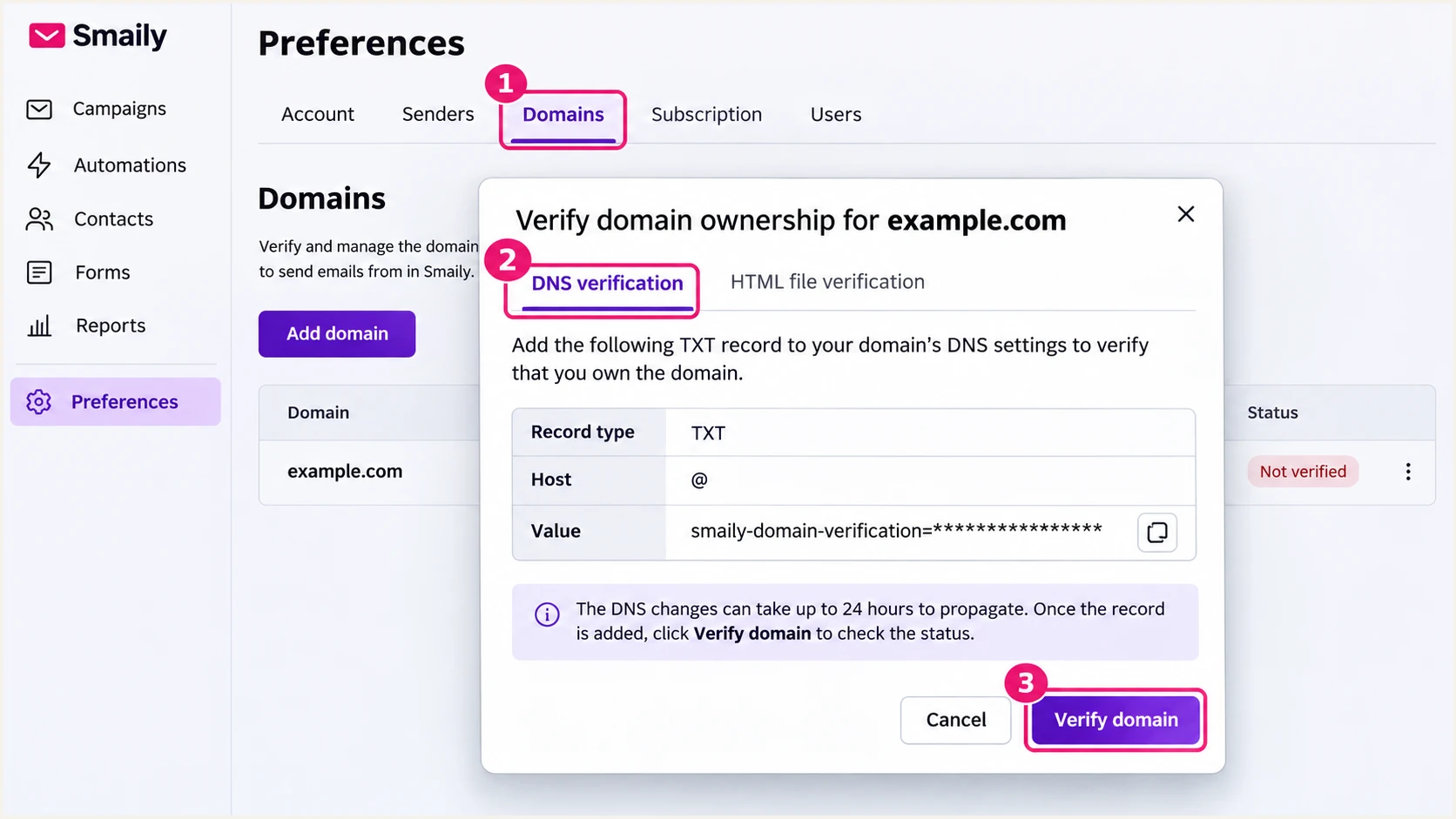
Smaily DNS ownership verification in Preferences, Domains.
For multiple Smaily accounts using the same domain, retain a separate DNS verification token for each account.
Switching to DNS verification revokes previous email-link ownership verifications for that domain. Coordinate the change with other account owners.
Set up SPF
I edit the existing SPF policy instead of creating a second SPF record at the same DNS name.
- Find the policy. Look up TXT records for your sender domain and locate the value beginning with v=spf1.
- Add Smaily. Insert include:_spf.smaily.com before the existing final ~all or -all. Preserve existing authorized senders and the current all qualifier.
- Create only if absent. Use the example below only when Smaily is the domain's sole sending service. Otherwise combine the authorizations into one SPF policy.
- Check Return-Path setup. For a custom Return-Path, obtain the exact account-specific configuration from support@smaily.com. Verify the resulting MAIL FROM domain on a delivered message; an SPF include does not change it.
SPF TXT example for a domain sending only through Smailydns
example.com. IN TXT "v=spf1 include:_spf.smaily.com ~all"
Smaily's new-record example also includes a and mx. I omit those mechanisms unless the domain's address records or MX servers actually send outbound mail.
Run the SPF check against the DNS name you edited. SPF permits at most 10 lookup-causing terms during evaluation, including nested includes; this is not a limit of 10 TXT records.
SPF checker
Find SPF syntax issues, lookup limits, and weak records.
?/16tests passed
SPF authenticates the envelope MAIL FROM domain, usually visible in Return-Path. With relaxed DMARC matching, its organizational domain must match the visible From domain for SPF to count toward DMARC.
Smaily's public setup instructions do not document a custom Return-Path menu or universal DNS target. If your message still uses a provider-owned Return-Path, expect SPF domain matching to fail. Passing DKIM with a matching signing domain can still make DMARC pass.
Set up DKIM
I publish both Smaily CNAME records on the domain used in the From address. Smaily manages the corresponding signing keys.
- Create both aliases. Add the blue.smly and green.smly selectors using the full records below.
- Avoid doubled names. If your DNS panel appends example.com automatically, enter only blue.smly._domainkey and green.smly._domainkey as the hosts.
- Keep DNS resolution direct. Use DNS-only CNAME records without a web proxy. Remove conflicting records at these exact selector names, while retaining unrelated selectors.
- Check message signing. After authentication, confirm the DKIM signature passes and its d= domain matches the From domain under your DMARC matching mode.
Publish both Smaily DKIM CNAME recordsdns
blue.smly._domainkey.example.com. IN CNAME blue._dkim.smaily.com.
green.smly._domainkey.example.com. IN CNAME green._dkim.smaily.com.
Replace example.com with your sender domain. These are CNAME aliases to Smaily's public keys, so do not generate replacement DKIM keys or paste a private key into DNS.
I check both aliases after saving. The active selector on an individual message is in the DKIM-Signature s= field; one signature does not need to use both selectors.
Check the published DKIM aliasesbash
dig +short CNAME blue.smly._domainkey.example.com
dig +short CNAME green.smly._domainkey.example.com
Set up DMARC
I inspect the current TXT record at _dmarc.example.com before changing it. DMARC applies to the domain's legitimate senders together, including services outside Smaily.
- Start monitoring. For a domain without DMARC, publish the exact starting value below as TXT at _dmarc.
- Keep existing enforcement. If the domain already uses quarantine or reject, retain that policy while adding Smaily. Update the existing record rather than creating another.
- Use a real destination. Replace dmarc@example.com with an aggregate-report address you control before publishing. Retain existing reporting destinations when updating a policy.
- Generate the value. Use the DMARC record generator to configure reporting and check the intended policy.
Starting DMARC TXT value at _dmarc.example.comtext
v=DMARC1; p=none; rua=mailto:dmarc@example.com
A none policy requests reporting without asking receivers to quarantine or reject failures. Receivers still apply their own filtering rules.
Enter your visible From domain in the checker below. Check the discovered policy and reporting address, then test a real Smaily message separately.
DMARC checker
Look up a domain's DMARC record and catch policy issues.
?/7tests passed
Aggregate reports usually arrive daily, rather than immediately after a test message. Not every receiving service sends reports.
If reports go to a different organizational domain, that destination needs to authorize external DMARC reporting. The destination provider supplies the authorization details.
Verify and troubleshoot
I check Smaily's authentication status, then test the actual message delivered to a receiving mailbox.
- Run Smaily's check. Open Preferences, then Domains, and click "Authenticate" beside your domain. Refresh after 15-20 minutes.
- Inspect failed checks. If it remains unauthenticated after about 30 minutes, click "Unauthenticated" to inspect missing records. Correct DNS names and values, allow caches to expire, and recheck.
- Send a test. Use the newsletter test option in step two of campaign creation. Set the intended From address and send directly to the address supplied by the email tester below.
- Inspect the result. Confirm DKIM passes with your domain, review SPF's MAIL FROM domain, and require a DMARC pass. Repeat with a small real campaign if a preview uses a different sender.
The expected Smaily status is a green checkmark with "Authenticated". That confirms its domain checks, but I still inspect receiver-side authentication results.
A screenshot is a navigation aid. Use the DNS values shown in your live account when investigating an account-specific error.
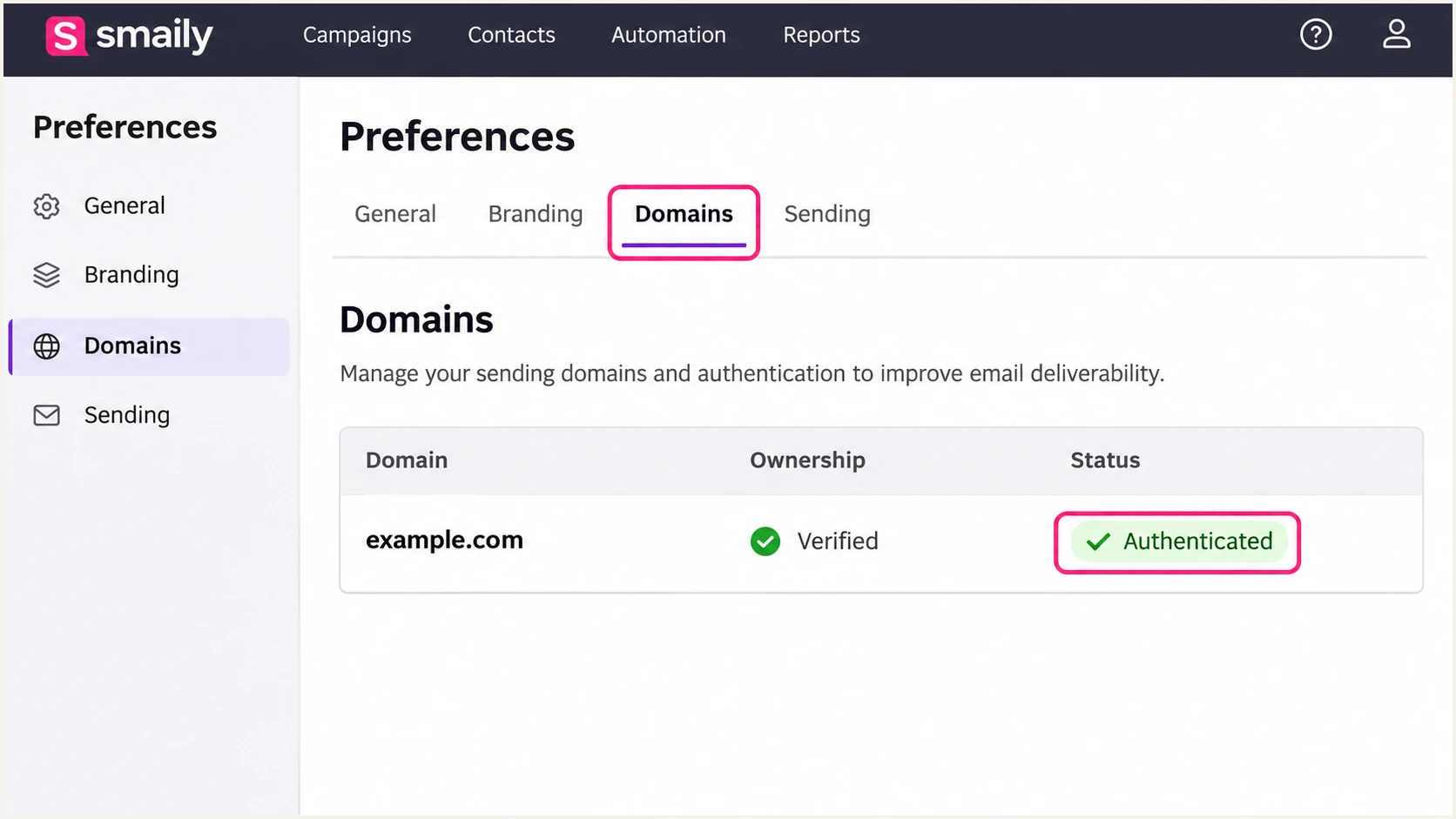
Smaily Domains tab showing successful authentication.
The email tester prompts you to send a message to a unique test address and returns a diagnosis of the received email. This is the quickest way to check the configuration in use.
Send directly through Smaily with your intended campaign sender. Forwarding an existing email changes the delivery path and produces a different SPF test.
Email tester
Send a real email to this address. Suped shows a results button when the test is ready.
?/43tests passed
Read the receiver's Authentication-Results together with the DKIM signing domain and Return-Path. A standalone SPF pass is insufficient when it authenticates a different domain.
I use these checks to choose the next fix. Successful authentication does not guarantee inbox placement.
|
|
|
|---|---|---|
Ownership lost | Verification TXT | Restore account token |
SPF permerror | Duplicates or lookups | Merge or reduce terms |
DKIM missing | Both CNAME aliases | Fix host and target |
SPF mismatch | MAIL FROM domain | Verify matching DKIM |
DMARC failure | From and signing domains | Correct sender identity |
Common Smaily authentication failures and the next check.
Get alerted when it breaks
I keep a named owner responsible for authentication after setup. Our DMARC platform, Suped, provides ongoing issue detection so a removed CNAME or a new sender does not depend on another manual test being noticed.
- Route reports. Keep aggregate reporting active so receiving services report Smaily traffic alongside your other senders.
- Enable notifications. In Suped notification settings, enable "Issues detected" and "Sending sources need verification" for the people responsible for DNS and email operations.
- Review Smaily failures. Filter report data by source and sending IP. Compare SPF results with DKIM domain matching, then use the detected issue's steps to fix.
- Confirm recovery. After a DNS correction, rerun the Smaily test and inspect fresh report data. Historical failures remain part of the earlier reporting period.
Suped's DMARC monitoring connects source-level failures with DNS history and record diagnostics. That makes it practical to trace a failing Smaily campaign back to a DNS change.
Report-based notifications depend on when receivers submit their data. I use a fresh test email for immediate verification after a change.
Keep ownership alerts separate
Smaily checks DNS ownership tokens and notifies the technical contact about verification problems. Keep that contact current. Use Suped's authentication issue notifications to investigate delivery authentication failures.
Secure your domain with p=reject
I move to reject after legitimate senders consistently pass DMARC. Smaily passing alone is insufficient if invoices or employee email still fail.
- Inventory every sender. Review a reporting period covering normal campaigns and less frequent mail. Verify that each recognized source is authorized before treating it as legitimate.
- Fix legitimate failures. Require passing DKIM with a matching domain for Smaily. Verify the actual Return-Path if relying on SPF, and test each sending subdomain separately.
- Stage enforcement. Keep reporting active, move to quarantine when legitimate traffic is ready, then use reject after resolving remaining failures. Keep an existing stricter policy in place.
- Manage policy changes. Our Hosted DMARC product lets teams manage policy in Suped after its DNS setup. Use source reports and issue diagnostics to decide when each policy change is ready.
I keep relaxed domain matching unless there is a specific requirement for strict matching. Strict SPF matching rejects a Return-Path subdomain match that relaxed matching accepts.
Review subdomain policies and any existing matching tags before changing the record. Preserve intentional settings and reporting destinations.
Ready for enforcement
Smaily has passing DKIM with the expected signing domain. Other authorized senders also pass DMARC across their regular sending cycles.
Use Suped's source-level reports to confirm this before changing policy.
Investigate first
Legitimate messages fail both usable authentication paths, or an important sending source has not yet appeared in the reports.
Resolve that source before tightening a monitoring policy. A high overall pass rate can hide a low-volume sender's failures.
Reject requests rejection of messages that fail DMARC, subject to the receiver's local policy. It protects use of your domain in the visible From address, but does not stop impersonation through unrelated lookalike domains.
For a domain ready for enforcement, the example below changes the policy while retaining aggregate reporting. Replace the reporting mailbox and preserve any existing intentional tags.
DMARC TXT value after legitimate senders passtext
v=DMARC1; p=reject; rua=mailto:dmarc@example.com
Frequency asked questions
Smaily documents include:_spf.smaily.com for authorizing its sending infrastructure. Merge it into an existing SPF policy when following Smaily's setup instructions. Other domains found inside an SPF lookup are not automatically additional includes you should publish.
Look up the PTR record of the sending IP, then compare that IP with Smaily's published SPF authorization and inspect the message's DKIM signature. A hostname suffix alone does not prove which account sent the message or that it is legitimate. Smaily manages reverse DNS for its sending servers; customer authentication does not require adding PTR records.
SPF can pass for Smaily's envelope sender while that domain differs from your visible From domain. Adding an include to your domain does not rewrite the envelope sender. A passing DKIM signature with a matching domain is sufficient for DMARC, even when SPF domain matching fails.
Yes. Publish the blue.smly and green.smly CNAME records. An individual message uses a selector identified by s= in DKIM-Signature; it does not need signatures using both selectors.
No. Keep your existing quarantine or reject policy while configuring Smaily. Correct the sender's authentication and test a message before launching campaigns. The none example is a starting policy for a domain without existing enforcement.
Ownership verification and authentication are separate checks. Confirm the ownership TXT token, publish the SPF policy and both DKIM CNAME aliases, then run Authenticate in the Domains tab. Inspect missing-record details if the check continues to fail after DNS caches refresh.




