
How to set up DMARC/DKIM/SPF for Skymail

Skymail email authentication requires its SPF include, a DKIM record generated for your domain, and a DMARC TXT record at _dmarc. Authorize sending with include:spf.skymail.net.br, activate DKIM under Envios SMTP, and start DMARC at p=none unless your domain already uses quarantine or reject.
I verify the setup with a received email: SPF must authenticate the envelope sender, DKIM must sign for your domain, and DMARC must pass through at least one of those checks with domain alignment.
Add your domain
Start in Skymail's control panel with administrator access and access to your domain's authoritative DNS. Existing Skymail domains can use their current domain entry.
- Open the domain: Open E-mail > Domínio. Select your existing domain, or open the add-domain form and enter your mail domain, such as example.com, without www.
- Prepare DNS: If Skymail will host DNS, create its DNS zone first. If another provider hosts your authoritative DNS, publish the authentication records there.
- Link SMTP sending: For the Envios SMTP service, open Envios SMTP > Configuração > Caixas postais > Vincular caixa postal. Select the domain and sending mailbox, then click Salvar.
- Confirm availability: Reopen the domain selector and confirm your domain is available. Complete DKIM's Validar step below, then send an external test to verify authentication.
Skymail's 'Renomear domínio de e-mail' documentation describes adding a domain without www. Its 'Como utilizar o serviço Envios SMTP' documentation provides the mailbox-linking steps. Contact Skymail support if the required tab is unavailable.
Adding the domain and changing inbound mail routing are separate operations. Change MX records only during a planned mail migration after the Skymail environment and mailboxes exist.
Set up SPF
Skymail's 'SPF: conceito e configuração' documentation specifies include:spf.skymail.net.br. Publish it in the SPF policy for the domain used by the SMTP envelope sender, which appears as Return-Path after delivery.
- Inspect the policy: Find TXT records beginning with v=spf1 at your sending domain. Keep exactly one SPF record at each name.
- Authorize Skymail: If Skymail is the only sender, use the record below. Otherwise, merge include:spf.skymail.net.br into the existing policy before its final all mechanism, preserving other legitimate senders.
- Publish the value: For Skymail-hosted DNS, open DNS, select the domain, and edit the existing SPF entry. If none exists, choose Adicionar entrada, select TXT, leave Endereço blank for the root, enter Valor, and save.
- Check the envelope: Use an envelope sender at your own domain in the sending application. Inspect smtp.mailfrom in a received message. If Skymail rewrites it to an unrelated domain, ask support to configure your domain for that sending route.
Skymail-only SPF value, TXT at example.comtext
v=spf1 include:spf.skymail.net.br -all
The -all ending declares that other servers are unauthorized. Use this complete example only when all legitimate sending is covered; keep existing sender authorizations during a migration.
SPF permits at most 10 DNS-querying terms during evaluation, including nested includes. Run the checker against the actual envelope sender domain to catch duplicate records and lookup-limit errors.
SPF checker
Find SPF syntax issues, lookup limits, and weak records.
?/16tests passed
Skymail supports Return-Path domain alignment. With relaxed SPF alignment, the envelope sender domain and visible From domain must share the same organizational domain; strict alignment requires an exact match.
An SPF pass alone does not establish DMARC alignment. I check the domain in smtp.mailfrom against the visible From address before treating SPF as a working DMARC authentication path.
Set up DKIM
Enable DKIM for the domain in your visible From address. A passing signature for Skymail's own domain does not give a message from your domain DKIM alignment.
- Select the domain: Open Envios SMTP, select your sending domain, and click the + control for DKIM.
- Choose DNS handling: Select Sim for Skymail-hosted DNS or Não for external DNS, then click Gerar entrada.
- Publish the record: Copy the generated record type, name, and value into authoritative DNS exactly as displayed.
- Activate signing: Wait for DNS caches to expire, return to the same Skymail tab, and click Validar.
Skymail's 'Ativando DKIM pelo painel de controle' documentation states that DKIM generation is available without an Envios SMTP subscription.
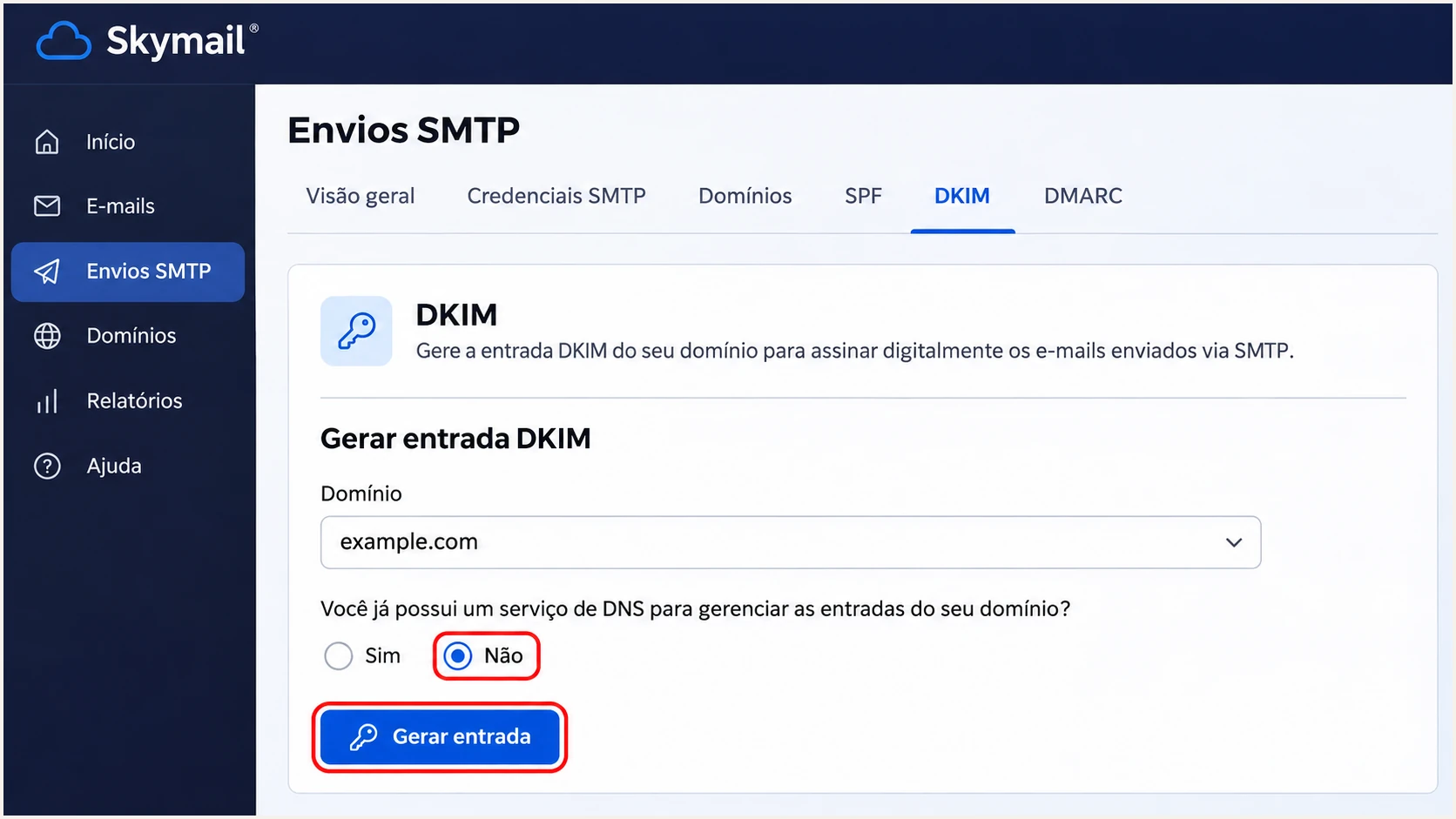
Skymail DKIM generation controls with external DNS selected.
Use the generated selector and record type. A TXT record contains a public key; a CNAME delegates the lookup to another hostname. Publish the type Skymail supplies, and keep any private key out of public DNS.
After activation, inspect a delivered message for dkim=pass and the signing domain in header.d. Under relaxed DKIM alignment, it must share the organizational domain of the visible From address; strict alignment requires the same domain.
Set up DMARC
I start a new DMARC deployment with p=none to collect reports while fixing legitimate senders. Keep an existing p=quarantine or p=reject policy in place and preserve its reporting destinations.
- Inspect existing DNS: Look up TXT records at _dmarc.example.com. Edit the existing DMARC record when present; publish only one DMARC policy at that name.
- Create the entry: In Skymail-hosted DNS, select your domain, choose Adicionar entrada, select TXT, set Endereço to _dmarc, and paste the initial value below into Valor.
- Set reporting: Replace dmarc@example.com with an inbox or report-processing address you control. A reporting destination outside your domain needs external reporting authorization.
- Save and check: Save the entry, wait for the previous DNS TTL to expire, and check the published policy and reporting address.
Initial DMARC value, TXT at _dmarc.example.comtext
v=DMARC1; p=none; rua=mailto:dmarc@example.com
Use the DMARC record generator to build the policy with your actual reporting destination. Keep the example address out of production DNS.
A p=none policy requests monitoring without DMARC enforcement. Receiving systems still apply their other delivery rules. Aggregate reports are usually daily XML batches, and some receivers do not send them.
DMARC checker
Look up a domain's DMARC record and catch policy issues.
?/7tests passed
Check the exact domain used in the visible From address. Confirm that the policy is valid, the rua destination is correct, and any inherited organizational-domain policy is the one you intend.
Skymail's 'Inserir entrada de DNS' documentation uses the DNS tab and Adicionar entrada control. If your authoritative nameservers belong to another provider, make the change in that provider's DNS editor.
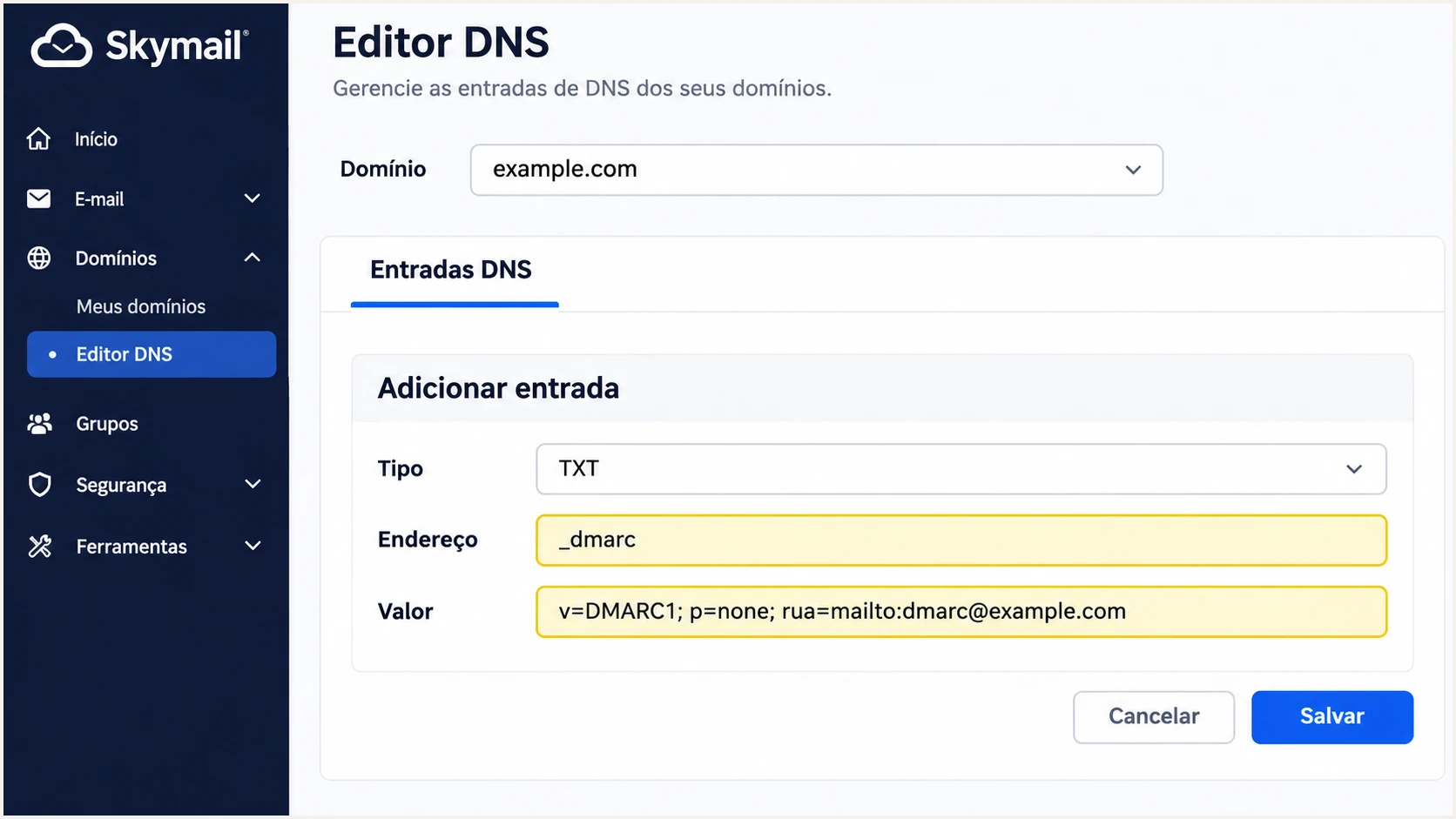
Skymail DNS editor with an illustrative monitoring DMARC record.
In an editor that appends the zone name, enter _dmarc as the relative name. In an editor requiring a full hostname, enter _dmarc.example.com. Check the saved hostname to catch an accidentally duplicated domain suffix.
The reporting mailbox receives aggregate authentication data, not copies of ordinary messages. Ensure it accepts report attachments and has enough storage or routes them to a report processor.
Verify and troubleshoot
I test externally through each sending route, including webmail and the application using Envios SMTP. A successful internal message or a visible DNS record does not prove that outbound mail is authenticated.
- Use the right endpoint: Skymail documents smtp.skymail.net.br for ordinary mailbox SMTP and sender.skymail.net.br for Envios SMTP. Use the endpoint provisioned for your service, with port 465 and SSL/TLS.
- Send a fresh message: Use your normal From address and production application. Test aliases and sending subdomains separately when they use different identities.
- Read receiver results: Inspect the destination's Authentication-Results for spf=pass, dkim=pass, and dmarc=pass. Compare smtp.mailfrom and header.d with the visible From domain.
- Retest changes: After DNS or signing changes, wait for cached answers to expire and send a new message. Previously delivered messages retain their original authentication results.
If webmail passes and your application fails, compare their SMTP endpoints and envelope sender domains. Repeat the test through the application that produced the failure.
The email tester below gives the quickest end-to-end check: it supplies a test address, you send a message through Skymail, and it returns an authentication diagnosis for that received message.
Email tester
Send a real email to this address. Suped shows a results button when the test is ready.
?/43tests passed
DMARC passes when SPF or DKIM passes with domain alignment. An SPF alignment error is compatible with dmarc=pass when a valid DKIM signature has alignment. Forwarding often breaks SPF, so working DKIM is especially useful.
For Skymail's direct sending route, investigate unexpected SPF alignment errors even when DKIM keeps DMARC passing. Changing Reply-To does not change the SMTP envelope sender or repair SPF alignment.
|
|
|
|---|---|---|
SPF | Pass | Check sender IP |
SPF alignment | Own domain | Check MAIL FROM |
DKIM | Pass | Revalidate key |
DKIM alignment | Own domain | Check signing domain |
DMARC | Pass | Check alignment |
Check results on a newly received external message.
For direct DNS troubleshooting, query the published records below. Replace example.com with your domain and selector with the s= value in the received DKIM-Signature header.
Query the DKIM hostname using the record type Skymail supplied. A missing result usually points to an incorrect hostname, an unpublished record, or cached DNS data; a published key still requires active message signing.
DNS verification commandsbash
dig +short TXT example.com
dig +short TXT _dmarc.example.com
dig +short TXT selector._domainkey.example.com
dig +short CNAME selector._domainkey.example.com
Get alerted when it breaks
Suped is our DMARC reporting and email authentication platform. Use its source-level diagnostics and issue notifications to track Skymail authentication after setup, including failures introduced by a new application or DNS change.
- Route aggregate reports: Set rua to your assigned Suped reporting address, preserving other required recipients. Publish any external reporting authorization requested for that destination.
- Enable notifications: In Suped's notification settings, enable Issues detected and Sending sources need verification. Enable DMARC summary emails for regular review.
- Review sending sources: Confirm that Skymail and every other legitimate sender are expected. Inspect failures by source, reporter, and sending IP before marking a source verified.
- Resolve the cause: Open the issue's steps to fix, correct the Skymail configuration or DNS value, and verify the change with a new test and subsequent reports.
Suped's DMARC monitoring connects report data to source-specific fixes. This makes recurring authentication review practical when several applications send for the same domain.
Aggregate-report alerts depend on receiving providers sending reports and Suped processing them. Keep Skymail's delivery logs available for immediate SMTP errors; DMARC reporting does not provide a live trace of every message.
Skymail delivery logs
Use Envios SMTP to filter sends by period, sender, or recipient. Inspect failed delivery details and the receiving server's SMTP response.
Suped authentication reports
Inspect the authentication outcomes reported by receivers. Track unexpected sending sources and use issue diagnostics to identify the configuration that needs fixing.
Secure your domain with p=reject
I move to p=reject after every legitimate sending route passes DMARC consistently. Suped's verified-source view and diagnostics provide the evidence for that decision across Skymail and your other authorized senders.
- Inventory all senders: Review Skymail mailboxes, transactional applications, and any other systems using your domain. Resolve unknown sources instead of assuming all reported failures are legitimate.
- Fix each route: Require at least one passing authentication method with domain alignment on every legitimate route. Aim for working SPF and domain-specific DKIM on direct Skymail sending.
- Cover a full cycle: Observe a complete business sending cycle, including infrequent invoices and account notifications. Judge authorized-source results separately from unauthorized traffic.
- Stage enforcement: For a new rollout, progress through p=none, p=quarantine, and p=reject. Review source-level failures and delivery complaints after each change before advancing.
- Check subdomains: Review inherited policies, any sp setting, and DMARC records published directly on sending subdomains. Include those routes in your tests.
Suped's Hosted DMARC lets your team manage the policy in our dashboard after DNS delegation is configured. Keep aggregate reporting active and use the issue view to confirm that authorized Skymail traffic keeps passing during policy changes.
For a directly managed TXT policy, the final example requests rejection for messages that fail DMARC. Replace the reporting address and preserve existing tags you need. With Hosted DMARC, use its assigned DNS delegation and change the policy in Suped instead of adding a competing TXT record.
Final DMARC value, TXT at _dmarc.example.comtext
v=DMARC1; p=reject; rua=mailto:dmarc@example.com
Continue monitoring after enforcement. New sending applications and DKIM key changes need the same authentication checks as the initial setup.
A rejection policy covers use of your domain in the visible From address according to receiver policy. It does not stop display-name impersonation or messages sent using a different, similar-looking domain.
Preserve working enforcement
Keep an existing quarantine or reject policy while adding Skymail. Fix the new sending route before relying on it for production mail; lowering the domain's policy weakens protection for every sender using it.
If a legitimate route fails after a policy change, inspect its envelope sender and signing domain first. Correct that route's authentication and confirm the result on a newly received message.
Use Suped's record detail diagnostics to compare the affected source's SPF and DKIM results with its earlier reports, then verify that the next reported traffic reflects the fix.
Frequency asked questions
Use include:spf.skymail.net.br in the single SPF TXT record for your envelope sender domain. Keep the other legitimate sender authorizations and check the full policy's DNS lookup count.
No. Skymail documents DKIM generation without that subscription. Use the Envios SMTP tab; ask support to check access if it is unavailable.
Yes, if DKIM passes with domain alignment. DMARC needs one passing method with alignment. For direct Skymail sending, still investigate unexpected SPF alignment failures and verify the actual Return-Path domain.
Keep an existing p=reject or p=quarantine policy. Configure and test Skymail before sending production traffic. The p=none example is for a new monitoring deployment.
Check the exact selector hostname, record type, and DNS cache expiry. Confirm that Skymail validation succeeded, then send a new message. A key published in DNS does not prove that the message was signed with its matching private key.
These suffixes are associated with Skymail infrastructure. Public PTR data includes smtp1.skymail.com.br, smtp1.byway2.skymail.com.br, and smtp1.byway3.skymail.com.br. Confirm the sending IP and authentication results before identifying an authorized source; rDNS alone does not authenticate a message.




