How to set up DMARC/DKIM/SPF for ReverbNation

Published 14 Nov 2026
Updated 14 Nov 2026
9 min read
Summarize with
ReverbNation mail passes DMARC when SPF or DKIM passes and the authenticated domain matches your visible From domain. I configure the FanReach sender address, obtain ReverbNation's customer-specific DKIM and custom Return-Path records, then publish them in DNS. Add a DMARC record for your From domain and test a delivered campaign before increasing enforcement.
ReverbNation's public "The Complete Guide to FanReach (ReverbNation Legacy)" documents the sender setting but supplies no customer SPF or DKIM values. Get those values directly from ReverbNation support; a guessed SPF include or DKIM selector is not a working configuration.
Add your domain
FanReach is available in ReverbNation Legacy. I separate choosing the From address from proving that ReverbNation can authenticate its domain.
- Open settings. Switch to the Legacy dashboard, then open Tools > FanReach > Settings.
- Save your sender. Enter a mailbox you control, such as artist@example.com, in the From field and click Save.
- Get domain records. Contact support@reverbnation.com with your profile and sender domain. Request ownership verification instructions, customer-domain DKIM records, and custom Return-Path configuration.
- Confirm activation. Publish any ownership record supplied and ask support to confirm domain verification and signing activation. Saving the From address alone does not prove ownership.
ReverbNation publishes no customer DNS verification screen in that guide. Use the verification procedure supplied for your account.
Make DNS changes at the provider hosting your authoritative nameservers. Keep your existing mailbox and website records intact.
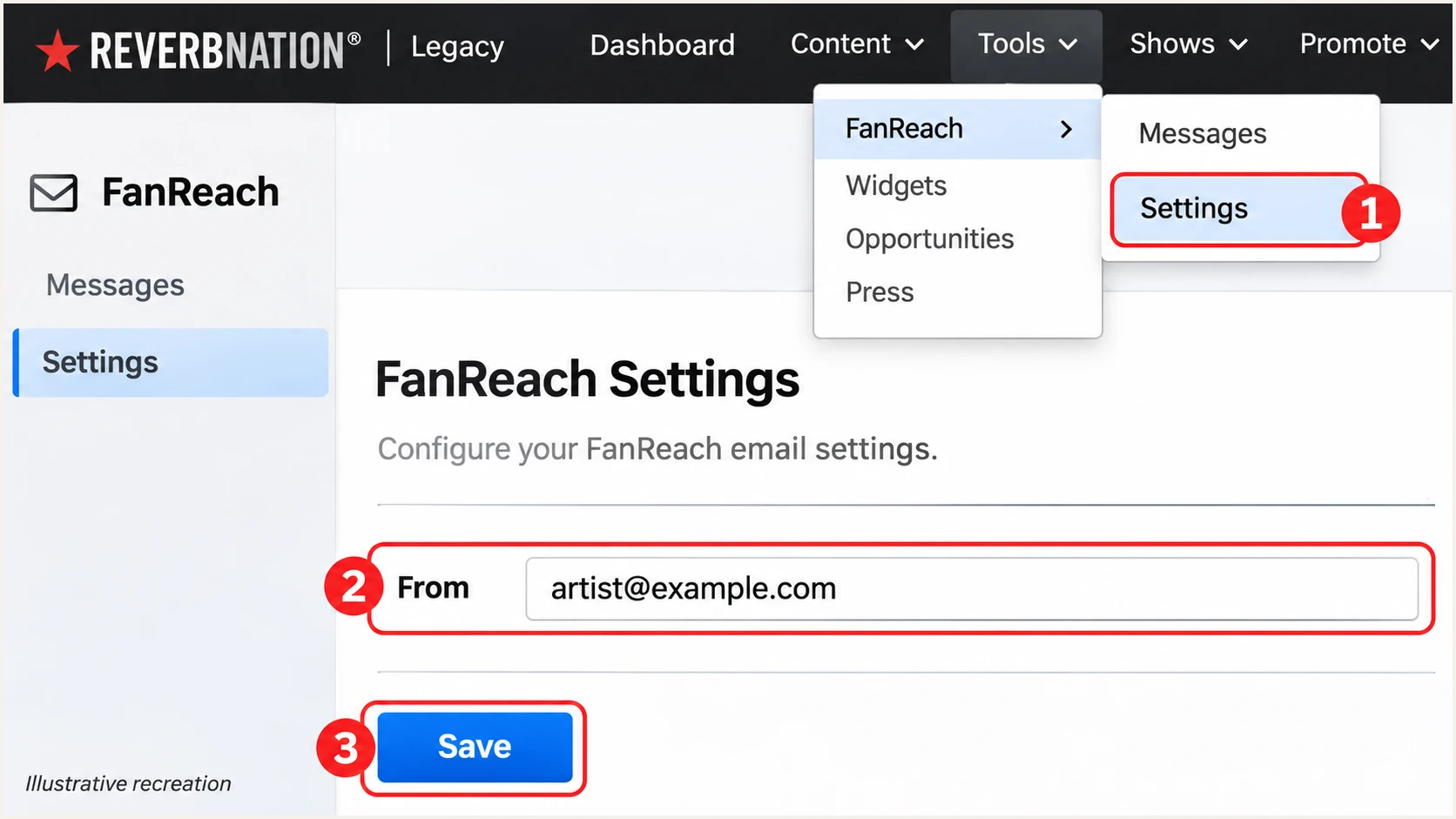
Illustrative recreation of ReverbNation Legacy FanReach Settings.
ReverbNation also documents mailsender@reverbnationapp.com as a fallback sender, with replies still routed to your configured address. Check the delivered From header to establish whose domain DMARC evaluates.
Set up SPF
Configure ReverbNation's custom Return-Path using the records supplied for your account. I check the actual envelope sender before editing SPF because SPF evaluates that domain, rather than the visible From address.
- Get exact values. Ask support for the Return-Path hostname and required DNS record types and targets. Do not assume include:reverbnation.com is an approved SPF mechanism.
- Publish at the correct host. If ReverbNation supplies a CNAME, publish that delegation. If it supplies TXT and MX records, publish those exact values at the specified bounce subdomain.
- Keep one SPF policy. Where a TXT-based SPF policy already exists at that same hostname, merge authorized mechanisms into one v=spf1 record. Stay within the 10 DNS-querying-term limit, including nested includes.
- Confirm the envelope domain. Ask support to activate the custom Return-Path, then verify that a delivered message uses your domain or its subdomain in smtp.mailfrom.
For example, bounce.example.com shares the organizational domain of a visible From address at example.com under relaxed DMARC matching. A policy with aspf=s requires an exact domain match instead.
Enter the actual Return-Path domain in the SPF checker below. Checking only example.com misses a policy published at bounce.example.com.
SPF checker
Find SPF syntax issues, lookup limits, and weak records.
?/16tests passed
A passing DNS check confirms the published policy. A delivered message establishes whether ReverbNation actually used that policy and an authorized sending IP.
If a message still uses a provider-owned Return-Path, SPF domain matching will fail for your custom From domain. DMARC still passes when a valid DKIM signature uses a matching domain. Adding ReverbNation to an unrelated root SPF record does not repair that mismatch.
Set up DKIM
I obtain the DKIM selector and public DNS record from ReverbNation. The sending system must hold the corresponding private key and sign messages using your domain.
- Request customer signing. Ask support to enable DKIM for your From domain and supply every required selector, record type, and value.
- Publish the records. Create each TXT or CNAME at the exact selector hostname supplied. Watch for DNS editors that append your domain automatically.
- Activate signing. After DNS resolves, ask ReverbNation to verify the records and confirm that customer-domain signing is active.
- Inspect a delivery. Check DKIM-Signature for d= and s=. The receiving server must report dkim=pass for a signing domain that matches your From domain.
DKIM configured for your ordinary mailbox does not automatically sign FanReach campaigns. ReverbNation needs its own configured signing key or delegated selector.
Under relaxed DMARC matching, a signing subdomain under the same organizational domain works. With adkim=s, the signing domain must exactly match the From domain.
Customer-domain signature
An example.com From domain and a passing signature with d=example.com satisfy the DKIM requirement for DMARC.
The selector locates the public key. Its name does not establish domain matching.
Provider-domain signature
A signature using d=reverbnationapp.com does not authenticate an example.com From domain for DMARC.
A matching, passing SPF result can still give that message a DMARC pass.
Do not generate an unrelated DKIM key and publish it as a substitute. DNS publication only works when ReverbNation signs with the matching private key.
Set up DMARC
Publish DMARC for the domain in your visible From address. For a new policy, start with p=none. If your domain already uses p=quarantine or p=reject, keep that policy while configuring ReverbNation.
- Check the existing record. Look up TXT records at _dmarc.example.com before changing anything. Keep a single DMARC policy at that name.
- Generate the policy. Use the DMARC record generator to prepare the record with a reporting address you control.
- Publish the TXT value. For example.com, use the host _dmarc or the full name _dmarc.example.com, according to your DNS editor. The monitoring example below starts with the required p=none policy.
- Set a real destination. Replace dmarc@example.com with your actual aggregate-report mailbox or reporting destination before publishing. Follow external reporting authorization instructions when the destination belongs to another domain.
Monitoring example: TXT at _dmarc.example.comtext
v=DMARC1; p=none; rua=mailto:dmarc@example.com
For a From address at news.example.com, check _dmarc.news.example.com and any inherited policy. DMARC belongs to the sender domain, not the DKIM selector or bounce hostname.
Run the DMARC checker against the visible From domain after saving DNS. Resolve syntax errors and duplicate policy records before sending a wider campaign.
DMARC checker
Look up a domain's DMARC record and catch policy issues.
?/7tests passed
A valid DMARC record does not prove that ReverbNation mail passes. It publishes the policy; receivers evaluate each message against its authenticated identities.
The p=none setting requests monitoring without requesting quarantine or rejection for DMARC failures. Receivers still apply their own spam filtering.
Verify and troubleshoot
I test mail delivered through ReverbNation itself. A message sent directly from your normal mailbox tests a different sending system.
- Send a controlled campaign. Deliver a FanReach message to a mailbox you control and open its full original headers.
- Read the identities. Compare From with smtp.mailfrom in the receiver's Authentication-Results and header.d for each passing DKIM signature. Reply-To does not determine DMARC.
- Check the verdict. Require dmarc=pass. Aim for both matching SPF and matching DKIM, while recognizing that either passing, matching method satisfies DMARC.
- Retest every path. Repeat for each From domain and campaign type you use. Check automated messages separately where your account exposes a different sending path.
Illustrative passing headers, not ReverbNation defaultstext
From: Artist <artist@example.com>
Return-Path: <bounce@bounce.example.com>
Authentication-Results: receiver.example;
  spf=pass smtp.mailfrom=bounce.example.com;
  dkim=pass header.d=example.com;
  dmarc=pass header.from=example.com
For a quicker diagnosis, the email tester below provides a unique recipient address. Send a message through ReverbNation directly to that address to analyze the delivered authentication results.
Use the same From address and sending path as your real campaign. Do not forward an existing email to the tester, because forwarding changes the delivery path.
Email tester
Send a real email to this address. Suped shows a results button when the test is ready.
?/43tests passed
Review the full diagnosis, then send another test after correcting a failed record. Keep the results with your DNS change notes so you can compare later deliveries.
If DNS still shows an old value, compare the authoritative answer with your resolver and allow cached data to expire according to its TTL. For unresolved signing failures, send ReverbNation support the complete original headers.
|
|
|
|---|---|---|
SPF error | Lookup count | Fix excess lookups |
SPF mismatch | Return-Path | Check custom host |
DKIM failure | Selector record | Confirm key and signing |
DMARC failure | From domain | Fix domain matching |
Start with the identity that failed, then verify a fresh delivery.
Authentication does not guarantee inbox placement. Review campaign bounces and recipient complaints separately from DNS authentication failures.
Get alerted when it breaks
Our platform, Suped, provides DMARC monitoring with source-level diagnostics and failure alerts. It gives your team an ongoing view of ReverbNation authentication after the initial delivery test.
- Review the source. Identify ReverbNation traffic in incoming aggregate reports and confirm it belongs to an approved account. Use sending IP and rDNS alongside authentication results.
- Enable notifications. In Suped notification settings, enable DMARC failure alerts and summary report emails for the people responsible for email DNS.
- Investigate the record. Open failed records to inspect SPF and DKIM results. Compare DNS history when failures follow a record change.
- Verify the repair. Follow Suped's issue-specific fix steps, then repeat a ReverbNation delivery test and watch subsequent reports.
Aggregate reporting depends on receivers sending reports, so these alerts are not an instant notification for every failed message. Keep ReverbNation's campaign bounce feedback in your operational checks.
I use source-specific results rather than a domain-wide percentage alone. A large successful sender can hide a smaller ReverbNation stream that is failing.
Keep the evidence together
Suped combines authentication diagnostics with detected issues and DNS history. That lets the team compare a failing ReverbNation stream with recent DNS changes and verify the fix using later reports.
Escalate unresolved failures with the sender domain, sending IP, timestamp, and full original headers. This gives ReverbNation support the identities and delivery evidence needed to investigate.
Secure your domain with p=reject
I move to p=reject after every legitimate sending stream has demonstrated a reliable DMARC pass. One successful ReverbNation test does not establish readiness for your whole domain.
- Inventory every sender. Review ReverbNation alongside your mailbox service and every other authorized sender. Investigate unknown sources before treating them as legitimate.
- Observe a full sending cycle. Include scheduled campaigns and infrequent legitimate mail. Resolve customer-domain DKIM failures and confirm the intended Return-Path is in use.
- Stage enforcement. For a domain starting at p=none, move to p=quarantine, review delivery and reports, then use p=reject when legitimate traffic remains authenticated. Keep existing enforcement in place.
- Manage the policy. Our Hosted DMARC lets you manage policy changes in Suped. Review ReverbNation's source results and failure alerts alongside each policy change.
- Check the scope. Review subdomain policies and inherited settings. Keep the reporting destination active after enforcement so later failures remain visible.
Enforcement example: TXT at _dmarc.example.comtext
v=DMARC1; p=reject; rua=mailto:dmarc@example.com
Resolve unmatched identities first
If ReverbNation cannot provide passing customer-domain DKIM or a passing custom Return-Path that matches your From domain, pause affected custom-domain campaigns and work with support. DNS publication alone cannot make the sending system use those identities.
Replace the example reporting address with your real destination and preserve other intentional policy tags. The reject policy requests rejection of messages that fail DMARC; receivers retain the final delivery decision.
Suped keeps the enforcement decision connected to actual source data. Use its failure diagnostics to fix legitimate ReverbNation mail before advancing the policy, then keep alerts enabled after reaching p=reject.
FAQ
A DNS lookup shows what you published. A delivered ReverbNation message shows which identities the sending system actually used.
ReverbNation's public FanReach guide does not specify a customer SPF include. Request the exact custom Return-Path records for your account. Publish them at the hostname supplied, and do not copy ReverbNation's own domain SPF policy into yours.
No. DMARC passes if a valid DKIM signature uses a domain that matches your visible From domain. If the Return-Path remains provider-owned, an SPF mismatch is expected for your custom From domain. Confirm the matching DKIM result passes on a delivered message.
That is ReverbNation's documented fallback sender. DMARC evaluates the delivered From domain, while replies go to your configured address. Publishing DMARC for your artist domain does not change authentication for a ReverbNation-owned From domain.
The .reverbnation.com rDNS suffix is associated with ReverbNation's sending infrastructure. Use it as a source-identification clue, then verify the sending IP and authentication results against your approved ReverbNation activity. An rDNS hostname alone does not prove domain authorization or a DMARC pass.
Yes, if DKIM passes with a domain that matches your From domain, the message passes DMARC without matching SPF. Confirm that result across your legitimate sending paths before enforcing reject. Configure a matching custom Return-Path as well when available, and keep monitoring after enforcement.