
How to set up DMARC/DKIM/SPF for Posteo

Published 22 Nov 2026
Updated 22 Nov 2026
10 min read
Summarize with
Posteo manages SPF, DKIM and DMARC for addresses on its own domains, such as posteo.de. You do not add those DNS records yourself. Posteo does not host custom domains or offer a custom-domain DKIM setup. For an external sender address, publish SPF and DMARC at your DNS host, then verify that the actual Return-Path matches your From domain before relying on SPF for DMARC.
I start with the sending address and a received test message. A Posteo identity changes the visible sender, but it does not create domain hosting or guarantee DMARC authentication.
Check your sending address
There is no 'Add domain' verification process in Posteo. Its public FAQ distinguishes custom-domain hosting from adding an external sender identity.
- Use a Posteo address. If your From address ends in a Posteo-owned domain, leave its authentication DNS to Posteo and proceed to message testing.
- Add an external identity. For an address you control, open Posteo webmail, select Settings, then Identities. Add an identity, enter your display name and email address, and save it. Select that identity when composing.
- Keep inbound delivery separate. Leave your domain's MX records with the service that receives its mail. An external identity does not make Posteo accept mail for your domain.
- Check the envelope sender. Send to a separate mailbox and inspect Return-Path and Authentication-Results there. Changing the From field alone does not establish SPF alignment.
Use your Posteo account credentials for authenticated SMTP. The submission server is posteo.de, with implicit TLS on port 465 or STARTTLS on port 587. An external sender identity is not a separate Posteo login.
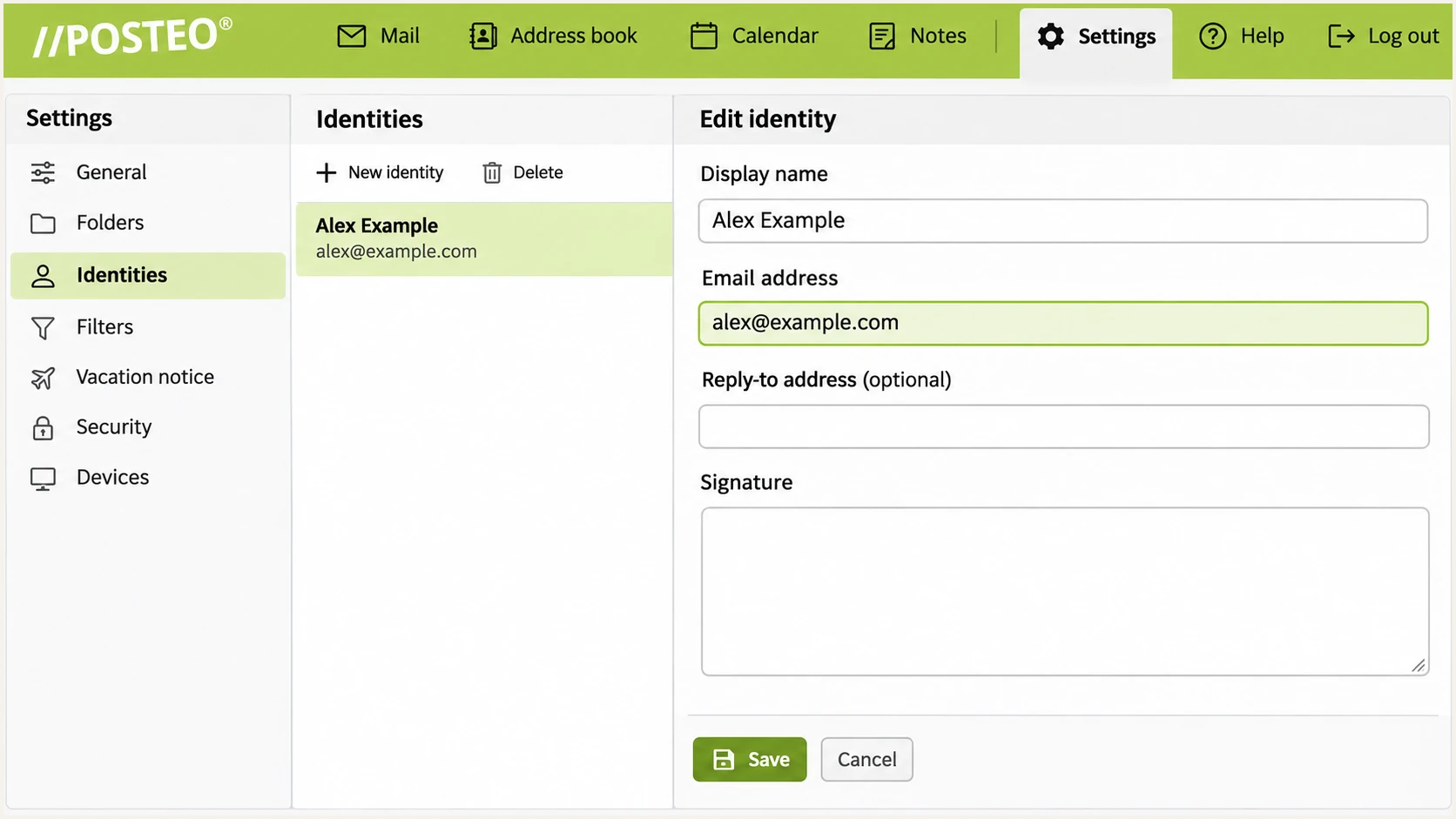
Illustrative Posteo identity form for an external sender address.
Set up SPF
For a Posteo-owned From address, SPF is already managed by Posteo. For an external domain sent through Posteo, its postmaster guidance identifies include:posteo.de as the authorization mechanism.
Publish authorization on the domain actually used in the SMTP envelope sender. SPF on an unrelated From domain is not consulted for that message.
- Find the existing record. At your DNS host, inspect TXT records on the Return-Path domain. Edit the single record beginning v=spf1; do not create a second SPF record.
- Authorize Posteo. Add include:posteo.de before the existing all mechanism. Preserve other authorized senders. The example below is only for a domain whose outbound mail uses Posteo alone.
- Check DNS limits. Keep the complete SPF evaluation within 10 lookup-causing terms, including nested includes. Do not copy Posteo's current IP addresses into a static record.
- Test the identity. Require spf=pass for the actual envelope domain and confirm it matches the From domain under your DMARC alignment mode.
SPF example: TXT at example.com, only when Posteo is the sole sendertext
v=spf1 include:posteo.de -all
Run the SPF check against posteo.de for a Posteo address, or against the observed Return-Path domain for an external identity.
SPF checker
Find SPF syntax issues, lookup limits, and weak records.
?/16tests passed
A valid DNS record proves syntax and authorization. It does not prove that Posteo used your domain in the envelope sender; only a received test message establishes that.
If the Return-Path remains on a Posteo domain, adding Posteo to your own domain's SPF does not fix SPF alignment. That failure is acceptable for DMARC only when a passing DKIM signature uses a matching domain.
Do not assume an external identity passes DMARC
Posteo does not provide custom-domain DKIM provisioning. If an external identity has neither matching SPF nor matching DKIM, change the sending route or use your Posteo address. DNS authorization alone cannot repair both mismatches.
Set up DKIM
Posteo applies DKIM signing for its own supported sender addresses. There is no customer DKIM selector or private-key upload workflow for your external domain.
- Send with your Posteo address. Select your Posteo identity in the From field and send directly to an external recipient.
- Inspect the signature. In the received message source, find DKIM-Signature. Note d=, the signing domain, and s=, the selector. Check the receiving system's Authentication-Results for dkim=pass.
- Compare domains. The passing signature's d= domain must match the From domain according to the domain's DMARC policy. A valid signature for posteo.de does not authenticate a From address at example.com.
- Avoid invented keys. Do not generate a DKIM key and publish it expecting Posteo to sign with it. For custom-domain DKIM, use an outbound mail service that provisions signing for that domain.
I take the selector from a fresh message rather than guessing. The command below illustrates a lookup only if the actual signature contains d=posteo.net and s=2017; substitute the values you received.
Inspect the key for the observed signing domain and selectorbash
dig +short TXT 2017._domainkey.posteo.net
Posteo-owned address
Posteo controls signing and DNS. Verify the receiver reports a valid signature with a matching signing domain. Report persistent signing failures to Posteo.
External sender identity
There is no custom-domain DKIM setup to complete in Posteo. Without a matching DKIM signature, DMARC depends on passing SPF for a matching envelope domain, which is vulnerable to forwarding.
Set up DMARC
Create a DMARC record only for a domain you control. Posteo customers cannot change the policy for posteo.de or its other shared domains.
For a new deployment, start with p=none to collect reports without requesting quarantine or rejection. If your domain already uses p=quarantine or p=reject, keep that policy while fixing the sender.
- Choose the DNS name. At your DNS host, create one TXT record at _dmarc.example.com. Enter _dmarc if the DNS panel automatically appends example.com.
- Set the reporting destination. Use the example below as a template, replacing example.com with your real domain and dmarc@example.com with a mailbox or report-processing address you control.
- Preserve a single policy. If a DMARC record already exists at that name, edit it. Multiple DMARC policy records prevent normal policy processing.
- Confirm publication. Save the TXT record, wait for the previous DNS TTL to expire, and check the published result. An external report destination requires authorization by its receiving domain.
Initial DMARC template: TXT at _dmarc.example.comtext
v=DMARC1; p=none; rua=mailto:dmarc@example.com
Use the DMARC record generator to prepare the record. A reporting mailbox receives XML attachments; publishing rua does not interpret those reports.
Run the check on your actual From domain. For a standard Posteo mailbox, this is a read-only check of Posteo's policy, not a record you can edit.
DMARC checker
Look up a domain's DMARC record and catch policy issues.
?/7tests passed
A published p=none record does not make an unauthenticated message pass. DMARC still requires a passing SPF result with a matching envelope domain, or a passing DKIM result with a matching signing domain.
Aggregate reports arrive on receiver schedules, commonly daily. Check both DNS publication and message results before interpreting missing reports as a configuration failure.
Verify and troubleshoot
I test the exact identity and sending path used for real mail. A successful webmail test does not prove that a desktop client uses the same From address or SMTP route.
- Open the tester. Use the widget below to obtain its test recipient address. Do not reuse an address from an old test.
- Send through Posteo. Compose a new message, select the intended From identity, enter the test recipient and send. Repeat through each mail client used in production.
- Read the diagnosis. Check SPF authentication and its envelope domain, DKIM authentication and its signing domain, and the final DMARC result. Investigate mismatches even when both protocols report pass.
- Retest the repair. After DNS changes have propagated, send a fresh message. Keep the received headers and any SMTP rejection code for support.
The email tester gives a faster configuration check than waiting for aggregate reports. It prompts you to send a message and returns authentication diagnostics for that actual delivery.
Email tester
Send a real email to this address. Suped shows a results button when the test is ready.
?/43tests passed
A passing test covers the tested message. It does not guarantee inbox placement or prove that every identity and forwarding path behaves the same way.
Use these results to choose the repair. DNS ownership determines whether you can make the change or need Posteo support.
|
|
|
|---|---|---|
SPF permerror | Duplicate or excess lookups | Repair SPF |
SPF mismatch | Different envelope domain | Check Return-Path |
DKIM mismatch | Different signing domain | Change sending route |
DKIM failure | Key or message problem | Retest direct delivery |
DMARC failure | No matching pass | Fix sender identity |
DMARC pass, spam | Other filtering signals | Inspect delivery details |
For mail sent directly with a Posteo address, persistent SPF or DKIM failures belong with Posteo support. Supply the delivery time, full received headers and recipient error; never send account passwords.
Get alerted when it breaks
For a domain you control, Suped is our DMARC platform for turning aggregate reports into source-level failures and repair steps. It is a practical fit when an external Posteo identity depends on SPF and needs continued monitoring.
- Enable issue notifications. In Suped notification settings, enable Issues detected and Sending sources need verification. Keep DMARC summary emails enabled for regular review.
- Review new sources. Check whether each newly observed source is an authorized sender before marking it verified. A posteo.de hostname alone is not proof of authorization.
- Investigate failures. Inspect the source's envelope domain and DKIM signing domain in detailed records. Use Suped's issue-specific repair steps, then send another test message.
- Track DNS changes. Use Suped DNS history to compare record changes with the start of failures. Keep monitoring active after every policy change.
Suped's DMARC monitoring connects report analysis with issue notifications. Report-based alerts depend on receivers sending their aggregate data, so they are not instantaneous alerts for every message.
Shared Posteo domains remain provider-managed
A personal Posteo mailbox does not give you control of its shared domain's rua destination or policy. Use message testing and Posteo support for that address. Suped monitoring applies to domains whose reporting configuration you control.
Secure your domain with p=reject
Enforce rejection only on a domain you control, after legitimate sending paths consistently pass DMARC. For an external Posteo identity, SPF-only success on direct mail needs extra scrutiny because forwarding commonly breaks SPF.
- Inventory real traffic. Review Suped reports across a complete sending cycle, including infrequent senders. Confirm every legitimate source has a matching SPF or DKIM pass.
- Resolve the DKIM gap. Test forwarding and mailing-list paths. If the external Posteo identity lacks matching DKIM and loses its SPF pass, move that identity's outbound mail to a service that signs for your domain.
- Stage enforcement. Change p=none to p=quarantine, review new failures and delivery complaints, then change to p=reject when authorized traffic remains authenticated. Keep rua reporting active.
- Keep existing protection. Do not downgrade an established quarantine or reject policy merely to add Posteo. Fix the route or sender identity before using it.
Suped's source verification and detailed failure records provide evidence for each policy change. Our Hosted DMARC lets teams manage those policy changes in the dashboard after its DNS delegation is configured.
Final policy example: only after legitimate mail has been verifiedtext
v=DMARC1; p=reject; rua=mailto:dmarc@example.com
Keep the reporting loop active
After enforcement, continue reviewing Suped issue notifications and source changes. A new application or changed sending route needs authentication verification before it sends production mail.
SPF authorizes Posteo's sending servers, not an individual Posteo account. For an external identity on shared infrastructure, assess that trust boundary before treating SPF-only DMARC success as sufficient protection.
A reject policy requests rejection for messages that fail DMARC; the receiving system makes the final delivery decision. It does not prevent display-name impersonation or messages sent using lookalike domains.
Frequency asked questions
Posteo does not host custom domains or provide a domain verification wizard. An external sender identity changes the From address, while inbound delivery and your domain's DNS remain separate responsibilities.
The relevant mechanism is include:posteo.de. Add it to the existing SPF record on the actual envelope domain. A complete example for Posteo-only sending is shown above. This helps DMARC only when that envelope domain matches your From domain under the policy's alignment mode.
Posteo does not offer custom-domain DKIM provisioning. Its own addresses use provider-managed signing. Publishing a DKIM key in your domain's DNS does not make Posteo use the corresponding private key.
Yes, if the passing DKIM signature's signing domain matches the From domain under DMARC. A passing signature for a different Posteo domain is insufficient for an external From address. Check the final DMARC result rather than treating dkim=pass alone as success.
Hostnames such as mout01.posteo.de and mout02.posteo.de are associated with Posteo's outbound mail infrastructure. The posteo.de suffix helps identify the sending network, but does not establish that a message is authorized for your domain. Confirm the connecting IP and authentication results.
You cannot change the DMARC policy of a shared Posteo domain. Posteo controls that policy. For your own external From domain, enforce p=reject only after you have verified all legitimate sending paths, including the consequences of relying on SPF without matching DKIM.




