
How to set up DMARC/DKIM/SPF for Postale.io

Published 22 Nov 2026
Updated 22 Nov 2026
11 min read
Summarize with
To authenticate Postale.io email, publish its SPF TXT value "v=spf1 mx ~all" when your MX points to Postale.io, copy your domain-specific DKIM record from Postale.io, and publish one DMARC TXT record at _dmarc. Start a new DMARC deployment with p=none and reporting. Keep p=quarantine or p=reject if either is already working.
I finish by testing an email sent through Postale.io. A valid DNS record alone does not prove that the message has passing authentication and domain alignment. Replace example.com throughout with your sending domain.
Add your domain
Postale.io verifies domain control during setup. I prepare the mailboxes before changing MX records when migrating an existing domain.
- Create the account: Sign up with your desired domain email address and an existing contact address. The domain email address becomes your first mailbox.
- Add another domain: In an existing account with a multi-domain plan, open Domains > Add a domain and enter the domain.
- Verify ownership: Follow the DNS configuration page after sign-up. During a migration, choose "Or verify via TXT record" and publish the exact verification TXT value supplied there.
- Switch incoming mail: After creating the required mailboxes, set the root MX to mail.postale.io. with priority 0. Replace the previous provider's MX records when the migration is ready.
- Confirm setup: Complete the DNS page's verification, sign in with an administrator address, open your domain page and select DNS diagnostic.
The MX change routes incoming mail to Postale.io. It is separate from DMARC, although Postale.io's SPF recommendation uses the MX hosts to authorize outbound servers. The ownership and migration options are documented in its setup FAQ.
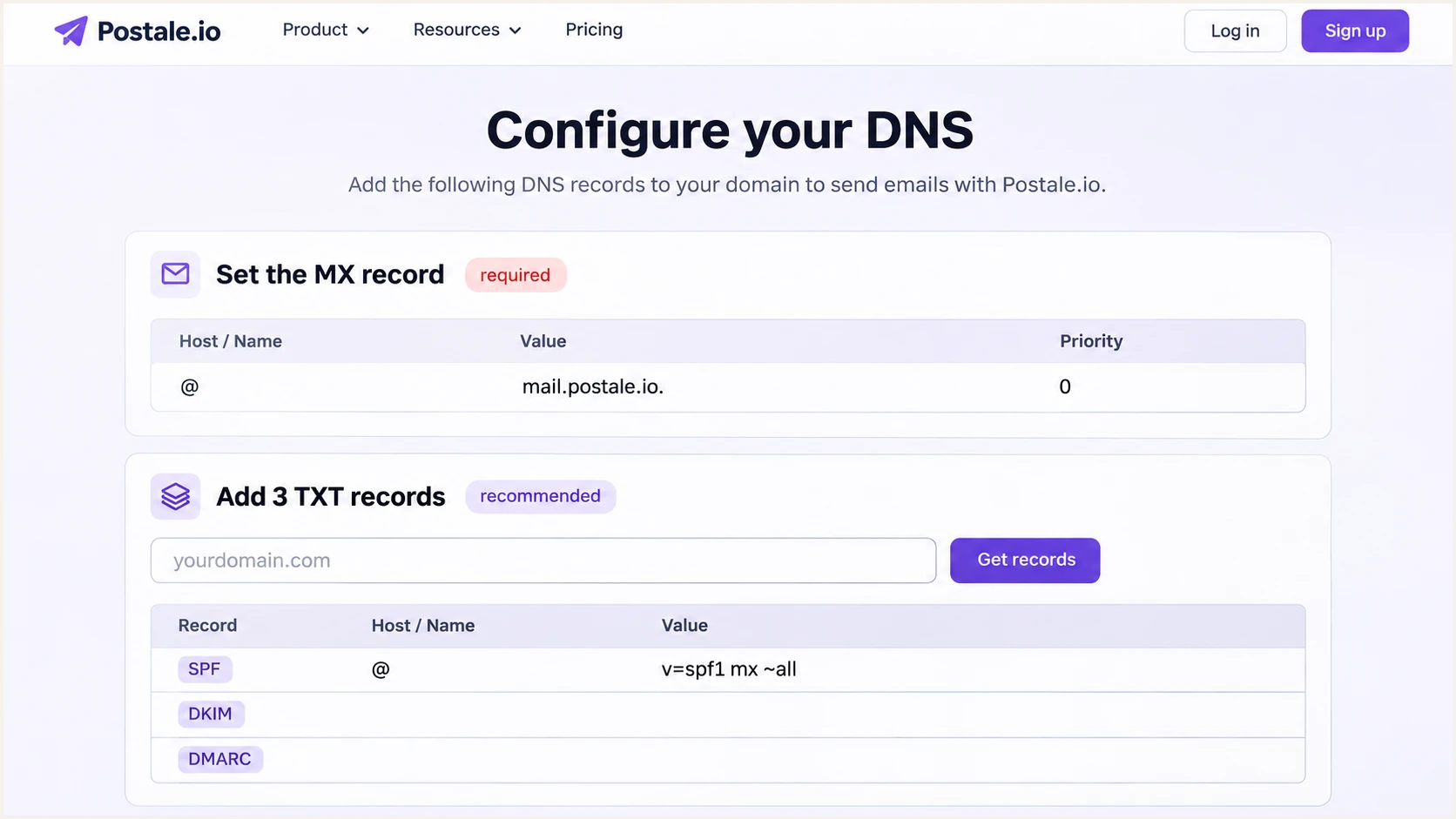
Postale.io DNS setup page with its MX value and domain-specific record lookup.
Keep the ownership TXT record separate from SPF. Several TXT records at the root are normal; several records beginning with v=spf1 at that same name are invalid.
Do not change MX records merely to repair authentication on a domain that already receives mail correctly through Postale.io.
Set up SPF
Postale.io's DNS configuration guide publishes "v=spf1 mx ~all". The mx mechanism authorizes the IP addresses of your domain's MX hosts. This works for its standard configuration when the root MX is mail.postale.io.
- Find the current policy: Open DNS at your authoritative DNS provider and locate the root TXT record beginning with v=spf1.
- Publish one record: For a domain sending only through the standard Postale.io setup, set type TXT, host @ and the value shown below. Keep the provider's default TTL.
- Preserve other senders: If a policy already exists, retain its legitimate mechanisms and add mx if missing, before the final all mechanism. Publish one combined SPF record.
- Check alignment: Postale.io supports a Return-Path using your domain. Test the actual message and compare smtp.mailfrom with the visible From domain.
Root TXT value for a standard Postale.io-only domaintext
v=spf1 mx ~all
The ~all ending returns SPF softfail for unmatched IP addresses. It does not itself request DMARC quarantine or rejection. I keep an existing, intentional -all policy when adding Postale.io authorization.
Run the SPF checker with your sending domain after saving. Check the expanded policy, including the 10 DNS-lookup-term limit across nested includes. If an inbound gateway is your MX, mx authorizes that gateway instead; ask Postale.io for the supported outbound authorization before using this example.
SPF checker
Find SPF syntax issues, lookup limits, and weak records.
?/16tests passed
A passing lookup confirms the published policy. A received message must also show spf=pass for the actual envelope sender domain.
Under default relaxed DMARC alignment, the envelope sender and visible From can use different subdomains of the same organizational domain. A passing SPF result for an unrelated domain does not satisfy DMARC.
Keep every legitimate sender in the existing policy. Do not replace a combined SPF policy with the Postale.io-only example, and do not add a second SPF record.
Set up DKIM
I copy the selector and public key directly from Postale.io. Its DKIM documentation places these values in the DKIM section of your domain page in the admin interface. There is no universal selector or public key to paste for every account.
- Open the domain: Sign in as an administrator, select Domains and open your sending domain. Find the DKIM section.
- Copy the record: Copy the displayed TXT hostname and entire public-key value. Keep the selector exactly as supplied.
- Publish the key: Add the TXT record at your DNS provider. If it appends the domain automatically, enter only the selector followed by ._domainkey in the host field.
- Check the signature: Send through Postale.io and confirm dkim=pass. The signature's d= domain must satisfy DMARC alignment with your visible From domain.
Use the key shown for your own domain, rather than a selector copied from a demonstration. Keep DKIM selectors belonging to other active senders.
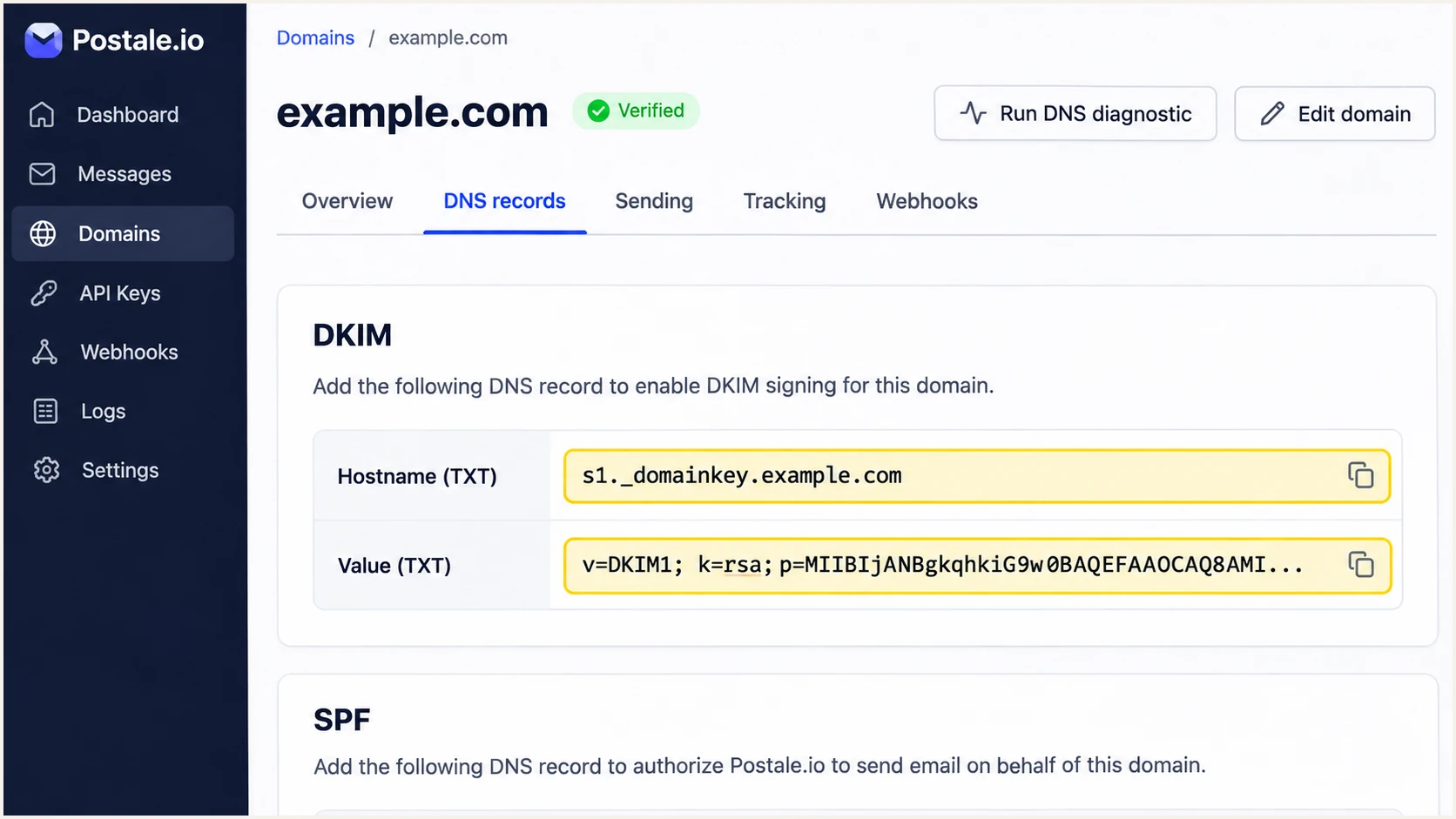
Postale.io domain page showing where to copy the DKIM hostname and public key.
DNS providers sometimes display a long TXT value as several quoted chunks. That is valid when the chunks belong to one TXT record and concatenate into the complete public key. Do not publish the chunks as separate records.
A valid key in DNS does not prove that mail is signed. I check the received message's DKIM-Signature and the receiving server's Authentication-Results after publishing.
Set up DMARC
DMARC checks whether a passing SPF or DKIM result has domain alignment with the visible From address. Only one of those passing, matching methods is required, although I configure both for Postale.io.
- Inspect the policy: Look up the TXT record at _dmarc.example.com. Edit the existing record rather than publishing another DMARC record.
- Start reporting: For a new deployment, publish type TXT at host _dmarc with the exact starter value below, replacing the example report address with a real destination.
- Keep enforcement: If your domain already has p=quarantine or p=reject, keep it while fixing Postale.io SPF and DKIM.
- Confirm reports: Use a mailbox that accepts aggregate XML reports, or the reporting address supplied by your monitoring service. Complete external-report authorization when the destination requires it.
Starter DMARC TXT value at _dmarctext
v=DMARC1; p=none; rua=mailto:dmarc@example.com
Create the record with our DMARC record generator. Replace dmarc@example.com before publishing; it is an example mailbox. Keep a single DMARC record and preserve any existing reporting destinations you still need.
Run the DMARC checker after saving. Check syntax and the reporting destination. The default relaxed alignment settings are appropriate for the initial setup; strict settings require exact domain matches.
DMARC checker
Look up a domain's DMARC record and catch policy issues.
?/7tests passed
A valid p=none record requests reporting without asking receivers to quarantine or reject mail because of DMARC failure. It does not protect the domain with an enforcement policy.
Aggregate reports usually cover daily reporting periods and arrive later than a message test. Not every receiver sends them, and they do not provide a live record of every message.
Verify and troubleshoot
I verify DNS and a newly received message separately. The Postale.io DNS diagnostic button is on the domain page after ownership verification.
- Recheck DNS: Run DNS diagnostic in Postale.io, then query the published records. Use the real selector from the DKIM section in place of YOUR_SELECTOR below.
- Test each route: Send separately through Postale.io webmail and any application using Postale.io SMTP. Test aliases and other sending domains individually.
- Inspect the result: Expect dmarc=pass and a passing SPF or DKIM result with the required domain relationship. Treat spf=permerror and missing DKIM signatures as configuration failures.
- Retest after caching: Wait for the previous DNS TTL to expire when results disagree, then send a fresh message. Rechecking an old message does not rerun authentication.
Check published records with digbash
dig +short MX example.com
dig +short TXT example.com
dig +short TXT YOUR_SELECTOR._domainkey.example.com
dig +short TXT _dmarc.example.com
For a fast end-to-end check, open the email tester below, copy its destination address and send it a message through Postale.io. The resulting diagnosis checks the message that actually left your account.
Keep the visible From address and sending route the same as normal business email. Inspect authentication results and the Return-Path before testing another mailbox or alias.
Email tester
Send a real email to this address. Suped shows a results button when the test is ready.
?/43tests passed
A successful direct test should show DMARC passing. If SPF lacks domain alignment but DKIM passes with it, DMARC still passes. Fix unexpected SPF failures on direct Postale.io mail, since this service supports a matching Return-Path.
Forwarding often breaks SPF because the forwarding server uses another IP address. A valid DKIM signature with domain alignment can preserve DMARC success if the message remains intact.
|
|
|
|---|---|---|
SPF error | Duplicate policy | Merge SPF records |
SPF softfail | MX mismatch | Check outbound IP |
DKIM missing | Wrong SMTP route | Check message path |
DKIM key absent | Wrong TXT host | Check selector name |
DMARC fail | Domain mismatch | Check From domains |
No reports | Bad destination | Check rua delivery |
Start with the specific failure rather than weakening the DMARC policy.
Get alerted when it breaks
Suped, our DMARC platform, provides ongoing DMARC monitoring for Postale.io sending. Its issue detection and notifications help catch authentication failures after the initial setup.
- Enable notifications: In Suped notification settings, enable Issues detected and Sending sources need verification. Enable DMARC summary emails for a recurring review.
- Review the sender: Inspect the Postale.io source in the report data and verify it only after confirming it belongs to your organization.
- Investigate the failure: Filter by source, reporter or sending IP, then open the detail view for SPF, DKIM and DMARC diagnostics.
- Check recent changes: Compare DNS history when a previously passing sender fails. Follow the issue's steps to fix, verify the change and send another test.
I keep direct message tests alongside report monitoring. Suped alerts depend on the report data arriving; they are not instantaneous notifications for every failed delivery.
Postale.io setup checks
Use the domain page's DNS diagnostic to compare your records with the provider's configuration. Send a test after each change.
Ongoing checks with Suped
Use aggregate report data to inspect sending sources over time, investigate detected issues and receive notifications when attention is needed.
Secure your domain with p=reject
I move to p=reject after every legitimate sending source has demonstrated DMARC success. A successful Postale.io test alone does not establish that the whole domain is ready.
- Inventory senders: Review Suped report sources and confirm expected business systems, including infrequent billing or support messages. Investigate unknown sources before authorizing them.
- Fix legitimate failures: Use Suped record details to identify domain mismatches or authentication failures. Retest each affected system through its normal sending route.
- Stage enforcement: Observe a complete business sending cycle, then change p=none to p=quarantine. Review reports and delivery complaints before moving to p=reject.
- Review subdomains: Check whether subdomains inherit the organizational domain policy or publish their own DMARC records. Apply an intentional subdomain policy after testing their senders.
- Keep monitoring: Retain aggregate reporting and Suped issue notifications after enforcement. Investigate new failures whenever a sender or DNS record changes.
Suped's hosted DMARC lets teams manage the policy through our dashboard after its DNS setup. Keep Postale.io SPF and DKIM records in place while staging the DMARC policy.
Readiness depends on known legitimate mail passing, rather than an arbitrary number of days or the total pass rate alone. Spoofing attempts are expected to fail and should not delay enforcement once legitimate senders are accounted for.
p=reject asks receivers to reject mail that fails DMARC, subject to their local handling. It also affects legitimate senders that remain misconfigured. Keep your working reporting destination when making this change.
Enforced DMARC example after validationtext
v=DMARC1; p=reject; rua=mailto:dmarc@example.com
DMARC enforcement reduces unauthorized use of your domain in the visible From address. It does not guarantee inbox placement or prevent impersonation using a different domain.
Frequency asked questions
The standard recommendation is v=spf1 mx ~all at the root domain, with MX pointing to mail.postale.io. If other services send for the domain, merge their authorization into the same SPF record. If your MX points at an inbound gateway, obtain the supported outbound authorization from Postale.io.
Use the selector and public key displayed in the DKIM section of your domain page in the Postale.io admin interface. They are domain-specific. The selector in a received message's DKIM-Signature identifies the DNS key used for that message.
Yes. On the DNS configuration page after sign-up, choose "Or verify via TXT record" and follow its instructions. This permits account setup before the incoming-mail migration. Change MX when the mailboxes and migration are ready.
No. DMARC passes when either SPF or DKIM passes with the required domain alignment. A passing DKIM signature with that alignment is sufficient. Postale.io supports Return-Path alignment, so investigate unexpected SPF alignment failures on mail sent directly through its service.
A verified PTR hostname ending in .postale.io points to Postale.io-named infrastructure. Treat it as a clue rather than proof that your organization authorized the message. Check the actual source IP, forward DNS and passing authentication for your domain. mail.postale.io is the documented service hostname; it is not an exhaustive list of outbound PTR names.
Keep a working p=reject or p=quarantine policy. Publish and verify Postale.io authorization and DKIM before moving production sending. Use p=none as the reporting starting point for a new DMARC deployment, then stage enforcement after validating legitimate senders.




