
How to set up DMARC/DKIM/SPF for Pair Networks

Set up Pair Networks email authentication by activating SPF and DKIM in the Account Control Center (ACC), publishing the records at your authoritative DNS host, and adding a DMARC TXT record. I also route website email through authenticated SMTP, because Pair's DKIM signing only covers SMTP-authenticated messages.
DMARC passes when SPF or DKIM passes with a domain that matches the visible From domain under the configured alignment rules. Pair supports a custom-domain Return-Path, so configure both methods and verify the identities in a delivered message.
Add your domain
I start in Pair Networks' ACC. The steps below use the new interface for Shared, VPS, or Dedicated hosting. If your sending domain is already listed, open that domain instead of adding it again.
- Open domains. Sign in to the ACC, select Domains, then Add New.
- Enter the domain. Under Add Existing Domain/Subdomain, choose Add Domain. Enter your registered domain without a protocol or www prefix.
- Choose hosting. Select the required hosting type and click Proceed. Confirm the domain appears in Domains.
- Check mail access. Confirm the account has mailboxes or the Email Add On, and that the sending mailbox exists.
Adding a domain to ACC does not prove that its public DNS points to Pair. I check its authoritative name servers before publishing authentication records.
Keep an existing external DNS host if needed, and publish the records there. Moving name servers is a separate migration that requires preserving the existing DNS zone, including MX records.
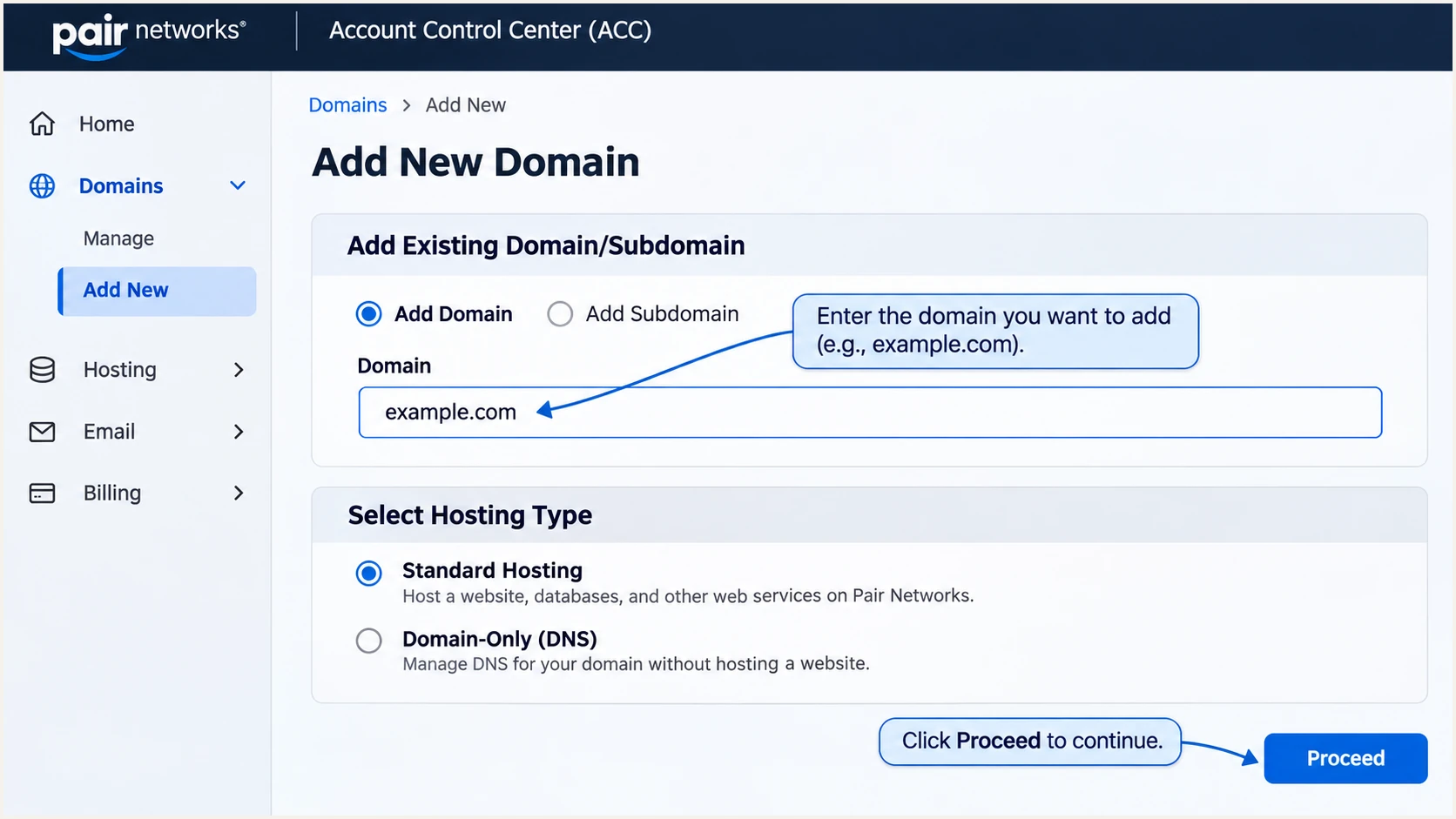
Pair Networks ACC domain form with Add Domain and Proceed highlighted.
In the legacy ACC, the equivalent starting path is Domains > Add a Domain Name. I confirm the public name servers with the following lookup; the result identifies where DNS changes must be made.
Find the domain's authoritative DNS hostbash
dig +short NS example.com
Set up SPF
I use the SPF value generated for this Pair account. Pair's preconfigured record depends on the account and mail servers, so copying another domain's SPF record is unreliable.
- Open SPF. Go to Domains > Edit beside your domain > Email > Sender Policy Framework (SPF) > Edit.
- Activate or merge. Click Activate SPF if no SPF record exists. Otherwise, combine Pair's required mechanisms with existing authorized senders in one record.
- Publish externally. If DNS is hosted elsewhere, copy the account's SPF value into a TXT record there. Recheck it after Pair server changes.
- Set the envelope sender. Configure the application's SMTP MAIL FROM, also called the envelope sender, to an address on your sending domain. Verify the received Return-Path.
SPF is checked at the envelope sender's domain. For a Return-Path such as bounces@example.com, publish SPF at example.com. A separate bounce subdomain needs its own SPF authorization.
Run the checker against that actual domain. In the legacy ACC, the activation path is Domains > Manage Your Domain Names > your domain > Change SPF Settings.
SPF checker
Find SPF syntax issues, lookup limits, and weak records.
?/16tests passed
Keep one TXT record beginning with v=spf1 at each SPF domain. Multiple SPF records produce a permanent error. Stay within the limit of 10 evaluated DNS-lookup terms, including nested includes.
A provider-owned Return-Path produces an SPF alignment failure even when SPF passes. If an application cannot use your domain there, rely on passing DKIM with a matching domain for DMARC; adding SPF at your visible From domain will not fix that mismatch.
Check SPF at the envelope sender's domainbash
dig +short TXT example.com
dig +short TXT bounce.example.com
Set up DKIM
I enable Pair's domain-level signing before testing applications. Pair's DKIM documentation limits this control to hosting packages with mailboxes.
- Open DKIM. Go to Domains > Edit beside your domain > Email > DomainKeys Identified Mail (DKIM) > Edit.
- Activate signing. Click Activate DKIM. This affects the domain's mailboxes.
- Publish the key. With external DNS, copy the DKIM Hostname and complete DKIM TXT Record Value shown in ACC to that DNS host. Use Pair's selector, not a guessed default.
- Authenticate SMTP. Use the mailbox's ACC SMTP settings and credentials. Choose port 465 with SSL/TLS or port 587 with STARTTLS, and use your own domain in From.
Pair-managed name servers receive the DKIM record automatically. Pair Domains Custom DNS is a separate DNS service: publish the copied TXT record there manually when it is authoritative.
I copy the Outgoing Mail Server (SMTP) value from ACC's mailbox settings. Newer accounts commonly use username.mail.pairserver.com; older accounts use account-specific Pair hostnames. Keep the password private.
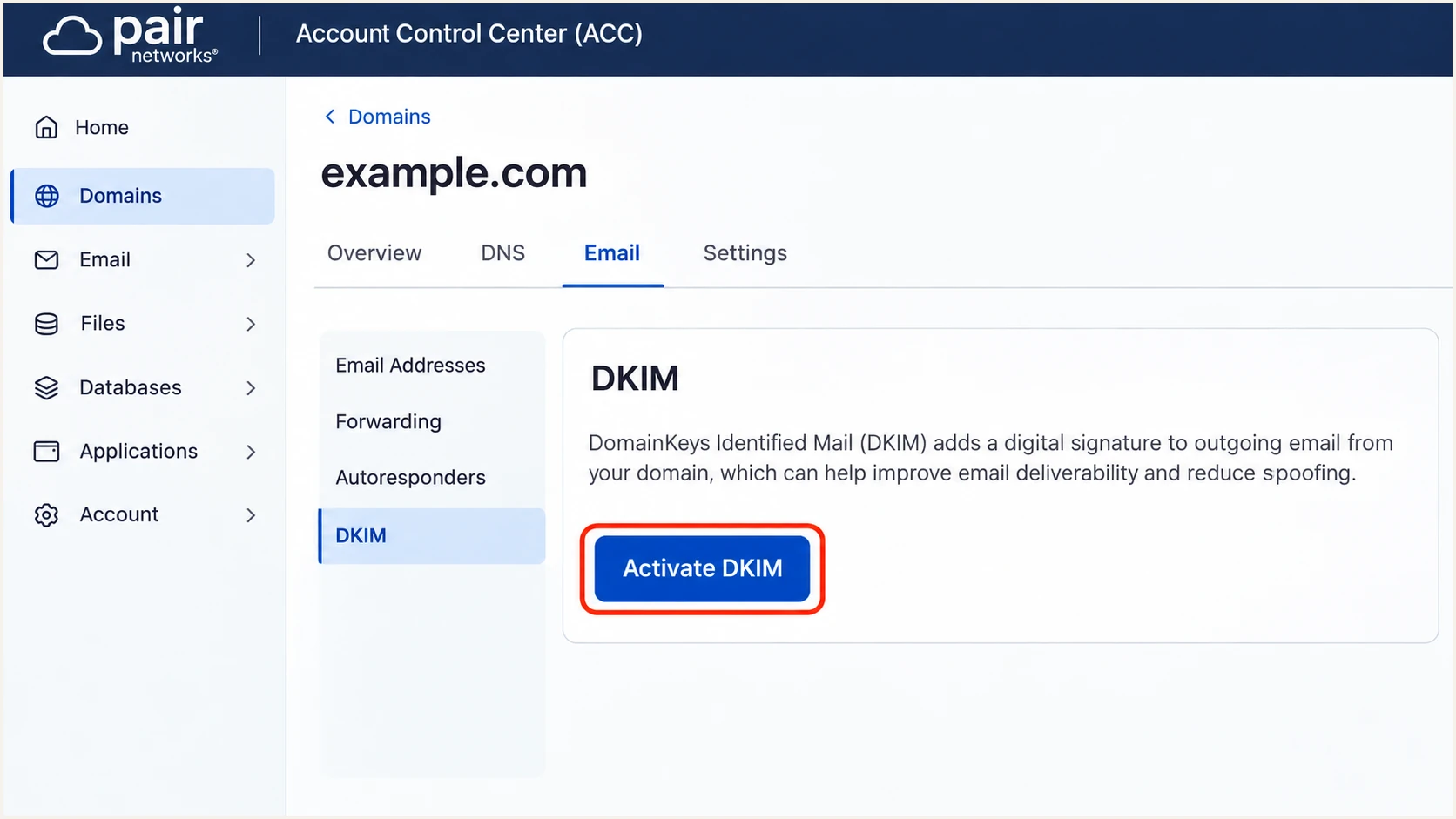
Pair Networks ACC DKIM controls with Activate DKIM highlighted.
For website forms, configure authenticated SMTP in the application's mail settings instead of assuming local PHP mail() receives a signature. Put the visitor's address in Reply-To and keep From on your own domain.
In the legacy ACC, use Domains > Manage Your Domain Names > your domain > Change DKIM Settings. After publication, send a fresh message and read its signing domain and selector.
Set up DMARC
I start a new DMARC deployment with p=none so reports expose failures before enforcement. If the domain already has p=quarantine or p=reject, keep that policy and fix Pair's authentication without downgrading it.
- Open DNS. For Pair-hosted DNS, use Domains > Edit beside your domain > DNS > Name Servers > Edit > Manage DNS Records.
- Create the TXT entry. Choose Add New DNS Entry > TXT > Proceed. Enter _dmarc in Hostname and the value below in Text Record, then click Create TXT Record.
- Update an existing record. Edit the existing DMARC TXT record instead of adding a second one. With external DNS, make the change at that provider.
- Set reporting. Replace the example report address with a working mailbox you control or your assigned aggregate-report address.
Starter DMARC TXT value at _dmarc.example.comtext
v=DMARC1; p=none; rua=mailto:dmarc@example.com
This is the exact starter syntax. The example address is a placeholder. A reporting destination on another domain requires that destination's external-report authorization.
Use the DMARC record generator to build the value with your real reporting address, then check the published domain below.
DMARC checker
Look up a domain's DMARC record and catch policy issues.
?/7tests passed
I verify that the public lookup returns one valid DMARC policy at _dmarc.example.com. A valid DNS record confirms publication; it does not prove that the website's messages pass authentication.
Aggregate reports generally arrive daily. Allow 24-48 hours after sending test traffic to participating receivers before treating an empty report inbox as a reporting fault.
Monitoring does not enforce a policy
p=none requests reports without requesting quarantine or rejection for DMARC failures. Keep collecting reports while correcting legitimate senders, then stage enforcement after testing.
Verify and troubleshoot
I test a mailbox message and each production website mail path separately. A successful mailbox test does not prove that a contact form, password reset, or scheduled job uses the same transport.
- Send real messages. Trigger each application and inspect messages at an external receiving mailbox. Include a forwarded route when your users rely on forwarding.
- Read receiver results. Inspect the receiving server's Authentication-Results for SPF, DKIM, and DMARC. Compare smtp.mailfrom and header.d with header.from.
- Check the selector. Read s= and d= in DKIM-Signature. Query TXT at selector._domainkey.signing-domain using those actual values.
- Retest after DNS changes. Check authoritative answers and allow cached values to expire according to TTL. Always send a new message after a fix.
Illustrative passing receiver resultstext
Authentication-Results: receiver.example;
  spf=pass smtp.mailfrom=example.com;
  dkim=pass header.d=example.com;
  dmarc=pass header.from=example.com
These header values are illustrative. Under relaxed DMARC rules, an authenticated subdomain can share the organizational domain with From. Strict settings require an exact domain match.
The email tester is the quickest practical check: send a message to the address it provides to receive a full diagnosis. Send it through the actual application being verified.
Email tester
Send a real email to this address. Suped shows a results button when the test is ready.
?/43tests passed
A DNS check cannot see the transport or identities chosen by an application. I use the test message to confirm what the receiving server actually evaluated.
Separate authentication failures from domain mismatches. A passing SPF result for a Pair-owned domain does not authenticate your visible From domain for DMARC.
SPF mismatch, valid DKIM
SPF uses a provider domain, but DKIM passes with your domain. DMARC passes through DKIM. Preserve that signing path and investigate the envelope sender separately.
No matching authentication
Neither passing SPF nor passing DKIM uses a domain that matches From. DMARC fails. Correct the SMTP envelope sender or domain signing before enforcing a stricter policy.
I fix the failing production path, then repeat the same trigger. Replacing a DKIM key in DNS alone does not make an unsigned application start signing.
If SPF and DKIM pass but delivery still fails, read the bounce's SMTP response. Authentication success does not guarantee inbox placement or override recipient filtering.
|
|
|
|---|---|---|
SPF permerror | Duplicate records | Merge SPF |
DKIM missing | Local mail() | Use SMTP AUTH |
DKIM fail | Wrong DNS key | Copy ACC key |
DMARC fail | Domain mismatch | Fix identities |
Common Pair Networks authentication faults and next actions.
Get alerted when it breaks
Suped, our DMARC reporting platform, provides ongoing DMARC monitoring for Pair traffic. Its issue detection and notifications make authentication changes actionable after the initial setup.
- Verify Pair traffic. Review the sending source in Suped against your actual mailbox and website activity before marking it verified.
- Enable notifications. In notification settings, enable Issues detected and Sending sources need verification. Enable DMARC summary emails for regular reviews.
- Investigate changes. Filter reported traffic by source and IP address, then open record details to compare SPF and DKIM results with the visible From domain.
- Confirm the repair. Follow the issue's steps to fix, repeat the application's email test, and check subsequent aggregate data.
I use this workflow after mailbox migrations or application changes, when a previously working sender starts using different credentials or bypasses authenticated SMTP.
Suped alerts when it detects issues in available data. Aggregate-report notifications depend on receivers submitting reports; they are not a live feed of every SMTP transaction.
Keep reports and test messages together
Use reports to locate affected senders and measure the failure volume. Use a fresh message to check a fix immediately, then confirm recovery in later reports.
Secure your domain with p=reject
I move toward p=reject after legitimate Pair messages pass DMARC consistently, with working DKIM. Suped's source-level diagnostics help separate unauthorized traffic from applications that need repair.
- Review every sender. Check all services using the From domain, including website jobs that run infrequently. Do not judge readiness from Pair mailbox tests alone.
- Cover real usage. Observe a complete sending cycle and test forwarding and mailing lists. If users post to Internet mailing lists, assess those paths before enforcement.
- Stage quarantine. Change the existing policy to p=quarantine after resolving legitimate failures. Watch report dispositions and user delivery problems before advancing.
- Enforce reject. Change p=quarantine to p=reject once the observed legitimate paths are working. Preserve reporting and review subdomain policies separately.
- Keep monitoring. Keep Suped issue notifications enabled and verify new senders before they enter production.
Our Hosted DMARC lets teams manage policy staging in Suped after its DNS configuration. For a directly published TXT record, edit the policy at the authoritative DNS host.
p=reject requests rejection of DMARC-failing messages, while receivers retain their own handling rules. It does not stop lookalike domains or guarantee delivery of authenticated mail.
Final policy example, with your real reporting addresstext
v=DMARC1; p=reject; rua=mailto:dmarc@example.com
I keep DKIM working during enforcement because forwarding commonly breaks SPF. Mailing lists that alter signed content need separate testing; successful direct delivery is insufficient evidence for those paths.
The parent policy applies to subdomains that inherit it. Check any sp setting and explicit child DMARC records before changing the parent policy.
Frequency asked questions
Use the complete SPF value generated for your account in ACC. Pair's preconfigured authorization depends on the account and mail servers. Merge it with existing senders rather than publishing another SPF record.
Do not assume it does. Pair signs SMTP-authenticated messages. I configure the website to use authenticated Pair SMTP and verify a fresh message has a passing signature for the sending domain.
Yes. Activate signing in Pair and publish the supplied authentication records at the authoritative DNS host. Pair Domains Custom DNS requires manual DKIM publication even though it is another Pair service.
Pair Networks uses pair.com mail server names. Its account SMTP hostnames also use pairserver.com. I treat an rDNS suffix as a source clue and confirm the sending IP against known account traffic; a suffix alone does not prove the message is authorized.
DMARC passes through either matching, authenticated SPF or matching, authenticated DKIM. A provider-domain Return-Path fails SPF alignment with your From domain, while a valid DKIM signature for your domain still passes DMARC. Keep DKIM passing and verify the actual envelope sender.
Use observed sending cycles rather than a fixed countdown. I require working DKIM and coverage of legitimate applications, forwarding, and mailing-list use. Allow daily aggregate reports to arrive, resolve legitimate failures, and monitor quarantine before advancing.