
How to set up DMARC/DKIM/SPF for Orange

Published 22 Nov 2026
Updated 22 Nov 2026
12 min read
Summarize with
Orange manages SPF, DKIM and DMARC for addresses ending in @orange.fr or @wanadoo.fr. You cannot edit those domains' authentication records. For a domain you own on Orange Messagerie Pro, configure SPF for the actual outbound service, confirm domain-specific DKIM signing with Orange, and publish a DMARC TXT record in your domain's DNS.
I check the sending address and the Orange offer first. An Orange internet connection, an Orange mailbox and a custom domain in Messagerie Pro are different things. The custom domain steps below apply only where you control the domain and Orange has provisioned it for sending.
Add your domain
For a custom address, Orange Assistance Pro documents the 'Nom de Domaine Messagerie Pro' option. Use the main account associated with your Pro subscription.
- Activate: In Espace client Pro, open the Nom de Domaine Messagerie Pro option and select 'Choisir cette option'. After activation, select 'A réserver'.
- Reserve: Enter the domain prefix, choose the extension and select 'Rechercher'. Select 'Choisir ce nom de domaine' for an available name. Use the transfer route only when you intend to transfer an existing registration.
- Complete: Choose the first custom email address, enter the registrant details, review the order and select 'Confirmer'.
- Verify: Check the confirmation email in the main Orange mailbox. Test sending and receiving with the custom address. Confirm that a delivered message uses it in the From header, rather than only Reply-To.
If the domain is already active, skip registration. In Messagerie Pro, open 'Mes services de messagerie', then 'Nom de domaine' to locate its management controls.
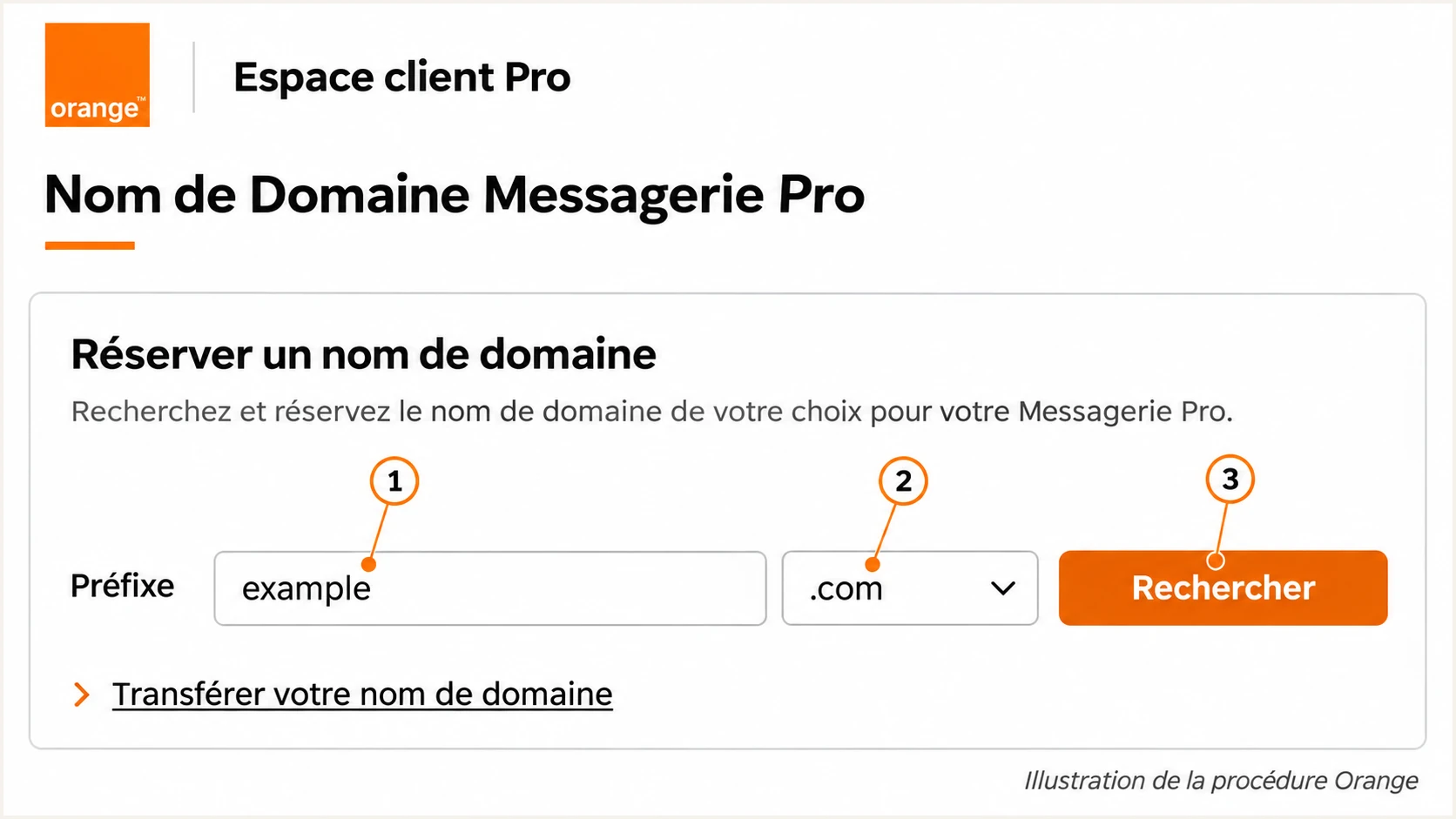
Illustrated Orange domain reservation screen with the prefix, extension and search controls.
I verify the address before changing authentication. Receiving mail at a custom alias does not prove that Orange sends with that domain in the SMTP envelope or DKIM signature.
Keep a delivered test message for the next steps. Its Return-Path and DKIM-Signature identify the domains that SPF and DKIM actually authenticate.
Set up SPF
SPF authorizes servers for the SMTP MAIL FROM domain, normally visible in the delivered Return-Path. For a standard Orange mailbox, Orange's public client instructions specify smtp.orange.fr, port 465, SSL/TLS and authenticated submission with the full mailbox address.
For a custom domain, get the current SMTP and SPF instructions for your specific Messagerie Pro offer. I do not treat Orange's own SPF record as a universal customer include. Its public Postmaster page lists shared outbound pools, but it does not provide a customer SPF template for every offer.
- Check the envelope: Confirm that the delivered Return-Path uses your domain or a subdomain under it. Ask Orange to provision the supported custom return path for your offer if it still uses an unrelated domain.
- Open DNS: For Orange-managed Pro domains, use 'Mes services de messagerie' > 'Nom de domaine' > 'Gérer le nom de domaine' > 'Afficher les paramètres avancés DNS'. If DNS is hosted elsewhere, edit the authoritative zone there.
- Authorize sending: Use the SPF include target or IP mechanisms supplied by Orange for your service. Add them to the existing SPF TXT record at the MAIL FROM domain. Keep one record starting with v=spf1 at each name and preserve other authorized senders.
- Check limits: Keep SPF evaluation within 10 lookup-causing terms, including nested includes and redirects. Do not authorize a single observed relay IP as a substitute for Orange's complete sending configuration.
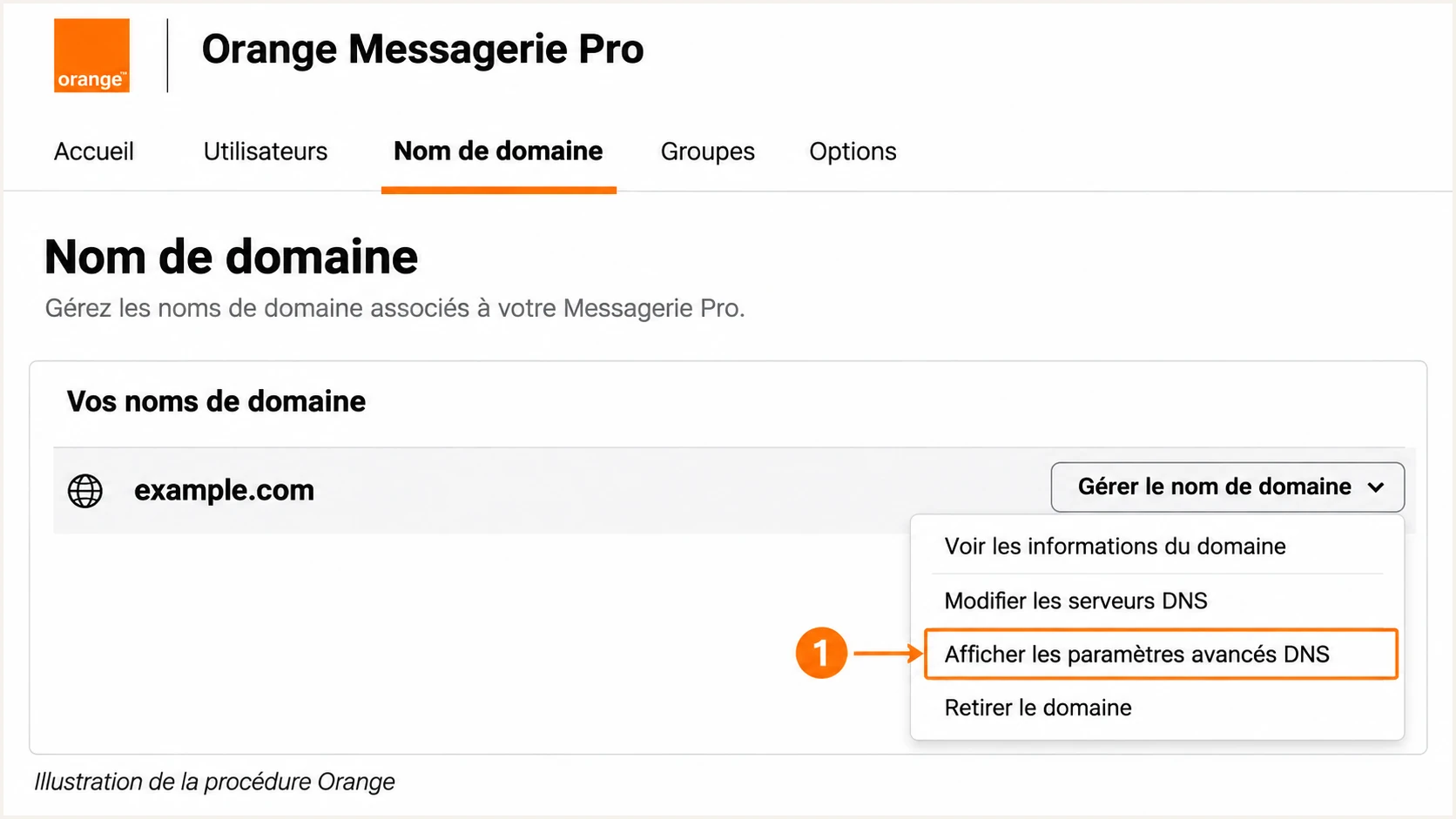
Illustrated Orange Messagerie Pro route to advanced DNS settings.
The domain entered into the SPF check must be the actual MAIL FROM domain. For example, a Return-Path under bounces.example.com requires checking that subdomain. SPF does not inherit the record at example.com.
Inspect the published policy below after saving DNS. A syntax pass confirms the record can be evaluated; the delivered message test confirms that it authorizes the server Orange actually used.
SPF checker
Find SPF syntax issues, lookup limits, and weak records.
?/16tests passed
If the Return-Path remains under an Orange-owned domain, adding Orange to your business domain's SPF record does not create SPF alignment. Orange controls the policy for its own envelope domain.
In that case, DMARC can still pass through a valid DKIM signature whose signing domain matches your From domain under your DMARC settings. Confirm that result before enforcement. Recipient rules can still require SPF authentication to pass independently.
Set up DKIM
DKIM requires the sending server to sign messages and publish the corresponding public key. Creating a TXT record alone does not enable signing. Orange controls signing for its own mailbox domains.
I check a delivered message before looking for DNS changes. Orange's public Pro setup articles do not document a universal customer DKIM activation switch, so get confirmation of custom-domain signing support for your offer.
- Inspect signing: Find DKIM-Signature in the delivered message. Read d= for the signing domain and s= for the selector. Use the receiver's Authentication-Results to check whether verification passed.
- Check the domain: For mail with From: contact@example.com, a passing signature with d=example.com meets strict domain matching. A signature with d=orange.fr does not authenticate that custom From domain for DMARC.
- Request provisioning: If signing is missing or uses an unrelated domain, ask Orange whether it can enable DKIM for your custom domain. Request the exact selector and public TXT value or CNAME target. Do not invent a selector or generate a replacement private key.
- Publish and retest: Publish the record supplied by Orange, or confirm Orange has published it in its managed DNS. Ask Orange to activate signing if required, then send a new message and verify dkim=pass with the correct signing domain.
DKIM matches your domain
From uses example.com and the receiver verifies a signature with d=example.com. That DKIM result can satisfy DMARC even when the Return-Path uses an unrelated domain.
DKIM uses Orange's domain
From uses example.com but the only passing signature has d=orange.fr. DMARC needs a passing SPF result with domain matching, or an additional passing DKIM signature for your domain.
Query the selector named in the actual signature, using its d= domain. In the commands below, selector and example.com are placeholders, not Orange's published selector details.
Inspect the supplied DKIM selectorbash
dig +short TXT selector._domainkey.example.com
dig +short CNAME selector._domainkey.example.com
If your Orange offer cannot sign for a custom domain, do not describe DKIM as configured for that domain. Resolve that limitation with Orange, and assess the working SPF path before changing DMARC enforcement.
Set up DMARC
Publish DMARC for the domain in the visible From address. You need control of that domain's DNS. Do not attempt to publish a policy for orange.fr or wanadoo.fr.
For a domain without an existing enforcement policy, start with p=none while you identify legitimate sending routes. Use the DMARC record generator to build the value.
- Choose the name: Create a TXT record at _dmarc.example.com for a From domain of example.com. If the DNS editor appends the domain automatically, enter only _dmarc as the host.
- Set reporting: Use the starter value below, replacing dmarc@example.com with a working aggregate-report destination. An external reporting domain needs the required reporting authorization in its DNS.
- Preserve enforcement: If the domain already uses p=quarantine or p=reject, keep that policy while fixing Orange. Edit the existing record rather than creating a second DMARC record.
- Publish: Save one valid DMARC TXT record at the selected name. Keep the default relaxed domain matching unless your requirements justify stricter settings.
Starter TXT value at _dmarc.example.comtext
v=DMARC1; p=none; rua=mailto:dmarc@example.com
The address in this example is a placeholder. A mailbox at example.com will not collect your reports. Supply a real destination and confirm it accepts aggregate XML attachments.
Check the published From domain below after DNS caches have refreshed. The check should find one policy with the intended reporting destination and no syntax errors.
DMARC checker
Look up a domain's DMARC record and catch policy issues.
?/7tests passed
A valid DNS policy does not prove that Orange messages pass DMARC. For each message, DMARC needs a passing SPF result with domain matching or a passing DKIM signature with domain matching.
Aggregate reports commonly arrive on a daily cycle, with delays of 24-48 hours. Check that reports reach the configured destination before using them to judge whether enforcement is safe.
Verify and troubleshoot
I verify a fresh message through the exact sending route people will use. SMTP login, TLS encryption and a successful DNS lookup do not prove that the delivered message passes DMARC.
The email tester below is the quickest configuration check. It provides a test address, accepts your message and returns a diagnosis of authentication and other delivery checks.
- Send a test: Send directly through Orange using the intended From address. Test webmail and configured mail clients separately when both are used. Do not forward an old message as the test.
- Read results: Check SPF against smtp.mailfrom, DKIM against header.d, and DMARC against header.from. Compare the domains as well as the pass/fail results.
- Test every route: Repeat for each custom domain and any application using Orange SMTP. A passing message from the primary Orange address does not verify a business-domain alias.
Email tester
Send a real email to this address. Suped shows a results button when the test is ready.
?/43tests passed
The example below shows the identities for a custom domain that passes all authentication checks with relaxed SPF domain matching. These are illustrative headers, not results from an Orange account.
Use Authentication-Results added by the receiving system. A sender-supplied copy of that header is not evidence that the receiver verified the message.
Illustrative passing authentication resultstext
From: Contact <contact@example.com>
Return-Path: <bounce@bounces.example.com>
Authentication-Results: receiver.example;
  spf=pass smtp.mailfrom=bounces.example.com;
  dkim=pass header.d=example.com;
  dmarc=pass header.from=example.com
For a rejection by an Orange recipient, preserve the full bounce. Orange's Postmaster documentation gives these OFR diagnostic codes. They describe delivery to Orange, rather than your mail client's account settings.
|
|
|
|---|---|---|
397/398 | SPF/DNS error | Envelope DNS |
519 | IP unauthorized | SPF permissions |
535 | DKIM missing | Server signing |
515 | DMARC failure | Domain matching |
Orange OFR diagnostics. OFR 535 is distinct from a generic SMTP 535 login error.
After a DNS correction, wait for the previous TTL to expire and send a new message. For shared Orange relay PTR or signing failures, give Orange support the timestamp, sending IP and full headers; those server settings belong to Orange.
Get alerted when it breaks
Suped is our DMARC reporting platform. Its DMARC monitoring brings Orange authentication results together with your other sending sources, so failures can be traced to a specific route.
I use ongoing reports to catch changes that a one-time test misses, such as a different relay pool or a custom address used by a newly configured application.
- Review sources: When aggregate reports reach Suped, confirm which Orange traffic is authorized. Verify a source only after checking it against actual business sending.
- Enable notifications: Use Suped's 'Issues detected' and 'Sending sources need verification' notifications. Enable DMARC summary emails for regular review.
- Investigate: Open the affected records and compare the sending IP, reporter and authentication domains. Use the issue's steps to fix to identify the DNS or Orange support action required.
- Confirm recovery: Send another test after the fix, then check later aggregate reports for recovery. Keep the original headers and change timestamp for comparison.
Alert timing follows available data
Suped detects issues in the data it receives. DMARC aggregate reports are delayed and do not provide an instant alert for every failed delivery. Use the email tester after changes and aggregate monitoring for ongoing coverage.
Secure your domain with p=reject
Move to p=reject after legitimate sending routes consistently pass DMARC. I base that decision on a representative sending cycle, including occasional business messages, rather than one successful test or a fixed waiting period.
- Inventory: Use Suped's source table to account for legitimate traffic, including Orange aliases and infrequent applications. Separate unauthorized traffic from messages that need a configuration fix.
- Repair: Confirm working SPF domain matching and custom-domain DKIM wherever supported. If only SPF satisfies DMARC, assess forwarding failures before enforcement.
- Stage: For a domain starting at p=none, move to p=quarantine, review reports and delivery results, then change to p=reject once legitimate failures are resolved. Keep existing enforcement when it is already working.
- Check subdomains: Review inherited policy and any explicit subdomain DMARC records. Keep reports and notifications active after enforcement so new sending routes are investigated.
Suped's Hosted DMARC lets your team manage policy changes through the dashboard after the initial DNS setup. Combined with source verification and issue diagnostics, it gives you a practical process for reviewing Orange traffic before each policy change.
The example below requests rejection of messages that fail DMARC. Replace the reporting address with your working destination and update the existing policy. Receiving systems make the final handling decision.
Enforcement TXT value at _dmarc.example.comtext
v=DMARC1; p=reject; rua=mailto:dmarc@example.com
After each policy change, send fresh tests from every approved Orange sending route, then review the next complete reporting period. Investigate legitimate failures before the next policy change.
Keep domain-matching DKIM working through selector changes. DMARC enforcement addresses unauthorized use of your From domain; it does not guarantee inbox placement or protect messages sent with a different lookalike domain.
Frequency asked questions
No. Orange controls DNS and server signing for orange.fr and wanadoo.fr. Configure authenticated sending using Orange's instructions, and escalate authentication failures with a fresh message's full headers. Publish your own records only for a domain you control.
Orange uses outbound servers under smtpout.orange.fr. Examples documented in Orange community message diagnostics include smtp-21.smtpout.orange.fr, with smtp.smtpout.orange.fr used as a relay identity. A matching suffix is a source clue, not proof that a message is authorized. Check the sending IP and authentication results before approving the source.
Get the supported include target or IP mechanisms for your specific offer from Orange. The public setup articles do not establish one universal customer include. Do not copy a guessed hostname or assume Orange's own domain policy is the correct customer configuration.
Yes, for DMARC, if the passing DKIM signing domain matches the From domain under the published DMARC settings. A passing signature for orange.fr does not satisfy DMARC for example.com. SPF authentication and recipient-specific acceptance requirements still need separate attention.
Check the actual Return-Path and DKIM signing domain first. DNS edits cannot change those server-selected identities. Also check the authoritative DNS zone, cached records and the DKIM selector in a newly sent message. An address placed only in Reply-To does not change the domain evaluated by DMARC.
DMARC can pass through SPF authentication with domain matching alone. Forwarding often breaks that path, so assess forwarded and indirect delivery before enforcement. Ask Orange about custom-domain DKIM support and use reports to confirm legitimate traffic will survive the policy change.




