
How to set up DMARC/DKIM/SPF for OpenText Cybersecurity

I configure OpenText Cybersecurity email authentication by registering the sending domain, authorizing the outbound servers in SPF, enabling DKIM signing for the domain, and publishing a DMARC TXT record. DMARC passes when at least one passing SPF or DKIM identity matches the visible From domain under the domain's DMARC alignment rules.
OpenText Cybersecurity is a product family. Secure Messaging Gateway has a documented Domain Management and DKIM Sign workflow. Hosted Secure Cloud and legacy Zix accounts have separate provisioning steps and account-specific DNS values. I identify the deployed product before changing DNS.
Add your domain
For Secure Messaging Gateway, I use the Domain Management workflow in OpenText's administrator documentation. The documented screens retain Micro Focus branding.
For hosted accounts, I use the domain onboarding supplied with the subscription. ZixCentral's Self-Service Setup documents a Domain Verification step for its encryption service; this is separate from gateway domain registration.
- Register the gateway domain. Open Domain Management, select Add new, enter your email domain, and select the save disk icon on Manage Domains. Reuse an existing domain entry when it is already configured.
- Check delivery routing. Configure the domain's SMTP Hosts destination. Use its test button, enter a valid recipient, and select Start Test. Confirm the connection succeeds.
- Verify hosted ownership. In ZixCentral, select Continue Setup, then Domain Verification if that step is present. Publish the exact TXT token shown for each listed domain and select Check Record. Confirm the step completes.
- Confirm the outbound route. Check that normal outbound mail actually traverses OpenText. For hosted Zix services, complete Outbound Mail Servers and Smarthost Setup using the tenant instructions. Inbound MX changes alone do not route outbound messages.
I keep domain ownership checks separate from authentication checks. A completed setup step proves only the condition that step tests.
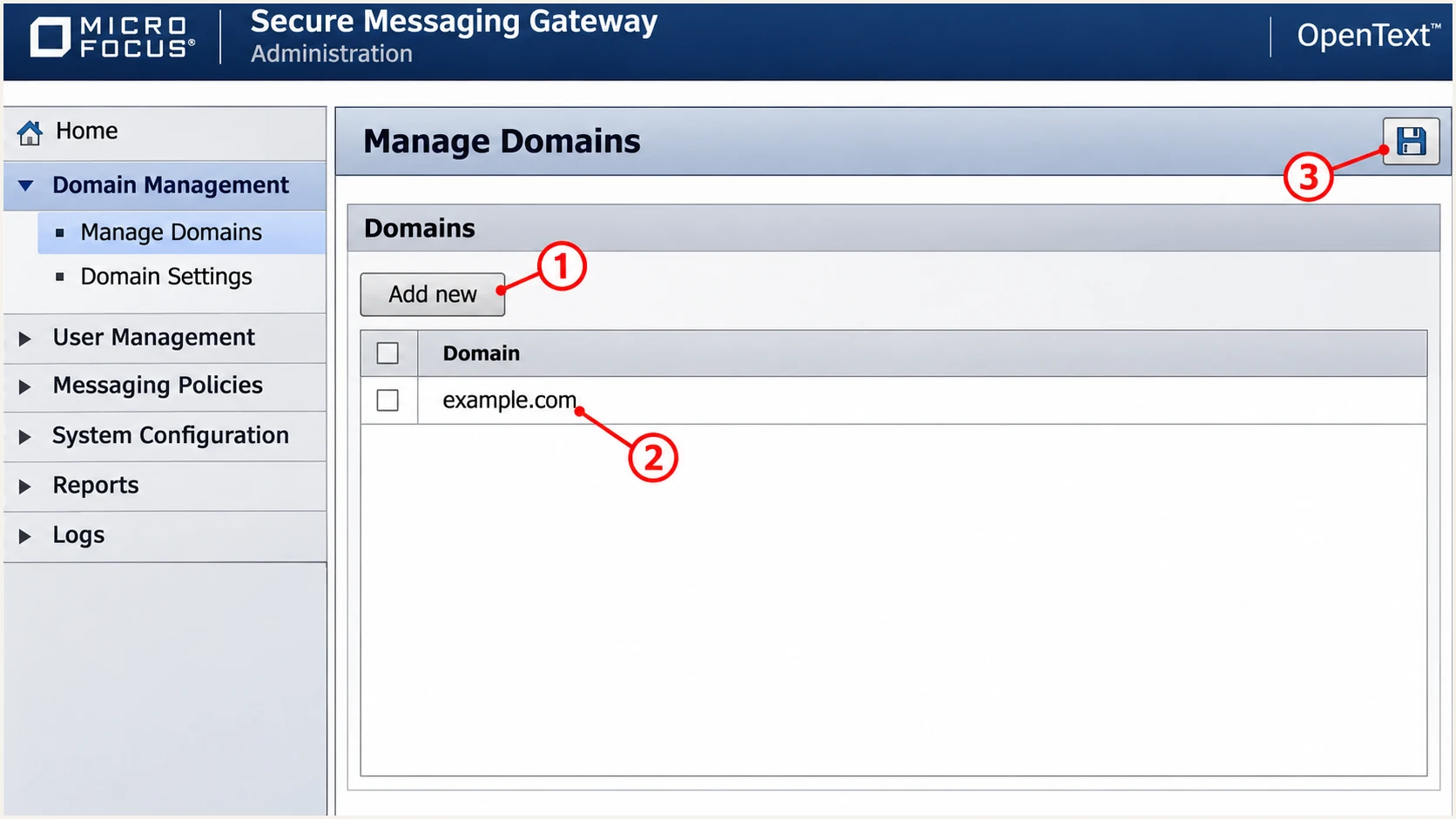
Illustrated Secure Messaging Gateway domain registration controls.
After registration, I send one external message and record the visible From domain and Return-Path domain.
I also record the public IP of the final outbound relay. SPF must authorize the server that connects to the external recipient.
Set up SPF
OpenText supports return-path alignment, so I check that the envelope sender uses the sending domain or an appropriate subdomain. The recipient exposes this envelope address in Return-Path.
A self-managed Secure Messaging Gateway deployment uses its actual public egress IPs. Hosted OpenText services use the SPF values supplied for that subscription. There is no universal OpenText Cybersecurity include to copy.
- Find the SPF domain. Read Return-Path on an externally delivered message. Publish SPF at that domain, which is not necessarily the root domain in the visible From address.
- Set the return path. For a gateway relay, preserve the upstream SMTP MAIL FROM when it already uses your domain. If a hosted route rewrites it, obtain that subscription's custom Return-Path instructions and publish its assigned DNS records. Confirm the delivered address uses the intended domain.
- Authorize the final relay. For a self-managed gateway, add its public IPv4 or IPv6 egress addresses. For hosted Zix services, use Continue Setup > SPF Records and merge the tenant-provided mechanism into the existing TXT record.
- Preserve other senders. Keep one v=spf1 record at each SPF domain. Insert new mechanisms before the existing final all mechanism; retain other authorized sources and the existing fail qualifier.
- Check the lookup budget. Keep evaluation within 10 DNS-querying SPF terms, including nested includes. An ip4 or ip6 mechanism does not consume this budget. In hosted setup, Mark as Complete records task completion; it does not prove recipient-side SPF success.
Example only: one self-managed outbound gatewaytext
Name: example.com
Type: TXT
Value: v=spf1 ip4:203.0.113.10 -all
The address 203.0.113.10 is reserved for documentation. Replace it with the real egress IP; this example assumes that IP is the only authorized sender.
Run the SPF check against the actual Return-Path domain. If a bounce subdomain is used, checking only the root domain misses its SPF configuration.
SPF checker
Find SPF syntax issues, lookup limits, and weak records.
?/16tests passed
An SPF pass authenticates the envelope domain. DMARC also compares that domain with the visible From domain.
Under relaxed alignment, the identities share the same organizational domain. Strict SPF alignment requires an exact domain match.
A provider-owned Return-Path needs a different fix
If a particular hosted route retains a provider-owned Return-Path, adding an include to your root domain does not fix SPF alignment. Request a supported custom Return-Path. Until that route changes, expect SPF alignment failures and require a valid DKIM signature using your domain for DMARC to pass.
Set up DKIM
In Secure Messaging Gateway, DKIM needs both a domain key and a signing service in the outbound policy. I configure both before testing delivery.
For hosted OpenText accounts, request the domain-specific signing configuration through the account's support or provisioning workflow. A Secure Messaging Gateway key-generation screen is not a hosted-account instruction.
- Choose the signing identity. Open the gateway domain's DKIM Signing settings. Set Domain to your sending domain and choose a selector, such as ot202611.
- Create the keys. Select Create Keys, or Upload Keys for an existing key pair. Open Public Key to obtain the DNS data. Keep the private key on the signing system.
- Publish the public key. Create the TXT record at ot202611._domainkey.example.com, substituting your selector and domain. Copy the complete public-key data. Remove zone-file wrappers and unwanted whitespace inside the base64 key.
- Activate signing. In the outbound policy's Deployment Workbench, add the DKIM Sign service and connect it to the appropriate message flow. Save the policy and check that normal outbound messages reach the signing service.
- Test the final message. Send externally and inspect DKIM-Signature. Confirm d= uses your domain, s= matches the published selector, and the recipient reports dkim=pass.
I use the Public Key output supplied by the gateway, rather than generating an unrelated key for DNS.
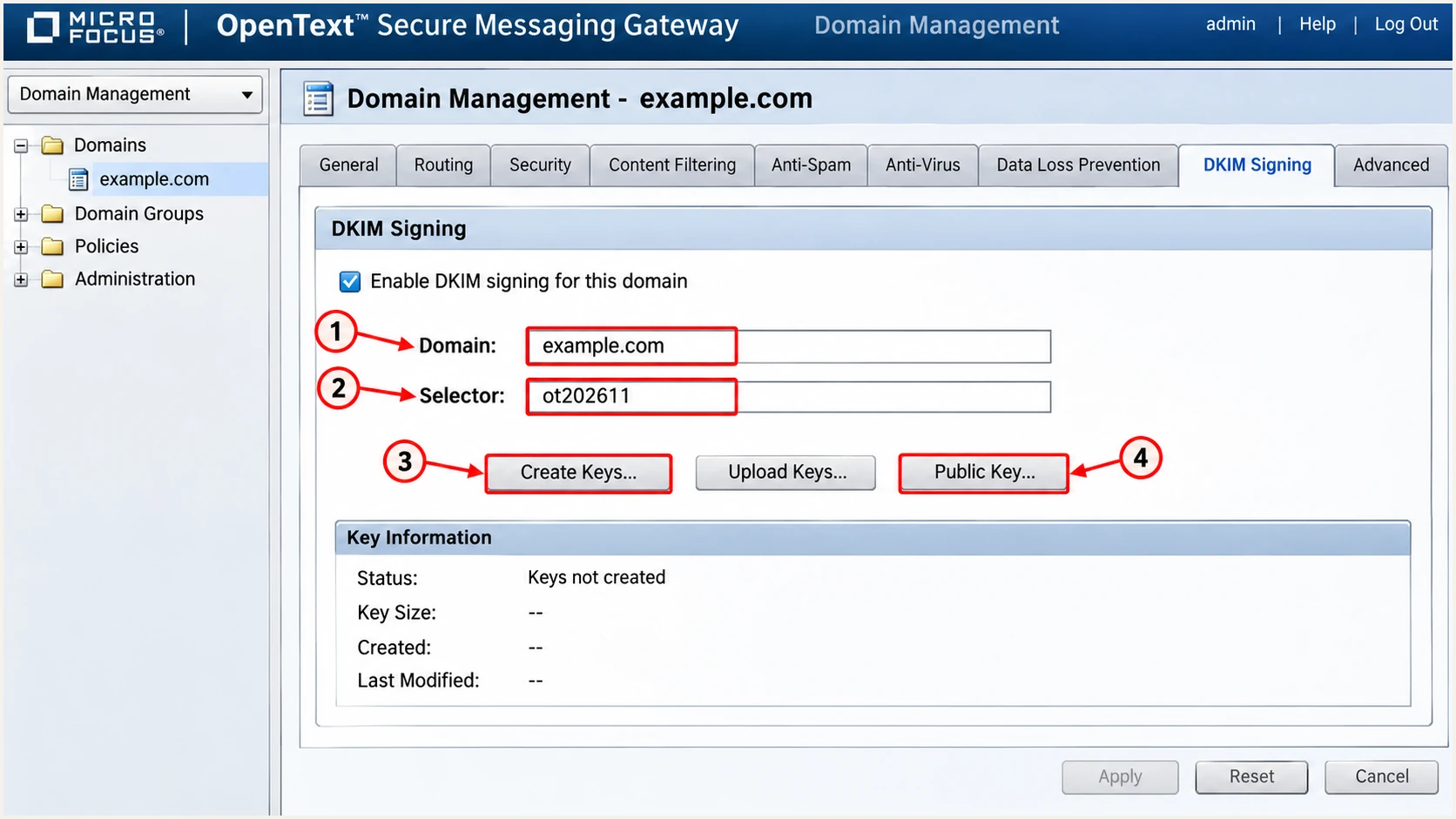
Illustrated Secure Messaging Gateway DKIM domain, selector, and key controls.
A gateway that changes a footer or message body after signing can invalidate the signature. I test the message after every outbound processing stage.
If the mailbox platform already signs with the correct domain and OpenText preserves the signed content, that signature can satisfy DMARC. Gateway signing is useful when OpenText makes the final content changes.
Gateway signing
Publish the gateway's public key and activate DKIM Sign. Arrange signing after outbound content changes and verify the final signature externally.
Existing mailbox signing
Keep the mailbox platform's selector records. Confirm OpenText preserves a passing signature whose d= domain matches the visible From domain.
Set up DMARC
DMARC is published in the sending domain's DNS. OpenText's inbound sender-verification settings do not create an outbound DMARC policy.
For a domain without an existing enforcement policy, I start with p=none and aggregate reporting. If it already uses p=quarantine or p=reject, I keep that policy while configuring OpenText.
- Check the existing policy. Look up TXT at _dmarc.example.com, substituting the visible From domain. Edit its existing DMARC record instead of publishing a second one.
- Create the initial record. For a new monitoring policy, use the example below. Replace example.com with your domain and dmarc@example.com with a real reporting mailbox you control.
- Keep reporting active. Preserve existing rua destinations when updating a policy. A reporting destination outside your domain needs the required external-report authorization.
- Verify public DNS. Confirm that exactly one valid DMARC record is returned at the intended name. Keep the default relaxed alignment unless an established requirement calls for strict matching.
Initial DMARC TXT record at _dmarc.example.comtext
v=DMARC1; p=none; rua=mailto:dmarc@example.com
Use the DMARC record generator to build the record with your actual reporting address. Publish it at your authoritative DNS provider.
The check below validates the public policy. It does not prove that a particular message has a valid DKIM signature or that its SPF identity matches the From domain.
DMARC checker
Look up a domain's DMARC record and catch policy issues.
?/7tests passed
The p=none policy requests reporting without requesting quarantine or rejection for DMARC failures. It does not stop domain spoofing through enforcement.
I wait for aggregate reports and verify that known outbound traffic appears. Receivers commonly report daily, and not every receiver sends reports.
Verify and troubleshoot
I verify a newly sent message through the production route. A valid DNS record alone does not establish that the gateway is using it.
The quickest check is the email tester below. Send to the address it supplies using the normal OpenText outbound route; the resulting diagnosis checks authentication on the message that actually arrived.
Email tester
Send a real email to this address. Suped shows a results button when the test is ready.
?/43tests passed
I inspect the destination server's Authentication-Results header and compare it with the final Return-Path and DKIM-Signature.
A normal message, an encrypted notification, and a relayed application message can take different routes. I test each route that the organization actually uses.
- Confirm SPF. Look for spf=pass and inspect smtp.mailfrom. If SPF passes for a provider domain, that pass alone does not satisfy DMARC for your own From domain.
- Confirm DKIM. Look for dkim=pass with your domain in header.d. If signing is absent, check the outbound DKIM Sign service. If verification fails, check the selector, public key, and subsequent content changes.
- Confirm DMARC. Look for dmarc=pass and the expected header.from. At least one passing authentication method must satisfy the domain-matching rules.
- Check DNS precisely. Query the full DKIM selector and exact SPF domain. After an edit, account for the previous TTL and negative caching before assuming a saved value is visible everywhere.
Illustrative recipient authentication resultstext
Authentication-Results: receiver.example.net;
 spf=pass smtp.mailfrom=example.com;
 dkim=pass header.d=example.com header.s=ot202611;
 dmarc=pass header.from=example.com
These are illustrative results, not a header to add to outgoing mail. Trust the authentication results written by the receiving system.
I use the failure type to choose the next check, rather than repeatedly changing the DMARC policy.
|
|
|
|---|---|---|
SPF permerror | Records / lookups | Merge / simplify |
SPF mismatch | Return-Path domain | Custom return path |
DKIM absent | Outbound policy | Enable DKIM Sign |
DKIM fail | Key / content edits | Correct key / order |
DMARC fail | Domain matching | Fix SPF or DKIM |
Common authentication failures and the next check.
If a domain or IP also appears on a blocklist (blacklist), investigate that separately. Authentication success does not guarantee inbox placement or remove a listing.
Get alerted when it breaks
I keep ongoing reporting active because gateway upgrades, DNS edits, and key rotation can change authentication after a successful setup. Suped is our DMARC platform for tracking those changes across sending sources.
Suped's DMARC monitoring combines source-level results with automated issue detection and steps to fix. That makes it practical to distinguish an OpenText routing problem from a failure on another authorized sender.
- Enable issue notifications. Turn on Issues detected emails in Suped's notification settings, and enable Sending sources need verification notifications for unfamiliar sources.
- Verify the OpenText source. Compare reported IPs and authentication domains with your gateway configuration and message headers before marking a source as verified. A familiar hostname alone is insufficient.
- Investigate the affected route. Use the source table and record detail view to inspect failing SPF or DKIM results. Compare DNS history with the time the failures began.
- Retest the repair. Follow the detected issue's fix steps, send another production-route test, and confirm recovery in subsequent reports. Keep DMARC summary emails enabled for review.
Suped's alerts depend on incoming data. DMARC aggregate reports commonly arrive daily, so a report-driven alert is not an immediate verdict on every message.
For a just-deployed change, I use a fresh test email first and aggregate reports to check the wider sending pattern.
Secure your domain with p=reject
I move to p=reject after every legitimate sending route has a verified way to pass DMARC. A high overall pass rate is insufficient if a low-volume billing or notification route still fails.
Suped's source verification and detailed diagnostics make policy changes reviewable. Our Hosted DMARC also lets teams manage policy through Suped after its DNS setup is complete.
- Cover a complete sending cycle. Review reporting that includes infrequent jobs, invoices, and encrypted-message notifications. Verify authorized sources and investigate unfamiliar traffic before deciding it is legitimate.
- Fix legitimate failures. Require a passing signature with a matching DKIM domain or a passing SPF identity that meets the domain-matching rules. Prefer working DKIM on every outbound route because forwarding often disrupts SPF.
- Stage the policy. For a domain starting at p=none, move to p=quarantine after legitimate routes pass. Review subsequent reports and delivery errors, then change to p=reject. Keep an existing enforcement policy in place.
- Review subdomains. Check inherited policy behavior, any sp setting, and explicit subdomain DMARC records. Test each sending subdomain before applying stronger enforcement.
- Monitor after enforcement. Keep rua reporting and Suped notifications active. Investigate source-specific failures after policy changes and repeat message tests after gateway or key changes.
Example enforcement record after source verificationtext
v=DMARC1; p=reject; rua=mailto:dmarc@example.com
Replace the example reporting address and preserve the reporting destinations and other tags your domain needs. Keep one DMARC record at the applicable DNS name.
I keep the rollout tied to verified traffic rather than a fixed number of days. OpenText relays and every other sender using the same From domain are subject to that domain's policy.
What p=reject requests
The policy asks receivers to reject messages that fail DMARC. Receivers retain local delivery discretion. It does not prevent lookalike-domain messages or messages that pass authentication through a compromised authorized account.
Before a signing-key rotation, I publish the replacement selector and verify its DNS response. I keep the old public key available while messages signed with it are still in transit.
For each policy change, I retain the previous record value and the change time. Those details help trace a new delivery failure to the correct configuration change.
Frequency asked questions
No. A self-managed Secure Messaging Gateway deployment authorizes its actual outbound IPs. Hosted OpenText services have subscription-specific SPF instructions. I use the account's provisioning values rather than inferring an include from the OpenText brand name.
SPF authenticates the envelope sender domain. If that domain does not meet the matching rules for the visible From domain, SPF cannot satisfy DMARC. A valid DKIM signature with a matching signing domain is another way to pass.
Open the domain's DKIM Signing settings and read Selector. On a delivered message, the DKIM-Signature s= tag identifies the selector and d= identifies the signing domain. Query TXT at selector._domainkey.domain using those actual values.
The appriver.com suffix is associated with AppRiver email infrastructure, now part of OpenText Cybersecurity. It identifies a relay, not the customer that originated a message. I confirm attribution against the sending IP and the trusted Received chain; a self-managed Secure Messaging Gateway has the rDNS configured by its IP operator.
OpenText's AppRiver infrastructure has used include:edgepilot.com in published relay setup examples. That association is not an instruction to add it to every OpenText deployment. I use the SPF value supplied for the actual subscription and outbound route; self-managed gateways generally authorize their own egress IPs.
Keep an existing p=reject or p=quarantine policy. Configure and test the OpenText route before directing production traffic through it. The p=none example is for a domain starting DMARC monitoring, and it does not request enforcement against failures.




